1
Table of Contents
1 Welcome........................................................................................................................................1
2 Your Powercost Monitor™..........................................................................................................2
2.1 Safety instructions............................................................................................................3
2.2 Care and maintenance ......................................................................................................3
3 Determining your utility meter type........................................................................................4
4 Unpacking and verifying basic operation ..............................................................................7
4.1 Powering the display unit ................................................................................................7
4.2 Powering the sensor unit..................................................................................................7
4.3 Verifying the basic operation ..........................................................................................8
5 Sensor unit installation ..............................................................................................................9
5.1 You will need ....................................................................................................................9
5.2 Electromechanical meter................................................................................................10
5.2.1 Preparing your sensor unit..............................................................................10
5.2.2 Installing your sensor unit ..............................................................................10
5.3 Electronic meter (optical port on face)..........................................................................12
5.3.1 Preparing your sensor unit..............................................................................12
5.3.2 Installing your sensor unit ..............................................................................13
5.4 Electronic meter (optical port on face-shims required)................................................14
5.4.1 Preparing your sensor unit..............................................................................14
5.4.2 Installing your sensor unit ..............................................................................15
5.5 Electronic meter (optical port on top) ..........................................................................16
5.5.1 Preparing your sensor unit..............................................................................16
5.5.2 Installing your sensor unit ..............................................................................17
5.6 Re-synchronizing your Display and Sensor Units ........................................................19
6 Setting up your display unit ....................................................................................................20
6.1 Determine your type of billing ......................................................................................20
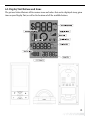
6.2 Display unit buttons and icons ......................................................................................21
6.3 Setting up for single (flat) rate billing............................................................................24
6.4 Setting up for tiered billing ............................................................................................26
6.5 Setting up for time-of-use billing ..................................................................................29
7 Display unit functions ..............................................................................................................33
7.1 Your display unit ............................................................................................................33
7.1.1 Current Consumption Row..............................................................................33
7.1.2 Total Consumption Row ..................................................................................34
7.1.3 Status Row ......................................................................................................34
7.2 Dollar and cents display mode ......................................................................................35
7.3 Kilowatt and kilowatt-hours mode ................................................................................36
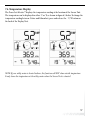
7.4 Temperature display ......................................................................................................37
7.5 Loss of signal display......................................................................................................38
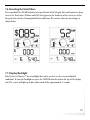
7.6 Resetting the total values................................................................................................39
7.7 Display backlight ............................................................................................................39
8 Troubleshooting ........................................................................................................................40