1
Thinstuff XP/VS Server User Manual – version 2.0.1
Table of Contents
1 Introduction......................................................................................................................4
1.1 General description....................................................................................................4
1.2 Manufacturer's notice................................................................................................4
2 Product features...............................................................................................................6
2.1 Basic features.............................................................................................................6
2.2 Optional features:......................................................................................................7
3 Server requirements.........................................................................................................9
3.1 Supported operating systems....................................................................................9
3.2 Hardware....................................................................................................................9
3.3 Application compatibility.........................................................................................10
3.4 Security.....................................................................................................................10
3.5 XP/VS Server in virtualized environments...............................................................11
4 Client requirements........................................................................................................12
5 Software installation and maintenance..........................................................................14
5.1 Requirements...........................................................................................................14
5.2 Installation...............................................................................................................14
5.3 Update......................................................................................................................19
5.4 Deinstallation...........................................................................................................20
6 Licensing .........................................................................................................................22
6.1 General.....................................................................................................................22
6.2 XP/VS Demo Licenses...............................................................................................22
6.3 XP/VS Full Licenses...................................................................................................22
6.4 Registration..............................................................................................................23
6.5 Coupons...................................................................................................................25
6.5.1 Redeem Coupon................................................................................................25
6.6 Activation.................................................................................................................25
6.6.1 Online Activation...............................................................................................25
6.6.2 Offline Activation..............................................................................................28
6.7 Licensing on virtual machines..................................................................................33
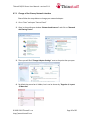
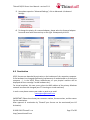
6.7.1 Change of the Primary Network Interface........................................................33
6.8 Reactivation.............................................................................................................35
6.9 Upgrade of Licenses.................................................................................................36
7 Usage of XP/VS Server....................................................................................................37
7.1 XP/VS Server Administrator Window......................................................................37
7.1.1 Menu Bar...........................................................................................................37
7.1.2 Selection Screen and Information Screen........................................................38
7.1.3 Status Line.........................................................................................................38
7.2 Function of Menu Bar .............................................................................................39
7.2.1 File ....................................................................................................................39
7.2.2 View...................................................................................................................40
7.2.3 Options..............................................................................................................40
7.2.4 Help ..................................................................................................................42
© 2006-2012 Thinstuff s.r.o
http://www.thinstuff.com
Page 2 of 56