1
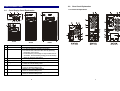
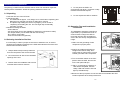
Front and Rear Panel
2.1.
.
1.
2.
3.
Main Switch
Self Test OK LED
Test/Silence
4.
5.
6.
Fault LED
Bypass LED
Utility LED
7.
Inverter LED
8.
Battery low LED
9.
Over load LED
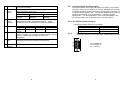
2KVA
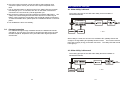
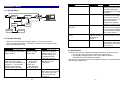
Rear Panel Explanation
2.2.1 General Explanation
Front Display Panel Explanation
1KVA
2.2.
3KVA
This is control the on/off of the UPS
Green LED lights up if self test is O.K.
a. To silence alarm by pressing the button.
b. To execute the self test of the UPS by pressing
the button over 10 sec.
c. To illustrate the percentage of output load level at
AC Mode, and the battery energy level at Backup
Mode by pressing the button.
Red LED lights up if UPS is faulty.
Amber LED lights up when UPS is in Bypass mode.
a. AC normal: Green LED lights up.
b. 100% for load & battery level
a. Inverter On: Green LED lights up
b. 75% for load & battery level.
a. Battery low : Red LED lights up
b. 50% for load & battery level
a. Over load condition: Red LED lights up
b. 25% for load & battery level.
6
7