1
user manual
chrono
setting the time
1. pull out the crown to position 3 (the watch stops)
2. turn the crown clockwise until you reach the correct time
3. push the crown back into position 1
setting the date
4. pull out the crown to position 2 (the watch continues to run)
5. turn the crown counter-clockwise until the previous day date
appears
6. pull out the crown to position 3 (the watch stops)
7. turn the crown clockwise. as you pass 0:00 hours (midnight),
the date will change to the current date, continue to turn the
crown until you reach the correct time.
8. push the crown back into position 1
warning notice
do not change the date between the hours of 10 p.m. and 2 a.m.
this is the time when the movement is in the position to carry
out the automatic date change, and any interference may cause
damage to the movement
chrono
chronograph
•
•
•
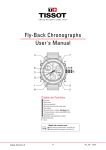
the chronograph’s hour counter measures times up to 12
hours.
the minute counter measures 30 minutes per rotation.
the center stop-second measures 60 seconds per rotation.
before using the chronograph functions, please ensure that:
•
•
the crown is in position 1 (= normal position).
the three chronograph hands are precisely at zero position
following activation of pusher B. should this not be the case,
the positions of the hands must be adjusted (see the chapter
entitled “adjusting the chronograph hands to zero position”).
chronograph: basic function
(start / stop / reset)
1. press pusher A to start the center stop-second hand.
2. to stop the timing, press pusher A again.
3. to reset the three chronograph hands to zero positioning,
press pusher B.
chrono
chronograph: intermediate or interval timing
adjusting the chronograph hands to zero position
1. press pusher A to start the center stop-second hand.
2. press pusher B to stop the chronograph.Note: although the
chronograph hands have stopped, the movement continues
to record the current timing.
3. make up the measured time: press pusher B again and the
3 chronograph hands are quickly advanced to the ongoing
measured time. to continue to record intervals, continue to
push pusher B.
4. press pusher A to stop and the final time is displayed.
5. to reset the three chronograph hands to zero positioning,
press pusher B.
1. pull crown out to position 3 (all three chronograph hands are
in their correct or incorrect zero position).
2. keep pushers A and B depressed simultaneously for at least 2
seconds (the center stop-second rotates by 360° – corrective
mode is activated).
3. press pusher A to single step the center stop-second hand.
Press and hold pusher A to advance the center stop-second
hand quickly
4. press pusher B to advance to the next hand.
5. press pusher A to single step the hour counter hand. press
and hold pusher A to advance the hour counter hand quickly.
press pusher B to advance to the next hand.
6. press pusher A to single step the minute counter hand. press
and hold pusher A to advance the minute counter hand
quickly.
7. return the crown to position 1.
alfex sa
via cantonale
centro galleria 3
6928 manno
switzerland
P. +41 91 612 22 90
F. +41 91 612 23 09
[email protected]
alfex.ch
facebook.com/alfexswiss
twitter.com/alfex_swissmade