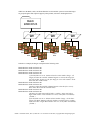
1
4) If you are upgrading from a previous version of CREW, you must choose the “Repair” option in
the installation program for each application, rather than the default “Modify” option.
5) Use the standard wizard interface to install the software on your computer, and follow any on-screen
directions that are given to you. The standard default options are best for most installations.
6) Once the installation is complete, the application installer will finish and the CREW installation
program will reappear, allowing you to install additional programs if you desire. Repeat steps 3 and 4
for each application you wish to install on this computer.
7) If the installer prompts you to reboot your system, please do so before running the CREW software.
Common problems when updating/installing CREW 1.10
•
•
Application complains of “HASP” errors, or “HASP not detected”
• Verify that the correct HASP “hardware key” for that application is placed on the parallel/printer
port of your computer
• Re-install the application, and choose the “Repair” option this time (problem caused by using the
default “Modify” option when upgrading from a previous version of CREW, rather than the
Repair option as noted above)
CREW and/or another application lock up when used on the same computer
• If the other application also uses a hardware protection key on the parallel port of your computer,
there may be a driver conflict between the CREW HASP driver and the other application. This is
a known problem when using Timestone software and CREW on the same computer (see
above).
• Manually upgrade the CREW HASP driver to a compatible version, or install the 1.11 Beta
version of CREW (see note for Timestone Software users at the beginning of this document for
details)
Changes since CREW 1.05 / 1.06
CREW Task Server Changes
• Added feature to use memory-mapping of image files to improve memory efficiency and speed
• Improved connection with printer core, better handling of online/offline and reconnection
• Faster handling of printer “write gating”
• Fixed small bugs from CREW 1.05 and earlier
• Server port number was not saved properly
• Error reporting in XML files not always handled correctly
• Corrected back-printing issues
CREW Task Generator Changes
• Improved user interface, with new “Print Properties” page for easier and faster use
• Added support for Windows XP Professional
• Improved network connection to Task Server
• Fixed small bugs from CREW 1.05 and earlier
• fixed socket connect/disconnect bug
• fixed printer information timeout bug
CREW Hotfolder Client Changes
• Preset Folders now directly support Kodak DP2 System and Gretag DRS-200/Cyra Reorder systems
(through new “Filename Parsing” feature)
• Improved user interface, with new “Print Properties” page for easier and faster use
• Added support for Windows XP Professional
CREW 1.10 Release Notes, June 19, 2002. Rev 1.0. Document #13307-003, Copyright 2002 Gretag Imaging Inc.