1
TAKE A GOOD LOOK
E
A
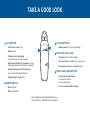
CALL BUTTON
C
• Take a call or end it (1 tap)
B
• Redial (2 taps)
A
• Volume presets (1 tap per level change)
C
D
• Initiate phone’s voice-dialing (2-second press until tone is heard)
• Very low battery (3 red flashes at powering on)
D
• Pairing mode (repeating red/white flashes)
E
MICRO USB CHARGING PORT
POWER SWITCH
• Use with the AC wall charger: 1 hour before first use
2 hours (full charge)
• On (slide back)
• Do not use headset while charging
• Exit DeepSleep™ mode (1 tap)
B
INDICATOR LIGHT (LED)
• Charging (solid red until charged)
• Reconnect lost Bluetooth® connection (1 tap if the headset doesn’t automatically reconnect)
• Activate pairing mode after initial set up (press until red/white LED flashes)
VOLUME BUTTON
• Off (slide forward)
Your headset may look slightly different than
the illustration, but will still work as described.