1
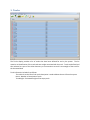
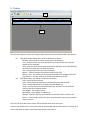
The user can add a field to the rotation by scrolling to the bottom of the list,
clicking in the empty box and selecting a field from a pull-down list.
Acre – Acreage of the field which is entered by the user.
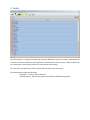
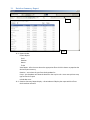
7.3. Owner List – This area is a list of owners for the field selected in the Field List for the
rotation selected in the Rotation List.
Header
Percent – Calculated percentage total of assigned ownership for the field.
Acre – Calculated acreage total of assigned ownership for the field.
Table
Del - Click on red circle to delete the field from the rotation
Name - The user selects an owner from a pull-down list by clicking in “Name”
box.
Percent - User entered selected owner’s percentage of ownership for the field.
Acre – Calculated acres owned for the selected owner for the selected field
based on the user entered percentage.
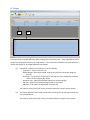
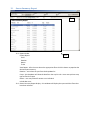
7.4. Crop List – This area is a list of crops grown in the field selected in the Field List for the
rotation selected in the Rotation List.
Header
Acre – Calculated acreage total of all defined crops for the field.
Table
Del - Click on red circle to delete the field from the rotation
Crop - The user selects a crop from a pull-down list by clicking in the “Crop” box.
Variety – The user selects a variety based on the crop from a pull-down list by
clicking in the “Variety” box.
Acre – User entered number of acres for the selected variety, crop and field.