1
Scanning and Instrument Control with BenchLink Data Logger Pro
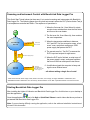
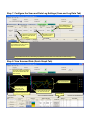
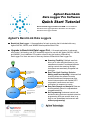
This Quick Start Tutorial shows just how easy it is to control scanning and instruments with BenchLink
Data Logger Pro. The following pages show a typical test scenario where the DUT (Device Under Test) is
in a temperature-controlled test fixture. The sequence of operations is:
1. When the first scan list, Oven Warm-Up, starts,
a script closes switches that close the test fixture
and turn on the oven heater.
Start
2. The first scan list, Oven Warm-Up, then monitors
the oven temperature.
Oven Warm-Up
Scan List
Temp. 25°C Event
Test DUT
Scan List
Scan Start Event
Close Fixture
Turn on Oven
3. When the temperature stabilizes to between
24°C and 26°C for five successive scans, a limit
event* runs a script that configures a GPIB
power supply that powers the DUT.
4. The second scan list, Test DUT, measures the
DUT's input and outputs for eight scans.
Set Power Supply Output
5. When the DUT test is finished, a script turns off
the power supply's output, and opens switches
that turn off the oven and open the test fixture.
Scan Stop Event
Save Data
Send Notifications
Oven Off, Fixture Open,
Power Supply Off
6. A notification signals the computer to beep and
logs the scan finished event.
...all without writing a single line of code!
*Limit events include: above a high value, below a low value, out of range, in range, stabilized in a delta band, and
destabilized outside a delta band. You can set any of these limits to occur after a specified number of successive scans.
Starting BenchLink Data Logger Pro
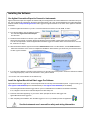
After installing the Agilent IO Libraries and BenchLink Data Logger Pro, click this icon on your desktop to
start the application:
Once the application has started, click Help > Quick Start Videos to watch videos that show you how to
get started with BenchLink Data Logger Pro.
Note: If you are having difficulty running the application, refer to the software installation instructions at
the end of this document.