1
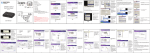
HDD Docking Station for 2.5”/3.5” SATA HDD with eSATA Connector User Manual Backup software instillation 1. Insert the supplied CD in to the CD/DVD reader and open the folder called [PCCLONEEX_LITE_2_00_08_JM329] and then the folder named [PcCloneEx]. 2. Double Click on the SETUP.EXE program to begin the instillation. Click on the Install button to proceed. 3. Click on the “Next” button to accept the license agreement and continue with the instillation 4. Select your preferred instillation options and click on the “Install” button 5. Click on the “OK” button to finish the installation Page 4 of 7