1
● Please reference from 4.2 and 4.3 for Droop
setting.
(11) Manually move the linkage. If the linkage oscillates
3 to 5 times and then stabilizes, then the setting is
correct.
(12) If engine speed overly increases or decreases
when adding load or reducing load, please adjust
the Gain VR clockwise a little.
(13) If engine speed recovers too slowly, adjust INT.
(Integration) clockwise, in the same time decrease
the GAIN setting. Observe the actuator linkage. If
the linkage is stable, manually adjust the linkage. If
the linkage slowly oscillates, then the response
time is inadequate. Adjust INT. clockwise until the
response is improved.
(14) Again manually adjust the linkage. If the linkage
begins to oscillate 3 to 5 times and then stabilizes,
then the setting is complete.
Note 1:If GAIN or INT. (Integration) is over adjusted, it
causes the engine speed to oscillate.
Repetitively increasing and decreasing the
GAIN and INT. arrangement can help to
obtain the best performance.
Note 2:Due to different types of external and internal
built-in type actuators, the adjustment of Gain
is very important, together with INT.
(Integration) adjustment. In PT pump type
actuators, the movement is very limited, so
Gain is set to the minimum using INT.
(Integration) to adjust engine speed
compensation.
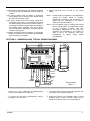
SECTION 5 : DIMENSION AND TYPICAL WIRING DIAGRAM
DROOP
INT.
GAIN
RAMP-TIME
SW
POWER : DC12/24V
SW1-ON 600~1200HZ
SW2-ON 1200~2500HZ
SW3-ON 2500~5000HZ
SW4-ON 5000~9500HZ
IDLE SPEED
REMOTE
SPEED POT
+
1
IDLE
2
3
4
5
RUN SPEED
~
ILS
ACT
6
7
8
9
Idle
switch
10 MPU 11
Cable A
Cable B
R
+
Magnetic
Pickup
_
DC Power
Actuator
CCW
5K
CW
Wiring Drawing
Figure 4
*
Cable A, B - use a cable with a wrapped Mylar
aluminum foil shield with a drain wire.
1. To connect the DC power supply and actuator use
a 12 AWG / 2mm twist pair harness.
*
To connect the 5K ohms potentiometer, refer to
paragraph 3. Connections.
2. Connect the MPU to the EG2000 using a 2-wire
shielded cable. Anchor the drain shield wire to
Terminal 10 and the other end cut and tape off.
___________________________________________________________________________________________
EG2000
5