1
Press the GREEN key to select the options these
include: Play, Music list, Shuffle, Repeat, Background play.
FM Radio
Listen to the radio on the speaker phone or connect the
headset into the headset jack.
1. Slide the FM radio key on the bottom left side of
the phone upwards to switch on the Radio.
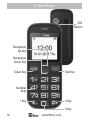
2. Use the UP and DOWN navigation key to scan the
stations.
3. Use the
VOLUME keys on the side of the phone
to increase/decrease the volume.
Press the GREEN key to select the options these
include: Pause, Auto search, Channel list, Manual search,
Save, Open speaker, Background play.
Adjusting the Volume
To adjust volume, press the
VOLUME keys on the
side of the phone.
*The quality of radio sound depends on signal quality at
your location.
The headphones act as an aerial so you will get better
reception when they are plugged in.
Image
1. Press the
UP navigation key to access the menu.
2. Press UP or DOWN navigation key until
“Multimedia” appears.
www.ttfone.com
31