1
Digital Projection Highlite
Cine 260
Selecting an input signal or test pattern
Input
•
Connect an video source to the projector. The signal should be automatically
detected by the projector, and should be displayed within a two or three
seconds.
•
If more than one signal is connected to the projector, then select which signal
is to be displayed, using the
to
buttons on the remote control, or
by pressing the SOURCE button on the projector control panel until the correct
signal is displayed.
Test pattern
If you have no video source connected to the projector, then you can display a test
pattern as follows:
•
Press
Notes
For more information about
connecting input signals, see
Signal Inputs, in section 2. of
the User Manual: Installation.
For more detailed information
about input connections, see
Input signals in section 6. of
the User Manual: Controlling
the projector.
on the remote control, until the desired test pattern is displayed.
Adjusting the lens
•
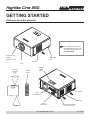
Getting Started
Press the
key repeatedly to cycle through the Lens adjustments, in the
following order:
For more information about lens
shift, see Shifting the image in
section 2. of the User Manual:
Installation.
Focus, Zoom, Shift...
•
Use the use the
,
,
and
keys to adjust the lens.
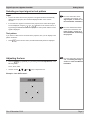
Example - Lens Shift control:
Rev A December 2010
Page