1
Chapter 9 Connecting to Microscope
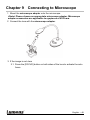
1 Mount the microscope adapter onto the microscope.
<Note> Please choose an appropriate microscope adapter. Microscope
adapter accessories are applicable to eyepieces of Ø 28 mm.
2 Connect the lens with the microscope adaptor.
3 If the image is not clear
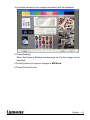
3.1. Press the [FOCUS] button on both sides of the lens to activate the auto
focus.
English - 48



![DC120 Visual Presenter User Manual [Important]](http://vs1.manualzilla.com/store/data/005845319_1-bd6fa75798b576fdb4accb3798bb8932-150x150.png)