1
User Guide
November 3, 2015
Version 1.0
Table of Contents
1. Adaptive Insights .................................................................................................................................................................... 2
2. Browsers.................................................................................................................................................................................. 2
3. Logging into Adaptive Insights ............................................................................................................................................. 3
4. User Security – Roles and Levels ....................................................................................................................................... 4
Roles ........................................................................................................................................................................................ 4
Levels ...................................................................................................................................................................................... 4
5. Navigating the Announcements Page ................................................................................................................................ 5
A. Locating Announcements ................................................................................................................................................ 5
B. Budget Office Links........................................................................................................................................................... 5
6. Accessing Reports ................................................................................................................................................................. 6
A. Locating Reports ............................................................................................................................................................... 6
B. Viewing Reports ................................................................................................................................................................ 6
7. Reports Toolbar...................................................................................................................................................................... 8
A. Save As .............................................................................................................................................................................. 8
B. Filter .................................................................................................................................................................................... 9
C. Printable View & Export Report .................................................................................................................................... 10
8. Unit Reports .......................................................................................................................................................................... 10
A. Budget vs Actual ............................................................................................................................................................. 11
B. Incentives ......................................................................................................................................................................... 11
C. Contingency ..................................................................................................................................................................... 12
D. Unit History ...................................................................................................................................................................... 12
E. Unit Report & Unit Report YTD ..................................................................................................................................... 12
9. Budget Requests.................................................................................................................................................................. 13
A. Adjustments to Original Budget .................................................................................................................................... 13
B. Capital Requests ............................................................................................................................................................. 13
C. Inflationary Requests...................................................................................................................................................... 14
D. Original Budget Variance ............................................................................................................................................... 14
E. SPIF Requests ................................................................................................................................................................ 15
10. Salary & Benefits ............................................................................................................................................................... 15
A. Full-Time Personnel by FOAP by Position .................................................................................................................. 15
B. Overtime by Division by Unit ......................................................................................................................................... 16
C. Salary Blanket by Division by Unit ............................................................................................................................... 16
D. Stipends by Division by Unit.......................................................................................................................................... 16
E. Student Aide by Division by Unit................................................................................................................................... 17
F. Total Salary & Benefits by Division by Unit ................................................................................................................. 17
11. Repeating Reports ............................................................................................................................................................. 18
12. Help & Contacts ................................................................................................................................................................. 20
Version 1.0
1. Adaptive Insights
Adaptive Insights is a comprehensive web-based application that will be used for budgeting,
planning, and forecasting. Adaptive can be accessed from anywhere by web or mobile. The same
Funds, Organizations (called Levels in Adaptive), Accounts, and Programs will be used in Adaptive.
Adaptive Insights is NOT a financial transaction system and is not replacing Banner. Banner will still
be used to check budget availability, to view transaction detail, enter requisitions, etc.
2. Browsers
Adaptive Insights supports the following browsers:
Windows-Based Browsers:
• Internet Explorer: Latest version, plus two prior releases
• Mozilla Firefox: Latest version of, plus ESR* release
o *ESR is an official release of Firefox for desktop use by organization including schools,
universities, business, and others who need extended support for mass developments
• Google Chrome: Latest version
o NOTE: Google Chrome will not be updating plugins like Java and will not work with
Adaptive in the near future
Mac Browsers:
• Firefox: Latest version, plus two prior versions
• Mac OS X 10.7 (Lion), 10.8 (Mountain Lion), and 10.9 (Mavericks)
Tablet Browsers:
• iOS: iPad 4 (Safari)
• Android: Galaxy Tab 3 (Chrome)
• Windows: MS Surface Pro (IE)
Call ITS Support at Ext. 7777 for issues with Internet browsers; do not call Adaptive or the Budget
Office.
Page |2
Version 1.0
3. Logging into Adaptive Insights
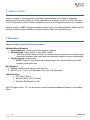
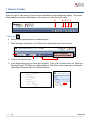
1. Go to www.adaptiveinsights.com OR to the Budget Office webpage at
www.ramapo.edu/budget and click on the “Adaptive Insights” button.
Login with your email address and password.
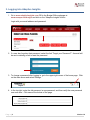
2. If a user has forgotten their password, select the link “Forgot your Password?”. An email will
be sent containing a link to reset the password.
3. To change a password after logging in, go to the upper right corner of the home page. Click
on the down arrow and select Settings.
4. In the top right, enter the old password, a new password, and then verify the new password
one more time. Click save at the bottom of the page.
Page |3
Version 1.0
4. User Security – Roles and Levels
Every user is assigned both a Role and a Level.
Roles enable a user to perform certain functions such as entering data in sheets or accessing
reports.
• Report Only: Users will have access to view all reports and Dashboards published to them,
but will not have access to create reports or edit data on sheets.
• Standard: Unit Directors can edit data on sheets, access and create reports, see salary
Level detail, see which users are logged in, and approve Levels in Workflow. In Discovery,
user can view Dashboards published to them, edit Personal Discovery Dashboards, and use
analysis tools.
• Discovery: User can view Dashboards published to them, edit Personal Discovery
Dashboards, and use analysis tools.
Levels provide access to data for the appropriate areas of the college. Some users may have
more than one Level.
• Access to reports is granted by Level or by user.
• A user can save a report with the “Show all data regardless of Level” option, allowing viewers
of the report to see data for all Levels available.
o If a user tries to drill into data he/she normally does not have access to, the system will
not allow a user to drill any further and will display an error message.
o Access cannot be granted by folder, nor can reports be assigned to an individual user.
Users will only see those
Levels that he/she has been
given access to in the dropdown selectors on reports.
Page |4
Version 1.0
5. Navigating the Announcements Page
A. Locating Announcements
• Hover over the Navigation Icon in the top left corner.
•
Hover over Announcements and choose Announcements.html.
B. Budget Office Links
On the Home Page contains links to the Budget Office files including the Budget Office Homepage,
Banner Finance Resources, Account Codes, Fringe Rates, the Budget Calendar, and the Adaptive
User Manual
To view one of these link, hold down the CTRL key and click the link you want to see.
Page |5
Version 1.0
6. Accessing Reports
A. Locating Reports
• Hover over the Navigation Icon in the top left corner.
•
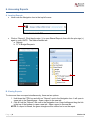
Click on “Reports”. Click the plus sign (+) to open Shared Reports, then click the plus sign (+)
again to open UNITS. The folders needed are:
a. Reports
b. FY16 Budget Requests
B. Viewing Reports
To view more than one report simultaneously, there are two options:
1. Hold down the CTRL key and click on “Reports” next to the Navigation Icon. It will open in
a new tab to the Reports page. Open a report in the new tab.
2. Click & Hold the “Reports” link next to the Navigation Icon. Keep holding and drag the link
to the top of the browser to open a new tab. Open a report in the new tab.
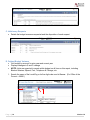
NOTE: If a report is filtered, the green triangle must be clicked on to run the report.
Page |6
Version 1.0
Some reports may have Rollups, or totals of multiple accounts. To view Rollups:
• Click on the plus sign (+) next to the Rollup to see a breakdown of the Rollup.
• Click on the minus sign (-) next to the Rollup to go back.
a. NOTE: Rollups can be broken down more than once
Salaries can be
broken down again
Some reports may have a page size at the bottom. Change the size to 1000 to ensure all data is
shown in the report. After clicking on a page size, the report should automatically reload and should
show the total number of rows.
Click on “Reports” next to the Navigation Icon. NOTE: If a user leaves a filtered report, the filter will
be lost when the user goes back to the report. Save Reports in Personal Folders to keep filters
(Section 6).
Page |7
Version 1.0
7. Reports Toolbar
At the top right of each report is a set of icons and buttons to help breakdown reports. The picture
below displays the buttons talked about in this section in order from left to right.
A
B C C A
A. Save As
• Used to save personal reports or shared reports
1. Filter the report using filters or the Filter button (discussed next in this section).
Must click green
arrow when finished
2. Click on the Save As icon.
3. In the Save Report pop up, name the new report. Then, click on either button for “Save as a
Personal Report” OR “Save as a Shared Report”. Click Save. View a new report in Reports
under either Personal Reports or Shared Reports.
Page |8
Version 1.0
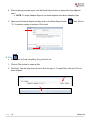
4. After creating a personal report, use the Email Report button to share with other Adaptive
users.
a. NOTE: To share Adaptive Reports, an email recipient must be an Adaptive User.
5. Open up the Personal Report and then click on the Email Report button.
“To:” to select a contact or contacts. Click send.
Then, click on
B. Filter
• Sort reports by Fund, Level/Org, Prog, Account, etc.
1. Click on Filter button to create a filter.
2. Click Add. Use the drop down arrows to filter the report. For each filter, click add. Click ok
when finished.
Page |9
Version 1.0
C. Printable View & Export Report
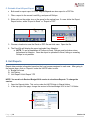
• Both used to export report to Excel. Export Report can also export to a PDF file:
1. Filter a report to the correct Level/Org, and open all Rollups.
2. Either click on the printer icon or the arrow for the upload icon. If a user clicks the Export
Report button, select “Export to Excel” or “Export to PDF”.
3. Choose a location to save the Excel or PDF file and click save. Open the file.
4. The Excel file will display the report uploaded from Adaptive.
a. NOTE: To see a breakdown of Rollups in Excel, Rollups must be broken down
beforehand in Adaptive. Once the report is uploaded to Excel, hiding or revealing
Rollups is not possible.
8. Unit Reports
Report data provides information based on the Level access assigned to each user. After going to
the reports page, click on “Reports” under the UNITS folder to view:
A. Budget vs Actual
B. Unit History
C. Unit Report & Unit Report YTD
NOTE: You must be in Revised Budget 2016 version to view these Reports. To change the
version:
1. Open the Reports folder. This can be under the UNITS folder in Shared folders.
2. In the top right of the page, change the version to Revised Budget 2016 in the FY16 folder.
P a g e | 10
Version 1.0
Each report can be filtered by Fund, Level/Org, or Program. Search the name or its five digit code
used in banner. (Ex: Budget Office = 73001)
Must click on green
arrow after to run report
A. Budget vs Actual
• Displays Original Budget in comparison to the Actual Budget for current and previous year
• Filter by Level/Org or Program
B. Incentives
• Displays Available Incentive Budget by Level
• Includes Fund, Program, Division, Original Budget, and Amount Used
• MUST BE IN REVISED BUDET 2015
P a g e | 11
Version 1.0
C. Contingency
• Displays Level, Unit Head, Amount Requested, Approved, & Distributed
• Description of Contingency request
• MUST BE IN REVISED BUDET 2015
D. Unit History
• Displays Revenue and Expense Rollup for past three fiscal years and current YTD
• Filter by Level/Org or Fund
E. Unit Report & Unit Report YTD
• Displays Revenue and Expense Rollup for previous 3 years, current year, and next 3 years
• Revenue and expenses are broken down into more specific Rollups
• Unit Report can be filtered by Fund or Level/Org
• Unit Report YTD can be filtered by Level/Org or Prog
P a g e | 12
Version 1.0
9. Budget Requests
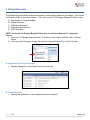
The Budget Requests folder contains information on submissions related to the budget. Click on the
Unit Reports folder to view more folders. Then, click on the “FY16 Budget Requests” folder to view:
A.
B.
C.
D.
E.
Adjustments to Original Budget
Capital Requests
Inflationary Requests
Original Budget Variance
SPIF Requests
NOTE: You must be in Original Budget 2016 version to view these Reports. To change the
version:
1. Open the FY16 Budget Requests folder. This can be found under the UNITS folder in Shared
folders
2. In the top right of the page, change the version to Original Budget 2016 in the FY16 folder.
A. Adjustments to Original Budget
• Displays changes in unit budgets from prior fiscal year
B. Capital Requests
• Displays the disposition of any capital improvement request
P a g e | 13
Version 1.0
C. Inflationary Requests
• Details the budget increases requested and the disposition of each request
D. Original Budget Variance
• Unit budget by account for prior year and current year
• Displays changes in $ and % change
• NOTE: Units are expected to remain within budget on all lines on this report, including
Blanket Salaries, Stipend, Pool, Telephone & Postage, etc.
1. Search the name of the Level/Org or its five digit code used in Banner. (Ex: Office of the
Provost = 20001)
P a g e | 14
Version 1.0
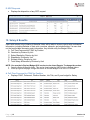
E. SPIF Requests
• Displays the disposition of any SPIF request
10. Salary & Benefits
Users with access to the Salaries & Benefits folder will be able to access reports with confidential
information, including Salaries of their units, overtime, stipends, and student aides. If a user does
not feel comfortable accessing such information, they should notify the Budget Office.
A. Full-Time Personnel by FOAP by Position
B. Overtime by Division by Unit
C. Salary Blanket by Division by Unit
D. Stipends by Division by Unit
E. Student Aide by Division by Unit
F. Total Salary & Benefits by Division by Unit
NOTE: You must be in Revised Budget 2016 version to view these Reports. To change the version:
1. Open the Salary & Benefits folder. This can be found under the UNITS folder in Shared folders
2. In the top right of the page, change the version to Revised Budget 2016 in the FY16 folder.
A. Full-Time Personnel by FOAP by Position
• Displays FOAP, Personnel, Position Number, Job Title, and 3-year budget for Salary
P a g e | 15
Version 1.0
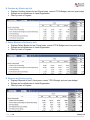
B. Overtime by Division by Unit
• Displays Overtime Actuals for last 3 fiscal years, current YTD & Budget, and next year budget
• Rollups can be drilled down to Level/Organization
• Filter by Level or Program
C. Salary Blanket by Division by Unit
• Displays Salary Blanket for last 3 fiscal years, current YTD & Budget, and next year budget
• Rollups can be drilled down to Level/Organization
• Filter by Level or Program
D. Stipends by Division by Unit
• Displays Stipends for last 3 fiscal years, current YTD & Budget, and next year budget
• Rollups can be drilled down to Level/Organization
• Filter by Level or Program
P a g e | 16
Version 1.0
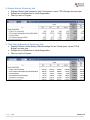
E. Student Aide by Division by Unit
• Displays Student Aide budgets for last 3 fiscal years, current YTD & Budget, and next year
• Rollups can be drilled down to Level/Organization
• Filter by Level or Program
F. Total Salary & Benefits by Division by Unit
• Displays Division’s entire Salary & Benefits budget for last 3 fiscal years, current YTD &
Budget, and next year
• Rollups can be drilled down to Level/Organization
• Filter by Level or Program
P a g e | 17
Version 1.0
11. Repeating Reports
Unit Directors may be responsible for more than one Level (Organization). Their Rollup will only
show the totals of all their divisions together. However, by using Repeating Reports, a Unit Director
can upload a report to Excel and have multiple tabs that include their Rollup and each individual
Level (Organization).
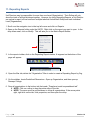
1. Scroll over the navigation icon in the top left corner and click on Reports.
2. Open up the Reports folder under the UNITS. Right click on the report you want to open. In the
drop down menu, click on Modify. This will take you to the Matrix Report Builder.
3. In the reports toolbar, click on the Repeating Reports button. A segment on the bottom of the
page will appear.
4. Open the filter tab, delete the “Organization” filter in order to create a Repeating Report by Org.
5. On the sidebar, locate Predefined Dimensions. Open up Organization, and then open up
Ramapo College.
6. Drag all organizations to the bottom tab that reads, “Drag here to add a spreadsheet tab”.
a. NOTE: Click on a rollup to drag the entire rollup to the tab.
b. NOTE: The arrow must be pointed down to show all organizations. If the arrow points
right, right click on the tab, click properties, and then open the rollup.
P a g e | 18
Version 1.0
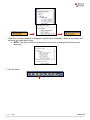
7. Right click on either Revenue or Expenses, and then click Properties. Open up any rollups and
accounts you might want to see.
a. NOTE: This step will have to be done twice if you need to change both Revenue and
Expenses.
8. Run the report.
P a g e | 19
Version 1.0
12. Help & Contacts
Browser Support: Call ITS helpdesk, Ext. 7777.
Adaptive Insights Technical Questions: Do not call Adaptive Insights. If you have any questions
about the software, feel free to call Beth Walkley at Ext. 7266 or contact the Budget Office at
[email protected].
Contacts:
Beth Walkley
Director of Budget & Fiscal Analysis
M207
Ext. 7266
[email protected]
Kathy Stathis
Budget & Systems Analyst
M209
Ext. 7763
[email protected]
P a g e | 20
Matthew Palmer
Financial Analyst
D120
Ext. 7617
[email protected]
Version 1.0