1
Quick Setup
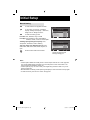
Connecting to an HDMI Compatible Device
By connecting an HDMI compatible device, high definition pictures can be displayed on your
TV in their digital form. Some HDMI devices can include DVD players, D-VHS or any HDMI
compatible device.
HDMI (High Definition Multimedia Interface) is the first industry supported, uncompressed, all
digital audio/video interface. HDMI provides an interface between any audio/video source,
such as a set-top box, DVD player, A/V receiver or an audio and/or video monitor, such as a
digital television (DTV).
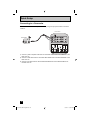
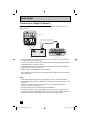
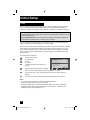
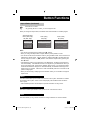
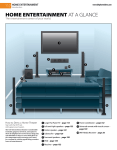
HDMI Cable
HDMI Compatible Device
L
R
AUDIO OUT
DIGITAL OUT
SERVICE
75 Ω
(VHF/UHF)
PHOTO
VIEWER
INPUT 1
INPUT 2
DIGITAL AUDIO
OPTICAL OUT
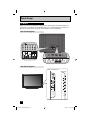
TV Rear Panel
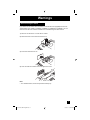
1) Connect the HDMI Cable from the DIGITAL OUT on the back of your DTV or HDMI device to
the HDMI INPUT-1 on the back of the TV.
Notes:
• When you do the above connection, set "Video-1 Audio" in the External Input menu to Digital.
See "Video-1 Audio", page 45.
• Some decoders may not respond depending on the equipment that is connected to the HDMI.
• If the HDMI output device signal is changed (for example, 480i/60Hz is changed to
480p/60Hz), the screen may turn green and there may be some distortion for a short time
until the signal becomes stable.
• This TV can accept 480i, 480p, 720p, 1080i and 1080p signals via HDMI.
19
LCT2275-001B-A English.indd 19
6/14/07 10:33:39 AM