1
INSTRUCTION MANUAL
GUIDE FOR USING THE DISHWASHER AND THE WASHING PROGRAMS
EN
CONTENTS
CONTENTS
1
INTRODUCTION ........................................................................................ 3
2
DESCRIPTION OF THE CONTROLS .......................................................... 5
2.1
Upper panel ............................................................................................... 5
2.2
Setting the washing program and switching on and off............................... 6
2.2.1
Switching on .............................................................................................. 9
2.2.2
Selecting and starting the program........................................................... 10
2.2.3
End of program ........................................................................................ 10
2.2.4
Interrupting a program............................................................................. 10
2.2.5
Changing the current program ................................................................. 10
2.2.6
Canceling the current program ................................................................ 11
2.2.7
Options .................................................................................................... 11
2.2.8
Switching off ........................................................................................... 12
3
ENERGY SAVING AND ENVIRONMENTAL RESPECT .............................. 13
3.1
Reducing the consumption of detergent and respecting the environment ........ 13
4
REMOVING THE DISHES ......................................................................... 14
5
TROUBLESHOOTING .............................................................................. 15
Rev. 0.1
1
EN
2
Rev. 0.1
EN
INTRODUCTION
1
INTRODUCTION
Thank you for choosing one of our products. To use this dishwasher
correctly and safely, please read this manual carefully. The manual is
divided into sections giving you a step-by-step guide to all your appliance’s functions. The texts are easy to understand and are complete with detailed illustrations. This user-friendly manual will provide
answers to all your questions about use of the dishwasher.
Before using this dishwasher, carefully read chapter 2 “Use and safety warnings” of the attached general manual.
For any other information about use and maintenance of the dishwasher, read the enclosed general manual carefully.
This manual comprises the following sections:
INTRODUCTION: general information about the manual.
USER INSTRUCTIONS: advice on using the washing programs and
information about all the dishwasher functions.
Nomenclature of figures and tables:
The progressive number of each figure is shown in the bottom righthand corner of the relative box. An example of a progressive number
is “Fig. 4-01”, where the first number (4) indicates the section to
which the figure belongs, while the second number (01) indicates
the progressive number of the figure in section 4 (Fig. 4-01 is the
first figure in section 4). The tables are numbered in the same way,
bearing in mind that “Tab.” is used instead of “Fig.” (e.g.: Tab. 4-01
is the first table in section 4). If a table occupies more than one page,
a letter is added after the progressive number (e.g.: “Tab. 4-01a”,
Tab. 4-01b”).
Rev. 0.1
3
EN
INTRODUCTION
Symbols used in this manual (see tab. 1-01)
DANGER. This symbol highlights information and warnings which, if not
observed, may compromise personal safety or damage the appliance.
This symbol highlights general information and warnings.
Tab. 1-01
4
Rev. 0.1
EN
USER INSTRUCTIONS
2
DESCRIPTION OF THE CONTROLS
2.1
Upper panel
All the dishwasher controls are grouped on the upper panel (see fig. 2-01). The
dishwasher can only be switched on, programmed, switched off, etc. with the
door open.
A brief description (see tab. 2-01) of the various controls on the upper panel is
given below.
FIG. 2-01
Rev. 0.1
5
EN
USER INSTRUCTIONS
1
2
3
4
5
6
7
8
9
10
11
On/off button
Press to power the appliance.
Program indicator lights
These show which program is selected and whether there are any faults
(Troubleshooting).
Program selection button
Press in sequence to select the required program.
Add rinse aid indicator light
(only fitted on some models)
Shows the appliance has run out of rinse aid.
Quick time option button
Press this button to start one of the 4 quick time programmes (see table).
Quick time programmes indicator light
Shows that one of the 4 quick time programmes will be run
Extra drying option button
Press to select the extra drying option
Extra drying option indicator light
Shows the function is active
Sanitation indicator light
Shows that sanitation has been completed (see notes in the programmes table)
Programme delay button
Press to delay the start of the programme up to 9 hours.
Information display
Tab. 2-01
2.2
Setting the washing program and switching
on and off
The dishwasher is equipped with a control panel (see fig. 2-02) which is used
to program the appliance and switch it on and off.
FIG. 2-02
6
Rev. 0.1
EN
USER INSTRUCTIONS
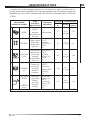
To select the most suitable program for the dishes to wash, consult the following table which specifies the most appropriate type of washing sequence
depending on the kind of dishes and how dirty they are (see tabs. 2-02a and
2-02b).
PROGRAMME,
NUMBER & SYMBOL
1
2
RINSE
CRYSTAL
LOAD
CROCKERY
AND CUTLERY
Pans and
dishes
awaiting
Cold prewash
completion of
the load
Glass, china
and mixed
dishes with
light dirt.
3
Half load of
dishes with
DAILY HALF normal dirt,
LOAD
washed
immediately
after use
4
Dishes with
normal dirt,
including
dried-on
residue
NORMAL
(2)
EXTREME
WASH
5
ETL
SANITATION
LISTED
Rev. 0.1
PROGRAM
PROGRESS
Very dirty
pans and
dishes,
including
dried-on
residue
DURATION
MINUTES
(1)
15
CONSUMPTION
ENERGY
kWh (1)
WATER
3,5 l
0,93 gal.
0,02
Wash at 45°C
(113°F)
Cold rinse
Rinse at 70°C
(158°F)
Dry
65
12 l
3,17 gal.
0,5
Wash at 65°C
(149°F)
Cold rinse
Rinse at 70°C
(158°F)
Dry
90
13 l
3,45 gal.
1,00
Wash at 50°C
(122°F)
Cold rinse
Rinse at 66°C
(150,8°F)
Dry
100
12 l
3,17 gal.
0,7
Hot prewash
Wash at 70°C
(158°F)
2 cold rinses
Rinse at 70°C
(158°F)
Dry
122
18,3 l
4,83 gal.
1,12
Tab. 2-02a
7
EN
USER INSTRUCTIONS
PROGRAMME,
NUMBER & SYMBOL
6
7
8
9
LOAD
CROCKERY
AND CUTLERY
PROGRAM
PROGRESS
DURATION
CONSUMPTION
MINUTES
(1)
WATER ENERGY
LITRES kWh (1)
RAPID 27’
Dishes with
light dirt,
washed
immediately
after use
Wash at 38°C
(100,4°F)
Rinse at 50°C
(122°F)
27
6,5 l
1,72 gal.
0,40
ECO
QUICK
Dishes with
normal dirt,
washed
immediately
after use.
Cold prewash
Wash at 60°C
(140°F)
Cold rinse
Rinse at 70°C
(158°F)
70
12,5 l
3,3 gal.
0,9
+
NORMAL
QUICK
Dishes with
normal dirt,
washed
immediately
after use.
Cold prewash
Wash at 70°C
(158°F)
Cold rinse
Rinse at 70°C
(158°F)
80
13 l
3,44 gal.
1,1
+
STRONG
and FAST
Mixed dishes
with normal
dirt without
dried-on
residues.
Wash at 65°C
(149°F)
Cold rinse
Rinse at 70°C
(158°F)
55
9,5 l
2,51 gal.
1,00
+
+
Tab. 2-02b
( The cycle times and electrical energy listed use and care manual are based on normal soil loads
(1)
and 120°F (49°C) incoming water and will vary based on your actual conditions.
(2) Program for energy star.
- Only “EXTREME WASH” program conforms to NSF std 184 and is certified by INTERTEK with
the ETL SANITATION LISTED.
- When the “Sanitized” light shine it means that the dishwasher and its contents have been sanitized according to the requirements of the National Sanitation Foundation (NSF).
- When the “AUTO PROGRAMMES” are selected, the dishwasher recognizes the type of dirt and
automatically adjusts the washing parameters as appropriate.
8
Rev. 0.1
EN
USER INSTRUCTIONS
Only run the soak program with half loads.
To run programmes 6, 7, 8, 9, 10 (see tab. 2-02b), select the required standard
programme (see programmes 1, 2, 3, 4, 5 in tab. 2-02a) and then press the
quick time option button (ref. 6 fig. 2-02).
After using the above tables to choose the most suitable washing cycle, program the appliance.
Before starting a washing program, make sure that:
• The water supply tap is open.
• The correct amount of detergent has been added to the dispenser (to add detergent, see the instructions in the general
manual).
• The spray arms are able to rotate freely and without obstruction.
• The racks have been correctly loaded (see the instructions in the
general manual).
• The dishwasher door is securely closed.
2.2.1
Switching on
Press the on/off button (ref. 1 fig. 2-02) to start the dishwasher. Then wait for
one of the program indicator lights to turn on (ref. 2 fig. 2-02).
Rev. 0.1
9
EN
USER INSTRUCTIONS
2.2.2
Selecting and starting the program
• Press the program selection button (ref. 3 fig. 2-02) several times until
the indicator light corresponding to the required program turns on (ref. 2 fig.
2-02);
• if required, press the relative buttons to select any complementary functions
(e.g.: “extra drying”, “program delay”; see para 2.2.7 “options”);
• close the door; the program will start after about 2 seconds and the relative
indicator light will flash throughout the cycle (program¬ running signal).
If the door of the dishwasher has not been closed or has been incorrectly closed, the washing cycle will not begin.
QUICK TIME PROGRAMS OPTION
• Select this option together with any washing program (except the soak program) to SHORTEN the cycle by from a minimum of 10% to a maximum
of 55%, depending on the cycle selected. To activate this option, press the
(light comes on) after selecting the proQUICK TIME OPTION button
gram required. The option is automatically deactivated at the end of the
program.
2.2.3
End of program
The end of the program is signaled by a short beep. Additionally the indicator
light of the normal and strong programs (marked “end”) flash.
2.2.4
Interrupting a program
To interrupt the current program simply open the door of the dishwasher; to
restart the program, simply close the door again. The program restarts from
where it was interrupted.
2.2.5
Changing the current program
To change the current program, simply open the door of the dishwasher and
select the new program. Close the door to run the new program automatically.
10
Rev. 0.1
EN
USER INSTRUCTIONS
2.2.6
Canceling the current program
• To cancel the current program, open the door and press and hold down the
program selection button (ref. 3 fig. 2-02) for a few seconds until the indicator lights of the fourth and fifth programs turn on (ref. pr. 4, pr. 5 fig. 2-03).
• Close the door again.
• After about 1 minute, the dishwasher terminates the cycle and the indicator
lights of the fourth and fifth programs (ref. pr. 4, pr. 5 fig. 2-03) start flashing.
FIG. 2-03
2.2.7
Options
Function designed for loads with hard to dry item s such as saucepans, nonstick pans and plastic containers. Increases the hot rinse temperature and can
be used in programmes featuring a final drying phase (see programmes table).
PROGRAM DELAY
(available for all programs except soak)
The “Program delay” function delays the beginning of the washing program
up to 9 hours from the moment in which programming takes place. This makes
it possible to use the dishwasher at a certain time of day.
Before programming a delay, open the door of the dishwasher, select the
required washing program (see para 2.2 “Setting the washing program and
switching on and off”). Select the day by pressing the Program delay button
(ref. 11 fig. 2-02); each time you press the button, the display increases the
delay before the appliance starts by 1 hour.
Rev. 0.1
11
EN
USER INSTRUCTIONS
2.2.8
Switching off
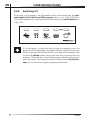
At the end of the program, the dishwasher emits a short beep and the indicator lights of the fourth and fifth program (ref. pr. 4, pr. 5 fig. 2-04) flash.
Turn off the appliance by opening the door and pressing the on/off button (ref.
1 fig. 2-02).
FIG. 2-04
If it is necessary to open the door during the washing cycle, the
program will be interrupted, the relative indicator light will continue to
flash and a beep will indicate that the cycle has not terminated. Wait
for about 1 minute before closing the door and continuing with the
program. When the door closes, the program will start from where it
was interrupted. This operation should be performed only if necessary as it could cause irregular program performance.
12
Rev. 0.1
EN
USER INSTRUCTIONS
3
ENERGY SAVING AND ENVIRONMENTAL
RESPECT
Always try to run the dishwasher fully loaded.
Do not wash the dishes under a running tap.
Use the most suitable washing program for each type of load.
Do not pre-rinse.
If available, connect the dishwasher to a hot water system with a temperature of up to 60°C (140°F).
• When possible, skip the drying cycle by opening the door after washing:
the air and the residue heat will dry the dishes to perfection.
•
•
•
•
•
3.1
Reducing the consumption of detergent
and respecting the environment
The phosphates contained in dishwasher detergents are harmful to the environment. To avoid using excessive amounts of detergent and to save on electricity:
• Separate the more delicate items from those that are more resistant to aggressive detergents and high temperatures;
• Do not pour the detergent directly onto the dishes.
Rev. 0.1
13
EN
USER INSTRUCTIONS
4
REMOVING THE DISHES
At the end of the washing program, wait at least 20 minute before
removing the dishes in order to allow them to cool. To prevent any
water droplets on the upper rack from falling onto the dishes in the
lower rack, empty the lower rack first and then the upper one.
14
Rev. 0.1
EN
USER INSTRUCTIONS
5
TROUBLESHOOTING
The dishwasher can to signal a number of malfunctions by turning on various
indicator lights, as described below (see following table):
FAULT
E1
E2
E3
E4
E5
DESCRIPTION
Acquastop failure
The anti-flooding system has tripped (only for models
fitted with this feature). Activates in case of water leaks.
Contact the technical assistance service.
Safety level
The system limiting the water level in the dishwasher
has tripped. Interrupt the current program. Switch off
the dishwasher, switch it back on again, program a new
cycle and press start. If the problem persists, contact
the technical assistance service.
Water heating malfunction
The water is not heated or is incorrectly heated. Repeat
the washing program; if the problem persists, contact
the technical assistance service.
Water temperature monitoring malfunction
Interrupt the current program. Switch off the dishwasher,
switch it back on again, program a new cycle and press
start. If the problem persists, contact the technical
assistance service.
Water intake malfunction
The appliance does not take in water or does so
incorrectly. Make sure the water connections are
correct, that the water supply tap is open and that the
filter is not clogged. If the problem persists, contact the
technical assistance service.
Tab. 5-01a
Rev. 0.1
15
EN
USER INSTRUCTIONS
FAULT
E6
E7
DESCRIPTION
Water pump-out malfunction
The appliance does not pump out the water or does so
incorrectly. Make sure the drain hose is not kinked or
crushed and that the siphon and filters are not clogged.
If the problem persists, contact the technical assistance
service.
Turbine flow-regulator malfunction
(only for models fitted with this feature)
The appliance is unable to precisely measure the
quantity of incoming water. Interrupt the current program
and switch off the dishwasher. Switch it back on again,
program a new cycle and press start. If the problem
persists, contact the technical assistance service.
E8
Alternate washing system malfunction
Interrupt the current program and switch off the
dishwasher. Switch it back on again, program a new
cycle and press start. If the problem persists, contact
the technical assistance service.
E9
Water intake system malfunction
Contact the technical assistance service.
Tab. 5-01b
Light off
Light on
Light flashing
If an alarm situation occurs, the dishwasher interrupts the current program and
signals the fault.
• Alarms E1, E2, E3, E4, E8, E9 immediately terminate the current program.
• Alarms E5, E6 interrupt the current program and, after the problem has been
eliminated, resume the cycle.
• Alarm E7 is displayed at the end of the cycle which, however, is completed
given that it does not jeopardize the operation of the dishwasher.
To “reset” an alarm:
• open or close the door, or switch the appliance on and back off again. At this
point, the dishwasher can be programmed again.
If the fault persists, contact the Authorized Technical Assistance Service.
16
Rev. 0.1