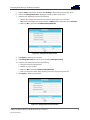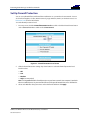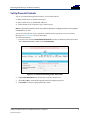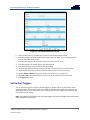
1
User Guide
SURFboard® SBG6580
Wireless Cable Modem Gateway
© 2014 ARRIS Enterprises, Inc. All rights reserved.
No part of this publication may be reproduced in any form or by any means or used to make any derivative work (such as translation,
transformation, or adaptation) without written permission from ARRIS Enterprises, Inc. (“ARRIS”). ARRIS reserves the right to revise this
publication and to make changes in content from time to time without obligation on the part of ARRIS to provide notification of such
revision or change.
ARRIS and the ARRIS logo are all trademarks of ARRIS Enterprises, Inc. Other trademarks and trade names may be used in this document to
refer to either the entities claiming the marks and the names of their products. ARRIS disclaims proprietary interest in the marks and names
of others.
Wi-Fi Alliance®, Wi-Fi®, the Wi-Fi logo, the Wi-Fi CERTIFIED logo, Wi-Fi Protected Access® (WPA), the Wi-Fi Protected Setup logo, and WMM® are
registered trademarks of Wi-Fi Alliance. Wi-Fi Protected Setup™, Wi-Fi Multimedia™, and WPA2™ are trademarks of Wi-Fi Alliance.
ARRIS provides this guide without warranty of any kind, implied or expressed, including, but not limited to, the implied warranties of
merchantability and fitness for a particular purpose. ARRIS may make improvements or changes in the product(s) described in this manual at
any time.
The capabilities, system requirements and/or compatibility with third-party products described herein are subject to change without notice.
Safety and Regulatory Information
i
Safety and Regulatory
Information
IMPORTANT SAFETY INSTRUCTIONS
Read This Before You Begin — When using your equipment, basic safety precautions should always be followed to reduce the risk of fire, electric shock, and injury to
persons, including the following:
• Read all of the instructions listed here and/or in the user manual before you operate this device. Give particular attention to all safety precautions.
Retain the instructions for future reference.
• This device must be installed and used in strict accordance with manufacturer’s instructions, as described in the user documentation that is included
with the device.
• Comply with all warning and caution statements in the instructions. Observe all warning and caution symbols that are affixed to this device.
• To prevent fire or shock hazard, do not expose this device to rain or moisture. The device must not be exposed to dripping or splashing. Do not place
objects filled with liquids, such as vases, on the device.
• This device was qualified under test conditions that included the use of the supplied cables between system components. To ensure regulatory and
safety compliance, use only the provided power and interface cables and install them properly.
• Different types of cord sets may be used for connections to the main POWER supply circuit. Use only a main line cord that complies with all applicable
device safety requirements of the country of use.
• Installation of this device must be in accordance with national wiring codes and conform to local regulations.
• Operate this device only from the type of power source indicated on the device’s marking label. If you are not sure of the type of power supplied to
your home, consult your dealer or local power company.
• Do not overload outlets or extension cords, as this can result in a risk of fire or electric shock. Overloaded AC outlets, extension cords, frayed power
cords, damaged or cracked wire insulation, and broken plugs are dangerous. They may result in a shock or fire hazard.
• Route power supply cords so that they are not likely to be walked on or pinched by items placed upon or against them. Pay particular attention to
cords where they are attached to plugs and convenience receptacles, and examine the point where they exit from the device.
• Place this device in a location that is close enough to an electrical outlet to accommodate the length of the power cord.
• Place the device to allow for easy access when disconnecting the power cord of the device from the AC wall outlet.
• Do not connect the plug into an extension cord, receptacle, or other outlet unless the plug can be fully inserted with no part of the blades exposed.
• Place this device on a stable surface.
• Avoid damaging the device with static by touching the coaxial cable when it is attached to the earth-grounded coaxial cable-TV wall outlet.
• Always first touch the coaxial cable connector on the device when disconnecting or reconnecting the Ethernet cable from the device or user’s PC.
• It is recommended that the customer install an AC surge protector in the AC outlet to which this device is connected. This is to avoid damaging the
device by local lightning strikes and other electrical surges.
• Postpone installation until there is no risk of thunderstorm or lightning activity in the area.
• Do not use this product near water: for example, near a bathtub, washbowl, kitchen sink or laundry tub, in a wet basement, or near a swimming pool.
• Do not cover the device or block the airflow to the device with any other objects. Keep the device away from excessive heat and humidity and keep the
device free from vibration and dust.
• Wipe the device with a clean, dry cloth. Never use cleaning fluid or similar chemicals. Do not spray cleaners directly on the device or use forced air to
remove dust.
• For added protection, unplug the device from the wall outlet and disconnect the cables to avoid damage to this device due to lightning and power
surges.
SURFboard® SBG6580 Wireless Cable Modem Gateway • User Guide
365-095-25397-x.1
i
Safety and Regulatory Information
• Upon completion of any service or repairs to this device, ask the service technician to perform safety checks to determine that the device is in safe
operating condition.
• Do not open the device. Do not perform any servicing other than that contained in the installation and troubleshooting instructions. Refer all servicing
to qualified service personnel.
• This device should not be used in an environment that exceeds 104º F (40º C).
SAVE THE ABOVE INSTRUCTIONS
Note to CATV System Installer — This reminder is provided to call the CATV system installer’s attention to Articles 820.93 and 820.100 of the
National Electric Code, which provides guidelines for proper grounding and, in particular, specifies that the Coaxial cable shield shall be connected to the
grounding system of the building, as close to the point of cable entry as practical.
FCC STATEMENTS
FCC Interference Statement
This equipment has been tested and found to comply with the limits for a Class B digital device, pursuant to part 15 of the FCC Rules. These limits are
designed to provide reasonable protection against harmful interference in a residential environment. This equipment generates, uses, and can radiate
radio frequency energy and, if not installed and used in accordance with the instructions, may cause harmful interference to radio communications.
However, there is no guarantee that interference will not occur in a particular installation. If this equipment does cause harmful interference to radio or
television reception, which can be determined by turning the device off and on, the user is encouraged to try to correct the interference by one or more of
the following measures:
• Reorient or relocate the receiving antenna.
• Increase the separation between the device and receiver.
• Connect the equipment into an outlet on a circuit different from that to which the receiver is connected.
• Consult the dealer or an experienced radio/TV technician for help.
This device complies with Part 15 of the FCC Rules. Operation is subject to the following two conditions: (1) This device may not cause harmful
interference, and (2) This device must accept any interference received, including interference that may cause undesired operation.
FCC CAUTION: Any changes or modifications not expressly approved by ARRIS for compliance could void the user’s authority to operate the equipment.
FCC RADIATION EXPOSURE STATEMENT
This equipment complies with FCC radiation exposure limits set forth for an uncontrolled environment. To comply with the FCC RF exposure compliance
requirements, the separation distance between the antenna and any person’s body (including hands, wrists, feet and ankles) must be at least 20 cm (8
inches).
This transmitter must not be co-located or operating in conjunction with any other antenna or transmitter except those already approved in this filing.
The availability of some specific channels and/or operational frequency bands are country dependent and are firmware programmed at the factory to
match the intended destinations. The firmware setting is not accessible by the end user.
INDUSTRY CANADA (IC) STATEMENT
This device complies with RSS-210 of the Industry Canada Rules. Operation is subject to the following two conditions:
• This device may not cause interference, and
• This device must accept any interference, including interference that may cause undesired operation of the device.
CAN ICES-3 (B)/NMB-3 (B)
In Canada, RLAN devices are restricted from using the 5600-5650 MHz frequency band.
CAUTION: To reduce the potential for harmful interference to co-channel mobile satellite systems, use of the 5150-5250 MHz frequency band is
restricted to indoor use only.
High power radars are allocated as primary users (meaning they have priority) of 5250-5350 MHz and 5650-5850 MHz frequency bands. These radars
could cause interference and/or damage to License Exempt–Local Area Network (LE-LAN) devices.
SURFboard® SBG6580 Wireless Cable Modem Gateway • User Guide
365-095-25397-x.1
ii
Safety and Regulatory Information
IC RADIATION EXPOSURE STATEMENT
IMPORTANT NOTE: This equipment complies with IC radiation exposure limits set forth for an uncontrolled environment. This equipment should be
installed and operated with a minimum distance of 20 cm between the radiator and your body.
AVIS D'INDUSTRIE CANADA (IC)
Cet appareil est conforme à la réglementation RSS-210 d'Industrie Canada. Son utilisation est assujettie aux deux conditions suivantes :
• Cet appareil ne doit pas causer d'interférences et
• Cet appareil doit accepter toute interférence reçue, y compris les interférences causant un fonctionnement non désiré.
CAN ICES-3 (B)/NMB-3 (B)
Au Canada, les appareils de réseau local sans fil ne sont pas autorisés à utiliser les bandes de fréquence 5600-5650 MHz.
AVERTISSEMENT: afin de réduire les risques de brouillage préjudiciable aux systèmes de satellites mobiles utilisant les mêmes canaux, les dispositifs
fonctionnant dans la bande 5150-5250 MHz sont réservés uniquement pour une utilisation à l'intérieur
Les radars à haute puissance sont définis en tant qu'utilisateurs principaux (c.-à-d. prioritaires) des bandes de fréquences 5250-5350 MHz et 5650-5850
MHz. Ces radars peuvent causer de l'interférence ou des dommages susceptibles de nuire aux appareils exempts de licence–réseau local (LAN-EL).
DÉCLARATION DE IC SUR L'EXPOSITION AUX RAYONNEMENTS
NOTE IMPORTANTE : cet équipement est conforme aux limites d'exposition aux rayonnements établies par IC pour un environnement non contrôlé. Cet
équipement doit être installé et utilisé de manière à maintenir une distance d'au moins 20 cm entre la source de rayonnement et votre corps.
WIRELESS LAN INFORMATION
This device is a wireless network product that uses Direct Sequence Spread Spectrum (DSSS) and Orthogonal Frequency-Division Multiple Access (OFDMA)
radio technologies. The device is designed to be interoperable with any other wireless DSSS and OFDMA products that comply with:
• The IEEE 802.11 Standard on Wireless LANs (Revision B, Revision G, and Revision N), as defined and approved by the Institute of Electrical Electronics
Engineers
• The Wireless Fidelity (Wi-Fi) certification as defined by the Wireless Ethernet Compatibility Alliance (WECA).
RESTRICTIONS ON THE USE OF WIRELESS DEVICES
In some situations or environments, the use of wireless devices may be restricted by the proprietor of the building or responsible representatives of the
organization. For example, using wireless equipment in any environment where the risk of interference to other devices or services is perceived or
identified as harmful.
If you are uncertain of the applicable policy for the use of wireless equipment in a specific organization or environment, you are encouraged to ask for
authorization to use the device prior to turning on the equipment.
The manufacturer is not responsible for any radio or television interference caused by unauthorized modification of the devices included with this
product, or the substitution or attachment of connecting cables and equipment other than specified by the manufacturer. Correction of the interference
caused by such unauthorized modification, substitution, or attachment is the responsibility of the user.
The manufacturer and its authorized resellers or distributors are not liable for any damage or violation of government regulations that may arise from
failing to comply with these guidelines.
Note: The use of the 5150-5250 MHz frequency band is restricted to Indoor Use Only.
SECURITY WARNING: This device allows you to create a wireless network. Wireless network connections may be accessible by unauthorized users. For
more information on how to protect your network, see the Change the Default User Name and Password for instructions or visit the ARRIS Support
website: www.arrisi.com/consumer.
SURFboard® SBG6580 Wireless Cable Modem Gateway • User Guide
365-095-25397-x.1
iii
Safety and Regulatory Information
CARING FOR THE ENVIRONMENT BY RECYCLING
When you see this symbol on a ARRIS product, do not dispose of the product with residential or commercial waste.
Recycling your ARRIS Equipment
Please do not dispose of this product with your residential or commercial waste. Some countries or regions, such as the
European Union, have set up systems to collect and recycle electrical and electronic waste items. Contact your local authorities
for information about practices established for your region.
SURFboard® SBG6580 Wireless Cable Modem Gateway • User Guide
365-095-25397-x.1
iv
Contents
Contents
Safety and Regulatory Information ..................................................................................................................... i
Getting Started .................................................................................................................................................... 1
In The Box ............................................................................................................................................................................................................ 1
Additional Items You May Need ................................................................................................................................................................. 2
System Requirements ..................................................................................................................................................................................... 2
Contact Information ........................................................................................................................................................................................ 2
Product Overview ................................................................................................................................................ 3
Front Panel .......................................................................................................................................................................................................... 3
Wi-Fi Protected Setup™ (WPS) ............................................................................................................................................................ 4
Rear Panel ............................................................................................................................................................................................................ 5
Gateway Label ................................................................................................................................................................................................... 6
Installing the Gateway ........................................................................................................................................ 7
Connect the SBG6580 to Your Computer ............................................................................................................................................... 7
Establish an Internet Connection ............................................................................................................................................................... 8
Wall Mount the Gateway ............................................................................................................................................................................... 8
Wall Mounting Template .................................................................................................................................................................... 10
Setting Up a Wireless Network Connection ..................................................................................................... 11
Launch the SBG6580 Quick Start Wizard .............................................................................................................................................. 11
Set Up a Wireless Network Connection Using Your Computer .................................................................................................... 13
Quick Connect Using the Windows Taskbar ............................................................................................................................... 13
Connect Using the Windows Control Panel ................................................................................................................................ 15
Use the SBG6580 WPS Pairing Button .................................................................................................................................................... 17
Test Your Wireless Network Connection ............................................................................................................................................... 18
Managing Your Gateway and Connected Networks ....................................................................................... 19
Start the Gateway Web Manager ............................................................................................................................................................. 19
Gateway Web Manager Menu Options ......................................................................................................................................... 20
Get Help ............................................................................................................................................................................................................. 21
Overview Help ........................................................................................................................................................................................ 22
Help Links ................................................................................................................................................................................................. 22
Field Level Help ...................................................................................................................................................................................... 22
View the Gateway Product Information ................................................................................................................................................ 23
View the Gateway Status ............................................................................................................................................................................. 23
Back Up Your Gateway Configuration .................................................................................................................................................... 24
Restore Your Gateway Settings ................................................................................................................................................................ 25
Reset Your Gateway Settings ..................................................................................................................................................................... 25
Exit the SBG6580 Web Manager ............................................................................................................................................................... 26
Protecting & Monitoring Your Wireless Network ............................................................................................ 27
Prevent Unauthorized Access.................................................................................................................................................................... 27
SURFboard® SBG6580 Wireless Cable Modem Gateway • User Guide
365-095-25397-x.1
v
Contents
Change the Default User Name and Password ................................................................................................................................... 27
Set Up Firewall Protection .......................................................................................................................................................................... 29
Set Up Parental Controls ............................................................................................................................................................................. 30
Set Up Port Triggers ...................................................................................................................................................................................... 31
Set Up the DMZ Host .................................................................................................................................................................................... 33
Store Remote Firewall Logs ........................................................................................................................................................................ 33
Creating Wi-Fi Networks ................................................................................................................................... 35
Set Up Your Wireless Primary Network .................................................................................................................................................. 35
Set Up a Wireless Guest Network ............................................................................................................................................................. 36
Change Your Wireless Network Name (SSID) ...................................................................................................................................... 37
Change the Wireless Channel .................................................................................................................................................................... 39
Troubleshooting Tips ........................................................................................................................................ 40
Solutions ............................................................................................................................................................................................................ 40
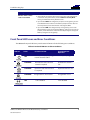
Front Panel LED Icons and Error Conditions ........................................................................................................................................ 41
Gateway Configuration Screen Definitions ..................................................................................................... 42
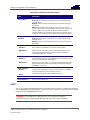
Basic Screens .................................................................................................................................................................................................... 42
Basic Setup ............................................................................................................................................................................................... 42
DHCP .......................................................................................................................................................................................................... 43
DDNS .......................................................................................................................................................................................................... 45
Backup and Restore .............................................................................................................................................................................. 46
Advanced Screens .......................................................................................................................................................................................... 47
Options ...................................................................................................................................................................................................... 47
IP Filtering................................................................................................................................................................................................. 49
MAC Filtering........................................................................................................................................................................................... 50
Port Filtering ............................................................................................................................................................................................ 50
Port Triggers ............................................................................................................................................................................................ 51
Port Forwarding ..................................................................................................................................................................................... 52
DMZ Host .................................................................................................................................................................................................. 54
Firewall Screens............................................................................................................................................................................................... 55
Protection Level ..................................................................................................................................................................................... 55
Parental Control ..................................................................................................................................................................................... 56
Local Log ................................................................................................................................................................................................... 58
Remote Log .............................................................................................................................................................................................. 59
Warranty Information ....................................................................................................................................... 61
SURFboard® SBG6580 Wireless Cable Modem Gateway • User Guide
365-095-25397-x.1
vi
Contents
Tables
Table 1: SBG6580 Package Contents ........................................................................................................................................................ 1
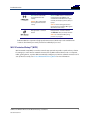
Table 2: SBG6580 Front Panel LED Icons ................................................................................................................................................. 3
Table 3: SBG6580 Rear Panel Ports & Connectors ................................................................................................................................ 5
Table 4: SBG6580 Web Manager Main Menu Options ..................................................................................................................... 21
Table 5: Troubleshooting Solutions ........................................................................................................................................................ 40
Table 6: Front Panel LED Icons and Error Conditions ....................................................................................................................... 41
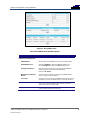
Table 7: Basic Setup Screen-Field Descriptions .................................................................................................................................. 43
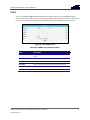
Table 8: Basic DHCP Screen-Field Descriptions .................................................................................................................................. 44
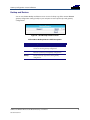
Table 9: Basic DDNS Screen-Field Descriptions .................................................................................................................................. 45
Table 10: Basic Backup & Restore-Field Descriptions ....................................................................................................................... 46
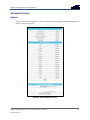
Table 11: Advanced Options-Field Descriptions ................................................................................................................................ 48
Table 12: Advanced IP Filtering-Field Descriptions .......................................................................................................................... 49
Table 13: Advanced MAC Filtering-Field Descriptions .................................................................................................................... 50
Table 14: Advanced Port Filtering-Field Descriptions ...................................................................................................................... 51
Table 15: Advanced Port Triggers-Field Descriptions ...................................................................................................................... 52
Table 16: Advanced Port Forwarding-Field Descriptions ............................................................................................................... 54
Table 17: Advanced DMZ Host-Field Descriptions ............................................................................................................................ 54
Table 18: Firewall Protection Level-Field Descriptions .................................................................................................................... 56
Table 19: Firewall Parental Control-Set Time Zone-Field Descriptions ..................................................................................... 57
Table 20: Firewall Parental Control-Field Descriptions .................................................................................................................... 57
Table 21: Firewall Local Log-Field Descriptions.................................................................................................................................. 59
Table 22: Firewall Remote Log-Field Descriptions ............................................................................................................................ 60
Figures
Figure 1 – SBG6580 Front Views ................................................................................................................................................................. 3
Figure 2 – SBG6580 Rear Views ................................................................................................................................................................... 5
Figure 3 – SBG6580 Gateway Label ........................................................................................................................................................... 6
Figure 4 – SBG6580 Connection Diagram .............................................................................................................................................. 7
Figure 5 – Wall Mount-Screw Head Dimensions .................................................................................................................................. 9
Figure 6 – SBG6580 Wall Mounting Template .................................................................................................................................... 10
Figure 7 – SBG6580 Quick Start Wizard Opening Screen ............................................................................................................... 12
Figure 8 – SBG6580 Quick Start Wizard Welcome Screen .............................................................................................................. 12
Figure 9 – Windows Taskbar Icons........................................................................................................................................................... 13
Figure 10 – Available Wireless Networks .............................................................................................................................................. 14
Figure 11 –Network Connection Window ............................................................................................................................................ 14
Figure 12 –Network Connection-Create Network Password Window ...................................................................................... 15
Figure 13 – Control Panel-Network and Sharing Center Window .............................................................................................. 15
SURFboard® SBG6580 Wireless Cable Modem Gateway • User Guide
365-095-25397-x.1
vii
Contents
Figure 14 – Manually Connect to a Wireless Network Window ................................................................................................... 16
Figure 15 – Manually Connect to a Wireless Network Window ................................................................................................... 16
Figure 16 – SBG6580 Main Screen ........................................................................................................................................................... 20
Figure 17 – SBG6580 Web Manager Main Menu Buttons............................................................................................................... 20
Figure 18 – SBG6580 Web Manager Main Menu Links .................................................................................................................... 21
Figure 19 – Help Overview Screen ........................................................................................................................................................... 22
Figure 20 – Help Links Screen.................................................................................................................................................................... 22
Figure 21 – SBG6580 Status – Product Information Screen ........................................................................................................... 23
Figure 22 – SBG6580 Status Connection Screen ................................................................................................................................ 24
Figure 23 – SBG6580 Backup and Restore Screen ............................................................................................................................. 25
Figure 24 – Restore Factory Defaults Screen ....................................................................................................................................... 26
Figure 25 – Change User Name Screen.................................................................................................................................................. 28
Figure 26 – Change User Password Screen .......................................................................................................................................... 28
Figure 27 – Firewall Protection Level Screen....................................................................................................................................... 29
Figure 28 – Parental Control-Change Time Zone Screen ............................................................................................................... 30
Figure 29 – Firewall Parental Control Screen....................................................................................................................................... 31
Figure 30 – Advanced Port Triggers Screen ......................................................................................................................................... 32
Figure 31 – Create Port Triggers Screen ................................................................................................................................................ 32
Figure 32 – Advanced DMZ Host Screen............................................................................................................................................... 33
Figure 33 – Firewall Remote Log Screen ............................................................................................................................................... 34
Figure 34 – Wireless Primary Network Screen..................................................................................................................................... 35
Figure 35 – Wireless Guest Network Screen ........................................................................................................................................ 37
Figure 36 – Wireless Primary Network Page ........................................................................................................................................ 38
Figure 37 – Wireless 802.11 Radio Screen............................................................................................................................................. 39
Figure 38 – Basic Setup Screen ................................................................................................................................................................. 42
Figure 39 – Basic DHCP Screen ................................................................................................................................................................. 44
Figure 40 – Basic DDNS Screen ................................................................................................................................................................. 45
Figure 41 – Basic Backup & Restore Screen .......................................................................................................................................... 46
Figure 42 – Advanced Options Screen ................................................................................................................................................... 47
Figure 43 – Advanced IP Filtering Screen ............................................................................................................................................. 49
Figure 44 – Advanced MAC Filtering Screen ....................................................................................................................................... 50
Figure 45 – Advanced Port Filtering Screen......................................................................................................................................... 51
Figure 46 – Advanced Create Port Triggers Screen .......................................................................................................................... 51
Figure 47 – Advanced Port Triggers Screen ......................................................................................................................................... 52
Figure 48 – Commonly Used Port Forwarding Port Numbers List .............................................................................................. 53
Figure 49 – Advanced Create Port Forwarding Screen ................................................................................................................... 53
Figure 50 – Advanced Port Forwarding Screen .................................................................................................................................. 53
Figure 51 – Advanced DMZ Host Screen............................................................................................................................................... 54
Figure 52 – Firewall Protection Level Screen....................................................................................................................................... 55
Figure 53 – Firewall Parental Control-Set Time Zone Screen ........................................................................................................ 56
Figure 54 – Firewall Parental Control Screen....................................................................................................................................... 57
SURFboard® SBG6580 Wireless Cable Modem Gateway • User Guide
365-095-25397-x.1
viii
Contents
Figure 55 – Firewall Local Log Screen .................................................................................................................................................... 58
Figure 56 – Firewall Remote Log Screen ............................................................................................................................................... 60
SURFboard® SBG6580 Wireless Cable Modem Gateway • User Guide
365-095-25397-x.1
ix
Getting Started
Getting Started
1
The ARRIS Motorola SURFboard® SBG6580 Wireless Cable Modem Gateway is an all in one wireless
DOCSIS 3.0® cable modem and four-port Ethernet router device. It provides secure ultra high-speed
wired and wireless broadband connections for your computer and other wireless network devices on
your home or small business network. The SBG6580 also includes a Wi-Fi® Pairing button option for
quick and easy connections for your wireless devices.
This guide provides instructions for installing and configuring the SBG6580, setting up secure wireless
network connections, and managing your gateway and network configurations.
Note: The information in this user guide is based on the SBG6580 Firmware version 8.6.0.0 or higher. Some of
the changes implemented in this newer firmware version may not be applicable to earlier firmware releases.
If the information and graphics in this guide do not match your SBG6580, please refer to an earlier version of
the SBG6580 User Guide (Part number: 574808-001-e).
In The Box
Note: For retail purchases only, if you purchased the SBG6580 Wireless Cable Modem Gateway from a retail
store, the items listed below should be included in the box. Otherwise, if you received your SBG6580 from your
service provider, some of the listed items may not be included with the gateway.
Before installing the SBG6580, check that the following items are also included in the box. If any items
are missing, please contact your service provider for assistance or call ARRIS Technical Support at
1-877-466-8646.
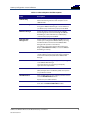
Table 1: SBG6580 Package Contents
Item
Description
SBG6580 Wireless Cable
Modem Gateway (Retail
or Service Provider)
High-speed DOCSIS 3.0 cable modem, wireless
access point, and 4-port Ethernet router
Power Supply
Power adapter and cord for an electrical wall
outlet connection
SURFboard® SBG6580 Wireless Cable Modem Gateway • User Guide
365-095-25397-x.1
1
Getting Started
Item
Description
Ethernet Cable
Standard Category 5 (CAT5) or higher network
cable
Software License &
Regulatory Card
Safety and regulatory information, software
license, and warranty for the gateway
SBG6580 Quick Start
Guide
Provides basic information for installing the
gateway and setting up a secure wireless
connection on your home network.
Additional Items You May Need
• Coaxial (coax) cable, if one is not already connected to a cable wall outlet
System Requirements
• High-speed Internet access account
• Web browser access – Internet Explorer, Google Chrome, Firefox, or Safari
• Compatible operating systems:
ο Windows® 8
ο Windows 7 Service Pack 1 (SP1)
ο Windows Vista™ SP2 or later
ο Windows XP SP3
Note: Microsoft no longer supports Windows XP. However, the SBG6580 should still function without
any problems.
ο Mac® 10.4 or higher
ο UNIX®
ο Linux®
Contact Information
For technical support and additional ARRIS product information:
• Visit the ARRIS Support website: www.arrisi.com/consumer
• Call ARRIS Technical Support: 1-877-466-8646
When you call, you may need the following information listed on the gateway label located on the
bottom of the SBG6580:
ο Gateway model name (SBG6580)
ο Gateway MAC address (HFC MAC ID)
ο Gateway serial number (S/N)
SURFboard® SBG6580 Wireless Cable Modem Gateway • User Guide
365-095-25397-x.1
2
Product Overview
Product Overview
2
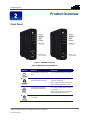
Front Panel
Figure 1 – SBG6580 Front Views
Table 2: SBG6580 Front Panel LED Icons
LED Icon
Blinking
On (Solid)
Not applicable – icon does not
flash
Green: Power is properly connected
Scanning for a downstream
(receive) channel connection
Green: Non-bonded downstream
channel is connected
Blue*: High-speed Internet connection
with bonded downstream channels
Scanning for an upstream
(send) channel connection
Green: Non-bonded upstream channel
is connected
Blue*: High-speed Internet connection
with bonded upstream channels
Scanning for an Internet
connection
SURFboard® SBG6580 Wireless Cable Modem Gateway • User Guide
365-095-25397-x.1
Green: Startup process completed
3
Product Overview
LED Icon
Blinking
On (Solid)
Green: Wi-Fi enabled with
encrypted wireless data
activity.
Green: 2.4 GHz wireless connection is
made between the SBG6580 and
another Wi-Fi enabled device on your
network; for example, printer, tablet, or
laptop.
Amber: Wi-Fi enabled with
unencrypted wireless data
activity
Not applicable – no LED on
button
Amber: Flashes during the wireless
pairing process and lights SOLID green
after five seconds or less.
Not applicable – no LED on button
The Wireless LED (see above) will flash
Amber to indicate the WPS pairing
process is in progress.
*Indicates DOCSIS 3.0 operation (high-speed Internet access) which may not be available in all
locations. Check with your service provider for availability in your area.
Wi-Fi Protected Setup™ (WPS)
Wi-Fi Protected Setup (WPS) is a wireless network setup option that provides a quick and easy solution
for setting up a secure wireless network connection for any WPS-enabled device; such as a computer,
tablet, gaming device, or printer. WPS automatically configures your wireless network connections and
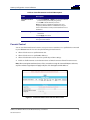
sets up wireless security. See Use the SBG6580 WPS Pairing Button for more information.
SURFboard® SBG6580 Wireless Cable Modem Gateway • User Guide
365-095-25397-x.1
4
Product Overview
Rear Panel
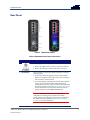
Figure 2 – SBG6580 Rear Views
Table 3: SBG6580 Rear Panel Ports & Connectors
Port Name
1
Description
Four one-gigabit Ethernet ports for RJ-45 cable connections:
• Green - LED is ON - Indicates a device connection is detected
• Green - LED is Blinking - Indicates data traffic is in progress
2
Reset button
Recessed button can be used to reboot the gateway or reset the
gateway settings.
• To reboot (or restart) the gateway, press the indented Reset
button once using the end of a paper clip or other small object
with a narrow tip, and then release.
• To reset the gateway configuration back to the factory default
settings, press and hold the indented Reset button for 15
seconds using the end of a paper clip or other small object with
a narrow tip, and then release. See Reset Your Gateway Settings
for more information on an alternative method to reset the
gateway settings using the SBG6580 Web Manager.
WARNING! Reset will also delete any custom gateway
configurations, including your user passwords and other
security settings. You should back up the gateway configuration
files before resetting the gateway. See Back Up Your Gateway
Configuration for more information.
SURFboard® SBG6580 Wireless Cable Modem Gateway • User Guide
365-095-25397-x.1
5
Product Overview
Port Name
Description
3
Coaxial cable connector
4
+12VDC Power connector
WARNING! To avoid any damage to your SBG6580 Gateway,
only use the power adapter and cord provided in the box.
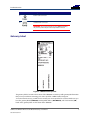
Gateway Label
Figure 3 – SBG6580 Gateway Label
The gateway label is located on the bottom of the SBG6580. It contains specific gateway ID information
that you may need when contacting your service provider or ARRIS Technical Support.
To receive Internet service, you will have to contact your service provider for assistance. Make sure you
have the gateway Model (SBG6580), Gateway MAC address (HFC MAC ID), and Serial number (S/N)
listed on the gateway label on the bottom of the SBG6580.
SURFboard® SBG6580 Wireless Cable Modem Gateway • User Guide
365-095-25397-x.1
6
Installing the Gateway
Installing the Gateway
3
This product is for indoor use only. Do not route the Ethernet cable(s) outside
of the building. Exposure of the cables to lightning could create a safety
hazard and damage the product.
Connect the SBG6580 to Your Computer
Before installing the SBG6580:
•
•
Check with your service provider to ensure broadband cable service is available in your area.
Choose a location in your home where your computer and gateway are preferably near existing
cable and electrical wall outlets.
For the best Wi-Fi coverage, a central location in your home or building is recommended.
Note: The following installation procedure covers the wired Ethernet connection process so that you can
confirm that the SBG6580 was properly installed and can connect to the Internet.
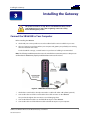
Figure 4 – SBG6580 Connection Diagram
1. Check that a coaxial cable is already connected to a cable wall outlet or RF splitter (optional).
2. Connect the other end of the coaxial cable to the Cable connector on the SBG6580.
Use your hand to tighten the connectors to avoid damaging them.
3. Connect the Ethernet cable to an available Ethernet port on the SBG6580.
4. Connect the other end of the Ethernet cable to the Ethernet port on your computer.
SURFboard® SBG6580 Wireless Cable Modem Gateway • User Guide
365-095-25397-x.1
7
Installing the Gateway
Optional: Repeat steps 3 and 4 for each additional computer or other network device that you
want to install as a wired connection on your home network.
5. Connect the power cord to the Power port on the SBG6580.
6. Plug the other end of the power cord into an electrical wall outlet.
Note: This automatically powers ON the SBG6580.
Establish an Internet Connection
Although your computer may already be configured to automatically access the Internet, you should
still perform the following gateway connectivity test to verify that the devices were connected properly.
1. Power ON the computer connected to the SBG6580 if it is turned off, and then log in.
2. Contact your service provider to activate (provision) the SBG6580. You may have to provide the
HFC MAC ID listed on the gateway label.
Note: Your service provider may allow for automatic activation which will automatically launch its own
special website when you open a web browser.
3. After the SBG6580 is activated, open a web browser (Internet Explorer, Google Chrome, Firefox, or
Safari) on your computer.
If the special website did not open, continue with step 4. If it did open, proceed to step 5.
4. Type a valid URL (www.arrisi.com) in the address bar and then click or press Enter.
The ARRIS website should open. If it did not open, please contact your service provider for
assistance.
5. Check that the Power, Receive, Send, and Online front panel LEDs on the SBG6580 light up in
sequential order. See Front Panel for additional LED status information.
ο If all four LEDs did not light up solid and you also do not have an Internet connection, you may
have to contact your service provider to reactivate the SBG6580 or check for signal issues.
ο If you still cannot connect to the Internet, your SBG6580 may be defective. Please contact ARRIS
Technical Support at 1-877-466-8646 for assistance.
Wall Mount the Gateway
Note: The SBG6580 is wall mountable. Please note that wall mounting the SBG6580 is for convenience only. It
may degrade the optimal Wi-Fi performance on the SBG6580.
If you choose to mount the SBG6580 on a wall, please read the following before starting:
•
Locate the unit as specified by the local or national codes governing residential or business cable
TV and communications services.
•
•
Follow all local standards for installing a network interface unit/network interface device (NIU/NID).
•
•
Decide if you are mounting the SBG6580 horizontally or vertically on the wall.
Unplug the power cord on the SBG6580 from the electrical wall outlet and verify that all the cables
are repositioned away from the back of the SBG6580 before mounting it on the wall.
Gather the following items:
ο
Wall-mounting template or ruler/measuring tape
ο
Applicable screwdriver: Phillips or flathead
SURFboard® SBG6580 Wireless Cable Modem Gateway • User Guide
365-095-25397-x.1
8
Installing the Gateway
ο
Two M3.5 (#6) screws with a flat underside and maximum screw head diameter of 9.0 mm to
mount the SBG6580.
Note: Contact a qualified installer to determine the appropriate screw length needed for mounting a
gateway.
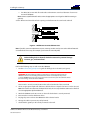
See the dimensioned view below for the spacing needed between the screw heads and wall:
Figure 5 – Wall Mount-Screw Head Dimensions
Note: If possible, mount the SBG6580 to concrete, masonry, wooden stud, or some other solid wall material.
Use anchor bolts if necessary (for example, if you mount the unit on drywall).
Before drilling holes in the wall, check the structure for potential damage
to water, gas, or electrical lines.
Perform the following steps to wall mount the SBG6580:
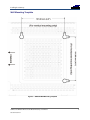
1. Use the wall mounting template as a guide for drilling holes in the wall (see Figure 6).
WARNING! The wall mounting template is intended as a sample representation of the
SBG6580 side view. The mounting hole dimensions shown on the template may not be
accurate. BEFORE drilling any holes in the wall, check to ensure that your measurements match
the hole markings on the side of the SBG6580.
There must be .10 inch (2.5 mm) between the wall and underside of the screw head.
2. Select an appropriate depth and diameter to drill the holes to a depth of at least 1½ inches (3.8 cm).
Note: The installer must determine the depth of the hole, the necessary hardware and must be careful to
select the appropriate depth and diameter.
3. Attach the SBG6580 to the two screws on the wall. Check that it is securely mounted.
4. Reconnect the coaxial and Ethernet cables.
5. Re-plug the power cord into the SBG6580 and the electrical outlet.
6. Arrange the cables to prevent any safety hazards.
7. Check that the gateway is still securely mounted on the wall.
SURFboard® SBG6580 Wireless Cable Modem Gateway • User Guide
365-095-25397-x.1
9
Installing the Gateway
Wall Mounting Template
Figure 6 – SBG6580 Wall Mounting Template
SURFboard® SBG6580 Wireless Cable Modem Gateway • User Guide
365-095-25397-x.1
10
Setting Up a Wireless Network Connection
Setting Up a Wireless Network
Connection
4
It is highly recommended that you first verify that your computer can connect to the Internet using an
Ethernet connection before configuring your wireless network.
You must already have access to an Internet service in your home before setting up a wireless network
connection. Also, make sure your computer and the SBG6580 are connected through an Ethernet
connection.
Choose one of the following options to set up your wireless network connection:
•
•
•
Launch the SBG6580 Quick Start Wizard
Set Up a Wireless Network Connection Using Your Computer
Use the SBG6580 WPS Pairing Button
After setting up your wireless network connection, check to make sure your wireless network
connection was set up properly. See Test Your Wireless Network Connection for more information.
Launch the SBG6580 Quick Start Wizard
The SBG6580 Quick Start Wizard is a six-step application to help you quickly configure the default
wireless network settings on your SBG6580. It configures your wireless network name (SSID), Wi-Fi
Security key (network password), and Wi-Fi Security code.
IMPORTANT NOTE: The quick start wizard uses default settings already configured for your SBG6580 to set
up your wireless network. You can keep the default settings for now to quickly connect your wireless network
and then customize your wireless network at a later time (highly recommended). Or, you can customize your
wireless network settings using the quick start wizard.
1. Open a web browser (Internet Explorer, Google Chrome, Firefox, or Safari) on the computer
connected to the SBG6580.
2. Type the default LAN IP address, http://192.168.0.1, in the Address bar and then press
Enter. The gateway Login screen displays.
3. Type the default username and password. Both entries are case-sensitive.
Username: admin
Password: motorola
4. Click Login to open the SBG6580 Web Manager. The Launch Quick Start Wizard screen displays (see
Figure 7).
Note: If the default user name and password are not working, your service provider may have to set up
alternate login credentials. Please contact your service provider or ARRIS Technical Support for
assistance.
5. Click Launch Quick Start Wizard to start the wizard. The Welcome screen displays (see Figure 8).
SURFboard® SBG6580 Wireless Cable Modem Gateway • User Guide
365-095-25397-x.1
11
Setting Up a Wireless Network Connection
Figure 7 – SBG6580 Quick Start Wizard Opening Screen
Note: The ARRIS logo shown here and on other screenshots throughout this user guide represents the
company logo for the manufacturer of the SURFboard SBG6580 Wireless Cable Modem Gateway.
Figure 8 – SBG6580 Quick Start Wizard Welcome Screen
6. Click Next to open the Wi-Fi Network Name & Passphrase screen.
7. Do one of the following to set up your wireless network name in the Network Name (SSID) field:
ο
Keep the default network name or SSID (listed on the SBG6580 Gateway label).
ο
Enter a name of your choice for your wireless network. Your new network name must contain
from one to 32 alphanumeric characters.
Note: You have the option to customize your wireless network name (SSID) after completing the initial
wireless network connection. However, you must use the default SSID listed on the gateway label for the
initial gateway installation. See Change Your Wireless Network Name (SSID) for more information.
SURFboard® SBG6580 Wireless Cable Modem Gateway • User Guide
365-095-25397-x.1
12
Setting Up a Wireless Network Connection
8. Do one of the following to set up your wireless network password in the Passphrase / Wi-Fi
Security Key field:
ο
Keep the default passphrase or Wi-Fi Security key (listed on the SBG6580 Gateway label).
ο
Enter a password of your choice for your wireless network password.
The passphrase or Wi-Fi Security key is the sign-on access code for your wireless network. The
access code must contain from eight to 64 characters consisting of any combination of letters,
numbers, and symbols. It should be as unique as possible to protect your wireless network and
deter hackers or unauthorized access to your wireless network.
9. Click Next to open the Security Configuration screen.
WPA2-PSK is automatically set as the default Wi-Fi Security code for your wireless network. It is the
highest wireless network security level.
10. Click Next to open the Wi-Fi Band Selection screen.
11. Do one of the following to select your wireless network frequency band in the Wi-Fi Band
Selection field:
ο
Keep the default 2.4 GHz Band (recommended).
ο
Select 5 GHz Band.
Note: The 2.4 GHz frequency range is recommended for backward compatibility purposes because older
wireless devices cannot connect to 5 GHz frequencies.
12. Click Next to open the Review Settings screen and verify your wireless network settings.
13. Click Apply to accept the wireless network settings and open the Settings Applied screen or click
Previous to go back and make changes.
14. Click Exit on the Settings Applied screen.
Note: You can click Print for a printout of your wireless network settings for later use for logging onto
your network or changing your wireless network settings.
Set Up a Wireless Network Connection Using Your Computer
Use one of the following options to create your wireless network:
• Quick Connect Using the Windows Taskbar
• Connect Using the Windows Control Panel
Note: The steps for setting up a wireless network may differ slightly depending on the Windows operating
system running on your computer. The steps used here apply to Windows 7.
Quick Connect Using the Windows Taskbar
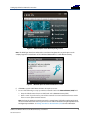
1. From the Windows taskbar, click the Wireless Link icon to open the list of available wireless
networks (see Figure 10).
If the icon is not visible, click the Show hidden icons button (see Figure 9).
Figure 9 – Windows Taskbar Icons
SURFboard® SBG6580 Wireless Cable Modem Gateway • User Guide
365-095-25397-x.1
13
Setting Up a Wireless Network Connection
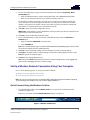
Figure 10 – Available Wireless Networks
2. Locate the Motorola wireless network name or SSID (MOTOROLA-#####) for your SBG6580 from
the list of wireless network connections.
The SSID is located on the gateway label on the bottom of your SBG6580.
Note: You have the option to customize your wireless network name or SSID after completing your initial
wireless network connection. However, you must use the default SSID listed on the gateway label for the
initial gateway installation. See Change Your Wireless Network Name (SSID) for more information.
3. Select Connect automatically to set up your wireless devices for automatic connections to your
home network upon log on and then click Connect.
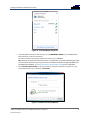
Figure 11 –Network Connection Window
SURFboard® SBG6580 Wireless Cable Modem Gateway • User Guide
365-095-25397-x.1
14
Setting Up a Wireless Network Connection
4. Enter a wireless network security code or passphrase for your wireless network password in the
Security key field.
You can use the Wi-Fi Security Key code listed on the SBG6580 gateway label or create your own
personal password.
Note: Remember to use a unique combination of letters, numbers, and characters to create a more
secure password. See Prevent Unauthorized Access for more information.
5. Select Hide characters and then click OK to encrypt your network Security key or network password.
Figure 12 –Network Connection-Create Network Password Window
Connect Using the Windows Control Panel
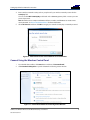
1. From the Windows taskbar, click Start button and then click Control Panel.
2. Click Network and Sharing Center to open the Network and Sharing Center window.
Figure 13 – Control Panel-Network and Sharing Center Window
SURFboard® SBG6580 Wireless Cable Modem Gateway • User Guide
365-095-25397-x.1
15
Setting Up a Wireless Network Connection
3. Click Manage wireless networks under Control Panel Home to open the Manage Wireless Networks window.
4. Click Add to open the Manually Connect to a Wireless Network window.
Figure 14 – Manually Connect to a Wireless Network Window
5. Click Manually create a network profile to open another Manually Connect to a Wireless Network window.
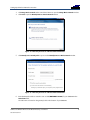
Figure 15 – Manually Connect to a Wireless Network Window
6. Enter the Motorola wireless network name or SSID (MOTOROLA-#####) for your SBG6580 in the
Network name field.
The SSID name is located on the gateway label on the bottom of your SBG6580.
SURFboard® SBG6580 Wireless Cable Modem Gateway • User Guide
365-095-25397-x.1
16
Setting Up a Wireless Network Connection
Note: You have the option to customize your wireless network name or SSID after completing your initial
wireless network connection. However, you must use the default SSID listed on the gateway label for the
initial gateway installation. See Change Your Wireless Network Name (SSID) for more information.
7. Select the wireless Security level for your wireless network from the Security type drop-down list.
Note: Select WPA2-Personal which is the highest security level. This is also the default security level for
the SBG6580.
8. Select the password encryption type from the Encryption type drop-down list. This is used for securing
your wireless network.
ο TKIP – Temporal Key Integrity Protocol
ο AES – Advanced Encryption Standard (recommended)
This is the default encryption type for the SBG6580.
9. Enter a Security code or passphrase for your wireless network password in the Security Key field.
You can use the WI-FI SECURITY KEY listed on the SBG6580 gateway label or create your own
personal password.
Note: Remember to use a unique combination of letters, numbers, and characters to create a more
secure password. See Prevent Unauthorized Access for more information.
10. Select Hide characters to prevent your Security Key or password from displaying in the field.
11. Select Start this connection automatically so that your wireless devices will automatically connect to the
wireless network upon login.
12. Click Next to complete the wireless network setup.
The Successfully added <Network name> message for your new wireless network should appear.
13. Click Close to exit.
Use the SBG6580 WPS Pairing Button
Use the WPS Pairing Button option to connect your WPS-enabled devices. The WPS Pairing button
automatically assigns a random wireless network name (SSID) and Wi-Fi Security Key to the SBG6580
and other WPS-enabled devices to connect to your wireless home network.
Note: To use the WPS Pairing button option, your computer hardware must support WPS and also have WPA
security compatibility.
1. Power ON your gateway and other WPS-enabled devices that you want to connect to your wireless
network.
2. Press and hold the WPS button located on the bottom of the SBG6580 front panel for five to 10
seconds and then release (see Figure 1 for the SBG6580 front view).
3. If applicable, press the WPS button on your WPS-enabled computer or other WPS device.
4. Repeat step 3 for each additional WPS-enabled device that you want to connect to your wireless
network.
SURFboard® SBG6580 Wireless Cable Modem Gateway • User Guide
365-095-25397-x.1
17
Setting Up a Wireless Network Connection
Test Your Wireless Network Connection
Perform the following connectivity test to check that the SBG6580 and other wireless devices are
connected to your wireless home network:
1. If the devices are connected, disconnect the Ethernet cable from your computer and the SBG6580.
2. Open a web browser on your computer.
3. Type a valid URL (www.arrisi.com) in the address bar, and then click or press Enter.
If the website did not open, please contact your service provider or call ARRIS Technical Support at
1-877-466-8646 for assistance.
SURFboard® SBG6580 Wireless Cable Modem Gateway • User Guide
365-095-25397-x.1
18
Managing Your Gateway and Connected Networks
Managing Your Gateway and
Connected Networks
5
Use the SBG6580 Web Manager to view and monitor the configuration settings and operational status
of your gateway. You can also configure your network connections and wireless security settings. See
Protecting & Monitoring Your Wireless Network for more information.
Note: If you did not purchase your gateway from a retail store, you may notice a few blocked configuration
settings in the SBG6580 Web Manager that cannot be modified. This may be due to some restrictions set up
by your service provider to prevent unauthorized changes to certain configuration parameters.
Start the Gateway Web Manager
Note: You must use the default user name and password (listed below) to log in to the SBG6580 Web
Manager for the first time. For network security purposes, we highly recommend that you should change the
gateway default user name and password after logging onto the SBG6580 for the first time. See Change the
Default User Name and Password for more information.
1. Open any web browser on the computer connected to the SBG6580.
2. In the Address bar, type 192.168.0.1 for the Gateway Web Manager IP address, and then press
Enter. The gateway Login screen displays.
3. Type the default user name and password. Both entries are case-sensitive.
ο Username: admin
ο Password: motorola
4. Click Login to open the SBG6580 Web Manager. The SBG6580 Main Screen displays (see Figure 16).
Note: If the default user name and password are not working, your service provider may have to set up
alternate login credentials. Please contact your service provider or ARRIS Technical Support for
assistance.
SURFboard® SBG6580 Wireless Cable Modem Gateway • User Guide
365-095-25397-x.1
19
Managing Your Gateway and Connected Networks
Figure 16 – SBG6580 Main Screen
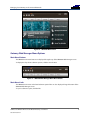
Gateway Web Manager Menu Options
Main Menu Buttons
The SBG6580 main menu buttons are displayed along the top of the SBG6580 Web Manager screen.
To display the drop-down submenu options, click the menu button.
Figure 17 – SBG6580 Web Manager Main Menu Buttons
Main Menu Links
The SBG6580 main menu and related submenu option links are also displayed along the bottom of the
SBG6580 Web Manager screen.
To open a submenu option, click the link.
SURFboard® SBG6580 Wireless Cable Modem Gateway • User Guide
365-095-25397-x.1
20
Managing Your Gateway and Connected Networks
Figure 18 – SBG6580 Web Manager Main Menu Links
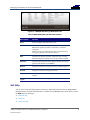
Table 4: SBG6580 Web Manager Main Menu Options
Menu Option
Function
Home
Displays the Quick Start Wizard main screen
Status
Provides information about the gateway hardware and software,
MAC address, gateway IP address, serial number, and related
information.
Additional screens provide diagnostic tools and also allow you to
change your gateway user name and password.
Basic
Configures the gateway IP-related configuration data, including
Network Configuration, WAN Connection Type, DHCP, and DDNS
Advanced
Controls Internet protocols which configure and monitor how the
gateway routes IP traffic on the SBG6580
Wireless
Configures and monitors the gateway wireless networking features
Firewall
Configures and monitors the gateway firewall
Help
Provides general information to help you set up your home
network
Logout
Closes the SBG6580 Web Manager
Get Help
You can choose any of the following three options to obtain help information for any SBG6580 Web
Manager function. General help information is available for any SBG6580 menu option when you click
the Help button on that page.
•
•
•
Overview Help
Help Links
Field Level Help
SURFboard® SBG6580 Wireless Cable Modem Gateway • User Guide
365-095-25397-x.1
21
Managing Your Gateway and Connected Networks
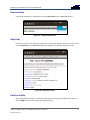
Overview Help
General help information is available when you click Help, Overview on the SBG6580 Main Menu.
Figure 19 – Help Overview Screen
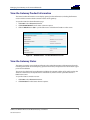
Help Links
Provides a concise list of your gateway configuration settings with applicable links for easy access when
you click Help, About on the SBG6580 Main Menu. The link opens the related configuration screen.
Figure 20 – Help Links Screen
Field Level Help
More specific help information is available throughout the web manager for field level help when you
click the Help link located to the right of the applicable field.
SURFboard® SBG6580 Wireless Cable Modem Gateway • User Guide
365-095-25397-x.1
22
Managing Your Gateway and Connected Networks
View the Gateway Product Information
The Status Product Information screen displays general product information, including the firmware
version and the current network connection status of the gateway.
To open the Status Product Information page:
1. Click Status on the SBG6580 Main Menu.
2. Click Product Information from the Status submenu options.
3. Click the Refresh button (F5) in your web browser to reload the information on the screen.
Figure 21 – SBG6580 Status – Product Information Screen
View the Gateway Status
The Status Connection screen displays information about the RF upstream and downstream channels,
including downstream channel frequency, upstream channel ID, and upstream and downstream signal
power and modulation.
This screen also displays IP lease information including the current IP address of the cable modem, the
duration of both leases, the expiration time of both leases, and the current system time from the
DOCSIS time server.
To open the Status Connection screen:
1. Click Status on the SBG6580 Main Menu.
2. Click Connection from the Status submenu options.
SURFboard® SBG6580 Wireless Cable Modem Gateway • User Guide
365-095-25397-x.1
23
Managing Your Gateway and Connected Networks
Figure 22 – SBG6580 Status Connection Screen
Back Up Your Gateway Configuration
You can save a backup copy of the current gateway settings to your local computer. You can use the
backup file to restore your custom gateway settings in the event that you made changes that you no
longer want.
We highly recommend that you perform the gateway configuration backup
using the SBG6580 default login username and password.
To create a back up copy of your gateway settings:
1. Click Basic on the SBG6580 Main Menu.
2. Click Backup and Restore from the Basic submenu options.
SURFboard® SBG6580 Wireless Cable Modem Gateway • User Guide
365-095-25397-x.1
24
Managing Your Gateway and Connected Networks
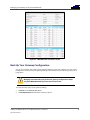
Figure 23 – SBG6580 Backup and Restore Screen
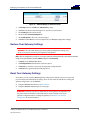
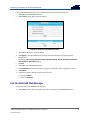
3. Click Backup and then click OK at the Select ‘Save’ prompt.
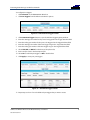
4. Click Save in the File Download dialog box to open the Save As window.
5. Select Desktop from the pull-down list.
6. Select the default GatewaySettings.bin file.
7. Select bin Document for the Save as document type.
8. Click Save and then Close to create a backup file of your SBG6580 configuration settings.
Restore Your Gateway Settings
WARNING! This action will delete your current gateway configuration settings and
allow you to restore a previously saved gateway configuration.
Note: After the configuration settings are restored, the gateway will automatically reboot and you will have
to log on using the default username (admin) and password (motorola).
1. Click Basic on the SBG6580 Main Menu.
2. Click Backup and Restore from the Basic submenu options.
3. Click Browse to search for a previously saved gateway configuration file.
4. Click Restore. The gateway will automatically reboot.
Reset Your Gateway Settings
At any time, you can reset the SBG6580 gateway configuration settings and your user name and
password back to the default factory settings. There are two methods available for resetting the
gateway configurations on the SBG6580:
•
•
Using the SBG6580 Reset button, see Reset button
Using the SBG6580 Web Manager (see next page)
WARNING! The factory reset process will delete all custom gateway configurations you
may have already created. We recommend that you create a backup copy of your
gateway configuration before resetting the gateway. See Back Up Your Gateway
Configuration for more information.
SURFboard® SBG6580 Wireless Cable Modem Gateway • User Guide
365-095-25397-x.1
25
Managing Your Gateway and Connected Networks
From the SBG6580 Web Manager, do the following to open the Status Security screen:
1. Click Status on the SBG6580 Main Menu.
2. Click Security from the Status submenu options.
Figure 24 – Restore Factory Defaults Screen
3. Select Yes under Restore Factory Defaults.
4. Click Apply to reset the default username and password, and restore the original gateway
configuration.
The message, This action will restore factory default settings. Please reboot the modem for
new settings to take effect, displays.
5. Click OK.
6. Click Status on the SBG6580 Main Menu.
7. Click Configuration from the Status submenu options to display the Status Configuration screen.
8. Click Reboot.
9. Log back in using the default username and password.
ο Username: admin
ο Password: motorola
Exit the SBG6580 Web Manager
To log out and close the SBG6580 Web Manager:
•
Click Logout located in the upper right corner of the screen above the SBG6580 Main Menu.
SURFboard® SBG6580 Wireless Cable Modem Gateway • User Guide
365-095-25397-x.1
26
Protecting & Monitoring Your Wireless Network
Protecting & Monitoring Your
Wireless Network
6
After you have successfully connected the SBG6580 gateway and your wireless devices, you should
configure the gateway to protect your wireless network from unwanted and unauthorized access by
any wireless devices within range of your wireless network. Although security for the SBG6580 gateway
is already configured, you can use the SBG6580 Configuration Manager to tailor the level of security and
access that you want to allow on your network.
Prevent Unauthorized Access
To prevent unauthorized access and configuration to your wireless network,
we highly recommend that you immediately change the default user name
and password after connecting to the Internet and logging on to the SBG6580
for the first time.
One of the most important recommendations for securing your wireless home network is to change the
default administrator password on your SBG6580 and other wireless devices as well. Default passwords
are commonly used and shared on the Internet.
To ensure that your wireless home network is secure, it is recommended that you follow these best
practices for user passwords:
•
•
•
•
Always create a secure password or passphrase that is not easily guessed.
Use phrases instead of names so that it may be easier for you to remember.
Use a combination of upper and lowercase letters, numbers, and symbols.
Continue to change your administrator password on a regular basis.
Note: If your service provider supplied the SBG6580, you may not have the necessary user privileges to
change the log in user name.
Change the Default User Name and Password
To change the default user name for logging onto the Gateway Web Manager:
1. Log in to the SBG6580 from any web browser on the computer connected to the SBG6580.
2. Type the Gateway Web Manager IP address, http://192.168.0.1, in the Address bar and
then press Enter. The gateway Login screen displays.
3. Type the default username and password as they appear below:
ο Username: admin
ο Password: motorola
4. Click Login to open the SBG6580 Web Manager. The SBG6580 Status Connection screen displays.
SURFboard® SBG6580 Wireless Cable Modem Gateway • User Guide
365-095-25397-x.1
27
Protecting & Monitoring Your Wireless Network
5. Click the Status menu button and then click Security to display the Status Security screen.
6. Confirm that Change Username is displayed in the drop-down selection box.
7. Complete each field entry, but note the following:
ο All fields (for example, Current Username & Current Password) are case-sensitive.
Note: For first time logons, the current username is admin and the current password is motorola.
ο Make sure No is selected under Restore Factory Defaults.
Figure 25 – Change User Name Screen
8. Click Apply to update your user name.
9. Click Change Username drop-down arrow to display Change Password.
10. Complete each field entry, but note the following:
ο Username is the Current Username.
ο All fields are case-sensitive.
ο Make sure No is selected for Restore Factory Defaults.
ο Find a secure place to write down and keep your new user name and password.
11. Click Apply to update your password.
Figure 26 – Change User Password Screen
SURFboard® SBG6580 Wireless Cable Modem Gateway • User Guide
365-095-25397-x.1
28
Protecting & Monitoring Your Wireless Network
Set Up Firewall Protection
You can set up firewall filters and firewall alert notifications on your wireless home network. You can
also block Java Applets, Cookies, ActiveX controls, popup windows, Proxies, and website access. See
Protection Level for more information.
To set the firewall protection level:
1. From any screen, click the Firewall-Protection Level menu link or click the Firewall menu button
on the SBG6580 Main Menu and then select Protection Level.
Figure 27 – Firewall Protection Level Screen
2. Click the Firewall Protection Setting drop-down button to select the firewall protection level.
Possible values:
ο Off
ο Low
ο Medium
ο High (recommended)
Note: Selecting Off will disable firewall protection on your home network. Your computer(s) and other
Ethernet-enabled devices on your network will be at risk for possible attacks from viruses and hackers.
3. Select each Web filter that you want to set for the firewall and then click Apply.
SURFboard® SBG6580 Wireless Cable Modem Gateway • User Guide
365-095-25397-x.1
29
Protecting & Monitoring Your Wireless Network
Set Up Parental Controls
You can set up the following Parental Controls on your home network:
• Allow or block access to specific Internet sites.
• Allow or block access to specific MAC addresses.
• Set time limitations for computer usage or Internet access
Note: Any Parental Control filters that do not include assigned ports, will apply to all ports. This also applies
to MAC addresses as well.
You can also link each user on your network to specified rules for login, time-access, and content
filtering. See Parental Control for more information.
To set Parental Controls:
1. From any screen, click the Firewall-Parental Control menu link or click the Firewall menu button
on the SBG6580 Main Menu and then select Parental Control.
Figure 28 – Parental Control-Change Time Zone Screen
2. Click Current Time Zone drop-down button to select your time zone.
3. Select Yes or No to automatically adjust the time for Daylight Saving Time.
4. Click Create to continue setting up Parental Controls.
SURFboard® SBG6580 Wireless Cable Modem Gateway • User Guide
365-095-25397-x.1
30
Protecting & Monitoring Your Wireless Network
Figure 29 – Firewall Parental Control Screen
5. Enter a name for the user profile that you want to create in the Description field.
6. Enter the 12-digit (hexadecimal) MAC address of the device for which you are creating Parental
Controls in the MAC Address field.
7. Enter the web address of the Internet site that you want to block or access.
8. Enter the Starting port number of the in the Start Port field.
9. Enter the Ending port number of the in the End Port field.
10. Select the days of the week that you want to allow the selected user to access the Internet.
11. Select the time range that you want to allow the selected user to access the Internet.
12. Select to Allow or Block Internet access for the time and days you set previously.
13. Select On or Off in the Enabled field to enable or disable this Parental Control restriction.
14. Click Apply, when done.
Set Up Port Triggers
You can use Port Triggers to configure dynamic triggers to specific devices on the LAN. This allows
special applications that require specific port numbers with bi-directional traffic to function properly.
Applications such as video conferencing, voice, gaming, and some messaging program features may
require these special settings.
Note: If you enable the firewall and set up custom port triggers, then you must configure the firewall to allow
traffic through those custom ports.
SURFboard® SBG6580 Wireless Cable Modem Gateway • User Guide
365-095-25397-x.1
31
Protecting & Monitoring Your Wireless Network
To configure Port Triggers:
1. Click Advanced on the SBG6580 Main Menu bar.
2. Click Port Triggers from the Advanced submenu options.
Figure 30 – Advanced Port Triggers Screen
3. Click Create Port Triggers button to open the Add Port Triggering Entry window.
4. Enter the starting port number for the port to be triggered in the Trigger Start Port field.
5. Enter the ending port number for the port to be triggered in the Trigger End Port field.
6. Enter the starting port number of the Port Trigger range in the Target Start Port field.
7. Enter the ending port number of the Port Trigger range in the Target End Port field.
8. Select TCP, UDP, or BOTH from the Protocol drop-down list.
9. Enter a unique name in the Description field.
10. Select On to enable IP port triggers or Off to disable them.
11. Click Apply to create your port triggers.
Figure 31 – Create Port Triggers Screen
12. Repeat steps 3 thru 11 for each additional port trigger that you want to create.
SURFboard® SBG6580 Wireless Cable Modem Gateway • User Guide
365-095-25397-x.1
32
Protecting & Monitoring Your Wireless Network
Set Up the DMZ Host
WARNING! The gaming DMZ host is not protected by the SBG6580 gateway firewall. It is
exposed to the Internet and thus vulnerable to attacks or hacking from any computer on
the Internet. Consider carefully before configuring a device to be in the DMZ.
You can configure one computer on your home network to be the DMZ Host. That computer will
operate outside of the SBG6580 firewall and allow remote access from the Internet to your computer,
gaming device, or other IP-enabled device. The DMZ Host feature will only allow outside users to have
direct access to the designated DMZ Host device and not your home network. See DMZ Host for more
information.
To create the DMZ Host:
1. Click Advanced on the SBG6580 Main Menu bar.
2. Click DMZ Host from the Advanced submenu options.
Figure 32 – Advanced DMZ Host Screen
3. Enter the last one to three digits (from 2 to 254) of the IP address of the computer or gaming device
that you are setting up as the DMZ host.
4. Click Apply.
Note: Remember to reset the IP address back to 0 (zero) to close all the ports when you are finished with the
needed application. If you do not reset the IP address, that computer will be exposed to the public Internet.
Store Remote Firewall Logs
You can store firewall attack reports or logs on a computer in your home, so that multiple instances can
be logged over a period of time. You can select individual attack or configuration items to send to the
SysLog server, so that only the items of interest will be monitored.
Note: The SysLog server must be on the same network as the Private LAN behind the Configuration Manager
(typically 192.168.0.x).
To store remote Firewall logs:
1. Click the Firewall-Remote Log menu link or click the Firewall menu button on the SBG6580 Main
Menu and then select Remote Log.
SURFboard® SBG6580 Wireless Cable Modem Gateway • User Guide
365-095-25397-x.1
33
Protecting & Monitoring Your Wireless Network
Figure 33 – Firewall Remote Log Screen
2. Select all desired event types that you want to monitor. This will activate the SysLog monitoring
feature.
3. Enter the last digits from 10 to 254 of the SysLog server’s IP address.
Note: Normally, the IP address of this SysLog server is hard-coded so that the address always agrees with
the entry on this page.
4. Click Apply.
SURFboard® SBG6580 Wireless Cable Modem Gateway • User Guide
365-095-25397-x.1
34
Creating Wi-Fi Networks
7
Creating Wi-Fi Networks
The SBG6580 supports a secure method for setting up multiple wireless access points on your wireless
home network. This enables you to designate a guest network for visitors, friends, or other family
members without giving them access to your files or other devices on your primary network. You have
the option to create a PIN or pushbutton method for logging onto your wireless network.
Set Up Your Wireless Primary Network
1. Open a web browser and log onto the SBG6580 to open the SBG6580 Web Manager. See Start the
Gateway Web Manager for more information.
2. Click Wireless on the SBG6580 Main Menu bar.
3. Click Primary Network Settings from the Wireless submenu options.
Figure 34 – Wireless Primary Network Screen
4. Select Enabled or Disabled in the Wireless Network field to turn ON or OFF wireless networking on
your home network.
5. Keep the default ARRIS or Motorola network name (also listed on the gateway label) or enter a
name of your choice for your wireless primary network in the Network Name (SSID) field.
6. Select Enabled or Disabled in the Network Name (SSID) Broadcast field to turn ON or OFF access to
the selected wireless network.
SURFboard® SBG6580 Wireless Cable Modem Gateway • User Guide
365-095-25397-x.1
35
Creating Wi-Fi Networks
7. Select one of the following wireless network security options for your wireless network from the
Wireless Security drop-down list:
ο
WPA: Wi-Fi Protected Access
ο
WPA-PSK: Wi-Fi Protected Access with Pre-Shared Key, standard encryption
ο
WPA2: Wi-Fi Protected Access version 2 with Pre-Shared Key, standard encryption with the AES
encryption type
ο
WPA2-PSK: Wi-Fi Protected Access version 2 with Pre-Shared Key (recommended)
8. Choose the wireless network encryption type in the Encryption field:
ο
AES – Advanced Encryption Standard: Provides the strongest encryption (recommended)
ο
AES+TKIP – Advanced Encryption Standard and Temporal Key Integrity Protocol: Allows both
AES and TKIP-capable clients to connect to your wireless network
9. Enter any combination of characters and words in the Passphrase field.
10. Select Enabled or Disabled in the WPS field to turn ON or OFF the Wi-Fi Protected Security (WPS)
network security on your home network.
11. Select one of the following methods to add or pair WPS-enabled devices:
ο
Push Button – Press the WPS button on the SBG6580 to start the pairing process with the
WPS-enabled wireless devices you want to connect to your wireless network
ο
Gateway PIN – Click Generate PIN to automatically create a new numeric password for
logging onto your wireless network
ο
Client PIN – Enter a numeric password for connecting to your wireless network and then click
Add
12. Click Apply when done.
Set Up a Wireless Guest Network
Note: This feature may be disabled on your SBG6580. Some service providers or cable operators do not allow
for secondary (or guest) wireless networks on their gateway devices.
1. Open a web browser and log onto the SBG6580 to open the SBG6580 Web Manager. See Start the
Gateway Web Manager for more information.
2. Click Wireless on the SBG6580 Main Menu bar.
3. Click Guest Network on the Wireless submenu options (see Figure 35).
4. Select the guest network from the Selected Guest Network drop-down list.
5. Select Enabled or Disabled in the Guest Network field to turn ON or OFF access to the selected
wireless guest network.
6. Keep the default ARRIS or Motorola network name (also listed on the gateway label) or enter a
name of your choice for your wireless guest network in the Guest Network Name (SSID) field.
See Change Your Wireless Network Name (SSID) for more information.
7. Select Guest from the IP Network drop-down list.
8. Enter the gateway’s IP Address for the Guest Network in the IP Address field.
9. Enter the subnet mask for the guest network in the Subnet Mask field.
10. Enter the starting IP address for the guest network lease pool in the Lease Pool Starting IP Address
field.
SURFboard® SBG6580 Wireless Cable Modem Gateway • User Guide
365-095-25397-x.1
36
Creating Wi-Fi Networks
Figure 35 – Wireless Guest Network Screen
11. Enter the ending IP address for the guest network lease pool in the Lease Pool Ending IP Address
field.
12. Enter the lease time for the guest network lease pool in the Lease Time field.
13. Select Enabled or Disabled in the UPnP (Universal Plug and Play) Enable field to allow or disallow
any network devices, such as smartphones, tablets, or laptops to automatically connect to your
wireless home network.
14. Select Enabled or Disabled in the Firewall Enable field to turn ON or OFF the gateway firewall.
15. Select Enabled or Disabled in the DHCPv6 Server field to allow the DHCP server to send leases to
the guest network clients from the guest network lease pool you specified earlier.
Note: If the DHCP server is disabled, you must assign static IP addresses to the guest network STAs.
16. Select Encrypted or Unencrypted in the Wireless Security field to turn ON or OFF encryption.
17. Click Apply, when done.
Change Your Wireless Network Name (SSID)
The SSID (Service Set Identification) is the wireless network name assigned to your SBG6580 wireless
primary and guest networks. The default SSID which is listed on the gateway label is automatically
populated in the network configuration screens. A list of SSIDs of available wireless networks in close
proximity of your home (for example, neighbors or local businesses) will display when you or someone
else in your home attempt to establish a wireless network connection. For security purposes and quick
recognition of your wireless network, it is recommended that you change the default SSID. You should
also consider changing the default wireless password or passphrase (see Prevent Unauthorized Access
for more information).
Note: When you change the SSID, any wireless devices that are already connected to your wireless network
will be disconnected from the network. The wireless devices will have to be reconnected to the wireless
network using the new SSID.
SURFboard® SBG6580 Wireless Cable Modem Gateway • User Guide
365-095-25397-x.1
37
Creating Wi-Fi Networks
Do the following to change your wireless network name or SSID:
1. Open a web browser and log onto the SBG6580 to open the SBG6580 Web Manager. See Start the
Gateway Web Manager for more information.
2. Click Wireless on the SBG6580 Main Menu bar.
3. Click Primary Network Settings from the Wireless submenu options to open the Wi-Fi Network
screen (see Figure 36).
Figure 36 – Wireless Primary Network Page
4. Make sure Enabled is selected in the Wireless Network field to turn ON wireless networking on your
home network.
5. Delete the current network name in the Network Name (SSID) field and then enter a new name of
your choice for your wireless network.
The network name can contain any combination of up to 32 alphanumeric characters.
6. Make sure Enabled is selected in the Network Name (SSID) Broadcast field.
7. Delete the current wireless password (passphrase) in the Passphrase field and enter a new
passphrase for the wireless network password.
See Prevent Unauthorized Access for more information.
8. Click Apply at the bottom of the screen.
The new wireless network name should appear in the list of available wireless networks when you
reconnect your wireless devices.
SURFboard® SBG6580 Wireless Cable Modem Gateway • User Guide
365-095-25397-x.1
38
Creating Wi-Fi Networks
Change the Wireless Channel
Network interference may occur at any time when using a wireless network connection. This may be
caused by other wireless access points that are using the same wireless channel as your SBG6580 and
are also operating within close proximity in your home. When experiencing wireless network
interference, changing the wireless channel on the SBG6580 can improve network connectivity (or
signal strength) and avoid network interference. By default, the SBG6580 is set on Channel 1.
Do the following to change the wireless channel on the SBG6580:
1. Open a web browser and log onto the SBG6580 to open the SBG6580 Web Manager. See Start the
Gateway Web Manager for more information.
2. Click Wireless on the SBG6580 Main Menu bar.
3. Click 802.11 Radio from the Wireless submenu options to open the Wireless 802.11 Radio screen
(see Figure 37).
Figure 37 – Wireless 802.11 Radio Screen
4. Select a channel number from the Channel drop-down list that is different from the channel
number listed as the Current Channel.
Note: It is recommended to use Channel 6 or 11, if it is not listed as the Current Channel.
In the Wi-Fi spectrum, there are multiple channels that overlap and thus degrade wireless network
performance. Channels 1, 6, and 11 are used for better network performance and stability because they
do not overlap.
5. Click Apply.
SURFboard® SBG6580 Wireless Cable Modem Gateway • User Guide
365-095-25397-x.1
39
Troubleshooting Tips
Troubleshooting Tips
A
If the solutions listed in this section do not solve your problem, contact your service provider for
assistance.
Your service provider may ask for the status of the gateway LEDs as described in Front Panel LED Icons
and Error Conditions.
You may have to reset the SBG6580 gateway configuration to its original factory settings if the gateway
is not functioning properly.
Solutions
Table 5: Troubleshooting Solutions
Gateway Problem
Possible Solution
POWER LED Icon
is OFF
• Check the power connection on the gateway and to the electrical
outlet.
• Check that the electrical outlet is working (is the outlet controlled
by a light switch?).
If so, disconnect the gateway power cord and connect to another
electrical outlet that is not controlled by a light switch.
Cannot Send or
Receive Data
• Check each end of the coaxial cable connection on the gateway and
cable outlet. Hand tighten each connector, if necessary.
• Check the Ethernet cable to make sure it is properly connected to
the gateway and computer.
• On the front panel, check the status of the LED icons and refer to
Front Panel LED Icons and Error Conditions to identify the problem.
• If you have cable television service, check your television to ensure
your cable service is operating properly.
• If none of the above resolves the problem, contact your service
provider for further assistance or call ARRIS Technical Support for
assistance at 1-877-466-8646.
Cannot Access the
Internet
• Check that all cable and power connections are properly connected.
• Check that the Power, Online, and Wireless LED icons on the front
panel are lit up solid.
• Contact your service provider for assistance.
SURFboard® SBG6580 Wireless Cable Modem Gateway • User Guide
365-095-25397-x.1
40
Troubleshooting Tips
Gateway Problem
Possible Solution
Wireless devices cannot
send or receive data
• If the problem still persists after checking the coaxial cable and Ethernet
connections and your IP address, check the Wireless Security Mode
setting on the Wireless Primary Network screen.
• If you enabled WPA and configured a passphrase on the gateway, be sure
each affected wireless client has the identical passphrase. If this does not
solve the problem, check if the wireless client supports WPA.
• If you enabled WEP and configured a key on the gateway, be sure each
affected wireless client has the identical WEP key. If this does not solve the
problem, check whether the client’s wireless adapter supports the type of
WEP key configured on the gateway.
Front Panel LED Icons and Error Conditions
The SBG6580 front panel LED icons provide status information for the following error conditions:
Table 6: Front Panel LED Icons and Error Conditions
LED Icon
Status
If, During Startup:
If, During Normal
Operation
OFF
Gateway is not properly plugged
into the electrical outlet
Gateway is unplugged
FLASHING
Downstream receive channel
cannot be acquired
Downstream channel is
lost
FLASHING
Upstream send channel cannot
be acquired
Upstream channel is lost
FLASHING
OFF
IP registration is unsuccessful
Led is disabled
SURFboard® SBG6580 Wireless Cable Modem Gateway • User Guide
365-095-25397-x.1
IP registration is lost
Led is disabled
41
Gateway Configuration Screen Definitions
Gateway Configuration
Screen Definitions
B
This section provides detailed field definitions for the following ARRIS SBG6580 network configuration
screens:
•
•
•
Basic
Advanced
Firewall
Basic Screens
Basic Setup
You can use the SBG6580 Basic Setup screen to configure basic SBG6580 IP-related configuration data,
including your local network configuration, and WAN connection type.
Figure 38 – Basic Setup Screen
SURFboard® SBG6580 Wireless Cable Modem Gateway • User Guide
365-095-25397-x.1
42
Gateway Configuration Screen Definitions
Table 7: Basic Setup Screen-Field Descriptions
Field
Description
Gateway Mode
Sets the device mode:
Routed: Allows the internal network devices to use IP addresses from
the WAN subnet.
Bridged: Disables the network address and port translation settings on
the gateway.
NAPT: Network Address Port Translation – this is the most common
form of network address translation (NAT) between public and private IP
addresses. NAPT maps one public IP address to multiple private IP
addresses. If NAPT is set on the Basic Setup screen, one public IP address
is mapped to an individual private IP address for up to 245 LAN clients.
Primary Network
Only Mode
Sets the device mode for the primary network only:
Routed: Allows the internal network devices to use IP addresses from
the WAN subnet.
Bridged: Disables the network address and port translation settings on
the gateway.
LAN
IP Address
MAC Address
WAN
IP Address
MAC Address
WAN (continued)
Duration
Expires
The IP address of the SBG6580 on your home network (LAN).
Media Access Control address is set of 12 hexadecimal digits that are
assigned during manufacturing to uniquely identify the hardware
address of the SBG6580 access point.
The public WAN IP address of your SBG6580, which is either dynamically
or statically assigned by the cable operator
Media Access Control address — a set of 12 hexadecimal digits assigned
during manufacturing that uniquely identifies the hardware address of
the SBG6580 access point.
Describes how long before your Internet connection expires, The WAN
lease will automatically renew itself when it expires.
Displays the exact time and date the WAN lease expires
Release WAN Lease
Click to release the WAN lease
Renew WAN Lease
Click to renew the WAN lease
DHCP
You can use the Basic DHCP (Dynamic Host Configuration Protocol) screen to configure the IP settings
of your SBG6580 gateway and the DHCP server on your home network. You can also view the status of
the optional internal SBG6580 DHCP server.
WARNING! Do not modify these setting unless you are an experienced network
administrator with a strong understanding of IP addressing, sub-netting, and DHCP.
SURFboard® SBG6580 Wireless Cable Modem Gateway • User Guide
365-095-25397-x.1
43
Gateway Configuration Screen Definitions
Figure 39 – Basic DHCP Screen
Table 8: Basic DHCP Screen-Field Descriptions
Field
Description
LAN Network Configuration
LAN IP Address
The IP address of the SBG6580 on your home network (LAN).
Enable DHCP Server
Checkmark Enabled to enable the SBG6580 DHCP Server.
Uncheck Enabled to disable the SBG6580 DHCP Server.
Starting Local Address
Enter the starting IP address to be assigned by the SBG6580
DHCP server to clients in dotted-decimal format.
Default is 192.168.0.2.
Max Number of Network
Devices
Sets the maximum number of clients for the SBG6580 DHCP
server to assign a private IP address.
Lease Time
Sets the time in seconds that the SBG6580 DHCP server leases an
IP address to a client. The default is 3600 seconds (60 minutes).
Reserve IP Address
Lists clients in which the DHCP server reserves a specific IP
address on the home network (LAN)
Client List
Lists the DHCP client device information.
SURFboard® SBG6580 Wireless Cable Modem Gateway • User Guide
365-095-25397-x.1
44
Gateway Configuration Screen Definitions
DDNS
You can use the Basic DDNS (Dynamic Domain Name System) screen to set up the DDNS service to
assign a static Internet domain name to a dynamic IP address. This allows various servers on the Internet
to access your computer for processing your requests when you are visiting various Internet sites.
Figure 40 – Basic DDNS Screen
Table 9: Basic DDNS Screen-Field Descriptions
Field
Description
DDNS Service
Select Disabled or select wwwDynDNS.org to enable the DDNS
service
Username
Enter your user name for the Dynamic Domain Name system
Password
Enter your password for the Dynamic Domain Name system
Host Name
Enter the host name for the Dynamic Domain Name system
IP Address
Displays the IP address
Status
Shows if the DDNS service is Enabled or Disabled
SURFboard® SBG6580 Wireless Cable Modem Gateway • User Guide
365-095-25397-x.1
45
Gateway Configuration Screen Definitions
Backup and Restore
You can use the Basic Backup and Restore screen to save a backup copy of the current SBG6580
gateway configuration settings locally on your computer or restore previously saved gateway
configurations.
Figure 41 – Basic Backup & Restore Screen
Table 10: Basic Backup & Restore-Field Descriptions
Field
Description
Browse
Allows you to search for a file on your computer to
retrieve or save the gateway configuration.
Restore
Restores a previously saved gateway configuration.
Backup
Creates a back up copy of the current gateway
configuration.
SURFboard® SBG6580 Wireless Cable Modem Gateway • User Guide
365-095-25397-x.1
46
Gateway Configuration Screen Definitions
Advanced Screens
Options
You can use the Advanced Options to set the operating modes for adjusting how the SBG6580 routes IP
traffic on your home network.
Figure 42 – Advanced Options Screen
SURFboard® SBG6580 Wireless Cable Modem Gateway • User Guide
365-095-25397-x.1
47
Gateway Configuration Screen Definitions
Table 11: Advanced Options-Field Descriptions
Field
Description
WAN Blocking
Prevents the SBG6580 Web Manager or the computers
behind it from being visible to other computers on the
SBG6580 WAN.
IPsec Pass-through
Enables the IPsec Pass-through protocol to be used
through the SBG6580 Web Manager so that a VPN device
(or software) may communicate properly with the WAN.
PPTP Pass-through
Enables the Point-to-Point Tunneling Protocol (PPTP)
Pass-through protocol to be used through the SBG6580
Web Manager so that a VPN device (or software) may
communicate properly with the WAN.
Remote Config
Management
Allows remote access to the SBG6580 Web Manager. This
enables you to configure the SBG6580 WAN by accessing
the WAN IP address at Port 8080 of the SBG6580 Web
Manager from anywhere on the Internet.
For example, in the Internet browser URL window, type
http://WanIPAddress:8080/ to access the SBG6580
Web Manager remotely.
Multicast Enable
Allows multicast-specific traffic (denoted by a multicast
specific address) to be passed to and from the computers
on the home network (LAN) behind the SBG6580 Web
Manager.
UPnP Enable
Turns on the Universal Plug and Play protocol (UPnP) agent
in the SBG6580 Web Manager.
Select this option, if you are running a CPE (client)
application that requires UPnP.
NAT ALG Status
Turn ON or OFF the various Network Address Translation
(NAT) and Application Level Gateway (ALG) status options
on your wireless network
Add MAC Address
Enter the MAC address for the computer you want to block
and click Add MAC Address button.
Repeat for up to 20 MAC addresses.
Remove MAC Address
Enter the MAC address filter that you want to delete or
block, then click Remove MAC Address button.
Clear All button
Deletes all of your MAC Address filters.
SURFboard® SBG6580 Wireless Cable Modem Gateway • User Guide
365-095-25397-x.1
48
Gateway Configuration Screen Definitions
IP Filtering
IP filtering allows you to define which local computers will be denied access to the SBG6580 WAN. You
can configure IP address filters to block Internet traffic to specific network devices on your home
network by entering the starting and ending IP address ranges.
Note: You only have to enter the LSB (Least-significant byte) of the IP address; the upper bytes of the IP
address are set automatically from the SBG6580 Web Manager’s IP address.
Figure 43 – Advanced IP Filtering Screen
Table 12: Advanced IP Filtering-Field Descriptions
Field
Description
Start Address
Enter the starting IP address range of the computers for which
you want to deny access to the SBG6580 WAN.
Be sure to only enter the least significant byte of the IP address.
End Address
Enter the ending IP address range of the computers you want to
deny access to the SBG6580 WAN.
Be sure to only enter the least significant byte of the IP address.
Enabled
Activates the IP address filter, when selected.
Select Enabled for each range of IP addresses you want to deny
access to the SBG6580 WAN.
When done, click Apply to activate and save your settings.
SURFboard® SBG6580 Wireless Cable Modem Gateway • User Guide
365-095-25397-x.1
49
Gateway Configuration Screen Definitions
MAC Filtering
MAC filtering allows you to define up to twenty Media Access Control (MAC) address filters to prevent
computers from sending outgoing TCP/UDP traffic to the WAN via their MAC addresses. This is useful
because the MAC address of a specific NIC card never changes, unlike its IP address, which can be
assigned via the DHCP server or hard-coded to various addresses over time.
Figure 44 – Advanced MAC Filtering Screen
Table 13: Advanced MAC Filtering-Field Descriptions
Field
Description
Add MAC Address
Enter the MAC address for the computer you want to
block and click Add MAC Address button.
Repeat for up to 20 MAC addresses.
Remove MAC Address
Enter the MAC address filter that you want to delete
block and click Remove MAC Address button.
Clear All button
Deletes all of your MAC Address filters.
Port Filtering
Port filtering allows you to define port filters to prevent all devices from sending outgoing TCP/UDP
traffic to the WAN on specific IP port numbers. By specifying a starting and ending port range, you can
determine what TCP/UDP traffic is allowed out to the WAN on a per-port basis.
Note: The specified port ranges are blocked for ALL computers, and this setting is not IP address or MAC
address specific. For example, if you wanted to block all computers on your home network from accessing
HTTP sites (or web surfing), you would create the following port filter and then click Apply when done:
•
•
•
•
Set Start Port to 80
Set End Port to 80
Set Protocol to TCP
Select Enabled
SURFboard® SBG6580 Wireless Cable Modem Gateway • User Guide
365-095-25397-x.1
50
Gateway Configuration Screen Definitions
Figure 45 – Advanced Port Filtering Screen
Table 14: Advanced Port Filtering-Field Descriptions
Field
Description
Start Port
The starting port number of the Port Filtering range.
End Port
The ending port number of the Port Filtering range.
Protocol
Select TCP, UDP, or BOTH from the drop-down list.
Enabled
Select to activate or deselect to deactivate the selected IP
port triggers.
Port Triggers
You can use Port Triggers to configure dynamic triggers to specific devices on the LAN. This allows
special applications that require specific port numbers with bi-directional traffic to function properly.
Applications such as video conferencing, voice, gaming, and some messaging program features may
require these special settings.
Figure 46 – Advanced Create Port Triggers Screen
SURFboard® SBG6580 Wireless Cable Modem Gateway • User Guide
365-095-25397-x.1
51
Gateway Configuration Screen Definitions
Figure 47 – Advanced Port Triggers Screen
Table 15: Advanced Port Triggers-Field Descriptions
Field
Description
Trigger Start Port
The starting port number of the Port Trigger range.
Trigger End Port
The ending port number of the Port Trigger range.
Target Start Port
The starting port number of the Port Target range.
Target End Port
The ending port number of the Port Target range.
Protocol
Available protocols: TCP, UDP, or BOTH
Description
Name to identify the port trigger.
Enabled
Lets you turn On or Off the selected IP port triggers.
Port Forwarding
Port forwarding allows you to run a publicly accessible server on your home network by specifying the
mapping of TCP/UDP ports to a local computer. This enables incoming requests on specific port
numbers to reach web servers, FTP servers, and mail servers, for example; so that they can be accessible
from the Internet.
To map a port, you must enter the range of port numbers that want forwarded locally and the IP
address to which traffic to those ports should be sent. If you only want a single port specification, enter
the same port number in the start and end locations for that IP address.
SURFboard® SBG6580 Wireless Cable Modem Gateway • User Guide
365-095-25397-x.1
52
Gateway Configuration Screen Definitions
A table of commonly used port numbers is also displayed on the page for your convenience. These are
some of the ports used by common applications:
Figure 48 – Commonly Used Port Forwarding Port Numbers List
Figure 49 – Advanced Create Port Forwarding Screen
Figure 50 – Advanced Port Forwarding Screen
SURFboard® SBG6580 Wireless Cable Modem Gateway • User Guide
365-095-25397-x.1
53
Gateway Configuration Screen Definitions
Table 16: Advanced Port Forwarding-Field Descriptions
Field
Description
External IP Address &
Start/End Port
The range of ports that you want to allow for incoming
traffic to be forwarded from a remote IP address.
Local IP Address &
Start/End Port
The range of ports that you want to allow for incoming
traffic to be forwarded from a local IP address.
Description
Name to identify the port trigger.
Protocol
Available protocols: TCP, UDP, or BOTH
Enabled
Lets you turn On or Off port forwarding.
DMZ Host
You can configure one computer on your home network as the DMZ Host. That computer will operate
outside of the SBG6580 firewall. This feature allows you to set up a separate subnetwork for remote
access from the Internet to your computer, gaming devices, or other IP-enabled device so that your
home network is not exposed to hackers or other external attacks from the Internet. Outside users will
only have direct access to the designated DMZ Host device and not your home network.
If you set up a computer as the DMZ Host, remember to set the IP address back to zero (0) when you are
finished with the needed application, since this computer will be exposed to the Internet. Although the
computer is protected from Denial of Service (DoS) attacks via the SBG6580 firewall, it is still exposed to
the Internet.
Figure 51 – Advanced DMZ Host Screen
Table 17: Advanced DMZ Host-Field Descriptions
Field
Description
DMZ Host
Enter the IP address of the selected computer you are
setting up as the DMZ host.
SURFboard® SBG6580 Wireless Cable Modem Gateway • User Guide
365-095-25397-x.1
54
Gateway Configuration Screen Definitions
Firewall Screens
You can configure firewall filters and alert notifications for your home network. The SBG6580 firewall
protects the SBG6580 LAN from unwanted attacks and other intrusions on the Internet. Firewall
protection also provides the following benefits:
•
Advanced, integrated stateful-inspection firewall supporting intrusion detection, session tracking,
and denial-of-service attack prevention.
•
•
Maintains state data for every TCP/IP session on the OSI network and transport layers.
•
Monitors all incoming and outgoing packets, applies the firewall policy to each one, and screens for
improper packets and intrusion attempts.
Generates comprehensive notifications for the following:
ο
User authentications
ο
Rejected internal and external connection requests
ο
Session creation and termination
ο
Outside attacks (intrusion detection)
Protection Level
The Firewall Protection Level screen has various settings related to blocking or exclusively allowing
different types of data through the SBG6580 from the WAN to the LAN. There are three security firewall
protection levels which correspond to how many services are allowed:
•
•
•
•
High - Safest configuration, highest security
Medium - Common configuration, modest risk
Low - Minimum security, higher risk
Off - No security, highest risk
Firewall protection enables the Stateful Packet Inspection (SPI) firewall features. Block Fragmented IP
packets prevent all fragmented IP packets from passing through the firewall. Port Scan Detection
detects and blocks port scan activity originating on both the LAN and WAN. IP Flood Detection detects
and blocks packet floods originating on both the LAN and WAN.
You can block Java Applets, Cookies, ActiveX controls, pop up windows, and Proxies.
Figure 52 – Firewall Protection Level Screen
SURFboard® SBG6580 Wireless Cable Modem Gateway • User Guide
365-095-25397-x.1
55
Gateway Configuration Screen Definitions
Table 18: Firewall Protection Level-Field Descriptions
Field
Description
Firewall Protection
Level
• Select Low, Medium, or High to set the level of firewall
protection that you want for your gateway.
• Select Off to disable firewall protection.
Note: If you choose to disable firewall protection, your
computer(s) and other Ethernet-enabled devices on your
home network will be at risk for possible attacks from viruses
and hackers.
Firewall Settings
• Checkmark to enable each filter that you want to set for
the firewall.
• Click Apply, when done.
Allowed Services
Listing of the websites you selected to allow access to
from your home network.
Parental Control
You can use the Parental Control screen to set up user access restrictions on a specific device connected
to your SBG6580 network. You can set up the following Parental Controls:
•
•
•
•
Allow or block access to specific Internet sites.
Allow or block access to specific MAC addresses.
Allow or block Internet access based on specific day and time settings.
Enable or disable Internet session duration timers to limit the amount of time for Internet access.
Note: When creating Parental Control access filters, remember to assign the Start and End ports. Otherwise,
any filters without assigned ports will apply to all ports. This also applies to MAC addresses.
Figure 53 – Firewall Parental Control-Set Time Zone Screen
SURFboard® SBG6580 Wireless Cable Modem Gateway • User Guide
365-095-25397-x.1
56
Gateway Configuration Screen Definitions
Table 19: Firewall Parental Control-Set Time Zone-Field Descriptions
Field
Description
Current Time
Enter the current time.
Current Time Zone
Select your time zone.
Automatically Adjust for
Daylight Saving Time
Select Yes or No if you want the time to change for
Daylight Saving Time.
Figure 54 – Firewall Parental Control Screen
Table 20: Firewall Parental Control-Field Descriptions
Field
Description
Description
Enter a name to create a new user profile.
MAC Address
Enter the 12-digit (hexadecimal) hardware address of the
device that you are setting up for parental controls.
The MAC addressed is assigned by the hardware
manufacturer and should be located on the device label.
SURFboard® SBG6580 Wireless Cable Modem Gateway • User Guide
365-095-25397-x.1
57
Gateway Configuration Screen Definitions
Field
Description
URL
Enter the web address of the Internet site that you want to
block or access.
Start Port
Enter the starting port number of the range of ports for which
you want to block incoming or outgoing access.
Default port is 0.
End Port
Enter the ending port number of the range of ports for which
you want to block incoming or outgoing access.
Default port is 0.
Protocol
Select TCP, UDP, or Both for the Internet protocol.
Days
Select the days of the week that the selected user can access
the Internet.
Time
Set the start and end time of day that the selected user can
access the Internet.
Allow/Block
Set to allow or block Internet access for the time defined
above.
Enabled
Turn ON or OFF this Parental Control restriction.
Time Zone
Update the related time information for your location.
Local Log
You can use either of the following two formats to send your firewall event log notifications:
•
•
Individual e-mail alerts sent out automatically each time the firewall is under attack
Local log stored within the gateway and displayed in table form on the Local Log page
Figure 55 – Firewall Local Log Screen
SURFboard® SBG6580 Wireless Cable Modem Gateway • User Guide
365-095-25397-x.1
58
Gateway Configuration Screen Definitions
Table 21: Firewall Local Log-Field Descriptions
Field
Description
Contact Email Address
Your email address
SMTP Server Name
Name of the email Simple Mail Transfer Protocol
(SMTP) server
The firewall page requires the name of your email
server for sending a firewall log to your email address.
You can obtain the SMTP server name from your
service provider.
SMTP Username
Your user name for your email account. Check with
your email service provider.
SMTP Password
Your user password for your email account. Check with
your email service provider.
Email Alerts
Enable or disable emailing firewall alerts.
Remote Log
You can send firewall attack reports out to a standard SysLog server, so that many instances can be
logged over a long period of time. You can select individual attack or configuration items to send to the
SysLog server so that only the items of interest will be monitored.
There are four types of Firewall reports that you can monitor and log:
•
Permitted Connections – Select to notify the server to send you email logs identifying who is
connecting to your network.
•
Blocked Connections – Select to notify the server to send you email logs identifying who was
blocked from connecting to your network.
•
Known Internet Attacks – Select to notify the server to send you email logs of known Internet
attacks against your network.
•
Product Configuration Events – Select to notify the server to send you email logs of the basic
product configuration events logs.
The SysLog server must be on the same network as the Private LAN behind the Configuration Manager
(typically 192.168.0.x).
To activate the SysLog monitoring feature, check all desired event types to monitor and enter the last
byte of the IP address of the SysLog server. Normally, the IP address of this SysLog server is hard coded
so that the address always agrees with the entry on this page.
SURFboard® SBG6580 Wireless Cable Modem Gateway • User Guide
365-095-25397-x.1
59
Gateway Configuration Screen Definitions
Figure 56 – Firewall Remote Log Screen
Table 22: Firewall Remote Log-Field Descriptions
Field
Description
Permitted Connections
Select if you want email notification of who is connecting
to your network.
Blocked Connections
Select if you want email notification of who is blocked
from connecting to your network.
Known Internet Attacks
Select if you want email notification of known Internet
attacks against your network.
Product Configuration
Events
Select if you want email notification of the basic product
configuration events.
to Syslog server at
192.168.0.x
Enter the last digit(s) of your SysLog server’s IP address.
Possible values: 10 to 254
SURFboard® SBG6580 Wireless Cable Modem Gateway • User Guide
365-095-25397-x.1
60
Warranty Information
C
Warranty Information
SURFboard & Touchstone SBG6580 Wireless Cable Modem Gateways
ARRIS Enterprises, Inc. (“ARRIS”)
Retail Purchasers: If you purchased this Product directly from ARRIS or from an authorized ARRIS retail
reseller, ARRIS warrants to you, the original end user customer, that (A) the Product, excluding Software,
will be free from defects in materials and workmanship under normal use, and (B) with respect to
Software, (i) the media on which the Software is provided will be free from defects in material and
workmanship under normal use, and (ii) the Software will perform substantially as described in its
documentation. This Limited Warranty to you, the original end user customer, continues (A) for
Software and the media upon which it is provided, for a period of ninety (90) days from the date of
purchase from ARRIS or an authorized ARRIS reseller, and (B) for the Product (excluding Software), for a
period of one (1) year from the date of purchase from ARRIS or from an authorized ARRIS reseller. To
take advantage of this Limited Warranty or to obtain technical support, you must call the ARRIS toll-free
phone number 1-877-466-8646. Technical support charges may apply. ARRIS’ sole and exclusive
obligation under this Limited Warranty for retail sales shall be to repair or replace any Product or
Software that does not meet this Limited Warranty. All warranty claims must be made within the
applicable Warranty Period.
Cable Operator or Service Provider Arrangements. If you did not purchase this Product directly from
ARRIS or from a ARRIS authorized retail reseller, ARRIS does not warrant this Product to you, the enduser. A limited warranty for this Product (including Software) may have been provided to your cable
operator or Internet Service Provider (“Service Provider”) from whom you obtained the Product. Please
contact your Service Provider if you experience problems with this Product.
General Information. The warranties described in this Section shall not apply: (i) to any Product
subjected to accident, misuse, neglect, alteration, Acts of God, improper handling, improper transport,
improper storage, improper use or application, improper installation, improper testing or unauthorized
repair; or (ii) to cosmetic problems or defects which result from normal wear and tear under ordinary
use, and do not affect the performance or use of the Product. ARRIS’ warranties apply only to a Product
that is manufactured by ARRIS and identified by ARRIS owned trademark, trade name or product
identification logos affixed to the Product. ARRIS does not warrant to you, the end user, or to anyone
else that the Software will perform error free or without bugs.
ARRIS IS NOT RESPONSIBLE FOR, AND PROVIDES “AS IS” ANY SOFTWARE SUPPLIED BY 3RD PARTIES.
EXCEPT AS EXPRESSLY STATED IN THIS SECTION (“WARRANTY INFORMATION”), THERE ARE NO
WARRANTIES OF ANY KIND RELATING TO THE PRODUCT, EXPRESS, IMPLIED OR STATUTORY, INCLUDING
BUT NOT LIMITED TO IMPLIED WARRANTIES OF MERCHANTABILITY, FITNESS FOR A PARTICULAR
PURPOSE, OR THE WARRANTY AGAINST INFRINGEMENT PROVIDED IN THE UNIFORM COMMERCIAL
CODE. Some states do not allow for the exclusion of implied warranties, so the above exclusion may not
apply to you.
What additional provisions should I be aware of? Because it is impossible for ARRIS to know the
purposes for which you acquired this Product or the uses to which you will put this Product, you assume
full responsibility for the selection of the Product for its installation and use. While every reasonable
effort has been made to insure that you will receive a Product that you can use and enjoy, ARRIS does
not warrant that the functions of the Product will meet your requirements or that the operation of the
Product will be uninterrupted or error-free.
SURFboard® SBG6580 Wireless Cable Modem Gateway • User Guide
365-095-25397-x.1
61
Warranty Information
ARRIS IS NOT RESPONSIBLE FOR PROBLEMS OR DAMAGE CAUSED BY THE INTERACTION OF THE
PRODUCT WITH ANY OTHER SOFTWARE OR HARDWARE. ALL WARRANTIES ARE VOID IF THE PRODUCT IS
OPENED, ALTERED, AND/OR DAMAGED.
THESE ARE YOUR SOLE AND EXCLUSIVE REMEDIES for any and all claims that you may have arising out
of or in connection with this Product, whether made or suffered by you or another person and whether
based in contract or tort.
IN NO EVENT SHALL ARRIS BE LIABLE TO YOU OR ANY OTHER PARTY FOR ANY DIRECT, INDIRECT,
GENERAL, SPECIAL, INCIDENTAL, CONSEQUENTIAL, EXEMPLARY OR OTHER DAMAGES ARISING OUT OF
THE USE OR INABILITY TO USE THE PRODUCT (INCLUDING, WITHOUT LIMITATION, DAMAGES FOR LOSS
OF BUSINESS PROFITS, BUSINESS INTERRUPTION, LOSS OF INFORMATION OR ANY OTHER PECUNIARY
LOSS), OR FROM ANY BREACH OF WARRANTY, EVEN IF ARRIS HAS BEEN ADVISED OF THE POSSIBILITY
OF SUCH DAMAGES. IN NO CASE SHALL ARRIS’ LIABILITY EXCEED THE AMOUNT YOU PAID FOR THE
PRODUCT.
These matters are governed by the laws of the Commonwealth of Pennsylvania, without regard to
conflict of laws principles and excluding the provisions of the United Nations Convention on Contracts
for the International Sale of Goods.
Retail Purchasers Only. If you purchased this Product directly from ARRIS or from a ARRIS authorized
retail reseller, please call the ARRIS toll-free number, 1-877-466-8646 for warranty service or technical
support. Technical support charges may apply.
Cable Operator or Service Provider Arrangements. If you did not purchase this Product directly from
ARRIS or from a ARRIS authorized retail reseller, please contact your Service Provider for technical
support.
SURFboard® SBG6580 Wireless Cable Modem Gateway • User Guide
365-095-25397-x.1
62
ARRIS Enterprises, Inc.
3871 Lakefield Drive, Suwanee, GA 30024
www.arrisi.com
365-095-25397 x.1 06/14