1
English
ES
Español
USER’S GUIDE
GUÍA DEL USUARIO
Please keep all information for future reference.
Guarde toda documentación para futuras consultas.
Safety Precautions
Before trying to use the piano, be sure to read
the separate “Safety Precautions”.
Precauciones de seguridad
Antes de intentar usar el piano, asegúrese de
leer las “Precauciones de seguridad” separadas.
PX330ES1B
TO REDUCE THE RISK OF FIRE OR ELECTRIC SHOCK, REFER SERVICING TO QUALIFIED SERVICE PERSONNEL.
IMPORTANT SAFETY INSTRUCTIONS
1.
2.
3.
4.
5.
6.
7.
8.
9.
Read these instructions.
Keep these instructions.
Heed all warnings.
Follow all instructions.
Do not use this apparatus near water.
Clean only with dry cloth.
Do not block any ventilation openings. Install in accordance with the manufacturer’s instructions.
Do not install near any heat sources such as radiators, heat registers, stoves, or other apparatus (including amplifiers) that produce heat.
Do not defeat the safety purpose of the polarized or grounding-type plug. A polarized plug has two blades with one wider than the other.
A grounding type plug has two blades and a third grounding prong. The wide blade or the third prong are provided for your safety. If the
provided plug does not fit into your outlet, consult an electrician for replacement of the obsolete outlet.
10. Protect the power cord from being walked on or pinched particularly at plugs, convenience receptacles, and the point where they exit
from the apparatus.
11. Only use attachments/accessories specified by the manufacturer.
12. Use only with the cart, stand, tripod, bracket, or table specified by the manufacturer, or sold with the
apparatus. When a cart is used, use caution when moving the cart/apparatus combination to avoid injury
from tip-over.
13. Unplug this apparatus during lightning storms or when unused for long periods of time.
14. Refer all servicing to qualified service personnel. Servicing is required when the apparatus has been damaged in any way, such as
power-supply cord or plug is damaged, liquid has been spilled or objects have fallen into the apparatus, the apparatus has been
exposed to rain or moisture, does not operate normally, or has been dropped.
The apparatus shall not be exposed to dripping or splashing and that no objects filled with liquids, such as vases, shall be placed on the apparatus.
The power indicator being unlit does not mean the apparatus is completely disconnected from the MAINS.
When you need to have the apparatus completely disconnected from the MAINS, you must unplug the power cord. For that purpose, locate
the apparatus in a way that secures easy access to the power cord.
Declaration of Conformity
Model Number: PX-330
Trade Name: CASIO COMPUTER CO., LTD.
Responsible party: CASIO AMERICA, INC.
Address: 570 MT. PLEASANT AVENUE, DOVER, NEW JERSEY 07801
Telephone number: 973-361-5400
This device complies with Part 15 of the FCC Rules, Operation is subject to the following two conditions:
(1) This device may not cause harmful interference, and (2) this device must accept any interference received, including interference that
may cause undesired operation.
NOTICE
This equipment has been tested and found to comply with the limits for a Class B digital device, pursuant to Part 15 of the FCC Rules.
These limits are designed to provide reasonable protection against harmful interference in a residential installation. This equipment
generates, uses and can radiate radio frequency energy and, if not installed and used in accordance with the instructions, may cause
harmful interference to radio communications. However, there is no guarantee that interference will not occur in a particular installation. If
this equipment does cause harmful interference to radio or television reception, which can be determined by turning the equipment off and
on, the user is encouraged to try to correct the interference by one or more of the following measures:
• Reorient or relocate the receiving antenna.
• Increase the separation between the equipment and receiver.
• Connect the equipment into an outlet on a circuit different from that to which the receiver is connected.
• Consult the dealer or an experienced radio/TV technician for help.
FCC WARNING
Changes or modifications not expressly approved by the party responsible for compliance could void the user’s authority to operate the
equipment.
Important!
Please note the following important information before using this product.
• Before using the AD-A12150LW Adaptor to power the product, be sure to check the AC Adaptor for any damage first. Carefully check the
power cord for breakage, cuts, exposed wire and other serious damage. Never let children use an AC adaptor that is seriously damaged.
• The product is not intended for children under 3 years.
• Use only the CASIO AD-A12150LW adaptor.
• The AC adaptor is not a toy.
• Be sure to disconnect the AC adaptor before cleaning the product.
This mark applies in EU countries only.
Manufacturer:
CASIO COMPUTER CO.,LTD.
6-2, Hon-machi 1-chome, Shibuya-ku, Tokyo 151-8543, Japan
Responsible within the European Union:
CASIO EUROPE GmbH
Casio-Platz 1, 22848 Norderstedt, Germany
General Guide........................... E-2
Installing the Music Stand........................................... E-3
Saving Settings and Using Panel Lock....................... E-4
Returning the Digital Piano to Its
Factory Default Settings ............................................. E-4
Recording Your
Keyboard Play ........................E-34
Using an AC Adaptor .................................................. E-5
Recording or Playing Back a Single Song ................ E-34
Recording or Playing Back Multiple Songs ............... E-35
Recording to a Specific Track (Part) ......................... E-35
Deleting Recorder Data............................................. E-37
Re-recording Part of a Recorder Song
(Punch-in Recording) ................................................ E-37
Connections.............................. E-6
Other Settings.........................E-40
Connecting Headphones ............................................ E-6
Connecting a Pedal .................................................... E-6
Connecting Audio Equipment or an Amplifier ............. E-7
Bundled and Optional Accessories............................. E-8
Configuring Settings.................................................. E-40
Power Outlet ............................. E-5
Using Built-in Tones ................ E-9
Turning on the Digital Piano and
Playing Something...................................................... E-9
Selecting a Tone......................................................... E-9
Layering Two Tones ................................................. E-10
Splitting the Keyboard between Two Tones ............. E-11
Using Octave Shift .................................................... E-12
Adjusting the Brilliance of a Tone ............................. E-12
Adding Reverb to the Tone....................................... E-13
Adding the Chorus Effect to the Tone....................... E-13
Using the Metronome ............................................... E-14
Using the Pitch Bend Wheel ..................................... E-15
Playing a Duet .......................................................... E-15
Using Auto
Accompaniment ..................... E-17
Playing an Auto Accompaniment.............................. E-17
Using One-Touch Presets ........................................ E-20
Using Auto Harmonize.............................................. E-20
Creating Your Own Original Rhythms....................... E-21
Using a Memory Card ............E-44
Loading and Removing a Memory Card ................... E-45
Formatting a Memory Card ....................................... E-45
Saving Digital Piano Data to a Memory Card............ E-46
Loading Data from a Memory Card........................... E-47
Deleting Memory Card Data...................................... E-47
Renaming a Memory Card File ................................. E-48
Playing Back a Song from a Memory Card ............... E-48
Saving Data to Digital Piano Memory
(Internal Area) Instead of a Memory Card................. E-49
Error Messages......................................................... E-50
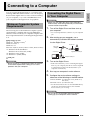
Connecting to a Computer ....E-51
Minimum Computer System Requirements .............. E-51
Connecting the Digital Piano to Your Computer ....... E-51
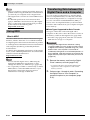
Using MIDI ................................................................ E-52
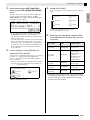
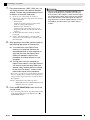
Transferring Data between the Digital Piano
and a Computer ........................................................ E-52
Reference ................................E-56
Troubleshooting ........................................................ E-56
Product Specifications............................................... E-57
Operating Precautions .............................................. E-58
Playing Demo Songs.............. E-24
Appendix ...................................A-1
Playing Tone Demo Songs ....................................... E-24
Listening to Songs Loaded from an
External Source ........................................................ E-25
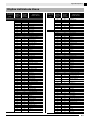
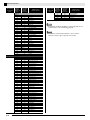
Tone List ..................................................................... A-1
Drum Assignment List ................................................. A-3
Rhythm List ................................................................. A-4
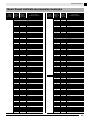
Music Preset List......................................................... A-6
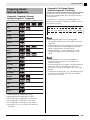
Fingering Guide........................................................... A-8
Chord Example List..................................................... A-9
Music Presets ......................... E-27
Selecting a Music Preset .......................................... E-27
Creating an Original User Preset.............................. E-28
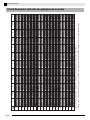
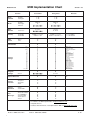
MIDI Implementation Chart
Registering Tone and
Rhythm Setups ....................... E-32
Saving Registration Data .......................................... E-33
Recalling a Registration............................................ E-33
Company and product names used in this
manual may be registered trademarks of others.
E-1
English
Contents
General Guide
8
1
2
3
4
5
6
9
7
bq
bl
bk
bm
bn
bo
bp
∗
do
br
ck
bs
cl
cm
bt
cn
co
cp
cs
ct
cq
cr
dk
dn
dl
dm
Back
dp
dq
dr
Left Side
ds
dt
ek
Bottom
en
el
E-2
em
General Guide
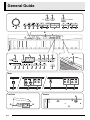
1 VOLUME controller
cn VIBES/CLAVI button
2 INTRO/REPEAT button
co ORGAN button
3 NORMAL/FILL-IN, sREW button
cp STRINGS/SYNTH-PAD button
4 VARIATION/FILL-IN, dFF button
cq BASS/GUITAR button
5 SYNCHRO/ENDING, PAUSE button
cr VARIOUS/GM TONES button
6 START/STOP, PLAY/STOP button
cs REVERB, REV TYPE, EXIT button
7 ACCOMP ON/OFF, PART button
ct CHORUS, CHOR TYPE, u button
8 METRONOME button
dk SPLIT, SPLIT POINT, i button
9 RECORDER button
dl CARD/INTERNAL, SAVE/LOAD,
bk TEMPO buttons
bl RHYTHM, USER SONGS button
bm POPS/JAZZ, MUSIC PRESET button
bn LATIN/WORLD, MUSIC PRESET button
bo BALLAD/PIANO RHYTHMS,
RHYTHM EDITOR button
English
• This manual uses the numbers and names below to refer to buttons and controllers.
ENTER button
dm STORE, USB DEVICE MODE button
dn SD CARD SLOT
do PITCH BEND wheel
dp USB port
dq MIDI OUT/IN terminals
bp USER RHYTHMS, RHYTHM EDITOR button
dr DAMPER, SOFT/SOSTENUTO PEDAL jacks
bq Display
ds DC 12V terminal
br TONE, REGISTRATION button
dt LINE OUT R, L/MONO jacks
bs FUNCTION button
ek LINE IN R, L/MONO jacks
bt w/NO, q/YES buttons
el POWER button
ck GRAND PIANO (MODERN) button
em PHONES jacks
cl GRAND PIANO (CLASSIC) button
en Pedal connector
cm ELEC PIANO button
* Installing the Music Stand
Insert the bottom of the music stand into the
groove on the top of the Digital Piano’s
console.
E-3
General Guide
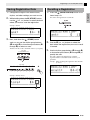
Saving Settings and Using
Panel Lock
Your Digital Piano lets you save its current settings,
and lock its buttons to protect against operation errors.
For details, see “Setting Backup” (page E-43) and
“Panel Lock” (page E-43).
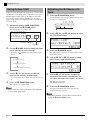
Returning the Digital Piano to
Its Factory Default Settings
Perform the following procedure when you want to
return the Digital Piano’s stored data and settings to
their initial factory defaults.
1.
2.
Turn off the Digital Piano.
While holding down both the br (TONE) and
bs (FUNCTION) buttons, press the el
(POWER) button.
The Digital Piano will turn on and initialize its internal
system. You will be able to use the Digital Piano in a
short while.
NOTE
• See “Turning on the Digital Piano and Playing
Something” (page E-9) for information about
turning digital power on and off.
E-4
Power Outlet
English
Your Digital Piano runs on standard household power.
Be sure to turn off power whenever you are not using
the Digital Piano.
Using an AC Adaptor
Use only the AC adaptor (JEITA Standard, with unified
polarity plug) that comes with this Digital Piano. Use
of a different type of AC adaptor can cause
malfunction of the Digital Piano.
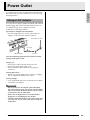
Specified AC Adaptor: AD-A12150LW
• Use the supplied power cord to connect the AC
adaptor as shown in the illustration below.
Household power outlet
AC adaptor
DC 12V terminal
Power cord
Note the following important precautions to avoid
damage to the power cord.
During Use
• Never pull on the cord with excessive force.
• Never repeatedly pull on the cord.
• Never twist the cord at the base of the plug or
connector.
During Movement
• Before moving the Digital Piano, be sure to unplug
the AC adaptor from the power outlet.
During Storage
• Loop and bundle the power cord, but never wind it
around the AC adaptor.
IMPORTANT!
• Never connect the AC adaptor (JEITA Standard,
with unified polarity plug) that comes with this Digital
Piano to any other device besides this piano. Doing
so creates the risk of malfunction.
• Make sure the Digital Piano is turned off before
plugging in or unplugging the AC adaptor.
• The AC adaptor will become warm to the touch after
very long use. This is normal and does not indicate
malfunction.
B
E-5
Connections
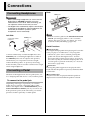
Connecting Headphones
Back
PEDAL jacks
IMPORTANT!
• Before connecting headphones, be sure to use the
Digital Piano’s VOLUME controller to turn the
volume down to a low level. After connecting, you
can adjust the volume to the level you want.
• The Digital Piano automatically adjusts sound output
to optimize for headphones (when headphones are
connected) or the built-in speakers (when
headphones are not connected).
SP-3
NOTE
Left Side
PHONES jacks
Commercially available
headphones
• You can connect a pedal to the SOFT/SOSTENUTO
PEDAL jack and apply either a soft or sostenuto
effect to the notes you play. For details, see “Soft/
Sostenuto Pedal Jack Setting” (page E-43).
Pedal Functions
Mini plug
Connect commercially available headphones to the
PHONES jacks. Connecting headphones to either of
the PHONES jacks cuts off output to the speakers,
which means you can practice even late at night
without bothering others. To protect your hearing,
make sure that you do not set the volume level too high
when using headphones.
Connecting a Pedal
The back of the Digital Piano has two pedal jacks, one
for a damper pedal and one for a soft/sostenuto pedal.
To connect to the pedal jack
Depending on the type of operation you want the
pedal (SP-3) to perform, connect the pedal’s cable
either to the Digital Piano’s DAMPER PEDAL jack or
SOFT/SOSTENUTO PEDAL jack. If you want to use
both operations (jacks) at the same time, you need to
purchase another optionally available pedal.
E-6
z Damper Pedal
Pressing the damper pedal while playing will cause the
notes you play to reverberate for a very long time.
• Whenever a piano tone is selected, pressing this
pedal will activate the Digital Piano’s Acoustic
Resonance effect, which causes notes to resonate in
the same way they do when the damper pedal on an
acoustic piano is pressed. For details, see “Acoustic
Resonance” (page E-41).
z Soft Pedal
Pressing this pedal suppresses notes played on the
keyboard after the pedal was pressed, and makes them
sound softer.
z Sostenuto Pedal
Only the notes that are played while this pedal are
depressed are sustained until the pedal is released.
Connections
You can connect the optionally available 3-Pedal Unit
(SP-32) to the pedal connector on the bottom of the
Digital Piano. You can then use the pedals for
expression that is similar to that available on an
acoustic piano.
Bottom
Pedal connector
Connecting Audio Equipment
or an Amplifier
You can connect audio equipment or a music amplifier
to the Digital Piano and then play through external
speakers for more powerful volume and better sound
quality.
IMPORTANT!
NOTE
• The SP-32 Pedal Unit supports half-pedal operation
(pressing the pedal part way). You can adjust the
amount of the effect is applied when the damper
pedal is pressed part way. For details, see “Half
Pedal Effect” (page E-43).
• The optionally available CS-67P special stand is
required in order to use the SP-32 Pedal Unit.
• The Digital Piano automatically adjusts sound output
to optimize for headphone output (when headphones
are connected) or built-in speaker output (when
headphones are not connected). This also will cause
a change in the output quality from the Digital
Piano’s LINE OUT R and L/MONO jacks.
• Whenever connecting a device to the Digital Piano,
first use the VOLUME controller to set the volume to
a low level. After connecting, you can adjust the
volume to the level you want.
• Whenever you connect any device to the Digital
Piano, be sure to read the user documentation that
comes with the device.
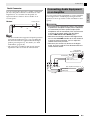
Guitar amplifier
Keyboard amplifier, etc.
INPUT 1
Standard plug
INPUT 2
Tape recorder,
MIDI sound source, etc.
Standard jack
Audio amplifier AUX IN jack, etc.
LEFT (White)
RIGHT (Red)
Pin plug
E-7
English
Pedal Connector
Connections
Playing Output from External Equipment
through the Piano’s Speakers 1
Use commercially available cables to connect the
external audio equipment to the piano’s LINE IN jacks
as shown in Figure 1.
LINE IN R jack input sounds through the piano’s right
speaker, while LINE IN L/MONO jack input sounds
through the left speaker. Connecting to the LINE IN
L/MONO jack only causes the same output to be
produced from both speakers. It is up to you to
purchase connecting cables that are compatible with
the equipment you are connecting.
Connecting to Audio Equipment 2
Use commercially available cables to connect the
external audio equipment to the piano’s LINE OUT
jacks as shown in Figure 2. LINE OUT R jack output is
right channel sound, while LINE OUT L/MONO jack
output is left channel sound. It is up to you to purchase
connecting cables like the ones shown in the
illustration for connection of audio equipment.
Normally in this configuration you must set the audio
equipment’s input selector to the setting that specifies
the terminal (such as AUX IN) to which the piano is
connected. Use the piano’s VOLUME controller to
adjust the volume level.
Connecting to a Musical Instrument
Amplifier 3
Use commercially available cables to connect the
amplifier to the piano’s LINE OUT jacks as shown in
Figure 3. LINE OUT R jack output is right channel
sound, while LINE OUT L/MONO jack output is left
channel sound. Connecting to the LINE OUT
L/ MONO jack only outputs a mixture of both
channels. It is up to you to purchase connecting cable
like the one shown in the illustration for connection of
the amplifier. Use the piano’s VOLUME controller to
adjust the volume level.
E-8
Bundled and Optional
Accessories
Use only accessories that are specified for use with this
Digital Piano.
Use of unauthorized accessories creates the risk of fire,
electric shock, and personal injury.
NOTE
• You can get information about accessories that are
sold separately for this product from the CASIO
catalog available from your retailer, and from the
CASIO website at the following URL.
http://world.casio.com/
btw, q
8METRONOME
blUSER SONGS
bsFUNCTION
ctCHORUS, u
csREVERB
brTONE
dkSPLIT, i
dlENTER
7PART
Turning on the Digital Piano
and Playing Something
1.
ck–crTone groups
bkTEMPO
1VOLUME
Press the el (POWER) button.
This turns on power.
• To turn off the Digital Piano, press the el button
again.
Left Side
Selecting a Tone
Your Digital Piano has 250 tones, divided into eight
groups.
• For more information, see the “Tone List” (page
A-1).
• The Digital Piano has built-in demonstration tunes
that highlight the different characteristics of tones.
For more information, see “Playing Tone Demo
Songs” (page E-24).
1.
Press the br (TONE) button so its upper lamp
is lit.
• Each press of the button toggles between the upper
and lower lamps.
Lit
el button
2.
After a short while, the display screen should
appear as shown below, which indicates that
the Digital Piano is ready to be played.
IMPORTANT!
• Continuing on to the next step while the
REGISTRATION lamp is lit will perform a registration
recall operation (page E-32), which will change the
setup of the Digital Piano. Make sure that the TONE
lamp is lit before you advance to the next step.
2.
3.
Use the 1 (VOLUME) controller to adjust the
volume level.
4.
Play something on the keyboard.
Use the “Tone List” (page A-1) to look up the
group and the number of the tone you want to
select.
E-9
English
Using Built-in Tones
Using Built-in Tones
3.
Use the ck to cr (tone groups) buttons to
select the group you want.
2.
Example: To select the ORGAN group
This will layer the tones currently selected in the two
groups.
Lit
4.
Hold down the button of the group that
contains the tone you want to select as the
layered tone until “LAYER: ON” appears on
the display as shown below for a few
moments.
Use the bt (w, q) buttons to select the
tone you want.
Example: To select “002 Jazz Organ”
Tone number
Tone name
The button you held down in step 2 will light to
indicate that it is selected.
Example: When BASS/GUITAR group is selected
Lit
NOTE
• Pressing q and w at the same time will jump to
tone 001 of the currently selected group. Holding
down either button changes the tone number at high
speed.
• See page E-40 for more information about scrolling.
3.
Use the bt (w, q) buttons to select the
tone you want in the group you selected in
step 2.
Example: When “006 Picked Bass” is selected
Layered tone number
Layered tone name
Layering Two Tones
You can layer two different tones so they play at the
same time when you press a keyboard key.
• The first tone you select is called the “main tone,”
while the second tone is called the “layered tone.”
1.
Select the main tone.
Example: To select MELLOW PIANO in the CLASSIC
group, press the cl (CLASSIC) button and
then use the bt (w, q) buttons to select
“002 Mellow Piano”.
4.
To unlayer the tones and return the keyboard
to a single tone, press any one of the tone
group buttons.
NOTE
• You can adjust the balance between the main tone
and layered tone. For details, see “Layered Tone
Volume (Layer Balance)” (page E-41).
E-10
Using Built-in Tones
You can split the keyboard so the left side (lower
range) plays one tone and the right side (upper range)
plays a different tone.
You can use the procedure below to specify the
location on the keyboard where it splits between the
left side and the right side. That location is called the
“split point”.
Left (Lower Range) side
Example: To split the keyboard between the GM SLAP
BASS 1 tone on the left (lower range) and the
GRAND PIANO tone on the right (upper range).
Left (Lower Range)
Tone: GM SLAP BASS 1
Right (Upper Range) side
Right (Upper Range)
Tone: GRAND PIANO
Split point
1.
1.
Press the dk (SPLIT) button.
This causes the SPLIT lamp to light, indicating that the
keyboard is split between two tones.
Hold down the dk (SPLIT) button until the
split point setting screen appears on the
display as shown below.
Lit
2.
Select the tone you want to assign to the left
side (lower range) of the keyboard.
Example: To select GM SLAP BASS 1 in the VARIOUS/
GM TONES group, press the cr (VARIOUS/
GM TONES) button and then use the bt (w,
q) buttons to select “073 GM SlapBass1”.
Current split point key name
2.
Press the keyboard key where you want to
specify as the leftmost key of the right (upper
range) tone.
This specifies the split point.
3.
Press the dk (SPLIT) button.
This exits the split point screen.
Lit
Left tone number
Left tone name
3.
To unsplit the keyboard and return it to a
single tone, press the dk (SPLIT) button.
The SPLIT lamp will go out, indicating that the
keyboard is no longer split.
NOTE
• If the keyboard is set up with layered tones (page
E-10) when you perform the above split operation,
the layered tones will play on the right (upper
range) side of the keyboard.
E-11
English
Moving the Keyboard Split Point
Splitting the Keyboard
between Two Tones
Using Built-in Tones
Using Octave Shift
After you split the keyboard (page E-11), you may find
out that the lower range notes on the left are too low or
that the upper range notes on the right are too high.
You can use octave shift to shift the octaves of the
upper range and lower range upwards or downwards
in octave units.
1.
Adjusting the Brilliance of a
Tone
1.
Press the bs (FUNCTION) button.
The FUNCTION lamp will light and the function screen
will appear on the display.
While holding down the bs (FUNCTION)
button, press the br (TONE) button.
This displays the octave shift screen.
Lit
2.
Use the dk (i) and ct (u) buttons to select
the Tmpr/Effect screen.
3.
Press the dl (ENTER) button.
Currently selected range
Shift amount
2.
Use the 7 (PART) button to select the range
whose octave you want to change.
This will display a screen for selecting settings in the
Tmpr/Effect group.
• Each press of 7 (PART) cycles through the ranges
below.
4.
Use the dk (i) or ct (u) button to select
the brilliance screen shown below.
5.
• You can shift the octave within the range of –2 to 0 to
2.
Use the bt (w, q) buttons to adjust the
brilliance of the currently selected tone. You
can adjust brilliance in the range of –3 to 0 to 3.
Press the bs (FUNCTION) button.
w : Mellower and softer
q : Brighter and harder
U1 (Upper1): Main tone
U2 (Upper2): Layered tone
L1 (Lower1): Left (lower range) tone
3.
4.
Use the bt (w, q) buttons to shift the
octave of the currently selected range.
This exits the octave shift screen.
NOTE
• Octave shift also can be performed as described for
“Octave Shift” (page E-41).
6.
Press the bs (FUNCTION) button.
This will exit the brilliance screen and cause the
FUNCTION lamp to go out.
NOTE
• See “Other Settings” (page E-40) for details about
using the bs (FUNCTION) button.
E-12
Using Built-in Tones
1.
Press the cs (REVERB) button to toggle
reverb on and off.
Adding the Chorus Effect to
the Tone
1.
Lit when on
Press the ct (CHORUS) button to toggle
chorus (which adds depth to a tone) on and
off.
Lit when on
Selecting the Reverb Type
You can select from among the following four types of
reverb.
1: Room
2: Hall
3: Large Hall
4: Stadium
1.
2.
3.
Hold down the cs (REVERB) button until the
reverb type selection screen shown below
appears on the display.
Use the bt (w, q) buttons to select the
reverb type you want.
Press the cs (REVERB) button to exit the
reverb type screen.
Selecting the Chorus Type
You can select from among the following four chorus
types.
1: LightChorus
2: Chorus
3: Deep Chorus
4: Flanger
1.
Hold down the ct (CHORUS) button until the
chorus type selection screen shown below
appears on the display.
2.
Use the bt (w, q) buttons to select the
chorus type you want.
3.
Press the ct (CHORUS) button to exit the
chorus type screen.
E-13
English
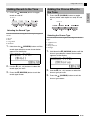
Adding Reverb to the Tone
Using Built-in Tones
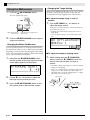
Using the Metronome
1.
Press the 8 (METRONOME) button.
This will start the metronome.
Changing the Tempo Setting
There are two different methods you can use to change
the tempo setting: by pressing q (faster) and w
(slower) buttons or by tapping a beat with a button.
■ To adjust the tempo using q and w
buttons
1.
Lights with the first beat
of each measure
2.
Use the bk (TEMPO w, q) buttons to
adjust the tempo setting.
Each press of a button increases or decreases the beats
per minute value by one.
• Holding down either button changes the value at
high speed.
• You can specify a tempo value in the range of 20 to
255.
Lights with each subsequent beat of
each measure
Press the 8 (METRONOME) button again to
stop the metronome.
Changing the Beats Per Measure
You can specify from two to six beats per measure for
the metronome. After you do, a chime will sound at the
beginning of each measure. Specifying 0 for this setting
will sound a straight beat, without a chime. This setting
lets you practice with a steady beat.
1.
Hold down the 8 (METRONOME) button
until the number of beats per measure screen
shown below appears on the display.
Tempo value
■ To adjust the tempo by tapping a beat
1.
While holding down the bs (FUNCTION)
button, tap the q bk (TEMPO) button four
times in time with the beat you want to
specify.
• The tempo setting will change in accordance with the
timing of your tapping.
• After you use this method to specify the approximate
tempo, you can then use the procedure under “To
adjust the tempo using q and w buttons” to adjust
the setting to a more exact value.
2.
Use the bt (w, q) buttons to select the
beats per measure value you want.
3.
Press the 8 (METRONOME) button to exit
the number of beats per measure screen.
E-14
Tap four times
Using Built-in Tones
You can use the following procedure to adjust the
volume level of the metronome, without affecting the
volume of Digital Piano output.
1.
While holding down the bs (FUNCTION)
button, press the 8 (METRONOME) button.
This displays the metronome volume screen.
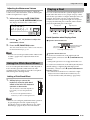
Playing a Duet
You can use the Duet Mode to split the Digital Piano’s
keyboard in the center so two people can play a duet.
This makes it possible to configure the keyboard so, for
example, the teacher can play on the left and the
student can follow along on the right. Or one person
can play the left hand part on the left, while another
plays the right hand part on the right.
Left keyboard
C3
C4
C5
Right keyboard
C6
(Middle C)
C3
C4
C5
C6
(Middle C)
Metronome volume
Pedal Operation when Playing a Duet
2.
Use the bt (w, q) buttons to adjust the
metronome volume.
3.
Press the bs (FUNCTION) button.
This will exit the metronome volume screen and cause
the FUNCTION lamp to go out.
NOTE
• You also can use the procedure under “Metronome
Volume” (page E-41) to adjust the metronome
volume.
z Optional SP-32 Pedal Unit
Left keyboard
damper pedal
Right side damper pedal
(Half-pedal operation
supported)
Left and right side damper pedal
z Optional SP-3 Pedal Unit
To use the SP-3 Pedal Unit as the right keyboard
damper pedal, connect it to the dr (DAMPER PEDAL)
terminal.
• Half-pedal operation is not supported in this case.
Using the Pitch Bend Wheel
You can use the pitch bend wheel to slide the pitch of
notes smoothly upwards and downwards. This
capability makes it possible to reproduce saxophone
and electric guitar choking effects.
Adding a Pitch Bend Effect
1.
To use the SP-3 Pedal Unit as the left keyboard (initial
default setting) or right keyboard damper pedal
(selectable), connect it to the dr (SOFT/SOSTENUTO
PEDAL) terminal.
• For information about how to select left or right
keyboard control with the SP-3 Pedal Unit, see
“Soft/Sostenuto Pedal Jack Setting” (page E-43).
While playing a note on the
keyboard, rotate the pitch bend
wheel on the left of the keyboard
upwards or downwards.
The amount the note bends depends on
how much you rotate the pitch bend
wheel.
• Do not have the pitch bend wheel
rotated as you turn on the Digital Piano.
NOTE
• You also can configure pitch bend wheel operation
by specifying the amount of pitch change at
maximum rotation in either direction. See “Pitch
Bend Range” (page E-43) for more information.
E-15
English
Adjusting the Metronome Volume
Using Built-in Tones
Configuring the Digital Piano for Duet
Play
1.
Press the bl (USER SONGS) button so its
lower lamp is lit.
Changing the Octave of a Duet Mode
Keyboard
You can use the following procedure to change the
octave of the left and right Duet Mode keyboards.
1.
This displays the Duet Mode on/off screen shown in
step 2 under “Configuring the Digital Piano for Duet
Play” (page E-16). If the Duet Mode is currently turned
off, press the bt (q) button to turn it on.
Lit
• To practice with songs stored on a memory card,
press the dl (CARD/INTERNAL) button so its lamp
is lit in place of the bl (USER SONGS) button.
2.
2.
While holding down the bs (FUNCTION)
button, press the dk (SPLIT) button.
This causes the Duet Mode on/off screen to appear.
• The keyboard keys are disabled while this screen is
displayed.
While holding down the bs (FUNCTION)
button, press the dk (SPLIT) button.
Of the four C keys in the left keyboard, press
the one that you want to have located at
middle C.
• This will sound the note assigned to C4 and change
the octave of the left keyboard.
Example: To change the configuration so the leftmost C
key is middle C as shown below.
Leftmost C key (Pressed key)
C4
C5
C6
C7
1 octave higher than initial setting
3.
Press the bt (q) button to turn on the Duet
Mode.
This will cause the dk (SPLIT) button lamp to flash.
4.
Press the bs (FUNCTION) button.
This exits the Duet mode on/off screen and configures
the Digital Piano’s keyboard for duet play.
5.
To turn off the Duet Mode, press the dk
(SPLIT) button so the SPLIT lamp goes out.
NOTE
• You also can use the procedure under “Duet Mode”
(page E-41) to turn the Duet Mode on or off.
E-16
C3
C4
C5
C6
Unchanged
3.
You can use the same procedure as step 2 to
select one of the C keys in the right keyboard
to shift its octave as well.
4.
Press the bs (FUNCTION) button.
This exits the Duet Mode on/off screen and causes the
bs (FUNCION) button lamp to go out.
The left and right keyboards will be configured
according to your settings.
NOTE
• Turning off the Duet Mode will clear your octave
shift settings and return the keyboard to its initial
default settings.
5SYNCHRO/ENDING
2–5Accompaniment
patterns
btw/NO, q/YES
boBALLAD/PIANO RHYTHMS
bpUSER RHYTHMS
6START/STOP
7ACCOMP ON/OFF
csEXIT
dlENTER
bm–bpRhythm groups
ck–crInstrument parts
bkTEMPO
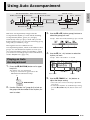
With Auto Accompaniment, simply select the
accompaniment rhythm you want and the matching
accompaniment (drums, guitar, etc.) will play
automatically when you play a chord with your left
hand. It’s like having your own personal backup group
along with you wherever you go.
This Digital Piano has 180 built-in Auto
Accompaniment patterns, which are divided into three
groups. You can edit built-in rhythms to create your
own original rhythms (called “user rhythms”), which
you can save in a fourth group. For more information,
see the “Rhythm List” (page A-4).
3.
Use the bm to bp (rhythm groups) buttons to
select the group you want.
Example: When the LATIN/WORLD group is selected
Lit
4.
Use the bt (w, q) buttons to select the
rhythm you want.
Example: When “005 Samba 2” is selected
Playing an Auto
Accompaniment
1.
brTONE
blRHYTHM
Press the bl (RHYTHM) button so its upper
lamp is lit.
This enables Auto Accompaniment.
• Each press of the button toggles between the
RHYTHM and USER SONGS lamps.
Rhythm name
Rhythm number
Tempo
Measure
Lit
5.
2.
Use the “Rhythm List” (page A-4) to look up
the group and the number of the rhythm you
want to select.
Use the bk (TEMPO w, q) buttons to
adjust the tempo setting.
• This is the same as metronome tempo adjustment
(page E-14).
• To return the rhythm to its standard tempo setting,
press the bk (TEMPO w, q) buttons at the same
time.
E-17
English
Using Auto Accompaniment
Using Auto Accompaniment
6.
Press the 7 (ACCOMP ON/OFF) button so
its lamp is lit.
This turns ACCOMP on, so all accompaniment parts
sound.
• Turning ACCOMP off so the ACCOMP lamp is unlit
causes only the percussion instrument parts to sound.
• Each press of the 7 (ACCOMP ON/OFF) button
toggles ACCOMP on and off.
Lit
9.
Play other chords with left hand as you play
the melody with your right hand.
• You can use “CASIO Chord” or other simplified
chord fingering modes to play chords. For details, see
“Selecting a Chord Fingering Mode” in the following
section.
• You can use the 3 (NORMAL) and 4
(VARIATION) buttons to modify accompaniment
patterns. For details, see “Modifying Auto
Accompaniment Patterns” (page E-20).
10. When you are finished, press the 6 (START/
7.
Press the 5 (SYNCHRO/ENDING) button.
This puts Auto Accompaniment into “synchro
standby”. Playing a chord during synchro standby will
cause Auto Accompaniment to start to play
automatically.
• Pressing the 2 (INTRO) button while Auto
Accompaniment is in synchro standby will enter
intro standby. Pressing the 4 (VARIATION) button
will enter variation standby. For details about intro
and variation patterns, see “Modifying Auto
Accompaniment Patterns” (page E-20).
Flashing
8.
Play the chord you want on the chord
keyboard (left keyboard keys).
Auto Accompaniment will start playing when you play
the chord.
• To start percussion part play without playing a
chord, press the 6 (START/STOP) button.
Example: To play a C chord
Chord keyboard
E-18
Melody keyboard
STOP) button again to stop Auto
Accompaniment.
• Pressing the 5 (SYNCHRO/ENDING) button
instead of the 6 (START/STOP) button will play an
ending pattern before stopping Auto
Accompaniment play. For details about ending
patterns, see “Modifying Auto Accompaniment
Patterns” (page E-20).
NOTE
• You can use the following procedure to adjust the
volume level of the Auto Accompaniment, without
affecting the volume of Digital Piano output. For
details, see “Auto Accompaniment Volume” (page
E-41).
• You can change the size of the chord keyboard by
using the split feature to move the split point (page
E-11). The keyboard keys to the left of the split point
make up the chord keyboard.
Using Auto Accompaniment
You can select from among the following five chord
fingering modes.
1: Fingered 1
2: Fingered 2
3: Fingered 3
4: CASIO Chord
5: Full Range
1.
■ CASIO CHORD
With “CASIO Chord”, you can use simplified
fingerings to play the four types of chords described
below.
Chord keyboard
Hold down the 7 (ACCOMP ON/OFF) button
until the chord type selection screen appears
on the display.
Chord Type
Example
Major Chords
Press one key, whose note
corresponds to the chord
name.
• To play C Major, press any
C key in the chord
keyboard. The octave of the
note does not matter.
C (C Major)
C C#DE b E F F#GAb A Bb B C C#DE b E F
Note name
Minor Chords
Cm (C minor)
Press the chord keyboard key
that corresponds to the major
chord, while also pressing one
other chord keyboard key to
the right.
C C#DE b E F F#GAb A Bb B C C#DE b E F
Chord fingering mode
2.
3.
Use the bt (w, q) buttons to select the
chord fingering mode you want.
Press the 7 (ACCOMP ON/OFF) button.
This exits the chord fingering screen.
■ Fingered 1, 2, 3
With these three chord fingering modes, you play
chords on the chord keyboard using their normal
chord fingerings. Some chord forms are abbreviated,
and can be fingered with one or two keys.
For information about the types of chords you can
finger and their fingerings, see the “Fingering Guide”
(page A-8).
Chord keyboard
Seventh Chords
Press the chord keyboard key
that corresponds to the major
chord, while also pressing
two other chord keyboard
keys to the right.
C7 (C seventh)
Minor Seventh Chords
Press the chord keyboard key
that corresponds to the major
chord, while also pressing
three other chord keyboard
keys to the right.
Cm7 (C minor seventh)
C C#DE b E F F#GAb A Bb B C C#DE b E F
C C#DE b E F F#GAb A Bb B C C#DE b E F
When pressing more than one chord keyboard key,
makes no difference whether the additional keys are
white or black.
■ FULL RANGE CHORD
Fingered 1: Play the component notes of the chord on the
keyboard.
Fingered 2: Unlike Fingered 1, 6th input is not possible with
this mode.
Fingered 3: Unlike Fingered 1, this mode allows input of
fraction chords with the lowest keyboard note as
the bass note.
With this chord fingering mode, you can use the full
range of the keyboard to play chords and the melody.
For information about the types of chords you can
finger and their fingerings, see the “Fingering Guide”
(page A-8).
Melody keyboard
Chord keyboard
E-19
English
Selecting a Chord Fingering Mode
Using Auto Accompaniment
Modifying Auto Accompaniment Patterns
There are six different Auto Accompaniment patterns,
shown below. You can switch between patterns during
accompaniment play and even modify patterns. Use
buttons 2 through 5 to select the pattern you want.
2
Intro *1
3
Normal
Normal fill-in *2
4
Variation
5
Using One-Touch Presets
One-Touch Preset gives you one-touch access to tone
and tempo settings that go well with the currently
selected Auto Accompaniment rhythm pattern.
1.
This will configure tone, tempo, and other settings to
match the currently selected rhythm pattern. At this
time, Auto Accompaniment play also will go into
synchro standby, which means that Auto
Accompaniment will start to play automatically when
you finger a chord.
Ending *4
Variation fill-in *3
*1 Press at the beginning of a song.
Accompaniment play proceeds with the normal
pattern after the intro pattern is complete. Pressing
the 4 (VARIATION/FILL-IN) button before
pressing this button will proceed with the variation
pattern after the intro pattern is complete.
*2 Press while a normal pattern is playing to insert a
fill-in pattern.
*3 Press while a variation pattern is playing to insert a
fill-in variation pattern.
*4 Press at the end of a song.
This will play an ending pattern and then stop Auto
Accompaniment.
Hold down the bl (RHYTHM) button for at
least two seconds.
2.
Play a chord on the keyboard.
This will start Auto Accompaniment play.
NOTE
• One-Touch Presets are not supported for user
rhythms (001 through 010 of the USER RHYTHMS
group).
Using Auto Harmonize
Auto Harmonize lets you add harmony to melody
notes you play with your right hand. You can select
any one of 12 Auto Harmonize settings.
1.
Press the br (TONE) button so its lamp is lit.
Lit
2.
Hold down the br (TONE) button until the
auto harmonize screen appears on the
display.
Type number
E-20
Type name
Using Auto Accompaniment
Use the bt (w, q) buttons to select the
Auto Harmonize type you want.
Type
Number
4.
Type Name
Description
00
Off
Turns off Auto Harmonize.
01
Duet 1
Adds close (separated by two to
four degrees) one-note harmony
below the melody note.
02
Duet 2
Adds open (separated by more
than 4 to 6 degrees) 1-note
harmony below the melody
note.
03
Country
Adds country style harmony.
04
Octave
Adds the note from the next
lower octave.
05
5th
Adds the fifth degree note.
06
3-Way Open
Adds 2-note open harmony, for
a total of three notes.
07
3-Way Close
Adds 2-note close harmony, for
a total of three notes.
08
Strings
Adds harmony that is optimal
for strings.
09
4-Way Open
Adds 3-note open harmony, for
a total of four notes.
10
4-Way Close
Adds 3-note close harmony, for
a total of four notes.
11
Block
Adds block chord notes.
12
Big Band
Adds big band style harmony.
Press the br (TONE) button.
This will exit the auto harmonize screen.
5.
While playing chords, play the melody on the
keyboard.
Harmony will be added to your melody notes based on
the chords you play.
Creating Your Own Original
Rhythms
You can use rhythm editing to modify a built-in Auto
Accompaniment rhythm to create an original “user
rhythm” of your own. You can select a part (drum,
bass, etc.) of a normal, intro, or other pattern (page
E-20) and turn it on or off, adjust its volume level, and
perform other operations.
1.
Select the number of the Auto
Accompaniment rhythm you want to edit.
2.
At the same time, press the bo (BALLAD/
PIANO RHYTHMS) and bp (USER
RHYTHMS) buttons.
This displays the rhythm editor screen.
3.
Use the accompaniment pattern buttons (2
through 5) to select the pattern (normal,
intro, ending, etc.) you want to edit.
The button you press will light, indicating that the
pattern is being edited.
• Each press of 3 (NORMAL/FILL-IN) toggles
between NORMAL and FILL-IN, and each press of
4 (VARIATION/FILL-IN) toggles between
VARIATION and FILL-IN. The applicable button
flashes while the fill-in pattern is selected.
Example: When intro is selected
2
3
4
5
E-21
English
3.
Using Auto Accompaniment
4.
Use the instrument part buttons (ck through
cr) to select the part (drums, bass etc.) you
want to edit.
The name of the part you select will appear on the
display. Rhythm patterns are made up of the eight parts
shown below.
ck
Drums
cl
Percussion
cm
Bass
cn
co
cp
cq
Description
Setting
Rhythm
Select:
Rhythm
Replaces the part
(drum, bass, etc.)
accompaniment
data with that of
the specified
rhythm number. *1
001 to 190:
Rhythm
number *2 *3
bm
Tone
Select:
Tone
Switches the part
tone (instrument)
to that of the
specified tone
number.
001 to 250: Tone
Numbers *2 *4
bn
Prt:
Part on/
off
Toggles each part
on or off.
OFF:
Mutes the part.
ON:
Sounds the
part.
Vol:
Volume
level
Controls the
volume level of
each part.
000 to 127
Pan:
Panning
(position)
Controls whether
the sound of the
part can be heard
–64 to 0 to 63 *5
from the left side or
right side.
Reverb:
Reverb
Controls the level
of the reverb effect
000 to 127
(page E-13) applied
to the part notes.
Chorus:
Chorus
Controls the level
of the chorus effect
000 to 127
(page E-13) applied
to the part notes.
cr
Chord 1 Chord 2 Chord 3 Chord 4 Chord 5
Parts
• Button illumination does not change when you press
the instrument part buttons (ck through cr). Button
illumination indicates whether there is
accompaniment data corresponding to each part.
Example: When bass is selected
Instrument part name
5.
Edit the selected part as desired.
The table below describes the parameters you can edit.
• Use the ct (u) and dk (i) buttons to select a
parameter, and the bt (w, q) buttons to change its
setting. You also can use shortcut buttons (see table
below) to select parameters.
• Pressing the bt (w, q) buttons at the same time
will return the currently selected parameter to its
initial default setting.
• Pressing the 6 (START/STOP) button during an
edit operation will sound the accompaniment pattern
with the edits you have made up to that point.
Pressing the 7 (ACCOMP ON/OFF) button will
sound only the instrument part you are editing.
Procedure continues on page E-23.
E-22
Shortcut
Button
Parameter
bo
bp
*1 Replacing part accompaniment data clears all edits to the
currently selected accompaniment data made up to that
point.
*2 Sequential numbers starting from 001, which is the first
rhythm of the first group (POPS/JAZZ). See the “Tone
List” (page A-1) and “Rhythm List” (page A-4) for
information on the numbering system.
*3 In the case of the intro and ending, specifying a rhythm
for one part (drum, bass, etc.) will cause the same rhythm
to be specified automatically for all of the other parts of
the pattern.
*4 Only drum set sounds (tone numbers 237 through 250)
can be selected for drum parts and percussion parts.
Drum set sounds cannot be selected for the bass and the
chord 1 through chord 5 parts.
*5 A smaller value shifts leftward, while a larger value shifts
rightward. A value of zero specifies center.
Using Auto Accompaniment
7.
Repeat steps 3 through 5 to edit all of the
accompaniment patterns and parts you want.
After editing is complete, adjust the tempo of
the rhythm as desired.
• The tempo you set here becomes the initial default
tempo of the rhythm.
8.
Press the cs (EXIT) button.
10. Decide on the user rhythm number where you
want to save the rhythm and a rhythm name.
• Use the ct (u) and dk (i) buttons to move the
cursor to the user rhythm number and rhythm name
character you want to change. Use the bt (w, q)
buttons to select the number or character you want.
• The rhythm name characters you can select are
shown below. To input a space, press both of the bt
(w and q) buttons at the same time.
This causes a confirmation message to appear asking if
you want to save your edits.
9.
Press the bt (YES) button.
This displays a screen for specifying the user rhythm
number and rhythm name.
• If you want to exit the editing operation without
saving, press the bt (NO) button instead of the bt
(YES) button.
11. Press the dl (ENTER) button.
This saves the data.
• If the rhythm number where you are saving the data
already has data saved to it, a message (Replace?) will
appear on the display to confirm whether you want
to replace the existing data with the new data.
IMPORTANT!
Rhythm name
Destination user rhythm number
• Saving user rhythm data to a user rhythm number
that already has data will cause the existing data to
be replaced by the new data.
NOTE
• If the size of the accompaniment pattern or
instrument part data is too large to be edited, a
memory full message (Memory Full) will appear on
the display. If that happens, select a different
accompaniment pattern or instrument part for
editing.
E-23
English
6.
Playing Demo Songs
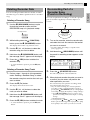
btw, q
blUSER SONGS
6PLAY/STOP
2REPEAT
7PART
Playing Tone Demo Songs
Your Digital Piano comes with eight built-in demo
tunes, which demonstrate the characteristics of each of
the eight tone groups.
No. Tone Group Name
Tune Name
01
GRAND PIANO
MODERN
Original
02
GRAND PIANO
CLASSIC
Arabesque 1
03
ELEC PIANO
Original
04
VIBES/CLAVI
Original
05
ORGAN
Original
06
STRINGS/
SYNTH-PAD
Nessun Dorma
[Turandot]
07
BASS/GUITAR
Original
08
VARIOUS/GM TONES
Original
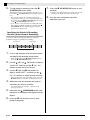
1.
While holding down the 7 (PART) button,
press the 6 (PLAY/STOP) button.
This will start sequential playback of the demo songs,
starting from song 1.
E-24
Song number
Current measure
Song name
Song tempo
• Pressing a tone group button (ck through cr) while
demo song playback is in progress will switch to the
demo song of that group’s tone. Also, you can scroll
through songs manually with the bt (w, q)
buttons.
2.
Press the 6 (PLAY/STOP) button.
This stops demo song playback.
Playback of the demo songs will continue in an endless
loop until you press the 6 (PLAY/STOP) button to
stop it.
NOTE
• Only the operations described above can be
performed while demo song playback is in progress.
Playing Demo Songs
4.
This starts playback of the song.
• Press the 4 (FF) button to perform a fast forward
operation or the 3 (REW) button for rewind.
Pressing and releasing either button moves one
measure, while holding down a button scrolls at high
speed.
• Pressing the 5 (PAUSE) button pauses playback.
Press again to resume song playback.
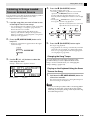
You can import song data from an SD memory card or
computer as a user song, and use it for Auto
Accompaniment or for practice.
1.
Load the song data you want to listen to one
of the Digital Piano’s user songs.
Lights with each subsequent beat of each measure
Lights with the first beat of each measure
• See “Loading Data from a Memory Card” (page E-47)
and “Connecting to a Computer” (page E-51) for
details about how to load data.
• You also could play back data directly from a
memory card without loading it into Digital Piano
memory. For details, see “Playing Back a Song from a
Memory Card” (page E-48).
2.
2
Lit
3
4
Rewind
Press the bl (USER SONGS) button so its
lamp is lit.
• Each press of the button toggles between the upper
and lower lamps.
3.
Press the 6 (PLAY/STOP) button.
5
6
Pause
Fast forward
5.
Press the 6 (PLAY/STOP) button again.
This stops song playback.
• Song playback also will stop automatically when the
end of the song is reached. To configure the Digital
Piano to loop song playback without stopping, turn
on “Song Repeat” (page E-42).
Changing the Song Tempo
Use the bt (w, q) buttons to select the
user song you want.
Example: When user song 003 is selected
You can change the song tempo using the same
procedure that you use to adjust the metronome
tempo. For more information, see “Changing the
Tempo Setting” (page E-14).
Playing on the Keyboard Using the Same
Tone as the Song
1.
User song number
Song name
Hold down the bl (USER SONGS) button for
at least two seconds.
This will assign the same tone as the right hand part of
the current song to the keyboard.
NOTE
• You can use the procedure under “Practicing Either
Hand’s Part (Part Off)” (page E-26) to turn off the
left hand part and play along on the keyboard using
the left hand part tone.
E-25
English
Listening to Songs Loaded
from an External Source
Playing Demo Songs
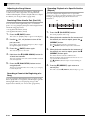
Adjusting the Song Volume
You can use the following procedure to adjust the
volume level of the song’s Auto Accompaniment,
without affecting the volume of keyboard tone output.
For details, see “Song Volume” (page E-41).
Repeating Playback of a Specific Section
(Repeat)
You can configure the Digital Piano to repeat the
section of a song you want to practice. You could, for
example, specify repeat play from measure 5 to
measure 8.
Practicing Either Hand’s Part (Part Off)
You can turn off the right hand part*1 or left hand
part*2 of a song and play that part on the Digital Piano
while the song plays back.
*1 Song data Channel 4 (fixed)
*2 Song data Channel 3 (fixed)
1.
3.
1.
2.
Use the bt (w, q) buttons to turn off the
part you want.
When playback reaches the first measure of
the section you want to repeat, press the 2
(REPEAT) button.
Press (w) to toggle the left hand part or (q) to toggle
the right hand part on and off.
This makes the measure the “start measure”.
The 2 (REPEAT) button lamp flashes at this time.
Press the 7 (PART) button again.
3.
Hold down the bl (USER SONGS) button for
at least two seconds.
Press the 6 (PLAY/STOP) button to start
song playback.
The part you turned off does not sound, so you can play
it on the keyboard.
Sounding a Count at the Beginning of a
Song
You can configure the Digital Piano to sound a count
before playback of a song starts, which helps to get the
timing right when you are playing along on the
keyboard. For details, see “Pre-count” (page E-42).
E-26
When playback reaches the last measure of
the section you want to repeat, press the 2
(REPEAT) button again.
This makes the measure the “end measure”.
Repeat playback of the specified section starts as soon
as you select the end measure.
The 2 (REPEAT) button lamp is lit (not flashing) at
this time.
This will assign the same tone as the hand that is turned
off to the keyboard.
5.
Press the 6 (PLAY/STOP) button.
This starts playback of the song.
This exits the part on/off screen.
4.
End
These measures are repeated.
Press the 7 (PART) button.
This causes “L-[ON] R-[ON]” to appear on the display.
2.
Start
4.
Pressing 2 (REPEAT) again returns to
normal play.
This will cause the 2 (REPEAT) button lamp to go out.
btw/NO, q/YES ctu
6START/STOP
bmbnMUSIC PRESET
4FF
csEXIT
bm–bpMusic Preset groups
dlENTER
dki
ck–crTone groups
3REW
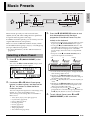
Music Presets provide you with one-touch tone,
rhythm, chord, and other settings that are optimized
for specific musical genres and songs.
In addition to built-in presets, you can create your own
original Music Presets (user presets).
3.
Press the 6 (START/STOP) button to start
Auto Accompaniment with the chord
progression of the Music Preset. Play the
melody on the keyboard.
• The preset chord progression repeats until you stop it
by pressing the 6 (START/STOP) button again.
• Pressing the 7 (ACCOMP ON/OFF) button so the
ACCOMP ON/OFF lamp is lit (not flashing) or unlit
will turn off the chord progression of the Music
Preset and play the normal Auto Accompaniment
pattern.
• Each press of the 7 (ACCOMP ON/OFF) button
cycles in the sequence shown below.
There are a total of 300 built-in Music Presets, which
are divided into three groups (A, B, C). A fourth group
(D) is provided for user presets.
• For more information, see the “Music Preset List”
(page A-6).
Selecting a Music Preset
Unlit
1.
Lit
Flashing
Press bm and bn (MUSIC PRESET) at the
same time.
This causes the 7 (ACCOMP ON/OFF) lamp to flash
and the Music Preset screen to appear.
Normal Auto Accompaniment
Music Preset
chord progression
• You can use the following steps to change the rhythm
after selecting a Music Preset.
Music Preset number
2.
(1) Hold down the bl (RHYTHM) button until the
displayed Music Preset number and name change to
the rhythm number and name.
(2) Use the bt (w, q) buttons to select the rhythm you
want.
(3) Hold down the bl (RHYTHM) button again until
the rhythm number and name change back to the
Music Preset number and name.
• To change the tone, use the ck through cr (tone
group) buttons to select the tone group and then use
the bt (w, q) buttons to select a tone number.
Music Preset name
Use buttons bm to bp (Music Preset group
buttons) to select a group, and then use the
bt (w, q) buttons to select the Music
Preset you want.
This will configure the Digital Piano with settings (tone,
rhythm, etc.) of the selected Music Preset.
The following are the settings that are included in a
Music Preset.
•
•
•
•
•
•
•
•
Tones (main, layer, lower split) (page E-9)
Layer balance (page E-10)
Octave shift (page E-12)
Reverb (page E-13)
Chorus (page E-13)
Rhythm (page E-21)
Tempo (page E-20)
Auto Harmonize (page E-20)
4.
To exit a Music Preset, press bm and bn
(MUSIC PRESET) at the same time.
E-27
English
Music Presets
Music Presets
Creating an Original User
Preset
4.
4-1. To edit the chord progression
Press the bt (w) down button to display
“CHORD” and then press the dl (ENTER)
button to advance to the chord progression
editing screen.
Next, perform the editing operation described
under “To edit the chord progression” (page
E-29). After you finish the editing operation,
press the cs (EXIT) button to return to the
screen for selecting the type of editing
operation, above.
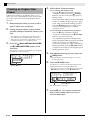
A Music Preset editor is provided to allow you to
create your own original Music Presets (user presets).
Up to 50 user presets can be stored in Music Preset
Group D.
1.
Select the Music Preset you want to edit in
order to create your user preset.
2.
Change the tone number, rhythm number,
and other settings of the Music Preset as you
want.
4-2. To edit Auto Accompaniment parameters
Press the bt (q) up button to display
“Parameter” and then press the dl (ENTER)
button to advance to the Auto
Accompaniment parameter editing screen.
Next, perform the editing operation described
under “To edit Auto Accompaniment
parameters” (page E-31). After you finish the
editing operation, press the cs (EXIT) button
to return to the screen for selecting the type of
editing operation, above.
• The settings you configure here will be saved as a
user Music Preset. See step 2 under “Selecting a
Music Preset” (page E-27) for the settings you can
configure and save for a user Music Preset.
3.
Press the bo (BALLAD/PIANO RHYTHMS)
and bp (USER RHYTHMS) buttons at the
same time.
This displays a screen for selecting the type of editing
operation you want to perform.
Edit the Music Preset parameters.
5.
After editing everything you want, press the
cs (EXIT) button.
• This will display a message asking if you want to
save the user preset.
6.
Press the bt (YES) button.
This displays a screen for selecting the Music Preset
number and name for storing the edited data.
• If you do not want to save the edited data, press the
bt (NO) button in place of the bt (YES) button.
Editing operation type
Music Preset name
Music Preset number for data storage
7.
E-28
Use the bt (w, q) buttons to select the
Music Preset number where you want to
store the edited data.
Music Presets
Enter a name for the preset.
Use the ct (u) and dk (i) buttons to move the cursor
to the character you want to change and then use the bt
(w, q) buttons to change the character. The
following shows a table of available characters.
• To input a space, press both of the bt (w and q)
buttons at the same time.
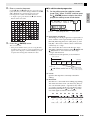
■ To edit the chord progression
1.
On the editing operation selection screen
(page E-28), select “CHORD” and then press
the dl (ENTER) button to display the chord
progression editing screen shown below.
(2) Cursor
9.
Press the dl (ENTER) button.
This saves the data.
• If the preset number where you are saving the data
already has data saved to it, a message (Replace?) will
appear on the display to confirm whether you want
to replace the existing data with the new data.
(1) Step (timing and chord)
(3) Resolution
(1) Step (timing and chord)
The timing of a chord progression is expressed as a
series of three values separated by colons (such as
001:1:00) indicating measure*1 (001), beat (1), and
tick (00).*2 This series of three values is referred to
collectively as a “step”.
The screen shot above shows the first two steps
(001, 002) of the Music Preset. Use the 3 (REW) and
4 (FF) buttons to scroll and view other steps.
*1 Up to 999 measures
*2 There are 12 ticks per beat, as shown below.
Chord progression
Measure 2
Measure 1
Beat 1
Beat 2
Beat 3
Tick 00 01 02
Beat 4
09 10 11
Beat 1
Beat 2
002:1:00
For the sample display
above, the chord change
from C to Bm occurs here.
001:1:00
(2) Cursor
Specifies the step that is currently selected for
editing.
(3) Resolution
Resolution is a unit used when editing step timing.
The initial resolution is R1 (one measure), but you
also can select R4 (1 beat = 4 quarter notes) when
you want to specify chords for each beat. Use the
instrument part buttons (ck through cr) to select
one of the eight resolutions shown below.
ck
cl
cm
cn
co
cp
cq
cr
R1
R2
R4
R8
R8T
R16
R16T
R32T
3
(1 measure)
(2 beats)
(1 beat)
(1/2 beat)
(1/3 beat)
3
(1/4 beat)
(1/6 beat)
(1/8 beat)
E-29
English
8.
Music Presets
2.
3.
Use the 3 (REW) and 4 (FF) buttons to
move the cursor (2) on the chord progression
editing screen to the step you want to select.
4.
• You can playback the Music Preset you are currently
editing by pressing the 6 (START/STOP) button.
• The table below describes other Music Preset editing
operations you can perform. Press the bs
(FUNCTION) button, use the ct (u) and dk (i)
buttons to select the editing operation you want,
perform the required operation, and then press the dl
(ENTER) button to apply the edit and return to the
chord progression editing screen.
• To exit the editing operation and discard all of your
edits, press the cs (EXIT) button.
Change the content of the selected step as
desired.
3-1. Select a chord fingering mode and use the
chord keyboard (page E-19) to input chords.
Fingering a chord causes the cursor (2) to
move to the next step automatically.
• If you want to advance to the next step
without changing the current chord, press
the 5 (PAUSE) button.
• If (3) Resolution is shorter than the time up
to the next step, a new step (without chord)
that is equal to the time of the resolution
will be inserted temporarily into the Music
Preset. Fingering a chord for the new step
will cause the step to be registered as part
of the Music Preset, and the cursor will
advance to the next step.* You can use this
operation to insert a new step between the
current and following step.
* Using the 3 (REW) and 4 (FF) buttons to
move the cursor without inputting a chord
will delete the temporarily inserted step.
3-2. Use the bt (w, q) buttons to change the
step timing (measure:beat:tick).
Each press of either button changing the
timing in accordance with the resolution.
• The range of values you can specify for the
step timing is limited by the steps before
and after the current step.
• The timing of the first step (001:1:00) is
fixed and cannot be changed. Also, the final
step is always one measure, regardless of
the resolution.
Editing
Operation
(Display)
Description
1
Initialize
(Initialize)
Initializes all steps.
Initialization is useful
when you want to create
a totally new chord
progression from
scratch.
2
Change Key
(Change
Key)
3
Append
Music Preset
(Append
Chords)
3-3. To delete a step, press both of the bt (w and
q) buttons at the same time.
• You cannot delete the first step or the last
step.
E-30
Operation
–
Changes the pitch (key)
of the chords in all of the
steps in semitone units.
Use the bt (w, q)
buttons to select the
amount of change
you want (–5 to 6
semitones).
Copies all of the steps of
another Music Preset to
the end of the current
Music Preset.
Use the bt (w, q)
buttons to select the
number∗ of the
Music Preset you
want to add.
4
Delete
Measures
(DELETE
Measure)
Deletes a specified
number of measures
from the current cursor
step forward.
Use the bt (w, q)
buttons to select the
measures.
5
Insert
Measure
(INSERT
1Measure)
Inserts a blank measure
at the currently selected
step.
–
* The Music Presets in groups B, C, and D are
numbered sequentially, following the numbers in
group A, which start with 001. For details about
sequential numbers, see the “Music Preset List” on
page A-6.
5.
Last step
Repeat the above steps to edit all of the steps
you want.
After all editing operations are complete,
press the cs (EXIT) button to return to the
editing operation selection screen (page
E-28).
NOTE
• A single preset can contain up to approximately
2,000 chords. If your edits cause the chord limit to be
exceeded, the message “Memory Full” will appear
on the display and further editing will become
impossible.
Music Presets
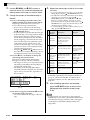
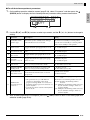
■ To edit Auto Accompaniment parameters
On the editing operation selection screen (page E-28), select “Parameter” and then press the dl
(ENTER) button to display the Auto Accompaniment parameter editing screen shown below.
Setting
2.
English
1.
Parameter
Use the ct (u) and dk (i) buttons to select a parameter, and the bt (w, q) buttons to change its
setting.
Parameter
Description
Setting
1
SYNCHRO TYPE:
Synchro type
Selects the synchro standby status and type
when the Music Preset is selected.
0 Off: Off (no standby)
1 Normal: From standby to normal pattern
2 Variation: From standby to variation pattern
3 Intro: From standby to intro pattern
2
DRUM ON/OFF:
Drum on/off
Toggles the drum part (page E-22) on or off.
OFF: Mutes the part.
ON: Sounds the part.
3
PERC ON/OFF:
Percussion on/off
Toggles the percussion part (page E-22) on or
off.
OFF: Mutes the part.
ON: Sounds the part.
4
BASS ON/OFF:
Bass on/off
Toggles the bass part (page E-22) on or off.
OFF: Mutes the part.
ON: Sounds the part.
Toggles the Chord 1 through 5 parts (page
E-22) on or off.
OFF: Mutes the parts.
ON: Sounds the parts.
CHORD1 - 5
5 - 9 ON/OFF:
Chord 1 - 5 on/off
10
INTRO CHORD:
Intro chord
Selects from among major (× 12 keys) and
minor (× 12 keys) for the intro chords.
C - B: Major (C to B)
Cm - Bm: Minor (Cm to Bm)
11
ENDING CHORD:
Ending chord
Selects from among major (× 12 keys) and
minor (× 12 keys) for the ending chords.
C - B: Major (C to B)
Cm - Bm: Minor (Cm to Bm)
12
AUTO FILL-IN:
Auto fill in on/off
Specifies whether or not a fill-in should be
inserted into the final measure of a chord
progression.
OFF: Fill-in not inserted
ON: Fill in inserted
TIMING SET:
Chord progression
variation
1 Normal: Edited chord progression proceeds
as-is.
• This parameter lets you add different
2 Half: Halves chord timing within a measure.
variations to the timing of the chord
3 Double: Doubles chord timing within a
progression being edited. You can use it to
measure.
match the chord progression to the beat of a 4 3/4: Multiplies chord timing within a measure
specific rhythm.
by 3/4. Select this setting to match to a
• A chord (step) that is outside of the rhythm’s
6/8 time rhythm.
beat is cut off.
5 6/4: Multiplies chord timing within a measure
by 3/2. Select this setting to match to a
6/4 time rhythm.
13
3.
After all editing operations are complete, press the cs (EXIT) button to return to the editing operation
selection screen (page E-28).
E-31
Registering Tone and Rhythm Setups
btw, q
brREGISTRATION
bm–bpTone and accompaniment areas
dmSTORE
ck–crTone areas
Registrations let you save Digital Piano setups (tone,
rhythm, tempo, etc.) and for quick and easy recall
when you need them.
Registrations are stored using eight banks of 12 areas
each as shown in the illustration below, for a total of 96
setups. Areas A through D on the left (tone and
accompaniment area) is for storing tones and Auto
Accompaniment settings, while areas 1 through 8 (tone
areas) are for storing tone settings only.
Tone and
accompaniment area
A
B
C
D
Tone area
1
2
3
4
5
6
7
8
1
2
3
Banks
4
5
6
7
8
Bank 7, Area B data
Bank 3, Area 2 data
Tone Settings
Keyboard Tone:
003 Harpsichord
Brightness: 2
Reverb: 1 Room
Chorus: Off
Tone Settings
Keyboard Tone:
002 Electric Piano2
Brightness: –1
Reverb: 4 Stadium
Chorus: 1 LightChorus
·
·
Auto Accompaniment
Settings
Rhythm: 005 Pop Rock
Tempo: 180
Accompaniment Volume:
098
·
·
E-32
·
·
■ Registration Data Types
z
•
•
•
•
•
•
•
•
•
•
•
•
•
•
Tone Settings
Tone numbers (main, layer, lower split)
Layer on/off
Layer balance
Split on/off
Split point
Octave shift
Brightness
Reverb
Chorus
Transpose
Touch response
Soft/sostenuto pedal setting
Damper pedal adjustment
Pitch bend range
z Auto Accompaniment Settings (Areas A through D
only)
• Rhythm number
• Accomp on/off
• Chord fingering mode
• Synchro standby
• Tempo
• Auto Accompaniment volume
• Auto harmonize
Registering Tone and Rhythm Setups
Recalling a Registration
1.
Configure the Digital Piano with the tone,
rhythm, and other settings you want to save.
2.
While holding down the dm (STORE) button,
use the bt (w, q) buttons to select the bank
where you want to save the registration.
1.
Press the br (REGISTRATION) button so its
lower lamp is lit.
This enters the registration recall mode.
Example: Bank 4
Lit
3.
Next, hold down the dm (STORE) button
again as you use the rhythm group buttons
(bm through bp) or instrument part buttons (ck
through cr) to select an area.
The data will be saved to the bank and area you specify.
Tone and
accompaniment area
bm bn
bo bp
2.
Use the bt (w, q) buttons to select the
bank where the registration you want to recall
is located.
3.
Use the rhythm group buttons (bm through bp)
or instrument part buttons (ck through cr) to
specify the area.
This will configure the Digital Piano with the
registration data located at the bank and area you
specified.
Example: When recalling the registration data in Bank
4, Area C
Tone area
ck cl
cm cn co cp
cq cr
dm
Example: Bank 4, Area C
Area
E-33
English
Saving Registration Data
Recording Your Keyboard Play
btw/NO, q/YES
6START/STOP
9RECORDER
You can record your music as you play and store up to
five songs in Digital Piano memory for later playback.
You can divide a song into parts (by instrument, by left
hand and right hand, etc.) and record each part
separately. You can even use “punch-in recording” to
edit specific parts of existing recordings.
bsFUNCTION
4.
1.
then light, indicating the playback mode.
• If you are using Auto Accompaniment, you also can
end the recording session by pressing the 5
(ENDING) button.
Lit: Playback mode
5.
To play back what you have recorded, press
6 (START/STOP) again.
• Each press of 6 starts and stops playback.
6.
To turn off the recorder, press the 9
(RECORDER) button so its lamp goes out.
Press the 9 (RECORDER) button twice so
its lamp is flashing.
This turns on the recorder and enters record mode.
• Each press of the 9 (RECORDER) button cycles
through modes as shown below.
ctu
When you are finished, press the 6 (START/
STOP) button.
This will cause the 9 (RECORDER) lamp to flash and
Recording or Playing Back a
Single Song
The following are the steps for recording or playing
back a single recorder memory song.
dki
Unlit: Recorder off
Recorder Off
Unlit
Recorder On
Lit: Playback mode
Flashing: Record mode
NOTE
2.
Configure the tone, rhythm, and other
settings you want to use.
• The settings you configure here will be included as
part of the recorded song data.
• For details about what is included in the recorded
song data, see “System Track” (page E-35).
3.
Play something on the keyboard.
Recording starts as soon as you play something.
• If Auto Accompaniment is playing, it will be
included in the recorded data.
E-34
• Recorder memory capacity is approximately 10,000
notes per song. When remaining capacity is 100
notes or less, the 9 (RECORDER) button lamp will
flash at high speed. Recording will stop
automatically when memory becomes full.
• Repeat, fast reverse, fast forward, pause, and tempo
adjustment during playback are the same as when
playing back user songs. See “Listening to Songs
Loaded from an External Source” (page E-25) for
more information.
• You can listen to the song data currently stored in
recorder memory at any time by pressing the
9 (RECORDER) button to enter the playback mode
and then pressing 6 (START/STOP).
Recording Your Keyboard Play
• A new recording replaces (deletes) previously
recorded contents.
• If power to the Digital Piano is cut off while recording
is in progress, everything you recorded up to that
point will be deleted. Take care so power is not
turned off accidentally during recording operations.
Recording to a Specific Track
(Part)
You can record specific instruments, the left hand and
right hand, or other parts of a song individually, and
then combine them into a final song.
■ What is a track?
Recording or Playing Back
Multiple Songs
You can record up to five songs (numbered 1 through
5) in memory. After that, you can select a specific song
for playback.
1.
Use the 9 (RECORDER) button to cycle
through the recorder modes until the
playback mode is selected.
Lit: Playback mode
2.
While holding down the bs (FUNCTION)
button, press the 9 (RECORDER) button.
This displays the song selection screen.
3.
Use the bt (w, q) buttons to select the
song number you want.
4.
Press the cs (EXIT) button to exit the song
selection screen.
5.
To record to the currently selected song,
press the 9 (RECORDER) button. To play
back the currently selected song, press the
6 (START/STOP) button.
6.
If you are recording, continue from step 2
under “Recording or Playing Back a Single
Song” (page E-34).
A “track” is a separate recorded part of a song. The
recorder of this Digital Piano supports a total of 17
tracks, which are divided between two types described
below.
z System Track
In addition to notes you play on the keyboard and
other performance operation data, the system track
also includes a wide range of setup information for
the song, including layer on/off, split on/off, tempo,
Auto Accompaniment settings, reverb on/off, etc.
When you record a single-track song to recorder
memory, as shown under “Recording or Playing
Back a Single Song” (page E-34) and “Recording or
Playing Back Multiple Songs” (page E-35),
everything is recorded to the system track.
z Tracks 01 through 16
These tracks can be used to record notes, as well as
pitch bend wheel and pedal operations, and the
keyboard tone setting. These tracks can be combined
with the system track and each other to create the
final song.
E-35
English
IMPORTANT!
Recording Your Keyboard Play
■ Supported Track Data
The following describes the data that can be recorded
to each type of track.
System Track, Tracks 01 through 16
Keyboard notes, keyboard tone setting (main), pedal
and pitch bend wheel operation
System Track only
Layer, split, octave shift, reverb, chorus, keyboard
temperament, tempo, Auto Accompaniment play, auto
harmonize, one-touch preset, Music Preset,*1
registration*1*2
4.
Select the tone of the part you want to record
to the track.
5.
Press the 6 (START/STOP) button.
This will start playback of what you recorded to the
system track and start recording to the currently
selected track. Play what you want to record to the
current track along with the playback from the system
track.
6.
*1 Recall only
*2 The Auto Accompaniment volume level and
transpose setting of the recalled data is not included
in the recording.
1.
STOP) button again to play back the track you just
recorded. Each press of 6 (START/STOP) starts and
stops playback.
• You can use the following procedure to turn specific
tracks on (play enabled) and off (play disabled). This
allows you to listen only to the track(s) you want
when recording a new track.
Record the first part to the system track.
(1) While holding down the bs (FUNCTION)
button, press the 9 (RECORDER) button.
This displays the song selection screen.
(2) Press the dk (i) button once.
This displays the track on/off screen.
(3) Use the bt (w, q) buttons to select the track
you want, and then press the dl (ENTER) button
to toggle it on or off.
• Use the procedure under “Recording or Playing Back
a Single Song” (page E-34) or “Recording or Playing
Back Multiple Songs” (page E-35) to record to the
system track.
2.
Use the 9 (RECORDER) button to cycle
through the recorder modes until the
RECORDER lamp is flashing (record mode).
7.
Flashing: Record mode
3.
While holding down the bs (FUNCTION)
button, press the 9 (RECORDER) button.
This displays the track selection screen.
Use the bt (w, q) button to select the track you
want to record next (T01 through T16).
After selecting a track, press the cs (EXIT) button to
exit the track selection screen.
E-36
Track Name
Display
System Track
Sys
Tracks 01 through 16
T01 through T16
To stop recording, press the 6 (START/
STOP) button again.
This enters the playback mode. Press the 6 (START/
Repeat steps 2 through 6 as required to
record all of the tracks you want.
Deleting Recorder Data
You can use the procedures below to delete an entire
recorder song or to delete a specific track of a recorder
song.
Deleting a Recorder Song
1.
Use the 9 (RECORDER) button to cycle
through the recorder modes until the
RECORDER lamp is lit (playback mode).
Re-recording Part of a
Recorder Song
(Punch-in Recording)
You can use punch-in recording to re-record a specific
part of recorder song that you want to improve or
correct.
Mistake
Playback
Lit: Playback mode
Use punch-in
recording to re-record
only this part.
2.
While holding down the bs (FUNCTION)
button, press the 9 (RECORDER) button.
1.
This displays the recorder song selection screen.
3.
Use the bt (w, q) buttons to select the
recorder song you want to delete.
4.
Hold down the 9 (RECORDER) button until
the message “Sure?” appears on the display.
5.
Press the bt (YES) button to delete the
recorder song.
• To cancel the delete operation, press the bt (NO)
Turn on the recorder, enter the record mode,
and select the track that contains the section
you want to re-record.
• See step 3 under “Recording to a Specific Track
(Part)” (page E-35).
2.
Hold down the 9 (RECORDER) button until
the punch-in recording screen appears on the
display.
3.
Press the 6 (START/STOP) button.
button.
Deleting a Recorder Song Track
1.
2.
Perform steps 1 through 3 of the procedure
under “Deleting a Recorder Song” to select
the recorder song that contains the track you
want to delete.
Press the dk (i) button.
This displays the track selection screen.
3.
Use the bt (w, q) buttons to select the
track you want to delete.
4.
Hold down the 9 (RECORDER) button until
the message “Sure?” appears on the display.
5.
Press the bt (YES) button to delete the track.
• To cancel the delete operation, press the bt (NO)
button.
This will start playback of the selected track.
4.
When playback reaches the point you want to
re-record, play the notes and perform the
other operations you want.
This automatically starts punch-in recording, which
will continue until step 5, below.
• Any one of the following also will start punch-in
recording: a pedal or pitch bend wheel operation;
pressing the 9 (RECORDER) button;*1 changing the
tone setting; changing the rhythm, or tempo setting*2
*1 Press 9 (RECORDER) when you want to start
punch-in recording without note input or a setting
change.
*2 System track only
• You can perform 3 (REW), 4 (FF), and 5 (PAUSE)
button operations during punch-in playback to jump
more quickly to the section you want to re-record.
E-37
English
Recording Your Keyboard Play
Recording Your Keyboard Play
5.
To stop punch-in recording, press the 6
(START/STOP) button again.
Anything in the track following the point where you
pressed the 6 (START/STOP) button will be retained
as-is.
• If you want to delete all of the data in the track
following the section you re-recorded with punch-in
recording, press the 9 (RECORDER) button in place
of the 6 (START/STOP) button above.
• If you want to cancel punch-in recording and retain
the original (unedited) track data, hold down the 9
(RECORDER) button until the display exits the
punch-in recording screen.
Specifying the Punch-in Recording
Location (Auto Punch-in Recording)
You can use the following procedure to specify a
particular range for punch-in recording.
Start measure
End measure
Punch-in recording range
1.
Turn on the recorder, enter the record mode,
and display the recording setup screen.
• While holding down the bs (FUNCTION) button,
press the 9 (RECORDER) button.
2.
Use the ct (u) and dk (i) buttons to display
“AutoPu.IN”, and then use the bt (w, q)
buttons to select the start measure.
3.
Use the ct (u) and dk (i) buttons to
display “AutoPu.OUT”, and then use the bt
(w, q) buttons to select the end measure.
• After selecting the start and end measures, press the
cs (EXIT) button to exit the recording setup screen.
4.
Select the track that contains the range of
measures you want to re-record.
• See step 3 under “Recording to a Specific Track
(Part)” (page E-35).
5.
Hold down the 9 (RECORDER) button until
the punch-in recording screen appears on the
display.
6.
Press the bt (q) button to turn on auto
punch-in recording.
E-38
7.
Press the 6 (START/STOP) button to start
playback.
• Punch in recording will start from the start measure
and stop with the end measure automatically.
8.
Play the notes and perform the other
operations you want.
Recording Your Keyboard Play
■ Performing Punch-in Recording for Areas
Smaller than One Measure
English
Use the procedure below to specify a punch-in
recording area that includes a part of a measure.
Example: To re-record from beat 3 of measure 2 up to beat
1 of measure 4
To re-record this section
1.
Start playback of the song that contains the
section you want to re-record.
2.
When playback reaches the beginning of the
section you want to re-record, press the 2
(REPEAT) button.
3.
When playback reaches the end of the
section you want to re-record, press the 2
(REPEAT) button again.
4.
Press the 6 (START/STOP) button to stop
playback.
5.
Turn on the recorder and select the track that
contains the section you want to re-record.
• For information about selecting a track, see step 3
under “Recording to a Specific Track (Part)” (page
E-35).
6.
Hold down the 9 (RECORDER) button until
the punch-in recording screen appears on the
display.
7.
Press the bt (q) button to turn on auto
punch-in recording.
8.
Press the 2 (REPEAT) button to turn on
repeat.
9.
Press the 6 (START/STOP) button.
This starts punch-in playback from the measure before
the location (start point) you specified in step 2, above.
• Punch-in recording starts automatically when
playback reaches the start point and ends
automatically when it reaches the location you
specified in step 3 (end point).
E-39
Other Settings
btw, q
bsFUNCTION
You can use the settings in this section to adjust the
tuning and touch of the keyboard, to configure pedal
and MIDI settings, and to configure other parameters
in order to tailor Digital Piano operation to your
particular needs.
Configuring Settings
1.
Press the bs (FUNCTION) button.
The FUNCTION lamp will light and the function screen
will appear on the display. (See table below.)
Parameter or group
2.
Setting
Use the ct (u) and dk (i) buttons to select
one of the parameters (1 through 8) shown in
the table below.
• Parameters 4 through 8 actually are parameter
groups. After selecting a group, press the dl
(ENTER) button, and then use buttons ct (u) and dk
(i) to select the parameter you want.
• Short cut buttons also are available for accessing a
parameter directly after you press the bs
(FUNCTION) button, without going through the
menu. See the “Shortcut Button” column in the table
below for the applicable shortcut button of each
parameter.
3.
E-40
Use the bt (w, q) buttons to change the
setting of the currently selected parameter.
• To return to the function screen, press the cs (EXIT)
or bs (FUNCTION) button.
dki
ctu
NOTE
• Holding down the bs (FUNCTION) button while
you press the bt (w, q) buttons in step 3 will
scroll the setting in steps of 10.
• You also can use the bs (FUNCTION) button for
faster scrolling while changing the tone number,
rhythm number, and other scrollable settings.
• Keep the bs (FUNCTION) button depressed
while pressing a bt (w, q) button for highspeed scrolling. Releasing the bs (FUNCTION)
button first can result in another unintended
setting being changed.
Other Settings
Parameter
Display
Name
Description
Settings
1
Keyboard Key (Transpose)
Transpose
Adjusts keyboard tuning by semitone
units.
–12 to 00 to 12
semitones
2
Keyboard Fine Tuning
(Tuning)
Tune
Adjusts keyboard tuning by cent
(1 semitone = 100 cents) units.
–99 to 00 to 99 cents
3
Keyboard Touch (Touch
Response)
Touch
Adjusts keyboard touch.
Off: Off
1: Strong sound even
with light pressure
2: Normal
3: Normal sound even
with strong pressure
4
Volume Level Group
4-1
4-2
4-3
4-4
5
ck
cl
cm
co
Volume
Layered Tone Volume LayerBal.
(Layer Balance)
Adjusts the volume level of the layered –24 to 00 to 24
tone without changing the keyboard
main tone.
Auto Accompaniment AccompVol.
Volume
Adjusts the volume level of Auto
00 to 42
Accompaniment without changing the
keyboard tone volume level.
bs – bl
Song Volume
Adjusts the volume level of user song
playback without changing the
keyboard tone volume level.
00 to 42
bs – bl
See page E-15.
00 to 42
Changes the temperament of the
keyboard and Auto Accompaniment
from the standard equal temperament
to another tuning more suitable for
playing classics, etc.
• Pressing a keyboard key while the
temperament screen is displayed
will make the pressed key the base
note of the temperament.
<Temperaments>
00: Equal / 01: Pure Major /
02: Pure Minor /
03: Pythagorean /
04: Kirnberger 3 /
05: Werckmeister /
06: Mean-Tone / 07: Rast /
08: Bayati / 09: Hijaz /
10: Saba / 11: Dashti /
12: Chahargah /
13: Segah / 14: Gurjari
Todi / 15: Chandrakauns /
16: Charukeshi
Metronome Volume
SongVol.
MetroVol.
Temperament/Effect Group Tmpr/Effect
5-1
Shortcut
Button*
Temperament
Temper.
–
bs – 8
cp
–
<Base notes>
C to B (12 types)
5-2
5-3
Stretch Tuning
AccompTmpr
Stretch
Turn this setting off to play Auto
Accompaniment patterns using
standard equal temperament (00:
Equal), regardless of the temperament
setting currently selected with the
Temperament parameter (5-1).
Off, On
Sharpens high notes and flattens low
notes to achieve stretch tuning. Turn
off this setting to play with normal
(non-stretch) tuning.
Off, On
–3 to 0 to 3
–
–
5-4
Brilliance
Brilliance
See page E-12.
5-5
Acoustic Resonance
AcoResona.
Reproduces the acoustic resonance
Off, On
that occurs when the damper pedal is
depressed on a grand piano.
No acoustic resonance is applied when
this setting is turned off.
5-6
5-7
*
Accompaniment
Temperament
Octave Shift
Duet Mode
OctShift
Duet
See page E-12.
See page E-15.
–
–
U1 : –2 to 0 to 2
U2 : –2 to 0 to 2
L1 : –2 to 0 to 2
bs – br
Off, On
bs – dk
bs – bl in this column means, “While holding down bs, press bl.”
E-41
English
No.
Other Settings
No.
6
Parameter
Description
Settings
7
Pre-count
PreCount
Turn on this setting for an audible
Off, On
count before starting playback of a
user song or a song on a memory card.
–
bs – 2
6-2
Song Repeat
SongRepeat
Turn on this setting to repeat play a
Off, On
user song or a song on a memory card.
6-3
Card Folder
CARD Folder
See page E-53.
(Folder Name)
6-4
Formatting a Memory
Card
CARD
FORMAT
See page E-45.
–
6-5
Card File Delete
File DELETE
See page E-47.
–
–
6-6
Card File Rename
File RENAME See page E-48.
–
–
MIDI Group
MIDI
7-1
KeyboardCh
7-2
7-3
7-4
Keyboard Channel
Accomp MIDI Out
MIDI In Chord Judge
Local Control
AccompOut
ChordJudge
LocalCtl.
bs – bn
to bp
bs – dl
cr
Selects the keyboard channel, which is
the channel used to send MIDI data
corresponding to Digital Piano
keyboard play to an external device.
01 to 16
–
Turn on this setting to send MIDI data Off, On
corresponding to Auto
Accompaniment to an external device.
–
Select whether chord input should be Off, On
performed when an Auto
Accompaniment chord keyboard MIDI
note on message is received.
–
Turn off this setting to have keyboard
notes sent to an external device
without being sounded by the Digital
Piano.
–
bs – bl in this column means, “While holding down bs, press bl.”
E-42
Shortcut
Button*
cq
Song Playback/Card Group Play/CARD
6-1
*
Display
Name
Off, On
Other Settings
8
Parameter
Description
Settings
General
8-1
Display Contrast
Contrast
Adjusts the contrast of the Digital
Piano’s display.
00 to 16
8-2
Soft/Sostenuto Pedal
Jack Setting
Ped.Assign
Specifies whether the pedal unit
connected to the SOFT/SOSTENUTO
jack is a soft pedal or a sostenuto
pedal.
• See page E-15 for details about the
two pedal types.
SFT : Soft pedal
SOS : Sostenuto pedal
Adjusts the amount of the pedal effect
applied when the damper pedal is
pressed part way.
00 to 42
Specifies the amount of pitch bend
applied when the pitch bend wheel is
rotated all the way up or down.
00 to 12 semitones
Turn on to lock the Digital Piano’s
control panel to prevent unauthorized
or accidental operation.
• This setting is disabled in the Duet
Mode, while the recorder is on, or
while Auto Accompaniment, a song,
or the metronome is playing.
Off, On
8-4
8-5
8-6
Half Pedal Effect
Pitch Bend Range
Panel Lock
Setting Backup
HalfPedal
BendRange
PanelLock
BackUp
Shortcut
Button*
cs
Other Parameters Group
8-3
*
Display
Name
–
–
–
–
Switching this setting from off to on
Off, On
will save various Digital Piano settings
in effect at that time, and restore them
the next time the Digital Piano is
turned on.
• This operation is disabled in the
Duet Mode, while the recorder is on,
or while Auto Accompaniment, a
song, or the metronome is playing.
–
–
bs – bl in this column means, “While holding down bs, press bl.”
E-43
English
No.
Using a Memory Card
btw/NO, q/YES
6PLAY/STOP
7PART
bsFUNCTION
bm–bpFolders
You can use the procedures in this section to transfer
edited Auto Accompaniment data, recorder data, and
other data from the Digital Piano to a commercially
available SD memory card for storage. You also can use
a memory card to transfer standard MIDI files (SMF),
and accompaniment data you downloaded from the
CASIO website from your computer to Digital Piano
memory. Once you do, you can use them as user songs
and user rhythms.
z Use a memory card with a capacity of 2GB or less.
Use of a card with a capacity that is greater than
2GB or other types of memory cards is not
supported.
z In this manual, mentions of a “memory card” refer
to an SD memory card.
■ Types of Data
Supported
Operations
Data Type
Description
(File Name Extension)
User
rhythms
(page E-21)
User songs
(page E-25)
Save to
Memory
Card
Load
from
Memory
Card
Auto Accompaniment
data edited with this
Digital Piano (AC7)
O
O
One of the following two
types of music data
1. CASIO format data
(CM2)
2. Standard MIDI files
(MID)
SMF Format 0 or
Format 1
–
O
User Music
Presets
(page E-28)
Music Preset data edited
on this Digital Piano
(MPS)
O
O
Recorder
songs
(page E-34)
Song data recorded on
this Digital Piano (CSR)
O*
O
Registration Tone and rhythm setup
(page E-32) settings (CR6)
O
O
* Can be saved as a standard MIDI file (SMF format 0).
E-44
dlCARD/INTERNAL,
ENTER
ctu dki
Card and Card Slot Precautions
IMPORTANT!
• Be sure to observe the precautions provided in the
documentation that comes with the memory card.
• Memory cards have a write-protect switch. Use it
when you want to protect the data on the card from
accidental deletion.
• Avoid using a memory card under the following
conditions. Such conditions can corrupt data stored
on the memory card.
• Areas subjected to high temperature, high
humidity, or corrosive gas
• Areas subjected to strong electrostatic charge and
digital noise
• Never touch the contacts of a memory card when
loading it or removing it from the Digital Piano.
• Never eject the memory card while data is being
written to or loaded from it. Doing so can corrupt the
data on the memory card and damage the memory
card slot.
• Never insert anything besides a memory card into
the card slot. Doing so creates the risk of
malfunction.
• Electrostatic charge from your fingers or the memory
card to the card slot can cause malfunction of the
Digital Piano. If this happens, turn the Digital Piano
off and then back on again.
A memory card can become quite warm after very
long use in the memory card slot. This is normal and
does not indicate malfunction.
Using a Memory Card
Loading and Removing a
Memory Card
Formatting a Memory Card
IMPORTANT!
• A memory card must be positioned correctly when
being loaded into the Digital Piano. Trying to force
an improperly oriented memory card into the slot can
damage the memory card and the slot.
1.
With the top of the memory card facing
upwards (so you can see it), carefully insert it
into the Digital Piano’s memory card slot (dn)
until stops with a click.
1.
Insert the memory card you want to format
into the Digital Piano’s memory card slot.
Make sure the write-protect switch of the memory card
is not in the write-protect position so writing is enabled.
2.
Top
While holding down the bs (FUNCTION)
button, press the dl (CARD/INTERNAL)
button.
This displays the format screen.
2.
To remove the memory card first press it into
the slot further.
This will cause the memory card to disengage and eject
partially. Pull the memory card the rest of the way out
of the slot.
3.
Press the dl (ENTER) button.
This will display a confirmation message (SURE?).
• If you want to cancel the format operation, press the
bt (NO) or cs (EXIT) button.
4.
Press the bt (YES) button.
• The message “Please Wait” will remain on the
display while the format operation is being
performed. Do not perform any Digital Piano
operation while this message is on the display.
“Complete” appears on the display after formatting
is complete.
E-45
English
IMPORTANT!
• Format a memory card before using it for the first
time.
• Before formatting a memory card, make sure it does
not have any valuable data stored on it.
• The memory card format operation performed by this
Digital Piano is a “quick format”. If you want to
completely delete all of the data on the memory
card, format it on your computer or some other
device.
Using a Memory Card
Saving Digital Piano Data to a
Memory Card
5.
• The file number is the final two characters of the file
name* that appears on the display. By changing this
within the range of 01 to 99 for each save, up to 99
files of the same data type can be stored on the
memory card.
* The first six characters of the file name indicate the
data type as shown below. These characters are
fixed and cannot be changed.
Use the following procedure to save Digital Piano data
to a memory card.
• Recorder songs can be saved as a standard MIDI file
(SMF format 0).
• User songs (downloaded songs, etc.) cannot be
saved to a memory card.
1.
2.
Insert a memory card into the Digital Piano’s
memory card slot.
Select the data you want to save to the
memory card.
To select this
type of data:*1
Do this:
User rhythms
Select from among user rhythms 001
through 010 (page E-21).
User Music
Preset
Select from among user Music Preset
001 through 050 (page E-28).
Recorder songs Select from among recorder songs 1
through 5 (page E-34).
Registrations*2
Press the br (REGISTRATION) button
so its lower lamp is lit.
*1 For more information about data types, see page
E-44.
*2 All registration data (8 banks × 12 areas) is saved
in a single file.
3.
Hold down the dl (CARD/INTERNAL) button
until the “LOAD” screen appears for the data
you selected.
• You can cancel the LOAD/SAVE operation any time
by pressing the cs (EXIT) button.
4.
Press the dk (i) button to switch to the
“SAVE” screen for the data you selected.
• If you are saving a recorder song to a standard MIDI
file (SMF), press the dk (i) button again so “SMF” is
displayed on the right side of the screen.
E-46
Use the bt (w, q) buttons to select the file
number (01 to 99) you want to assign to the
data when it is saved to the memory card.
Data Type
File Name
(** = file number)
User rhythms
USRRHY**
User Music Preset
USRMPS**
Recorder songs
RECSNG**
Registrations
REGIST**
6.
Press the dl (ENTER) button.
• The message “Please Wait” will remain on the
display while the save operation is being performed.
Do not perform any Digital Piano operation while
this message is on the display. “Complete” appears
on the display after data save is complete.
• If there already is a file with the same name on the
memory card, a message (Replace?) will appear
asking if you want to replace it with the new data.
Press the bt (YES) button to overwrite or the bt (NO)
button to cancel the save operation.
■ Memory Card Data Storage
The above procedure stores Digital Piano data in a
folder named MUSICDAT on the memory card.
• The MUSICDAT folder is created automatically
when you format the memory card on the Digital
Piano (page E-45).
• Note that files not in the MUSICDAT folder cannot
be loaded, deleted, or renamed by this Digital Piano.
You also will not be able to load or delete any file
stored in any subfolder inside the MUSICDAT
folder.
Using a Memory Card
You can use the procedure below to load data from a
memory card into Digital Piano memory.
Deleting Memory Card Data
Use the following procedure to delete memory card
data (files).
1.
Insert the memory card into the Digital
Piano’s memory card slot.
• Make sure that all of the data you want to load is in
the MUSICDAT folder on the memory card.
Note that if you put data into a music data play-only
folder on a memory card (such as the MUSIC__B
folder), you will no longer be able to load that file into
Digital Piano memory.
2.
While holding down the bs (FUNCTION)
button, press the dl (CARD/INTERNAL)
button.
1.
3.
IMPORTANT!
2.
Insert the memory card into the Digital
Piano’s memory card slot.
Select the data you want to load.
To load this
type of data*
Select from among user rhythms 001
through 010 (page E-21).
User songs
Select from among user songs 001
through 010 (page E-25).
User Music
Preset
Select from among user Music Presets
001 through 050 (page E-28).
Recorder songs Select from among recorder songs 1
through 5 (page E-34).
Press the br (REGISTRATION) button
so its lower lamp is lit.
* For more information about data types, see page
E-44.
3.
Press the dk (i) button.
This displays the file delete screen.
4.
Press the dl (ENTER) button.
This displays a screen for selecting data for deletion.
Do this:
User rhythms
Registrations
This displays the memory card format screen (page
E-45).
5.
Use the bt (w, q) buttons to select the file
you want.
6.
Press the dl (ENTER) button.
This will display a confirmation message (SURE?).
• If you want to cancel the delete operation, press the
bt (NO) or cs (EXIT) button.
7.
Press the bt (YES) button.
• The message “Please Wait” will remain on the
display while the delete operation is being
performed. Do not perform any Digital Piano
operation while this message is on the display.
“Complete” appears on the display after deletion is
complete.
Hold down the dl (CARD/INTERNAL) button
until the “LOAD” screen appears for the data
you selected.
• You can cancel the LOAD/SAVE operation any time
by pressing the cs (EXIT) button.
4.
Use the bt (w, q) buttons to select the file
you want.
5.
Press the dl (ENTER) button.
• The message “Please Wait” will remain on the
display while the load operation is being performed.
Do not perform any Digital Piano operation while
this message is on the display. “Complete” appears
on the display after data loading is complete.
• If there already is a file with the same name on the in
Digital Piano memory, a message (Replace?) will
appear asking if you want to replace it with the new
data. Press the bt (YES) button to overwrite or the bt
(NO) button to cancel the load operation.
E-47
English
Loading Data from a Memory
Card
Using a Memory Card
Renaming a Memory Card File
Use the following procedure to change the file name of
a file on a memory card.
1.
Insert the memory card into the Digital
Piano’s memory card slot.
2.
While holding down the bs (FUNCTION)
button, press the dl (CARD/INTERNAL)
button.
This displays the memory card format screen (page
E-45).
3.
4.
Press the dk button (i) twice so “File
RENAME” is displayed.
Press the dl (ENTER) button.
This displays a screen for changing the file name.
5.
Use the bt (w, q) buttons to select the file
you want.
6.
Use the dk (i) and ct (u) buttons to move
the flashing cursor to the character you want
to change, and then use the bt (w, q)
buttons to change the character.
• The characters you can select are shown below.
0
A
K
U
(
7.
1 2 3
B C D
L M N
V W X
) - ^
4
E
O
Y
{
5 6
F G
P Q
Z S
} @
7
H
R
&
~
8
I
S
_
`
9
J
T
'
After the file name is the way you want, press
the dk (ENTER) button.
This will display a confirmation message (SURE?).
• If you want to cancel the renaming operation, press
the bt (NO) or cs (EXIT) button.
8.
You can use the procedure below to play back a user
song (page E-25) stored on a memory card without
loading the song into Digital Piano memory.
■ Memory Card Folders
Formatting a memory card on the Digital Piano will
automatically create the four folders shown below. You
put playback song data into any one of the folders. You
can use the four folders to group your music data by
family member, genre, or some other categories. Use
buttons bm through bp (A through D) to select a folder.
Folder Name
Button Assignment
MUSICDAT
bm (A)
bn (B)
bo (C)
bp (D)
MUSIC__B
MUSIC__C
MUSIC__D
1.
Store the music data you want to play back in
one of the memory card folders.
2.
Insert the memory card into the Digital
Piano’s memory card slot.
3.
4.
Press the dl (CARD/INTERNAL) button.
5.
Use the bt (w, q) buttons to select the
song you want.
6.
Press the 6 (PLAY/STOP) button.
Press one of the folder selection buttons (bm
through bp) to select the card folder you want.
This will display the song number and song
name of the first song in the folder you
selected.
This will start playback.
• Each press of 6 (PLAY/STOP) starts and stops
playback.
• Fast forward, fast reverse, tempo changes, and other
operations are the same as those during playback of a
user song in Digital Piano memory. For details, see
“Listening to Songs Loaded from an External Source”
(page E-25).
Press the bt (YES) button.
• The message “Please Wait” will remain on the
display while the rename operation is being
performed. Do not perform any Digital Piano
operation while this message is on the display.
“Complete” appears on the display after renaming is
complete.
E-48
Playing Back a Song from a
Memory Card
7.
To quit memory card data playback, press the
dl (CARD/INTERNAL) button.
Playing Back All of the Songs in a Folder
Use the procedure below to select one of the four
folders on a memory card and play back all of the
songs in the folder in succession.
1.
While holding down the 7 (PART) button,
press the 6 (PLAY/STOP) button.
This will start tone demo tune playback (page E-24).
2.
Press the dl (CARD/INTERNAL) button.
This will switch from tone demo tune playback to card
tune playback.
• While playback is in progress, you can use the bm
through bp buttons (Folder A through Folder D) to
switch playback to another folder.
• To stop playback, press the 6 (PLAY/STOP) button.
Assigning a Different Folder to a Folder
Selection Button
2.
1.
Remove the memory card from the Digital
Piano’s memory card slot (page E-45).
• Removing the memory card from the slot enables
internal memory area data operations (save, load,
delete, rename, playback).
Perform this operation
Save data to
the internal
memory area
From step 2 under “Saving Digital
Piano Data to a Memory Card” on page
E-46
Load data
from the
internal
memory area
From step 2 under “Loading Data from
a Memory Card” on page E-47
From step 2 under “Deleting Memory
Card Data” on page E-47
• This displays the folder assignment screen for the
button you press.
Delete data
from the
internal
memory area
Use the bt (w, q) buttons to select the
folder you want to assign to the button.
Rename a file
in the internal
memory area
From step 2 under “Renaming a
Memory Card File” on page E-48
Play back a
song in the
internal
memory area
From step 3 under “Playing Back a
Song from a Memory Card” on page
E-48
• The operation in step 4 of the above
procedure is not possible in the case
of internal memory area song
playback.
While holding down the bs (FUNCTION)
button, press the folder selection button (bn,
bo, or bp) whose folder assignment you want
to change.
• You can select any folder on the memory card.
3.
Even when you do not have a memory card loaded in
the Digital Piano’s memory card slot, you can save up
to about 16MB of data in the Digital Piano’s internal
memory area. You also can load and delete internal
memory area data using the same procedures that you
use with a memory card.
To do this
You can use the following procedure to assign different
folders to folder selection buttons bn, bo, and bp.
1.
Saving Data to Digital Piano
Memory (Internal Area) Instead
of a Memory Card
After selecting a folder, you can rename it if
you want.
• Perform steps 6 through 8 of the procedure under
“Renaming a Memory Card File” (page E-48) to
rename the folder.
E-49
English
Using a Memory Card
Using a Memory Card
Error Messages
One of the error messages below appears on the display when a problem occurs.
• All mentions of “memory card” in the following table refer to an SD memory card.
Display
Message
Cause
Required Action
Convert
Reduce the size of the recorder song data by deleting unneeded
There is not enough Digital Piano memory available to
convert a recorder song (page E-34) to SMF data and store tracks (page E-37), if there are any.
it on the memory card.
Format
1. The current memory card format is not compatible
with this Digital Piano.
1. Format the memory card on the Digital Piano (page E-45).
2. The memory card capacity is greater than 2GB.
2. Use a memory card with a capacity of 2GB or less.
3. There is something wrong with the memory card.
3. Use a different memory card.
1. There is not enough room available on the memory
card.
1. Delete some of the files on the memory card to make room for
new data (page E-47), or use a different card.
2. There is not enough room available in Digital Piano
memory.
2. Delete some or all user data from Digital Piano memory to make
room for new data.
1. Memory card data is corrupted.
1. Use a different memory card.
2. Digital Piano memory is corrupted.
2. Back-up Digital Piano memory data by copying it to your
computer, and then turn the Digital Piano off and then back on
again.
• Note that you may not be able to back-up Digital Piano data
in certain cases.
MediaFull
Media R/W
No Card
1. The memory card is not loaded correctly in the Digital 1. Correctly load the memory card into the memory card slot.
Piano’s memory card slot.
2. The memory card was removed while some operation 2. Do not remove the memory card while any operation is in
was in progress.
progress.
No Data
You tried to save a Digital Piano user area (user rhythm,
user rhythm song, etc.) that does not contain any data to
the memory card.
Select a user area that contains data.
No File
1. There is no MUSICDAT folder (page E-46) on the
memory card.
1. Create a MUSICDAT folder on the memory card or format the
memory card on the Digital Piano (page E-45).
2. There is no loadable or playable data in the
MUSICDAT folder, or there is no playable data in a
song playback folder (MUSIC__B, etc.)
2. Move the file you want to load or play into the memory card’s
MUSICDAT folder. For song playback, you can place the song
data into any one of the following folders: MUSIC__B,
MUSIC__C, or MUSIC__D.
Not SMF01
You are attempting to play back SMF Format 2 song data. This Digital Piano supports playback of SMF Format 0 or Format 1
only.
Protect
The memory card is write-protected.
ReadOnly
A read-only file with the same name you are trying to use • Use a different name to save the new file.
is already stored on the memory card.
• Remove the read-only attribute from the existing file and
overwrite it with the new file.
• Use a different memory card.
SizeOver
1. The data on the memory card is too big to play.
1. This Digital Piano supports playback of song data files with a
maximum size of about 320 kbytes.
2. The data you are trying to load is too large.
2. The following is the maximum data size (per data item) when
loading data into Digital Piano memory.
User rhythm: Approximately 40KB
User Song: 320KB
User Music Preset: Approximately 8KB
1. The memory card data is corrupted.
—
WrongDat
2. The memory card contains data that is not supported
by this Digital Piano.
E-50
Use the memory card’s write protect switch to enable writing.
You can connect the Digital Piano to a computer and
exchange MIDI data between them. You can send play
data from the Digital Piano to music software running
on your computer, or you can send MIDI data from
your computer to the Digital Piano for playback.
Minimum Computer System
Requirements
The following shows the minimum computer system
requirements for sending and receiving MIDI data.
Check to make sure that your computer complies with
these requirements before connecting the Digital Piano
to it.
Connecting the Digital Piano
to Your Computer
IMPORTANT!
• Make sure you follow the steps of the procedure
below exactly. Connecting incorrectly can make data
send and receive impossible.
1.
Turn off the Digital Piano and then start up
your computer.
• Do not start up the music software on your computer
yet!
2.
z Operating System
Windows® XP (SP2 or later)*1
Windows Vista® *2
Windows® 7 *3
Mac OS® X (10.3.9, 10.4.11, 10.5.8 or later, 10.6.6 or later)
*1: Windows XP Home Edition
Windows XP Professional (32-bit)
*2: Windows Vista (32-bit)
*3: Windows 7 (32-bit, 64-bit)
After starting up your computer, use a
commercially available USB cable to connect
it to the Digital Piano.
B connector
USB cable
(A-B type)
A connector
Computer USB port
z USB port
IMPORTANT!
• Never connect to a computer that does not conform
to the above requirements. Doing so can cause
problems with your computer.
Digital Piano USB port
3.
Turn on the Digital Piano.
• If this is the first time you are connecting the Digital
Piano to your computer, the driver software required
to send and receive data will be installed on your
computer automatically.
4.
5.
Start up your computer’s music software.
Configure the music software settings to
select one of the following as the MIDI device.
CASIO USB-MIDI : (For Windows Vista, Windows 7,
Mac OS X)
USB Audio Device: (For Windows XP)
• For information about how to select the MIDI device,
see the user documentation that comes with the
music software you are using.
IMPORTANT!
• Be sure to turn on the Digital Piano first before
starting up your computer’s music software.
B
E-51
English
Connecting to a Computer
Connecting to a Computer
NOTE
• Once you are able to connect successfully, there is no
problem with leaving the USB cable connected when
you turn off your computer and/or Digital Piano.
• This Digital Piano conforms to General MIDI Level 1
(GM).
• For detailed specifications and connections that
apply to MIDI data send and receive by this Digital
Piano, see the latest support information provided
by the website at the following URL.
http://world.casio.com/
Using MIDI
What is MIDI?
The letters MIDI stand for Musical Instrument Digital
Interface, which is the name of a worldwide standard
for digital signals and connectors that makes it possible
to exchange musical data between musical instruments
and computers (machines) produced by different
manufacturers.
For details about the MIDI specifications of this Digital
Piano, see the “MIDI Implementation” document at the
website located at the URL below.
http://world.casio.com/
NOTE
• You can alter the Digital Piano’s MIDI setup by
changing the MIDI data send channel or other
settings. For details, see “MIDI Group” (page E-42).
• Use a separately available or commercially available
MIDI cable to connect the MIDI terminals of your
Digital Piano and another electronic musical
instrument for exchange of MIDI data.
E-52
Transferring Data between the
Digital Piano and a Computer
You can use the procedure below to transfer edited
Auto Accompaniment data, recorder data, and other
data from the Digital Piano to a computer for storage.
You also can transfer standard MIDI files (SMF), as
well as Auto Accompaniment data you downloaded
from the CASIO website from your computer to Digital
Piano memory.
■ Data Types Supported for Data Transfer
The types of data that can be exchanged with a
computer are the same as those that can be saved to an
SD memory card from the Digital Piano (page E-44).*
* Recorder songs (page E-34) cannot be converted to
SMF data for storage on a computer.
IMPORTANT!
• Turning off the Digital Piano while data is being
saved or loaded can cause all data currently stored
in Digital Piano memory (recorded songs, etc.) to be
deleted. Take care so power is not turned off
accidentally during data save and load operations. If
data is deleted, it will take longer than normal for the
Digital Piano to power up the next time you turn it on
(page E-9).
1.
Remove the memory card from the Digital
Piano’s memory card slot (page E-45).
• You will not be able to transfer data between the
Digital Piano and a computer if a card is in the
memory card slot.
2.
Perform steps 1 through 3 under “Connecting
the Digital Piano to Your Computer” to
connect the piano to your computer (page
E-51).
Connecting to a Computer
3.
While holding down the bs (FUNCTION)
button, press the dm (USB DEVICE MODE)
button.
5.
Double-click “PIANO”.
You now should see five data folders, one for each data
type.
English
This will enter the storage mode, which enables data
transfer with the connected computer. The bs
(FUNCTION) button lamp will flash and the display
will appear as shown below.
This folder is not a data folder. You should not try to
use it for normal Digital Piano operation.
• To exit the storage mode at any time, press the bs
(FUNCTION) button. This is the only button
operation that is supported while the Digital Piano is
in the storage mode.
• You will not be able to enter the storage mode while
any one of the following operations is in progress.
Metronome, Auto Accompaniment, song playback,
recorder (on), Auto Accompaniment editing, Music
Preset editing, data transfer between the Digital
Piano and card
4.
If your computer is running Windows XP,
double-click “My Computer”.*
Under “Devices with Removable Storage”, you should
be able to see a folder representing Digital Piano
memory or the memory card loaded in the Digital
Piano (see below).
* Windows Vista, Windows 7: Double-click “Computer”.
Mac OS: Skip step 4 and double-click “PIANO” on
your Mac desktop.
PIANO drive (Digital Piano memory)
B
6.
Referring to the table below, open the folder
that corresponds to the type of data you want
to transfer.
To load this
type of data
Open this data
Data File Name
folder
User rhythms
(page E-21)
RHYTHMAC
BIDRHYnn.AC7
(nn: 01 to 10)
User songs
(page E-25)
MUSICLIB
BIDSNGnn.MID
(nn: 01 to 10)
(SMF Format 0 or
Format 1)
BIDSNGnn.CM2
(nn: 01 to 10)
(CASIO format)
User Music Presets
(page E-28)
MUSICPST
BIDMPSnn.MPS
(nn: 01 to 50)
Recorder songs
(page E-34)
RECORDER
BIDRECnn.CSR
(nn: 01 to 05)
Registration
(page E-32)
REGISTMR
BIDREGAL.CR6
• Data types and contents are the same as those when
saving Digital Piano data to or loading it from an SD
memory card. See “Using a Memory Card” (page
E-44) for more information.
E-53
Connecting to a Computer
7.
File name extensions (.MID, .CM2, etc.) are
not displayed under initial default Windows
settings. Perform the procedure below to turn
on display of file name extensions.
(1)
(2)
(3)
(4)
8.
Open any one of the folders shown above.
Perform one of the following operations to display
folder information.
• Windows XP:
On the [Tools] menu at the top of the folder
window, select [Folder Options].
• Windows Vista, Windows 7:
On the left side of the folder window, click
[Organize] and then select [Folder and Search
Options].
On the Folder Information window, click the
[View] tab.
Under “Advanced Settings”, clear the “Hide
extensions for known file types” check box and
then click [OK].
IMPORTANT!
• The message “ERROR, DATA EXCHANGE” will
appear on the display if a problem occurs during
data transfer. If this happens, check the message in
the “STATELOG” folder (page E-53) on the “PIANO”
drive. Next find the same message in the table on
page E-50 of this manual to determine the cause of
the problem and what action you need to take to
avoid it.
After opening a data folder, perform either of
the following operations to transfer data.
8-1.To transfer data from Digital Piano
memory to a computer, perform the
required operation on your computer to
copy the data from the Digital Piano
folder you opened in step 6 of this
procedure to another location on your
computer.
8-2.To load data from your computer to
Digital Piano memory, first copy the data
you want to load to the data folder you
opened. Next, rename the file as shown
in the “Data File Name” * column in the
table under step 6 of this procedure.
* The value you assign for “nn” in the data file name in
this case specifies the user number (user rhythm, user
song, recorder song, user preset) you want the data to
be assigned to.
Example: Renaming downloaded song data to
BIDSNG04.CM2 to the MUSICLIB folder will
make the data user song 004.
9.
Press the bs (FUNCTION) button to exit the
storage mode.
• If you are using a Macintosh, drag the PIANO folder
to the Trash and then press the Digital Piano’s bs
(FUNCTION) button.
E-54
B
Connecting to a Computer
You can use the procedure below at any time to copy
user song data to the PIANO drive (without putting it
in the MUSICLIB folder) for simplified playback on the
Digital Piano.
• When you copy a user song data file to the
MUSICLIB folder, you need to rename it according
to specified format (page E-53, step 6). You do not
need to rename the file if you use the procedure
below.
Using Your Digital Piano as a Memory
Card Reader
You can display the contents of the memory card
currently loaded in the Digital Piano’s card slot and
perform copy, delete, and other card operations from
your computer.
1.
Insert the memory card into the Digital
Piano’s memory card slot.
2.
Perform the procedure starting from step 2 on
page E-52.
In step 4 of the procedure, “SD_MMC” will appear in
place of “PIANO”. You can double-click “SD_MMC” to
display the contents of the card loaded in the Digital
Piano card slot, and change it as you like.
■ Using Auto Accompaniment Data from the
CASIO Website
CASIO format song data
1.
2.
MIDI file song data
Perform the previous procedure to copy the
user song data file to the PIANO drive.
Press the dl (CARD/INTERNAL) button.
This will cause the button’s lamp to light and will the
display the song number and song name of the first
song on the PIANO drive.
3.
Use the bt (w, q) buttons to select the
song you want to play.
4.
Press the 6 (PLAY/STOP) button.
This starts playback of the selected song.
• Each press of the 6 (PLAY/STOP) button toggles
between play and stop.
• Fast forward, fast reverse, tempo change, and other
operations are the same as those during playback of a
loaded user song and a song file on a memory card.
5.
When you are finished playing back songs,
press the dl (CARD/INTERNAL) button.
You can download other model Auto Accompaniment
data from the “Internet Data Expansion System” of the
CASIO Music Site (http://music.casio.com/) and
transfer it to Digital Piano memory.
NOTE
• Since the accompaniment data is for other models,
you may experience some abnormalities when
playing it on this model.
Copyrights
The rights of creators and copyright holders of music,
images, computer programs, databases, and other
data are protected by copyright laws. You are allowed
to reproduce such works for personal or noncommercial use only. For any other purpose, all
reproduction (including data format conversion),
modification, transfer of reproductions, distribution
over a network, or any other use without permission
of the copyright holder exposes you to claims for
damages and criminal prosecution for copyright
infringement and violation of the author’s personal
rights. Be sure to reproduce and otherwise use
copyrighted works only in accordance with applicable
copyright laws.
E-55
English
Playing Back User Song Data by Copying
It to the PIANO Drive
Reference
Troubleshooting
Problem
No sound is produced when I
press a keyboard key.
The pitch of the Digital Piano is
off.
Tones and/or effects sound
strange. Turning power off and
then back on again does not
eliminate the problem.
Cause
Action
See Page
1. The VOLUME controller is set to
“MIN”.
1. Rotate the VOLUME controller more towards
“MAX”.
) E-9
2. Headphones or an adaptor plug is
plugged into one of the PHONES
jacks.
2. Disconnect whatever is connected to the
PHONES jack.
) E-6
1. The Digital Piano’s key setting is
something other than “00”.
1. Change the key setting to “00”, or turn Digital
Piano power off and then back on again.
) E-41
2. Digital Piano tuning is incorrect.
2. Adjust Digital Piano tuning, or turn the piano
off and then back on again.
) E-41
3. A non-standard temperament setting
is being used.
3. Change the temperament setting to
“00:Equal”, which is the standard modern
tuning.
) E-41
4. Octave shift is enabled.
4. Change the octave shift setting to 0.
) E-12
The “Setting Backup” feature is turned
on.
Turn off “Setting Backup”. Next, turn power off
and then back on again.
) E-43
—
1. Check to make sure that the USB cable is
connected to the Digital Piano and computer,
and that the correct device is selected with
your computer’s music software.
) E-51
Example: Note intensity does not
change even though I alter key
pressure.
I cannot transfer data after
connecting the Digital Piano to a
computer.
2. Turn off the Digital Piano and then exit the
music software on your computer. Next, turn
the Digital Piano back on and then restart the
music software on your computer.
I cannot record chord
accompaniment data on my
computer.
Accomp MIDI Out is turned off.
Turn on Accomp MIDI Out.
) E-42
I cannot store data to a memory
card or load data from a memory
card.
—
See “Error Messages” on page E-50.
—
Playback stops part way through
while transferring song data from
my computer.
Digital noise from the USB cable or
power cord caused data communication
your computer and Digital Piano to be
interrupted.
Stop song playback, disconnect the USB cable
from the Digital Piano, and then reconnect it.
Next, try playing back the song again.
If this does not solve the problem, quit the MIDI
software you are using, disconnect the USB
cable from the Digital Piano, and then reconnect
it. Next, restart the MIDI software and then try
playing back the song again.
) E-51
A tone’s quality and volume
sounds slightly different
depending where it is played on
the keyboard.
This is an unavoidable result of the digital sampling process,* and does not indicate malfunction.
* Multiple digital samples are taken for the low range, middle range, and high range of the original
musical instrument. Because of this, there may be a very slight difference in tonal quality and volume
between sample ranges.
Performing a button operation while playing with the Duet Mode, Auto Accompaniment, the recorder, or
When I press a button, the note
other functions can cause such phenomena when the Digital Piano switches internal tone effects. It does
that is sounding cuts out
not indicate malfunction.
momentarily or there is a slight
change in how effects are applied.
Even though I play on different
ranges of the keyboard, the notes
do not change octaves.
E-56
The ranges of certain tones are limited, which means that octaves change normally up to a certain low
note or high note. With such a tone, the notes of the lowest octave will be repeated to the left of the
lowest possible note, and the highest octave will be repeated to the right of the highest possible note.
This is due do limitations in the range of the original musical instrument for each tone, and does not
indicate malfunction of the Digital Piano.
Reference
Model
PX-330BK/PX-330WE
Keyboard
88-key piano keyboard, with Touch Response (3 types)
Maximum Polyphony
128 notes
Tones
250 (with Layer and Split)
Effects
Reverb (4 types), Chorus (4 types), Brilliance (–3 to 0 to 3), Acoustic Resonance
Metronome
• Beats per measure: 0, 2, 3, 4, 5, 6
• Tempo Range: 20 to 255
Duet
Adjustable tone range: 0 to 3 octaves for the left keyboard; –4 to –1 octaves for the right keyboard
Auto Accompaniment
•
•
•
•
Built-in Rhythms: 180
User Rhythms: Up to 10 (Approximately 40KB* maximum per rhythm)
One Touch Presets: 180 types
Auto Harmonize: 12 types
Demo Songs
8 songs (tone demo songs)
User Songs
Up to 10 songs (320KB* maximum per song)
Music Presets
Built-in Presets: 300
User Presets: Up to 50 (Approximately 8KB* maximum per preset)
Registration
(4 rhythm areas + 8 tone areas) × 8 banks
Recorder
•
•
•
•
•
Pedals
Damper, Soft/Sostenuto (switchable)
Other Functions
•
•
•
•
•
•
MIDI
16 multi-timbre received, GM Level 1 standard
Functions: Real-time recording, playback
Number of Songs: 5
Number of Tracks: 17 (System Track + Tracks 01 through 16)
Capacity: Approximately 50,000 notes total (Up to approximately 10,000 notes per song)
Punch-in recording
Transpose: ±1 octave (–12 to 00 to 12)
Tuning: A4 = 440.0 Hz ±99 cents
Octave Shift: ±2 octaves
Temperaments: 17 types
Stretch Tune
Panel Lock
Pitch Bend Wheel
Pitch Bend Range: 00 to 12 semitones
SD Memory Card
• SD memory card slot
• Supported SD Memory Cards: Up to 2GB
• Functions: SMF playback, file storage, file recall, card format
Inputs/Outputs
•
•
•
•
•
•
•
•
English
Product Specifications
PHONES jacks: Stereo mini jacks × 2
Pedal Jacks: Standard jacks × 2
MIDI OUT/IN terminals
LINE OUT R, L/MONO jacks: Standard jacks × 2
Output impedance: 2.3KΩ
Output voltage: 1.8V (RMS) MAX
LINE IN R, L/MONO jacks: Standard jacks × 2
Input impedance: 9.0KΩ
Input voltage: 200mV
Power: 12V DC
USB port: Type B
Pedal connector (for optional SP-32 only)
Speakers
[13cm × 6cm (rectangular)] × 2 + φ 5cm × 2 (Output: 8.0W + 8.0W)
Power Requirements
AC Adaptor: AD-A12150LW
Power Consumption
12V = 18W
Dimensions
132.2 (W) × 28.6 (D) × 13.5 (H) cm (52 1/16 × 11 1/4 × 5 5/16 inch)
Weight
Approximately 11.6kg (25.6lbs)
* Based on 1KB = 1024bytes, 1MB = 10242 bytes
• Specifications and designs are subject to change without notice.
B
E-57
Reference
Operating Precautions
Be sure to read and observe the following operating
precautions.
■ Location
Avoid the following locations for this product.
• Areas exposed to direct sunlight and high humidity
• Areas subjected to temperature extremes
• Near a radio, TV, video deck, or tuner
• The above devices will not cause malfunction of the
product, but the product can cause interference in
the audio or video of a nearby device.
■ User Maintenance
• Never use benzine, alcohol, thinner, or other
chemical agents to clean the product.
• To clean the product or its keyboard, wipe with a
soft cloth moistened in a weak solution of water and
a mild neutral detergent. Wring all excess moisture
from the cloth before wiping.
■ Included and Optional Accessories
Use only accessories that are specified for use with this
product. Use of unauthorized accessories creates the
risk of fire, electric shock, and personal injury.
■ Weld Lines
Lines may be visible on the exterior of the product.
These are “weld lines” that result from the plastic
molding process. They are not cracks or scratches.
■ Musical Instrument Etiquette
Always be aware of others around you whenever using
this product. Be especially careful when playing late at
night to keep the volume at levels that do not disturb
others. Other steps you can take when playing late at
night are closing windows and using headphones.
E-58
• Any reproduction of the contents of this manual,
either in part or its entirety, is prohibited. Except for
your own, personal use, any other use of the
contents of this manual without the consent of
CASIO is prohibited under copyright laws.
• IN NO EVENT SHALL CASIO BE LIABLE FOR
ANY DAMAGES WHATSOEVER (INCLUDING,
WITHOUT LIMITATION, DAMAGES FOR LOSS
OF PROFITS, BUSINESS INTERRUPTION, LOSS
OF INFORMATION) ARISING OUT OF THE USE
OF OR INABILITY TO USE THIS MANUAL OR
PRODUCT, EVEN IF CASIO HAS BEEN ADVISED
OF THE POSSIBILITY OF SUCH DAMAGES.
• The contents of this manual are subject to change
without notice.
■ AC Adaptor Handling Precautions
• Use a power outlet that is easily accessible so you
can unplug the AC adaptor when a malfunction
occurs or whenever else you need to do so.
• The AC adaptor is intended for indoor use only. Do
not use it where it might be exposed to splashing or
moisture. Do not place any container, such as a
flower vase, that contains liquid on the AC adaptor.
• Store the AC adaptor in a dry place.
• Use the AC adaptor in an open, well-ventilated area.
• Never cover the AC adaptor with newspaper, a table
cloth, a curtain, or any other similar item.
• Unplug the AC adaptor from the power outlet if you
do not plan to use the Digital Piano for a long time.
• Never try to repair the AC adaptor or modify it in
any way.
• AC adaptor operating environment
Temperature: 0 to 40°C
Humidity: 10% to 90% RH
Output polarity:
Reference
Model: AD-A12150LW
1. Read these instructions.
2. Keep these instructions on hand.
3. Heed all warnings.
4. Follow all instructions.
5. Do not use this product near water.
6. Clean only with a dry cloth.
7. Do not install near radiators, heat registers, stoves, or any other source of heat (including amplifiers).
8. Use only attachments and accessories specified by the manufacturer.
9. Refer all servicing to qualified service personnel. Servicing is required after any of the following occurs:
when the product is damaged, when the power supply cord or plug is damaged, when liquid is spilled into
the product, when a foreign object falls into the product, when the product is exposed to rain or moisture,
when the product does not operate normally, when the product is dropped.
10. Do not allow the product to be exposed to dripping or splashing liquid. Do not place any object containing
liquid on the product.
11. Do not allow the electrical load output to exceed the label rating.
12. Make sure the surrounding area is dry before plugging into a power source.
13. Make sure the product is oriented correctly.
14. Unplug the product during lightning storms or when you do not plan to use it for a long time.
15. Do not allow product ventilation openings to become blocked. Install the product in accordance with the
manufacturer’s instructions.
16. Take care the power cord is located where it will not be stepped upon or bent severely, particularly in
locations close to plugs and convenience receptacles, and in locations where it exits from the product.
17. The AC adaptor should be plugged into a power outlet as close to the product as possible to allow
immediate disconnection of the plug in case of emergency.
The symbol below is an alert indicating un-insulated hazardous voltage inside the product’s enclosure, which
may be sufficient to constitute the risk of electric shock to users.
’
The symbol below is an alert indicating the presence of important operating and maintenance (servicing)
instructions in the documentation that accompanies the product.
*
E-59
English
AC Adaptor Handling Precautions
Appendix/Apéndice
Tone List/Lista de tonos
Group
Name/
Nombre
del
grupo
Group
Number/
Número
de
grupo
Sequential
Number/
Número
secuencial
GRAND PIANO MODERN
001
001
002
002
003
003
004
004
005
005
006
006
GRAND PIANO CLASSIC
001
007
002
008
003
009
004
010
005
011
006
012
ELEC PIANO
001
013
002
014
003
015
004
016
005
017
006
018
007
019
008
020
009
021
VIBES/CLAVI
001
022
002
023
003
024
004
025
005
006
026
027
Tone Name/
Nombre del tono
Program
Change/
Cambio
de
programa
Bank
Select
MSB/
MSB de
Selección
de banco
Acoustic
Resonance/
Resonancia
acústica
0
48
O
GRAND PIANO MODERN
GRAND PIANO
VARIATION
ROCK PIANO
LA PIANO
MODERN PIANO
DANCE PIANO
0
50
O
1
1
1
1
48
49
50
51
O
O
O
O
GRAND PIANO CLASSIC
MELLOW PIANO
HONKY-TONK
OCTAVE PIANO
STRINGS PIANO
PIANO PAD
0
0
3
3
0
0
49
51
48
49
52
53
O
O
O
O
O
O
ELEC.PIANO 1
ELEC.PIANO 2
60’S E.PIANO
E.GRAND 80
DYNO ELEC.PIANO
FM ELEC.PIANO
MELLOW E.PIANO
POP ELEC.PIANO
SYNTH-STR.E.PIANO
4
5
4
2
4
5
4
5
4
48
48
51
48
49
49
50
50
52
VIBRAPHONE
CLAVI
HARPSICHORD
COUPLED
HARPSICHORD
MARIMBA
CHORUS VIBRAPHONE
11
7
6
48
48
48
6
49
12
11
48
49
ROCK ORGAN 1
JAZZ ORGAN
DRAWBAR ORGAN
ROTARY DRAWBAR
ROTARY ORGAN
PERC.ORGAN
70’S ORGAN
OVERDRIVE ORGAN
TREMOLO ORGAN
ROCK ORGAN 2
ELEC.ORGAN
CHURCH ORGAN
CHAPEL ORGAN
16
17
16
16
16
17
17
16
16
18
16
19
19
49
48
48
50
51
49
50
52
53
48
54
48
49
STRINGS
STRING ENSEMBLE
SYNTH-STRINGS
70’S SYNTH-STR.
80’S SYNTH-STR.
VIOLIN SECTION
CHOIR
SYNTH-VOICE
SYNTH-PAD
FANTASY
NEW AGE
WARM PAD
WARM VOX
POLYSYNTH PAD
ATMOSPHERE PAD
49
48
50
50
50
40
52
54
90
88
88
89
89
90
99
48
48
48
49
50
48
48
48
48
48
49
48
49
49
48
ACOUSTIC BASS
RIDE BASS
FINGERED BASS 1
FINGERED BASS 2
FINGERED BASS 3
PICKED BASS
TRANCE BASS
NYLON STR.GUITAR
32
32
33
33
33
34
38
24
48
49
48
49
50
48
48
48
ORGAN
001
028
002
029
003
030
004
031
005
032
006
033
007
034
008
035
009
036
010
037
011
038
012
039
013
040
STRINGS/SYNTH-PAD
001
041
002
042
003
043
004
044
005
045
006
046
007
047
008
048
009
049
010
050
011
051
012
052
013
053
014
054
015
055
BASS/GUITAR
001
056
002
057
003
058
004
059
005
060
006
061
007
062
008
063
A-1
Group
Name/
Nombre
del
grupo
Group
Number/
Número
de
grupo
Sequential
Number/
Número
secuencial
009
064
010
065
011
066
012
067
013
068
014
069
015
070
016
071
017
072
VARIOUS/GM TONES
001
073
002
074
003
075
004
076
005
077
006
078
007
079
008
080
009
081
010
082
011
083
012
084
013
085
014
086
015
087
016
088
017
089
018
090
019
091
020
092
021
093
022
094
023
095
024
096
025
097
026
098
027
099
028
100
029
101
030
102
031
103
032
104
033
105
034
106
035
107
036
108
037
109
038
110
039
111
040
112
041
113
042
114
043
115
044
116
045
117
046
118
047
119
048
120
049
121
050
122
051
123
052
124
053
125
054
126
055
127
056
128
057
129
058
130
059
131
060
132
061
133
Tone Name/
Nombre del tono
Program
Change/
Cambio
de
programa
STEEL STR.GUITAR 1
STEEL STR.GUITAR 2
STEEL STR.GUITAR 3
JAZZ GUITAR
CLEAN GUITAR
CHORUS CLEAN GUITAR
CRUNCH ELEC.GUITAR 1
CRUNCH ELEC.GUITAR 2
OVERDRIVE GUITAR
25
25
25
26
27
27
27
27
29
Bank
Select
MSB/
MSB de
Selección
de banco
48
49
50
48
49
48
50
51
48
BREATHY ALTO SAX
BREATHY TENOR SAX
ALTO SAX
TENOR SAX
CLARINET
FLUTE
TRUMPET
TROMBONE
STEREO BRASS
BRASS SECTION
SYNTH-BRASS
80’S SYNTH-BRASS
SAW LEAD
MELLOW SAW LEAD
SQUARE LEAD
ER HU
YANG QIN 1
YANG QIN 2
DI ZI
ZHENG
SHENG
SUO NA
XIAO
PI PA 1
PI PA 2
SITAR
TANPURA
HARMONIUM
SANTUR
SAROD
SHANAI
SARANGI
KANUN
OUD
NEY
ARABIC ORGAN
GM PIANO 1
GM PIANO 2
GM PIANO 3
GM HONKY-TONK
GM E.PIANO 1
GM E.PIANO 2
GM HARPSICHORD
GM CLAVI
GM CELESTA
GM GLOCKENSPIEL
GM MUSIC BOX
GM VIBRAPHONE
GM MARIMBA
GM XYLOPHONE
GM TUBULAR BELL
GM DULCIMER
GM ORGAN 1
GM ORGAN 2
GM ORGAN 3
GM PIPE ORGAN
GM REED ORGAN
GM ACCORDION
GM HARMONICA
GM BANDONEON
GM NYLON STR.GUITAR
65
66
65
66
71
73
56
57
61
61
62
62
81
81
80
110
15
15
72
107
109
111
77
105
105
104
104
20
15
105
111
110
15
105
72
16
0
1
2
3
4
5
6
7
8
9
10
11
12
13
14
15
16
17
18
19
20
21
22
23
24
49
49
48
48
48
48
48
48
48
49
48
49
48
49
48
56
56
57
56
56
56
57
56
56
57
56
57
56
58
58
56
57
59
59
57
56
0
0
0
0
0
0
0
0
0
0
0
0
0
0
0
0
0
0
0
0
0
0
0
0
0
Acoustic
Resonance/
Resonancia
acústica
O
O
Appendix/Apéndice
Group
Name/
Nombre
del
grupo
Group
Number/
Número
de
grupo
Sequential
Number/
Número
secuencial
062
063
064
065
066
067
068
069
070
071
072
073
074
075
076
077
078
079
080
081
082
083
084
085
086
087
088
089
090
091
092
093
094
095
096
097
098
099
100
101
102
103
104
105
106
107
108
109
110
111
112
113
114
115
116
117
118
119
120
121
122
123
124
125
126
127
128
129
130
131
132
133
134
135
136
137
138
139
134
135
136
137
138
139
140
141
142
143
144
145
146
147
148
149
150
151
152
153
154
155
156
157
158
159
160
161
162
163
164
165
166
167
168
169
170
171
172
173
174
175
176
177
178
179
180
181
182
183
184
185
186
187
188
189
190
191
192
193
194
195
196
197
198
199
200
201
202
203
204
205
206
207
208
209
210
211
Tone Name/
Nombre del tono
GM STEEL STR.GUITAR
GM JAZZ GUITAR
GM CLEAN GUITAR
GM MUTE GUITAR
GM OVERDRIVE GT
GM DISTORTION GT
GM GT HARMONICS
GM ACOUSTIC BASS
GM FINGERED BASS
GM PICKED BASS
GM FRETLESS BASS
GM SLAP BASS 1
GM SLAP BASS 2
GM SYNTH-BASS 1
GM SYNTH-BASS 2
GM VIOLIN
GM VIOLA
GM CELLO
GM CONTRABASS
GM TREMOLO STRINGS
GM PIZZICATO
GM HARP
GM TIMPANI
GM STRINGS 1
GM STRINGS 2
GM SYNTH-STRINGS 1
GM SYNTH-STRINGS 2
GM CHOIR AAHS
GM VOICE DOO
GM SYNTH-VOICE
GM ORCHESTRA HIT
GM TRUMPET
GM TROMBONE
GM TUBA
GM MUTE TRUMPET
GM FRENCH HORN
GM BRASS
GM SYNTH-BRASS 1
GM SYNTH-BRASS 2
GM SOPRANO SAX
GM ALTO SAX
GM TENOR SAX
GM BARITONE SAX
GM OBOE
GM ENGLISH HORN
GM BASSOON
GM CLARINET
GM PICCOLO
GM FLUTE
GM RECORDER
GM PAN FLUTE
GM BOTTLE BLOW
GM SHAKUHACHI
GM WHISTLE
GM OCARINA
GM SQUARE LEAD
GM SAW LEAD
GM CALLIOPE
GM CHIFF LEAD
GM CHARANG
GM VOICE LEAD
GM FIFTH LEAD
GM BASS+LEAD
GM FANTASY
GM WARM PAD
GM POLYSYNTH
GM SPACE CHOIR
GM BOWED GLASS
GM METAL PAD
GM HALO PAD
GM SWEEP PAD
GM RAIN DROP
GM SOUND TRACK
GM CRYSTAL
GM ATMOSPHERE
GM BRIGHTNESS
GM GOBLINS
GM ECHOES
Program
Change/
Cambio
de
programa
25
26
27
28
29
30
31
32
33
34
35
36
37
38
39
40
41
42
43
44
45
46
47
48
49
50
51
52
53
54
55
56
57
58
59
60
61
62
63
64
65
66
67
68
69
70
71
72
73
74
75
76
77
78
79
80
81
82
83
84
85
86
87
88
89
90
91
92
93
94
95
96
97
98
99
100
101
102
Bank
Select
MSB/
MSB de
Selección
de banco
0
0
0
0
0
0
0
0
0
0
0
0
0
0
0
0
0
0
0
0
0
0
0
0
0
0
0
0
0
0
0
0
0
0
0
0
0
0
0
0
0
0
0
0
0
0
0
0
0
0
0
0
0
0
0
0
0
0
0
0
0
0
0
0
0
0
0
0
0
0
0
0
0
0
0
0
0
0
Acoustic
Resonance/
Resonancia
acústica
Group
Name/
Nombre
del
grupo
Group
Number/
Número
de
grupo
Sequential
Number/
Número
secuencial
140
141
142
143
144
145
146
147
148
149
150
151
152
153
154
155
156
157
158
159
160
161
162
163
164
165
166
167
168
169
170
171
172
173
174
175
176
177
178
212
213
214
215
216
217
218
219
220
221
222
223
224
225
226
227
228
229
230
231
232
233
234
235
236
237
238
239
240
241
242
243
244
245
246
247
248
249
250
Tone Name/
Nombre del tono
GM SF
GM SITAR
GM BANJO
GM SHAMISEN
GM KOTO
GM THUMB PIANO
GM BAGPIPE
GM FIDDLE
GM SHANAI
GM TINKLE BELL
GM AGOGO
GM STEEL DRUMS
GM WOOD BLOCK
GM TAIKO
GM MELODIC TOM
GM SYNTH-DRUM
GM REVERSE CYMBAL
GM GT FRET NOISE
GM BREATH NOISE
GM SEASHORE
GM BIRD
GM TELEPHONE
GM HELICOPTER
GM APPLAUSE
GM GUNSHOT
STANDARD SET 1
STANDARD SET 2
STANDARD SET 3
STANDARD SET 4
ROOM SET
HIP-HOP SET
POWER SET
ELECTRONIC SET
SYNTH SET 1
SYNTH SET 2
TRANCE SET
JAZZ SET
BRUSH SET
ORCHESTRA SET
Program
Change/
Cambio
de
programa
103
104
105
106
107
108
109
110
111
112
113
114
115
116
117
118
119
120
121
122
123
124
125
126
127
0
1
2
3
8
9
16
24
25
30
31
32
40
48
Bank
Select
MSB/
MSB de
Selección
de banco
0
0
0
0
0
0
0
0
0
0
0
0
0
0
0
0
0
0
0
0
0
0
0
0
0
120
120
120
120
120
120
120
120
120
120
120
120
120
120
Acoustic
Resonance/
Resonancia
acústica
NOTE
• Acoustic resonance (page E-41) is applied only to
tones indicated by “O”.
• While sequential numbered tone 065 (STEEL
STR.GUITAR 2) or 066 (STEEL STR.GUITAR 3) is
selected, pressing multiple keys on the far left side of
the keyboard will produce a guitar strumming
sound. It does not indicate malfunction.
• See the “Drum Assignment List” (page A-3) for the
percussion instrument assigned to each keyboard
key when a drum set (Sequential Number 237 to 250)
is selected.
NOTA
• La resonancia acústica (página S-42) se aplica
solamente a los tonos indicados mediante “O”.
• Cuando los tonos secuenciales número 065 (STEEL
STR. GUITAR 2) o 066 (STEEL STR. GUITAR 3)
estén seleccionados, si presiona múltiples teclas en el
extremo izquierdo del teclado producirá un sonido
de rasgueo de guitarra. Esto no es ningún signo de
anomalía.
• Consulte la “Lista de asignación de batería”
(página A-3) para saber cuáles son los instrumentos
de percusión asignados a cada tecla cuando se
selecciona un ajuste de batería (números
secuenciales 237 a 250).
A-2
A-3
E b 6 87
C # 6 85
B b 5 82
A b 5 80
F # 5 78
E b 5 75
C # 5 73
High Q
Slap
Scratch Push
Scratch Pull
Sticks
Square Click
Metronome Click
Metronome Bell
Standard1 Kick 2
Standard1 Kick 1
Side Stick
Standard1 Snare 1
Hand Clap
Standard1 Snare 2
Low Tom 2
Closed Hi-Hat
Low Tom 1
Pedal Hi-Hat
Mid Tom 2
Open Hi-Hat
Mid Tom 1
High Tom 2
Crash Cymbal 1
High Tom 1
Ride Cymbal 1
Chinese Cymbal
Ride Bell
Tambourine
Splash Cymbal
Cowbell
Crash Cymbal 2
Vibraslap
Ride Cymbal 2
High Bongo
Low Bongo
Mute High Conga
Open High Conga
Open Low Conga
High Timbale
Low Timbale
High Agogo
Low Agogo
Cabasa
Maracas
Short High Whistle
Long Low Whistle
Short Guiro
Long Guiro
Claves
High Wood Block
Low Wood Block
Mute Cuica
Open Cuica
Mute Triangle
Open Triangle
Shaker
Jingle Bell
Bell Tree
Castanets
Mute Surdo
Open Surdo
Applause 1
Applause 2
STANDARD
SET 1
Standard3 Kick 2
Standard3 Kick 1
Standard3 Side Stick
Standard3 Snare 1
Standard3 Hand Clap
Standard3 Snare 2
Standard3 Low Tom 2
Standard3 Closed Hi-Hat
Standard3 Low Tom 1
Standard3 Pedal Hi-Hat
Standard3 Mid Tom 2
Standard3 Open Hi-Hat
Standard3 Mid Tom 1
Standard3 High Tom 2
Standard3 High Tom 1
STANDARD
SET 3
Standard2 Kick 2
Standard2 Kick 1
Standard2 Snare 1
Standard2 Snare 2
Standard2 Closed Hi-Hat
Standard2 Pedal Hi-Hat
Standard2 Open Hi-Hat
STANDARD
SET 2
Standard4 Kick 2
Standard4 Kick 1
Standard4 Snare 1
Standard4 Snare 2
STANDARD
SET 4
Room Kick 2
Room Kick 1
Room Snare 1
Room Snare 2
Room Low Tom 2
Room Low Tom 1
Room Mid Tom 2
Room Mid Tom 1
Room High Tom 2
Room High Tom 1
ROOM SET
Hip-Hop Kick 2
Hip-Hop Kick 1
Hip-Hop Side Stick
Hip-Hop Snare 1
Hip-Hop Hand Clap
Hip-Hop Snare 2
Hip-Hop Closed Hi-Hat
Hip-Hop Pedal Hi-Hat
Hip-Hop Open Hi-Hat
HIP-HOP SET
POWER SET
Power Kick 2
Power Kick 1
Power Snare 1
Power Snare 2
Room Low Tom 2
Room Low Tom 1
Room Mid Tom 2
Room Mid Tom 1
Room High Tom 2
Room High Tom 1
• “»” indica una clave asignada a los mismos tonos que para STANDARD SET.
• “»” indicates a key is assigned the same tones as it is for STANDARD SET.
F6 89
E6 88
D6 86
C6 84
B5 83
A5 81
G5 79
F5 77
E5 76
D5 74
C5 72
B4 71
B b 4 70
A b 4 68
A4 69
F # 4 66
G4 67
E b 4 63
C # 4 61
B b 3 58
A b 3 56
F # 3 54
E b 3 51
C # 3 49
B b 2 46
A b 2 44
F # 2 42
E b 2 39
C # 2 37
B b 1 34
A b 1 32
F # 1 30
F4 65
E4 64
D4 62
C4 60
B3 59
A3 57
G3 55
F3 53
E3 52
D3 50
C3 48
B2 47
A2 45
G2 43
F2 41
E2 40
D2 38
C2 36
B1 35
A1 33
G1 31
F1 29
E1 28
E b 1 27
Key/Note Number
Número de clave/nota
Drum Assignment List/Lista de sonidos de batería
Elec. Kick 2
Elec. Kick 1
Elec. Snare 1
Elec. Snare 2
Elec. Low Tom 2
Elec. Low Tom 1
Elec. Mid Tom 2
Elec. Mid Tom 1
Elec. High Tom 2
Elec. High Tom 1
Reverse Cymbal
ELECTRONIC
SET
Synth1 Kick 2
Synth1 Kick 1
Synth1 Rim Shot
Synth1 Snare 1
Synth1 Hand Clap
Synth1 Snare 2
Synth1 Low Tom 2
Synth1 Closed Hi-Hat 1
Synth1 Low Tom 1
Synth1 Closed Hi-Hat 2
Synth1 Mid Tom 2
Synth1 Open Hi-Hat
Synth1 Mid Tom 1
Synth1 High Tom 2
Synth1 Crash Cymbal
Synth1 High Tom 1
Synth1 Ride Cymbal
Synth1 Tambourine
Synth1 Cowbell
Synth1 High Bongo
Synth1 Low Bongo
Synth1 Mute Hi Conga
Synth1 Open Hi Conga
Synth1 Open Low Conga
Synth1 Maracas
Synth1 Claves
SYNTH SET 1
Synth2 Kick 2
Synth2 Kick 1
Synth1 Rim Shot
Synth2 Snare 1
Synth2 Snare 2
Synth2 Low Tom 2
Synth2 Closed Hi-Hat 1
Synth2 Low Tom 1
Synth2 Closed Hi-Hat 2
Synth2 Mid Tom 2
Synth2 Open Hi-Hat
Synth2 Mid Tom 1
Synth2 High Tom 2
Synth2 High Tom 1
Synth1 Cowbell
Synth1 Maracas
Synth1 Claves
SYNTH SET 2
Trance Kick 2
Trance Kick 1
Trance Side Stick
Trance Snare 1
Trance Hand Clap
Trance Snare 2
Trance Closed Hi-Hat
Trance Open Hi-Hat 1
Trance Open Hi-Hat 2
Trance Tambourine
TRANCE SET
Jazz Kick 2
Jazz Kick 1
Jazz Snare 1
Jazz Snare 2
JAZZ SET
Jazz Kick 2
Brush Kick
Brush Side Stick
Brush Snare 1
Brush Slap
Brush Snare 2
Brush Crash Cymbal 1
Brush Ride Cymbal 1
Brush Ride Bell
Brush Tambourine
Brush Splash Cymbal
Brush Crash Cymbal 2
Brush Ride Cymbal 2
BRUSH SET
Closed Hi-Hat
Pedal Hi-Hat
Open Hi-Hat
Ride Cymbal 1
Jazz Kick 1
Concert BD
Concert SD
Castanets
Concert SD
Timpani F
#
Timpani F
Timpani G
#
Timpani G
Timpani A
#
Timpani A
Timpani B
Timpani c
#
Timpani c
Timpani d
#
Timpani d
Timpani e
Timpani f
Concert Cymbal 2
Concert Cymbal 1
ORCHESTRA
SET
Appendix/Apéndice
Appendix/Apéndice
Rhythm List/Lista de ritmos
Group Name/
Nombre del
grupo
Group
Number/
Número de
grupo
Sequential
Number/
Número
secuencial
Rhythm name/
Nombre del ritmo
POPS/JAZZ
POPS
001
002
003
004
005
006
007
008
009
010
8 BEAT/16 BEAT
011
012
013
014
015
016
017
018
019
020
021
DANCE
022
023
024
025
026
027
028
029
ROCK
030
031
032
033
034
035
036
037
038
039
040
041
042
043
044
045
JAZZ
046
047
048
049
050
051
052
053
054
055
EUROPEAN
056
057
058
001
002
003
004
005
006
007
008
009
010
POP 1
POP 2
FAST POP
FUNK POP
POP ROCK
6/8 POP
FAST SOUL
SLOW SOUL
60’S SOUL
POP SHUFFLE
011
012
013
014
015
016
017
018
019
020
021
STRAIGHT 8 BEAT 1
STRAIGHT 8 BEAT 2
FUNK 8 BEAT
MELLOW 8 BEAT
GUITAR 8 BEAT
8 BEAT
8 BEAT POP
OLDIES 8 BEAT
60’S 8 BEAT
16 BEAT
16 BEAT SHUFFLE
022
023
024
025
026
027
028
029
HIP-HOP
DANCE POP
DISCO POP
TECHNO POP
TRANCE
MODERN R&B
MODERN DANCE
DISCO SOUL
030
031
032
033
034
035
036
037
038
039
040
041
042
043
044
045
STRAIGHT ROCK
SHUFFLE ROCK
BLUES 1
BLUES 2
EP BLUES
SLOW BLUES
SOFT ROCK
LATIN ROCK
SLOW ROCK
50’S ROCK
50’S PIANO ROCK
NEW ORLNS R&R
60’S ROCK
ROCK
70’S PIANO ROCK
ROCK WALTZ
046
047
048
049
050
051
052
053
054
055
SLOW BIG BAND
MIDDLE BIG BAND
FAST BIG BAND
SWING 1
SWING 2
SLOW SWING
JAZZ WALTZ
FOX TROT
QUICKSTEP
JAZZ COMBO 1
056
057
058
SCHLAGER
POLKA
WALTZ 1
Group
Number/
Número de
grupo
059
060
061
062
063
064
065
066
LATIN/WORLD
LATIN I
001
002
003
004
005
006
007
008
009
010
011
012
013
014
015
LATIN II
016
017
018
019
020
021
022
023
024
025
026
COUNTRY
027
028
029
030
Group Name/
Nombre del
grupo
031
Sequential
Number/
Número
secuencial
059
060
061
062
063
064
065
066
Rhythm name/
Nombre del ritmo
WALTZ 2
SLOW WALTZ
VIENNESE WALTZ
FRENCH WALTZ
SERENADE
TANGO
MARCH 1
MARCH 2
067
068
069
070
071
072
073
074
075
076
077
078
079
080
081
BOSSA NOVA
SLOW BOSSA NOVA
BEGUINE
SAMBA 1
SAMBA 2
MAMBO
RHUMBA
CHA-CHA-CHA
MERENGUE
BOLERO
SALSA 1
SALSA 2
REGGAE
POP REGGAE
SKA
082
083
084
085
086
087
088
089
090
091
092
REGGAETON 1
REGGAETON 2
CUMBIA
CALYPSO
FORRO
PAGODE
BANDA
PASILLO
ARGENTINE CUMBIA
PUNTA
BACHATA
093
094
095
096
MODERN COUNTRY
COUNTRY 8 BEAT
COUNTRY BALLAD
COUNTRY SHUFFLE
FINGER PICKING
COUNTRY
COUNTRY WALTZ
BLUEGRASS
097
032
098
033
099
WORLD I
AMERICAN
034
100
DIXIE
035
101
TEX-MEX
036
102
FAST GOSPEL
037
103
SLOW GOSPEL
038
104
HAWAIIAN
SPANISH/EASTERN EUROPEAN
039
105
PASODOBLE
040
106
CAUCASIAN
041
107
RUSSIAN CHANSON 1
042
108
RUSSIAN CHANSON 2
043
109
POLISH WALTZ
ARABIC/ORIENTAL
044
110
SIRTAKI
045
111
MUS
046
112
ADANI
047
113
BALADI
048
114
KHALIJI
049
115
MALFOOF
A-4
Appendix/Apéndice
Group
Sequential
Number/
Number/
Número de
Número
grupo
secuencial
WORLD II
INDIAN
050
116
051
117
052
118
053
119
054
120
055
121
056
122
CHINESE
057
123
058
124
059
125
060
126
061
127
062
128
063
129
064
130
065
131
066
132
067
133
068
134
069
135
070
136
SOUTHEAST ASIAN
071
137
072
138
JAPANESE
073
139
BALLAD/PIANO RHYTHMS
BALLAD
001
140
002
141
003
142
004
143
005
144
006
145
007
146
008
147
009
148
010
149
011
150
012
151
013
152
014
153
015
154
016
155
VARIOUS
017
156
018
157
019
158
020
159
021
160
PIANO RHYTHMS
022
161
023
162
024
163
025
164
026
165
027
166
028
167
029
168
030
169
031
170
032
171
033
172
034
173
035
174
036
175
Group Name/
Nombre del
grupo
A-5
Rhythm name/
Nombre del ritmo
BHANGRA
DADRA
GARBA
KEHARWA
DANDIYA
TEEN TAAL
BHAJAN
GUANGDONG
JIANGNAN
BEIJING
DONGBEIYANGGE
JINGJU
HUANGMEIXI
QINQIANG
YUJU
YAOZU
DAIZU
MIAOZU
MENGGU
XINJIANG
ZANGZU
KRONCONG
DANGDUT
ENKA
PIANO ROCK BALLAD
90’S BALLAD
MODERN BALLAD
ELECTRIC BALLAD
SLOW BALLAD 1
SLOW BALLAD 2
R&B BALLAD
16 BEAT BALLAD
SOUL BALLAD
POP BALLAD 1
POP BALLAD 2
PIANO WALTZ BALLAD
90’S 6/8 BALLAD
6/8 BALLAD 1
6/8 BALLAD 2
ROCK BALLAD
CHRISTMAS SONG
CHRISTMAS WALTZ
SCREEN SWING
SYMPHONY
STR QUARTET
PIANO 8 BEAT
PIANO BALLAD 1
PIANO BALLAD 2
EP BALLAD 1
EP BALLAD 2
BLUES BALLAD
JAZZ COMBO 2
JAZZ COMBO 3
RAGTIME
BOOGIE-WOOGIE
PIANO ROCK & ROLL
ARPEGGIO 1
ARPEGGIO 2
ARPEGGIO 3
PIANO MARCH 1
Group Name/
Nombre del
grupo
Group
Number/
Número de
grupo
037
038
039
040
041
Sequential
Number/
Número
secuencial
176
177
178
179
180
Rhythm name/
Nombre del ritmo
PIANO MARCH 2
STRIDE PIANO
WALTZ 3
WALTZ 4
WALTZ 5
NOTE
• Sequential number rhythms 171 through 180 do not
sound unless a chord is being played.
NOTA
• Los ritmos secuenciales números 171 al 180 no
suenan a menos que se ejecute un acorde.
Appendix/Apéndice
Music Preset List/Lista de preajustes musicales
Group
Name/
Nombre
del grupo
Group
Number/
Número de
grupo
Sequential
Number/
Número
secuencial
Preset Name/
Nombre de preajuste
Group
Name/
Nombre
del grupo
Group
Number/
Número de
grupo
Sequential
Number/
Número
secuencial
75
76
77
78
79
80
81
82
83
84
85
86
87
88
89
90
75
76
77
78
79
80
81
82
83
84
85
86
87
88
89
90
Funky Clavi
Earth Disco
70’s Disco
Disco Lady
Staying
Upside
80’s Disco
Give You Up
Bb Girl
Blv Disco
Lady M
Out Of My H
Euro Pop
Don’t Funk
Trance
The Escape
91
92
93
94
95
96
97
98
99
100
101
102
103
104
105
106
107
108
109
110
111
112
113
114
115
116
117
118
119
120
91
92
93
94
95
96
97
98
99
100
101
102
103
104
105
106
107
108
109
110
111
112
113
114
115
116
117
118
119
120
Wonderland
My Swing
Things
Angel
Time
Leaf
Blackbird
Dolphin
Roses
Steps
RhythmChange
Swing Mood
The Mood
Brown Jug
Lullaby
Night
Street
Doll
Someday
Mode Jazz
Train
Tea Time
Jazz Waltz
Home
Blues in F
Blues in Bb
Blues in C
II-V
II-V-I
Minor Blues
121
122
123
124
125
126
127
128
129
130
131
132
133
134
135
136
137
138
139
140
141
142
143
144
145
146
147
148
149
Canon
Air G String
Je Te Veux
Adagio
Spring
Ave Maria
JesusBleibet
Symphony 25
Symphony 40
HungriaDance
Eine Kleine
Pathetique
Moonlight
PstlSymphony
Ode To Joy
Le Cygne
Swan Lake
Valse Fleurs
Habanera
Nocturne
Etude
FrenchCancan
FantaisieImp
Humoresque
Pavane
Hope & Glory
Moldau
FromNewWorld
Reverie
A
POPS
1
2
3
4
5
6
7
8
9
10
11
12
13
14
15
16
17
18
19
20
21
22
23
24
25
26
27
28
29
30
31
32
33
34
35
36
37
38
39
40
41
42
43
44
ROCK
45
46
47
48
49
50
51
52
53
54
55
56
57
58
59
60
61
62
63
64
65
66
67
68
69
70
71
72
73
DANCE
74
1
2
3
4
5
6
7
8
9
10
11
12
13
14
15
16
17
18
19
20
21
22
23
24
25
26
27
28
29
30
31
32
33
34
35
36
37
38
39
40
41
42
43
44
Soft Pop
Winter Pop
Oldies Pop
Alpine Flora
Gypsy
Rain Pop
Movie Waltz
Blowin’ in
Funky Rspct
Love Pop
Loco
Rising Sun
Believer
Pop Ska
Weep Blues
Sugar Pop
JoyWorldPop
My Life
Ribbon
Blue Love
Xmas Pop
Close
Going On
70’s Pop
West Coast
Bossa Pop
Radio Pop
Crazy Roll
Ivory Pop
UK Pop
Breath You
A Feeling
Calling
Take On
The World
PlaceOnEarth
Mexican Pop
Guitar Pop
W Up
Sign
Wonder
Hips D Lie
Say Right
MdrnPopRock
45
46
47
48
49
50
51
52
53
54
55
56
57
58
59
60
61
62
63
64
65
66
67
68
69
70
71
72
73
Rock Clock
Johnny
Heartache
EP R&R
Pop R&B
60’s Rock 1
60’s Rock 2
60’s Rock 3
60’s Rock 4
60’s Rock 5
Get Rock
Honky Rock
Wild Rock
Alligator
The Tiger
Pop Rock
16Bt Rosa
Heat Up
Hard Rock
Grunge Rock
Latin Rock
Hanging By
R&R
Piano R&R
Blues
8 Bars Blues
Riff Rock 1
Riff Rock 2
Riff Rock 3
74
Disco Freak
Preset Name/
Nombre de preajuste
JAZZ
B
CLASSIC
1
2
3
4
5
6
7
8
9
10
11
12
13
14
15
16
17
18
19
20
21
22
23
24
25
26
27
28
29
A-6
Appendix/Apéndice
Group
Name/
Nombre
del grupo
Group
Number/
Número de
grupo
30
31
32
33
34
35
TRAD
36
37
38
39
40
41
42
43
44
45
46
47
48
49
50
51
52
53
54
55
56
57
58
59
60
LATIN
61
62
63
64
65
66
67
68
69
70
71
72
73
74
75
76
77
78
79
80
81
82
83
84
85
86
87
88
89
90
COUNTRY
91
92
93
94
95
96
97
98
99
100
Sequential
Number/
Número
secuencial
Preset Name/
Nombre de preajuste
150
151
152
153
154
155
Nutcracker
Liebestraume
Gymnopedies
Jupiter
Entertainer
MapleLeafRag
156
157
158
159
160
161
162
163
164
165
166
167
168
169
170
171
172
173
174
175
176
177
178
179
180
Michael Row
GrndpasClock
Troika
AuldLangSyne
Aloha Oe
O Sole Mio
Furusato
SzlaDziweczk
Battle Hymn
Condor
ScarboroFair
Danny Boy
Greensleeves
Annie Laurie
AmazingGrace
WeWishU Xmas
Silent Night
Joy To World
YankeeDoodle
Clarnt Polka
TaRaRaBoom
Double Eagle
Blauen Donau
Yellow Rose
BeautDreamer
181
182
183
184
185
186
187
188
189
190
191
192
193
194
195
196
197
198
199
200
201
202
203
204
205
206
207
208
209
210
Moon Bossa
Your Smile
Rio
Bossa Blue
One Note
Wave Bossa
Out Of Tune
Quiet Star
Insentive
Brzl Samba
Orpheus
Tico-Tico
Beguine
Amapola
La Paloma
Banana Boat
Peanut
Coffee
Jamaica
MoreBeguine
The No.5
Everyday
Mucho
El Tango
El Choclo
Sheriff
No Woman
Can’t Help
Livin’
Whenever
211
212
213
214
215
216
217
218
219
220
This Land
My Sunshine
Walk Line
Home Roads
A Friend
Cowboy
Still One
Breath
CountryWaltz
He Cheats
221
222
223
224
225
226
Love Ballad
R&B Ballad
Soul Ballad
Blues Ballad
MovieBallad1
MovieBallad2
C
BALLAD
1
2
3
4
5
6
A-7
Group
Name/
Nombre
del grupo
Group
Number/
Número de
grupo
Sequential
Number/
Número
secuencial
7
8
9
10
11
12
13
14
15
16
17
18
19
20
21
22
23
24
25
26
27
28
29
30
31
32
33
34
35
36
37
38
39
40
41
42
43
44
45
46
47
48
49
50
51
52
53
54
55
56
57
58
59
60
61
62
63
64
65
66
67
68
JAZZ BALLAD
69
70
71
72
73
74
75
76
77
78
79
80
227
228
229
230
231
232
233
234
235
236
237
238
239
240
241
242
243
244
245
246
247
248
249
250
251
252
253
254
255
256
257
258
259
260
261
262
263
264
265
266
267
268
269
270
271
272
273
274
275
276
277
278
279
280
281
282
283
284
285
286
287
288
Xmas Ballad
Love Me
Oldies Bld 1
Oldies Bld 2
Oldies Bld 3
Oldies Bld 4
E World
Tears
Moon Waltz
A’s Theme
Paradise
60’s Ballad1
60’s Ballad2
Whiter Shade
FrenchBallad
Everywhere
Wonderful
70’s Ballad1
70’s Ballad2
My Song
Bridge
Img Ballad
Without
Not In Love
Soft Ballad
We Were
Minor Ballad
Pop Ballad 1
Pop Ballad 2
PianoBallad1
PianoBallad2
Musical Bld
R Ballad
Always Mind
Endless
80’s Ballad1
80’s Ballad2
80’s Ballad3
80’s Ballad4
Friends For
Rock Ballad
Eternal
Everything
Save Best
Of The Road
I Always
New World
Vision
I Can Fly
Wind Ballad
Love To You
My Ballad
Beautiful
Scrubs
Falling
BlngTogether
B Day
Rap Ballad
Dance Ballad
MdrnRock Bld
Slow Ballad
Kiss Rose
289
290
291
292
293
294
295
296
297
298
299
300
Summer
New York
B&S
L Alone
Foggy
Moon Swing
Foolish
Valentine
Midnight
Journey
Star
Starlight
Preset Name/
Nombre de preajuste
Appendix/Apéndice
Fingering Guide/
Guía de digitación
Fingered 1, Fingered 2 Chords/
Acordes Fingered 1, Fingered 2
C
Cm
Cdim
Fingered 3, Full Range Chords/
Acordes Fingered 3, Full Range
In addition to the chords that can be fingered with
Fingered 1 and Fingered 2, the following chords also
are recognized.
Además de los acordes que se pueden digitar con
Fingered 1 y Fingered 2, también se pueden reconocer
los siguientes acordes.
C#
C
D
C
E
C
F
C
G
C
Ab
C
Bb
C
B
C
C #m Dm
C
C
Fm
C
b
b
b
Gm Am B m Ddim A 7 F7 Fm7 Gm7 A add9
C
C
C
C
C C
C
C
C
Caug *3
Csus4 *3
Csus2 *3
C7
Cm7 *3
CM7
Cm7b5 *3
C7b5 *3
C7sus4
Cadd9
Cmadd9
CmM7
NOTE
• With Fingered 3, the lowest note fingered is
interpreted as the base note. Inverted forms are not
supported.
• With Full Range Chord, when the lowest fingered is
a certain distance from the neighboring note, the
chord is interpreted as a fraction chord.
• Unlike Fingered 1, 2, and 3, Full Range Chord
requires pressing of at least three keys to form a
chord.
NOTA
• Con Fingered 3, la nota más baja digitada se
interpreta como nota base. No se pueden usar
formas invertidas.
• Con Full Range Chord, cuando la nota digitada más
baja se encuentre a cierta distancia de la nota
adyacente, el acorde se interpreta como un acorde
bitonal.
• A diferencia de Fingered 1, 2, y 3, Full Range Chord
requiere la pulsación de tres teclas como mínimo
para formar un acorde.
Cdim7 *3
C69 *3
C6 *1 *3
Cm6 *2 *3
*1 With Fingered 2, interpreted as Am7.
*2 With Fingered 2, interpreted as Am7b5.
*3 Inverted form not supported in some cases.
*1 Con Fingered 2, se interpreta como Am7.
*2 Con Fingered 2, se interpreta como Am7b5.
*3 En algunos casos no se puede usar de forma
invertida.
A-8
A-9
Root
C
C#/(Db)
D
(D#)/Eb
E
F
F#/(Gb)
G
(G#)/Ab
A
(A#)/Bb
• Debido a que el rango de entrada de acordes es limitado, es posible que este modelo no admita algunos de los acordes mostrados arriba.
• Since the chord input range is limited, this model may not support some of the chords shown above.
m6
6
69
dim7
mM7
madd9
add9
7sus4
7b5
m7b5
M7
m7
7
sus2
sus4
aug
dim
m
M
Chord
Type
B
Appendix/Apéndice
Chord Example List/Lista de ejemplos de acordes
MIDI Implementation Chart
Model PX-330
Function
Transmitted
Recognized
Basic
Channel
Default
Changed
1 - 16
1 - 16
1 - 16
1 - 16
Mode
Default
Messages
Altered
Mode 3
X
Mode 3
X
0 - 127
0 - 127
0 - 127*1
O 9nH v = 1 - 127
X 8nH v = 64
O 9nH v = 1 - 127
X 9nH v = 0, 8nH v =**
X
X
X
O
O
O
O
X
X
O
O
X
X
X
X
X
X
O
X
O
O
X
X
X
X
X
X
X
X
O
O
O
O
O
O
O
O
O
O
O
O
O
O
O
O
O
O
O
O
O
O
O
O
O
O
O
O
O
Note
Number
True voice
Velocity
Note ON
Note OFF
After
Touch
Key’s
Ch’s
Pitch Bender
0,32
1
5
6, 38
7
10
11
16
17
18
19
64
65
66
67
76
77
78
80
81
82
83
84
91
93
100, 101
Control
Change
Program
Change
O
** : no relation
** : sin relación
Bank select
Modulation
Portamento Time
Data entry LSB, MSB*2
Volume
Pan
Expression
DSP Parameter0*2
DSP Parameter1*2
DSP Parameter2*2
DSP Parameter3*2
Damper
Portamento Switch
Sostenuto
Soft pedal
Vibrato rate
Vibrato depth
Vibrato delay
DSP Parameter4*2
DSP Parameter5*2
DSP Parameter6*2
DSP Parameter7*2
Portamento Control
Reverb send
Chorus send
RPN LSB, MSB*2
O
O
O
System
Common
: Song Pos
: Song Sel
: Tune
X
X
X
X
X
X
System
Real Time
: Clock
: Commands
O
O
X
X
Aux
Messages
: All sound off
: Reset all controller
: Local ON/OFF
: All notes OFF
: Active Sense
: Reset
O
O
X
O
X
X
O
O
X
O
O
X
Remarks
Remarks
0 - 127
:True #
System Exclusive
Version : 1.0
*2
*1 : Depends on tone
*2 : For details, see MIDI Implementation at http://world.casio.com/.
*1 : Depende del tono
*2 : Si desea más información, vea Implementación MIDI en http://world.casio.com/.
Mode 1 : OMNI ON, POLY
Mode 3 : OMNI OFF, POLY
B
Mode 2 : OMNI ON, MONO
Mode 4 : OMNI OFF, MONO
O : Yes
X : No
This recycle mark indicates that the packaging conforms to
the environmental protection legislation in Germany.
Esta marca de reciclaje indica que el empaquetado se
ajusta a la legislación de protección ambiental en Alemania.
C
MA1106-B Printed in China
PX330ES1B