1
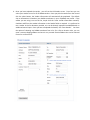
5. When you click Save Header, the header will collapse and the detail section will automatically
expand. Near the bottom of the next screen, you can add, edit and delete items on the PO
requisition. You must enter a Quantity, Item Number, Description, Unit Price, and also Select
the appropriate GL Account for the PO, then click the add icon. Note that several GL code
groups are region sensitive. Once you are finished entering items, click ‘Save and Request PO
Number’.
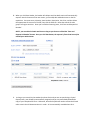
NOTE: you can edit the header and items as long as you have not clicked the “Save and
Request PO Number” button. Once you click that button, the request is firmed and can only be
edited by an administrator
6.
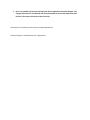
As long as you are within the standard purchase limit and you are not purchasing a Capital
Expense Item, your G# will be automatically assigned, and you can immediately download a
copy of your completed PO form. Otherwise, Accounts Payable will need to review the PO and
make certain that all documentation is in order. AP is automatically emailed when this is