1
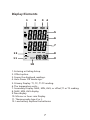
• Press to toggle between showing the T1, T2, , and T1-T2 readings
in the primary or secondary display.
Notes
The display shows "- - - -" when a thermocouple is not connected.
The display shows OL (overload) when the temperature being measured
is outside the thermocouple’s valid range.
T1 T2
T 1 -T 2
Holding the Displayed Readings
• Press
HOLD
to freeze the readings on the display .The display shows
HOLD.
• Press
T1 T2
to toggle showing the T1, T2, or T1-T2 readings in the
primary or secondary display.
• Press
T 1 -T 2
HOLD
again to turn off the HOLD function.
Viewing the MIN, MAX, and AVG Readings
• Press
MAN
NIM
• Press
MAN
NIM
to step through the maximum (MAX), minimum (MIN), or
the average (AVG) readings. The elapsed time since entering MIN
MAX mode, or the time at which the minimum or maximum occurred
appears on the display.
button for 3 seconds to exit MAX, MIN and AVG mode
Using the Offset to Adjust for Probe Errors
Use the offset option in Setup to adjust the thermometer’s readings to
compensate for the errors of a specific the thermocouple and IR
temperature. The allowable adjustment range is ± 5.0 0C or ± 9.0 0F.
• Plug the thermocouple into the input connector.
• Place the thermocouple in a known, stable temperature environment
(such as an ice dry well calibrator).
• Allow the readings to stabilize.
• In Setup change the offset until the primary reading matches the
calibration temperature.(“Changing Setup Options.").
10