Transcript
Dear User,
Thank you for purchasing BRIK Equalizer Stage.
Please read this User Manual before operating the machine to ensure its
best performance and your safety.
Instructions:
Specifications:
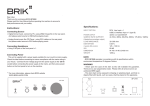
Connecting Source
INPUT OPTION
OUTPUT OPTION
Connect D/A Converter, Bluetooth Stage, Internet Radio, Phono Stage, CD
Player, or other line level sources through Input on the rear panel.
Connecting Amplifier
Connect the Output socket to a line input on an amplifier.
Connecting Power
Before connecting, check the label to ensure the local power supply is
compliant, and then connect the low voltage plug from the power supply to the
12V In socket and switch the machine on.
ANALOGUE RCA INPUT x 1
ANALOGUE RCA OUTPUT x 1
BY PASS / EQ SELECTION x 1
2V
<0.035%
FLAT - 100 dB
A-WEIGHTED - 106 dB
< 650 OHM
±10 dB
W 140 x H 48 x D160 mm
1000 g
OUTPUT LEVEL
DISTORTION
S/N
OUTPUT IMPEDANCE
CONTROL RANGE
DIMENSION
WEIGHT
Reinforcing Sound
Reinforce sound with the 10 selections on the front panel - Upward for plus
(+10dB+2dB) & Downward for minus (-10dB+2dB).
Use the By Pass / EQ selection on the rear panel to bypass or pass the
signals through Equalizer Stage.
NOTE
- BRIK Equalizer Stage operates in accordance with its specifications within
environment temperature 40 degrees Celsius.
WARNING
- Never open the case of this item as this will invalidate the guarantee. There
are no user adjustments inside. Please refer all service work to an authorized
BRIK agent.
- This item shall not be exposed to dripping or splashing liquid, and that no
objects filled with liquids, such as vases, shall be placed on the apparatus.
Input
Equalizer Stage
Power
32Hz
62.5Hz
125Hz
250Hz
500Hz
1K
2K
4K
8K
16K
Output
L
L
R
R
By PASS EQ
Equalizer Stage
Made In Taiwan
DC 12V 50mA In