1
Bluetooth Stage
Analog
Power
Bluetooth Stage
User Manual
Digital
Output
Dear User,
Thank you for purchasing BRIK Bluetooth Stage.
Please read this User Manual before operating the machine to ensure its
best performance and your safety.
Instructions:
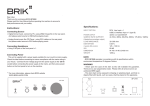
Installing Antenna
Put the antenna into the socket on the rear panel and rotate the antenna
clockwise until contacting bearing. Turn the antenna to a vertical position.
Connecting Amplifier / D-A Converter
Connect the Analog Output socket to a line input on an amplifier.
Connect the Digital Output socket to a coaxial input on a digital-analog
converter.
Use Output switch on the front panel to choose the output function.
Connecting Power
Before connecting, check the label to ensure the local power supply is
compliant, and then connect the low voltage plug from the power supply to the
12V In socket and switch the machine on.
Only use approved BRIK power supply. The use of other adaptors or supplies
could seriously damage this item.
Pairing Bluetooth
Access the Bluetooth menu of your audio device (PC, Mobile Phone, MP3
Player, etc.) that supports the A2DP format, turn on Bluetooth function, and make
a Bluetooth search.
Once the Bluetooth search is complete, please select BRIK from the list of
available devices and enter password/pin code 0000. Now, the Bluetooth Stage
is being successfully paired to your audio device and will start functioning once
the music is played. The LED indicator will be on when the Bluetooth Stage is
being paired and will be off when it is no longer being paired.
Please stop pairing first, change the Output selection, and then pair bluetooth
again to complete the output selection changing process.
Bluetooth Stage
Analog
Power
Digital
Output
Specifications:
OUTPUT SELECTION
Analog
Digital - Coaxial
44.1K & 48K 16 Bit Stereo
40 Hz ~ 15K Hz
> 70 dB
< 0.1 %
> 55 dB
2V rms ±0.2V
50M Maximum
W 140 x H 48 x D160 mm
1000 g
AUDIO FUNCTION
FRENQUENCY RESPONSE
S/N
THD
CROSSTALK
OUTPUT LEVEL
AVAILABLE DISTANCE
DIMENSION
WEIGHT
NOTE
- BRIK Bluetooth Stage operates in accordance with its specifications within
environment temperature 40 degrees Celsius.
WARNING
- Never open the case of this item as this will invalidate the guarantee. There
are no user adjustments inside. Please refer all service work to an authorized
BRIK agent.
- This item shall not be exposed to dripping or splashing liquid, and that no
objects filled with liquids, such as vases, shall be placed on the apparatus.
Bluetooth Stage
Output
L
R
Antenna
Analog
Digital
Made In Taiwan
DC12V 100mA In
WWW.BRIK-AUDIO.COM
The information was correct at the time of going to press. The manufacturer reserves
the rights to make changes to the technical specification without prior notice.
The manufacturer accepts no responsibility for damage caused by not adhering to
these instructions for use. Modification or change to any part of the product by
unauthorized persons releases the manufacturer from any liability over and above the
lawful rights of the customer.
BRIK 2011