1
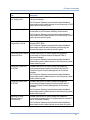
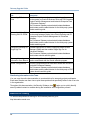
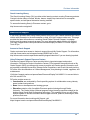
Gateway Upgrade Guide Reinstall customizations using the Gateway configuration utilities in the <Primavera_Gateway_Home>\snapshots\dbsetup-dist folder Using the Gateway Configuration Utilities The following configuration utilities are provided in Primavera Gateway. Run each utility for the purpose described below: Gateway-P6Setup: Run this utility to add User Defined Fields (UDFs) and codes to P6 EPPM. Access the Gateway-P6Setup utility from the <Primavera_Gateway_Home>\pdi\snapshots\dbsetup-dist folder or the <INSTALLER_FOLDER>\GatewayUtility folder. Gateway-Configuration: Run this utility to manage metadata, and add or remove providers and customizations. The following configuration options are available: Manage Gateway metadata Manage providers Manage customizations Access the Gateway-Configuration utility from the <Primavera_Gateway_Home>\pdi\snapshots\dbsetup-dist folder or the <INSTALLER_FOLDER>\GatewayUtility folder. Note: Before executing the utilities on Windows, Linux, or Solaris, ensure the following: The bin folder of the supported Java JDK is included in the PATH. If there are other JDK bin folders in the PATH, then the supported Java JDK should be listed first. Adding User-Defined Fields (UDFs) and Codes to P6 EPPM You have the option to add User-Defined Fields (UDFs) and codes to P6 EPPM and to prepare the P6 EPPM database for synchronizing the data. Use this procedure to also add UDFs and codes from Oracle Primavera Prime, Primavera Unifier, to P6 EPPM. For example, if your application has UDFs or codes that P6 EPPM does not have, you can add these UDFs or codes using an XML file that you edit and then point to it in the Gateway Configuration utility. The XML file needs to conform to the DataConfiguration.xsd schema. For more information on the DataConfiguration.xsd schema, see the Primavera Gateway Developer's Guide. To add your application UDFs or codes to P6 EPPM: 1) Ensure that your JAVA_HOME variable is pointing to a supported JDK folder. 16