1
C3i-CR3i
Instructions for Use
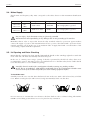
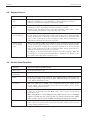
4.2. Display Screens
Screen
Description
Upper screen
(15)
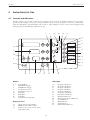
This screen displays the set speed (rpm) or RCF (x g) for the given program
when the centrifuge is at rest, depending on which parameter is selected
During a run, this screen displays actual speed or RCF.
Middle screen
(16)
This screen displays either the set run time or the centrifugal radius when the
centrifuge is at rest, depending on which parameter is selected.
During a run, this display shows only time remaining (timed runs) or time
elapsed (during deceleration, ‘hold’ runs and ‘pulse’ runs).
Lower screen
(17) on the C3i
This screen displays either the acceleration or the deceleration profile selected
for the given program. The value of the acceleration profile is displayed either
during acceleration or when the acceleration set button (8) is pressed. The
value of the deceleration profile is displayed either during deceleration or
when the deceleration set button (9) is pressed.
Lower screen
(17) on the R
units
This screen displays either the acceleration or the deceleration profile selected
for the given program. The value of the acceleration profile is displayed either
during acceleration or when the acceleration set button (8) is pressed. The
value of the deceleration profile is displayed either during deceleration or
when the deceleration set button (9) is pressed.
In addition, it shows the temperature in the bowl of the centrifuge. When the
centrifuge is at rest, the set bowl temperature is displayed (°C). During a run,
the actual bowl temperature is displayed (°C).
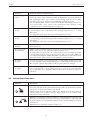
4.3. Control Panel Functions
Function
Keystroke sequence and description
Start cycle
Press the start button (12).
Stop cycle,
immediate
Press the stop button (10)
Pulse
Press the pulse button (11) and hold. The centrifuge will accelerate the rotor
to the speed setting of the active program. When the button is released, the
rotor will be decelerated to rest.
Set speed
When the LED next to ‘RPM’ (18) is illuminated, the upper display shows
speed values. To increase/decrease the speed values, press on the
corresponding up/down arrows.
Set RCF
When the LED next to ‘G’ (19) is illuminated, the upper display shows RCF
values. To increase/decrease the RCF values, press on the corresponding
up/down arrows.
When using RCF as a control/display value, make sure the correct centrifugal
radius is entered into the control system (see below). If an incorrect radius
value is in the control system, the RCF value displayed will not be accurate.
Set run time
When the LED next to ‘TIME’ (20) is illuminated, the middle display shows
time values. To increase/decrease the run time values, press on the
corresponding up/down arrows.
14