1
C3i-CR3i
Instructions for Use
Function
Keystroke sequence and description
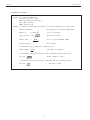
Set centrifugal
radius
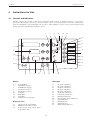
When the LED next to ‘RADIUS’ (21) is illuminated, the middle display
shows the value of the centrifugal radius in millimeters. To increase/decrease
the centrifugal radius, press on the corresponding up/down arrows. This
parameter can only be viewed and set while the centrifuge is at rest.
It is essential that this value be correct for the RCF control/display function to
be accurate. The correct value of the centrifugal radius depends on the
combination of rotor/buckets/adapters being used.
Set acceleration
profile
When the button (8) is pressed, the lower display (17) shows the number
corresponding to the acceleration profile currently registered (1 to 5 : 5 being
the fastest).
To change the value, press the corresponding up/down arrows.
Set deceleration
profile
When the button (9) is pressed, the lower display (17) shows the number
corresponding to the deceleration profile currently registered (1 to 5 : 5 being
the fastest).
To change the value, press the corresponding up/down arrows.
Set temperature
(R only)
To increase/decrease the temperature set values, press on the corresponding
up/down arrows.
To pre-program
the centrifuge
There are five available memory locations for pre-programmed protocols.
Each corresponds to one of the five memory buttons (1-5).
To enter/save a program into one of the locations, press the memory button
corresponding to the desired program position. The corresponding LED (1a5a) will be illuminated. While the LED is illuminated, enter the desired
parameter values. These values are automatically saved in memory.
To lock a
program
To lock a program, press and hold the corresponding button for several
seconds until the corresponding LED begins to flash. Release the button, and
the program is locked. Parameters of the program cannot be changed.
To unlock a
program
To unlock a program (when a program is locked, the associated LED flashes),
press and hold the corresponding button for several seconds until the
associated LED stops flashing. Release the button, and the program is
unlocked.
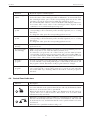
4.4. Control Panel Indicators
Indicator
Description
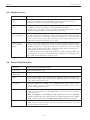
When the lid interlock indicator LED (14) is illuminated, the lid interlock is
not active. The lid can be opened. The indicator will only be illuminated when
the rotor is at rest and it is safe to open the lid.
When the lid interlock indicator LED is not illuminated, the lid cannot be
opened. The rotor is still in motion. This feature is in accordance with
international safety standards.
When the load imbalance indicator LED (13) is illuminated, the centrifuge run
has been automatically ended due to excessive load imbalance. The rotor will
be decelerated to rest, at which time the lid can be opened and the load can be
re-balanced.
When the lid is opened this indicator will go off.
15