1
COMPUTHERM Q7RF THERMOSTAT USER MANUAL
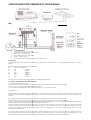
Wiring Instructions
Display Icons
ADJUSTING THE CURRENT DAY AND TIME
1.
Press the SET key to go in to the main screen.
2.
Press the DAY key. The day of the week will start to flash
3.
With the Keys - + keys adjust the day.
4.
Press the TIME key and the hour starts to flash.
5.
With the - + adjust the minutes
6.
Press the SET key to finish the programmingg and go back to the main screen.
PROGRAMMING
In the Wireless thermostat you can set a daily programme (every
(
day of the week has the same daily program) or a weekly program (different
(
programs for each day of
the week)
By default the wireless thermostat has the following daily program:
Slot
Start time Set Temperature
P1
7.00
20 Degrees
P2
9.00
17 Degrees
P3
12.30
20 Degrees
P4
15.00
19 Degrees
P5
17.30
22 Degrees
P6
23.00
17 Degrees
The start time of each slot and the consignment temperature can be
b modified in the following way.
THE SAME DAILY PROGRAMMING FROM MONDAY TO SUNDAY
1. Press the SET key to go to the main screen.
2. Press and hold the SET key then press PROG to go to the program. In the upper part of the screen, the days of the week start Flashing.
3. With the - + keys, select the group of days: MON TUE WED THR FIR SAT SUN.
4. Press the PRO key to confirm the program block. Then the hour of the key - + keys set in steps of 10 minutes
Press the PROG key.
The desired temperature of the slot starts flashing. With the help of - + keys set the desired temperature. The Temperature can be set in steps of 0.5 Degree. Press the
PROG key to confirm the programming and going to the next slot. Repeat the steps 1 and 2 until you have programmed the 6 slot.
slot Finish the programming by pressing
the set Key.
If you want to modify the programming for any day, do the following weekly programming. Press the SET key to go to the main screen.
Press and hold the SET key then press the PRO to go to the programming. The upper part of the screen, the days of the week start flashing.
With the - + Keys, select the day you want to modify: MON TUE WED
WE THR FRI SAT SUN is illustrated by 1 2 3 4 5 6 7 . The programming will automatically become daily
dai
and the modified day is adopted within the programming. Press the PROG to confirm the day.
Then the hour of the first slot P1 starts flashing. With the help of the - + keys set start hour of the first slot. The time can be set in steps of 10 minutes. Press the PROG
key. The program temperature for the first slot starts flashing. With the help of the - + keys set the desired temperature. The Temperature can be set in steps of 0.5
degree. Press the PROG key to confirm the programming and going to the next slot. Repeat the step 1 and 2 until you have programmed the 6 slots. Finish the
programming by pressing the set key
If you want to modify the programming for any day, do the following: Weekly programming Press the SET key to go to the main screen. Press and hold the Set key then
press the programming. In the upper part of the screen, the days of the week starts flashing. With the - + keys, select the day you want to modify: SUN.....Sat. The
programming will automatically become weekly and the
he modified day is adopted within
in the programming. Press the PROG to confirm the day.