1
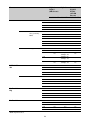
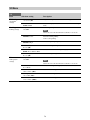
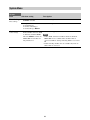
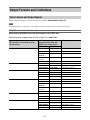
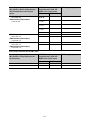
Paint
Item
Sub-item setting
Description
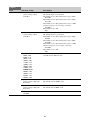
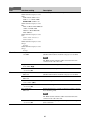
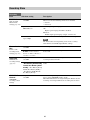
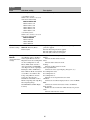
Selects the gamma table used for gamma correction.
Gamma Select
When Gamma Category is set to
STD.
STD1 DVW / STD2 x 4.5 /
STD3 x 3.5 / STD4 240M /
STD5 R709 / STD6 x 5.0
When Gamma Category is set to
HG.
HG1 3250G36 / HG2 4600G30
/ HG3 3259G40 / HG4
4609G33 / HG7 8009G40 /
HG8 8009G33
When Gamma Category is set to
User.
User 1 / User 2 / User 3 /
User 4 / User 5
When Gamma Category is set to
SLog2.
S-Log2
When Gamma Category is set to
SLog3.
S-Log3
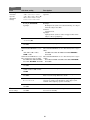
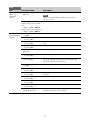
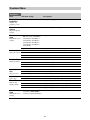
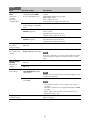
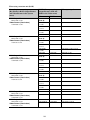
Black Gamma Setting
On / Off
Turns the black gamma correction function on/off.
(Enabled when Gamma >Gamma Category is set to STD)
Note
The Black Gamma and Knee >Knee Saturation functions
cannot be used at the same time.
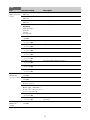
Knee
Range
Low / Mid / High
Selects the effective range of the black gamma correction.
Master Black Gamma
–99 to +99 (±0)
Sets the master black gamma level.
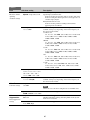
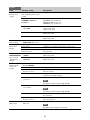
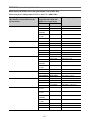
Setting
On / Off
Turns the knee correction function on/off.
(Enabled when Gamma >Gamma Category is set to STD)
Auto Knee
On / Off
Turns the auto knee correction function on/off.
Point
75% to 109% (90%)
Sets the knee point.
Slope
–99 to +99 (±0)
Sets the knee slope.
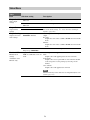
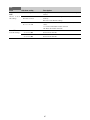
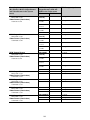
Knee Saturation
On / Off
Enables/disables knee saturation adjustment (adjusts coloring
above the knee point).
Note
The Black Gamma and Knee >Knee Saturation functions
cannot be used at the same time.
Knee Saturation Level
–99 to +99 (±0)
Sets the level for adjusting the coloring above the knee point
(knee saturation).
69