1
PolNav Navigation Software
User’s Manual
Version 2008 R5.0
For use with PC/PDA/Personal Navigators
Polstar Technologies, Inc.
http://www.polstargps.com
Tel: +886-3-552-5279
Fax: +886-3-552-5269
Address: 5F-1 No.28 Taiyuan St, Jhubei City, Hsinchu County 30288, Taiwan
© Copyright 2008 Polstar Technologies, Inc. All rights reserved.
Polstar™, The RoadMentor™ Series, PolNav™, The Polstar™ Logo are
registered trademarks of Polstar Technologies, Inc. in Taiwan and/or other
countries. All other trademarks, registered trademarks, trade names and
service marks are properties of their respective owners
No part of this user manual may be reproduced or transmitted by any means,
for any purpose other than for the user’s own use, without the prior written
consent of Polstar Technologies, Inc.
This document is subject to change without notice.
You must read the warnings and the disclaimer at the back of this manual
prior to using PolNav.
ii
Contents
1. INTRODUCTION ..............................................................................................................................1
2. INSTALLATION AND HARDWARE SETUP ...............................................................................2
2.1 SOFTWARE INSTALLATION ..............................................................................................................2
2.1.1 Map code................................................................................................................................2
2.1.2 Registration............................................................................................................................2
2.1.3 Device ID ...............................................................................................................................3
2.1.3 Device ID ...............................................................................................................................4
2.2 HARDWARE CONFIGURATION (PC/PDA ONLY) .............................................................................4
3. GETTING STARTED WITH GPS NAVIGATION AND POLNAV ............................................5
4. USER INTERFACE...........................................................................................................................8
4.1 MAIN MENU ...................................................................................................................................8
4.2 MAP SCREEN ..................................................................................................................................9
4.2.1 Functions................................................................................................................................9
4.2.2 Map Displays ........................................................................................................................9
4.2.2 Map Displays .......................................................................................................................10
4.3 ZOOM IN/ZOOM OUT ....................................................................................................................11
4.4 PANNING (BROWSING THE MAP) ...................................................................................................11
4.5 LOCATION MENU ..........................................................................................................................12
4.6 NAVIGATION SCREEN ...................................................................................................................13
4.7 FREE RUN SCREEN ........................................................................................................................14
5. FINDING DESTINATIONS..................................................................................................................15
5.1 BY ADDRESS-CITY/POSTAL CODE FIRST ......................................................................................15
5.2 BY POINTS-OF-INTEREST (POI) ....................................................................................................17
5.3 BY RECENT DESTINATIONS ..........................................................................................................21
5.4 BY GPS COORDINATES.................................................................................................................21
5.5 ENTERING INFORMATION ..............................................................................................................22
5.6 SEARCHING IN DIFFERENT COUNTRIES .........................................................................................22
5.7 BY PHOTO.....................................................................................................................................23
6. ADVANCED ROUTING FEATURES ...........................................................................................24
6.1 MAKING DETOURS........................................................................................................................24
6.2 ADDING INTERMEDIATE WAYPOINTS ...........................................................................................25
6.3 CHANGING THE END DESTINATION...............................................................................................26
6.4 SETTING STARTING LOCATIONS/CLEARING ROUTES/SETTING SIMULATED STARTING LOCATIONS
...........................................................................................................................................................26
6.5 ROUTE SIMULATION .....................................................................................................................27
6.6 CHANGING ROUTING OPTIONS .....................................................................................................27
7. ROUTE MANAGEMENT...............................................................................................................28
7.1 ROUTE INFORMATION ...................................................................................................................28
7.2 TURN LIST ....................................................................................................................................28
7.3 ITINERARY LIST ............................................................................................................................29
8. MANAGING FAVOURITES, ITINERARIES AND TRAILS ....................................................30
8.1 MY FAVOURITES...........................................................................................................................30
8.2 MY ITINERARY .............................................................................................................................31
8.3 MY TRAIL .....................................................................................................................................31
8.4 CLEAR DATA ................................................................................................................................32
9. CONFIGURING THE POLNAV....................................................................................................33
9.1 GENERAL SETTINGS ......................................................................................................................33
9.1.1 VOLUME ....................................................................................................................................34
iii
9.1.3 Language..............................................................................................................................35
9.1.4 Unit ......................................................................................................................................36
9.1.5 Time Zone.............................................................................................................................36
9.1.6 Guidance ..............................................................................................................................37
9.2 ADVANCED SETTINGS ...................................................................................................................38
9.2.1 Safe Mode.............................................................................................................................38
9.2.2 Speed Alert ...........................................................................................................................39
9.2.3 POI Icon...............................................................................................................................40
9.2.4 Factory Default ....................................................................................................................40
9.3 ROUTE OPTIONS ...........................................................................................................................41
9.3.1 General ................................................................................................................................41
10. INFORMATION ............................................................................................................................42
10.1 GPS ............................................................................................................................................42
10.2 STATISTICS .................................................................................................................................43
10.3 MAP ............................................................................................................................................43
10.4 ABOUT ........................................................................................................................................44
11. GPS SETTINGS ..............................................................................................................................45
12. DISCLAIMER ................................................................................................................................46
13. IMPORTANT MESSAGES...........................................................................................................46
iv
1. Introduction
Congratulations on purchasing the Polstar PolNav Navigation Software. PolNav is a
state of the art navigation software designed to make your journey more efficient and
productive. PolNav offers the following features to make travelling and navigating
through your neighbourhood easier:
•
•
•
•
•
•
•
•
•
•
Dynamic route calculation
Set and manage multiple waypoints en route to your destination with ease
Powerful and convenient address search (Postal code/street search)
Accurate moving map display
Turn-by-turn voice instructions and mini maps
Voice output engine
Comprehensive and detailed map and Points-of-Interest (POI) database
Easy to use and intuitive interface
Space efficient
Compatible with PC, PDA and Personal Navigator Packages.
Polstar would like to thank you again for purchasing PolNav, and hope that it will assist
you in your travels in the many years to come.
For the latest news and updates, product support, and information regarding Polstar’s
range of GPS products, please visit Polstar’s website at http://www.polstargps.com.
1
2. Installation and Hardware Setup
2.1 Software Installation
To run the software legally, the user has to get a license key by registration process.
The license key is encrypted by the combination of the device ID, which could be your
SD card ID, and a map code. Also, please note that the license key is per map region.
Each map region has its own map code, and thus you should have different license key
for each map region. E.g. the map codes for BeNeLux, Germany and Taiwan could be
BeNeLux@2008, Germany@2008 and Taiwan@2006, respectively.
If the software you have is not equipped with legal map licenses, the security warning
pages will pop up to remind you of finishing the process to have legal licenses at the
beginning of running PolNav.
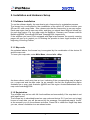
2.1.1 Map code
As explained above, the license key is encrypted by the combination of the device ID
and the map code.
To know your map code, enter Main Menu, choose Info ->Map.
As shown above, each entry has an icon, indicating if the corresponding map is legal or
not, a map code and the date code. As an example, the first two illustrates the region
Australia has a map code Australia @2008 and the region Austria/Switzerland has a
map code Australia@2008.
2.1.2 Registration
The software may not run with full functionalities and successfully if the map data is not
with legal license.
The license key is calculated based on map code and device ID. If you have not a legal
license of map data, you will be warned by the message “Unregistered map(s) found!”
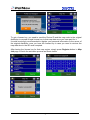
at the moment you run the software as below. Press OK to check the illegal map data
you use, where a forbidden icon are shown below.
2
To get a license key, you need to send the Device ID and the map code to the original
distributor to request a legal license key to that map data once you have paid for it.
It would be strongly recommended to register your personal information to the server of
the original distributor once you have the license key in case you need to retrieve the
map data due to the SD card corrupted.
After having the license key for that map region, simply press Register button in Map
Info page to finish the activation process as shown below.
3
2.1.3 Device ID
To know your Device ID, entering Main Menu ->Info ->About
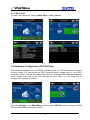
2.2 Hardware Configuration (PC/PDA Only)
After installing PolNav on your PC/PDA, please ensure your GPS hardware has been
correctly setup. For instructions on GPS hardware setup, please refer to your GPS
hardware manual. You will only need to do this once. Once the GPS hardware has been
setup, please take note of the Port Settings for your GPS. You will need this to
configure the settings in PolNav.
Press the Settings in the Main Menu and then press GPS Port. Now change the COM
Port and Baud Rate to the given values.
4
3. Getting Started With GPS Navigation and PolNav
This tutorial will get you started on using PolNav for navigation. Before you start, you
should ensure that the software has been installed and the necessary hardware
configured. Instructions for installation and configuration can be found in the Hardware
Configuration Section of this manual.
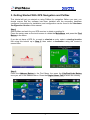
Step 1
Start PolNav and wait for your GPS receiver to obtain a position fix.
Press the center area on the touch screen to obtain the Main Menu, and press the Find
Button in the Menu.
If you do not have a GPS fix, or want to simulate a route, select a starting location
first using this tutorial up to Step 5, then select a destination using this tutorial a
second time.
Step 2
Press the Address Button in the Find Menu, the press the City/PostCode Button
once you are in the Address Menu. Press the Region Name Tab to switch the country.
5
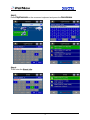
Step 3
Enter City/Postcode on the onscreen keyboard and press the Done Button.
Step 4
Then enter the Street info.
6
then press the Go To Button in the Street Center Menu to begin navigation. PolNav
will calculate a route to the destination from your current location when you have a GPS
fix.
If you are selecting a starting location for simulation, press the Set Start Button (Demo)
Button, and then return to Step 1 to find a destination and press the Go To Button
once the destination has been found. This will calculate a route from your starting
location to your destination.
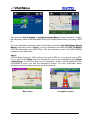
Step 5
You can begin using your GPS system if you have a GPS fix. If you do not have a GPS
fix, you can use the Demo feature to simulate the route to your destination using Route
> Start Demo. You can now drive to your destination, and you will be guided by voice
commands at every turn and the Navigation Screen. For more information about
advanced functions, please read the rest of this manual.
Map screen
Navigation screen
7
4. User Interface
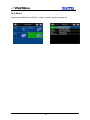
4.1 Main Menu
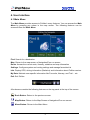
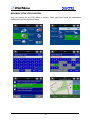
The Main Menu provides access to PolNav’s many features. You can access the Main
Menu by pressing any where in the map screen. The following features can be
accessed from the Main Menu.
Find: Search for a destination
Map: Return to the map screen or Navigation/Free run screen
Route: Access the current route, itinerary, statistics and map information
Settings: Configure system and routing settings and manage favourites list
Info: Display GPS, driving information (Statistics) and information about PolNav version.
My Data: Maintain user specific information like Favourite, Itinerary, and Trail …etc.
Exit: Exit PolNav
All submenus contain the following features on the top panel at the top of the screen:
Back Button: Return to the previous screen
Map Button: Return to the Map Screen or Navigation/Free run screen
Menu Button: Return to the Main Menu
8
4.2 Map Screen
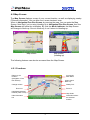
The Map Screen displays a map of your current location, as well as displaying nearby
POIs and information. You can also use it as an electronic map.
When in Navigation/Free Run Screen, by panning the map, you can enter the Map
Screen. Note that if you’re using Heading-up in Navigation/Free Run Screen, then the
Map Screen will follow the orientation. By click the North Indicator, the Map Screen
will change to North-up. Once in North-up, it can’t return to Heading-up.
Map screen
Map screen
(heading up)
The following features can also be accessed from the Map Screen.
4.2.1 Functions
Return to Car
Position
(Navigation / Free
Run Screen)
Access the
Main Menu
Orient map to
North-up
Change volume
Nearby POI
Zoom out
Zoom in
Highlighted selected
location (road or POI)
Map Scale
Information about
the selected
location
Hide information
bar
9
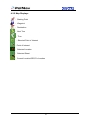
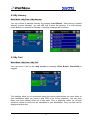
4.2.2 Map Displays
: Starting Point
: Waypoint
: Destination
: Next Turn
: Turn
: Selected Point of Interest
: Point of Interest
: Selected Location
: Selected Street
: Current Location/GPS Fix Location
10
4.3 Zoom In/Zoom Out
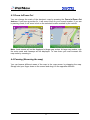
You can change the scale of the electronic map by pressing the Zoom In/Zoom Out
buttons. If you have a position fix, it will zoom in/out on your current location. If you are
in panning mode, it will zoom in/out on the selected location marked by the red dot.
Note: Local streets will not be displayed at large map scales. At large map scales, only
the main roads and freeways will be displayed. To view them you must increase the
map scale by zooming in.
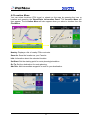
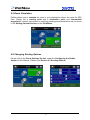
4.4 Panning (Browsing the map)
You can browse different areas of the map in the map screen by dragging the map.
Simply hold your finger down on the screen and drag it in the opposite direction.
11
4.5 Location Menu
You can select locations (POI Icons) or streets on the map by pressing the icon or
location and pressing the Street/Place Information Panel. The Location Menu will
then appear. The Location Menu will also appear when you select a location from the
Find Menu.
Nearby: Displays a list of nearby POIs or streets.
Save As: Save the location as your Favorite.
Info: Information about the selected location.
Set Start: Set the starting point for route planning/simulation.
Go To: Set the destination for route planning.
Add Via: Add intermediate waypoint in route to your destination.
.
12
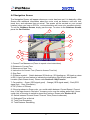
4.6 Navigation Screen
The Navigation Screen will appear whenever a route has been set. It is basically a Map
Screen with additional information about the route, such as distance until next turn,
travel time, and estimated time at arrival. The screen will be centred on your current
location (when you have a GPS fix, or else simulation will move at a constant velocity).
To exit the Guidance Screen, simply pan the map. To return to the Guidance Screen,
press the Car Position.
3
4
5
1
2
6
7
13
12
8
10
9
11
1: Current Turn Manoeuvre (Press to repeat voice instructions)
2: Distance to Current Turn
3: Maneuver at Next Turn
4: Instruction for Current Turn (Press to Access Turn List)
5: Sign Post
6: Guidance symbol: Switch between 2D North-up, 2D Heading-up, 3D Head-up views.
In R5.0, there is a new feature to indicate the destination (Red Arrow) and Special
Location (Dark Green Arrow). Please refer Section 8.1 My Favorite
7: Car position: Green (GPS signal good)、Orange (GPS signal weak)、Red (GPS
signal lost)、Gray (Simulation)
8. PIP (Picture in Picture)
9: If the sign shows in Green color, you could switch between Current Speed / Current
time. If the sign shows in Red color, it means you’re over the setting speed limit. Users
could click on the sign to switch to speed limit options. Please refer Section 9.2.2
10: Switch between Current Street / Current Town (Press to alternate)
11. Estimated Time at Arrival
12. Total Time Remaining
13. Total Distance Remaining
13
4.7 Free Run Screen
The Free Run Screen will appear whenever a route has NOT been set. It is basically a
Map Screen with additional information about the current road/city you’re driving on, and
driving speed. The screen will be centred on your current location (when you have a
GPS fix). To exit the Free Run Screen, simply pan the map. To return to the Free Run
Screen, press the Car Position.
14
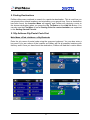
5. Finding Destinations
PolNav offers many methods to search for a particular destination. This is useful as you
can pinpoint the search locations and minimising your search time. Once a destination
has been found, the Location Menu will appear, and PolNav will calculate a route to
the chosen destination when you press the Go To Button or the Add Via Button. You
can also use the Find Menu to set a Starting Point for route simulation, as explained
in the Getting Started Tutorial.
5.1 By Address-City/Postal Code First
Main Menu ->Find ->Address ->City/Postcode
Enter the city name of postal code using the onscreen keyboard. You can also enter a
key word if you are unsure of the location as PolNav will list all possible locations with
that key word. Once you have found the destination, PolNav will load the Location Menu.
15
16
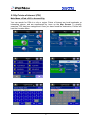
5.2 By Points-of-Interest (POI)
Main Menu ->Find ->POI -> Around City
You can search for POIs in a city or region. Points of Interest are local landmarks or
interesting places, and are represented by icons on the Map Screen. To simplify
searches, POI has been categorized. Once you have found the destination, PolNav will
load the Location Menu.
17
18
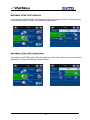
Main Menu ->Find ->POI ->All Cities
You can search for any POI within a country. Once you have found the destination,
PolNav will load the Location Menu.
19
Main Menu ->Find ->POI ->Near Car
List maximum 300 POIs within 50 kilometers from your current location. Once you have
found the destination, PolNav will load the Location Menu.
Main Menu ->Find ->POI ->Near Cursor
List maximum 300 POIs within 50 kilometers from the cursor. Once you have found the
destination, PolNav will load the Location Menu.
20
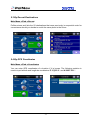
5.3 By Recent Destinations
Main Menu ->Find ->Recent
PolNav stores and lists the 50 destinations that were previously in sequential order for
convenience should you decide to revisit the same place in the future.
5.4 By GPS Coordinates
Main Menu ->Find ->Coordinates
You can enter GPS coordinates of a location if it is known. The following notation is
used to input latitude and longitude coordinates: E 121°0’5.2’’ and N 24°47’30.1’’.
21
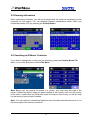
5.5 Entering Information
When performing searches, you will be prompted with the onscreen keyboard to enter
keywords for the search. You can alternate between alphabetical letters (ABC) and
numbers/symbols (123) by pressing the Switch Button.
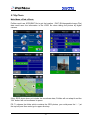
5.6 Searching in Different Countries
If you want to change the country you are searching, press the Country Name Tab
when in one of the Submenus of the Find Menu:
Note: Before you can search for places in a country, you must have the map of the
region. PolNav lists all the maps you have installed in the Country List, so if the country
is not listed, it means that you either don’t have the map for that country, or that the map
for that country has not been installed.
Note: You can perform international searches and calculate international routes if you
have the maps of the relevant countries.
22
5.7 By Photo
Main Menu ->Find ->Photo
PolNav could use JPEG/EXIF file to get the location. EXIF (EXchangeable Image File)
data could save the information in the JPEG file when taking the picture by digital
camera.
If the JPEG photo does not include the coordinate data, PolNav will not adapt it and the
“OK” button will not be allowed to press.
PS. To choose the folder which contains the GPS photos, you could press the “.. “ (at
the top left) and then could go to upper directory.
23
6. Advanced Routing Features
6.1 Making Detours
Route ->Turn List ->Select the street or location ->Detour
The route is recalculated to take a detour around the location or street.
24
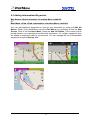
6.2 Adding Intermediate Waypoints
Map Screen ->Select a location ->Location Menu ->Add Via
Or
Main Menu ->Find ->Find a destination ->Location Menu ->Add Via
You can add additional waypoints en route to your destination by using the Add Via
Button. Simply find a destination using the Find Menu or by selecting it from the Map
Screen. Once in the Location Menu, press the Add Via Button. This location will be
placed between your starting/current and final destination. For multiple waypoints, they
are added in sequential order for convenience. You can manage the list of intermediate
waypoints using the Itinerary List.
25
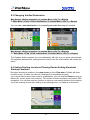
6.3 Changing the End Destination
Map Screen ->Select a location ->Location Menu ->Go To ->Extend
Or Main Menu ->Find ->Find a destination ->Location Menu ->Go To ->Extend
You can add a new destination to the end of your route list using this method.
Map Screen ->Select a location ->Location Menu ->Go To ->Replace
Or Main Menu ->Find ->Find a destination ->Location Menu ->Go To ->Replace
The Replace button replaces the end destination with the one you have just selected.
All waypoints between the starting/current location and the end location will remain the
same.
6.4 Setting Starting Locations/Clearing Routes/Setting Simulated
Starting Locations
By either selecting a location in the map screen or from Find menu, PolNav will enter
Location menu, in which you can set a start point for simulation purpose.
If you would like to plan a new route to a destination, you can use the Reset function to
delete the current route from memory. This works for both simulation and actual GPS
navigation. You can also use this function to select a new starting location for simulation.
If you are clearing a route then setting a new starting point, you need to do this twice.
26
6.5 Route Simulation
PolNav allows you to simulate the route to your destination without the need for GPS
fixes. Simply set a starting point and a destination point and intermediate
waypoints if needed. Instructions on selecting starting points/destinations can be found
in the Getting Started Section and the Find Menu.
6.6 Changing Routing Options
Please refer to the Route Settings Section, under the Configuring the PolNav
Section of this Manual. (Please refer Section 9.3 Routing Options)
27
7. Route Management
7.1 Route information
Main Menu ->Route ->Detail
It includes information such as the distance remaining until next waypoint, travel time
and arrival time.
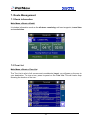
7.2 Turn List
Main Menu ->Route ->Turn List
The Turn List is a list of all corners and roundabouts (turns) you will pass on the way to
your destination. To view a turn, press its panel on the Turn List. This will load a map
showing the location of the turn.
28
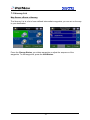
7.3 Itinerary List
Map Screen ->Route ->Itinerary
The Itinerary List is a list of user defined intermediate waypoints you can set on the way
to your destination.
Press the Change Button, you delete waypoints or adjust the sequence of the
waypoints. To add waypoints, press the Add Button.
29
8. Managing Favourites, Itineraries and Trails
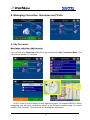
8.1 My Favourites
Main Menu ->My Data ->My Favourite
You can edit your Favourite destinations by accessing the My Favourites Menu. You
can add the places of Favourites.
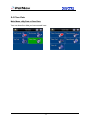
In R5.0, there is a new feature to set a Special Location, for example MECCA. When
navigating, you will see a “dark green arrow” in the Guidance symbol range. You could
enable it from Favorite. The red arrow is indicating the destination.
30
8.2 My Itinerary
Main Menu ->My Data ->My Itinerary
You can retrieve a planned itinerary by pressing Load Button. After having a loaded
itinerary (current itinerary), you can add, edit or save the itinerary. If a route already
exists before you retrieve an itinerary, a warning message will be shown.
8.3 My Trail
Main Menu ->My Data ->My Trail
You can show a trail on the map screen by pressing Show Button. Show/Hide is
toggled.
Trail settings allow you to record and name the travel tracks/routes you have taken to
your destination when you have a valid GPS fix for future reference. You can save
these and load (display) them at a later date. This is particular useful for off-road
situations where no route can be calculated to your destination. Only one trail can be
displayed at any time.
31
8.4 Clear Data
Main Menu ->My Data ->Clear Data
You can clear the data you have saved here.
32
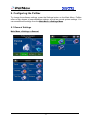
9. Configuring the PolNav
To change the software settings, press the Settings button on the Main Menu. PolNav
offers a high degree of personalisation settings, as well as normal system settings. You
can access these settings from the Main Menu ->Settings Menu.
9.1 General Settings
Main Menu ->Settings ->General
33
9.1.1 Volume
Main Menu ->Settings ->General ->Sound
You can adjust the volume of the voice prompts and sound effects here, as well as
enabling sound/disabling sound.
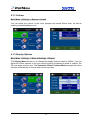
9.1.2 Display Options
Main Menu ->Settings ->General Settings ->Display
The Display Menu allows you to change the display features used by PolNav. You can
adjust the colour scheme to suit your current lighting conditions for ease of visibility, the
3D view angle and font size. The Automatic Colour Scheme Mode changes the colour
scheme automatically at sunrise and sunset each day.
34
In R5.0, there is a new feature to enable the 3D Landmark (optional). There are
three options :OFF、Less、or More.
3D LandMark (enable)
3D LandMark (disable)
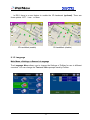
9.1.3 Language
Main Menu ->Settings ->General ->Language
The Language Menu allows you to change the Settings of PolNav for use in different
countries. You can change the Text and Voice prompts used by PolNav.
35
9.1.4 Unit
Main Menu ->Settings ->General ->Unit
The Unit Menu allows you to change Unit Settings of PolNav for use in different
countries. You can change the measuring units (distance) and time settings.
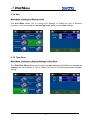
9.1.5 Time Zone
Main Menu ->Settings ->General Settings ->Time Zone
The Time Zone Menu allows you to adjust the time displayed by PolNav for the area or
country you are currently in. This is useful if you are in a country that adopts daylight
saving.
36
9.1.6 Guidance
Main Menu ->Settings ->General ->Guidance
The Guidance Menu allows you to adjust the Map Orientation, Auto Zoom,
Approaching View, Turn PIP.
37
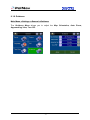
9.2 Advanced Settings
Main Menu ->Settings ->Advanced
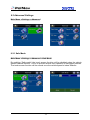
9.2.1 Safe Mode
Main Menu ->Settings ->Advanced ->Safe Mode
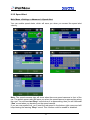
By enabling “Safe mode”, the touch screen function will be disabled when the vehicle
speed is above 40km/hr. This is to prevent drivers from operation of navigation devices.
The touch screen function will be normal once the vehicle speed is below 40km/hr.
38
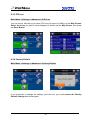
9.2.2 Speed Alert
Main Menu ->Settings ->Advanced ->Speed Alert
You can enable speed alerts, which will warn you when you exceed the speed alert
velocity.
Note: The speed cameras sign will show when there are speed cameras in front of the
car. The speed camera alert will warn you when the speed camera is approaching along
the road. You will hear two”Beep” sound when it is approaching; then you will hear one
“Don” sound when you deviate from the speed camera.
If you are over speed limit, you’ll read the red speed in the bottom right corner and will
keep hearing the warning “Beep” sound. This function could be enable or disabled.
39
9.2.3 POI Icon
Main Menu ->Settings ->Advanced ->POI Icon
You can reveal, hide all or just some POI icons for ease of visibility on the Map Screen.
Select the icons you wish to have displayed or hidden on the Map Screen, then press
the Done Button.
9.2.4 Factory Default
Main Menu ->Settings ->Advanced ->Factory Default
If you would like to change the settings you have set, you could restore the Factory
Default Settings and restart again.
40
9.3 Route Options
Main Menu -> Route ->Route Options
9.3.1 General
Main Menu -> Route ->Route Options
Route options take your preferences into account when calculating the route to your
destination. It is affected by the following parameters, which you can set:
· Vehicle Type: Car, Bicycle, Walker can be selected.
· Routing Method: Shorter (distance), Faster (time), Economic (heuristic) routing
algorithm can be applied.
· Avoid Highway: Highway won’t be considered as route solutions.
· Avoid Minor Road: Minor roads in communities or paved for walker won’t be
considered as route solutions.
· Ignore Traffic Rule: one-way or manoeuvre traffic rules won’t be considered as route
solutions.
· Avoid Toll Roads: the route won’t take roads with tollbooth as solutions.
· Avoid Ferry: ferry won’t be considered as route solutions.
To select or deselect a parameter, press the relevant panel on the screen. Once
selected, it will be highlighted by a check.
41
10. Information
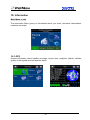
Main Menu -> Info
The Information Menu gives you information about your route, itineraries, destinations,
locations and maps.
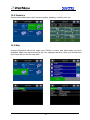
10.1 GPS
Access information about satellite coverage, current time, longitude, latitude, altitude,
quality of the signals received and the status.
42
10.2 Statistics
Access information about your current location, heading, velocity, time, etc.
10.3 Map
Access information about the maps your PolNav is using, and what maps you have
available. Maps are required before you can navigate the area. Note you should have
the license key to use the map data.
43
10.4 About
Access information about PolNav, version number, memory usage etc.
44
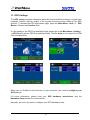
11. GPS Settings
The GPS screen contains information about the current satellite coverage, current time,
longitude, latitude, altitude, quality of the signals received and the status of the GPS
receiver. To access the GPS Information page, press the Main Menu ->Info -> . GPS
Button (Please refer Section 10.1)
For the setting of the GPS Port and Baud Rate, please go to the Main Menu ->Setting
->GPS Port to set the GPS Port and Baud Rate. Choose Auto to auto-detect the COM
Port and Baud Rate.
]
When you run PolNav for the first time on your machine, you need to configure your
GPS settings.
For more information, please read your GPS hardware instructions, and the
Hardware Setup section from this manual.
Normally, you will only need to configure your GPS hardware once.
45
12. Disclaimer
Polstar Technologies, Inc. takes no responsibility for any use of this product that may
result in law violation and/or accidents leading to personal injuries and/or property
damage. It is the user’s own responsibility to operate the product in a prudent manner
that will comply with the law. Polstar will take no responsibility for the consequences
caused by inaccurate satellite transmissions. The Government of the United States of
America is solely responsible for the accuracy and maintenance of the GPS system.
13. Important Messages
•
Warning: Do not operate PolNav and a vehicle simultaneously as this is very
dangerous. The vehicle must be parked prior to operating PolNav. It is your sole
responsibility to operate PolNav and the vehicle in a prudent manner. Misusing
PolNav may result in accidents and may lead to injuries and/or property damage.
Only a passenger should operate PolNav while the vehicle is in motion.
•
Caution: Do not use PolNav as a medium to generate precise readings of altitude,
direction, distance, location or topography. PolNav must only be used as a
navigational aid. Any information generated from PolNav must only be used as
reference.
•
Caution: Although every attempt has been made to ensure the accuracy of the
maps and the data used by PolNav, the location of points of interest, transportation
networks, etc may change over time without notice therefore rendering the data
obsolete. Therefore it is essential that you check the actual surroundings with
PolNav’s maps in order to confirm that you are at the exact destination.
•
Caution: PolNav cannot guarantee that any parts of the planned route will be
dangerous, closed to traffic, or restricted to certain types of vehicles or is congested.
Therefore it is your responsibility to determine the safety of the suggested route and
to ignore any illegal or unsafe routes.
46