1
Appendix: AccuClear Assay Protocol for the AccuLite 470
Fluorometer
Main Menu
Measure
Calibrate
Info
Data
Sample Preparation
Note: if using Mini Glass Tubes, 100 uL sample volume can be used. Scale all
volumes in the reaction (working solution and DNA) proportionally.
1.
Prepare working solution as described in the AccuClear protocol.
2.
For each sample to be tested, pipette 200 uL of the working solution into
a 0.2 mL thin-walled clear PCR tube. To test samples in triplicate, prepare
three tubes for each sample. Prepare two additional tubes for standards.
1. Select Calibrate
7. Select Measure
13. Select Data
3.
Prepare standards. Only the 0 ng DNA standard (blank) and 100 ng DNA
standard are required. Pipette 10 uL of AccuClear Buffer into the 0 ng DNA
tube (blank). Pipette 10 uL of the 10 ng/uL DNA standard into the 100 ng
DNA tube. Pipette up and down or vortex to mix.
Accu dsDNA
AccuOrange
Assay 3
Return
Accu dsDNA
AccuOrange
Assay 3
Return
4.
Prepare samples by pipetting 10 uL of each sample DNA per tube. Pipette
up and down or vortex to mix.
Accu dsDNA
AccuOrange
Assay 3
Return
2. Select Accu dsDNA
8. Select Accu dsDNA
14. Select Accu dsDNA
Accu dsDNA
Blank
Return
Accu dsDNA
Blank
Measure
Return
[Data]
<- ## ->
Erase All
Return
3. Insert blank tube,
select Blank
9. Insert sample tube,
select Measure
15. Use arrows to scroll
through data points.
-orSelect Erase All
00100.000
<- Std ->
Measure
Return
[Timer]
[Data Value]
Save
Return
Confirm?
4. Standard value is
displayed (000100.000)
10. Select Save (or
Return if not saving)
Return
Calibration
To move to a previous screen at any time, select Return. Continue selecting Return
to go back to the Main Menu.
1.
From the AccuLite Main Menu, select Calibrate.
2.
Select Accu dsDNA from the assay list.
3.
Insert the blank tube and close the cover. Select Blank.
4.
After blanking, the standard value will appear (00100.000). Insert the 100 ng
DNA standard tube and close the cover. Press Measure.
5.
Calibration Finished will appear on the screen.
6.
Select Return to return back to the Main Menu.
Sample Measurement
1.
From the AccuLite Main Menu, select Measure.
2.
Select Accu dsDNA from the assay list.
3.
Insert the first sample tube and close the cover. Select Measure. The value
shown is ng DNA per tube.
4.
Select Save to save the data in the meter.
5. Insert 100 ng standard
tube, select Measure
Alternatively, you can manually the record data without saving, then select
Return.
5.
Insert next sample and select Measure.
6.
After reading all samples, select Return repeatedly to navigate back to main
menu.
Retrieving Saved Data
1.
From the AccuLite Main Menu, select Data.
2.
Select Accu dsDNA from the assay list.
3.
Use the arrow keys to navigate through saved data points. Data points are
numbered (##) in order of measurement.
4.
To erase data, select Erase All and Confirm.
5.
To return to previous screens, select Return.
Calibration
Finished
Return
6. Select Return once to
return to Main Menu
[Timer]
[Data Value]
Measure
Return
(Erase All)
16. Select Return
repeatedly to return to
Main Menu.
11. Insert next sample
tube, select Measure.
Repeat for each sample.
12. Select Return
repeatedly to return to
Main Menu.
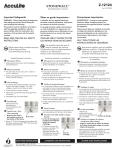
Figure 4. AccuLite user menu tree showing AccuClear calibration,
measurement, and data retrieval steps. See the AccuLite user manual for
complete user menu tree.
Performing a Full Calibration Curve with AccuLite
The first time you perform the assay, or if unexpected results are obtained, you
may wish to perform a full calibration curve to verify that the assay is performing
properly. In this case, perform the 2 point calibration as described above, then read
the full set of standards as if they were unknown samples. Plot the standard curve
as described in the AccuClear protocol.
AccuClear™ Ultra High Sensitivity dsDNA Quantitation Kit with 1 DNA Standard Page 3 of 3
PS006