1
CONTROL PANEL
CONTROL PANEL
DISCRIMINATION
PINPOINT
AND
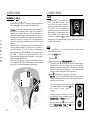
Press DISCRIMINATION or at any time (other than immediately
after pressing
) to adjust the target discrimination level.
aann dd will increase or decrease the level of discrimination.
Each press of the pads will cause a target icon to appear or
disappear on the display. When an icon is not illuminated, the
corresponding target category will be eliminated from detection.
No audible tone nor target-icon will appear when the searchcoil
passes by an object in a category which is not illuminated.The
Dime, Qtr, and + target categories cannot be eliminated from
detection.
While searching, the only target category icons visible are those
indicating detected targets; no more than one is visible at a
time while searching. In order to display the discrimination
status, press either the DISC
or
key. The first press of either
DISC
or
displays the current discrimination status
(eliminated target categories are not displayed — all accepted
target categories are illuminated).
This first key press does not change the discrimination status;
each subsequent DISC
or
will change the discrimination
setting, with icons either disappearing or reappearing.
+
Press and hold to activate this feature
This is a static detection mode; no coil
motion over the target is required to
detect metal while pinpoint is depressed.
This feature is most effective for
pinpointing the exact location of small
buried objects. Reduced sensitivity, and
thus a smaller search field, can be
achieved by pressing the pad while an object is in the coil’s
detection field. The greatest sensitivity to large, deeply-buried objects is
achieved with this mode.
NOTCH
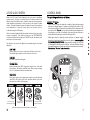
This control allows you to selectively include or exclude target
categories from detection.
NO
OTTC
CHH feature.
To use the N
1.. First press
1
.
2.. Then immediately press DDII SSC
2
C RRIIM
MIINN AATTIIO
ONN or .
Each press of DISC
will change the status of a target category
(starting with iron, from left to right). If an icon was previously
illuminated, indicating inclusion, then it will disappear, indicating
that it is now eliminated from detection. If an icon was previously
turned off, then it will reappear, indicating inclusion.
a second time to save your notch setting.
3.. Press
3
TTIIM
ME
E-- O
OUUTT:: if you do not press NOTCH after several seconds, the
detector will beep twice and return to normal operation, without
changing the notch setting.
Only one category can be notched at a time.
To program multiple notches, press
again
and
change
another
target
category.
You may program any combination of detected
and eliminated target categories using the
DDIISSC
CR
RIIM
MIIN
NA
ATTIIO
ON
N and N
NO
OTTC
CH
H functions.
Practice by pressing the
pad in conjunction
D ii sscc rr iim
m ii nnaa tt iioonn aanndd
paaddss; their
p
with the D
function will quickly become obvious.
8
8
9
9