1
SalesNexus Online CRM and Email Marketing
User Manual
•
•
•
•
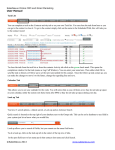
Clicking on the center Notes tab will show you all notes on all contact records associated with this group.
Clicking on the center Activities tab will show you all activities on all contact records associated with this group.
Clicking on the center Sales/ tab will show you all Sales Opportunities on all contact records associated with this group.
Clicking on the center Contact tab will show you all contact records associated with this group. To go to a contact in the
group, click on the mag glass.
To see the groups a given contact belongs to, go to the Groups tab in the center of the contact record.
©SalesNexus 2013
www.salesnexus.com