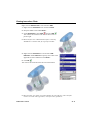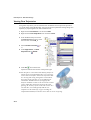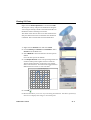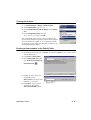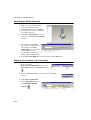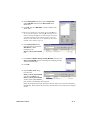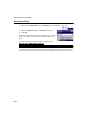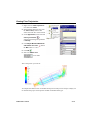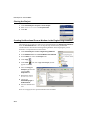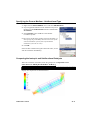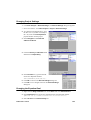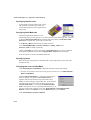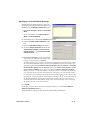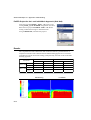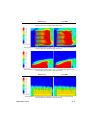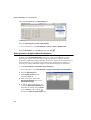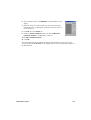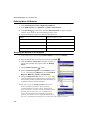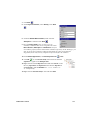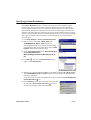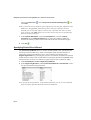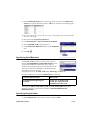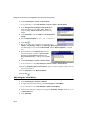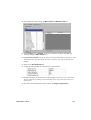
1
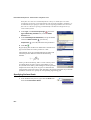
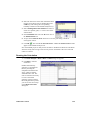
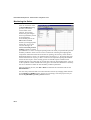
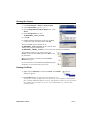
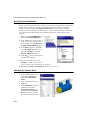
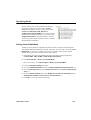
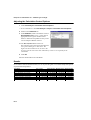
FloEFDTM for Creo
Tutorial
Software Version 13
Rev. 09242013
© 2013 Mentor Graphics Corporation
All rights reserved.
This document contains information that is proprietary to Mentor Graphics Corporation. The original recipient of this
document may duplicate this document in whole or in part for internal business purposes only, provided that this entire
notice appears in all copies. In duplicating any part of this document, the recipient agrees to make every reasonable effort
to prevent the unauthorized use and distribution of the proprietary information.
This document is for information and instruction purposes. Mentor Graphics reserves the right to
make changes in specifications and other information contained in this publication without prior
notice, and the reader should, in all cases, consult Mentor Graphics to determine whether any
changes have been made.
The terms and conditions governing the sale and licensing of Mentor Graphics products are set
forth in written agreements between Mentor Graphics and its customers. No representation or
other affirmation of fact contained in this publication shall be deemed to be a warranty or give
rise to any liability of Mentor Graphics whatsoever.
MENTOR GRAPHICS MAKES NO WARRANTY OF ANY KIND WITH REGARD TO THIS
MATERIAL INCLUDING, BUT NOT LIMITED TO, THE IMPLIED WARRANTIES OF
MERCHANTABILITY AND FITNESS FOR A PARTICULAR PURPOSE.
MENTOR GRAPHICS SHALL NOT BE LIABLE FOR ANY INCIDENTAL, INDIRECT, SPECIAL,
OR CONSEQUENTIAL DAMAGES WHATSOEVER (INCLUDING BUT NOT LIMITED TO LOST
PROFITS) ARISING OUT OF OR RELATED TO THIS PUBLICATION OR THE INFORMATION
CONTAINED IN IT, EVEN IF MENTOR GRAPHICS CORPORATION HAS BEEN ADVISED OF
THE POSSIBILITY OF SUCH DAMAGES.
RESTRICTED RIGHTS LEGEND 03/97
U.S. Government Restricted Rights. The SOFTWARE and documentation have been developed
entirely at private expense and are commercial computer software provided with restricted
rights. Use, duplication or disclosure by the U.S. Government or a U.S. Government
subcontractor is subject to the restrictions set forth in the license agreement provided with the
software pursuant to DFARS 227.7202-3(a) or as set forth in subparagraph (c)(1) and (2) of the
Commercial Computer Software - Restricted Rights clause at FAR 52.227-19, as applicable.
Contractor/manufacturer is:
Mentor Graphics Corporation
8005 S.W. Boeckman Road, Wilsonville, Oregon 97070-7777.
Telephone: 503.685.7000
Toll-Free Telephone: 800.592.2210
Website: www.mentor.com
SupportNet: supportnet.mentor.com/
Send Feedback on Documentation: supportnet.mentor.com/doc_feedback_form
TRADEMARKS: The trademarks, logos and service marks ("Marks") used herein are the
property of Mentor Graphics Corporation or other third parties. No one is permitted to use these
Marks without the prior written consent of Mentor Graphics or the respective third-party owner.
The use herein of a third-party Mark is not an attempt to indicate Mentor Graphics as a source of
a product, but is intended to indicate a product from, or associated with, a particular third party.
A current list of Mentor Graphics’ trademarks may be viewed at: www.mentor.com/trademarks.
Contents
Features List . . . . . . . . . . . . . . . . . . . . . . . . . . . . . . . . . . . FL-1
First Steps
Ball Valve Design
Opening the Model . . . . . . . . . . . . . . . . . . . . . . . . . . . . . . . . . . . . . . . . . . A1-1
Creating a FloEFD Project . . . . . . . . . . . . . . . . . . . . . . . . . . . . . . . . . . . . A1-2
Specifying Boundary Conditions . . . . . . . . . . . . . . . . . . . . . . . . . . . . . . . A1-5
Specifying the Engineering Goal . . . . . . . . . . . . . . . . . . . . . . . . . . . . . . . A1-7
Running the Calculation . . . . . . . . . . . . . . . . . . . . . . . . . . . . . . . . . . . . . . A1-8
Monitoring the Solver . . . . . . . . . . . . . . . . . . . . . . . . . . . . . . . . . . . . . . . . A1-9
Adjusting Model Transparency. . . . . . . . . . . . . . . . . . . . . . . . . . . . . . . . A1-10
Viewing Cut Plots . . . . . . . . . . . . . . . . . . . . . . . . . . . . . . . . . . . . . . . . . . A1-11
Viewing Surface Plots . . . . . . . . . . . . . . . . . . . . . . . . . . . . . . . . . . . . . . . A1-14
Viewing Isosurface Plots. . . . . . . . . . . . . . . . . . . . . . . . . . . . . . . . . . . . . A1-15
Viewing Flow Trajectories . . . . . . . . . . . . . . . . . . . . . . . . . . . . . . . . . . . A1-16
Viewing XY Plots . . . . . . . . . . . . . . . . . . . . . . . . . . . . . . . . . . . . . . . . . . A1-17
Viewing Surface Parameters . . . . . . . . . . . . . . . . . . . . . . . . . . . . . . . . . . A1-18
Analyzing a Design Variant in the Creo Elements/Pro & Creo Parametric Ball
FloEFD FEP13 Tutorial
i
part. . . . . . . . . . . . . . . . . . . . . . . . . . . . . . . . . . . . . . .A1-18
Cloning the Project . . . . . . . . . . . . . . . . . . . . . . . . . . . . . . . . . . . . . . . . .A1-19
Creating a New Instance in the Family Table . . . . . . . . . . . . . . . . . . . . .A1-19
Changing the Model Geometry . . . . . . . . . . . . . . . . . . . . . . . . . . . . . . . .A1-20
Replacing the Instance in the Assembly . . . . . . . . . . . . . . . . . . . . . . . . .A1-20
Analyzing a Design Variant in the FloEFD Application . . . . . . . . . . . . .A1-22
Conjugate Heat Transfer
Opening the Model . . . . . . . . . . . . . . . . . . . . . . . . . . . . . . . . . . . . . . . . . .A2-1
Preparing the Model . . . . . . . . . . . . . . . . . . . . . . . . . . . . . . . . . . . . . . . . .A2-2
Creating a FloEFD Project . . . . . . . . . . . . . . . . . . . . . . . . . . . . . . . . . . . .A2-3
Specifying the Fan . . . . . . . . . . . . . . . . . . . . . . . . . . . . . . . . . . . . . . . . . . .A2-7
Specifying Boundary Conditions. . . . . . . . . . . . . . . . . . . . . . . . . . . . . . . .A2-8
Specifying Heat Sources . . . . . . . . . . . . . . . . . . . . . . . . . . . . . . . . . . . . . .A2-9
Creating Solid Materials in the Engineering Database . . . . . . . . . . . . . .A2-11
Specifying Solid Materials . . . . . . . . . . . . . . . . . . . . . . . . . . . . . . . . . . .A2-13
Specifying Engineering Goals . . . . . . . . . . . . . . . . . . . . . . . . . . . . . . . . .A2-14
Changing the Geometry Resolution . . . . . . . . . . . . . . . . . . . . . . . . . . . .A2-18
Running the Calculation . . . . . . . . . . . . . . . . . . . . . . . . . . . . . . . . . . . . .A2-19
Viewing the Goals . . . . . . . . . . . . . . . . . . . . . . . . . . . . . . . . . . . . . . . . . .A2-19
Adjusting Model Transparency . . . . . . . . . . . . . . . . . . . . . . . . . . . . . . . .A2-20
Viewing Flow Trajectories . . . . . . . . . . . . . . . . . . . . . . . . . . . . . . . . . . .A2-20
Viewing Cut Plots . . . . . . . . . . . . . . . . . . . . . . . . . . . . . . . . . . . . . . . . . .A2-22
Viewing Surface Plots . . . . . . . . . . . . . . . . . . . . . . . . . . . . . . . . . . . . . . .A2-24
ii
FloEFD FEP13 Tutorial
Porous Media
Opening the Model . . . . . . . . . . . . . . . . . . . . . . . . . . . . . . . . . . . . . . . . . . A3-2
Creating a FloEFD Project . . . . . . . . . . . . . . . . . . . . . . . . . . . . . . . . . . . . A3-2
Specifying Boundary Conditions . . . . . . . . . . . . . . . . . . . . . . . . . . . . . . . A3-4
Creating Isotropic Porous Medium in the Engineering Database . . . . . . A3-5
Specifying Porous Medium . . . . . . . . . . . . . . . . . . . . . . . . . . . . . . . . . . . A3-7
Specifying Surface Goals . . . . . . . . . . . . . . . . . . . . . . . . . . . . . . . . . . . . . A3-7
Specifying the Equation Goal. . . . . . . . . . . . . . . . . . . . . . . . . . . . . . . . . . A3-8
Running the Calculation . . . . . . . . . . . . . . . . . . . . . . . . . . . . . . . . . . . . . . A3-9
Viewing the Goals . . . . . . . . . . . . . . . . . . . . . . . . . . . . . . . . . . . . . . . . . A3-10
Viewing Flow Trajectories . . . . . . . . . . . . . . . . . . . . . . . . . . . . . . . . . . . A3-11
Cloning the Project . . . . . . . . . . . . . . . . . . . . . . . . . . . . . . . . . . . . . . . . . A3-12
Creating Unidirectional Porous Medium in the Engineering Database . A3-12
Specifying the Porous Medium - Unidirectional Type . . . . . . . . . . . . . . A3-13
Comparing the Isotropic and Unidirectional Catalysts. . . . . . . . . . . . . . A3-13
Intermediate Examples
Determination of Hydraulic Loss
Opening the Model . . . . . . . . . . . . . . . . . . . . . . . . . . . . . . . . . . . . . . . . . . B1-1
Model Description . . . . . . . . . . . . . . . . . . . . . . . . . . . . . . . . . . . . . . . . . . B1-2
Creating a FloEFD Project . . . . . . . . . . . . . . . . . . . . . . . . . . . . . . . . . . . . B1-3
Specifying Boundary Conditions . . . . . . . . . . . . . . . . . . . . . . . . . . . . . . . B1-7
Specifying Surface Goals . . . . . . . . . . . . . . . . . . . . . . . . . . . . . . . . . . . . . B1-8
Running the Calculation . . . . . . . . . . . . . . . . . . . . . . . . . . . . . . . . . . . . . . B1-9
Monitoring the Solver. . . . . . . . . . . . . . . . . . . . . . . . . . . . . . . . . . . . . . . B1-10
Cloning the Project . . . . . . . . . . . . . . . . . . . . . . . . . . . . . . . . . . . . . . . . . B1-11
Viewing Cut Plots. . . . . . . . . . . . . . . . . . . . . . . . . . . . . . . . . . . . . . . . . . B1-11
Working with Parameter List . . . . . . . . . . . . . . . . . . . . . . . . . . . . . . . . . B1-14
Viewing the Goal Plot. . . . . . . . . . . . . . . . . . . . . . . . . . . . . . . . . . . . . . . B1-15
Working with Calculator . . . . . . . . . . . . . . . . . . . . . . . . . . . . . . . . . . . . B1-16
Changing the Geometry Resolution . . . . . . . . . . . . . . . . . . . . . . . . . . . . B1-18
FloEFD FEP13 Tutorial
iii
Cylinder Drag Coefficient
Problem Statement. . . . . . . . . . . . . . . . . . . . . . . . . . . . . . . . . . . . . . . . . . .B2-1
Opening the Model . . . . . . . . . . . . . . . . . . . . . . . . . . . . . . . . . . . . . . . . . .B2-2
Creating a FloEFD Project . . . . . . . . . . . . . . . . . . . . . . . . . . . . . . . . . . . .B2-2
Specifying 2D simulation . . . . . . . . . . . . . . . . . . . . . . . . . . . . . . . . . . . . .B2-6
Specifying a Global Goal . . . . . . . . . . . . . . . . . . . . . . . . . . . . . . . . . . . . .B2-7
Specifying an Equation Goal. . . . . . . . . . . . . . . . . . . . . . . . . . . . . . . . . . .B2-7
Cloning the Project . . . . . . . . . . . . . . . . . . . . . . . . . . . . . . . . . . . . . . . . . .B2-8
Changing Project Settings . . . . . . . . . . . . . . . . . . . . . . . . . . . . . . . . . . . . .B2-9
Changing the Equation Goal . . . . . . . . . . . . . . . . . . . . . . . . . . . . . . . . . . .B2-9
Creating a Template. . . . . . . . . . . . . . . . . . . . . . . . . . . . . . . . . . . . . . . . .B2-10
Creating a Project from the Template . . . . . . . . . . . . . . . . . . . . . . . . . . . B2-11
Solving a Set of Projects . . . . . . . . . . . . . . . . . . . . . . . . . . . . . . . . . . . . .B2-12
Getting Results . . . . . . . . . . . . . . . . . . . . . . . . . . . . . . . . . . . . . . . . . . . .B2-12
Heat Exchanger Efficiency
Problem Statement. . . . . . . . . . . . . . . . . . . . . . . . . . . . . . . . . . . . . . . . . . .B3-1
Opening the Model . . . . . . . . . . . . . . . . . . . . . . . . . . . . . . . . . . . . . . . . . .B3-2
Creating a FloEFD Project . . . . . . . . . . . . . . . . . . . . . . . . . . . . . . . . . . . .B3-3
Specifying Symmetry Condition . . . . . . . . . . . . . . . . . . . . . . . . . . . . . . . .B3-5
Specifying a Fluid Subdomain . . . . . . . . . . . . . . . . . . . . . . . . . . . . . . . . .B3-6
Specifying Boundary Conditions. . . . . . . . . . . . . . . . . . . . . . . . . . . . . . . .B3-8
Specifying Solid Materials . . . . . . . . . . . . . . . . . . . . . . . . . . . . . . . . . . .B3-12
Specifying a Volume Goal . . . . . . . . . . . . . . . . . . . . . . . . . . . . . . . . . . . .B3-12
Running the Calculation . . . . . . . . . . . . . . . . . . . . . . . . . . . . . . . . . . . . .B3-13
Viewing the Goals . . . . . . . . . . . . . . . . . . . . . . . . . . . . . . . . . . . . . . . . . .B3-13
Viewing Cut Plots . . . . . . . . . . . . . . . . . . . . . . . . . . . . . . . . . . . . . . . . . .B3-14
Adjusting the Parameter Display Range . . . . . . . . . . . . . . . . . . . . . . . . .B3-15
Displaying Flow Trajectories . . . . . . . . . . . . . . . . . . . . . . . . . . . . . . . . .B3-16
Viewing the Surface Parameters . . . . . . . . . . . . . . . . . . . . . . . . . . . . . . .B3-18
Calculating the Heat Exchanger Efficiency. . . . . . . . . . . . . . . . . . . . . . .B3-19
iv
FloEFD FEP13 Tutorial
Mesh Optimization
Problem Statement . . . . . . . . . . . . . . . . . . . . . . . . . . . . . . . . . . . . . . . . . . B4-2
Opening the Model . . . . . . . . . . . . . . . . . . . . . . . . . . . . . . . . . . . . . . . . . . B4-3
Creating a FloEFD Project . . . . . . . . . . . . . . . . . . . . . . . . . . . . . . . . . . . . B4-3
Specifying Boundary Conditions . . . . . . . . . . . . . . . . . . . . . . . . . . . . . . . B4-4
Manual Specification of the Minimum Gap Size . . . . . . . . . . . . . . . . . . . B4-6
Switching off the Automatic Mesh Definition . . . . . . . . . . . . . . . . . . . . . B4-9
Using the Local Initial Mesh Option . . . . . . . . . . . . . . . . . . . . . . . . . . . B4-11
Specifying Control Planes . . . . . . . . . . . . . . . . . . . . . . . . . . . . . . . . . . . B4-12
Creating a Second Local Initial Mesh . . . . . . . . . . . . . . . . . . . . . . . . . . B4-15
Advanced Examples
Application of EFD Zooming
Problem Statement . . . . . . . . . . . . . . . . . . . . . . . . . . . . . . . . . . . . . . . . . . C1-1
The EFD Zooming Approach to Solve the Problem . . . . . . . . . . . . . . . . C1-3
The Local Initial Mesh Approach. . . . . . . . . . . . . . . . . . . . . . . . . . . . . . C1-12
Results . . . . . . . . . . . . . . . . . . . . . . . . . . . . . . . . . . . . . . . . . . . . . . . . . . C1-16
Textile Machine
Problem Statement . . . . . . . . . . . . . . . . . . . . . . . . . . . . . . . . . . . . . . . . . . C2-1
Opening the Model . . . . . . . . . . . . . . . . . . . . . . . . . . . . . . . . . . . . . . . . . . C2-2
Creating a FloEFD Project . . . . . . . . . . . . . . . . . . . . . . . . . . . . . . . . . . . . C2-3
Specifying Boundary Conditions . . . . . . . . . . . . . . . . . . . . . . . . . . . . . . . C2-4
Specifying Rotating Walls . . . . . . . . . . . . . . . . . . . . . . . . . . . . . . . . . . . . C2-5
Specifying Initial Conditions . . . . . . . . . . . . . . . . . . . . . . . . . . . . . . . . . . C2-6
Specifying Goals. . . . . . . . . . . . . . . . . . . . . . . . . . . . . . . . . . . . . . . . . . . . C2-7
Results (Smooth Walls) . . . . . . . . . . . . . . . . . . . . . . . . . . . . . . . . . . . . . . C2-8
Displaying Flow and Particles Trajectories . . . . . . . . . . . . . . . . . . . . . . . C2-8
Modeling Rough Rotating Wall . . . . . . . . . . . . . . . . . . . . . . . . . . . . . . . C2-10
Adjusting Wall Roughness . . . . . . . . . . . . . . . . . . . . . . . . . . . . . . . . . . . C2-11
Results (Rough Walls) . . . . . . . . . . . . . . . . . . . . . . . . . . . . . . . . . . . . . . C2-11
FloEFD FEP13 Tutorial
v
Non-Newtonian Flow in a Channel with Cylinders
Problem Statement. . . . . . . . . . . . . . . . . . . . . . . . . . . . . . . . . . . . . . . . . . .C3-1
Opening the Model . . . . . . . . . . . . . . . . . . . . . . . . . . . . . . . . . . . . . . . . . .C3-2
Defining Non-Newtonian Liquid. . . . . . . . . . . . . . . . . . . . . . . . . . . . . . . .C3-2
Project Definition . . . . . . . . . . . . . . . . . . . . . . . . . . . . . . . . . . . . . . . . . . .C3-2
Specifying Boundary Conditions. . . . . . . . . . . . . . . . . . . . . . . . . . . . . . . .C3-3
Specifying Goals . . . . . . . . . . . . . . . . . . . . . . . . . . . . . . . . . . . . . . . . . . . .C3-4
Comparison with Water . . . . . . . . . . . . . . . . . . . . . . . . . . . . . . . . . . . . . . .C3-4
Radiative Heat Transfer
Problem Statement. . . . . . . . . . . . . . . . . . . . . . . . . . . . . . . . . . . . . . . . . . .C4-1
Opening the Model . . . . . . . . . . . . . . . . . . . . . . . . . . . . . . . . . . . . . . . . . .C4-2
Case 1: The reflector inner surface is a whitebody . . . . . . . . . . . . . . . . . .C4-3
Case 2: All reflector surfaces are blackbody . . . . . . . . . . . . . . . . . . . . . . .C4-6
Case 3: The reflector is removed. . . . . . . . . . . . . . . . . . . . . . . . . . . . . . . .C4-7
Results . . . . . . . . . . . . . . . . . . . . . . . . . . . . . . . . . . . . . . . . . . . . . . . . . . . .C4-8
Rotating Impeller
Problem Statement. . . . . . . . . . . . . . . . . . . . . . . . . . . . . . . . . . . . . . . . . . .C5-1
Opening the Model . . . . . . . . . . . . . . . . . . . . . . . . . . . . . . . . . . . . . . . . . .C5-2
Creating a FloEFD Project . . . . . . . . . . . . . . . . . . . . . . . . . . . . . . . . . . . .C5-2
Specifying Boundary Conditions. . . . . . . . . . . . . . . . . . . . . . . . . . . . . . . .C5-3
On Calculating the Impeller’s Efficiency . . . . . . . . . . . . . . . . . . . . . . . . .C5-5
Specifying Project Goals . . . . . . . . . . . . . . . . . . . . . . . . . . . . . . . . . . . . . .C5-5
Results . . . . . . . . . . . . . . . . . . . . . . . . . . . . . . . . . . . . . . . . . . . . . . . . . . . .C5-8
vi
FloEFD FEP13 Tutorial
CPU Cooler
Problem Statement . . . . . . . . . . . . . . . . . . . . . . . . . . . . . . . . . . . . . . . . . . C6-1
Opening the Model . . . . . . . . . . . . . . . . . . . . . . . . . . . . . . . . . . . . . . . . . . C6-2
Creating a FloEFD Project . . . . . . . . . . . . . . . . . . . . . . . . . . . . . . . . . . . . C6-2
Adjusting the Computational Domain Size . . . . . . . . . . . . . . . . . . . . . . . C6-3
Specifying the Rotating Region . . . . . . . . . . . . . . . . . . . . . . . . . . . . . . . . C6-3
Specifying Stationary Walls . . . . . . . . . . . . . . . . . . . . . . . . . . . . . . . . . . . C6-5
Specifying Solid Materials . . . . . . . . . . . . . . . . . . . . . . . . . . . . . . . . . . . . C6-6
Specifying Heat Source . . . . . . . . . . . . . . . . . . . . . . . . . . . . . . . . . . . . . . C6-6
Specifying Initial Mesh Settings. . . . . . . . . . . . . . . . . . . . . . . . . . . . . . . . C6-6
Specifying Project Goals . . . . . . . . . . . . . . . . . . . . . . . . . . . . . . . . . . . . . C6-9
Results . . . . . . . . . . . . . . . . . . . . . . . . . . . . . . . . . . . . . . . . . . . . . . . . . . C6-11
Oil Catch Can
Problem Statement . . . . . . . . . . . . . . . . . . . . . . . . . . . . . . . . . . . . . . . . . . C7-1
Opening the Model . . . . . . . . . . . . . . . . . . . . . . . . . . . . . . . . . . . . . . . . . . C7-2
Creating a FloEFD Project . . . . . . . . . . . . . . . . . . . . . . . . . . . . . . . . . . . . C7-2
Specifying Boundary Conditions . . . . . . . . . . . . . . . . . . . . . . . . . . . . . . . C7-2
Specifying Project Goals . . . . . . . . . . . . . . . . . . . . . . . . . . . . . . . . . . . . . C7-3
Setting Solution Adaptive Mesh Refinement . . . . . . . . . . . . . . . . . . . . . . C7-4
Defining Motor Oil Material . . . . . . . . . . . . . . . . . . . . . . . . . . . . . . . . . . C7-6
Studying the Motion of Oil Droplets . . . . . . . . . . . . . . . . . . . . . . . . . . . . C7-6
Results . . . . . . . . . . . . . . . . . . . . . . . . . . . . . . . . . . . . . . . . . . . . . . . . . . . C7-8
FloEFD FEP13 Tutorial
vii
Examples for HVAC Module
150W Halogen Floodlight
Problem Statement. . . . . . . . . . . . . . . . . . . . . . . . . . . . . . . . . . . . . . . . . . .D1-1
Opening the Model . . . . . . . . . . . . . . . . . . . . . . . . . . . . . . . . . . . . . . . . . .D1-2
Creating a FloEFD Project . . . . . . . . . . . . . . . . . . . . . . . . . . . . . . . . . . . .D1-3
Adjusting the Computational Domain Size . . . . . . . . . . . . . . . . . . . . . . . .D1-3
Specifying Fluid Subdomain . . . . . . . . . . . . . . . . . . . . . . . . . . . . . . . . . . .D1-4
Specifying Heat and Radiation Conditions . . . . . . . . . . . . . . . . . . . . . . . .D1-4
Specifying Solid Materials . . . . . . . . . . . . . . . . . . . . . . . . . . . . . . . . . . . .D1-8
Specifying Goals . . . . . . . . . . . . . . . . . . . . . . . . . . . . . . . . . . . . . . . . . . . .D1-9
Setting Local Initial Mesh . . . . . . . . . . . . . . . . . . . . . . . . . . . . . . . . . . . . .D1-9
Adjusting the Calculation Control Options . . . . . . . . . . . . . . . . . . . . . . .D1-10
Results . . . . . . . . . . . . . . . . . . . . . . . . . . . . . . . . . . . . . . . . . . . . . . . . . . .D1-10
Hospital Room
Problem Statement. . . . . . . . . . . . . . . . . . . . . . . . . . . . . . . . . . . . . . . . . . .D2-1
Model Configuration . . . . . . . . . . . . . . . . . . . . . . . . . . . . . . . . . . . . . . . . .D2-2
Project Definition . . . . . . . . . . . . . . . . . . . . . . . . . . . . . . . . . . . . . . . . . . .D2-3
Boundary Conditions. . . . . . . . . . . . . . . . . . . . . . . . . . . . . . . . . . . . . . . . .D2-4
Specifying Heat Sources . . . . . . . . . . . . . . . . . . . . . . . . . . . . . . . . . . . . . .D2-5
Specifying Calculation Control Options . . . . . . . . . . . . . . . . . . . . . . . . . .D2-7
Specifying Goals . . . . . . . . . . . . . . . . . . . . . . . . . . . . . . . . . . . . . . . . . . . .D2-7
Adjusting Initial Mesh . . . . . . . . . . . . . . . . . . . . . . . . . . . . . . . . . . . . . . . .D2-7
Setting Local Initial Mesh . . . . . . . . . . . . . . . . . . . . . . . . . . . . . . . . . . . . .D2-8
Results . . . . . . . . . . . . . . . . . . . . . . . . . . . . . . . . . . . . . . . . . . . . . . . . . . . .D2-9
viii
FloEFD FEP13 Tutorial
Pollutant Dispersion in the Street Canyon
Problem Statement . . . . . . . . . . . . . . . . . . . . . . . . . . . . . . . . . . . . . . . . . . D3-1
Model Configuration . . . . . . . . . . . . . . . . . . . . . . . . . . . . . . . . . . . . . . . . D3-2
Project Definition . . . . . . . . . . . . . . . . . . . . . . . . . . . . . . . . . . . . . . . . . . . D3-3
Adjusting the Computational Domain Size . . . . . . . . . . . . . . . . . . . . . . . D3-3
Specifying Goals. . . . . . . . . . . . . . . . . . . . . . . . . . . . . . . . . . . . . . . . . . . . D3-3
Setting Local Initial Mesh . . . . . . . . . . . . . . . . . . . . . . . . . . . . . . . . . . . . D3-4
Adjusting the Calculation Control Options . . . . . . . . . . . . . . . . . . . . . . . D3-4
Specifying Tracer Study . . . . . . . . . . . . . . . . . . . . . . . . . . . . . . . . . . . . . . D3-5
Results . . . . . . . . . . . . . . . . . . . . . . . . . . . . . . . . . . . . . . . . . . . . . . . . . . . D3-6
Examples for Electronics Cooling and LED Modules
Electronic Components
Problem Statement . . . . . . . . . . . . . . . . . . . . . . . . . . . . . . . . . . . . . . . . . . E1-1
Opening the Model . . . . . . . . . . . . . . . . . . . . . . . . . . . . . . . . . . . . . . . . . . E1-2
Creating a FloEFD Project . . . . . . . . . . . . . . . . . . . . . . . . . . . . . . . . . . . . E1-5
Specifying Boundary Conditions . . . . . . . . . . . . . . . . . . . . . . . . . . . . . . . E1-6
Specifying Perforated Plates. . . . . . . . . . . . . . . . . . . . . . . . . . . . . . . . . . . E1-7
Specifying Two-Resistor Components . . . . . . . . . . . . . . . . . . . . . . . . . . . E1-8
Specifying Heat Pipes. . . . . . . . . . . . . . . . . . . . . . . . . . . . . . . . . . . . . . . E1-10
Specifying Contact Resistances . . . . . . . . . . . . . . . . . . . . . . . . . . . . . . . E1-11
Specifying Printed Circuit Board . . . . . . . . . . . . . . . . . . . . . . . . . . . . . . E1-12
Specifying Solid Materials . . . . . . . . . . . . . . . . . . . . . . . . . . . . . . . . . . . E1-13
Specifying Project Goals . . . . . . . . . . . . . . . . . . . . . . . . . . . . . . . . . . . . E1-13
Adjusting the Initial Mesh . . . . . . . . . . . . . . . . . . . . . . . . . . . . . . . . . . . E1-14
Specifying Local Initial Mesh Properties . . . . . . . . . . . . . . . . . . . . . . . . E1-15
Results . . . . . . . . . . . . . . . . . . . . . . . . . . . . . . . . . . . . . . . . . . . . . . . . . . E1-16
FloEFD FEP13 Tutorial
ix
LED Lighting
Problem Statement. . . . . . . . . . . . . . . . . . . . . . . . . . . . . . . . . . . . . . . . . . . E2-1
Opening the Model . . . . . . . . . . . . . . . . . . . . . . . . . . . . . . . . . . . . . . . . . . E2-3
Creating a FloEFD Project . . . . . . . . . . . . . . . . . . . . . . . . . . . . . . . . . . . . E2-4
Adjusting the Computational Domain Size . . . . . . . . . . . . . . . . . . . . . . . . E2-4
Specifying Solid Materials . . . . . . . . . . . . . . . . . . . . . . . . . . . . . . . . . . . . E2-5
Specifying Radiative Surfaces. . . . . . . . . . . . . . . . . . . . . . . . . . . . . . . . . . E2-7
Specifying LEDs . . . . . . . . . . . . . . . . . . . . . . . . . . . . . . . . . . . . . . . . . . . . E2-8
Specifying Goals . . . . . . . . . . . . . . . . . . . . . . . . . . . . . . . . . . . . . . . . . . . E2-12
Results . . . . . . . . . . . . . . . . . . . . . . . . . . . . . . . . . . . . . . . . . . . . . . . . . . . E2-12
Examples for Advanced CFD Module
Combustion in a Tube
Problem Statement. . . . . . . . . . . . . . . . . . . . . . . . . . . . . . . . . . . . . . . . . . . F1-1
Case 1: Non-premixed combustion . . . . . . . . . . . . . . . . . . . . . . . . . . . . . . F1-2
Case 2: Premixed Combustion with ignition. . . . . . . . . . . . . . . . . . . . . . . F1-9
x
FloEFD FEP13 Tutorial
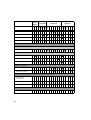
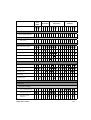
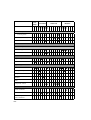
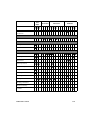
Features List
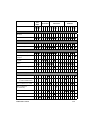
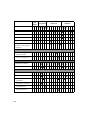
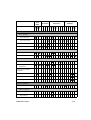
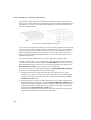
This chapter contains the list of the physical and interface features of FloEFD as they
appear in the tutorial examples. If you need to find an example of a certain feature or
function usage, look for the desired feature in the left column and in its row you can see in
which tutorial examples this feature is used. Usually, the first entrance of the feature in the
tutorial contains the most detailed description. The tutorial examples are listed in Features
List by their respective numbers. All tutorial examples are divided in three categories:
First Steps, Intermediate and Advanced.
In the First Steps examples you will learn the basic principles of the FloEFD structure
and interface.
A1 - Ball Valve Design
A2 - Conjugate Heat Transfer
A3 - Porous Media
On the Intermediate level you will learn how to solve engineering problems with
FloEFD, using some of the most common tasks as examples.
B1 - Determination of Hydraulic Loss
B2 - Cylinder Drag Coefficient
B3 - Heat Exchanger Efficiency
B4 - Mesh Optimization
FloEFD FEP13 Tutorial
FL-1
In the Advanced examples you can see how to use a wide variety of the FloEFD
features to solve real-life engineering problems. It is assumed that you successfully
completed all First Steps examples before.
C1 - Application of EFD Zooming
C2 - Textile Machine
C3 - Non-Newtonian Flow in a Channel with Cylinders
C4 - Radiative Heat Transfer
C5 - Rotating Impeller
C6 - CPU Cooler
C7 - Oil Catch Can
In the examples for HVAC Module you can see how to use an additional capabilities of
the FloEFD to solve Heating, Ventilation, and Air Conditioning tasks. This
functionality is available for the HVAC module users only.
D1 - 150W Halogen Floodlight
D2 - Hospital Room
D3 - Pollutant Dispersion in the Street Canyon
In the examples for Electronics Cooling Module and LED Module you can see how to
use an additional capabilities of the FloEFD to simulate a wide variety of electronic
components. This functionality is available for the Electronics Cooling and LED
modules users only.
E1 - Electronic components
E2 - LED lighting
In the examples for Advanced CFD Module you can see how to use an additional
capabilities of the FloEFD to solve specific engineering problems, such as the
combustion of gas-phase mixtures. This functionality is available for the Advanced
CFD module users only.
F1 - Combustion in a Tube
FL-2
First
Steps
Advanced
Intermediate
Modules
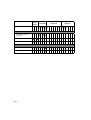
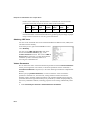
A A A B B B B C C C C C C C D D D E E F
1 2 3 1 2 3 4 1 2 3 4 5 6 7 1 2 3 1 2 1
DIMENSIONALITY
2D flow
3D flow
ANALYSIS TYPE
External analysis
Internal analysis
PHYSICAL FEATURES
Steady state analysis
Time-dependent (transient)
analysis
Liquids
Gases
Non-Newtonian liquids
Combustible Mixtures
Multi-fluid analysis
Mixed flows
Separated flows
(as Fluid Subdomains)
Heat conduction in solids
Heat conduction
in solids only
Laminar only flow
FloEFD FEP13 Tutorial
Gravitational effects
Porous media
FL-3
First
Steps
Advanced
Intermediate
Modules
A A A B B B B C C C C C C C D D D E E F
1 2 3 1 2 3 4 1 2 3 4 5 6 7 1 2 3 1 2 1
Radiation
Absorption in solids
Spectrum
Roughness
Two-phase flows
(fluid flows with particles
or droplets)
Rotation
Global rotating
reference frame
Local rotating regions
CONDITIONS
Computational domain
Symmetry
Initial and ambient conditions
Velocity parameters
Dependency
Thermodynamic
parameters
Turbulence parameters
Concentration
Solid parameters
FL-4
First
Steps
Advanced
Intermediate
Modules
A A A B B B B C C C C C C C D D D E E F
1 2 3 1 2 3 4 1 2 3 4 5 6 7 1 2 3 1 2 1
Boundary conditions
Flow openings
Inlet mass flow
Inlet volume flow
Outlet volume flow
Inlet velocity
Pressure openings
Static pressure
Environment pressure
Wall
Real wall
Boundary condition
parameters
Transferred boundary
conditions
Fans
Contact resistances
Perforated plates
Volume conditions
Fluid Subdomain
Initial conditions
Velocity parameters
Dependency
FloEFD FEP13 Tutorial
FL-5
First
Steps
Advanced
Intermediate
Modules
A A A B B B B C C C C C C C D D D E E F
1 2 3 1 2 3 4 1 2 3 4 5 6 7 1 2 3 1 2 1
Solid parameters
Solid material
Semi-transparent
Porous medium
Heat sources
Surface sources
Heat generation rate
Volume sources
Temperature
Heat generation rate
Goal-dependent sources
Radiative conditions
Radiation sources
Radiative surfaces
Electronics module features (requires Electronics Cooling license)
Two-resistor
components
Heat pipe
Printed circuit board
LED module features (requires LED license)
LED components
FL-6
First
Steps
Advanced
Intermediate
Modules
A A A B B B B C C C C C C C D D D E E F
1 2 3 1 2 3 4 1 2 3 4 5 6 7 1 2 3 1 2 1
Tracers (requires HVAC license)
Tracer Study Setting
Surface sources
Mass flow
PROJECT DEFINITION
Wizard and Navigator
From template
Clone project
General settings
Copy project’s features
GOALS
Global goal
Surface goal
Volume goal
Point goal
Equation goal
MESH SETTINGS
Initial mesh
Automatic settings
Level of initial mesh
Minimum gap size
Minimum wall
thickness
FloEFD FEP13 Tutorial
FL-7
First
Steps
Advanced
Intermediate
Modules
A A A B B B B C C C C C C C D D D E E F
1 2 3 1 2 3 4 1 2 3 4 5 6 7 1 2 3 1 2 1
Manual adjustments
Control planes
Solid/fluid interface
Narrow channels
Local initial mesh
Manual adjustments
Refining cells
Narrow channels
TOOLS
Dependency
Custom units
Engineering database
User-defined items
Check geometry
Gasdynamic calculator
Toolbars
Filter
Component control
CALCULATION CONTROL OPTIONS
Finish conditions
Result resolution level
Solution adaptive
mesh refinement
FL-8
First
Steps
Advanced
Intermediate
Modules
A A A B B B B C C C C C C C D D D E E F
1 2 3 1 2 3 4 1 2 3 4 5 6 7 1 2 3 1 2 1
Calculate comfort
parameters
RUNNING CALCULATION
Batch run
MONITORING CALCULATION
Goal plot
Preview
GETTING RESULTS
Cut plot
Surface plot
Isosurfaces
Flow trajectories
Particle study
XY plot
Surface parameters
Volume parameters
Goal plot
Display parameters
Results summary
Callouts
FloEFD FEP13 Tutorial
FL-9
First
Steps
Intermediate
Advanced
Modules
A A A B B B B C C C C C C C D D D E E F
1 2 3 1 2 3 4 1 2 3 4 5 6 7 1 2 3 1 2 1
Display mode
Show/Hide model
geometry
Transparency
Apply lighting
OPTIONS
Use CAD geometry
Display mesh
FL-10
A
First Steps
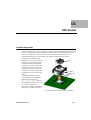
The First Steps examples presented below demonstrate the basic principles of the
FloEFD structure and interface. Its strongly recommended to complete these tutorials
examples first.
A1 - Ball Valve Design
A2 - Conjugate Heat Transfer
A3 - Porous Media
FloEFD FEP13 Tutorial
A-1
First Steps:
A-2
A1
Ball Valve Design
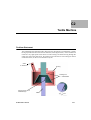
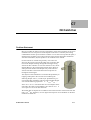
This tutorial deals with the flow of water through a ball valve assembly before and after
some design changes. The objective is to show how easy fluid flow simulation can be with
FloEFD and how simple it is to analyze design variations. These two factors make FloEFD
the perfect tool for engineers who want to test the impact of their design changes.
Opening the Model
1 Copy the A1 - Ball Valve folder from the installation directory
(<install_dir>\Examples\Tutorial Examples\) into your working directory and ensure
that the files are not read-only since FloEFD will save input data to these files. Run
FloEFD.
2 Click File > Open. In the File Open dialog box, browse
to the ball_valve.asm assembly located in the A1 Ball Valve folder and click Open (or double-click the
assembly). Alternatively, you can drag and drop the
ball_valve.asm file to an empty area of Creo
Elements/Pro & Creo Parametric window.
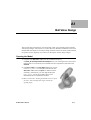
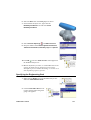
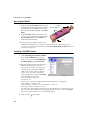
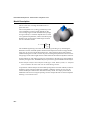
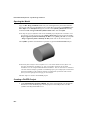
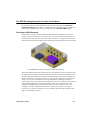
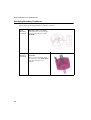
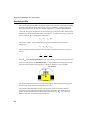
This is a ball valve. Turning the handle closes or opens
the valve. The assembly mate angle controls the
opening angle.
FloEFD FEP13 Tutorial
A1-1
First Steps: A1 - Ball Valve Design
3 Highlight the lids by clicking the components in the Creo Elements/Pro & Creo
Parametric Model Tree (LID_1 and LID_2).
We utilize this model for the FloEFD simulation without any significant changes. The
user simply closes the interior volume using extrusions that we call lids. In this
example the lids are made semi-transparent so you may look into the valve.
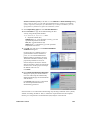
To skip the project definition and run the FloEFD project defined in accordance with
the tutorial, you will need to open the ball_valve.asm assembly located in the A1 -
Ball Valve\Ready To Run folder and run the desired projects.
Creating a FloEFD Project
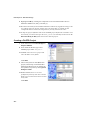
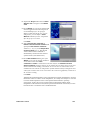
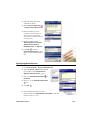
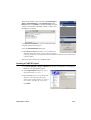
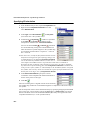
1 In the main menu click Flow Analysis >
Project > Wizard.
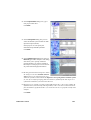
2 Once inside the Wizard, type a new
FloEFD project name: Project 1.
FloEFD will create a new project and
store all data in a new folder.
Click Next.
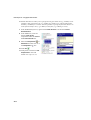
3 Choose the system of units (SI for this
project). Please keep in mind that after
finishing the Wizard you can change the
unit system at any time by clicking Flow
Analysis > Units.
Within FloEFD, there are several
predefined systems of units. You can also
define your own and switch between them
at any time.
Click Next.
A1-2
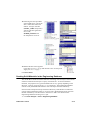
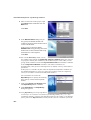
4 Keep the default Internal analysis type.
Do not include any physical features.
We want to analyze the flow through the
structure. This is what we call an internal
analysis. The alternative is an external
analysis, which is the flow around an
object. In this dialog box you can also
choose to ignore cavities that are not
relevant to the flow analysis, so that
FloEFD will not waste memory and CPU
resources to take them into account.
Not only will FloEFD calculate the fluid flow, but can also take into account heat
conduction within the solid, including surface-to-surface radiation. Transient (timedependent) analyses are also possible. Gravitational effects can be included for
natural convection cases. Analysis of rotating equipment is one more option available.
We skip all these features, as none of them is needed in this simple example.
Click Next.
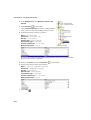
5 In the Fluids tree expand the Liquids item
and choose Water as the fluid. You can
either double-click Water or select the
item in the tree and click Add.
FloEFD is capable of calculating flow of
fluids of different types in the same
analysis, but fluids of different types must
be separated by walls. A mixing of fluids
may be considered only if the fluids are of
the same type.
FloEFD has an integrated database containing properties of several liquids, gases and
solids. Solids are used in conjugate heat conduction analyses. You can easily create
your own materials. Up to ten liquids or gases can be chosen for each analysis run.
FloEFD can analyze any flow type: Turbulent only, Laminar only or Laminar and
Turbulent. The turbulent equations can be disregarded if the flow is entirely laminar.
FloEFD can also handle low and high Mach number compressible flows for gases. For
this demonstration we will perform a fluid flow simulation using a liquid and will keep
the default flow characteristics.
Click Next.
FloEFD FEP13 Tutorial
A1-3
First Steps: A1 - Ball Valve Design
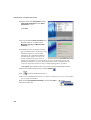
6 Click Next accepting the default wall
conditions.
Since we did not choose to consider heat
conduction in solids, we have an option to
define a value of heat transfer for all
surfaces of the model being in contact with
the fluid. Keep the default Adiabatic wall
to specify that the walls are perfectly
insulated.
You can also specify a wall roughness value applied by default to all model walls. The
specified roughness value is the Rz value.
To set a heat transfer or roughness value for a specific wall, you can define a Real Wall
boundary condition.
7 Click Next accepting the default for the
initial conditions.
On this step we can change the default
settings for pressure, temperature and
velocity. The closer these values to the
final values determined in the analysis,
the quicker the analysis will finish.
Since we do not have any knowledge of
the expected final values, we will not
modify them for this demonstration.
8 Accept the default for the Result
Resolution.
Result Resolution is a measure of the desired level of accuracy of the results. It controls
not only the resolution of the geometry by the mesh, but also sets many parameters for
the solver, e.g. convergence criteria. The higher the Result Resolution, the finer the
mesh will be and the stricter convergence criteria will be set. Thus, Result Resolution
determines the balance between results precision and computation time. Entering
values for the minimum gap size and minimum wall thickness is important when you
A1-4
have small features. Accurately setting these values ensures that the small features of
the model will not be “passed over” by the mesh. For our model we type the value of
the minimum flow passage as the minimum gap size.
Select the Manual specification of the minimum gap size check box. Type the value
of 0.0093 m for the Minimum gap size.
Click Finish.
Now FloEFD creates a new project with the FloEFD data attached.
The FloEFD Projects tree and the FloEFD Analysis tree appears in
the FloEFD Analysis tab of the Navigator panel.
Go to the FloEFD Analysis tab and expand all the items in the
FloEFD Analysis tree.
Click
to hide the FloEFD projects tree.
We will use the FloEFD Analysis tree to define our analysis,
just as you use the Model Tree to design your models. The
FloEFD analysis tree is fully customizable; anytime you can
select which folders are shown and which folders are hidden.
A hidden folder becomes visible when you add a new feature
of the corresponding type. The folder remains visible until the
last feature of this type is deleted.
Right-click the Computational Domain icon and select Hide
to hide the wireframe box.
The Computational Domain icon is used to modify the size of
the volume being analyzed. The wireframe box enveloping
the model is the visualization of the limits of the
computational domain.
Specifying Boundary Conditions
A boundary condition is required where fluid enters or exits the model and can be
specified as a Pressure, Mass Flow Rate, Volume Flow Rate or Velocity.
FloEFD FEP13 Tutorial
A1-5
First Steps: A1 - Ball Valve Design
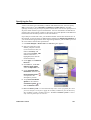
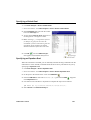
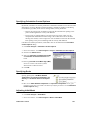
1 In the FloEFD Analysis tree, right-click the
Boundary Conditions icon and select Insert
Boundary Condition.
2 Select the inner face of the LID_1 part as shown.
(To access the inner face, set Filter to Geometry and
right-click the Lid_1 until the inner face is
highlighted, then click the left mouse button).
3 Select Flow Openings
4 Set the Mass Flow Rate
and Inlet Mass Flow.
to 0.5 kg/s.
5 Click OK
. The new Inlet Mass Flow 1 item appears
in the FloEFD Analysis tree.
With the definition just made, we told FloEFD that at this opening 0.5 kilogram of
water per second is flowing into the valve. Within this dialog we can also specify
swirling of the flow, a non-uniform profile and time-dependent properties of the flow.
The mass flow rate at the outlet does not need to be specified due to the conservation of
mass; inlet mass flow rate equals outlet mass flow rate. Therefore, a different condition
must be specified, such as outlet pressure.
A1-6
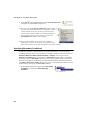
6 Select the inner face of the LID_2 part as shown.
7 In the FloEFD Analysis Tree, right-click the
Boundary Conditions icon and select Insert
Boundary Condition.
8 Select Pressure Openings
and Static Pressure.
9 Keep the defaults under Thermodynamic Parameters,
Turbulence Parameters, Boundary Layer and Options.
10 Click OK
. The new Static Pressure 1 item appears in
the FloEFD Analysis tree.
With the definition just made, we told FloEFD that at this
opening the fluid exits the model to an area of static
atmospheric pressure. Within this dialog we can also set a
time-dependent properties pressure.
Specifying the Engineering Goal
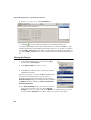
1 Right-click the Goals icon in the FloEFD Analysis tree
and select Insert Surface Goals.
2 Click the Inlet Mass Flow 1 item
to select the face where the goal is
going to be applied.
FloEFD FEP13 Tutorial
A1-7
First Steps: A1 - Ball Valve Design
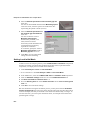
3 In the Parameter table, select the Av
check box in the Static Pressure
row. The already selected Use for
Conv. check box means that the
created goal will be used for
convergence control.
If the Use for Conv. (Use for
Convergence Control) check box is
not selected, the goal will not
influence the calculation stopping criteria. Such goals can be used as monitoring
parameters to give you additional information about processes in your model without
influencing the other results and the total calculation time.
4 Click OK
. The new SG Av Static Pressure 1 item
appears in the FloEFD Analysis tree.
Engineering goals are the parameters of interest. Setting goals is a way of conveying to
FloEFD what you are trying to get out of the analysis, as well as a way to reduce the
time FloEFD needs to reach a solution. By setting a parameter as a project goal you
give FloEFD information about parameters that are important to converge upon (the
parameters selected as goals) and parameters that can be computed with less accuracy
(the parameters not selected as goals) in the interest of the calculation time. Goals can
be set throughout the entire domain (Global Goals), within a selected volume (Volume
Goals), for a selected surface area (Surface Goals), or at given point (Point Goals).
Furthermore, FloEFD can consider the average value, the minimum value or the
maximum value of the goal. You can also define an Equation Goal that is a goal
defined by an equation involving basic mathematical functions with existing goals and
input data parameters as variables. The equation goal allows you to calculate the
parameter of interest (i.e., pressure drop) and keeps this information in the project for
later reference.
Click File > Save.
Running the Calculation
1 Click Flow Analysis > Solve > Run.
The already selected Load results check box
means that the results will be automatically
loaded after finishing the calculation.
2 Click Run.
The solver takes less than a minute to run on a
typical PC.
A1-8
Monitoring the Solver
This is the solver monitor
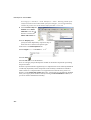
dialog box. By default, on
the left is a log of each
step taken in the solution
process. On the right is
the information dialog
box with mesh
information and warnings
concerning the analysis.
Do not be surprised when
the error message “A
vortex crosses the
pressure opening”
appears. We will explain
this later during the
demonstration.
1 After the calculation has started and several first iterations has passed (keep your eye
on the Iterations line in the Info window), click the Suspend
toolbar.
button on the Solver
We employ the Suspend option only due to extreme simplicity of the current example,
which otherwise could be calculated too fast, leaving you not enough time to perform
the subsequent steps of monitoring. Normally you can use the monitoring tools without
suspending the calculation.
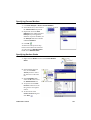
2 Click Insert Goal Plot
on the Solver toolbar. The Add/Remove Goals dialog box
appears.
3 Select the SG Average Static Pressure 1 in the
Select goals list and click OK.
FloEFD FEP13 Tutorial
A1-9
First Steps: A1 - Ball Valve Design
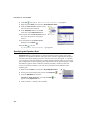
This is the Goals dialog box
and each goal created earlier is
listed in the table at top. Here
you can see the current value
and graph for each goal as well
as the current progress towards
completion given as a
percentage. The progress value
is only an estimate and the rate of progress generally increases with time.
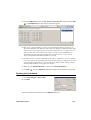
4 Click Insert Preview
on the Solver toolbar.
The Preview Settings dialog box will appear.
5 To create a preview plot, you can select any
plane from the Plane name list and then press
OK. For this model, ASM_TOP can be a good
choice.
The preview allows you to look at the results
while the calculation is still running. This helps to
determine if all the boundary conditions are correctly
defined and gives the user an idea of how the solution
will look even at this early stage. At the start of the run
the results might look odd or change abruptly. However,
as the run progresses these changes will lessen and the
results will settle in on a converged solution. The result
can be displayed either in contour-, isoline- or vectorrepresentation.
6 Click the Suspend
button again to let the solver go
on.
7 When the solver is finished, close the monitor by
clicking File > Close.
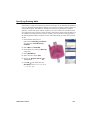
Adjusting Model Transparency
Click View > Color and Appearance.
In the Appearance Editor click the plus button to add a
new appearance.
Go to Advanced tab and adjust transparency to about 80.
A1-10
Click Apply and then Close.
The first step for results processing is to create a transparent view of the geometry, a
‘glass-body’. This way you can easily see where cut planes etc. are located with respect
to the geometry.
In Creo Parametric click View > Model Display > Appearance Gallery > More
Appearances. In the Appearance Editor adjust transparency to about 80.
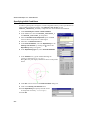
Viewing Cut Plots
A cut plot displays the distribution of the selected parameter on a certain plane. It can be
represented as a contour plot, isolines, vectors, or as arbitrary combination of the above
(e.g. contours with overlaid vectors).
1 In the FloEFD Analysis tree, right-click the Cut Plots icon
and select Insert.
2 Go to the Creo Elements/Pro & Creo Parametric Model
Tree tab, click Settings > Tree Filters, make sure that
Features is checked, click OK and select ASM_TOP
item in the Model Tree.
3 Click OK
FloEFD FEP13 Tutorial
.
A1-11
First Steps: A1 - Ball Valve Design
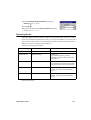
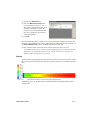
You will see the plot like the one shown below.
If you want to set up the color bar display options
(change the color bar font, background, etc.), rightclick the color bar and select Appearance. To change
the color bar font, deselect Use default font and click
. Then in the font dialog, select the desired font, its
size and color and click OK. Click OK in the
appearance dialog.
You can to set up the callout display options in the
same way as the color bar appearance.
If you want to access additional options for this and
other plots, you can double-click on the color bar. Some
options available here include changing the displayed
parameter as well as changing the min/max plot values.
The best way to learn each of these options is thorough
experimentation.
A1-12
4 Change the contour cut plot to a vector cut plot. To do
this, right-click the Cut Plot 1 icon and select Edit
Definition.
5 Under Display, clear Contours
and select Vectors
.
The vectors size and spacing can be controlled under the
Vectors.
6 Click OK
.
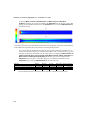
You will see the plot like the one shown below.
FloEFD FEP13 Tutorial
A1-13
First Steps: A1 - Ball Valve Design
Viewing Surface Plots
Right-click the Cut Plot 1 icon and select Hide.
1 Right-click the Surface Plots icon and select Insert.
2 Select the Use all faces check box.
The same basic options are available for Surface Plots
as for Cut Plots. Feel free to experiment with different
combinations on your own.
3 Click OK.
You will see the plot like the one shown below.
This plot shows the pressure (or other parameter selected) distribution on all faces of
the valve in contact with the fluid. You can also select one or more single surfaces for
this plot, which do not have to be planar.
A1-14
Viewing Isosurface Plots
Right-click the Surface Plot 1 icon and select Hide.
1 Right-click the Isosurfaces icon and select Insert.
2 Keep the default value under Value 1.
3 Under Appearance, select Grid
and click OK
You will see the isosurface like the one show in the
picture right.
.
The Isosurface is a 3-Dimensional surface created by
FloEFD at a constant value for a specific variable.
4 Right-click the Isosurface 1 icon and select Edit
Definition. Enable Value 2 and specify some value in the
appeared box that is different to the Value 1.
5 Click OK
.
You will see the isosurfaces like the ones shown below.
The isosurface is a useful way of determining the exact 3D area, where the flow
reaches a certain value of pressure, velocity or other parameter.
FloEFD FEP13 Tutorial
A1-15
First Steps: A1 - Ball Valve Design
Viewing Flow Trajectories
Using Flow trajectories you can show the flow streamlines. Flow trajectories provide a
very good image of the 3D fluid flow. You can also see how parameters change along each
trajectory by exporting data into Microsoft® Excel®.
1 Right-click the Isosurfaces icon and select Hide.
2 Right-click the Flow Trajectories icon and select Insert.
3 In the FloEFD Analysis tab click
the Static Pressure 1 item to select
the inner face of the LID_2.
4 Set the Number of Points
16.
to
5 Under Appearance, set Draw
Trajectories as
Bands.
6 Click OK
.You will the flow
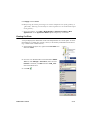
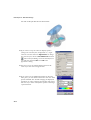
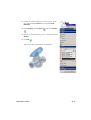
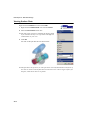
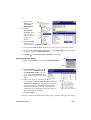
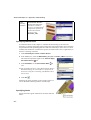
trajectories like the ones shown in the picture right.
For this plot we selected the outlet lid (any flat face or
sketch can be selected) and therefore every trajectory
crosses that selected face. Notice the trajectories that
are entering and exiting through the exit lid. This is
the reason for the warning we received during the
calculation. FloEFD warns us of inappropriate
analysis conditions so that we do not need to be CFD
experts. When flow both enters and exits the same
opening, the accuracy of the results will worsen. In a
case like this, one would typically add the next
component to the model (say, a pipe extending the
computational domain) so that the vortex does not occur at opening.
A1-16
Viewing XY Plots
Right-click the Flow Trajectories 1 icon and select Hide.
We will plot velocity and pressure distributions along the
valve using the already created Creo Elements/Pro & Creo
Parametric sketch containing several lines.
This sketch work does not have to be done ahead of time
and your sketch lines can be created after the calculation
is finished. Take a look at Sketch1 in the Model Tree.
1 Right-click the XY Plots icon and select Insert.
2 Choose Velocity and Pressure as Parameters. Select
Sketch1 from the Model tree.
3 Select Model X as abscissa and leave all other options
default.
Leave all other options as defaults.
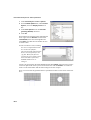
4 Click Export to Excel. Excel will open and generate two
columns of data points together with two charts for
Velocity and for Pressure, respectively. One of these
charts is shown below. You will need to toggle between
different sheets in Excel to view each chart.
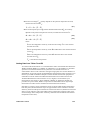
BALL_VALVE.ASM [PROJECT1]
8
7
6
5
s)/
m
(
tyi
c
lo
e
V
4
SKETCH_1@Line1@Line2@Line3_1
3
2
1
0
-0,04
-0,03
-0,02
-0,01
0
0,01
0,02
0,03
0,04
-1
Model X (m)
5 Click OK
.
The XY Plot allows you to view any result along sketched lines. The data is put directly
into Excel or displayed as images in the bottom pane.
FloEFD FEP13 Tutorial
A1-17
First Steps: A1 - Ball Valve Design
Viewing Surface Parameters
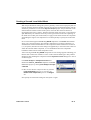
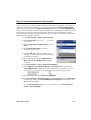
Surface Parameters is a feature used to determine the values of pressure, forces, heat
fluxes as well as many other variables on any face in your model contacting the fluid. For
this type of analysis, a calculation of the average static pressure drop from the valve inlet
to outlet would probably be of some interest.
1 Right-click the Surface Parameters icon and select Insert.
2 In the FloEFD Analysis tab click the Inlet Mass Flow 1
item to select the inner face of the LID_1.
3 Under Parameters, select All.
4 Click Show.
5 Take a look at the local parameters.
The average static pressure at the inlet face is shown to
be about 135500 Pa. We already know that the outlet
static pressure is 101325 Pa since we have specified it
previously as a boundary condition. So, the average static pressure drop through the
valve is about 34000 Pa.
6 Close the Surface Parameters dialog box.
Analyzing a Design Variant in the Creo Elements/Pro & Creo
Parametric Ball part
This section is intended to show you how easy it is to analyze design variations. The
variations can be different geometric dimensions, new features, new parts in an
assembly – whatever! This is the heart of FloEFD and this allows design engineers to
quickly and easily determine which designs have promise, and which designs are
unlikely to be successful. For this example, we will see how filleting two sharp edges
will influence the pressure drop through the valve. If there is no improvement, it will
not be worth the extra manufacturing costs.
A1-18
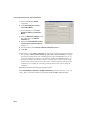
Cloning the Project
1 Click Flow Analysis > Project > Clone Project.
2 In the Project Name, type Project 2.
3 In the Configuration to Add the Project select Create
new.
4 In the Configuration Name list, type
BALL_VALVE_FILLETED.Click OK.
Now the FloEFD project we have chosen is added to the
project which contains the geometry that has been changed.
All our input data are copied, so we do not need to define
our openings or goals again. The Boundary Conditions can
be changed, deleted or added.
Creating a New Instance in the Family Table
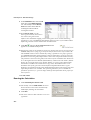
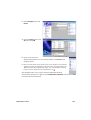
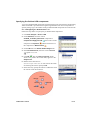
1 In the Model Tree, right-click the BALL icon and select Open. A new window opens
with the BALL part.
2 Click Tools > Family Table.
3 In the Family Table dialog box
click Insert a new instance at
the selected row
.
4 Change the name of the new
configuration from
BALL_INST to the more clear
name BALL_FILLETED.
5 Click Open. A new window
showing the new instance
BALL_FILLETED appears.
FloEFD FEP13 Tutorial
A1-19
First Steps: A1 - Ball Valve Design
Changing the Model Geometry
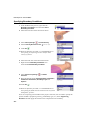
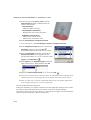
1 Select sharp edges and make them
round with radius of 0.9 mm.
2 Click File > Save to save the BALL
part with the new instance containing
the changed geometry.
3 Click File > Close Window. to close the
window with the BALL_FILLETED
instance.
4 The window with the BALL
part in generic configuration is
still opened. Click Tools >
Family Table to check that the
new configuration with
rounded edges is added to the
Family Table of the BALL part.
5 Click File > Close Window to close the window with the BALL part.
Replacing the Instance in the Assembly
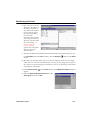
1 In the still opened
BALL_VALVE_FILLETED window click
File > Open and select the In Session option
.
1 Open the ball_valve.asm assembly and select the generic
instance.
2 Click Tools > Family Table.
3 In the Family Table dialog box
click Add/delete the table
columns
A1-20
.
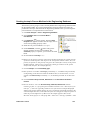
4 In the Family Items dialog box select Component
under Add Item and then select BALL.PRT in the
Model Tree.
5 Click OK. The new M45 BALL column is added to the
family table.
In the new column you can choose between Y, N and *
for each of the instances. Selecting N will suppress the
instance and all the differences and changes it contains,
selecting Y unsuppress the instance and * leaves the
instance in the same state as it is defined for the whole
column in the column’s top cell.
6 In the Family Table dialog
box select the cell of the new
M45 BALL column
belonging to the
BALL_VALVE_FILLETED
row.
7 Click Tools > Replace Using > Family Member and select the
BALL_FILLETED instance containing the changed geometry
with the rounded edges.
8 Click OK.
9 In the Family Table dialog
box select the
BALL_VALVE_FILLETED
row and click Open. The
BALL_VALVE_FILLETED
window opens and the BALL
part now has rounded edges in this project.
Since all conditions have been copied into the new instance you can start calculation
immediately. Please follow the previously described steps for solving and viewing the
results.
FloEFD FEP13 Tutorial
A1-21
First Steps: A1 - Ball Valve Design
Analyzing a Design Variant in the FloEFD Application
In the previous sections we examined how you could compare results from different
geometries. You may also want to run the same geometry over a range of flow rates.
This section shows how quick and easy it can be to do that kind of parametric study.
Here we are going to change the mass flow to 0.75 kg/s.
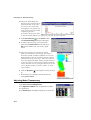
Activate the Project 1 in the FloEFD Projects tree.
1 Create a copy of the Project 1 project by clicking Flow
Analysis > Project > Clone Project.
2 Type Project 3 for the new project name and click
OK.
FloEFD now creates a new project. All our input data are
copied, so we do not need to define our openings or goals
again. The Boundary Conditions can be changed, deleted or
added. All changes to the geometry will only be applied to
this new configuration, so the old results remain valid. After
changing the inlet flow rate value to 0.75 kg/s you would be
ready to run again. Please follow the previously described steps for solving and for
viewing the results.
Imagine being the designer of this ball valve. How would you make decisions concerning
your design? If you had to determine whether the benefit of modifying the design as we
have just done outweighted the extra costs, how would you do this? Engineers have to
make decisions such as this every day, and FloEFD is a tool to help them make those
decisions. Every engineer who is required to make design decisions involving fluid and
heat transfer should use FloEFD to test their ideas, allowing for fewer prototypes and
quicker design cycles.
A1-22
A2
Conjugate Heat Transfer
This tutorial covers the basic steps required to set up a flow analysis problem including
heat conduction in solids. This example is particularly pertinent to users interested in
analyzing flow and heat conduction within electronics devices, although the basic
principles are applicable to all thermal problems. It is assumed that you have already
completed the Ball Valve Design tutorial since it teaches the basic principles of using
FloEFD in greater detail.
Opening the Model
1 Copy the A2 - Conjugate Heat Transfer folder into your working directory and
ensure that the files are not read-only since FloEFD will save input data to these files.
Run FloEFD. Click File > Open.
In the File Open dialog box, browse to the enclosure_assembly.asm assembly
located in the A2 - Conjugate Heat Transfer folder and click Open.
To skip the project definition and run the FloEFD project defined in accordance with
the tutorial, you will need to open the enclosure_assembly.asm assembly located
in the A2 - Conjugate Heat Transfer\Ready To Run folder and run the project.
FloEFD FEP13 Tutorial
A2-1
First Steps: A2 - Conjugate Heat Transfer
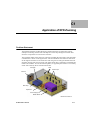
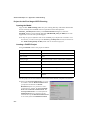
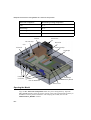
Heat Sink
Inlet Fan
PCBs
Small Chips
Main Chip
Capacitors
Power Supply
Motherboard
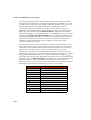
Preparing the Model
In a typical assembly there may be many features, parts or sub-assemblies that are not
necessary for the analysis. Prior to creating a FloEFD project, it is a good practice to check
the model to find components that can be removed from the analysis. Excluding these
components reduces the computer resources and calculation time required for the analysis.
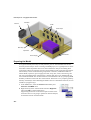
The assembly consists of the following components: enclosure, motherboard and two
smaller PCBs, capacitors, power supply, heat sink, chips, fan, screws, fan housing, and
lids. You can highlight these components by clicking them in the Creo Elements/Pro &
Creo Parametric Model Tree. In this tutorial we will simulate the fan by specifying a Fan
boundary condition on the inner face of the inlet lid. The fan has a very complex geometry
that may cause delays while rebuilding the model. Since it is outside the enclosure, we can
exclude it by suppressing it.
1 In the Model Tree, select the FAN-412 subassembly and
Pattern 4 of SCREW item.
2 Right-click any of the selected items and select Suppress.
Then click OK to confirm suppressing.
Suppressing fan and its screws leaves open five holes in the
enclosure. Since we are going to perform an internal analysis,
all the holes must be closed with lids.
A2-2
To save your time, we created the lids and included them in this model. You just need
to unsuppress them. Please make sure that the Tree Filters settings allow you to see the
supressed objects in the Model Tree.
3 In the Model tree, select the INLET_LID and Pattern 5
of SCREWHOLE_LID_ items .
4 Right-click any of the selected items and select Resume.
Now you can start with FloEFD.
Creating a FloEFD Project
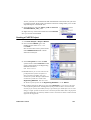
1 Click Flow Analysis > Project > Wizard.
2 Once inside the Wizard, type a new
FloEFD project name: Inlet Fan.
Click Next.
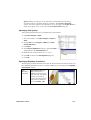
Now we will create a new system of units
named USA Electronics that is better
suited for our analysis.
3 In the Unit system list select the USA
system of units. Select Create new to add
a new system of units to the Engineering
Database and name it
USA Electronics.
FloEFD allows you to work with several
pre-defined unit systems but often it is
more convenient to define your own
custom unit system. Both pre-defined and
custom unit systems are stored in the
Engineering Database. You can create
the desired system of units in the Engineering Database or in the Wizard.
By scrolling through the different groups in the Parameter tree you can see the units
selected for the parameters. Although most of the parameters have convenient units
such as ft/s for velocity and CFM (cubic feet per minute) for volume flow rate we will
change a couple of units to that are more convenient for this model. Since the physical
size of the model may be relatively small it is more convenient to choose inches instead
of feet as the length unit.
FloEFD FEP13 Tutorial
A2-3
First Steps: A2 - Conjugate Heat Transfer
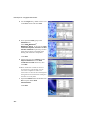
4 For the Length entry, double-click its cell
in the Unit column and select Inch.
5 Next expand the Heat group in the
Parameter tree.
Select Watt, Watt/meter2,
Watt/meter2/Kelvin as the units for Total
heat flow and power, Heat flux and Heat
transfer coefficient respectively, because
these units are more convenient when
dealing with electronic components .
Click Next.
6 Set the analysis type to Internal. Under
Physical Features select the Heat
conduction in solids check box, then
click Next.
Heat conduction in solids is selected
because heat is generated by several
electronics components and we are
interested to see how the heat is dissipated
through the heat sink and other solid parts
and then out to the fluid.
7 Expand the Gases folder and double-click
Air. Keep the default Flow
Characteristics.
Click Next.
A2-4
8 Expand the Alloys folder and click Steel
Stainless 321 to assign it as the Default
solid.
In the Wizard you specify the default solid
material applied to all solid components
in the FloEFD project. To specify a
different solid material for one or more
components, you can define a Solid
Material condition for these components
after the project is created.
Click Next.
9 Select Heat transfer coefficient as
Default outer wall thermal condition and
specify the Heat transfer coefficient
value of 5.5 W/m^2/K and Temperature
of external fluid of 50°F. The entered
value of heat transfer coefficient is
automatically converted to the selected
system of units (USA Electronics).
In the Wall Conditons dialog box of the
Wizard you specify the default conditions
at the model walls. When Heat
conduction in solids is enabled in an internal analysis, the Default outer wall
thermal condition parameter allows you to simulate heat exchange between the outer
model walls and surrounding environment. In our case the box is located in an airconditioned room with the air temperature of 50°F and heat transfer through the outer
walls of the enclosure due to the convection in the room can significantly contribute to
the enclosure cooling.
Click Next.
Although the initial temperature is more important for transient calculations to see how
much time it takes to reach a certain temperature, in a steady-state analysis it is useful
to set the initial temperature close to the expected final solution to speed up
convergence. In this case we will set the initial air temperature and the initial
temperature of the stainless steel (which represents the material of enclosure) to 50°F
because the box is located in an air-conditioned room.
FloEFD FEP13 Tutorial
A2-5
First Steps: A2 - Conjugate Heat Transfer
10 Set the initial fluid Temperature and the
Initial solid temperature (under Solid
Parameters) to 50°F.
Click Next.
11 Accept the default Result resolution and
keep the automatic evaluation of the
Minimum gap size and Minimum wall
thickness.
FloEFD calculates the default minimum
gap size and minimum wall thickness using
information about the overall model
dimensions, the computational domain,
and dimensions of faces on which you
specify conditions and goals. Prior to
starting the calculation, we recommend you to check the minimum gap size and
minimum wall thickness to ensure that small features will be recognized. We will
review this again after all the necessary conditions and goals are specified.
Click Finish. Now FloEFD creates a new project with the FloEFD data attached.
Switch to the FloEFD Analysis tab by clicking FloEFD
Click
.
to hide the FloEFD projects tree.
We will use the FloEFD Analysis tree to define our analysis, just as you use the Model
Tree to design your models.
Right-click the Computational Domain icon and select Hide to
hide the wireframe box.
A2-6
Specifying the Fan
A Fan is one of the types of boundary condition that defines the flow. You can specify
Fans on the surfaces, free of Boundary Conditions and Heat Sources. At model
openings closed by lids you can specify Inlet or Outlet Fans. You can also specify fans on
any faces within the flow region as Internal Fans. A Fan is considered as an ideal device
creating a flow with a certain volume (or mass) flow rate, which depends on the difference
between the inlet and outlet pressures on the selected faces.
If you analyze a model with a fan, you should be familiar with the fan characteristics. In
this example, we use one of the pre-defined fans available in the Engineering Database. If
you cannot find an appropriate fan in the Engineering Database, you can define your own
fan in accordance with the fan specifications.
1 Click Flow Analysis > Insert > Fan. The Fan dialog box appears.
2 Select the inner face of the
INLET_LID part as shown.
(To access the inner face, set
Filter to Geometry and
right-click the INLET_LID
until the inner face is
highlighted, then click the
left mouse button).
3 Under Type, select External
Inlet Fan.
4 In the Fan list, under PreDefined / Axial / Papst,
select the Papst 412 item.
5 Under Thermodynamic
Parameters check that the
Environment Pressure
corresponds to the
atmospheric pressure.
6 Accept Face Coordinate
System as the reference
Coordinate system
and
X as the Reference axis.
Face coordinate system is created automatically in the center of a planar face when
you select this face as the face to apply the boundary condition or fan. The X axis of
this coordinate system is normal to the face. The Face coordinate system is created
only when one planar face is selected.
FloEFD FEP13 Tutorial
A2-7
First Steps: A2 - Conjugate Heat Transfer
7 Click OK
. The new Fans folder and the External Inlet Fan 1
item appear in the FloEFD Analysis tree.
Now you can edit the External Inlet Fan 1 item or add a
new fan using FloEFD Analysis tree. This folder remains
visible until the last feature of this type is deleted. You
can also make a feature folder to be initially available in
the tree. Right-click the project name item and select
Customize Tree to add or remove folders.
Since the outlet lids of the enclosure are at ambient
atmospheric pressure, the pressure rise produced by the
fan is equal to the pressure drop through the electronics enclosure.
Specifying Boundary Conditions
A boundary condition is required in any place where fluid enters or exits the model,
excluding openings where a fan is specified. A boundary condition can be set in form of
Pressure, Mass Flow Rate, Volume Flow Rate or Velocity. You can also use the
Boundary Condition dialog for specifying an Ideal Wall condition that is an adiabatic,
frictionless wall or a Real Wall condition to set the wall roughness and/or temperature
and/or heat conduction coefficient at the selected model surfaces. For internal analyses
with Heat conduction in solids enabled, you can also set thermal wall condition on outer
model walls by specifying an Outer Wall condition.
1 In the FloEFD analysis tree right-click the Boundary
Conditions icon and select Insert Boundary
Condition.
A2-8
2 Select the inner faces of all
outlet lids as shown.
3 Select Pressure Openings
and Environment Pressure.
The Environment pressure
condition is interpreted as a
static pressure for outgoing
flows and as a total pressure for
incoming flows.
4 Keep the defaults under
Thermodynamic Parameters,
Turbulence Parameters,
Boundary Layer and Options.
5 Click OK
. The new
Environment Pressure 1 item
appears in the FloEFD Analysis
tree.
Specifying Heat Sources
1 Click Flow Analysis > Insert > Volume Source.
2 Select the MAIN_CHIP from the Model
tree to add it to the Components to
Apply the Volume Source
list.
3 Select the Heat Generation Rate
Parameter.
as
4 Enter 5 W in the Heat Generation Rate
box.
5 Click OK
.
6 In the FloEFD Analysis tree, clickpause-click the new VS Heat Generation Rate 1 item and
rename it to Main Chip.
FloEFD FEP13 Tutorial
A2-9
First Steps: A2 - Conjugate Heat Transfer
Volume Heat Sources allow you to specify the heat generation rate (e.g. in Watts) or the
volumetric heat generation rate (e.g. in Watts per volume) or a constant temperature
boundary condition for a volume. It is also possible to specify Surface Heat Sources in
terms of heat transfer rate (e.g. in Watts) or heat flux (e.g. in Watts per area).
7 In the FloEFD analysis tree, right-click the Heat Sources icon and select Insert
Volume Source.
8 In the Model tree, select all
three CAPACITOR
components under the Pattern
3 of CAPACITOR item.
9 Select the Temperature
as
Parameter and enter 100 °F in
the Temperature
10 Click OK
box.
.
11 Click-pause-click the new VS
Temperature 1 item and
rename it to Capacitors.
A2-10
12 Following the same procedure
as described above, specify the
other volume heat sources as
follows: all chips on PCBs
(SMALL_CHIP components)
with the total heat generation
rate of 4 W,
POWER_SUPPLY with
the temperature of 120 °F.
13 Rename the heat source applied
to the chips to Small Chips and the heat source for the power
supply to Power Supply.
Click File > Save.
Creating Solid Materials in the Engineering Database
The real PCBs are made of laminate materials consisting of several layers of thin metal
conductor interleaved with layers of epoxy resin dielectric. As for most laminate
materials, the properties of a typical PCB material can vary greatly depending on the
direction - along or across the layers, i.e. it is anisotropic. The Engineering Database
contains some predefined PCB materials with anisotropic thermal conductivity.
In this tutorial example anisotropic thermal conductivity of PCBs does not affect the
overall cooling performance much, so we will create a PCB material having the same
thermal conductivity in all directions to learn how to add a new material to the
Engineering Database and assign it to a part.
1 Click Flow Analysis > Tools > Engineering Database.
FloEFD FEP13 Tutorial
A2-11
First Steps: A2 - Conjugate Heat Transfer
2 In the Database tree select Materials / Solids / User
Defined.
3 Click New Item
on the toolbar.
The blank Item Properties tab appears. Double-click the
empty cells to set the corresponding properties values.
4 Specify the material properties as follows:
Name = Tutorial PCB,
Comments = Isotropic PCB,
Density = 1120 kg/m^3,
Specific heat = 1400 J/(kg*K),
Conductivity type = Isotropic
Thermal conductivity = 10 W/(m*K),
Melting temperature = 390 K.
We also need to add a new material simulating thermal conductivity and other thermal
properties of electronic components.
5 Switch to the Items tab and click New Item
6 Specify the properties of the chips material:
Name = Tutorial component package,
Comments = Component package,
Density = 2000 kg/m^3,
Specific heat = 120 J/(kg*K),
Conductivity type = Isotropic
Thermal conductivity = 0.4 W/(m*K),
Melting temperature = 390 K.
7 Click Save
A2-12
.
on the toolbar.
8 Click File > Exit to exit the database.
You can enter the material properties in any unit system you want by typing the unit
name after the value and FloEFD will automatically convert the entered value to the SI
system of units. You can also specify temperature-dependent material properties using
the Tables and Curves tab.
Specifying Solid Materials
The Solid Material feature is used to specify the material for solid parts in the assembly.
1 In the FloEFD analysis tree, right-click the Solid Materials icon and select Insert
Solid Material.
2 In the Model Tree, select the
MOTHERBOARD and both
PCB components.
3 In the Solid list, expand User
Defined and select Tutorial
PCB.
4 Click OK
.
5 Following the same
procedure, specify solid
materials for other
components:
• for the Main Chip and all
Small Chips assign the
new Tutorial component
package material
(available under User Defined);
• the Heat Sink is made of Aluminum (available under Pre-Defined / Metals);
• the lids (INLET_LID and all lids in both the Pattern 2 of OUTLET_LID and
Pattern 5 of SCREWHOLE_LID patterns) are made of the Insulator material
(available under Pre-Defined / Glasses and Minerals).
To select a part, click it in the Model Tree or Creo Elements/Pro & Creo Parametric
graphics area.
6 Change the name of each assigned solid material. The new,
descriptive names should be:
PCB - Tutorial PCB,
Chips - Tutorial component package,
Heat Sink - Aluminum,
Lids - Insulator.
7 Click File > Save.
FloEFD FEP13 Tutorial
A2-13
First Steps: A2 - Conjugate Heat Transfer
Specifying Engineering Goals
Specifying Volume Goals
8 In the FloEFD analysis tree, right-click the Goals icon
and select Insert Volume Goals.
9 Select the Small
Chips item in the
FloEFD analysis
tree. This will
select all
components
belonging to the
Small Chips heat
source.
10 In the Parameter
table, select the
Max check box in
the Temperature
(Solid) row.
11 Accept selected
Use for Conv. check box to use this goal for convergence control.
12 Click OK. The new VG Max Temperature (Solid) 1 item appears in the FloEFD
Analysis tree.
13 Change the name of the new item to
VG Small Chips Max Temperature. You can
also change the name of the item using the Feature
Properties dialog that appears if you right-click the
item and select Properties.
A2-14
14 Right-click the Goals icon and select Insert Volume Goals.
15 Select the Main
Chip item in the
FloEFD analysis
tree.
16 In the Parameter
table, select the
Max check box in
the Temperature
(Solid) row.
17 Click OK.
18 Rename the new VG Max Temperature (Solid) 1 item to VG Chip Max
Temperature.
Click anywhere in the graphic area to clear the selection.
FloEFD FEP13 Tutorial
A2-15
First Steps: A2 - Conjugate Heat Transfer
Specifying Surface Goals
1 Right-click the Goals icon and select Insert Surface Goals.
2 Click the
External Inlet
Fan 1 item to
select the face
where the goal is
going to be
applied.
3 In the Parameter
table select the
Av check box in
the Static
Pressure row.
4 Accept selected
Use for Conv.
check box to use
this goal for
convergence
control.
Notice the X(Y, Z)
- Component of Force and X(Y, Z) - Component of Torque surface goals. For these you
can select the Coordinate system, in which these goals will be calculated.
5 At the bottom of the Surface Goals dialog box click Inlet
<Number> field from the Name Template box.
6 Click OK.
The new SG Inlet Av Static Pressure goal appears.
Click anywhere in the graphic area to clear the selection.
A2-16
and then remove the
1 Right-click the
Goals icon and
select Insert
Surface Goals.
2 Click the
Environment
Pressure 1 item to
select the faces
where the goal is
going to be
applied.
3 In the Parameter
table select the
first check box in the Mass Flow Rate row.
4 Accept selected Use for Conv. check box to use this goal for convergence control.
5 At the bottom of the Surface Goals dialog box, click Outlet
<Number> field from the Name Template.
6 Click OK
and then remove the
. The SG Outlet Mass Flow Rate goal appears.
Specifying Global Goals
1 Right-click the Goals icon and select Insert Global Goals.
2 In the Parameter table select the Av
check boxes in the Static Pressure
and Temperature (Fluid) rows and
accept selected Use for Conv. check
box to use these goals for convergence
control.
3 Remove the <Number> field from the Name Template
and click OK. The GG Av Static Pressure and GG Av
Temperature (Fluid) goals appear.In this tutorial, the
engineering goals are set to determine the maximum
temperature of the heat generating components, the
temperature rise in air and the pressure drop and mass
flow rate through the enclosure.
4 Click File > Save.
Next let us check the automatically defined geometry resolution settings for this project.
FloEFD FEP13 Tutorial
A2-17
First Steps: A2 - Conjugate Heat Transfer
Changing the Geometry Resolution
1 Click Flow Analysis > Initial Mesh.
In Creo Parametric click Flow Analysis >
Mesh > Initial Mesh.
2 Select the Manual specification of the
minimum gap size check box.
3 Enter 0.1 in for the Minimum gap size
(i.e. passage between the fins of the heat sink).
Entering values for the minimum gap size and minimum
wall thickness is important when you have small
features. Setting these values accurately ensures that
the small features are not "passed over" by the mesh.
The minimum wall thickness should be specified only if
there are fluid cells on either side of a small solid
feature. In case of internal analyses, there are no fluid cells in the ambient space
outside of the enclosure. Therefore boundaries between internal flow and ambient
space are always resolved properly. That is why you should not take into account the
walls of the steel cabinet. Both the minimum gap size and the minimum wall thickness
are tools that help you to create a model-adaptive mesh resulting in increased
accuracy. However the minimum gap size setting is the more powerful one. The fact is
that the FloEFD mesh is constructed so that the specified Level of initial mesh controls
the minimum number of mesh cells per minimum gap size. And this number is equal to
or greater than the number of mesh cells generated per minimum wall thickness.
That's why even if you have a thin solid feature inside the flow region it is not
necessary to specify minimum wall thickness if it is greater than or equal to the
minimum gap size. Specifying the minimum wall thickness is necessary if you want to
resolve thin walls smaller than the smallest gap.
4 Click OK.
A2-18
Running the Calculation
1 Click Flow Analysis > Solve > Run.
2 Click Run.
It will take a few minutes to calculate this
problem on a typical PC.
You may notice that different goals take differ-
ent number of iterations to converge.
The goal-oriented philosophy of FloEFD
allows you to get the answers you need in the shortest amount of time. For example, if
you were only interested in the temperature of fluid in the enclosure, FloEFD would
have provided the result more quickly then if the solver was allowed to fully converge
on all of the parameters.
Viewing the Goals
1 Right-click the Goal Plots icon under Results and select Insert.
2 In the Goals dialog, select All.
3 Click OK.
An Excel spreadsheet with the goal results will be open.
The first sheet will show a table summarizing the goals.
ENCLOSURE_ASSEMBLY.ASM [INLET_FAN]
Goal Name
Unit
GG Av Static Pressure
[lbf/in^2]
SG Inlet Av Static Pressure [lbf/in^2]
GG Av Temperature (Fluid) [°F]
SG Outlet Mass Flow Rate [lb/s]
VG Small Chips Max Temp [°F]
VG Chip Max Temperature [°F]
Value
Averaged Value Minimum Value Maximum Value
14,69677107
14,69677231
14,69677092
14,69677308
14,69653289
14,69653726
14,69653289
14,69653939
61,37009916
61,30920925
61,18051182
61,40785695
-0,007193183
-0,007190625
-0,007193183
-0,007189949
89,24271231
89,14410831
88,65386757
89,445698
88,33986905
88,34641545
88,31882243
88,36898683
You can see that the maximum temperature in the main chip is about 88 °F, and the
maximum temperature over the small chips is about 89 °F.
Goal progress bar is a qualitative and quantitative characteristic of the goal
convergence process. When FloEFD analyzes the goal convergence, it calculates the
goal's amplitude excursion of the averaged value defined as the difference between the
maximum and minimum values of the averaged goal over the analysis interval
reckoned from the last iteration and compares this amplitude excursion with the goal's
FloEFD FEP13 Tutorial
A2-19
First Steps: A2 - Conjugate Heat Transfer
convergence criterion amplitude excursion, either specified by you or automatically
determined by [Product] as a fraction of the goal's physical parameter amplitude
excursion over the analysis interval reckoned from the fourth iteration until one travel
is completed. The percentage of the goal's convergence criterion to the goal's real
amplitude excursion over the analysis interval is shown in the goal's convergence
progress bar (when the goal's real amplitude excursion becomes equal or smaller than
the goal's convergence criterion, the progress bar is replaced by word "Achieved").
Naturally, if the goal's real amplitude excursion oscillates, the progress bar oscillates
also, moreover, when a hard problem is solved, it can noticeably regress, in particular
from the "achieved" level. The calculation can finish if the iterations (in travels)
required for finishing the calculation have been performed, or if the goal convergence
criteria are satisfied before performing the required number of iterations. You can
specify other finishing conditions at your discretion.
To analyze the results in more detail let us use the various FloEFD results processing
tools. The best method for the visualization of how the fluid flows inside the enclosure is
to create flow trajectories.
Adjusting Model Transparency
Click View > Color and Appearance.
In the Appearance Editor click the plus button to add a
new appearance.
Go to Advanced tab and adjust transparency to about 80.
Click Apply and then Close.
The first step for results processing is to create a
transparent view of the geometry, a ‘glass-body’. This way you can easily see where
cut planes etc. are located with respect to the geometry.
In Creo Parametric click View > Model Display > Appearance Galery > More
Appearances. In the Appearance Editor adjust transparency to about 80.
Viewing Flow Trajectories
1 Right-click the Flow Trajectories icon and select Insert.
2 In the FloEFD Analysis click the External Inlet Fan1 item
to select the inner face of the INLET_LID.
A2-20
3 Set the Number of Points
to 200.
4 Under Appearance, set Draw Trajectories as
Bands.
5 Make sure that Color by Parameter
is selected
and then change the parameter to Velocity.
If Color by Parameter
is selected, then the
trajectories are colored in accordance with the
distribution of the parameter specified. If you select
Color
then all flow trajectories will have a fixed
color specified by you.
6 Click OK
.
The new Flow Trajectories 1 item appears in the FloEFD Analysis tree.
This is the picture you should see.
Notice that there are only a few trajectories along the adjacent to the wall PCB and this
may cause problems with cooling of the chips placed on this PCB. Additionally the blue
color indicates low velocity in front of this PCB .
Right-click the Flow Trajectories 1 item and select Hide.
Let us now examine the velocity distribution in more
detail.
FloEFD FEP13 Tutorial
A2-21
First Steps: A2 - Conjugate Heat Transfer
Viewing Cut Plots
1 Right-click the Cut Plots icon and select Insert.
2 Select the ASM_FRONT plane as the section plane.
3 Under Contours, change the parameter to Velocity, then
. Change the
select Adjust Minimum and Maximum
Min and Max values to 0 and 10 ft/s respectively. The
specified values produce a palette where it is easier to
determine the value.
4 Set the Number of levels
5 Click OK
to 30.
. The new Cut Plot 1 item appears in the
FloEFD Analysis tree.
A2-22
Let us now look at the fluid temperature.
6 Right-click the Cut Plot 1 icon and select Edit Definition.
7 Change the Offset
to -0.3 in.
8 Change the Parameter from Velocity to
Temperature (Fluid).
9 Change the Min and Max values to 50 and 120 F
respectively.
10 Under Display, select Vectors
.
11 Under the appeared Vectors tab, make sure that Static
Vectors
is selected and the Parameter is set to
Velocity, then select Adjust Minimum and Maximum
.
12 Set the Max value to 1 ft/s.
By specifying the custom Min and Max values you can
control the vector length. The vectors whose velocity
exceeds the specified Max value will have the same length
as the vectors whose velocity is equal to Max. Likewise,
the vectors whose velocity is less than the specified Min
value will have the same length as the vectors whose
velocity is equal to Min. We have set 1 ft/s in order to
display areas of low velocity.
13 Change the Spacing
to 0.18 in.
14 Click OK.
FloEFD FEP13 Tutorial
A2-23
First Steps: A2 - Conjugate Heat Transfer
Right-click the Cut Plot 1 item and select Hide. Let us now display solid temperature.
Viewing Surface Plots
1 Right-click the Surface Plots item and select Insert.
2 Hold down the Ctrl key and select
Heat Sink - Aluminum and Chips Tutorial component package items
in the Analysis Tree.
3 Under Contours, change the
Parameter to Temperature (Solid).
4 Change the Min and Max values to
50 and 120 F respectively.
5 Click OK.
6 Repeat steps 1 and 2 and select the
Power Supply and Capacitors
items, then click OK.
7 On the Model Display toolbar click
Wireframe
the face outlines.
A2-24
to show only
You can view and analyze the results further with the post-processing tools that were
shown in the Ball Valve Design tutorial. FloEFD allows you to quickly and easily
investigate your design both quantitatively and qualitatively. Quantitative results such as
the maximum temperature in the component, pressure drop through the cabinet, and air
temperature rise will allow you to determine whether the design is acceptable or not. By
viewing qualitative results such as air flow patterns, and heat conduction patterns in the
solid, FloEFD gives you the necessary insight to locate problem areas or weaknesses in
your design and provides guidance on how to improve or optimize the design.
FloEFD FEP13 Tutorial
A2-25
First Steps: A2 - Conjugate Heat Transfer
A2-26
A3
Porous Media
In this tutorial we consider flow in a section of an automobile exhaust pipe, whose exhaust
flow is resisted by two porous bodies serving as catalysts for transforming harmful carbon
monoxide into carbon dioxide. When designing an automobile catalytic converter, the
engineer faces a compromise between minimizing the catalyst's resistance to the exhaust
flow while maximizing the catalyst's internal surface area and duration that the exhaust
gases are in contact with that surface area. Therefore, a more uniform distribution of the
exhaust mass flow rate over the catalyst's cross sections favors its serviceability. The
porous media capabilities of FloEFD are used to simulate each catalyst, which allows you
to model the volume that the catalyst occupies as a distributed resistance instead of
discretely modeling all of the individual passages within the catalyst, which would be
impractical or even impossible. Here, as a FloEFD tutorial example we consider the
influence of the catalysts' porous medium permeability type (isotropic and unidirectional
media of the same resistance to flow) on the exhaust mass flow rate distribution over the
catalysts' cross sections. We will observe the latter through the behavior of the exhaust gas
flow trajectories distributed uniformly over the model's inlet and passing through the
porous catalysts. Additionally, by coloring the flow trajectories by the flow velocity the
exhaust gas residence time in the porous catalysts can be estimated, which is also
important from the catalyst effectiveness viewpoint.
FloEFD FEP13 Tutorial
A3-1
First Steps: A3 - Porous Media
Opening the Model
1 Copy the A3 - Porous Media folder into your
working directory and ensure that the files are
not read-only since FloEFD will save input
data to these files. Run FloEFD. Click File >
Open.
Outlet
Porous catalysts
2 In the File Open dialog box, browse to the
catalyst.asm assembly located in the A3 Porous Media folder and click Open (or
double-click the assembly).
Inlet
To skip the project definition and run the
FloEFD project defined in accordance with the tutorial, you will need to open the
catalyst.asm assembly located in the A3 - Porous Media\Ready To Run folder and
run the desired projects.
Creating a FloEFD Project
1 Click Flow Analysis > Project > Wizard.
Once inside the Wizard, type a project
name: Isotropic. Under Configuration
to add the project, keep Use Current.
The project Wizard guides you through the
definition of the project’s properties
step-by-step. Except for two steps (steps
to define the project fluids and default
solid), each step has some pre-defined
values, so you can either accept these
values (skipping the step by clicking Next)
or modify them to your needs.
These pre-defined settings are:
unit system – SI,
analysis type – internal, no additional physical capabilities are considered,
wall condition – adiabatic wall
initial conditions – pressure - 1 atm, temperature - 293.2 K.
result and geometry resolution – level 3,
For this project these default settings suit perfectly and all what we need to do is just to
select Air as the project fluid. To avoid passing through all steps we will use Navigator
pane that provides a quick access to the Wizard’s pages.
2 Click an arrow
A3-2
at the right.
3 In the Navigator pane click
Fluids.
4 Open the Gases folder, click
Air, then click Add.
5 Since we do not need to
change other properties we can close the Wizard. Click Finish in the
Navigator panel.
You can click Finish at any moment, but if you attempt to close Wizard
without specifying all obligatory properties (such as project fluids), the
Wizard will not close and the page where you need to define a missing
property will be marked by the exclamation icon .
Now FloEFD creates a new project with the FloEFD data attached.
In the FloEFD Analysis tree, right-click the Computational Domain icon and select Hide
to hide the black wireframe box.
FloEFD FEP13 Tutorial
A3-3
First Steps: A3 - Porous Media
Specifying Boundary Conditions
1 In the FloEFD Analysis tree, right-click the
Boundary Conditions icon and select Insert
Boundary Condition.
2 Select the inner face of the inlet lid as shown.
3 Select Flow Openings
and Inlet Velocity.
4 Set the Velocity Normal to Face
5 Click OK
to 10 m/s.
.
With the definition just made, we told FloEFD that at
this opening air is flowing into the catalyst with a
velocity of 10 m/s.
6 Select the inner face of the outlet lid as shown.
7 Right-click the Boundary Conditions icon
and select Insert Boundary Condition.
8 Select Pressure Openings
Pressure.
and Static
9 Keep the defaults under Thermodynamic Parameters,
Turbulence Parameters, Boundary Layer and
Options.
10 Click OK
.
With the definition just made, we told FloEFD that at
this opening the fluid exits the model to an area of static
atmospheric pressure.
Now we can specify porous media in this project. To do this, first we need to specify the
porous medium’s properties (porosity, permeability type, etc.) in the Engineering
Database and then apply this feature to the components in the assembly.
A3-4
Creating Isotropic Porous Medium in the Engineering Database
The material you are going to create is already defined in the Engineering Database under
the Pre-Defined folder. You can skip the definition of porous material and select the
pre-defined "Isotropic" material from the Engineering database when you will assign the
porous material to a component later in this tutorial.
1 Click Flow Analysis > Tools > Engineering Database.
2 In the Database tree select Porous Media /
User Defined.
3 Click New Item
on the toolbar. The blank Item
Properties tab appears. Double-click the empty cells to
set the corresponding property values.
4 Name the new porous medium Isotropic.
5 Under Comment, click the
button and type the
desired comments for this porous medium. The
Comment property is optional, you can leave this field
blank.
6 Set the medium’s Porosity to 0.5.
Porosity is the effective porosity of the porous medium, defined as the volume fraction
of the interconnected pores with respect to the total porous medium volume; here, the
porosity is equal to 0.5. The porosity will govern the exhaust flow velocity in the porous
medium channels, which, in turn, governs the exhaust gas residence in the porous
catalyst and, therefore, the catalyst efficiency.
7 Choose Isotropic as the Permeability type.
First of all let us consider an Isotropic permeability, i.e, a medium with permeability
not depending on the direction within the medium. Then, as an alternative, we will
consider a Unidirectional permeability, i.e., the medium permeable in one direction
only.
8 Choose Pressure drop, Flowrate, Dimensions as the Resistance calculation
formula.
For our media we select the Pressure Drop, Flowrate, Dimensions medium
resistance to flow, i.e., specify the porous medium resistance as k = P×S /(m×L) (in
units of s-1), where the right-side parameters are referred to a tested parallelepiped
sample of the porous medium, having the cross-sectional area S and the length L in the
selected sample direction, in which the mass flow rate through the sample is equal to m
under the pressure difference of P between the sample opposite sides in this
direction. In this project we will specify P = 20 Pa at m = 0.01 kg/s (and P = 0 Pa
FloEFD FEP13 Tutorial
A3-5
First Steps: A3 - Porous Media
at m=0 kg/s), S = 0.01 m2, L = 0.1m. Therefore, k = 200 s-1. Knowing S and L of the
catalyst inserted into the model and m of the flow through it, you can approximately
estimate the pressure loss at the model catalyst from P = k×m×L/S.
9 For the Pressure drop vs.
flowrate choose Mass
Flow Rate. Click the
button to switch to the
Tables and Curves tab.
10 In the Property table
specify the linear dependency of pressure drop vs.
mass flow rate as shown in the picture right.
11 Go back to the Item Properties tab.
12 Set Length to 0.1 m and Area to 0.01 m2.
13 Click Save
.
14 Click File, Exit to exit the database.
Now we will apply the specified porous medium to the model components representing
the porous bodies.
Note that a porous medium is applied only to a component that is not treated by FloEFD as
a solid body. By default, all the components in the assembly considered are treated as
solids. If there is a component that is not supposed to be treated as solid, you have to
disable it in the Component Control dialog box. Components are automatically disabled
when you assign a porous media to them by creating the Porous Medium condition, so
you do not need to disable them manually.
A3-6
Specifying Porous Medium
1 Click Flow Analysis > Insert > Porous Medium.
2 In the Model Tree, select both of
the MONOLITH components.
3 Expand the list of the User
Defined porous media and select
Isotropic. If you skipped the
definition of porous medium, use
the Isotropic material available
under Pre-Defined.
4 Click OK
.
To obtain the total pressure drop
between the model inlet and outlet
we will specify an Equation Goal
based on two Surface Goals.
Specifying Surface Goals
1 Right-click the Goals icon and select Insert Surface
Goals.
2 In the FloEFD Analysis
tree, click the Inlet
Velocity 1 item to select
the inner face of the inlet
lid.
3 In the Parameter table
select the Av check box in
the Total Pressure row.
4 Accept the selected Use
for Conv. check box to use
this goal for convergence
control.
5 At the bottom of the
Surface Goals dialog box
click Inlet
FloEFD FEP13 Tutorial
.
A3-7
First Steps: A3 - Porous Media
6 Click OK
- the new SG Inlet Av Total Pressure 1 goal appears.
7 Right-click the Goals icon and select Insert Surface Goals.
8 Click the Static Pressure 1 item to select
the inner face of the outlet lid.
9 In the Parameter table select the Av
check box in the Total Pressure row.
10 Accept the selected Use for Conv. check
box to use this goal for convergence
control.
11 At the bottom of the Surface Goals
dialog box click Outlet
.
12 Click OK
- the new
SG Outlet Av Total Pressure 1 goal appears.
Specifying the Equation Goal
Equation Goal is a goal defined by an analytical function of the existing goals and/or
parameters of input data conditions. This goal can be viewed as equation goal during the
calculation and while displaying results in the same way as the other goals. As variables,
you can use any of the specified goals, including another equation goals, except for goals
that are dependent on other equation goals, and parameters of the specified project’s input
data features (general initial or ambient conditions, boundary conditions, fans, heat
sources, local initial conditions). You can also use constants in the definition of the
equation goal.
1 Right-click the Goals icon and select Insert Equation Goal.
2 On the pane in the bottom of the screen click Add Goal
3 From the Add Goal list select the
SG Inlet Av Total Pressure 1 goal and click Add
appears in the Expression box.
4 Click the minus "-" button in the calculator.
A3-8
. It
.
5 From the Add Goal list select the SG Outlet Av Total Pressure 1 goal and click Add
. In the Expression box the resulting expression appears.
You can use goals (including previously specified Equation Goals), parameters of
input data conditions and constants in the expression defining an Equation Goal. If the
constants in the expression represent some physical parameters (i.e. length, area, etc.),
make sure that they are specified in the project’s system of units. FloEFD has no
information about the physical meaning of the constants you use, so you need to
specify the Equation Goal dimensionality by yourself.
To add an area or a volume of the model items (faces, components, etc.) as a variable,
previously create a corresponding goal on the desired surfaces or components by using
one of the following parameters: Area (Fluid), Area (Solid), Volume (Fluid), Volume
(Solid) and then add the created goal as a variable.
6 Make sure that Pressure & stress is selected in the Dimensionality list.
7 Click OK
. The new Equation Goal 1 item appears in the FloEFD Analysis Tree.
Running the Calculation
1 Click Flow Analysis > Solve > Run.
2 Click Run.
After the calculation has finished, close the Monitor dialog box.
FloEFD FEP13 Tutorial
A3-9
First Steps: A3 - Porous Media
Viewing the Goals
1 Right-click the Goal Plots icon under Results and select Insert.
2 Select the Equation Goal 1 in the Goals dialog box.
3 Click OK.
An Excel spreadsheet with the goal results will open. The first
sheet will contain a table presenting the final values of the
goal.
You can see that the total pressure drop is about 120 Pa.
CAT ALYST .ASM [ISOT ROPIC]
Goa l Nam e
Equation Goal 1
Unit
[Pa]
Va lue
Avera ge d Value Minimum Value Max im um Value Progress [%] Use In Converge nce
123,2906883
125,845
123,291
131,028
100 Yes
To see the non-uniformity of the mass flow rate distribution over a catalyst’s cross section,
we will display flow trajectories with start points distributed uniformly across the inlet.
A3-10
Viewing Flow Trajectories
1 Right-click the Flow Trajectories
icon and select Insert.
2 In the FloEFD Analysis Tree click
the Inlet Velocity 1 item. This
selects the inner face of the inlet lid.
3 Under Appearance, make sure that
Color by Parameter
is
selected, then change the parameter
to Velocity.
4 Click Adjust Minimum/Maximum
and Number of Levels
and set
the Max value to 12 m/s.
5 Click OK
.
6 Select the Hidden Line
view mode.
This is the picture you will see.
To compare the effectiveness of a unidirectional porous catalyst to an isotropic catalyst, let
us calculate the project with a porous medium of unidirectional type.
FloEFD FEP13 Tutorial
A3-11
First Steps: A3 - Porous Media
Cloning the Project
1 Click Flow Analysis > Project > Clone Project.
2 Enter Unidirectional as the Project name.
3 Click OK.
Creating Unidirectional Porous Medium in the Engineering Database
The material you are going to create now is already defined in the Engineering Database
under the Pre-Defined folder. You can skip this step and select the pre-defined
"Unidirectional" material from the Engineering database when assigning the porous
material to a component later in this tutorial.
1 Click Flow Analysis > Tools > Engineering Database.
2 In the Database tree select Porous Media / User Defined.
3 On the Items tab select the Isotropic item.
4 Click Copy
.
5 Click Paste
. The new Copy of Isotropic (1) item
appears in the list.
6 Select the Copy of
Isotropic (1) item and
click the Item
Properties tab.
7 Rename the item to
Unidirectional.
8 Change the
Permeability type to
Unidirectional.
9 Save the database and
exit.
Now we can apply the new porous medium to the monoliths.
A3-12
Specifying the Porous Medium - Unidirectional Type
1 Right-click the Porous Medium 1 icon and select Edit Definition.
2 If you skipped the definition of the unidirectional porous
medium, use the Unidirectional material available under
Pre-Defined.
3 In the Direction, select the Z axis of the Global
Coordinate System.
For porous media having unidirectional permeability, we
must specify the permeability direction as an axis of the
selected coordinate system (axis Z of the Global
coordinate system in our case).
4 Click OK.
Since all other conditions and goals remain the same, we can
start the calculation immediately.
Comparing the Isotropic and Unidirectional Catalysts
When the calculation is finished, create the goal plot for the Equation Goal 1.
C A T A L Y S T .A S M [ U N I D I R E C T IO N A L ]
Goa l Na m e
U n it V a lu e
A v e ra g e d V a l u e M i n i m u m V a l u e M a x i m u m V a l u e P ro g re ss [%] U se I n C o n v e rg e n c e
E q u a t io n G o a l 1 [ P a ] 1 1 9 , 2 1 7 4 8 5 8
1 21 ,4 17
119,217
1 26 ,4 05
100 Y es
Display flow trajectories as described above.
FloEFD FEP13 Tutorial
A3-13
First Steps: A3 - Porous Media
Comparing the trajectories passing through the isotropic and unidirectional porous
catalysts installed in the tube, we can summarize:
Due to the asymmetric position of the inlet tube with respect to the larger tube in which
the catalyst bodies are installed, the incoming flow is non-uniform. Since the incoming
flow is non-uniform, the flow inside the first catalyst body is non-uniform also. It is seen
that the catalyst type (isotropic or unidirectional) affects both the incoming flow
non-uniformity (slightly) and, more substantially, the flow within the catalysts (especially
the first catalyst body). In both the cases the gas stream mainly enters the first catalyst
body-closer to the wall opposite to the inlet tube. For the isotropic case, the gas flows into
the first body nearer to the wall than for the case of the unidirectional catalyst. As a result,
the flow in the initial (about one-third of the body length) portion of the first catalyst body
is noticeably more non-uniform in the isotropic catalyst. Nevertheless, due to the isotropic
permeability, the main gas stream expands in the isotropic catalyst and occupies a larger
volume in the next part of the body than in the unidirectional catalyst, which, due to its
unidirectional permeability, prevents the stream from expanding. So, the flow in the last
two-thirds of the first catalyst body is less non-uniform in the isotropic catalyst. Since the
distance between the two porous bodies installed in the tube is rather small, the gas stream
has no time to become more uniform in the volume between the catalyst bodies, although
in the unidirectional case a certain motion towards uniformity is perceptible. As a result,
the flow non-uniformity occurring at the first catalyst body's exit passes to the second
catalyst body. Then, it is seen that the flow non-uniformity does not change within the
second catalyst body.
Let us now consider the flow velocity inside the catalyst. This is easy to do since the flow
trajectories' colors indicate the flow velocity value in accordance with the specified
palette. To create the same conditions for comparing the flow velocities in the isotropic
and unidirectional catalysts, we have to specify the same velocity range for the palette in
both the cases, since the maximum flow velocity governing the value range for the palette
by default is somewhat different in these cases. It is seen that, considering the catalyst on
the whole, the flow velocities in the isotropic and unidirectional catalysts are practically
the same. Therefore, from the viewpoint of gas residence in the catalyst, there is no
difference between the isotropic and unidirectional catalysts.
We can conclude that the isotropic catalyst is more effective than the unidirectional
catalyst (of the same resistance to uniform flows), since the flow in it, as a whole, is more
uniform. In spite of specifying the same resistance of the catalysts to flow, the overall
pressure loss is lower by about 3% in the case of employing the unidirectional catalyst.
This difference is due to the different flow non-uniformity both in the catalyst bodies and
out of them.
A3-14
B
Intermediate Examples
The Intermediate Examples presented below demonstrate how to solve engineering
problems with FloEFD, using some of the most common tasks as examples.
B1 - Determination of Hydraulic Loss
B2 - Cylinder Drag Coefficient
B3 - Heat Exchanger Efficiency
B4 - Mesh Optimization
FloEFD FEP13 Tutorial
B-1
Intermediate Examples:
B-2
B1
Determination of Hydraulic Loss
In engineering practice the hydraulic loss of pressure head in any piping system is
traditionally split into two components: the loss due to friction along straight pipe sections
and the local loss due to local pipe features, such as bends, T-pipes, various cocks, valves,
throttles, etc. Being determined, these losses are summed to form the total hydraulic loss.
Generally, there are no problems in engineering practice to determine the friction loss in a
piping system since relatively simple formulae based on theoretical and experimental
investigations exist. The other matter is the local hydraulic loss (or so-called local drag).
Here usually only experimental data are available, which are always restricted due to their
nature, especially taking into account the wide variety of pipe shapes (not only existing,
but also advanced) and devices, as well as the substantially complicated flow patterns in
them. FloEFD presents an alternative approach to the traditional problems associated with
determining this kind of local drag, allowing you to predict computationally almost any
local drag in a piping system within good accuracy.
Opening the Model
Copy the B1 - Hydraulic Loss folder into your working directory and ensure that the files
are not read-only since FloEFD will save input data to these files. Run FloEFD.
Click File > Open. In the File Open dialog box, browse to the valve.asm model located in
the B1 - Hydraulic Loss folder and click Open.
In the Select Instance dialog box, select 40_DEGREES_SHORT_VALVE and click Open.
To skip the project definition and run the FloEFD project defined in accordance with
the tutorial, you will need to open the valve.asm model located in the B1 Hydraulic Loss\Ready To Run folder and run the desired projects.
FloEFD FEP13 Tutorial
B1-1
Intermediate Examples: B1 - Determination of Hydraulic Loss
Model Description
This is a ball valve. Turning the handle closes or
opens the valve.
The local hydraulic loss (or drag) produced by a ball
valve installed in a piping system depends on the
valve turning angle or on the minimum flow passage
area governed by it. The latter depends also on a ball
valve geometrical parameter, which is the ball-to-pipe
diameter ratio governing the handle angle at which
the valve becomes closed:
D ball
= arc sin 2 -----------D pipe
The standard engineering convention for determining local drag is by calculating the
difference between the fluid dynamic heads measured upstream of the local pipe feature
(ball valve in our case) and far downstream of it, where the flow has become uniform
(undisturbed) again. In order to extract the pure local drag the hydraulic friction loss in the
straight pipe of the same length must be subtracted from the measured dynamic head loss.
In this example we will obtain pressure loss (local drag) in the ball valve whose handle is
turned by an angle of 40o. The Valve analysis represents a typical FloEFD internal analysis.
Internal flow analyses deal with flows inside pipes, tanks, HVAC systems, etc. The fluid
enters a model at the inlets and exits the model through outlets.
To perform an internal analysis all the model openings must be closed with lids, which are
needed to specify inlet and outlet flow boundary conditions on them. In any case, the
internal model space filled with a fluid must be fully closed. You simply create lids as
additional extrusions covering the openings. In this example the lids are semi-transparent
allowing a view into the valve.
B1-2
To ensure the model is fully closed click Flow Analysis >
Tools > Check Geometry. Under Analysis Type select
Internal. Then click Check to calculate the fluid and solid
volumes of the model. If the fluid volume is equal to zero,
the model is not closed.
Click Show Fluid Volume to see the volume that will be
occupied by fluid in the analysis.
Close the Check Geometry dialog box.
The Check Geometry tool allows you to calculate the
total fluid and solid volumes, check bodies for possible
geometry problems (i.e. invalid contact) and visualize the fluid area and solid body as
separate models.
The first step is to create a new FloEFD project.
Creating a FloEFD Project
1 Click Flow Analysis > Project > Wizard. The project wizard guides you through the
definition of a new FloEFD project.
2 In the Project Name dialog box, type a
new project name: Project 1.
Each FloEFD project is associated with
ainstance. You can attach the project
either to the existing instance or create a
new instance based on the current one.
Click Next.
FloEFD FEP13 Tutorial
B1-3
Intermediate Examples: B1 - Determination of Hydraulic Loss
3 In the Unit System dialog box you can
select the desired system of units for both
input and output (results).
For this project use the International
System SI by default.
Click Next.
4 In the Analysis Type dialog box you can
select either Internal or External type of
the flow analysis.
To disregard closed internal spaces not
involved in the internal analysis, you
select Exclude cavities without flow
conditions.
The Reference axis of the global
coordinate system (X, Y or Z) is used
for specifying data in a tabular or
formula form in a cylindrical coordinate
system based on this axis.
This dialog also allows you to specify advanced physical features you may want to take
into account (heat conduction in solids, gravitational effects, time-dependent problems,
surface-to-surface radiation, rotation).
Specify Internal type and accept the other default settings.
Click Next.
5 Since we use water in this project, open
the Liquids folder and double-click the
Water item.
Engineering Database contains
numerical physical information on a wide
variety of gas, liquid and solid substances
as well as radiative surfaces. You can also
use the Engineering Database to specify a
porous medium. The Engineering
Database contains pre-defined unit
systems. It also contains fan curves
defining volume or mass flow rate versus static pressure difference for selected
industrial fans. You can easily create your own substances, units, fan curves or specify
a custom parameter you want to visualize.
Click Next.
B1-4
6 Since we do not intend to calculate heat
conduction in solids, in the Wall
Conditions dialog box you can specify
the thermal wall boundary conditions
applied by default to all the model walls
contacting with the fluid.
For this project accept the default
Adiabatic wall feature denoting that all
the model walls are heat-insulated.
Click Next.
7 In the Initial Conditions dialog box specify
initial values of the flow parameters. For
steady internal problems, the specification of
these values closer to the expected flow field
will reduce the analysis convergence time.
For steady flow problems FloEFD iterates
until the solution converges. For unsteady
(transient, or time-dependent) problems
FloEFD marches in time for a period you
specify.
For this project use the default values.
Click Next.
8 In the Results and Geometry Resolution
dialog box you can control the analysis
accuracy as well as the mesh settings and,
through them, the required computer
resources (CPU time and memory).
For this project accept the default result
resolution level 3.
FloEFD FEP13 Tutorial
B1-5
Intermediate Examples: B1 - Determination of Hydraulic Loss
Select the Manual specification of the minimum
gap size check box and enter 0.04 m for the
Minimum gap size.
FloEFD calculates the default minimum gap size
and minimum wall thickness using information
about the overall model dimensions, the
computational domain, and faces on which you
specify conditions and goals. However, this
information may be insufficient to recognize
relatively small gaps and thin model walls. This
may cause inaccurate results. In these cases, the
Minimum gap size and Minimum wall thickness
have to be specified manually.
Result Resolution governs the solution accuracy
via mesh settings and conditions of finishing the
calculation that can be interpreted as resolution of
calculation results. The higher the Result Resolution, the finer the mesh and the stricter
the convergence criteria. Naturally, higher Result Resolution requires more computer
resources (CPU time and memory).
Geometry Resolution (specified through the minimum gap size and the minimum wall
thickness) governs proper resolution of geometrical model features by the
computational mesh. Naturally, finer Geometry Resolution requires more computer
resources.
Click Finish.
The FloEFD Analysis tree provides a convenient specification of project data and view
of results. You also can use the FloEFD Analysis tree to modify or delete the various
FloEFD features.
At the same time, a computational domain appears in the graphics window as a wireframe
box.
The Computational Domain is a rectangular prism
embracing the area inside which the flow and heat
transfer calculations are performed.
The next step is specifying Boundary Conditions.
Boundary Conditions are used to specify fluid
characteristics at the model inlets and outlets in an
internal flow analysis or on model surfaces in an external
flow analysis.
B1-6
Specifying Boundary Conditions
1 Click Flow Analysis > Insert > Boundary Condition.
2 Select the inner face of the inlet lid.
The selected face appears in the Faces to Apply the
Boundary Condition
list.
3 Under Type in the Type of Boundary Condition list,
select the Inlet Velocity item.
4 Under Flow Parameters, click the Velocity Normal to
edit box and set its value equal to 1 m/s (type
Face
the value, the units will appear automatically).
5 Accept all the other parameters and click OK
.
This will simulate water flow entering the valve with the
velocity of 1.0 m/s.
1 Select the inner face of the outlet lid.
2 Click Flow Analysis > Insert > Boundary
Condition. The Boundary Condition dialog
appears with the selected face in the Faces to
apply the boundary condition
list.
Before the calculation starts, FloEFD checks
the specified boundary conditions for mass flow
rate balance. The specification of boundary
conditions is incorrect if the total mass flow
rate on the inlets is not equal to the total mass
flow rate on the outlets. In such case the calculation will not start. Also, note that the
FloEFD FEP13 Tutorial
B1-7
Intermediate Examples: B1 - Determination of Hydraulic Loss
mass flow rate value is recalculated from the velocity or volume flow rate value
specified on an opening. To avoid problems with specifying boundary conditions, we
recommend that you specify at least one Pressure opening condition since the mass
flow rate on a Pressure opening is automatically calculated to satisfy the law of
conservation of mass.
3 Under Type, click Pressure Openings
and in the
Type of Boundary Condition list, select the Static
Pressure item.
4 Under Thermodynamic Parameters, accept the default
values for Static Pressure
Temperature
5 Click OK
(101325 Pa),
(293.2 K) and all the other parameters.
.
By specifying this condition we define that at the ball valve
pipe exit the water has a static pressure of 1 atm.
The hydraulic losses are calculated through the outlet and
inlet total pressure difference P from the following
formula:
P = ---------------2
V 2
where is the water density, and V is water velocity. Since
we already know the water velocity (specified by us as 1
m/s) and the water density (998.1934 kg/m3 for the specified
temperature of 293.2 K), then our goal is to determine the
total pressure value at the valve’s inlet and outlet. The easiest and fastest way to find the
parameter of interest is to specify the corresponding engineering goal.
Specifying Surface Goals
1 In the FloEFD Analysis tree, right-click the Goals icon
and select Insert Surface Goals.
B1-8
2 Select the inner faces of the inlet lid and the outlet
lid (this can be done easily by holding down the
CTRL key and clicking the corresponding
boundary conditions in the FloEFD Analysis tree).
3 Select Create goal for each surface check box to
create two separate goals, i.e. one for each of the
selected faces.
4 In the Parameter table select the Av check box in
the Total Pressure row.
5 Accept selected Use for Conv. check box to use the goals being created for
convergence control.
6 Click OK
. The new SG Av Total Pressure 1 and SG Av Total Pressure 2 items
appear in the FloEFD Analysis tree.
Now the FloEFD project is ready for the calculation. FloEFD will finish the calculation
when the steady-state average value of total pressure calculated at the valve inlet and
outlet are reached.
Running the Calculation
1 Click Flow Analysis > Solve > Run. The Run dialog box appears.
2 Click Run to start the
calculation.
FloEFD automatically
generates a computational
mesh by dividing the
computational domain into
slices, which are further
subdivided into cells. The
cells are refined if necessary
to resolve the model
geometry properly. During
the mesh generation process,
you can see the current step
in the Mesh Generation
dialog box.
FloEFD FEP13 Tutorial
B1-9
Intermediate Examples: B1 - Determination of Hydraulic Loss
Monitoring the Solver
After the calculation starts,
the Solver Monitor dialog
provides you with the
current status of the
solution. You can also
monitor the goal changes
and view preliminary results
at selected planes
In the bottom pane of the
Info window FloEFD
notifies you if inappropriate
results may occur. In our
case, the message “A
vortex crosses the pressure
opening” appears to inform
you that there is a vortex crossing the opening surface at which you specified the pressure
boundary condition. In this case the vortex is broken into incoming and outgoing flow
components. When flow both enters and exits an opening, the accuracy of the results is
diminished. Moreover, there is no guarantee that convergence (i.e., the steady state goal)
will be attained at all. Anyway, in case a vortex crosses a pressure opening the obtained
results become suspect. If this warning persists we should stop the calculation and
lengthen the ball valve outlet pipe to provide more space for development of the vortex. It
is also expedient to attach the ball valve inlet pipe to avoid the flow disturbance caused by
the valve’s obstacle to affect the inlet boundary condition parameters.
Since the warning persists, click File > Close to terminate the calculation and exit the
Solver Monitor.
You can easily extend the ball valve inlet and outlet sections by changing offset distance
for the DTM3 and DTM4 features. Instead, we will simply clone the project to the predefined 40_DEGREES_LONG_VALVE instance.
B1-10
Cloning the Project
1 Click Flow Analysis > Project > Clone Project.
2 In the Project Name, type Project 2.
3 In the Configuration to Add the Project list, select
Select.
4 In the Configuration list, select
40_DEGREES_LONG_VALVE.
5 Click OK.
6 FloEFD has detected that the model was modified.
Confirm the both warning messages with Yes.
The new FloEFD project, attached to the
40_DEGREES_LONG_VALVE instance, has the same
settings as the old one attached to the
40_DEGREES_SHORT_VALVE so you can start the calculation immediately.
In the FloEFD Analysis tree, right-click the root
Project 2 item and select Run. Then click Run to start
the calculation.
When the calculation is finished, close the Solver
Monitor dialog box.
Let us now see the vortex notified by FloEFD during the
calculation, as well as the total pressure loss.
Viewing Cut Plots
1 Right-click the Cut Plots icon and select Insert. The Cut Plot
dialog box appears.
The Cut Plot displays results of a selected parameter in a
selected view section. To define the view section, you can use planes or model planar
faces (with the additional shift if necessary). The parameter values can be represented
as a contour plot, as isolines, as vectors, or in a combination (e.g. contours with
overlaid vectors).
FloEFD FEP13 Tutorial
B1-11
Intermediate Examples: B1 - Determination of Hydraulic Loss
2 Click the Model Tree tab and select
ASM_TOP. Its name appears in the
list.
Section Plane or Planar Face
3 In the Cut Plot dialog box under
Display, in addition to displaying
Contours
, select Vectors
.
4 Under Contours, select the Velocity (X)
as the displayed parameter.
5 Under Vectors, set the Vector Spacing
to 0.012 m and the Arrow size
to 0.02 m.
6 Click OK
.
The new Cut Plot 1 item appears in the
FloEFD Analysis tree.
However, the cut plot cannot be seen
through the non-transparent model. In order
to see the plot, you can hide the model by
clicking Flow Analysis > Results >
Display > Geometry.
1 In the FloEFD Analysis tree, right-click
the Computational Domain icon and select Hide.
B1-12
Now you can see a contour plot of the velocity and the velocity vectors projected on the
plot.
For better visualization of the vortex you can scale small vectors:
1 In the FloEFD Analysis tree, right-click the Cut Plot
1 icon and select Edit Definition.
2 Under Vectors click the Adjust Minimum and
Maximum
2 m/s.
and change the Minimum
value to
By specifying the custom Minimum we change the vector
length range so that the vectors in areas where velocity is
less than the specified Minimum value will appear as if
it is equal to Minimum. This allows us to visualize the
low velocity area in more detail.
3 Click OK
to save the changes and exit the Cut Plot dialog box. Immediately the
cut plot is updated.
You can easily visualize the vortex by displaying the flow relative to the X axis. For that,
you can display the x-component of velocity in a two-color palette and set the value,
separating two colors, at zero.
1 In the geometry area, double-click the palette bar or right-click on it and select Edit.
FloEFD FEP13 Tutorial
B1-13
Intermediate Examples: B1 - Determination of Hydraulic Loss
2 Under Settings using the slider set Number of Levels
to 3.
3 In the Maximum
box type 1.
4 In the Minimum
box type -1.
5 Click OK
.
Now the distribution of the Velocity (X) parameter is
displayed in red-blue palette so that all the positive values are in red and all the negative
values are in blue. This means that the blue area show the region of reverse flow, i.e. half
of the vortex.
Next, we will display the distribution of total pressure within the valve.
Working with Parameter List
By default the total pressure is not included in the list of parameters available to display.
To enable or disable a certain physical parameter for displaying, use Customize
Parameter List.
1 In the palette bar, click the caption with the name of the current
visualization parameter and select Add Parameter.
B1-14
2 In the opened Customize
Parameter List dialog box,
expand the Loads group and
select Total Pressure.
3 Click OK to save the changes.
4 In the geometry area double-click
the palette bar. In the opened
dialog box, change the
visualization parameter to Total
Pressure.
5 Under Settings using the slider,
set the Number of Levels
6 Click OK
to about 30.
to save the changes and exit the Color Bar
dialog box.
This will update the current cut plot to display the total
pressure contour plot.
While the cut plot shows you the flow pattern, we will use the surface goal plot to
determine the inlet and outlet values of total pressure required to calculate the loss.
Viewing the Goal Plot
The Goal Plot allows you to study how the goal value changed in the course of
calculation. FloEFD uses Excel to display goal plot data. Each goal plot is displayed
in a separate sheet. The converged values of all project goals are displayed in the
Summary sheet of an automatically created Excel workbook.
1 In the FloEFD Analysis tree, under Results, right-click the
Goal Plots icon and select Insert. The Goal Plot dialog box
appears.
FloEFD FEP13 Tutorial
B1-15
Intermediate Examples: B1 - Determination of Hydraulic Loss
2 Select All.
3 Click OK
. The Goals1 Excel workbook is created.
This workbook displays how the goal changed during the
calculation. You can take the total pressure value presented at the Summary sheet.
VALVE.ASM [40_DEGREES_LONG_VALVE]
Goal Name
SG Av Total Pressure 1
SG Av Total Pressure 2
Unit
[Pa]
[Pa]
Value
Averaged Value Minimum Value Maximum Value Progress [%] Use In Convergence
115177,1813
115186,177
115172,0662
115203,3627
100 Yes
101841,635
101842,1902
101841,635
101844,0757
100 Yes
In fact, to obtain the pressure loss it would be easier to specify an Equation goal with the
difference between the inlet and outlet pressures as the equation goal’s expression.
However, to demonstrate the wide capabilities of FloEFD, we will calculate the pressure
loss with the FloEFD gasdynamic Calculator.
The Calculator contains various formulae from fluid dynamics, which can be useful
for engineering calculations. The calculator is a very useful tool for rough estimations
of the expected results, as well as for calculations of important characteristic and
reference values. All calculations in the Calculator are performed only in the
International system of units SI, so no parameter units should be entered, and FloEFD
Units settings do not apply in the Calculator.
Working with Calculator
1 Click Flow Analysis > Tools > Calculator.
2 Right-click the A1 cell in the Calculator sheet and
select New Formula. The New Formula dialog box
appears.
3 In the Select the name of the new formula tree
expand the Pressure and Temperature item and select
the Total pressure loss check box.
4 Click OK. The total pressure loss formula appears in
the Calculator sheet.
In the Result (or A) column you see the formula name, in
the next columns (B, C, etc.) you see names of the
formula arguments (variables and constants). You can
either type all the formula arguments’ values in cells
under their names in the SI units, or copy and paste them
from the goals Excel worksheet table obtained through
the Goals dialog box. The result value appears in the
Result column cell immediately when you enter all the
arguments and click another cell.
1 Specify the values in the cells as follows:
B1-16
Density = 998.1934 (the water density at the specified temperature of 293.2 K),
Velocity = 1.
2 Open the goals1 Excel workbook and copy the Value of SG Av Total Pressure 1 into
the Clipboard.
3 Go to the Calculator, click the B2 cell and press Ctrl+V to paste the goal value from
the Clipboard.
4 Return to Excel, copy the Value of SG Av Total Pressure 2. Go to the Calculator,
click the C2 cell and press Ctrl+V. Click any free cell. Immediately the Total pressure
loss value appears in the Result column.
26,71936
115177,2
101841,6
5 Click File > Save.
6 In the Save As dialog box browse to the folder where the ball valve model used in this
example is located, enter ball valve for the file name, and click Save.
7 Click File > Exit to exit the Calculator.
To obtain the pure local drag, it is necessary to subtract from the obtained value the total
pressure loss due to friction in a straight pipe of the same length and diameter. To do that,
we perform the same calculations in the ball valve model with the handle in the 0o angle
position. You can do this with the 00_DEGREES_LONG_VALVE configuration.
Since the specified conditions are the same for both 40_DEGREES_LONG_VALVE and
00_DEGREES_LONG_VALVE instance, it is useful to attach the existing FloEFD
project to the 00_DEGREES_LONG_VALVEinstance.
Clone the current project to the
00_DEGREES_LONG_VALVE instance.
Since at zero angle the ball valve becomes a simple straight
pipe, there is no need to set the Minimum gap size value
smaller than the default gap size which, in our case, is
automatically set equal to the pipe’s diameter (the automatic
minimum gap size depends on the characteristic size of the
faces on which the boundary conditions are set). Note that
using a smaller gap size will result in a finer mesh and, in
turn, more computer time and memory will be required for
calculation. To solve your task in the most effective way you
should choose the optimal settings for the task.
FloEFD FEP13 Tutorial
B1-17
Intermediate Examples: B1 - Determination of Hydraulic Loss
Changing the Geometry Resolution
Check to see that the Project 3 is the active project.
1 Click Flow Analysis > Initial Mesh.
In Creo Parametric click Flow
Analysis > Mesh > Initial Mesh.
2 Clear the Manual specification of
the minimum gap size check box.
3 Click OK.
Click Flow Analysis > Solve > Run.
Then click Run to start the calculation.
After the calculation is finished, create
the Goal Plot. The goals2 workbook is
created. Go to Excel, then select the both cells in the Value column and copy them into the
Clipboard.
Goal Name
SG Av Total Pressure 1
SG Av Total Pressure 2
Unit
[Pa]
[Pa]
Value
Averaged Value Minimum Value
102028,2609
102039,6075
102024,2042
101829,3757
101828,9696
101827,9773
Now you can calculate the total pressure loss in a straight pipe.
1 Click Flow Analysis > Tools > Calculator.
2 In the Calculator menu, click File > Open. Browse to the folder where you saved the
calculator file earlier in this tutorial and select the ball valve.fwc file. Click Open.
3 Click the B4 cell and in the Calculator toolbar click
to paste data from the
Clipboard.
4 Save the existing value of the total pressure loss: click the A2 cell, click
the A7 cell and finally click
, then click
.
5 Double-click the Name7 cell and
type 40 degrees.
26,71936
115177,2
102028,3
101829,4
26,71936
B1-18
6 Right-click the Total pressure at point 1 cell
and select Add Relation. The cursor
appears.
7 Click the B4 cell. The value of total pressure is
now taken from the B4 cell.
115177,2
8 Right-click the Total pressure at point 2 cell and select Add Relation.
102028,3
101829,4
9 Click the B5 cell. The value of total pressure is now taken from the B5
cell. Immediately the total pressure value is recalculated.
102028,3
102028,3
101829,4
Now you can calculate the local drag in the ball valve with the handle set at 40o.
Total Pressure loss (40 deg)
Total Pressure loss (0 deg)
Local Drag
2 6 ,7 2
0 ,4 0
2 6 ,3 2
FloEFD FEP13 Tutorial
B1-19
Intermediate Examples: B1 - Determination of Hydraulic Loss
B1-20
B2
Cylinder Drag Coefficient
Problem Statement
FloEFD can be used to study flow around objects and to determine the resulting lift and
drag forces on the objects due to the flow. In this example we use FloEFD to determine
the drag coefficient of a circular cylinder immersed in a uniform fluid stream. The
cylinder axis is oriented perpendicular to the stream.
The computations are performed for a range of Reynolds numbers (1,1000,105), where
UD
Re = ---------------- , D is the cylinder diameter, U is the velocity of the fluid stream, is the
density, and is the dynamic viscosity. The drag coefficient for the cylinder is defined as:
FD
C D = ---------------------2
1
--- U DL
2
where FD is the total force in the flow direction (i.e. drag) acting on a cylinder of diameter
D and length L.The goal of the simulation is to obtain the drag coefficient predicted by
FloEFD and to compare it to the experimental data presented in Ref.1.
FloEFD FEP13 Tutorial
B2-1
Intermediate Examples: B2 - Cylinder Drag Coefficient
Opening the Model
Copy the B2 - Drag Coefficient folder into your working directory and ensure that the
files are not read-only since FloEFD will save input data to these files. Run FloEFD.Click
File > Open. In the File Open dialog box, browse to the cylinder_001m.asm assembly
located in the B2 - Drag Coefficient\cylinder 0.01m folder and click Open.
To skip the project definition and run the FloEFD project defined in accordance with
the tutorial, you will need to open the cylinder_001m.asm assembly located in the B2 Drag Coefficient\cylinder 0.01m\Ready To Run or the cylinder_1m.asm assembly B2
- Drag Coefficient\cylinder 1m\Ready To Run folder and run the desired projects.
The Cylinder problem considered here represents a typical FloEFD External analysis.
External flows analyses deal with flows over or around a model such as flows over
aircrafts, automobiles, buildings, etc. For external flow analyses the far-field
boundaries are the Computational Domain boundaries. You can also solve a combined
external and internal flow problem in a FloEFD project (for example flow around and
through a building). If the analysis includes a combination of internal and external
flows, you must specify External type for the analysis.
The first step is to create a new FloEFD project.
Creating a FloEFD Project
1 Click Flow Analysis > Project > Wizard. The project wizard guides you through the
definition of a new FloEFD project. In this project we will analyze flow over the
cylinder at the Reynolds number of 1.
B2-2
2 In the Project Name dialog box, type a
new project name: Re 1.
Click Next.
3 In the Unit System dialog box you can
select the desired system of units for both
input and output (results).
In this project we will specify the
International System SI by default.
Click Next.
4 In the Analysis Type dialog box select an
External type of flow analysis. This dialog
also allows you to specify advanced
physical features you want to include in
the analysis. In this project we will not use
any of the advanced physical features
To disregard closed internal spaces within
the body you can select Exclude internal
spaces; however no internal spaces exist
within the cylinder in this tutorial. The Reference axis of the global coordinate system
(X, Y or Z) is used for specifying data in a tabular or formula form with respect to a
cylindrical coordinate system based on this axis.
The flow over a cylinder is steady at a Reynolds number Re < 40 (see the cylinder Re
definition above) and unsteady (time-dependent) at Re > 40. Since in this tutorial the
first calculation is performed at Re=1, to accelerate the run, we perform a steady-state
analysis.
Click Next.
FloEFD FEP13 Tutorial
B2-3
Intermediate Examples: B2 - Cylinder Drag Coefficient
5 Since we use water in this project, open
the Liquids folder and double-click the
Water item.
Click Next.
6 In the Wall Conditions dialog box you
may specify the default thermal wall
conditions applied to all the model walls in
contact with the fluid.
In this project we keep the default
Adiabatic wall setting, denoting that all the
model walls are heat-insulated and accept
the default zero wall roughness.
Click Next.
For a steady External problem, such as
the cylinder in this tutorial, the Initial and Ambient Conditions dialog box asks you
to specify the ambient flow conditions of the undisturbed free stream. Thus you will
specify initial conditions inside the Computational Domain and boundary conditions
at the Computational Domain boundaries. The ambient conditions are
thermodynamic (static pressure and temperature by default), velocity, and turbulence
parameters.
In this project we consider the flow under the default thermodynamic conditions (i.e.,
the standard atmosphere at sea level), and set the incoming stream (X-component)
velocity in accordance with the desired Reynolds number.
For convenience we can use the
Dependency box to specify the incoming
flow velocity in terms of the Reynolds
number.
7 Click in the Velocity in X direction field.
The Dependency button is enabled.
8 Click Dependency. The Dependency
dialog box appears.
Using Dependency you can specify data in
several ways: as a constant, as a tabular or formula dependency on x, y, z, r, ,
coordinates and time t (only for time-dependent analysis). The radius r is the distance
from a point to the Reference axis selected from the reference coordinate system (the
B2-4
Global Coordinate System for all data set in the Wizard and General Settings dialog
boxes), while and are the polar and azimuthal angles of spherical coordinate
system, respectively. Therefore, by combination of r, , and coordinates you can
specify data in cylindrical or spherical coordinate systems.
9 In the Dependency type list select Formula Definition.
10 In the Formula box type the formula defining the flow
velocity using the Reynolds number:
1*(0.0010115/0.01/998.19). Here:
1 – Reynolds number (Re)
0.0010115 (Pa*s) - water dynamic viscosity () at the
specified temperature of 293.2 K
0.01 (m) - cylinder diameter (D)
998.19 (kg/m3)- water density () at the specified
temperature of 293.2 K
11 Click OK. You will return to the Initial and Ambient
Conditions dialog box.
For most flows it is difficult to have a
good estimation of their turbulence a
priori, so it is recommended that the
default turbulence parameters be used.
The default turbulence intensity values
proposed by FloEFD are 0.1% for
external analyses and 2% for internal
analyses and these values are appropriate
for most cases. In this project we accept
the default value of 0.1%.
Click Next.
12 In the Result and Geometry Resolution
dialog box specify the result resolution
level of 7 and accept the automatically
defined minimum gap size and minimum
wall thickness.
Click Finish. The project is created and
the 3D Computational Domain is
automatically generated.
In this tutorial we are interested in determining only the drag coefficient of the cylinder,
without accounting 3D effects. Thus, to reduce the required CPU time and computer
memory, we will perform a two-dimensional (2D) analysis in this tutorial.
FloEFD FEP13 Tutorial
B2-5
Intermediate Examples: B2 - Cylinder Drag Coefficient
Specifying 2D simulation
1 In the FloEFD Analysis tree, expand the Input Data item.
2 Right-click the Computational Domain icon and
select Edit Definition.
3 Under Type select 2D simulation
and XY plane
(since the Z-axis is the cylinder axis).
4 Automatically the Symmetry
condition is specified
at the Z min
and Z max
boundaries of the
Computational domain under Size and Conditions.
You can see that the Z min
and Z max
boundaries
are set automatically, basing on the model dimensions.
Thus the reference cylinder length L in the cylinder drag
(CD) formula presented above is equal to L = Z max-Z
min = 0.002 m.
For most cases, to study the flow field around an external
body and to investigate the effects of design changes it is
recommended to use the default Computational Domain
size as determined by FloEFD. However, in this case we
will compare the FloEFD results to experimental results and we would like to
determine the drag coefficient with a high degree of accuracy. In order to eliminate
any disturbances of the incoming flow at the Computational Domain boundaries due
to the presence of the cylinder, we will manually set the boundaries farther away from
the cylinder. The accuracy will be increased at the expense of required CPU time and
memory due to the larger size of Computational Domain.
5 Under Size and Conditions specify the X and Y
coordinates of the Computational domain boundaries as
shown on the picture to the right.
6 Click OK
.
Since the incoming flow is aligned with the X-axis direction,
the cylinder drag coefficient is calculated through the X-component of the force acting on
the cylinder.
The X-component of force can be determined easily by specifying the appropriate FloEFD
goal. In this case you will need to specify the Force (X) as a Global Goal. This ensures
that the calculation will not be finished until Force (X) is fully converged in the entire
computational domain (i.e. on the cylinder surface).
B2-6
Specifying a Global Goal
1 Click Flow Analysis > Insert > Global Goals.
In Creo Parametric click Flow Analysis > Insert > Goals > Global Goals.
2 In the Parameter table select the first check
box in the Force (X) row.
3 Accept selected Use for Conv. check box to
use this goal for convergence control.
When choosing x, y, z-components of Force
(or Torque) as goal you can select the
Coordinate system in which these goals are
calculated. In this example the default
Global Coordinate System meets the task.
4 Click OK
. The new GG Force (X) 1
item appears in the FloEFD Analysis tree.
Specifying an Equation Goal
When the calculation is finished, you can manually calculate the drag coefficient from the
obtained force value. Instead, let FloEFD make all the necessary calculations for you by
specifying an Equation Goal.
1 Click Flow Analysis > Insert > Equation Goal.
In Creo Parametric click Flow Analysis > Insert > Goals > Equation Goal.
2 On the pane in the bottom of the screen click Add Goal
.
3 From the Add Goal list select the GG Force (X) 1 goal and click Add
in the Expression box.
. It appears
4 Use buttons in the calculator or keyboard to complete the expression as follows:
{GG Force (X) 1}/(0.002*(1*0.0010115)^2)*(2*998.19*0.01).
5 Select No unit in the Dimensionality list.
FloEFD FEP13 Tutorial
B2-7
Intermediate Examples: B2 - Cylinder Drag Coefficient
6 Type Drag Coefficient in the Goal Name box.
7 Click OK
. The new equation goal appears in the FloEFD Analysis tree.
To compare the FloEFD results with the experimental curve taken from Ref.1, we will
perform calculations considering Reynolds number values of 1, 103 and 105. As with Re =
1, the cylinder_001m.asm will be used to calculate the flow at the Reynolds number of
103. The cylinder_1m.asm will be used to calculate the flow at the Reynolds number of
105.
Cloning the Project
1 In the FloEFD Analysis tree, right-click the top Re 1
icon and select Clone Project.
2 In the Project name box, type Re 1000.
3 Click OK. Now FloEFD creates a new project with the
FloEFD data attached.
Since the new project is a copy of the Re 1 FloEFD project,
you only need to change the flow velocity value in
accordance with the Reynolds number of 1000. Use the
General Settings dialog box to change the data specified in
the Wizard, except the settings for Units and Result and
Geometry Resolution.
The General Settings always presents the current state
of the project parameters. You can change General
Settings to correct the settings made in the Wizard or to modify the project created
with the FloEFD Template in accordance with the new project requirements.
B2-8
Changing Project Settings
1 Click Flow Analysis > General Settings. The General Settings dialog box appears.
In Creo Parametric click Flow Analysis > Project > General Settings.
2 As it has been mentioned above, since
the flow over a cylinder is unsteady at
Re > 40, select the Time-dependent
physical feature for this project.
3 In the Navigator click Initial and
ambient conditions.
4 Click the Velocity in X direction field
and then click Dependency.
5 In the Formula box, type the formula
for the new Reynolds number:
1e3*(0.0010115/0.01/998.19).
6 Click OK to return to the General Settings dialog box.
7 Click OK to save changes and close the General Settings
dialog box.
Changing the Equation Goal
1 Right-click the Drag Coefficient icon under Goals and select Edit Definition.
2 In the Expression box type the new formula for the new Reynolds number:
{GG Force (X) 1}/(0.002*(0.0010115*10^3)^2)*(2*998.19*0.01).
3 Select No unit in the Dimensionality list.
FloEFD FEP13 Tutorial
B2-9
Intermediate Examples: B2 - Cylinder Drag Coefficient
4 Click OK
to save changes and close the Equation Goal pane.
In the experiments performed with one fluid medium, the Reynolds number’s large rise is
usually obtained by increasing both the velocity and the model overall dimension (i.e.
cylinder diameter) since it is difficult to increase only velocity by e.g. 105 times. Since our
simulation is performed with water only, let us increase the cylinder diameter to 1 m to
perform the calculation at a Reynolds number of 105.
Cloning a project is convenient if you want to create similar projects for the same model.
The easiest way to apply the same general project settings to another model is to use the
FloEFD Template.
Template contains all of the general project settings that can be used as a basis for a
new project. These settings are: problem type, physical features, fluids, solids, initial
and ambient flow parameters, wall heat condition, geometry and result resolution, and
unit settings. Notice that Boundary Conditions, Fans, Initial Conditions, Goals and
other features accessible from the Flow Analysis > Insert menu, as well as results are
not stored in the template. Initially, only the Internal Water default template is
available, but you can easily create your own templates.
Creating a Template
1 Click Flow Analysis > Project > Create Template.
The Create Template dialog box appears.
2 In the Template name box, type Cylinder Drag.
3 Click Save. The new FloEFD template is created.
All templates are stored as .fwp files in the
<install_dir>/Template folder, so you can easily
apply a template to any previously created models.
4 Save the model.
Next, create a new project based on the Cylinder Drag template.
B2-10
Creating a Project from the Template
Open the cylinder_1m.asm file located in the cylinder 1m folder.
1 Click Flow Analysis > Project > New. The New Project
dialog box appears.
2 In the Project name box, type Re 1e5.
3 In the Project templates list, select Cylinder Drag.
4 Click OK.
The newly created project has the same settings as the Re
1000 project with the cylinder_001m model. The only
exceptions are Geometry Resolution and Computational
Domain size, which are calculated by FloEFD in accordance
with the new model geometry.
Notice that the 2D simulation setting and Global Goal are retained. Next, you can modify
the project in accordance with the new model geometry.
1 Click Flow Analysis > Computational Domain and
adjust the computational domain size as shown at the
picture to the right.
In Creo Parametric click Flow Analysis > Project >
Computational Domain.
2 Click OK
.
3 Open the General Settings dialog box and click Initial and ambient conditions, click
the Velocity in X direction field, then click Dependency.
4 Change the velocity X component formula as follows:
1e5*(0.0010115/1/998.19).
Click OK to return to the General Settings dialog box.
By default, FloEFD determines the default turbulence length basis equal to one percent
of the model overall dimension (i.e. cylinder diameter). Since the Re 1e5 project was
created from the template, it inherited the turbulence length value calculated for the
small cylinder (d = 0.01m). For the cylinder_1m we need to change this value.
5 In the General Settings dialog box
expand the Turbulence parameters
item. Type 0.01 m in the Turbulence
length field.
6 Click OK.
7 Create the Equation Goal for the drag
coefficient of the cylinder as it was
described before. In the Expression box enter the formula:
FloEFD FEP13 Tutorial
B2-11
Intermediate Examples: B2 - Cylinder Drag Coefficient
{GG Force (X) 1}/(0.2*(0.0010115*10^5)^2)*(2*998.19*1).
8 Select No unit in the Dimensionality list.
9 Type Drag Coefficient in the Goal Name box.
10 Click OK
.
Now you can solve all of the projects created for both cylinders.
Solving a Set of Projects
FloEFD allows you to automatically solve a set of projects that exist in any currently
opened document.
1 Click Flow Analysis > Solve > Batch Run.
2 Select the Solve check
box in the All projects
row to select Solve for
all projects (Re 1,
Re 1000, Re 1e5). Also
select the Close Monitor
check box in the
All projects row. When
the Close Monitor check
box is selected, FloEFD
automatically closes the
Solver Monitor window
when the calculation
finishes.
3 Click Run.
Getting Results
After all calculations are complete, activate the Re 1000 project in the FloEFD projects
tree. Create Goal Plot to obtain the Drag Coefficient value:
1 Click Flow Analysis > Results > Load\Unload Results.
2 In the Load Results dialog box, keep the default project’s results file (2.fld) and click
Open.
3 In the FloEFD Analysis tree, under Results, right-click
the Goal Plots icon and select Insert. The Goal Plot
dialog box appears.
4 Select All.
B2-12
5 Click OK
. The Goals1 Excel workbook is created. Switch to Excel to obtain the
value.Activate the Re 1 project and load results. Create the goal plot for both the goals.
CYLINDER_001M.ASM [RE1000]
Goal Name
GG Force (X) 1
Drag Coefficient
Unit
[N]
[]
Value
Averaged Value Minimum Value Maximum Value
0,000113488
0,000137279
0,000112818
0,000157575
1,107217709
1,339326042
1,100680396
1,537335639
CYLINDER_001M.ASM [RE1]
Goal Name
GG Force (X) 1
Drag Coefficient
Unit
[N]
[]
Value
Averaged Value Minimum Value Maximum Value
1,17543E-09
1,20537E-09
1,10834E-09
2,16893E-09
11,46775487
11,75983582
10,81316853
21,16057241
6 Switch to the cylinder 1m part, activate the Re 1e5 project, load results and create the
goal plot for both the goals.
CYLINDER_1M.ASM [RE1E5]
Goal Name
GG Force (X) 1
Drag Coefficient
Unit
[N]
[]
Value
Averaged Value Minimum Value Maximum Value
0,802145756
0,758909684
0,684053148
0,834139189
0,782590787
0,740408737
0,667377079
0,813804273
Even if the calculation is steady, the averaged value is more preferred, since in this case
the oscillation effect is of less perceptibility. We will use the averaged goal value for the
other two cases as well.
You can now compare FloEFD results with the experimental curve.
Re
0,1
1
10
100
1000
10000 100000 100000010000000
Ref. 1 Ronald L. Panton, “Incompressible flow” Second edition. John Wiley & sons Inc., 1995
FloEFD FEP13 Tutorial
B2-13
Intermediate Examples: B2 - Cylinder Drag Coefficient
B2-14
B3
Heat Exchanger Efficiency
Problem Statement
FloEFD can be used to study the fluid flow and heat transfer for a wide variety of
engineering equipment. In this example we use FloEFD to determine the efficiency of a
counterflow heat exchanger and to observe the temperature and flow patterns inside of it.
With FloEFD the determination of heat exchanger efficiency is straightforward and by
investigating the flow and temperature patterns, the design engineer can gain insight into
the physical processes involved thus giving guidance for improvements to the design.
A convenient measure of heat exchanger performance is its “efficiency” in transferring a
given amount of heat from one fluid at higher temperature to another fluid at lower
temperature. The efficiency can be determined if the temperatures at all flow openings are
known. In FloEFD the temperatures at the fluid inlets are specified and the temperatures
at the outlets can be easily determined. Heat exchanger efficiency is defined as follows:
actual heat transfer
= ----------------------------------------------------------------------------maximum possible heat transfer
The actual heat transfer can be calculated as either the energy lost by the hot fluid or the
energy gained by the cold fluid. The maximum possible heat transfer is attained if one of
the fluids was to undergo a temperature change equal to the maximum temperature
difference present in the exchanger, which is the difference in the inlet temperatures of the
inlet – T inlet . Thus, the efficiency of a counterflow
hot and cold fluids, respectively: T hot
cold
T inlet – T outlet
hot
hot
heat exchanger is defined as follows: = ----------------------------------- - if hot fluid capacity rate is less
inlet
inlet
T hot – T cold
T outlet – T inlet
cold
cold
than cold fluid capacity rate or = ----------------------------------- - if hot fluid capacity rate is more than
inlet – T inlet
T hot
cold
cold fluid capacity rate, where the capacity rate is the product of the mass flow and the
· c (Ref.2)
specific heat capacity: C= m
FloEFD FEP13 Tutorial
B3-1
Intermediate Examples: B3 - Heat Exchanger Efficiency
The goal of the project is to calculate the efficiency of the counterflow heat exchanger.
Also, we will determine the average temperature of the heat exchanger central tube’s wall.
The obtained wall temperature value can be further used for structural and fatigue
analysis.
Opening the Model
Copy the B3 - Heat Exchanger folder into your working directory and ensure that the
files are not read-only since FloEFD will save input data to these files. Run FloEFD.
Click File > Open. In the File Open dialog box, browse to the heat_exchanger.asm
assembly located in the B3 - Heat Exchanger folder and click Open (or double-click the
assembly).
To skip the project definition and run the FloEFD project defined in accordance with
the tutorial, you will need to open the heat_exchanger.asm assembly located in the B3
- Heat Exchanger\Ready To Run folder and run the project.
Cold water = 0.02 kg/s
Tinlet = 293.2 K
Warm water
Air
Steel
Hot air = 10 m/s
Tinlet = 600 K
B3-2
Creating a FloEFD Project
1 Click Flow Analysis > Project, Wizard.
2 Type Level 3 as the Project name.
The ‘Level_ 3’ name was chosen because
this problem will be calculated using
Result Resolution level 3.
Click Next.
3 In the Units dialog box select the desired
system of units for both input and output
(results). For this project we will use the
International System SI by default.
Click Next.
4 In the Analysis Type dialog box among
Physical features select Heat conduction
in solids.
By default, FloEFD will consider heat
conduction not in solids, but only within
the fluid and between the walls and the
fluid (i.e., convection). Selecting the Heat
conduction in solids option enables the
combination of convection and conduction
heat transfer, known as conjugate heat
transfer. In this project we will analyze heat transfer between the fluids through the
model walls, as well as inside the solids.
Click Next.
FloEFD FEP13 Tutorial
B3-3
Intermediate Examples: B3 - Heat Exchanger Efficiency
5 Since two fluids (water and air) are used
in this project, expand the Liquids folder
and add Water and then expand the
Gases folder and add Air to the Project
Fluids list. Check that the Default fluid
type is Liquids.
Click Next.
6 Since we have selected the Heat
conduction in solids option at the
Analysis Type step of the Wizard, the
Default Solid dialog box appears. In this dialog you specify the default solid material
applied to all solid components. To assign a different material to a particular assembly
component you need to create a Solid Material condition for this component.
If the solid material you wish to specify as
the default is not available in the Solids
table, you can click New and define a new
substance in the Engineering Database.
The tube and its cooler in this project are
made of stainless steel.
Expand the Alloys folder and click Steel
Stainless 321 to make it the default solid
material.
Click Next.
7 In the Wall Condition dialog box, select
Heat transfer coefficient as Default outer
wall thermal condition.
This condition allows you to define the
heat transfer from the outer model walls to
an external fluid (not modeled) by
specifying the reference fluid temperature
and the heat transfer coefficient value.
Set the Heat transfer coefficient value to
5 W/m2/K.
Leave the default (zero) wall roughness.
Click Next.
B3-4
8 In the Initial Conditions dialog box under
Thermodynamics parameters enter
2 atm in the Value cell for the Pressure
parameter. FloEFD automatically
converts the entered value to the selected
system of units.
Click Next accepting the default values of
other parameters for initial conditions.
9 In the Results and Geometry
Resolution dialog box we accept the
default result resolution level 3 and the
default minimum gap size and minimum
wall thickness.
Click Finish.
After finishing the Wizard you will complete
the project definition by using the FloEFD
Analysis tree. First of all you can take
advantage of the symmetry of the heat exchanger to reduce the CPU time and memory
required for the calculation. Since this model is symmetric, it is possible to “cut” the
model in half and use a symmetry boundary condition at the plane of symmetry. This
procedure is not required, but is recommended for efficient analyses.
Specifying Symmetry Condition
1 In the FloEFD Analysis tree, expand the Input Data item.
2 Right-click the Computational Domain icon and select Edit Definition.
FloEFD FEP13 Tutorial
B3-5
Intermediate Examples: B3 - Heat Exchanger Efficiency
3 Under Size and Conditions select the Symmetry
condition at the X max boundary and type 0 in the X max
box
To resize the domain manually, select the Computational
Domain item in the FloEFD analysis tree, and in the
graphics area click and drag the arrow handles at the
sides of the computational domain frame to the desired
positions, then adjust the exact coordinates in the
appearing callouts..
4 Click OK
.
Specifying a Fluid Subdomain
Since we have selected Liquids as the Default fluid type and Water as the Default fluid in
the Wizard, we need to specify another fluid type and select another fluid (air) for the fluid
region inside the tube through which the hot air flows. We can do this by creating a Fluid
Subdomain. When defining a Fluid Subdomain parameters we will specify Gas as the
fluid type for the selected region, Air as the fluid and the initial temperature of 600 K and
flow velocity of 10 m/s as the initial conditions in the selected fluid region.
1 Click Flow Analysis > Insert > Fluid Subdomain.
2 Select the FLANGE_1 inner face (in contact with the fluid).
Immediately the fluid subdomain you are going to create is
displayed in the graphics area as a body of blue color.
To specify the fluid subdomain within a fluid region we must
specify this condition on the one of the faces lying on the
region’s boundary - i.e. on the boundary between solid and fluid
substances. The fluid subdomain specified on the region’s
boundary will be applied to the entire fluid region. You may
check if the region to apply a fluid subdomain is selected
properly by looking at the fluid subdomain visualization in the graphics area.
B3-6
3 Under Selection, accept the default Coordinate System
and the Reference axis.
4 Under Fluids in the Fluid type list, select Gases / Real
Gases / Steam. Because Air was defined in the Wizard
as one of the Project fluids and you have selected the
appropriate fluid type, it appears as the fluid assigned to
the fluid subdomain.
In the Fluids group box, FloEFD allows you to specify
the fluid type and/or fluids to be assigned for the fluid
subdomain as well as flow characteristics, depending on
the selected fluid type.
5 Under Flow Parameters in the Velocity in Z Direction
box enter -10.
FloEFD allows you to specify initial flow parameters,
initial thermodynamic parameters, and initial turbulence
parameters. These settings are applied to the specified
fluid subdomain.
6 Under Thermodynamic parameters, change the Static
Pressure
and Temperature
to 1 atm and 600 K
respectively. FloEFD will automatically convert the
entered values to the selected system of units.
These initial conditions are not necessary and the
parameters of the hot air inlet flow are defined by the
boundary condition, but we specify them to improve
calculation convergence.
7 Click OK
. The new Fluid Subdomain1 item appears
in the Analysis tree.
8 To easily identify the specified condition you can
give a more descriptive name for the Fluid
Subdomain1 item. Right-click the Fluid
Subdomain1 item and select Properties. In the
Name box type Hot Air and click OK.
You can also click-pause-click an item to rename it
directly in the FloEFD Analysis tree.
FloEFD FEP13 Tutorial
B3-7
Intermediate Examples: B3 - Heat Exchanger Efficiency
Specifying Boundary Conditions
1 Right-click the Boundary Conditions icon in the FloEFD Analysis tree and select
Insert Boundary Condition. The Boundary Condition dialog box appears.
2 Select the WATER_INLET_LID component.
The selected component appears in the Faces to Apply
the Boundary Condition
list.
3 Under Selection, accept the default Coordinate System
and Reference axis.
If you specify a new boundary condition, a callout
showing the name of the condition and the default values
of the condition parameters appears in the graphics
area. You can double-click the callout to open the quickedit dialog.
4 Under Flow Parameters in the Mass Flow Rate
box,
set the value equal to 0.01 kg/s. Since the symmetry
plane halves the opening, we need to specify a half of the
actual mass flow rate.
5 Click OK
. The new Inlet Mass Flow 1 item appears
in the Analysis tree.
This boundary condition specifies that water enters the steel
jacket of the heat exchanger at a mass flow rate of 0.02 kg/s
and temperature of 293.2 K.
6 Rename the Inlet Mass Flow 1 item to Inlet Mass
Flow - Cold Water.
B3-8
Next, specify the water outlet Environment Pressure condition.
7 In the FloEFD Analysis tree, right-click the Boundary Conditions icon and select
Insert Boundary Condition.
8 Select the WATER_OUTLET_LID component. The
selected component appears in the Faces to Apply the
Boundary Condition
list.
9 Under Type, click Pressure Openings
and in the
Type of Boundary Condition list select the
Environment Pressure item.
10 Under Thermodynamic Parameters, accept the value of
Environment Pressure
(202650 Pa), taken from the
value specified at the Initial Conditions step of the
Wizard, the default value of Temperature (293.2 K)
and all other parameters.
11 Click OK
. The new Environment Pressure 1 item
appears in the FloEFD Analysis tree.
12 Rename the Environment Pressure 1 item to
Environment Pressure – Warm Water.
FloEFD FEP13 Tutorial
B3-9
Intermediate Examples: B3 - Heat Exchanger Efficiency
Next we will specify the boundary conditions for the hot air flow.
13 In the FloEFD Analysis tree, right-click the Boundary Conditions icon and select
Insert Boundary Condition.
14 Select the AIR_INLET_LID component.
The selected component appears in the Faces to Apply
the Boundary Condition
list. Accept the default
Coordinate System
and Reference axis.
15 Under Type, select the Inlet Velocity condition.
16 Under Flow Parameters in the Velocity Normal to
box, set the value equal to 10 (type the value,
Face
the units will appear automatically).
17 Expand the Thermodynamic Parameters item. The
default temperature value is equal to the value specified
as the initial temperature of air in the Fluid Subdomain
dialog box. We accept this value.
18 Click OK
. The new Inlet Velocity 1 item appears in
the Analysis tree.
This boundary condition specifies that air enters the tube at
the velocity of 10 m/s and temperature of 600 K.
19 Rename the Inlet Velocity 1 item to Inlet Velocity
– Hot Air.
B3-10
Next specify the air outlet Environment Pressure condition.
20 In the FloEFD Analysis tree, right-click the Boundary Conditions icon and select
Insert Boundary Condition. The Boundary Condition dialog box appears.
21 Select the AIR_OUTLET_LID component.
The selected component appears in the Faces to Apply
list.
the Boundary Condition
22 Under Type, click Pressure Openings
and in the
Type of Boundary Condition list select the
Environment Pressure item.
23 Under Thermodynamic Parameters, make sure that the
Environment Pressure
and Temperature are set
to 101325 Pa and 600 K respectively. Accept the default
values of other parameters.
Click OK
.
24 Rename the new item Environment Pressure 1 to
Environment Pressure – Air.
This project involving analysis of heat conduction in
solids. Therefore, you must specify the solid materials for
the model’s components and the initial solid temperature.
FloEFD FEP13 Tutorial
B3-11
Intermediate Examples: B3 - Heat Exchanger Efficiency
Specifying Solid Materials
Notice that the auxiliary lids on the openings are solid. Since the material for the lids is the
default stainless steel, they will have an influence on the heat transfer. You cannot
suppress or disable them in the Component Control dialog box, because boundary
conditions must be specified on solid surfaces in contact with the fluid region. However,
you can exclude the lids from the heat conduction analysis by specifying the lids as
insulators.
1 Right-click the Solid Materials icon
and select Insert Solid Material.
2 In the Model Tree, select all the lid
parts. As you select the lids, their
names appear in the Components
list.
to Apply the Solid Material
3 In the Solid group box expand the
list of Pre-Defined materials and
select the Insulator solid in the
Glasses & Minerals folder.
4 Click OK
. Now all auxiliary lids
are defined as insulators.
The thermal conductivity of the
Insulator substance is zero. Hence
there is no heat transferred through an insulator.
5 Rename the Insulator Solid Material 1 item to Insulators.
Specifying a Volume Goal
1 In the FloEFD Analysis tree,
right-click the Goals icon
and select Insert Volume
Goals.
2 In the Model tree select the
Tube part.
3 In the Parameter table select
the Av check box in the
Temperature (Solid) row.
Accept the selected Use for
Conv. check box to use this
goal for convergence control.
B3-12
4 In the Name template type
VG Av T of Tube.
5 Click OK
.
Running the Calculation
1 Click Flow Analysis > Solve > Run. The Run dialog box appears.
2 Click Run.
After the calculation finishes you can obtain the temperature of interest by creating the
corresponding Goal Plot.
Viewing the Goals
In addition to using the FloEFD Analysis tree you can use FloEFD Toolbars to get fast and
easy access to the most frequently used FloEFD features. Toolbars are very convenient for
displaying results.
1 Click Generate goal plot
on the toolbar. The Goal Plot dialog box appears.
2 Select the goals of the project (actually, in our case there
is only one goal) .
3 Click OK
. The Goals1 Excel workbook is created.
You can view the average temperature of the tube on the Summary sheet.
HEAT_EXCHANGER.ASM [LEVEL3]
Goal Name
VG Av T of Tube
FloEFD FEP13 Tutorial
Unit
[K]
Value
Averaged Value Minimum Value Maximum Value Progress [%] Use In Convergence
344,504625
343,93285
343,1591445
344,5243078
100 Yes
B3-13
Intermediate Examples: B3 - Heat Exchanger Efficiency
Viewing Cut Plots
1 Click Cut Plot
. The Cut Plot dialog box appears.
2 In the Model Tree select ASM_RIGHT.
3 In the Cut Plot dialog under Display, in
addition to displaying Contours
select Vectors
,
.
4 Under Contours specify the parameter
which values to show at the contour plot.
In the Parameter box, select
Temperature.
5 Using the slider set the Number of Levels
to 255.
6 Under Vectors make sure that Static
Vectors
is selected. Click the Adjust
and change
Minimum and Maximum
the Maximum velocity to 0.004 m/s.
7 Click OK
.
8 The cut plot is created but the model
overlaps it.
9 Click Geometry
model.
B3-14
icon to hide the
Adjusting the Parameter Display Range
1 In the temperature palette bar click the maximum
value and type 300 K in an edit box
2 Click
. This will update the current cut plot in
accordance with the specified temperature range.
To see how the water flows inside the exchanger we will display the Flow Trajectories.
Let us now display how the flow develops inside the exchanger.
In the FloEFD Analysis tree right-click the Cut Plot 1 icon and select Hide.
3 Click Geometry
Hidden Line
FloEFD FEP13 Tutorial
to show the model, then on the Model Display toolbar click
to show the face outlines.
B3-15
Intermediate Examples: B3 - Heat Exchanger Efficiency
Displaying Flow Trajectories
1 Click Flow Trajectories
. The Flow Trajectories dialog appears.
2 In the FloEFD Analysis
tree select the Inlet
Mass Flow – Cold
Water item.
This will select the inner
face of the
WATER_INLET_LID
to place the trajectories
start points on it.
3 Under Appearance, in
the Color by Parameter
list, select Velocity.
4 Click the Adjust Minimum/Maximum and Number of
Levels
s.
5 Click OK
and set Maximum
velocity to 0.004 m/
. Trajectories are created and displayed.
By default the trajectories are colored in accordance with the
distribution of the parameter specified in the Color by Parameter
list. Since you
specified velocity, the trajectory color corresponds to the velocity value. To define a fixed
color for flow trajectories click Color
and select a desired color.
Since we are more interested in the temperature distribution, let us color the trajectories
with the values of temperature.
B3-16
1 In the velocity palette bar click the caption with the name of
the current visualization parameter and select Temperature
in a dropdown list.
2 Click
. Immediately the trajectories are updated.
The water temperature range is less than the default overall
(Global) range (293 – 600), so all of the trajectories are the
same blue color. To get more information about the
temperature distribution in water you can manually specify
the range of interest.
Let us display temperatures in the range of inlet-outlet water temperature.
The water minimum temperature value is close to 293 K. Let us obtain the values of air
and water temperatures at outlets using Surface Parameters. You will need these values to
calculate the heat exchanger efficiency and determine the appropriate temperature range
for flow trajectories visualization.
FloEFD FEP13 Tutorial
B3-17
Intermediate Examples: B3 - Heat Exchanger Efficiency
Surface Parameters allows you to display parameter values (minimum, maximum,
average and integral) calculated over the specified surface. All parameters are divided
into two categories: Local and Integral. For local parameters (pressure, temperature,
velocity etc.) the maximum, minimum and average values are evaluated.
Viewing the Surface Parameters
1 Click Surface Parameters
. The Surface Parameters dialog appears.
2 In the FloEFD Analysis
tree select the
Environment Pressure Warm Water item to
select the inner face of the
WATER_OUTLET_LID.
3 Select Consider entire
model to take into account the Symmetry condition to see the values of parameters as
if the entire model, not a half of it, was calculated. This is especially convenient for
such parameters as mass and volume flow.
4 Under Parameters, select All.
5 Click Show. The calculated parameters values are
displayed on the pane at the bottom of the screen. Local
parameters are displayed at the left side of the bottom
pane, while integral parameters are displayed at the right
side.
6 Take a look at the local parameters.
You can see that the average water temperature at the outlet is about 300 K.
Now let us determine the temperature of air at the outlet.
7 Click the Environment
Pressure - Air item to
select the inner face of the
AIR_OUTLET_LID.
8 At the bottom pane, click
Refresh
B3-18
.
9 Look at the local parameters at the left side of the bottom pane.
You can see that the average air temperature at the outlet is about 585 K.
10 The values of integral parameters are displayed at the right side of the bottom pane.
You can see that the mass flow rate of air is 0.046 kg/s. This value is calculated with
the Consider entire model option selected, i.e. taking into account the Symmetry
condition.
11 Click OK
to close the dialog box.
Calculating the Heat Exchanger Efficiency
The heat exchanger efficiency can be easily calculated, but first we must determine the
c ). In this example the water mass flow rate
fluid with the minimum capacity rate (C= m
is 0.02 kg/s and the air mass flow rate is 0.046 kg/s. The specific heat of water at the
temperature of 300 K is about five times greater than that of air at the temperature of
586 K. Thus, the air capacity rate is less than the water capacity rate. Therefore,
according to Ref.2, the heat exchanger efficiency is calculated as follows:
inlet
outlet
– T hot
T hot
= ------------------------------,
inlet
inlet
Thot
– T cold
inlet
outlet
T hot
is the temperature of the
is the temperature of the air at the inlet, T hot
inlet
air at the outlet and T cold is the temperature of the water at the inlet.
where
We already know the air temperature at the inlet (600 K) and the water temperature at the
inlet (293.2 K), so using the obtained values of water and air temperatures at outlets, we
can calculate the heat exchanger efficiency:
inlet
outlet
T hot
– T hot
600 – 586- = 0,045
= ------------------------------ = --------------------------inlet
i
nlet
600
– 293,2
T hot – Tcold
As you can see, FloEFD is a powerful tool for heat-exchanger design calculations.
Ref. 2 J.P. Holman. “Heat Transfer” Eighth edition.
FloEFD FEP13 Tutorial
B3-19
Intermediate Examples: B3 - Heat Exchanger Efficiency
B3-20
B4
Mesh Optimization
The goal of this tutorial example is to demonstrate various meshing capabilities of
FloEFD allowing you to perform manual adjustment of the computational mesh.
Although the automatically generated mesh is usually appropriate, intricate problems with
thin and/or small, but important, geometrical and physical features can result in extremely
high number of cells, for which the computer memory may be too small. In such cases we
recommend you trying the FloEFD options allowing you to manually adjust the
computational mesh to the solved problem's features to resolve them better. This tutorial
teaches you how to do this.
The considered Ejector in Exhaust Hood example aims to:
• Settle the large aspect ratio between the minimum gap size and the model size by
adjusting the initial mesh manually.
• Resolve small features by specifying local mesh settings.
FloEFD FEP13 Tutorial
B4-1
Intermediate Examples: B4 - Mesh Optimization
Problem Statement
The ejector model is shown in the picture below. Note that the ejector orifice’s diameter is
more than 1000 times smaller than the characteristic model size determined as the
computational domain’s overall dimension.
Exhaust
Opening
Baffles
Ejector
Ejected chlorine orifice
B4-2
Opening the Model
Copy the B4 – Mesh Optimization folder into your working directory and ensure that the
files are not read-only since FloEFD will save input data to these files. Open the
Ejector_in_Exhaust_ Hood.asm assembly.
To skip the project definition and run the FloEFD project defined in accordance with
the tutorial, you will need to open the Ejector_in_Exhaust_ Hood.asm assembly
located in the B4 – Mesh Optimization\Ready To Run folder and run the desired
projects.
Creating a FloEFD Project
Using the Wizard create a new project as follows:
Project name
Ejector Analysis
Configuration
Use current
Unit system
USA
Analysis type
Internal; Exclude cavities without flow conditions
Physical features
Gravity; Default gravity (Y component: 32.1850394 ft/s^2)
Fluids substances
Air, Chlorine
Wall Conditions
Adiabatic wall, default smooth walls
Initial Conditions
Initial gas concentration: Air – 1, Chlorine - 0
Result and Geometry Resolution
Default result resolution level 3;
Default geometry resolution: automatic minimum
gap size and minimum wall thickness, other
options by default
When you enable gravitation, pay attention that the hydrostatic pressure is calculated
with respect to the global coordinate system, as follows:
Phydrostatic = (gx*x + gy*y+ gz*z), where reference density, gi - component of the
gravitational acceleration vector and x, y, z - coordinates in the global coordinate
system.
FloEFD FEP13 Tutorial
B4-3
Intermediate Examples: B4 - Mesh Optimization
Specifying Boundary Conditions
At first, let us specify all the necessary boundary conditions because they influence the
automatic initial mesh settings through the automatic minimum gap size, which depends
on the characteristic size of the faces on which the boundary conditions are set.
FloEFD calculates the default minimum gap size using information about the faces
where boundary conditions (as well as sources, fans) and goals are specified. Thus, it
is recommended to set all conditions before you start to analyze the mesh.
The first two boundary conditions are imposed on the exhaust hood's inlet and outlet.
Inlet
Boundary
Condition
Environment Pressure:
Default values (14.6959 lbf/in2, gas
substance – Air) of the Environment
pressure and Temperature (68.09 °F)
at the lid that closes the opening
(make sure that you have selected the
inner face of the lid);
Outlet
Boundary
Condition
Outlet Volume Flow:
Outlet volume flow rate of
1000 ft3/min at the lid that closes the
exhaust (make sure that you have
selected the inner face of the lid).
Open the Initial Mesh dialog box (click Flow Analysis > Initial Mesh) and select the
Manual specification of the minimum gap size option. You will see that the current
automatic minimum gap size is 0.5 ft, which is the width of the outlet opening. Click
Cancel to close this dialog box.
To open Initial Mesh dialog box in Creo Parametric, click Flow Analysis > Mesh >
Initial Mesh.
B4-4
The next inlet volume flow rate condition defines the gas ejected from the bottom of the
Ejector component.
Inlet
Boundary
Condition
Inlet Volume Flow:
Inlet chlorine (Substance
concentrations: Chlorine – 1; Air – 0)
volume flow rate of 0.14 ft3/min at the
lid that closes the orifice (make sure
that you have selected the upper face
of the lid).
If you now look at the automatic minimum gap size value (click Flow Analysis > Initial
Mesh > Manual specification of the minimum gap size), you will notice that it is now
changed to approximately 0.00446 ft, which is close to the orifice diameter.
The Minimum gap size is a parameter governing the computational mesh, so that a
certain number of cells per the specified gap should be generated. To satisfy this
condition the corresponding parameters governing the mesh are set by FloEFD
(number of basic mesh cells, small solid features refinement level, narrow channel
resolution, etc.). Note that these parameters are applied to the whole computational
domain, resolving all its features of the same geometric characteristics (not only to a
specific gap).
Since the minimum gap size value influences the mesh in the entire computational
domain, the large aspect ratio between the model and the minimum gap size value will
produce a non-optimal mesh: not only will all small gaps be resolved, but there will also
be many small cells in places where they are not necessary. As a result, an extremely large
mesh will be produced, which may result in overly large computer memory requirements
exceeding the computers' available resources. Moreover, if the aspect ratio between the
model and the minimum gap size is more than 1000, FloEFD may not adequately resolve
such models with the automatically generated mesh anyway.
Finally, let us create the ejector’s porous media and apply it to the ejector’s top and side
screens.
The material you are going to create is already defined in the Engineering Database under
the Pre-Defined folder. You can skip the definition of the porous material, then when
creating the porous condition, select the pre-defined "Screen Material" from the
Engineering database.
FloEFD FEP13 Tutorial
B4-5
Intermediate Examples: B4 - Mesh Optimization
Porous
Media
Screen material:
Porosity: 0.5,
Permeability type:
Isotropic,
Dependency on
velocity:
A = 0.07 kg/m4,
B = 3e-008 kg/(s*m3).
Components to apply:
TOP_SCREEN
SIDE_SCREEN
To see advantages of using the local mesh and refinement options, let us first try to
generate the computational mesh governed by the automatic mesh settings. The resulting
mesh will consist of more than 1000000 cells, and may be not processed by some
computers due to the computer memory restriction (you may get a warning message about
insufficient memory)
Manual Specification of the Minimum Gap Size
We can distinguish two parts of the model that are very different in size: a relatively big
cavity having several thin walls within and no small solid features, and the ejector’s region
containing some very fine geometrical features. Therefore, the mesh required to resolve
the ejector properly and the mesh appropriate for the rest of the model should be also very
different in terms of cell size. Since the ejector region is a part of the entire computational
domain, we need to specify such settings for the automatic mesh generation that the
model’s geometry outside the ejector’s region will be resolved without excessive mesh
splitting.
The minimum gap size value, automatically defined from the dimensions of the ejector’s
Top Screen and Side Screen components, is too small and will result in excessive mesh
splitting.
To define an appropriate minimum gap size we need to examine all narrow flow passages
outside the ejector’s region:
• Boundary conditions;
• The passages connecting the ejector’s internal volume with the model’s cavity;
• The narrow flow passages between the baffles.
B4-6
After reviewing the model we can accept the width of the
gap between the middle and upper baffles as the
minimum gap size. To avoid excessive mesh splitting, we
will specify the same value for the minimum wall
thickness.
1 Click Flow Analysis > Initial Mesh.
In Creo Parametric, click Flow Analysis > Mesh >
Initial Mesh.
2 Use the slider to set the Level of the initial mesh to 5.
3 Select the Manual specification of the minimum gap
size checkbox and enter 0.067 ft in the Minimum
gap size box.
4 Select the Manual specification of the minimum wall
thickness checkbox and enter 0.067 ft in the
Minimum wall thickness box.
0.067 ft
5 Click OK.
To view the resulting mesh:
1 Click Flow Analysis > Run
2 Clear the Solve check box in order to generate
the mesh only.
3 Click Run.
After the mesh generation finishes you can view it
by creating a Cut Plot on the ASM_RIGHT plane
with the Mesh option selected.
FloEFD FEP13 Tutorial
B4-7
Intermediate Examples: B4 - Mesh Optimization
The resulting mesh has significantly less cells than the mesh generated automatically with
the default values of Minimum gap size and Minimum wall thickness. The total number
of cells is about 200 000.
B4-8
Switching off the Automatic Mesh Definition
We have successfully reduced the number of cells, yet using the mesh of the higher level.
The higher level mesh provides better refinement in the regions with small geometrical
features. However, we actually do not need such a fine mesh in some regions where the
flow field changes slowly and so does not affect the solution much. We can further
decrease the number of cells by switching off the automatic definition of the mesh
generation settings and adjusting these settings manually. The decreased number of cells
will provide us a computer memory reserve needed to resolve better fine geometrical
features of the ejector.
Click Flow Analysis > Project > Rebuild.
1 Click Flow Analysis > Initial Mesh. Switch off the automatic mesh settings by
clearing the Automatic settings check box. The Initial Mesh dialog box controls the
basic mesh and the initial mesh within the entire computational domain unless local
initial mesh settings are specified.
To open Initial Mesh dialog box in Creo Parametric, click Flow Analysis > Mesh >
Initial Mesh.
The mesh is named Initial since it is the mesh the calculation starts from and it could
be further refined during the calculation if the solution-adaptive meshing is enabled.
The initial mesh is constructed from the Basic mesh by refining the basic mesh cells in
accordance with the specified mesh settings. The Basic mesh is formed by dividing the
computational domain into slices by parallel planes which are orthogonal to the
Global Coordinate System’s axes.
The Initial Mesh’s parameters are currently set by FloEFD in accordance with the
previously specified automatic mesh settings, including Minimum gap size and Minimum
wall thickness.
1 Go to the Narrow channel tab and
set the Narrow channels
refinement level to 1. This allows
us to reduce the number of cells in
the channels between the baffles and
the wall of the Box.
The Narrow channels refinement
level specifies the smallest size of
the cells in model’s flow passages
with respect to the basic mesh cells.
FloEFD FEP13 Tutorial
B4-9
Intermediate Examples: B4 - Mesh Optimization
So if N = 0…9 is the specified Narrow channels refinement level, the minimum size of
the cells obtained due to the mesh refinement is 2N times smaller (in each direction of
the Global Coordinate System, or 8N times by volume) than the basic mesh cell’s size.
To view the resulting mesh, run the mesh generation again (without further problem
calculation).
The resulting mesh is shown below. It consists of about 80 000 cells.
B4-10
Using the Local Initial Mesh Option
While the ejector’s geometry is resolved reasonably well, the inlet face of the ejector’s
orifice needs finer mesh in order to resolver it properly. The resolution of the boundary
condition face is very important for imposing the boundary condition correctly. To resolve
the gas inlet face properly we will use the Local Initial Mesh option.
The local initial mesh option allows you to specify mesh settings in a local region of the
computational domain to resolve better the model geometry and/or flow peculiarities in
this region. The local region can be defined by a component of the assembly (disabled in
the Component Control dialog box, in case it belongs to the fluid region) or specified by
selecting a face, edge or vertex of the model. Local mesh settings are applied to all cells
intersected by a component, face, edge, or a cell enclosing the selected vertex.
1 Click Flow Analysis > Insert > Local Initial Mesh.
In Creo Parametric click Flow Analysis > Mesh >
Local Initial Mesh.
2 Select the inlet face of the ejector’s orifice or click
the Inlet Volume Flow 1 boundary condition in the
FloEFD Analysis tree to select the face on which this
boundary condition is applied.
3 Clear the Automatic settings check box
and switch to the Refining cells tab.
4 Select the Refine all cells check box and
use the slider to set the Level of refining
all cells to 7.
5 Click OK.
To see the resulting mesh, once again run
the mesh generation.
FloEFD FEP13 Tutorial
B4-11
Intermediate Examples: B4 - Mesh Optimization
Now we have specified to refine all cells near the ejector’s orifice inlet face up to the
maximum level. The locally refined mesh is shown below.
Before specifying local initial mesh
After specifying local initial mesh
Specifying Control Planes
The basic mesh in many respects governs the generated computational mesh. The proper
basic mesh is necessary for the most optimal mesh.
You can control the basic mesh in several ways:
• Change number of the basic mesh cells along the X, Y, Z-axes.
• Shift or insert basic mesh planes.
• Stretch or contract the basic mesh cells locally by changing the relative distance
between the basic mesh planes.
The local mesh settings do not influence the basic mesh but are basic mesh sensitive:
all refinement levels are set with respect to the basic mesh cell.
You may notice that the mesh resolving the ejector’s orifice inlet face is not symmetric. It
can has a negative effect on the specified boundary condition. We will add a control plane
to shift the boundary between cells so that it will pass through the center of the inlet face.
1 Click Wireframe button on the Model Display toolbar. The wireframe display mode
makes it easier to select small geometrical features.
In Creo Parametric click Model > Display Style > Wireframe on the Graphics
Toolbar.
2 In the Initial Mesh dialog box, go to the Basic Mesh tab.
3 Click Add Plane. The Create Control Planes dialog box appears.
4 In the Creating mode list select Reference geometry.
5 Under Parallel to select XY.
B4-12
6 Zoom in to the ejector’s orifice area and select one of the
vertexes of the the edge of the inlet face in the graphics area.
The control plane will pass through the middle of the edge
parallel to the Global Coordinate System plane selected in the
Parallel to group.
Please check that the value of offset along the Z axis, appeared
in the Control planes list, is equal to 0.703125 ft. If not, it
means that you have mistakenly selected another geometry
feature. In this case, right-click on the Control planes list and select Delete All, then
try to select the edge of the inlet face again.
7 Click OK. The Z2 control plane appears in the Control intervals table.
You can visualize the basic mesh before solving the problem. To see the basic mesh,
click Show basic mesh in the Initial Mesh dialog box or click Flow Analysis > Project
> Show Basic Mesh.
8 Click OK to save changes and close the Initial Mesh dialog box.
Then, generate the initial mesh to check whether the thin walls and the other geometry are
resolved.
1 Click Flow Analysis > Solve > Run.
2 Clear the Solve check box in order to generate the
mesh only.
3 Clear the Load results check box.
4 Click Run.
Prior to visualizing the initial computational mesh, let
us switch the FloEFD option to use the meshed
geometry instead of the model's geometry to visualize the results.
By default, FloEFD shows the model’s geometry when displaying the results. Depending
on how exactly the model has been resolved with the computational mesh, the model’s
geometry may differ from the geometry used in the calculation. To display the real
captured geometry the Use CAD geometry option is reserved.
FloEFD FEP13 Tutorial
B4-13
Intermediate Examples: B4 - Mesh Optimization
1 Click Flow Analysis > Tools > Options.
2 On the FloEFD Options tab, under General
Options, select the Display mesh check
box.
3 Under View Options clear the Use CAD
geometry (Default) check box.
4 Click OK.
Next load the file with the initial computational
mesh: right-click the Results icon and select
Load Results, then select the 1.cpt file and
click Open. Note that the total number of cells
is about 75 000.
The calculation results, including
the current computational mesh,
are saved in the .fld files,
whereas the initial computational
mesh is saved separately in the
.cpt files. Both of the files are
saved in the project folder, whose
numerical name is formed by
FloEFD and must not be
changed.
Create a cut plot based on the ASM_RIGHT planewith the Mesh option selected. Create a
second cut plot based on the ejector’s orifice inlet face with the Position of -0.00015 ft
relative to the selected face and the same settings as the first cut plot.
Now you can see that the generated mesh is symmetrical relative to the center of the inlet
face.
B4-14
Creating a Second Local Initial Mesh
With the specified mesh settings the ejector’s geometry will be resolved properly. But we
need to create the mesh successfully resolving not only fine geometrical features, but the
small flow peculiarities as well. In the Ejector Analysis project such peculiarities can be
found within the internal volume of the ejector, where the thin stream of chlorine is
injected from the ejector’s orifice. Therefore the mesh within the ejector’s region must be
split additionally. To refine the mesh only in this region and avoid excessive splitting of
the mesh cells in other parts of the model, we apply a local initial mesh at the component
surrounding this region. The component was created specially to specify the local initial
mesh.
Set to resolved the suppressed LOCAL_MESH component. Click Close after FloEFD
shows you a warning message. Note that this component was created so that there is a
small distance between the boundaries of the component and the solid feature of interest
(i.e., the ejector). Because the local settings are applied only to the cells whose centers lie
within the selected model component, it is recommended to have the component's
boundaries offset from the solid component's walls.
After resolving the LOCAL_MESH component an error message appears informing you
that the inlet volume flow condition is not in contact with the fluid region. The problem
disappears after disabling the component in the Component Control dialog box to treat it
as a fluid region.
Click Flow Analysis > Component Control and
deselect the LOCAL_MESH-48 component. Click OK.
Rebuild the project by clicking Flow Analysis >Project
> Rebuild.
You can also disable components directly from the
Local Initial Mesh dialog box by selecting the
Disable solid components option on the Region
tab.
Next specify the local mesh settings for the ejector’s region.
FloEFD FEP13 Tutorial
B4-15
Intermediate Examples: B4 - Mesh Optimization
1 Select the LOCAL_MESH
component.
2 Click Flow Analysis > Insert >
Local Initial Mesh.
In Creo Parametric click Flow
Analysis > Mesh > Local Initial
Mesh.
3 Clear the Automatic settings check
box and switch to the Narrow
Channels tab.
4 Specify the Characteristic number
of cells across a narrow channel
equal to 15.
5 Use the slider to set the Narrow channels refinement level to 3.
6 Click OK.
The settings on the Narrow Channels tab controls the mesh refinement in the model’s
flow passages. Characteristic number of cells across a narrow channel box specify
the number of initial mesh cells (including partial cells) that FloEFD will try to set
across the model’s flow passages in the direction normal to solid/fluid interface . If
possible, the number of cells across narrow channels will be equal to the specified
characteristic number, otherwise it will be close to the characteristic number. If this
condition is not satisfied, the cells lying in this direction will be split to satisfy the
condition.
Rebuild the project and run the mesh generation again.
Click Flow Analysis > Results > Display > Geometry, then select EJECTOR.ASM and
LOCAL_MESH.PRT in the model tree, right click and press hide to hide the model.
B4-16
In the figure below you can see the final mesh. After all the adjustments made to resolve
only the regions of interest its number of cells turned out to be about 100 000. The is an
order less comparing to the mesh generated using the automatic mesh settings, where the
number of cells turned out to be more than 1 000 000.
FloEFD FEP13 Tutorial
B4-17
Intermediate Examples: B4 - Mesh Optimization
B4-18
C
Advanced Examples
The Advanced Examples presented below demonstrate how to use a wide variety of the
FloEFD features to solve real-life engineering problems. It is assumed that you
successfully completed all First Steps examples before.
C1 - Application of EFD Zooming
C2 - Textile Machine
C3 - Non-Newtonian Flow in a Channel with Cylinders
C4 - Radiative Heat Transfer
C5 - Rotating Impeller
C6 - CPU Cooler
C7 - Oil Catch Can
FloEFD FEP13 Tutorial
C-1
Advanced Examples:
C-2
C1
Application of EFD Zooming
Problem Statement
The FloEFD capability of EFD Zooming is demonstrated as an engineering tutorial
example of selecting a better heat sink shape for a main chip taking into account other
electronic components in an electronic enclosure.
The assembly model of the electronic enclosure including the main chip’s heat sink under
consideration is shown in the figure below. The fan installed at the enclosure inlet blows
air through the enclosure to the outlet slots with the goal of cooling the heated electronic
elements (having heat sources inside). The planar main chip is attached to a motherboard
made of an insulator. To cool the main chip better, its opposite plane surface is covered by
a heat sink cooled by the air stream from the fan.
Heat Sink
PCB
Small Chips
Inlet Fan
Main Chip
Capacitors
Power Supply
Mother Board
Electronic enclosure
FloEFD FEP13 Tutorial
C1-1
Advanced Examples: C1 - Application of EFD Zooming
The problem’s engineering aim is to determine the temperature of the main chip when
using one of two heat sink designs considered with the other conditions unchanged within
the enclosure. As a result, we will determinate difference in cooling capability between
these two competing shapes.
No.1
No.2
The heat sink’s competing shapes (No.1 and No.2)
As you can see, all components within the electronic enclosure except the main chip’s heat
sink are specified as coarse shapes without any small details, since they do not influence
the main chip’s temperature which is the aim of the analysis (the enclosure model was
preliminary simplified to this level on purpose). On the contrary, the heat sink of each
shape is featured by multiple thin (thickness of 0.1 in) fins with narrow (gaps of 0.1 in)
channels between them.
To solve this problem, FloEFD offers two possible approaches described below.
In the first and more direct way, we compute the entire flow inside the whole electronic
enclosure for each heat sink shape using the Local Initial Mesh option for constructing a
fine computational mesh in the heat sink’s narrow channels and thin fins. Naturally, the
Heat conduction in solids option is enabled in these computations.
In the other, two-stage way (EFD Zooming using the Transferred Boundary Condition
option), we solve the same problem in the following stages:
1 computing the entire flow inside the whole electronic enclosure at a low result
resolution level without resolving the heat sink’s fine features (so, the parallelepiped
envelope is specified instead of the heat sink’s comb shape) and disabling the Heat
conduction in solids option;
2 computing the flow over the real comb-shaped heat sink in a smaller computational
domain surrounding the main chip, using the Transferred Boundary Condition option
to take the first stage’s computation results as boundary conditions, specifying a fine
computational mesh in the heat sink’s narrow channels and thin fins to resolve them,
and enabling the Heat conduction in solids option.
The first stage’s computation is performed once and then used for the second stage’s
computations performed for each of the heat sink’s shapes.
C1-2
The EFD Zooming Approach to Solve the Problem
Let us begin from the second (EFD Zooming) approach employing the Transferred
Boundary Condition option. Then, to validate the results obtained with this approach, we
will solve the problem in the first way by employing the Local Initial Mesh option.
First Stage of EFD Zooming
In accordance with the 1st stage of EFD Zooming aimed at computing the entire flow
inside the electronic enclosure, it is not necessary to resolve the flow’s small features, i.e.
streams between the heat sink’s fins, at this stage. Therefore, we suppress the heat sink’s
comb shape feature in the assembly model, obtaining the parallelepiped envelope instead.
A parallelepiped heat sink is used at the 1st stage of EFD Zooming.
The model simplification at this stage allows us to compute the electronic enclosure’s flow
by employing the automatic initial mesh settings with a lower level of initial mesh (we use
4) and accepting the automatic settings for the minimum gap size and the minimum wall
thickness. Moreover, at this stage it is also not necessary to compute heat conduction in
solids, since we do not compute the main chip temperature at this stage. Instead, we
specify surface heat sources of the same (5W) heat transfer rates at the main chip and heat
sink (parallelepiped) faces and at the small chips’ faces (they are heated also in this
example) to simulate heating of the air flow by the electronic enclosure. This is not
obligatory, but removing the heat conduction in solids at this stage saves computer
resources. As a result, the computer resources (memory and CPU time) required at this
stage are substantially reduced.
FloEFD FEP13 Tutorial
C1-3
Advanced Examples: C1 - Application of EFD Zooming
Project for the First Stage of EFD Zooming
Opening the Model
Copy the C1 - EFD Zooming folder into your working directory and ensure that the files
are not read-only since FloEFD will save input data to these files.Open the
enclosure_assembly.asm assembly. In the Select Instance dialog box, select the
GLOBAL instance. Notice that the heat sink (HEATSINK_NO1_SC.PRT) has its cuts
suppressed, so it looks like a parallelepiped.
To skip the project definition and run the FloEFD project defined in accordance with
the tutorial, you will need to open the enclosure_assembly.asm assembly located in the
C1 - EFD Zooming\Ready To Run folder and run the desired projects.
Creating a FloEFD Project
Using the Wizard create a new project as follows:
Project name
Zoom – Global – L4
Configuration name
GLOBAL
Unit system
USA
Analysis type
Internal; Exclude cavities without flow conditions
Physical features
No physical features are selected
Fluid
Air
Wall Conditions
Adiabatic wall, Zero roughness
Initial Conditions
Default conditions
Result and Geometry Resolution
Result resolution level set to 4, other options are
default
For this project we use the automatic initial mesh and the default computational domain.
Notice that Level of initial mesh is set to 4 in
accordance with the Result resolution level
specified in the Wizard. The Result
Resolution defines two parameters in the
created project, namely, the Level of initial
mesh and the Results resolution level. The
Level of initial mesh is accessible from the
Initial Mesh dialog box and governs the
initial mesh only. The Results resolution level
is accessible from the Calculation Control
C1-4
Options dialog box and governs the refinement of computational mesh during
calculation and the calculation finishing conditions. The Geometry Resolution
options, which also influence the initial mesh, can be changed in the Initial Mesh box,
and/or their effects can be corrected in the Local Initial Mesh dialog box.
Specifying Unit System
After passing the Wizard, first we will adjust the system of units.
1 Click Flow Analysis > Units.
In Creo Parametric click Flow Analysis > Project >
Units.
2 Specify Inch for the Length and Watt for the Total
Heat flow & power.
3 Click Save.
4 In the Save to Database dialog box, expand the Units
group and select the User Defined item.
5 Name the new system of units Electronics.
6 Click OK to return to the Unit System dialog box.
7 Click OK.
Specifying Boundary Conditions
We will specify External Inlet Fan at the inlet, Environment Pressure at three outlets. For
more detailed explanation of how to set these conditions, you can refer to the Conjugate
Heat Transfer tutorial.
Inlet
Boundary
Condition
FloEFD FEP13 Tutorial
External Inlet Fan: PreDefined \Fan Curves\
PAPST\ DC-Axial\ Series
400\ 405\ 405 with default
settings (environment
pressure of 14.6959 lbf/in2,
temperature of 68.09 °F)
set at the INLET_LID;
C1-5
Advanced Examples: C1 - Application of EFD Zooming
Outlet
Boundary
Condition
Environment Pressure:
Default thermodynamic
parameters (ambient
pressure of 14.6959 lbf/in2,
temperature of 68.09 °F)
for the Environment
pressure at the
OUTLET_LIDs.
Specifying Heat Sources
As mentioned earlier in this chapter, to simulate the flow heating by the electronic
enclosure, we specify surface heat sources of the same (5W) heat transfer rates at the main
chip and the heat sink (parallelepiped) faces and at the small chips’ faces. Since we do not
consider heat conduction in solids in this project, the surface heat source is applied only to
the faces contacting with fluid.
1 Click Flow Analysis > Insert > Surface Source.
2 In the Model Tree, select the HEATSINK_NO1_SC and MAIN_CHIP components.
The selected components appear in the Faces to Apply
the Surface Source
list.
3 Under Parameter, set the Heat Transfer Rate
to
5 W.
The specified heat source value (Heat Transfer Rate) is
distributed among the selected faces in proportion to
their areas. Only faces contacting with fluid are taken
into account.
4 Click OK
.
Following the same procedure, create a surface source of
5 W on the fluid-contacting surfaces of small chips.
Specifying Goals
Specify the surface goals of mass flow rate at the inlet and
outlet.
C1-6
Run the calculation. After the calculation is finished, you can start the second stage of
EFD Zooming to focus on the main chip.
Save the model.
Second Stage of EFD Zooming
At the 2nd stage of EFD Zooming aimed at determining the main chip’s temperature, we
compute the flow over the heat sink in a smaller computational domain surrounding the
main chip, using the Transferred Boundary Condition option to take the first stage’s
computation results as boundary conditions. To compute the solids temperature, we enable
the Heat conduction in solids option. Since at this stage the computational domain is
reduced substantially, a fine computational mesh with an affordable number of cells can
be constructed in the heat sink’s narrow channels and thin fins, even when considering
heat conduction in solids during computation.
Project for the Second Stage of EFD Zooming
Opening the Model
Activate the SINK_1_ZOOM configuration (instance).
Creating a FloEFD Project
Using the Wizard create a new project as follows:
Project name
Zoom – Sink 1 – L4
Configuration name
SINK_1_ZOOM
Unit system
Electronics
Analysis type
Internal
Physical features
Heat conduction in solids is enabled
Fluid
Air
Default solid
Metals/Aluminum
Wall Condition
Adiabatic wall, Zero roughness
Initial Conditions
Default initial conditions (in particular, the initial
solid temperature is 68.09F)
Result and Geometry Resolution
Result resolution level set to 4;
Minimum gap size = 0.1 in, automatic minimum
wall thickness; other options are default.
FloEFD FEP13 Tutorial
C1-7
Advanced Examples: C1 - Application of EFD Zooming
Here, we use the automatic initial mesh by specifying the Result resolution level (Level
of initial mesh) of 4, but in contrast to the first stage’s computation, we specify manually
the minimum gap size of 0.1 in to resolve the fine features of heat sink.
Next, we will reduce the computational domain to focus on the main chip, i.e. perform
EFD Zooming.
Adjusting the Computational Domain Size
When reducing the computational domain for EFD Zooming purposes, it is necessary to
take into account that the first stage’s computation results will serve as the boundary
conditions at this domain’s boundaries. Therefore, to obtain reliable results in the second
stage’s computations, we have to specify computational domain boundaries (as planes
parallel to the X-, Y-, Z-planes of the Global Coordinate system) satisfying the following
conditions:
1 the flow and solid parameters at these boundaries, taken from the first stage’s
computation, must be as uniform as possible;
2 the boundaries must not lie too close to the object of interest, since the object’s features
were not resolved at the first stage’s computation. The computational domain must be
large enough not to receive influence from more complex features of the newly added
object;
3 the boundary conditions transferred to or specified at the boundaries must be consistent
with the problem’s statements (e.g., if in the problem under consideration the mother
board is made of a heat-conducting material, then it is incorrect to cut the mother board
with computational domain boundaries, since this will yield an incorrect heat flux from
the chip through the mother board).
In this project we specify the following computational domain boundaries satisfying the
above-mentioned requirements. Click Flow Analysis > Computational Domain to adjust
the computational domain size as follows:
• Xmax = 0.7 in (the boundary conditions in the fluid region of this boundary are
transferred from the first stage’s computation results, the same boundary conditions
as at Xmin = -2.95 in are automatically specified at this boundary’s upper solid part
lying in the electronic enclosure’s aluminum wall, and the same boundary
conditions as at Zmin = -1 in are automatically specified at the lower solid part lying
in the mother board),
• Xmin = -2.95 in (entirely lies inside the electronic enclosure side wall made of
aluminum, this material does not influence the main chip’s temperature since it is
insulated from the chip by the heat-insulating mother board and the air flow, its
boundary condition is automatically specified as the 68.09 °F temperature specified
as the initial condition for all solids),
• Ymax = 4 in, Ymin = -1 in (the boundary conditions at these boundaries are specified
in the same manner as at Xmax = 0.7 in, as well as at the boundaries’ side parts also
lying in the aluminum wall),
C1-8
• Zmax = 1.2 in (entirely lies inside the electronic enclosure’s aluminum upper wall,
therefore the same boundary condition, as at Xmin = -2.95 in, are automatically
specified at this boundary),
• Zmin = -1.1 in (entirely lies inside the mother board specified as a heat insulator,
therefore the adiabatic wall boundary condition is automatically specified at this
boundary).
To adjust the computational domain size in Creo Parametric, click Flow Analysis >
Project > Computational Domain .
The reduced computational domain.
Specifying Transferred Boundary Conditions
1 Click Flow Analysis > Insert >
Transferred Boundary Condition.
2 Add the Xmax, Ymax and Ymin
Computational Domain boundaries to
the Boundaries to apply the transferred
boundary condition list. To add a
boundary, select it and click Add, or
double-click a boundary.
3 Click Next.
4 At Step 2, click Browse to select the
FloEFD project whose results will be used
as boundary conditions for the current
Zoom – Sink 1 – L4 project.
You can select a calculated project of any
currently open model, or browse for the
results (.fld) file.
5 In the Browse for Project dialog select
the Zoom – Global – L4 project and click
OK.
6 Click Next.
FloEFD FEP13 Tutorial
C1-9
Advanced Examples: C1 - Application of EFD Zooming
7 At Step 3, accept Ambient as the
Boundary condition type.
The Ambient boundary condition consists
of specifying (by taking results of a
previous calculation) flow parameters at
the boundary's section lying in the fluid,
so they will act during the calculation in
nearly the same manner as ambient
conditions in an external analysis. If Heat
Conduction in Solids is enabled, then the solid temperature is specified at this
boundary's section lying in the solid (by taking results of a previous calculation). The
heat flux at this boundary, which will be obtained as part of the problem solution, can
be non-zero.
8 Click Finish.
Specifying Heat Sources
Volume Source of 5W heat generation rate
in the main chip.
Specifying Solid Materials
a) MAIN_CHIP is made of silicon (PreDefined/Semiconductors);
b) MOTHERBOARD and ENCLOSURE are
made of insulator (Pre-Defined/Glasses &
Minerals);
c) all other parts (e.g. the heat sink) are made of
aluminum.
C1-10
Specifying Goals
Specify the Volume Goals of maximum and average
temperatures of the main chip and the heat sink.
Run the calculation.
The obtained computational results are presented in tables and pictures below. These
results were obtained with the heat sink’s shape N.1.
If you look at the computational mesh you can see that it has two cells for each of the heat
sink’s channels, and two cells for each of the sink’s fins.
The mesh cut plot obtained for the heat sink No.1 at Y=-0.3 in.
The Minimum gap size and Minimum wall thickness influence the same parameter,
namely, the characteristic cell size. By default, FloEFD generates the basic mesh in
order to have a minimum of two cells per the specified Minimum gap size. The number
of cells per the Minimum gap size depends non-linearly on the Level of initial mesh
and cannot be less than two. In turn, the Minimum wall thickness condition induces
FloEFD to create the basic mesh having two cells (two cells are enough to resolve a
wall) per the specified Minimum wall thickness (regardless of the specified initial
mesh level). That’s why, if the Minimum wall thickness is equal to or greater than the
Minimum gap size, then the former does not influence the resulting mesh at all.
Changing the Heat Sink Configuration
Let us now see how employing the heat sink’s shape No. 2 changes the computational
results. To do this, we change the heat sink configuration to the No.2 version, whereas all
the EFD Zooming FloEFD project settings of 2nd stage are retained. There is no need to
perform the EFD Zooming computation of 1st stage again, as we can use its results in this
project too.
The easiest way to create the same FloEFD project for the new model configuration is to
clone the existing project to this configuration.
FloEFD FEP13 Tutorial
C1-11
Advanced Examples: C1 - Application of EFD Zooming
Cloning Project to the Existing Configuration
1 Click Flow Analysis > Project > Clone Project.
2 In the Project Name, type Zoom - Sink 2 - L4.
3 In the Configuration to Add the Project
Select.
4 In the Configurations
list, select
list, select SINK_2_ZOOM.
Click OK. After clicking OK, two warning messages appear
asking you to reset the computational domain and to rebuild
the computational mesh. Select No to ignore the resizing of
computational domain, and Yes to rebuild the mesh.
The obtained results are presented in tables and pictures at
the end of this tutorial. It is seen that due to the new shape of
the heat sink the main chip’s temperature is reduced by about 15 °F. That is caused by both
the increased area of the heat sink’s ribs and streamlining the flow in the heat sink’s
narrow channels between the ribs (in heat sink No.1 about half of the channel is occupied
by a counterflow vortex).
The Local Initial Mesh Approach
To validate the results obtained with the EFD Zooming approach, let us now solve the
same problems employing the Local Initial Mesh option. To employ this option, we add a
parallelepiped surrounding the main chip to the model assembly and then disable it in the
Component Control dialog box. This volume represents a fluid region in which we can
specify computational mesh settings differing from those in the other computational
domain, using the Local Initial Mesh option.
The electronic enclosure configuration with the additional part for applying the Local Initial Mesh option.
C1-12
FloEFD Project for the Local Initial Mesh Approach (Sink No1)
To create the project in this case, we clone the Zoom - Sink 1 - L4 project to the existing
SINK_1_LOCALMESH configuration, but in contrast to the previous cloning, we reset
the computational domain to the default size so the computational domain encloses the
entire model.
Activate Zoom - Sink 1 - L4 project.
Open the Clone Project dialog, in the Project Name, type
LocalMesh - Sink 1 - N2. In the Configuration to Add
the Project
list, select Select. In the Configurations
list, select SINK_1_LOCALMESH as the configuration to
which FloEFD will attach the cloned project.
After clicking OK, confirm with Yes both messages
appearing.
Specifying Boundary Conditions
First remove the inherited transferred boundary
condition. Right-click the Transferred Boundary
Condition1 item in the tree and select Delete.
Next, copy the boundary conditions from the Zoom Global - L4 project using the Copy to Project tool.
1 Activate Zoom- Global - L4 project.
2 Click Flow Analysis > Tools > Copy to Project.
The Copy to Project dialog box appears.
3 Hold down the Ctrl key and in the FloEFD
Analysis tree select Environment Pressure 1 and
External Inlet Fan 1 items. These features appear
in the Features to copy list.
4 Select LocalMesh - Sink 1 - N2 as the Target
Project.
5 Click OK.
6 Activate LocalMesh - Sink 1 - N2 project.
FloEFD FEP13 Tutorial
C1-13
Advanced Examples: C1 - Application of EFD Zooming
Specifying Heat Sources
To the already existing volume source of the
5W specified in the main chip, add a 5W
volume heat generation source applied on the
small chips.
Specifying Solid Materials
The following material definitions were
inherited from the previous project so you do not need to create them again, but you need
to edit the Silicon Solid Material 1 to include small chips and to edit Insulator Solid
Material 1 to include inlet, outlet and screwhole lids:
a) the MAIN_CHIP and small chips are made of silicon;
b) the MOTHERBOARD, the ENCLOSURE, the INLET_LID and the
OUTLET_LIDs are made of insulator;
c) Both small PCBs are made of user defined Tutorial PCB material, which is added to
the Engineering Database in the A2 - Conjugate Heat Transfer tutorial example.
d) all other parts are made of the default aluminum.
Specifying Goals
Keep the cloned volume goals of maximum and average temperatures of the main chip
and the heat sink.
Changing the Level of Initial Mesh
Click Flow Analysis > Initial Mesh to adjust the automatic initial mesh settings.
To adjust the automatic initial mesh settingsin Creo Parametric, click Flow Analysis >
Mesh > Initial Mesh.
Set the Level of initial mesh to 3. Since heat conduction in
solids is enabled, setting the Level of initial mesh to 4
together with the local mesh settings will produce large
number of cells resulting in longer CPU time. To decrease the
calculation time for this tutorial example we decrease the
Level of initial mesh to 3. Note that the Result resolution
level is still equal to 4 as it was specified in the Wizard. To see
the value of the result resolution level, click Flow Analysis > Calculation Control
Options, and then click Reset. To close the Reset dialog box, click Cancel.
Click Flow Analysis > Project > Rebuild.
C1-14
Specifying Local Initial Mesh Settings
To apply the local mesh setting to a region we
need a component representing this region to be
disabled in the Component Control dialog box.
1 Click Flow Analysis > Insert > Local Initial
Mesh.
In Creo Parametric click Flow Analysis >
Mesh > Local Initial Mesh.
2 In the Model Tree, select the LocalMesh component.
3 Click the Disable solid components check
box.
4 Clear the Automatic settings check box.
5 Go to the Narrow Channels tab and set the
Characteristic number of cells across a
narrow channel = 2 and Narrow channels
refinement level = 4.
The Narrow Channels term is conventional
and used for the definition of the model’s flow
passages in the normal-to-solid/fluidinterface direction. The procedure of refinement is applied to each flow passage within
the computational domain unless you specify for FloEFD to ignore the passages of a
specified height with the Enable the minimum height of narrow channels and Enable
the maximum height of narrow channels options. The Characteristic number of cells
across a narrow channel (let us denote it as Nc) and Narrow channels refinement
level (let us denote it as L) both influence the mesh in narrow channels in the following
way: the basic mesh in narrow channels will be split to have the specified Nc number
per a channel, if the resulting cells satisfy the specified L. In other words, whatever the
specified Nc, a narrow channel’s cells cannot be smaller in 8L (2L in each direction of
the Global Coordinate System) times than the basic mesh cell. This is necessary to
avoid the undesirable mesh splitting in superfine channels that may cause increasing
the number of cells to an excessive value.
6 Click OK.
In our case, to ensure the 2 cells across a channel criterion, we increased the Narrow
channels refinement level to 4.
We perform these settings for both of the heat sinks under consideration.
FloEFD FEP13 Tutorial
C1-15
Advanced Examples: C1 - Application of EFD Zooming
FloEFD Project for the Local Initial Mesh Approach (Sink No2)
Clone the active LocalMesh – Sink 1 – N2 project to the
existing SINK_2_LOCALMESH configuration (instance).
Name the new project LocalMesh - Sink 2 - N2. While
cloning confirm the message to rebuild the mesh.
Using the Batch Run, calculate both projects.
Results
The computational results obtained for both of the heat sinks are presented below in
comparison with the results obtained with the EFD Zooming approach. It is seen that
computations with the local mesh settings yield practically the same results as the EFD
Zooming approach.
Parameter
M ain chip
Heat sink
Heat sink N o.1
Zoom
LocalM esh
tm ax , °F
110,6
114,5
96,8
99,4
tav er , °F
110,3
114,2
96,6
99,2
tm ax , °F
110,6
114,5
96,7
99,4
tav er , °F
110,2
114
96,4
99
EFD Zooming
C1-16
Heat sink N o.2
Zoom
LocalM esh
Local Mesh
EFD Zooming
Local Mesh
The temperature cut plots obtained for heat sink No.1 at Y=2.19 in Top plane with the EFD
Zooming (left) and Local Mesh (right) approaches.
The temperature cut plots obtained for heat sink No.1 at Z= -0.32 in Front plane with the EFD
Zooming (left) and Local Mesh (right) approaches.
The temperature cut plots obtained for heat sink No.1 at X= -1.53 in Right plane with the EFD
Zooming (left) and Local Mesh (right) approaches.
EFD Zooming
Local Mesh
The temperature cut plots obtained for heat sink No.2 at Y=2.19 in Top plane with the EFD
Zooming (left) and Local Mesh (right) approaches.
FloEFD FEP13 Tutorial
C1-17
Advanced Examples: C1 - Application of EFD Zooming
EFD Zooming
Local Mesh
The temperature cut plots obtained for heat sink No.2 at Z= -0.32 in Front plane with the EFD
Zooming (left) and Local Mesh (right) approaches.
The temperature cut plots obtained for heat sink No.2 at X= -1.53 in Right plane with the EFD
Zooming (left) and Local Mesh (right) approaches.
C1-18
C2
Textile Machine
Problem Statement
The simplified textile machine used in this tutorial is described as a closed hollow cylinder
having a cylindrical stator with a narrow inlet tube (see the figure below). A thin-walled cone
rotates at a very high speed. The air flows over the rotating cone before leaving through the
outlet pipe. Due to the shear stress, the rotating cone swirls the air. The swirling air motion
orients the fibers, for the correct formation of yarn.
Outlet
P = 96325 Pa
Housing
Rotating wall
= 130000 RPM
Inlet mass flow rate of
0.0002026 kg/s
Stator
FloEFD FEP13 Tutorial
1mm
C2-1
Advanced Examples: C2 - Textile Machine
In this example a hollow cylinder with the following dimensions were used: 32 mm inner
diameter and 20 mm inner height. Air is injected into an inlet tube of 1 mm diameter at a mass
flow rate of 0.0002026 kg/s. The cone thickness is 1 mm and the cone's edge is spaced at 3
mm from the bottom of the main cylinder. The cone rotates at a speed of 130000 RPM. The
static pressure of 96325 Pa is specified at the cylinder's outlet tube exit.
FloEFD analyzes the air flow without any fiber particles. The influence of the fiber
particles on the air flow was assumed to be negligible. Small polystyrene particles were
injected into the air stream using the results processing Flow Trajectory feature to study
the air flows influence on the fibers. A 40 m/s tangential velocity of air is specified as an
initial condition to speed up convergence and reduce the total CPU time needed to solve
the problem.
Opening the Model
Copy the C2 - Textile Machine folder into your working directory and ensure that the
files are not read-only since FloEFD will save input data to these files. Open the
textile_machine.asm assembly.
To skip the project definition and run the FloEFD project defined in accordance with
the tutorial, you will need to open the textile_machine.asm assembly located in the C2
- Textile Machine\Ready To Run folder and run the desired projects.
C2-2
Creating a FloEFD Project
Using the Wizard create a new project as follows:
Project name
130000rpm
Configuration
Use current
Unit system
SI; select mm (Millimeter) for Length, RPM
(Rotations Per Minute) for Angular Velocity
and kg/h (Kilogram/hour) for Mass Flow Rate
under Loads&Motion
Analysis type
Internal;
Exclude cavities without flow conditions
Physical features
No physical features are selected
Fluid
Air
Wall Conditions
Adiabatic wall, Zero roughness
Initial Conditions
Default conditions
Result and Geometry Resolution
Result resolution level set to 4;
Minimum gap size = 1 mm, other options are
default
FloEFD FEP13 Tutorial
C2-3
Advanced Examples: C2 - Textile Machine
Specifying Boundary Conditions
Specify the inlet and outlet boundary conditions as follows:
C2-4
Inlet
Boundary
Condition
Inlet Mass Flow = 0.73 kg/h:
Inlet mass flow rate of 0.73 kg/h
normal to the inlet face of the
STATOR;
Outlet
Boundary
Condition
Outlet Static Pressure =
96325 Pa:
Static pressure of 96325 Pa at
the outlet face of the HOUSING
(the other parameters are
default).
Specifying Rotating Walls
The influence of parts and components rotation on the flow can be simulated in FloEFD in
two ways. With the Rotating Region feature you can assign a rotating reference frame to a
selected fluid region. This allows to simulate the rotation of components of complex
geometry, such as fans, pump wheels, impellers, etc. In this tutorial we consider rotation
of a component with a relatively simple geometry. All surfaces of the textile machine rotor
are surfaces of revolution such as cones or cylinders. For this kind of rotating geometry
the Moving Wall boundary condition is better suited and usually provides more accurate
results.
1 In the FloEFD Analysis tree,
right-click the Boundary Conditions
icon and select Insert Boundary
Condition.
2 Select Wall, then Real Wall.
3 In the Model Tree select the ROTOR
component.
4 Select Wall Motion.
5 Select Y as the rotation Axis.
6 Specify the Angular Velocity
of
130000 RPM.
7 Click OK
and rename the new
Real Wall 1 item to Rotating Wall
= 130 000 rpm.
FloEFD FEP13 Tutorial
C2-5
Advanced Examples: C2 - Textile Machine
Specifying Initial Conditions
In order to speed up the convergence, a 40 m/s tangential velocity of air is specified as an
initial condition within the housing. The INITIAL_VELOCITY_1 and
INITIAL_VELOCITY_2 auxiliary components are used to define a fluid domain.
1 Click Flow Analysis > Insert > Initial Condition.
2 In the Model Tree select the INITIAL_VELOCITY_1
and INITIAL_VELOCITY_2 components.
3 Select the Disable solid components option. FloEFD
will treat these components as a fluid region.
4 Select Y in the Reference axis list.
5 Under Flow Parameters, select the Dependency for the
Velocity in X direction by clicking the
Dependency dialog box appears.
button. The
6 In the Dependency type list, select Formula Definition.
7 In the Formula box, type the formula defining the
velocity in X direction: 40*cos(phi).
Here phi is the polar angle defined as shown on the picture
below.
8 Click OK. You will return to the Initial Condition dialog box.
9 Click in the Velocity in Z direction item.
10 Click Dependency and specify formula for the
Z component of velocity: -40*sin(phi).
11 Click OK.
C2-6
12 Under Thermodynamic Parameters, change the
Pressure
13 Click OK
to 99800 Pa.
.
14 Click-pause-click the new Initial Condition1 item and
rename it to vel = 40.
Specifying Goals
Since the rotating cone swirls the air, it make sense to specify the air velocity as a goal to
ensure the calculation stops when the velocity is converged. In addition, let us specify the
static pressure surface goal at the inlet and the mass flow rate surface goal at the outlet as
additional criteria for converging the calculation.
Specify the following project goals:
GOAL TYPE
GOAL VALUE
FACE/COMPONENT
Global Goal
Average Velocity
Surface Goal
Mass Flow Rate
Outlet face
(click the outlet static pressure
boundary condition item to select the
outlet face)
Surface Goal
Average Static Pressure
Inlet face
(click the inlet mass flow rate boundary
condition item to select the inlet face)
Volume Goal
Average Velocity
INITIAL_VELOCITY_1
(select the component in the Model
Tree)
Volume Goal
Average Velocity
INITIAL_VELOCITY_2
(select the component in the Model
Tree)
Calculate the project.
FloEFD FEP13 Tutorial
C2-7
Advanced Examples: C2 - Textile Machine
Results (Smooth Walls)
The calculated flow velocity field and velocity Y-component field at Z = 0 (XY section)
are shown in the pictures below. It can be seen that the maximum flow velocity occurs
near the inlet tube and near the rotating cone's inner surface at the cone's edge.
Velocity in the XY section at Z = 0.
Flow velocity
Y-component of flow velocity
It is interesting that the vertical (i.e. along the Y axis) velocity in the region close to the
rotating cone's internal and external surfaces is directed to the cylinder bottom. Also, this
velocity component is nearly zero in the gap between the rotating cone and the bottom of
the cylinder, and positive (i.e. directed to the top) in the vicinity of the cylinder's side
walls. As a result, small particles carried by the air into the region between the lower edge
of the rotating cone and the bottom of the cylinder cannot leave this region due to the
small vertical velocity there. On the other hand, larger particles entering this region may
bounce from the cylinder’s bottom wall (in this example the ideal, i.e. full reflection is
considered) and fly back to the region of high vertical velocity. Then they are carried by
the air along the cylinder's side walls to the cylinder's top wall where they remain in this
region's vortex.
Displaying Flow and Particles Trajectories
To display flow trajectories as flow streamlines, we need to specify the starting points
through which the trajectory passes and the streamline direction relative to these points.
C2-8
1 In the FloEFD Analysis tree, right-click the Flow Trajectories icon and select Insert.
2 In the FloEFD Analysis tree click the inlet boundary
condition icon (Inlet Mass Flow = 0.73 kg/h) to select
the corresponding face.
3 Set the Number of Points
to 10.
4 Under Appearance, set the Draw Trajectories As
to
Lines with Arrows and change Color by Parameter
to Velocity.
5 Under Constraints. select the Forward
increase the Maximum Length
m.
direction and
of trajectories to 15
The Maximum length option limits the length of the
trajectory to the specified value. We increase this value
to show better the flow vorticity.
6 Click OK
to display flow streamlines.
7 To specify the parameter display range
click the maximum value in the velocity
palette bar and type 70 m/s in an edit box.
To display particles trajectories, we need to specify initial particle properties (temperature,
velocity and diameter), particle's material and the wall condition (absorption or
reflection).
1 In the Analysis tree, right-click the Particle Studies icon and select Wizard.
2 Keep the default name for the Particle Study and click Next
FloEFD FEP13 Tutorial
.
C2-9
Advanced Examples: C2 - Textile Machine
3 Click the inlet boundary condition icon (Inlet Mass
Flow = 0.73 kg/h) in the tree to select the inlet face from
which the particles are injected.
4 Under the Starting Points, set the Number of Points
to 5.
5 Under the Particle Properties, set the Diameter
equal
to 0.005 mm and change the Material to the Solids
and in the list select the Polystyrene (Materials / Solids
/ Pre-Defined / Polymers).
We leave unchanged the default zero values of relative
velocity and temperature, which means that the velocity
and temperature of particles are equal to those of the
incoming flow. We also leave the default value of mass
flow rate, since it is used only to estimate mass rates of
erosion or accumulation, which we are not going to take into account.
6 Click Next
twice.
7 Change the Default Wall Condition to Reflection.
8 Click Next
.
9 Under Default Appearance, set Draw Trajectories as
Lines with Arrows.
10 Under Constraints, increase the Maximum Length
trajectories to 15 m.
of
11 Click OK
. A new Particle Study 1 item with one sub-item (Injection 1) appear in
the Analysis tree.
12 Right-click the created Injection 1 item and select Clone. The Injection 2 item will be
created. For this item, increase the particle size by editing the Diameter to 0.015 mm.
13 Right-click the Particle Study 1 item and select Run.
14 Select Injection 1 and click Show to view the particles’ trajectories.
15 When finished examining the trajectories from the first injection, hide the Injection 1
trajectories and show the Injection 2 trajectories.
Modeling Rough Rotating Wall
In the previous calculation zero roughness was used for the walls of the rotating cone's
internal and external surfaces. To investigate an influence of the rotating cone wall's
roughness, let us perform the calculation with the rotating cone's internal and external
surfaces' at 500 m roughness under the same boundary conditions.
C2-10
Create a new project by cloning the current project to the
current configuration, and name it 130000rpm - rough
wall.
Adjusting Wall Roughness
1 Right-click the Rotating Wall = 130 000 rpm item and
select Edit Definition.
2 Under Wall parameters, select Adjust Wall Roughness
.
3 Specify the wall roughness of 500 micrometers.
4 Click OK.
Run the calculation.
Results (Rough Walls)
The calculated fields of flow velocity and Y-component of velocity in different section are
shown below and reveal practically no change in the vertical velocity of the flow. As a
result, the flying particles’ trajectories are nearly identical to those in the case of smooth
walls. It is seen that increase in the roughness from 0 to 500 m increases the vortex flow's
tangential velocity.
Velocity in the XY section at Z = 0 (roughness = 500 m)
Flow velocity
FloEFD FEP13 Tutorial
Flow velocity's Y-component
C2-11
Advanced Examples: C2 - Textile Machine
Velocity in the ZX section at Y = 2 mm
roughness = 0 m
roughness = 500 m
Flow trajectories
Smooth wall
Rough wall
Trajectories of 5 m particles
Smooth wall
C2-12
Rough wall
Trajectories of 15 m particles
Smooth wall
FloEFD FEP13 Tutorial
Rough wall
C2-13
Advanced Examples: C2 - Textile Machine
C2-14
C3
Non-Newtonian Flow in a Channel with Cylinders
Problem Statement
Let us consider a non-Newtonian liquid's 3D flow through a rectangular-cross-section
channel encumbered with seven circular cylinders arranged asymmetrically with respect
to the channel's midplane shown in Ref.1. Following Ref.1, let us consider the 3%
aqueous solution of xanthan gum as a non-Newtonian liquid. Its viscosity approximately
n 1
obeys the power law K with a consistency coefficient of K = 20 Pa×sn and a
power-law index of n = 0.2, whereas its other physical properties (density, etc.) are the
same as in water (since the solution is aqueous).
The problem's goal is to determine the total pressure loss in the channel. Also, to highlight
the influence of the 3% xanthan gum addition to water on the channel's total pressure loss,
we will calculate the flow of water using the same volume flow rate within the channel.
The FloEFD calculations are performed with the uniform liquid velocity profile at the
channel inlet, the liquid’s volume flow rate is 50 cm3/s. The static pressure of 1 atm is
specified at the channel outlet. The calculation’s goal is the channel’s resistance to the
flow, i.e., the total pressure drop Рo between the channel inlet and outlet.
FloEFD FEP13 Tutorial
C3-1
Advanced Examples: C3 - Non-Newtonian Flow in a Channel with Cylinders
Opening the Model
Copy the C3 - Non-Newtonian Flow folder into your working directory and ensure that
the files are not read-only since FloEFD will save input data to these files. Open the
array_of_cylinders.asm assembly.
To skip the project definition and run the FloEFD project defined in accordance with
the tutorial, you will need to open the array_of_cylinders.asm assembly located in the
C3 - Non-Newtonian Flow\Ready To Run folder and run the desired projects.
Defining Non-Newtonian Liquid
1 Click Flow Analysis > Tools > Engineering Database.
2 In the Database tree, select Materials / Non-Newtonian Liquids / User Defined.
3 Click New Item
in the toolbar. The blank Item Properties tab appears. Doubleclick the empty cell to set the corresponding property value.
4 Specify the material properties as shown in the table below:
Name
XGum
Density
1000 kg/m^3
Specific heat
4000 J/(kg*K)
Thermal conductivity
0.6 W/(m*K)
Viscosity
Power law model
Consistency coefficient
20 Pa*sn
Power law index
0.2
Save and exit the database.
Project Definition
Using the Wizard create a new project as follows:
C3-2
Project name
XGS
Configuration
Use current
Unit system
CGS modified: Pa (Pascal) for the
Pressure & Stress
Analysis type
Internal;
Exclude cavities without flow
conditions
Physical features
No physical features are selected (default)
Fluid
XGum (non-Newtonian liquids);
Flow type: Laminar only (default)
Wall Conditions
Adiabatic wall, default smooth walls,
default slip condition
Initial Conditions
Default conditions
Result and Geometry Resolution
Default result resolution level 3;
Minimum gap size=0.25 cm, other
options are default
Specifying Boundary Conditions
Specify boundary conditions as follows:
Inlet
Boundary
Condition
Inlet Volume Flow 1:
50 cm3/s Volume flow rate; default
temperature (20.05 °C) at the face
shown in the figure;
Outlet
Boundary
Condition
Static Pressure 1:
Default value (101325 Pa) for the Static
pressure at the face shown in the figure;
FloEFD FEP13 Tutorial
C3-3
Advanced Examples: C3 - Non-Newtonian Flow in a Channel with Cylinders
Specifying Goals
Specify surface goals for the Average Total Pressure at the inlet and outlet.
Specify an equation goal for the total pressure drop between the channel’s inlet and outlet.
Run the calculation. When the calculation is finished, create the goal plot to obtain the
pressure drop between the channel’s inlet and outlet.
A R R A Y _ O F _ C Y L IN D E R S .A S M [X G S ]
G oa l Na m e
S G A v Tota l P res s ure 1
S G A v Tota l P res s ure 2
P res s ure D rop
U n it
[P a]
[P a]
[P a]
V a lu e
A ve ra g e d V a lu e M in im u m V a lu e M a x im u m V a lu e P ro g re ss
1 056 52, 296 4
1 05 652 ,21 7
10 56 49, 863 2
1 056 55 ,00 1
101 329 ,31 9
10 13 29, 317 6
10 13 29, 311 6
10 132 9,3 19 9
4 322 ,97 740 6
43 22 ,89 940 3
43 20 ,54 859 5
43 25, 681 39 9
[%]
100
100
100
It is seen that the channel's total pressure loss is about 4 kPa.
Comparison with Water
Let us now consider the flow of water in the same channel under the same conditions (at
the same volume flow rate).
Create a new project by cloning the current project to the
current configuration, and name it Water.
C3-4
Changing Project Settings
1 Click Flow Analysis > General
Settings.
In Creo Parametric click Flow
Analysis > Project > General
Settings.
2 On the Navigator click Fluids.
3 In the Project Fluids table, select
XGum and click Remove.
4 Select Water in Liquids and click
Add.
5 Under Flow Characteristics, change Flow type to Laminar and Turbulent.
6 Click OK.
Run the calculation. After the calculation is finished, create the goal plot.
A R R A Y _ O F _ C Y L IN D E R S .A S M [W A T E R ]
G oa l Na m e
S G A v Tota l P res s ure 1
S G A v Tota l P res s ure 2
P res s ure D rop
U n it
[P a]
[P a]
[P a]
V a lu e
A ve ra g e d V a lu e M in im u m V a lu e M a x im u m V a lu e P ro g re ss
1 014 04, 182 7
10 14 03, 887 6
10 14 03, 370 4
10 140 4,3 25 7
1 013 29, 938 5
10 13 29, 962 2
10 13 29, 913 8
10 133 0,0 17 1
7 4,2 441 802 3
73 ,92 54 206 6
73 ,36 80 046 9
74 ,37 034 85 7
[%]
100
100
100
As shown in the results table above, the channel's total pressure loss is about 60 Pa, i.e.
60...70 times lower than with the 3% aqueous solution of xanthan gum, this is due to the
water's much smaller viscosity under the problem's flow shear rates.
The XGS (above) and water velocity distribution in the range from 0 to 30 cm/s.
1 Georgiou G., Momani S., Crochet M.J., and Walters K. Newtonian and Non-Newtonian
Flow in a Channel Obstructed by an Antisymmetric Array of Cylinders. Journal of
Non-Newtonian Fluid Mechanics, v.40 (1991), p.p. 231-260.
FloEFD FEP13 Tutorial
C3-5
Advanced Examples: C3 - Non-Newtonian Flow in a Channel with Cylinders
C3-6
C4
Radiative Heat Transfer
Problem Statement
Let us consider a ball with diameter of 0.075 m, which is continuously heated by a 2 kW
heat source. The ball radiates heat to a concentrically arranged hemispherical reflector
with the inner diameter of 0.256 m, and through a glass cover of the same inner diameter
to a circular screen with the diameter of 3 m arranged coaxially with the reflector at the 1
m distance from the ball. All parts except the glass cover are made of stainless steel. The
ball surface and the screen surface facing the ball are blackbody. The other side of the
screen side is non-radiating. The goal of the simulation is to see how the presence of
reflector and its emissivity influence the ball and screen temperatures. To do that, the
following three cases are considered:
• Case 1: the reflector inner surface is whitebody;
• Case 2: all reflector surfaces are blackbody;
• Case 3: the reflector is removed.
The steady-state problem is solved with the Heat conduction in solids option selected,
so that conduction within all parts is calculated. Considering the convective heat transfer
negligibly low (as in highly rarefied air), we also select the Heat conduction in solids
only option. With this option, we do not need to specify a fluid for the project, and it is
calculated without considering any fluid flow at all, thus saving the CPU time and
limiting the heat transfer between parts to radiation only. The initial temperature of the
parts is assumed to be 293.2 K.
Let us consider the solutions obtained with FloEFD for each of the cases under
consideration.
FloEFD FEP13 Tutorial
C4-1
Advanced Examples: C4 - Radiative Heat Transfer
Opening the Model
Copy the C4 - Radiative Heat Transfer folder into your working directory and ensure
that the files are not read-only since FloEFD will save input data to these files. Open the
heated_ball_assembly.asm assembly.
To skip the project definition and run the FloEFD project defined in accordance with
the tutorial, you will need to open the heated_ball_assembly.asm assembly located in
the C4 - Radiative Heat Transfer\Ready To Run folder and run the desired projects.
Screen
Glass Cover
Ø3
Reflector
Heated Ball
1
The heated ball with the reflector and screen.
C4-2
Case 1: The reflector inner surface is a whitebody
Creating a FloEFD Project
Using the Wizard create a project as follows:
Project name
Case 1
Configuration
Use current
Unit system
SI
Analysis type
External
Physical features
Heat conduction in solids,
Heat conduction in solids only,
Radiation, Radiation model: Discrete Transfer
Environment temperature = 293.2 K;
Default Solid
Alloys / Steel Stainless 321
Wall conditions
Default wall radiative surface: Non-radiating surface;
Initial and Ambient
Conditions
Default initial solid temperature of 293.2 K
Result and Geometry
Resolution
Default result resolution level of 3;
Minimum wall thickness = 0.007 m;
other options are default.
Adjusting the Computational Domain size
Specify the computational domain size as follows:
X max = 1.4 m
Y max = 1.6 m
Z max = 1.6 m
X min = -0.2 m
Y min = -1.6 m
Z min = -1.6 m
FloEFD FEP13 Tutorial
C4-3
Advanced Examples: C4 - Radiative Heat Transfer
Adjusting Initial Mesh Settings
Click Flow Analysis > Initial Mesh. Clear the
Automatic settings check box to switch off the
automatic initial mesh settings, switch to the
Solid/Fluid Interface tab and change the
Curvature refinement level to 5. Click OK.
To adjust Initial Mesh settings in Creo
Parametric, click Flow Analysis > Mesh >
Initial Mesh.
Specifying Radiative Surfaces
Follow the steps below to specify the radiative surfaces:
1 Click Flow Analysis > Insert > Radiative Surface.
2 Under Type, expand the list of Pre-Defined radiative
surfaces and select Blackbody wall.
3 In the Model Tree select the HEATED_SPHERE
component. Next, holding the CTRL key, select the
surface of SCREEN facing the HEATED_SPHERE.
4 Click OK
. Rename the new Radiative Surface 1
item to Blackbody Walls.
Click anywhere in the graphic area to clear the selection.
5 Click Flow Analysis > Insert > Radiative Surface.
6 Select the inner surface of REFLECTOR.
7 Under Type, expand the list of Pre-Defined radiative
surfaces and select Whitebody wall.
8 Click OK
. Change the name of the new radiative
surface to Whitebody Wall.
C4-4
Specifying Bodies and Materials Transparent to the Heat Radiation
Assign the Glass material to the glass cover and specify it as transparent to radiation.
1 Click Flow Analysis > Insert > Solid Material.
2 In the Model Tree, select the GLASS component.
3 Under Solid expand the list of Pre-Defined solid
materials and select Glass under Glasses and Minerals.
4 Under Radiation Transparency select Transparent
then select Thermal only.
,
You can separately specify a solid material transparency
to the solar radiation and transparency to thermal
radiation from all other sources, including heated bodies.
Since there are no sources of solar radiation in the
project, we can select Thermal only to make the material
fully transparent to all radiation in the project.
5 Click OK. FloEFD now treats this solid material and all
bodies it is applied to as fully transparent to the thermal
radiation.
Specifying Heat Source and Goals
Specify the surface heat source of the heat generation rate at
the sphere surface:
1 Click Flow Analysis > Insert > Surface Source.
2 In the Model Tree select the HEATED_SPHERE
component.
3 Select Heat Generation Rate
as the source type and
on the Settings tab set its value to 2000 W.
Specify surface goals of the maximum, average,
and minimum temperatures at the
HEATED_SPHERE surface and the blackbody
surface of SCREEN.
In addition, specify the volume goal of the
HEATED_SPHERE average temperature. (In all
FloEFD FEP13 Tutorial
C4-5
Advanced Examples: C4 - Radiative Heat Transfer
cases you should select Temperature (Solid) as the goal parameter). You can rename
the goals as shown to make it easier to monitor them during the calculation.
Save the model and run the calculation.
If you take a look at the goals convergence, you can see that the sphere’s temperature at
the start of the calculation is high. This happens because the initial sphere’s temperature
(293.2 K) is too low to take away by radiation the heat produced by the 2000 W heat
source. To illustrate this better, in cases number 2 and 3 we will increase the initial
temperature of the heated sphere to 1000 K, thus providing the greater amount of heat
being lost by the sphere starting from the very beginning of the calculation.
Case 2: All reflector surfaces are blackbody
In contrast to the Case 1, in this case the reflector inner surface
is blackbody and all other surfaces of the reflector are also
blackbody.
Create a new Case 2 project by cloning the current Case 1
project.
Changing the Radiative Surface Condition
1 Delete the Whitebody Wall condition.
2 Right-click the Blackbody Walls item and select Edit
Definition.
3 Click the REFLECTOR item in the Model tree. The
component is added to the list.
4 Click OK
C4-6
.
Specifying Goals
Specify the additional surface goals of the maximum, average, and minimum temperature
of solid for the REFLECTOR inner and outer surfaces.
Specifying Initial Condition in Solid
Specify the initial temperature of the heated sphere of
1000 K using Initial Condition.
Save the model.
Case 3: The reflector is removed
In contrast to Case 1 and Case 2, the reflector is removed in Case 3.
Create a new Case 3 project by cloning the current Case 2 project.
1 Edit definition of the Blackbody Walls condition: under Selection remove from the
list all faces belonging to Reflector. To delete a face/component from the list of Faces
to Apply the Radiative Surface, select the face/component and press the Delete key.
2 Delete the surface goals related to reflector.
3 Disable the REFLECTOR component in the
Component Control dialog box.
Using Batch Run, calculate the cases 2 and 3.
FloEFD FEP13 Tutorial
C4-7
Advanced Examples: C4 - Radiative Heat Transfer
Results
In Case 1, due to the heat returned by the reflector, the ball surface facing the reflector is
hotter than the ball surface facing the screen (see pictures below). Therefore, the screen
temperature in Case 1 is higher than in the other cases.
In Case 2, radiation coming from the ball to the reflector heats up the reflector and heat is
radiated from the reflector outer surface to ambient, therefore being lost from the system.
Since less heat is returned to the ball by the radiation from the reflector, the ball
temperature is lower, although it is distributed over the ball in the same manner as in
Case 1. Less heat is also coming from the reflector to the screen. As a result, the screen
temperature is lower than in Case 1.
Since the reflector is removed in Case 3, there is no noticeable heat radiated back to the
ball. The ball temperature is lower than in Case 2 and mostly uniform (the non-uniformity
is lower than 1 K). Since in the absence of reflector the screen is only exposed to the
radiation from the side of the ball facing the screen, the screen temperature is the lowest
among all the cases.
The ball temperature distribution (ASM_FRONT plane cross-section) in
Case 1 (left), Case 2 (center) and Case 3 (right) in the range from 1200 to 1220 K
(the reflector is arranged at the left).
The screen temperature distribution (surface plot of solid temperature) in
Case 1 (left), Case 2 (center) and Case 3 (right) in the range from 295 to 340 K.
C4-8
P arame te r
M a ximum
The b a ll’s te mp e ra ture , K
A verage
M inimum
M a ximum
The sc re en’s temp erature, K A verage
M inimum
FloEFD FEP13 Tutorial
C ase 1
1 2 5 1 ,5 6
1 2 2 8 ,6 6
1 2 1 0 ,7
3 4 0 ,8 5
3 1 7 ,8 2
3 0 7 ,6 4
C ase 2
1 2 3 1 ,2 8
1 2 1 1 ,2 9
1 1 9 9 ,3 7
3 2 2 ,1 8
3 0 8 ,9 7
3 0 3 ,1 8
C ase 3
1 2 2 2 ,9 3
1 2 0 4 ,0 6
1 1 9 4 ,3 2
3 1 1 ,9 1
3 0 3 ,5 9
2 9 9 ,8 5
C4-9
Advanced Examples: C4 - Radiative Heat Transfer
C4-10
C5
Rotating Impeller
Problem Statement
Let us consider the air flow through a centrifugal pump having a rotating impeller (see
below). This pump has a stationary axial inlet (an eye), a pipe section of 92 mm radius
with a central body of circular arc contour, which turns the flow by 90o from the axial
direction. At the inlet's exit the radial air flow is sucked by a rotating impeller, which has
seven untwisted constant-thickness backswept blades with wedge-shape leading and
trailing edges. Each blade is cambered from 65o at the impeller inlet of 120 mm radius to
70o at the impeller exit of 210 mm radius, both with respect to the radial direction. These
blades are confined between the impeller shrouding disks rotating with the same (as the
blades) angular velocity of 2000 rpm. Downstream of the impeller the air enters a
stationary (non-rotating) radial diffuser.
To complete the problem statement, let us specify the following inlet and outlet boundary
conditions: inlet air of 0.3 m3/s volume flow rate having uniform velocity profile with
vectors parallel to the pump's axis; at the radial-directed outlet a static pressure of 1 atm is
specified.
rpm
Outlet Static Pressure
Inlet Volume Flow
The centrifugal pump with a rotating impeller.
FloEFD FEP13 Tutorial
C5-1
Advanced Examples: C5 - Rotating Impeller
Opening the Model
Copy the C5 - Rotating Impeller folder into your working directory. Open the
pump.asm assembly.
To skip the project definition and run the FloEFD project defined in accordance with
the tutorial, you will need to open the pump.asm assembly located in the C5 - Rotating
Impeller\Ready To Run folder and run the project.
Creating a FloEFD Project
Using the Wizard create a new project as follows:
C5-2
Project name
Impeller Efficiency
Configuration
Use current
Unit system
SI
Analysis type
Internal,
Exclude cavities without flow conditions
Physical features
Rotation:
Type: Global rotating,
Rotation axis: Z axis of Global Coordinate
system,
Angular velocity = 2000 RPM (209.43951 rad/s)
Default fluid
Air
Wall Conditions
Adiabatic wall, default smooth walls
Initial Conditions
Default conditions
Result and Geometry Resolution
Set the Result resolution level to 4;
Minimum gap size = 0.04 m,
Minimum wall thickness = 0.01 m,
other options are default
Specifying Boundary Conditions
Specify the boundary conditions for inlet and outlet flows as shown in the tables below:
Type
Inlet Volume Flow
Name
Inlet Volume Flow 1
Faces to apply
the inner face of the
INLET_LID
Parameters:
Volume Flow Rate of 0.3 m^3/s, with the
Uniform profile, in the absolute frame of
reference (the Absolute option is selected)
Relative to rotating frame. When the Relative to rotating frame option is selected, the
specified velocity (Mach number) is assumed to be relative to the rotating reference
frame (Vr):
V specified V r V abs r
Here, r is the distance from the rotation axis and is the angular velocity of the
rotating frame. The mass or volume flow rate specified in the rotating reference frame
(the Relative to rotating frame option is selected) will be the same in the absolute (nonrotating) frame of reference if the tangential velocity component is perpendicular to the
opening’s normal, thus not influencing the mass (volume) flow rate value, e.g. when the
opening's normal coincides with the rotation axis.
Type
Environment Pressure
Name
Environment Pressure 1
Faces to apply
the inner face of the
OUTLET_LID
Thermodynamic Parameters:
Default values (101325 Pa and 293.2 K) in the
absolute frame of reference (the Pressure
potential option is not selected)
Pressure potential. If you enable a rotating reference frame, you can select the
Pressure potential check box. When the Pressure potential check box is selected, the
specified static pressure is assumed to be equal to the rotating frame pressure (Pr) and
may be calculated using following parameters: absolute pressure, density, angular
velocity and radius:
Pspecified Pr Pabs
FloEFD FEP13 Tutorial
1
2 r 2
2
C5-3
Advanced Examples: C5 - Rotating Impeller
When the Pressure potential check box is unchecked, the specified static pressure is
assumed to be a pressure in terms of the absolute frame of reference (Pabs).
When you specify a rotating reference frame, it is assumed that all model walls are rotated
with the reference frame's angular velocity unless you set a specific wall to be stationary.
To specify a non-rotating wall, the Stator moving wall boundary condition can be applied
to this wall. Specifying the stator boundary condition is the same as specifying the zero
velocity of this wall in the absolute (non-rotating) frame of reference. Note that stator face
must be axisymmetric with respect to the rotation axis.
Specifying Stationary Walls
We will specify the stator condition at the corresponding walls of the pump’s cover.
1 In the Model tree, select the COVER component.
2 Click Flow Analysis > Insert > Boundary Condition.
3 Click Wall
and keep the default Real Wall condition
type.
4 Select Stator.
5 Click OK
and rename the new Real Wall 1
condition to Stator Walls.
C5-4
On Calculating the Impeller’s Efficiency
Engineers dealing with pump equipment are interested in the pump efficiency. For the
pump under consideration the efficiency () can be calculated in the following way
(F.M.White "Fluid Mechanics", 3rd edition, 1994):
Poutlet Pinlet Q
M
where Pinlet is the static pressure at the pump’s inlet, Poutlet is the bulk-average static
pressures at the impeller’s outlet (Pa), Q is the volume flow rate (m3/s), is the impeller
rotation angular velocity (rad/s), and M is the impeller torque (N·m). To obtain Poutlet, an
auxiliary MEASURE component was placed where the flow exits the impeller.
The MEASURE component is only used for the pressure
measurement (the corresponding goal will be specified at
the inner face of the MEASURE thin ring), thus it should be
disabled in the Component Control dialog box.
1 Click Flow Analysis > Component Control.
In Creo Parametric click Flow Analysis > Component
Control.
2 Deselect the MEASURE component.
3 Click OK to close the dialog.
Specifying Project Goals
First, since the pressure and volume flow rate boundary condition are specified, it makes
sense to set the mass flow rate surface goal at the pump’s inlet and outlet to inspect the
mass balance as an additional criterion for converging the calculation.
GOAL TYPE
GOAL PARAMETER
FACE
Surface Goal
Mass Flow Rate
The inner face of the INLET_LID
Surface Goal
Mass Flow Rate
The inner face of the OUTLET_LID
FloEFD FEP13 Tutorial
C5-5
Advanced Examples: C5 - Rotating Impeller
Next, specify the goals that are necessary for calculating the impeller’s efficiency:
GOAL TYPE
GOAL PARAMETER
FACE
Surface Goal
Av Static Pressure
The inner face of the INLET_LID
Surface Goal
Bulk Av Static Pressure
The inner face of
the MEASURE
ring at the
impeller's outlet.
Surface Goal
Torque (Z)
All impeller faces in contact with air
(see details below).
1 Select the IMPELLER component by clicking on it in
the geometry area or in the Model tree.
2 Click Flow Analysis > Insert > Surface Goals. The
IMPELLER component appears in the Faces to Apply
the Surface Goal list.
Rename the created goals as shown below:
C5-6
Finally, specify the following Equation goals:
GOAL NAME
FORMULA
DIMENSIONALITY
Pressure Drop
{SG Av Static Pressure Inlet}{SG Bulk Av Static Pressure
Impeller's Outlet}
Pressure &
stress
Efficiency
{Pressure Drop}*{Inlet Volume
Flow 1:Volume flow
rate:3.000e001}/209.44/{Torque on
Impeller}
No unit
To add inlet volume flow value to the equation goal’s expression:
1 On the Equation goal pane click Add Parameter
.
2 In the Add Parameter list expand the Boundary Conditions
group, under Inlet Volume Flow 1 select Volume flow rate
and click Add
.
Save the model and run the calculation.
FloEFD FEP13 Tutorial
C5-7
Advanced Examples: C5 - Rotating Impeller
Results
The velocity vectors and static pressure distribution are shown below. To display vectors
in the rotating reference frame, select the Velocity RRF parameter under the Vectors of
the Cut Plot definition window.
The flow velocity vectors in the frame rotating with the impeller (left) and in the stationary frame (right)
at the impeller flow passage midsection (ASM_FRONT cross-section, position Z = - 0.02 m, vector
spacing = 0.02 m, arrow size = 0.03 m).
The flow static pressure at the impeller flow passage midsection.
C5-8
The flow pressure distribution over the impeller surface.
For the impeller under consideration the obtained efficiency is about 0.75.
Goal Name
Efficiency
FloEFD FEP13 Tutorial
Unit
[]
Value
Averaged Value Minimum Value Maximum Value
0,75704682
0,757049362
0,756981666
0,757112269
C5-9
Advanced Examples: C5 - Rotating Impeller
C5-10
C6
CPU Cooler
Problem Statement
Let us consider a CPU cooler consisting of a copper core and an aluminum heat sink with
62 fins. An eight-blade propeller generates a constant flow of air through the heat sink.
The CPU is mounted on a socket installed on a PCB. Heat produced by the CPU is
transferred through the core to the heat sink and then released into the air flow.
To calculate the problem using
FloEFD, it is convenient to use the
concept of local rotating regions.
In order to simplify the problem
statement, we do not consider the
thermal interface layer between
the processor and the cooler. Also,
we neglect the thermal conduction
through the processor socket and
PCB.
A quantitative measure of the
cooler efficiency is the thermal
characterization parameter
CA = T C – TA PD , where Tc is
the temperature of the CPU cover,
TA is the surrounding air
temperature, and PD is the thermal
design power (TDP) of the CPU.
Fan
Heat sink
Copper core
CPU
An exploded view of the CPU cooler assembly.
FloEFD FEP13 Tutorial
C6-1
Advanced Examples: C6 - CPU Cooler
Opening the Model
Copy the C6 - CPU Cooler folder into your working directory. Open the
CPU_COOLER.ASM assembly.
To skip the project definition and run the FloEFD project defined in accordance with
the tutorial, you will need to open the CPU_COOLER.ASM assembly located in the
C6 - CPU Cooler\Ready To Run folder and run the project.
Creating a FloEFD Project
Using the Wizard create a new project as follows:
Project name
CPU Cooler at 4400 RPM
Configuration
Use current
Unit system
SI
Analysis type
External;
Exclude cavities without flow conditions;
Exclude internal space
Physical features
Heat conduction in solids;
Rotation:
Type: Local region(s)
Default fluid
Gases / Air
Default solid
Glasses and Minerals / Insulator
Wall Conditions
Default smooth walls
Initial and Ambient Conditions
Thermodynamic parameters:
Temperature = 38°C;
Solid parameters:
Initial solid temperature = 38°C; other
conditions are default
Result and Geometry Resolution
C6-2
Set the Result resolution level to 5;
Minimum gap size = 0.001 m,
other options are default
Adjusting the Computational Domain Size
Specify the computational domain size as follows:
X max = 0.095 m
Y max = 0.1123 m
Z max = 0.095 m
X min = -0.095 m
Y min = 0.0005 m
Z min = -0.095 m
Specifying the Rotating Region
The Rotating region is used to calculate flow through rotating components of model
(fans, impellers, mixers, etc.) surrounded by non-rotating bodies and components, when a
global rotating reference frame cannot be employed. For example, local rotating regions
can be used in analysis of the fluid flow in the model including several components
rotating over different axes and/or at different speeds or if the computational domain has a
non-axisymmetrical (with respect to a rotating component) outer solid/fluid interface.
Each rotating solid component is surrounded by an axisymmetrical rotating region which
has its own coordinate system rotating together with the component.
A rotating region is defined by an additional component of the model. This additional
component must meet the following requirements:
• the rotating component must be fully enclosed by it,
• it must be axisymmetric (with respect to the rotating component's rotation axis),
• its boundaries with other fluid and solid regions must be axisymmetrical too, since
the boundaries are sliced into rings of equal width and the flow parameters' values
transferred as boundary conditions from the adjacent fluid regions are
circumferentially averaged over each of these rings,
• the components defining different rotating regions must not intersect.
Specify the rotating region as follows:
1 Click Flow Analysis > Insert > Rotating Region.
2 In the Model tree, select ROTATION_REGION component. Note that the Disable solid
components check box is automatically selected to treat the Rotating Region as a fluid
region.
A component to apply a rotating region must be a body of revolution whose axis of
revolution is coincident with the rotation axis. This component must be disabled in the
Component Control. When specifying the rotating region, make sure that its
boundaries do not coincide with the boundaries of other surrounding solid
components, because the mesh will not resolve this region. However these components
may intersect in some way, but in this case the surrounding components must be also
symmetrical relatively to the axis of revolution. Since the flow on the boundary of the
rotating region must be axisymmetrical as well, we must provide a reasonable gap
between the rotating region boundary and the outer edges of the propeller blades in
FloEFD FEP13 Tutorial
C6-3
Advanced Examples: C6 - CPU Cooler
order to minimize the influence of local non-axisymmetrical perturbations. Due to the
same reason, it is preferable to put the rotating region boundary inside the solid bodies
whenever possible, rather than putting them in the narrow flow passages. Also, the
supposed direction of the flow at the rotating region boundary should be taken into
account when defining the shape of the rotating region. You should choose such shape
of the rotating region that the flow direction will be as much perpendicular to the
rotating region boundary as possible. The picture below provides an additional insight
into how the rotating region shape was adapted to the actual geometry of the CPU
cooler in this tutorial example (the rotation region boundary is denoted by red).
These gaps are
necessary for flow to
be more
axisymmetrical at the
rotating region
boundary
By placing the
rotating region
boundary within a
solid instead of
putting it into a
narrow channel
between the fan and
the attach clip we
avoid the additional
mesh refinement
and the negative
effects of the nonaxisymmetrical flow
in this narrow
channel
Here the rotating region boundary is placed within
a solid to avoid unnecessary and non-realistic
calculation of a swirled flow within the closed
cavity, which may yield inaccurate results
C6-4
3 Under Parameter, set the Angular Velocity
to 4400 RPM. If default direction of
the rotation is opposite to the desired, then specify -4400.
During the definition of a rotation region, heavy
green arrows denoting the rotation axis and the
default direction of rotation speed can be seen in
the graphics area. Since we want to define the
rotation in the direction opposite to the default, we
specify negative value of the angular velocity.
4 Click OK.
When you specify a rotating region, it is assumed that
all model walls within this region rotate with the
region's angular velocity unless you set a specific wall
to be stationary. To specify a non-rotating wall, the Stator real wall boundary condition
should be applied to the wall. Specifying the stator boundary condition is the same as
specifying the zero velocity of this wall in the absolute (non-rotating) frame of reference.
Note that the stator face (or a part of the face that is located inside the rotating region in
the case when the given face intersects with the rotating region boundary) must be
axisymmetric with respect to the rotation axis.
Specifying Stationary Walls
We will specify the stator condition at the appropriate walls of the fan attach and the
attachment clip. To easily select the necessary faces, hide the FAN and
ROTATING_REGION components.
1 Click Flow Analysis > Insert > Boundary Condition.
2 Under Type, select Wall
. Keep the default Real Wall
condition type and select Stator option.
3 In the Model tree select the FAN_ATTACH component.
FloEFD FEP13 Tutorial
C6-5
Advanced Examples: C6 - CPU Cooler
4 Holding the CTRL key, select the two inner circular
side faces and two top faces of ATTACH_CLIP as
shown.
5 Click OK.
Specifying Solid Materials
Specify the solid materials for the project as follows:
a) the CPU and the HEAT_SINK are made of Aluminum (Pre-Defined/Metals);
b) the COPPER_CORE, naturally, is made of Copper (Pre-Defined/Metals);
c) all other parts are made of default Insulator.
Specifying Heat Source
Specify the volume source with the heat generation rate of 75 W in the CPU component.
Specifying Initial Mesh Settings
To resolve the complex geometry of the fan and heat sink better, let us define six
additional control planes and specify the proper Ratios for the intervals between them to
make the mesh denser in the central region containing the complex geometry and coarser
near the computational domain’s boundaries.
1 Click Flow Analysis > Initial Mesh.
In Creo Parametric click Flow Analysis > Mesh > Initial Mesh.
2 Clear the Automatic settings check box.
3 Click Reset and then in the Automatic Initial Mesh window click OK.
C6-6
4 On the Basic Mesh tab, under
Control intervals select either Max
of X1 interval or Min of X2 interval
and click Delete Plane.
5 Click Add plane.
6 In the Create Control Planes
window make sure that Creating mode is set to Click on
screen and Parallel to is set to YZ, click anywhere in the
geometry area and enter manually -0.05 as a new value
for X. Click OK to return to the Initial Mesh window.
7 Following the same procedure, add one more plane at
X = 0.05.
By default, FloEFD creates six control planes on the
computational domain boundaries and a number of
planes inside it. We now want to tune the set of control
planes to our needs by removing the default planes inside the computational domain
and adding new ones.
8 Click the Ratio cell of the X1 interval and enter the value of 2. In the same manner
enter the values 1 and -2 for the intervals X2 and X3.
Ratio is the ratio of cell sizes on the given interval. The cell sizes are changed
gradually along the selected direction so that the proportion between the first and the
last cells of this interval is close (but not necessarily equal) to the entered value of the
Ratio. Negative values of the ratio correspond to the reverse order of cell size increase.
FloEFD FEP13 Tutorial
C6-7
Advanced Examples: C6 - CPU Cooler
9 Delete any existing inner control
planes perpendicular to Y and add
new planes at Y = 0.042 m and
Y = 0.047 m. Specify the Ratio
values for Y1, Y2 and Y3 intervals
as 1.5, 1 and -1.4, respectively.
10 Delete the existing inner control
plane perpendicular to Z and add
new planes at Z = -0.05 m and
Z = 0.05 m. Specify the Ratio
values for Z1, Z2 and Z3 intervals as
2, 1 and -2, respectively.
11 Check that the Numbers of cells
per X, Y and Z are 26, 12 and 26, respectively. If the numbers are different, please
correct them manually.
12 To avoid the unnecessary mesh
refinement at the edges of the
heatsink fins, go to the Solid/fluid
Interface tab and set Small solid
features refinement level to 3,
Tolerance refinement level to 2,
and Tolerance refinement criterion
to 0.001 m, while leaving other
options default.
13 Go to the Narrow Channels tab and
set Characteristic number of cells
across a narrow channel to 4 and
Narrow channels refinement level
to 1, leaving default values for other
options. This will prevent the
unnecessary mesh refinement in the
narrow channels between heatsink
fins.
14 Click OK.
C6-8
Specifying Project Goals
Specify surface goals for maximum temperature on the CPU cover and mass flow rate for
the flows entering the rotating region and exiting from it. To select the necessary faces,
you will probably need to hide temporarily some components of the assembly.
GOAL TYPE
GOAL VALUE
FACE
Surface Goal
Max Temperature
(Solid)
Top face of the CPU
cover. To set this
goal you may need
to hide the
HEAT_SINK and
COPPER_CORE
components.
Surface Goal
Mass Flow Rate
Top and side
surfaces of the
Rotation Region
component.
Surface Goal
Mass Flow Rate
Bottom face of
the
Rotation Region
component. To set
this goal you may
need to hide the
PCB component.
Equation goal
({SG Mass Flow Rate
1}+{SG Mass Flow
Rate 2})/{SG Mass
Flow Rate 1}
The disbalance of the inlet and outlet mass
flow rates. We are using the "+" operand
since the inlet and outlet mass flow rate
values have opposite signs.
Select No unit for Dimensionality.
To calculate the thermal characterization parameter we will need the temperature of the
center of the CPU cover. To get more accurate value of the parameter we will specify a
separate point goal.
FloEFD FEP13 Tutorial
C6-9
Advanced Examples: C6 - CPU Cooler
1 Click Flow Analysis > Insert > Point Goals.
In Creo Parametric click Flow Analysis > Insert >
Goals > Point Goals.
2 Click Point Coordinates
.
3 Enter the coordinates of the point: X = 0 m,
Y = 0.009675 m, Z = 0 m.
4 Click Add Point
. In the Parameter table, select
the Value check box in the Temperature (Solid) row.
5 Click OK.
Save the model and run the calculation.
C6-10
Results
Use the goal plot tool to obtain the value of the temperature of the center of the CPU
cover. Now we can calculate the thermal characterization parameter of the heat sink:
CA = TC – T A PD = (330-311.15)/75 = 0.25 °C/W. The second most important
characteristic of the CPU Cooler is the velocity of the flow above PCB. We can assess the
value of this parameter as well as the distribution of the temperature by looking at the cut
plots made in the ASM_FRONT and ASM_RIGHT planes (see below).
Temperature field and velocity vectors distribution
(ASM_FRONT plane, no offset, vector spacing = 0.003 m, arrow size = 0.015 m).
Temperature field and velocity vectors distribution
(ASM_RIGHT plane, no offset, vector spacing = 0.003 m, arrow size = 0.015 m).
FloEFD FEP13 Tutorial
C6-11
Advanced Examples: C6 - CPU Cooler
Velocity distribution as a contour plot (ASM_FRONT plane, no offset).
Velocity distribution as a contour plot (ASM_RIGHT plane, no offset).
C6-12
C7
Oil Catch Can
Problem Statement
Here we consider the motion of motor oil droplets in the air flow inside the oil catch can
installed in the car. The presence of the droplets in this flow is caused by the rotating
crankshaft that churns up oil inside the crankcase. As oil catch can traps these droplets, it
eliminates the possibility of oil suction into the engine and its subsequent combustion
with fuel and oxidizer (air) that produces a lot of smoke in the exhaust.
For this tutorial we consider the geometry of oil catch can
shown on the picture right. The dividing wall is placed so that
most of the droplets entering through the inlet nipple along
with the air flow collide to it. Once the collision occurs, the oil
droplet adheres to the wall and then trickles down. However
some particular smaller-sized droplets may evade collision
with the wall due to their small inertia and escape the can
through the outlet nipple.
The objective of the simulation is to estimate the probability of
trapping oil droplets in the oil catch can considering the
following droplet sizes: 8, 13 and 18 m. Quantitatively, we
can calculate this probability value for each individual droplet
size with the following expression: P = m outlet m inlet ,
where m inlet m outlet is the mass flow rate of oil droplets in the
inlet and in the outlet correspondingly. The value of m inlet is
set to equal to 0.5% of air mass flow rate.
We assume that oil droplets do not influence the air flow because of their small size and
mass (~10-13 kg). Therefore, we also neglect the impact of oil accumulation on the flow
inside the oil catch can.
FloEFD FEP13 Tutorial
C7-1
Advanced Examples: C7 - Oil Catch Can
Opening the Model
Copy the C7 - Oil Catch Can folder into your working directory. Open the
OIL_CATCH_CAN.asm assembly.
To skip the project definition and run the FloEFD project defined in accordance with
the tutorial, you will need to open the OIL_CATCH_CAN.asm assembly located in the
C7 - Oil Catch Can\Ready To Run folder and run the project.
Creating a FloEFD Project
Using the Wizard create a new project as follows:
Project name
Oil particles
Configuration
Use current
Unit system
SI
Analysis type
Internal
Default fluid
Gases / Air
Wall Conditions
Adiabatic wall with zero roughness
Initial Conditions
Default conditions
Result and Geometry Resolution
Default Result resolution level of 3;
other options are default
Specifying Boundary Conditions
Specify the boundary conditions for inlet and outlet flows as shown in the tables below:
Type
Inlet Volume Flow
Name
Inlet Air Volume Flow
Faces to apply
the inner face of the
INLET_LID
Parameters:
Volume Flow Rate
of 100 l/min (0.00167 m^3/s)
C7-2
Type
Static Pressure
Name
Outlet Static Pressure
Faces to apply
the inner face of
OUTLET_LID
Thermodynamic Parameters:
Default values (101325 Pa and 293,2 K)
Specifying Project Goals
1 In the Analysis tree, select the Inlet Air Volume Flow boundary condition
2 Click Flow Analysis > Insert > Surface Goals.
3 Under Parameter, select Av Static Pressure.
4 Click OK
. This goal will be an intermediate one to calculate pressure drop through
the oil catch can.
5 Click Flow Analysis > Insert > Equation Goal.
6 On the pane in the bottom of the screen click Add Goal
.
7 From the Add Goal list select the SG Av Static Pressure 1 goal and click Add
will appear in the Expression box.
. It
In Creo Parametric click Flow Analysis > Insert > Goals > Equation Goal.
8 Click the minus "-" button in the calculator.
9 On the pane in the bottom of the screen click Add Parameter
.
10 In the Add Parameter list expand the Boundary Conditions group.
11 Under the Boundary Conditions group expand the Outlet Static Pressure boundary
condition, select Static Pressure and click Add
.
12 Select Pressure & stress for Dimensionality.
FloEFD FEP13 Tutorial
C7-3
Advanced Examples: C7 - Oil Catch Can
13 Type Pressure Drop in the Goal Name box.
14 Click OK.
15 Click Flow Analysis > Insert > Global Goals.
In Creo Parametric click Flow Analysis > Insert > Goals > Global Goals.
16 Under Parameter, select Torque (Y), and click OK
.
Setting Solution Adaptive Mesh Refinement
With the specified Result Resolution value of 3, it may be not sufficient to resolve
accurately the regions with large velocity gradients and swirls, which are obviously
present here. When analyzing the particles, this may also lead to incorrect predictions of
particle trajectories. So, to improve the accuracy of the solution in those regions, it is
convenient to perform additional (adaptive) mesh refinement during the calculation.
1 Click Flow Analysis > Calculation Control Options.
In Creo Parametric click Flow Analysis > Project > Calculation Control Options.
2 Go to the Refinement tab.
3 Under Global Domain specify
refinement level = 1.
4 Make sure that the value of the
Refinement Strategy item is set to
Tabular Refinement.
5 To edit the table of refinements, first
expand the Refinement Strategy item
and make sure that the value of Units
is set to Travels. Then, click the
button in the Table of refinements field.
C7-4
6 In the opened window, click Add Row. A single blank row will
appear.
7 Enter the value of 2 in the created row. This means that mesh
refinement will occur during the calculation when the value of
travels reaches 2.
8 Click OK. Go to the Finish tab.
9 Under the Finish Conditions, make sure that the Minimum
refinement number is set On. Edit its value to 1.
10 Set Off the Maximum travels.
11 Click OK.
Save the model and run the calculation. During the calculation you can preview the
velocity field in the Front Plane or other plane and see how mesh refinement improves
the final solution.
FloEFD FEP13 Tutorial
C7-5
Advanced Examples: C7 - Oil Catch Can
Defining Motor Oil Material
1 Click Flow Analysis > Tools > Engineering Database.
2 In the Database tree, select Materials > Liquids > User Defined.
3 Click New Item
in the toolbar. The blank Item Properties tab appears. Doubleclick the empty cell to set the corresponding property value.
4 Specify the material properties as shown in the table below:
Name
Tutorial Motor Oil
Density
900 kg/m^3
Dynamic viscosity
0.01 Pa*s
Specific heat
1900 J/(kg*K)
Thermal conductivity
0.2 W/(m*K)
Studying the Motion of Oil Droplets
1 In the Analysis tree, right-click the Particle Studies icon and select Wizard.
2 Keep the default name for the Particle Study and click Next
.
3 Click the Inlet Air Volume Flow boundary condition, so
that the corresponding face appears under the Starting
Points.
4 Set the Number of points
to 200.
5 Under the Particle Properties, set the Diameter equal to
8e-06 m and change the Material to the created Tutorial
Motor Oil (Materials / Liquids / User Defined).
6 Change the Mass flow rate value to 1e-05 kg/s. This
value is obtained once we take the 0.5% of inlet air mass
flow rate (the product of volume flow rate and density) in
accordance with the problem statement.
The value set for the Number of points reflects the
number of different possible trajectories of the
considered particles used for tracing. Obviously the
larger this value is, the more accurate information about
possible particle trajectories can be obtained. As a
result, you can obtain a more detailed picture of the
particles’ distribution in the considered domain and, if
necessary, calculate their mass flow rate in the outlet with a higher precision.
C7-6
7 Click Next
.
8 Under Physical Features, select Gravity. Click Next
.
9 Under the Default Wall Condition, make sure that
Absorption is selected. Click Next
.
For the Particle Study, there are three types of
boundary conditions that can be assigned to the walls:
Ideal reflection, Absorption and Reflection. The first
two indicate perfectly elastic and inelastic collision respectively. In the third type, you
have to specify the restitution coefficients that define the ratios of normal and
tangential (to the wall) velocity components after and before the collision.
10 Under Default Appearance, set Draw Trajectories as
Lines.
11 Click OK
. A new Particle Study 1 item with one sub-item
(Injection 1) appear in the Analysis tree.
12 Right-click the created Injection 1 item and select Clone. Create
this way Injection 2 and Injection 3 items.For the Injection 2
and Injection 3, edit the Diameter to 1.3e-05 m and 1.8e05 m respectively.
13 Right-click the Particle Study 1 item and select Run.
FloEFD FEP13 Tutorial
C7-7
Advanced Examples: C7 - Oil Catch Can
Results
You can see the trajectories of each droplet size (injection), by right-clicking on the
Injection of interest and selecting Show. The resulting trajectories colored by the Velocity
parameter are presented below.
8m droplets
13m droplets
18m droplets
For each particular droplet size, we can obtain the precise amount of particles flown out of
the Oil Catch Can by evaluating the integral parameter Number of Particles on the outlet
face using the Surface Parameters feature.
With these values, we can conclude that the probability of trapping the 18m droplets is
100%; 13m is about 97%; 8m is about 90%.
C7-8
D
Examples for HVAC Module
The examples for HVAC Module presented below demonstrate how to use capabilities
and features of this module to solve real-life Heating, Ventilation, and Air Conditioning
problems. This functionality is available for the HVAC module users only.
D1 - 150W Halogen Floodligh
D2 - Hospital Room
D3 - Pollutant Dispersion in the Street Canyon
FloEFD FEP13 Tutorial
D-1
Examples for HVAC Module:
D-2
D1
150W Halogen Floodlight
This feature is available for the HVAC module users only.
Problem Statement
This tutorial demonstrates the capability of FloEFD to simulate heat transfer by
convection and radiation, including the radiation absorption in semi-transparent solids and
the radiation spectrum. It is shown how to define a project, specify the radiation properties
of semi-transparent solid materials, radiation conditions and calculation goals.
Here we consider a halogen floodlight with an aluminum housing, which contains a quartz
glass front window, a silicone gasket, an aluminum internal reflector, a ceramic
lampholder and a 150W linear halogen lamp.
The linear halogen lamp consists of a quartz glass bulb, a straight-line tungsten filament,
molybdenum pinch pins and ceramic base sockets. The lamp is filled with argon at 2 atm
and 293.2 K. The lamp operates in typical indoor conditions at the room temperature
(~20 °C) and without any forced cooling.
Components of the floodlight and the halogen lamp are shown at the figures below.
Pinch pins
Bulb
Filament
Base sockets
FloEFD FEP13 Tutorial
D1-1
Examples for HVAC Module: D1 - 150W Halogen Floodlight
Case
Cover
Lamp
Lampholder
Front Window
Reflector
Gasket
In the table below, you can see the typical values of the maximum allowable operating
temperatures for some of these components. The objective of the simulation is to ensure
that the pinch pins, the lamp bulb and the front glass are not overheated.
Component
Maximum permissible temperature
Pinch pins
350 °C
Bulb glass
900 °C
Opening the Model
Copy the D1 - Halogen Floodlight folder into your working directory. Open the
Floodlight.asm assembly. Select the generic instance.
To skip the project definition and run the FloEFD project defined in accordance with
the tutorial, you will need to open the Floodlight.asm assembly located in the D1 Halogen Floodlight\Ready To Run folder and run the project.
D1-2
Creating a FloEFD Project
Using the Wizard create a new project as follows:
Project name
Floodlight
Configuration
Use current
Unit system
SI
Analysis type
External
Physical features
Heat conduction in solids,
Radiation:
Radiation model: Discrete Ordinates
Environment radiation:
Environment temperature of 293.2 K;
Absorption in solids;
Spectrum: Number of bands is 2,
Bands edge 1 at 2500 nm;
Gravity: Y component of -9.81 m/s^2
Default fluid
Gases / Air (Default fluid)
Gases / Argon (clear the Default fluid check box)
Default solid
Metals / Aluminum
Wall Conditions
Default wall radiative surface: Pre-Defined /
Real Surfaces / Aluminum, commercial sheet
Default zero roughness
Initial Conditions
Default conditions
Result and Geometry Resolution
Result resolution level of 4
Only one semi-transparent solid material, the quartz glass, is used in this device. Its
absorption properties are specified as dependent on the wavelength with an abrupt
change in absorption at 2500 nm. The UV radiation from the tungsten filament is
negligible at 2900K. Thus, a two-bands spectrum with the bands edge at 2500 nm
allows to simulate the radiation absorption in the glass components of the lamp
accurately enough.
Adjusting the Computational Domain Size
Specify the computational domain size as follows:
X max = 0.15 m
Y max = 0.2 m
Z max = 0.15 m
X min = 0 m
Y min = -0.12 m
Z min = -0.15 m
FloEFD FEP13 Tutorial
D1-3
Examples for HVAC Module: D1 - 150W Halogen Floodlight
Specify the Symmetry
condition at X min
.
Specifying Fluid Subdomain
Halogen lamps are filled with an inert gas and some small amount of halogen (iodine or
bromine). For the purposes of this simulation we can consider the lamp as filled with an
inert gas only. The gas in a halogen lamp is at the pressure several times higher than
atmospheric. We use fluid subdomain to define both the gas filling the lamp and its
pressure.
1 Click Flow Analysis > Insert > Fluid Subdomain.
2 Select the inner cylindrical surface of
the LAMP.ASM\LAMP_BULB
component. Immediately the fluid
subdomain you are going to create is
displayed in the graphics area as a
body of blue color.
3 Under Fluids make sure that
Gases/Real Gases/Steam is selected
in the Fluid type list and clear the
Air (Gases) check box in the list of
fluids below, so that only Argon
remains selected.
4 Under Thermodynamic parameters in the Pressure
5 Click OK
box type 2 atm.
.
Specifying Heat and Radiation Conditions
There are several ways to define a heat source in FloEFD. The surface area of the
cylindrical straight-line filament can substantially differ from the actual surface area of the
coil. If you specify a heat source by its power, this difference must be considered. To avoid
discrepancy between the actual and specified radiation heat transfer you can:
a)
b)
define a heat source with the temperature specified,
then define a radiation source with the power specified.
To do this, we specify a Volume Heat Source with the temperature of 2900K. The value
of the convective heat transfer rate is determined as a Surface Goal and the Radiation
Source power is defined as 150 Watt minus the convective heat transfer rate. And finally,
the outgoing radiation by the filament must be excluded from the calculation, so the
filament surface must be defined as a whitebody surface.
D1-4
Specify the volume heat source as shown in the table below:
Type
Volume Heat Source
Name
2900 K
Components to
apply
LAMP.ASM\LAMP_WIR
E
Parameter:
Temperature of 2900 K
The true temperature of the filament can be estimated from its color temperature. The
typical values of the filament color temperature are specified by the lamp
manufacturer. For the filament temperature of about 3000 K the color temperature of
tungsten is 2-3 % higher than its equivalent true temperature.
Specify the goal necessary for calculating the convective heat transfer rate:
GOAL TYPE
GOAL PARAMETER
FACE
Surface Goal
Heat Transfer Rate
The faces of the
LAMP.ASM\LAMP_WIRE component
located within the computational domain.
Select the LAMP.ASM\LAMP_WIRE
component in the Model tree.
FloEFD FEP13 Tutorial
D1-5
Examples for HVAC Module: D1 - 150W Halogen Floodlight
Specifying Radiation Source
Follow the steps below to specify the radiation source:
1 Click Flow Analysis > Insert > Radiation Source.
2 In the Model tree select the
LAMP.ASM\LAMP_WIRE component. All the
filament faces are selected as Faces to Apply the
Radiation Source
3 Select Diffusive
.
as the Type.
4 Under Power select Power
and then click
.
Dependency
5 In the Dependency Type list select Formula Definition.
In the Formula box, type the formula for the total heat power
emitted by the source. To add a goal to the formula, select the
goal in the Dependent on goal list and click goal in the input
panel. The resulting expression must be the following:
150/2-{SG Heat Transfer Rate 1}
We used a Volume Heat Source to define the heat transferred
from the filament by the convection. To specify the remaining
heat power, transferred by the radiation, the calculated heat
transfer rate of the volume source must be subtracted from the
total heat power.
6 Click OK to return to the Radiation Source dialog.
7 Under Spectrum select Blackbody Spectrum and enter
2900 K in the Blackbody Temperature
8 Click OK
box.
.
The new Diffusive Radiation source 1 item appears in the Analysis tree.
D1-6
Specifying Radiative Surfaces
Follow the steps below to specify the radiative surfaces:
1 Click Flow Analysis > Insert > Radiative Surface.
2 Under Type, expand the list of Pre-Defined radiative
surfaces and select Whitebody wall.
3 In the FloEFD Analysis Tree select the Diffusive
Radiation source 1 item.
4 Click OK
. Rename the new Radiative Surface 1
item to Radiative Surface Filament.
Click anywhere in the graphic area to clear the selection.
5 Click Flow Analysis > Insert > Radiative Surface.
6 Under Type, click Create/Edit.
7 In the Engineering Database, under Radiative Surfaces > User Defined, create a
new item and change its Name to Tutorial Aluminum, polished.
8 Change the parameters of the surface as shown below:
9 Save the created radiative surface and exit the Engineering Database.
10 Under Type, expand the list of User-Defined radiative surfaces and select Tutorial
Aluminum, polished.
11 Select the inner faces of REFLECTOR
located (at least, partially) within the
computational domain.
12 Click OK
. Change the name of the
new radiative surface to
Radiative Surface Reflector.
FloEFD FEP13 Tutorial
D1-7
Examples for HVAC Module: D1 - 150W Halogen Floodlight
Specifying Solid Materials
For the opaque components, specify the Solid Material as following:
LAMP.ASM\LAMP_WIRE
Pre-Defined\Metals\Tungsten
LAMP.ASM\LAMP_PINCH
(the first one in the tree)
Pre-Defined\Metals\Molybdenum
LAMP.ASM\LAMP_BASE
(the first one in the tree)
HOLDER
Pre-Defined\Ceramics\Alumina (96%)
SEAL
Pre-Defined\Glasses and Minerals\Glass Lid Seal
Specifying Bodies and Materials Transparency
Assign the Quartz glass material to the bulb and the glass cover and specify these
components as semi-transparent to radiation.
1 Click Flow Analysis > Insert > Solid Material
2 In the Model Tree select the GLASS and
LAMP.ASM\LAMP_BULB components.
3 Under Solid expand the list of Pre-Defined solid
materials and select Quartz Glass under Glasses and
Minerals.
4 Under Radiation Transparency select Absorptive
.
Absorptive body is semi-transparent. It means that it
absorbs the heat radiation within its volume. This
option is available only if the absorption coefficient is
specified in the solid material definition in the
Engineering Database and the Absorption in solids
check box is selected under Radiation in the Wizard or
General Settings. The Absorption Coefficient
and
Refractive Index
values are specified in the Engineering Database and are
provided here just for reference.
5 Click OK
. FloEFD now treats this solid material and all solid bodies it is assigned
to as semi-transparent to the thermal radiation.
D1-8
Specifying Goals
Specify surface goals of the maximum and average
temperatures at the outer surface of the GLASS
component.In addition, specify volume goals of the
GLASS, LAMP.ASM\LAMP_BULB and
LAMP.ASM\LAMP_PINCH(the first one in the tree)
maximum and average temperatures. (you must select
Temperature (Solid) as the goal parameter). You can
rename the goals as shown to make it easier to monitor
them during the calculation.
Setting Local Initial Mesh
It makes sense to adjust the computational mesh to better resolve the semi-transparent
solid bodies and the fine filament. The most convenient way to do this is to specify Local
Initial Mesh - it allows us to obtain more accurate solution in these specific regions
without creating an excessively fine mesh in other regions.
1 In the Model Tree select the filament and bulb components of the halogen lamp
(LAMP.ASM\LAMP_WIRE, LAMP.ASM\LAMP_BULB).
2 Click Flow Analysis > Insert > Local Initial Mesh.
In Creo Parametric click Flow Analysis > Mesh > Local Initial Mesh.
3 Clear the Automatic settings check box.
4 Go to the Solid/Fluid Interface tab and set Small solid features refinement level to 1.
5 Go to the Refining Cells tab. Select Refine solid cells and set Level of refining solid
cells to 3.
6 Go to the Narrow Channels tab. Select Enable narrow channels refinement and set
Characteristic number of cells across a narrow channel to 7.
7 Click OK to save local initial mesh settings.
FloEFD FEP13 Tutorial
D1-9
Examples for HVAC Module: D1 - 150W Halogen Floodlight
Adjusting the Calculation Control Options
1 Click Flow Analysis > Calculation Control Options.
In Creo Parametric click Flow Analysis > Project > Calculation Control Options.
2 Switch to the Advanced tab.
3 Under Radiation, make sure that the value of
Discretization level is set to 3. This value is
appropriate for the given conditions and
allows to obtain an acceptable accuracy in the
case of compact radiation sources.
The Discretization level controls the
discretization of the whole directional domain
into equal solid angles or directions. The
higher the discretization level, the better the
accuracy, but the more CPU time and memory resources are required for the
calculation.
4 Click OK.
Save the model and run the calculation.
Results
In accordance with the obtained results, we can say that the glass cover and the lamp bulb operate
at permissible temperatures.
Goal Name
SG Av Temperature of Front Glass (outside)
SG Max Temperature of Front Glass (outside)
VG Av Temperature of Front Glass
VG Max Temperature of Front Glass
VG Av Temperature of Bulb Glass
VG Max Temperature of Bulb Glass
VG Av Temperature of Pinch
VG Max Temperature of Pinch
D1-10
Unit
[K]
[K]
[K]
[K]
[K]
[K]
[K]
[K]
Value
Averaged Value Minimum Value Maximum Value
406,9207831
405,9210302
404,5090822
406,9207831
447,7389048
446,1168752
443,7679985
447,7389048
408,4118527
407,4064091
405,9832431
408,4118527
450,5026033
448,8672748
446,5126887
450,5026033
711,9991158
711,2355085
710,1377058
711,9991158
909,362173
908,7665526
907,8839731
909,362173
496,2168727
495,7868545
494,6775118
496,6216646
520,884922
520,3716383
519,4545268
521,1030745
The glass temperature distribution (surface plot of
solid temperature) in the range from 293 to 900 K.
FloEFD FEP13 Tutorial
The temperature distribution in the symmetry plane (cut
plot of temperature) in the range from 293 to 700 K.
D1-11
Examples for HVAC Module: D1 - 150W Halogen Floodlight
D1-12
D2
Hospital Room
Some of the features used in this tutorial are available for the HVAC module users only.
Problem Statement
This tutorial demonstrates the capability of FloEFD to predict the performance of a
building ventilation system and to estimate air quality and general thermal sensation by
calculating comfort criteria. It is shown how to define a project, i.e. specify the heat
sources, boundary conditions and calculation goals, and how to obtain values of comfort
criteria.
Here we consider a hospital isolation room and estimate the ventilation system
effectiveness with respect to the contaminant removal and thermal satisfaction of people
in the room. A typical patient room includes standard features such as a patient bed,
exhausts, lightening, equipment. The overhead ventilation system contains an overhead
ceiling supply diffuser, the ceiling and the washroom exhausts. The contaminant source is
assumed to be the patient breathing. The heat sources are lights, a medical equipment, a
TV, a patient and a caregiver.
FloEFD FEP13 Tutorial
D2-1
Examples for HVAC Module: D2 - Hospital Room
The ventilation system and the patient room features are shown at the figure below.
Washroom exhaust vent grille
Forced air removal
Ceiling lights
Forced inlet
fresh air flow
Caregiver
Hospital
equipment
Patient
TV set
The following parameters are used to estimate the ventilation system effectiveness with
respect to contaminant removal: Contaminant Removal Effectiveness (CRE) and Local
Air Quality Index (LAQI).
The following parameters are used to estimate the ventilation system effectiveness with
respect to thermal satisfaction of people: Air Diffusion Performance Index (ADPI),
Predicted Mean Vote (PMV) and Predicted Percent Dissatisfied (PPD).
Model Configuration
Copy the D2 - Hospital Room folder into your working directory. Open the
hospital_room.asm assembly.
To skip the project definition and run the FloEFD project defined in accordance with
the tutorial, you will need to open the hospital_room.asm assembly located in the D2 Hospital Room\Ready To Run folder and run the desired projects.
D2-2
Project Definition
Using the Wizard create a new project as follows:
Project name
Hospital room
Configuration
Use current
Unit system
SI, units for Temperature: °C (Celsius)
Analysis type
Internal,
Exclude cavities without flow conditions
Physical features
Gravity: Y component of -9.81 m/s^2
Default fluid
Gases / Air
Gases / Expired Air (user-defined)
Click New and in the Engineering Database create
a new item named Expired Air by copy-pasting
the pre-defined Air, available under
Materials\Gases\Pre-Defined, to the
Materials\Gases\User Defined folder
Wall Conditions
Default
Initial Conditions
Thermodynamic parameters:
Temperature of 19.5°C
Concentration:
Mass fraction of Air is 1
Mass fraction of Expired air is 0
Result and Geometry Resolution
Default Result resolution level of 3
After creating the project an error message appears informing you that the fluid volume
recognition has failed. Select No to ignore the closing openings with Create Lids tool. The
problem disappears after disabling the FLUIDVOLUMEPART component in the Flow
Analysis > Component Control dialog box to treat it as a fluid region.
Rebuild the project by clicking Flow Analysis >Project > Rebuild.
FloEFD FEP13 Tutorial
D2-3
Examples for HVAC Module: D2 - Hospital Room
Boundary Conditions
Specify the inlet and outlet boundary conditions as shown in the tables below:
Type
Inlet Volume Flow
Name
Inlet Volume Flow 1
Faces to apply
the inner face of the ROOM
component (the one above
the hospital equipment table)
Forced inlet fresh air flow
Parameters:
Volume Flow Rate of 4.8 m^3/min
Type
Outlet Volume Flow
Name
Outlet Volume Flow 1
Faces to apply
the inner face of the ROOM
component (the one near the
window)
Forced air removal
Parameters:
Volume Flow Rate of 2.6 m^3/min
Type
Environment Pressure
Name
Environment Pressure 1
Faces to apply
the inner face of the ROOM
component, as shown
Washroom exhaust vent grille
Thermodynamic Parameters:
Default values (101325 Pa and 19.5°C)
D2-4
Type
Inlet Volume Flow
Name
Inlet Volume Flow 2
Faces to apply
a face of the PATIENT
component, representing the
patient’s mouth, as shown
Contaminated expired air
Parameters:
Volume Flow Rate of 12 l/min
Substance Concentrations:
Mass fraction of Air is 0
Mass fraction of Expired Air is 1
Specifying Heat Sources
There are several heat sources in the hospital room: ceiling lights, a TV set and hospital
equipment. The caregiver and the patient are the sources of heat also. The amount of heat
produced by a human body depends on the kind of activity the person is involved in. A
patient laying on the bed produces significantly less heat than a caregiver, whose work
requires physical activity and concentration.
Since we do not consider heat conduction in solids in this simulation, we use surface heat
sources with the fixed heat transfer rate.
Click Flow Analysis > Insert > Surface Source.
1 In the Model tree, select the PATIENT.ASM component. This component appears in
the Faces to Apply the Surface Source
list.
2 Under Parameter specify Heat Transfer Rate
3 Click OK
of 81 W.
.
Rename the created heat source to Patient.
In the same way specify the surface heat source of 144 W at all faces of the
CAREGIVER.ASM component.
Rename the created heat source to Caregiver.
FloEFD FEP13 Tutorial
D2-5
Examples for HVAC Module: D2 - Hospital Room
Other sources of heat are not represented by separate components, but by cuts and
extrudes made on the Room component. Use the tables below as a reference to specify the
remaining heat sources:
Type
Surface Heat Source
Name
Ceiling Lights
Faces to apply
both inner faces of the
ROOM component
representing the ceiling
lights
Parameters:
Heat Transfer Rate of 120 W
Type
Surface Heat Source
Name
TV Set
Faces to apply
all inner faces of the ROOM
component representing the
TV set
Parameters:
Heat Transfer Rate of 50 W
Type
Surface Heat Source
Name
Hospital Equipment
Faces to apply
all inner faces of the ROOM
component representing the
hospital equipment
Parameters:
Heat Transfer Rate of 50 W
D2-6
Specifying Calculation Control Options
By default, calculation of comfort parameters is disabled in FloEFD to save the CPU time
and memory resources. Besides comfort parameters, FloEFD is capable of calculating
Local Mean Age (LMA) and Local Air Change Index (LACI) parameters:
• LMA is the average time for fluid to travel from the selected inlet opening to the
point considering both the velocity and diffusion.
• LACI (Local Air Change Index) is the ratio of the V/Q value, where V is the
computational domain fluid volume and Q is the volume flow rate of the fluid
entering this volume, to the average time for the fluid to travel from the selected
inlet opening to the point considering both the velocity and diffusion.
Calculation of comfort parameters, LMA and LACI can be enabled in the Calculation
Control Options dialog.
1 Click Flow Analysis > Calculation Control Options.
In Creo Parametric click Flow Analysis > Project > Calculation Control Options.
2 Switch to the Advanced tab.
3 Select the Calculate Local Mean Age (LMA)
and Calculate Comfort Parameters check
boxes.
Selecting Calculate Local Mean Age (LMA)
check box enables calculation of LMA,
Dimensionless LMA and LACI.
4 Click OK.
Specifying Goals
Specify global goals of Av Mean Radiant
Temperature, Av Operative Temperature, Av
Velocity and Av Volume Fraction of Expired
Air.
You can use Mean Radiant Temperature and Operative Temperature as the goal
parameters only after you enable calculation of comfort parameters in the Calculation
Control Options dialog.
Adjusting Initial Mesh
1 Click Flow Analysis > Initial Mesh.
In Creo Parametric click Flow Analysis > Mesh > Initial Mesh.
FloEFD FEP13 Tutorial
D2-7
Examples for HVAC Module: D2 - Hospital Room
2 Select the Manual specification of the minimum gap size
check box.
You can see that FloEFD determined the Minimum gap size
value as 0.012 m, which is equal to the width of the face
representing the patient’s mouth (12 mm).
3 Select the Manual specification of
the minimum gap wall thickness
check box.
You can see that the value of
Minimum wall thickness,
determined by FloEFD, is too
small, which can lead to
unnecessary mesh refinement and
increased amount of memory
required for calculation.
To avoid this, specify the value of
Minimum wall thickness equal to
Minimum gap size of 0.012 m.
4 Click OK to save the initial mesh
settings and close the dialog.
Setting Local Initial Mesh
To better resolve the complex geometry of the CAREGIVER and PATIENT components
and more accurately account the heat produced by the heat sources specified at these
components, we employ the local initial mesh refinement.
1 Click Flow Analysis > Insert > Local Initial Mesh.
In Creo Parametric click Flow Analysis > Mesh > Local Initial Mesh.
2 In the Model Tree, select the CAREGIVER.ASM and PATIENT.ASM components.
3 Clear the Automatic settings check box. Go to the Solid/Fluid Interface tab.
4 Set Small solid features refinement level to 4.
5 Go to the Refining Cells tab. Select Refine fluid cells and set Level of refining fluid
cells to 2.
6 Click OK to save local mesh settings.
Run the calculation. During the calculation process you may notice that the Av Volume
Fraction of Expired Air goal converges slower than the other goals specified. Since this is
a tutorial example, there may be not need to wait before the solution fully converges. To
save the CPU time, you can stop the calculation earlier, for example when all the other
specified goals converge.
D2-8
Results
Overview of Comfort Parameters
It is a common practice to assess the performance of a ventilation system by some
standard criteria, named comfort parameters. With FloEFD you can simulate various
environments and get the values of comfort parameters, determining whether the air
quality and temperature are safe and comfortable for people working or living in these
environments. Later we will use FloEFD results processing tools to see and analyze the
values of comfort parameters obtained in the calculation.
The following two parameters are used to assess the ventilation system effectiveness in
contaminated air removing:
• Contaminant Removal Effectiveness (CRE). This parameter is an index that
provides information on the effectiveness of a ventilation system in removing
contaminated air from the whole space. For a perfect mixing system CRE = 1.
Values above 1 are good, values below 1 are poor.
• Local Air Quality Index (LAQI) is an index that provides information on the
effectiveness of a ventilation system in removing contaminated air from a local
point.
The following several parameters are used to estimate the ventilation system effectiveness
with respect to the thermal satisfaction of people in the ventilated area:
• Mean Radiant Temperature (MRT) is the uniform surface temperature of an
imaginary black enclosure in which an occupant would exchange the same amount
of radiant heat as in the actual non-uniform space.
• Operative Temperature is the uniform temperature of an imaginary black
enclosure, in which an occupant would exchange the same amount of heat by
radiation plus convection as in the actual non-uniform environment.
• Draft Temperature is the difference in temperature between any point in the
occupied zone and the control condition. "Draft" is defined as any localized feeling
of coolness or warmth of any portion of the body due to both air movement and air
temperature, with humidity and radiation considered constant.
• Air Diffusion Performance Index (ADPI) is the percentage of the space in which
the air speed is less than 0.35 m/s and the Draft Temperature falls between -1.7 °C
and 1.1 °C.
Note:If Draft Temperature or ADPI is calculated as Volume Parameters, the
reference space or zone is the specified volume region. In all other cases the
whole computational domain is considered.
• Predicted Mean Vote (PMV) is an index that predicts the mean value of the votes
of a large group of persons on the 7-point thermal sensation scale, based on the heat
FloEFD FEP13 Tutorial
D2-9
Examples for HVAC Module: D2 - Hospital Room
balance of the human body. Thermal balance is obtained when the internal heat
production in the body is equal to the loss of heat to the environment.
cold
cool
slightly
cool
neutral
slightly
warm
warm
hot
-3
-2
-1
0
+1
+2
+3
• Predicted Percent Dissatisfied (PPD) is an index that provides information on
thermal discomfort or thermal dissatisfaction by predicting the percentage of people
likely to feel too warm or too cool in a given environment.
Obtaining CRE Value
You can see the calculated value of the Contaminant Removal Effectiveness (CRE) in the
calculation results summary.
In the Analysis tree, right-click the Results icon and
select Summary.
You can see the CRE of Expired Air value at the
bottom of the Results Summary page, in the
Comfort Parameters section. The value of CRE of
Expired Air is higher than 1, which means that the
ventilation system is reasonably effective in
removing the contaminated air.
Volume Parameters
We can obtain the values of thermal satisfaction parameters with the Volume Parameters
results processing feature. The volume, in which the parameters will be calculated, is
FLUIDVOLUMEPART component (i.e. the entire fluid region within the computational
domain).
Before specifying Volume Parameters, we need to check the values of reference
parameters: metabolic rate, external work, closing thermal resistance and relative
humidity, used to calculate comfort parameters such as PMV and PPD. These reference
parameters define the approximate heat power produced by a human body depending on
the activity and health condition, insulating properties of the closing and humidity of the
air.
1 Click Flow Analysis > Results > Default Reference Parameters.
D2-10
2 Specify Metabolic rate
of
100 W/m^2. Keep the other values default.
The closing thermal resistance of 0.11 K·m2/W
corresponds to a light working ensemble: light
underwear, cotton work shirt with long sleeves,
work trousers, woolen socks and shoes. The
definition of clothing insulation relates to heat
transfer from the whole body and, thus, also
includes the uncovered parts of the body, such as
head and hands.
The relative humidity of 55% is typical for indoor
conditions. If the relative humidity is considered in
the analysis (the Humidity option is selected in the General Settings), the actual
calculated value of the relative humidity is used as the reference parameter.
3 Click OK.
Now we can use the Volume Parameters feature to see the values of comfort parameters.
1 In the FloEFD Analysis tree right-click the Volume Parameters icon and select Insert.
2 In the Model tree, select the FLUIDVOLUMEPART component.
3 Under Parameters click More Parameters. The Customize Parameter List dialog
appears.
4 Expand the Comfort Parameters item and select the following parameters:
• Mean Radiant Temperature,
• Operative Temperature,
• PMV,
• PPD,
• Draft Temperature
• LAQI of Air,
• LAQI of Expired Air.
5 Click OK to close the Customize Parameter List dialog.
6 In the Volume Parameters dialog make sure that the selected parameters are also
selected as the Parameters to Evaluate under Parameters. Additionally select the
ADPI parameter.
FloEFD FEP13 Tutorial
D2-11
Examples for HVAC Module: D2 - Hospital Room
7 Click Export to Excel. A spreadsheet with the selected parameters values appears.
Parameter
Mean Radiant Temperature [°C]
Operative Temperature [°C]
PMV [ ]
PPD [%]
Draf t Temperature [K]
Average
Bulk Average Volume [m^3]
24,0880572 24,0841671
41,858273
23,5721111 23,5684728
41,858273
0,731470357 0,730771361
41,858273
17,4027619 17,3802028
41,858273
0,726633855 0,72332388
41,858273
Parameter V alue
A DPI [% ]
62,0554295
D2-12
Cut Plots and Isosurfaces
To see how the quality of air with respect to the contained contaminant changes through
the room, we create a cut plot by the LAQI of Expired Air parameter at the distance of
1 m from the floor - i.e. slightly above the level of the patient’s head. The higher the value,
the less the concentration of the contaminant and better it is removed.
The isosurfaces of PMV at 0, 0.25, 0.5, 0.75 and 1 allows us to estimate the level of
thermal comfort through the room - from 0 (normal) to +1 (slightly warm).
FloEFD FEP13 Tutorial
D2-13
Examples for HVAC Module: D2 - Hospital Room
D2-14
D3
Pollutant Dispersion in the Street Canyon
Some of the features used in this tutorial are available for the HVAC module users only.
Problem Statement
This tutorial demonstrates the capability of FloEFD to simulate an urban pollution. It is
shown how to obtain a flow field, and how to define a tracer source to simulate the
pollutant dispersion.
Here we consider the street canyon, a road and its flanking buildings shown in Ref.1. The
street is 50 m wide and is flanked on the North side with 100 m high tower block
(31 stories) and on the South side with 30 m high building (10-11 stories). Orientation of
the street is east-west.
The source of pollution comes from the vehicular exhaust. Traffic-related air pollution is a
complex mixture of gases and particles. Here we consider Nitrogen Oxide (NOx) air
pollution. Nitrogen Oxides include NO and NO2, the former being produced in far more
abundance by vehicles than the latter. However, NO rapidly oxidizes to NO2 which
destroys lung tissue with the obvious negative implications for asthmatics. The emission
of NOx is assumed to be 8.6·10-5 kg/s.
Traffic pollution in a street canyon is characterized by large vertical variability, which is
not only related to the variation in the traffic amount but is also influenced by the
meteorological conditions.
It is common in engineering practice to describe the wind profile with a power-law in noncomplex terrain up to a height of about 200 m above ground level:
V h = Vr h hr
p
where V(h) is the wind speed at height h, and Vr is the known wind speed at a reference
height hr. The power-law exponent p is an empirically derived coefficient that varies
dependent upon the stability of the atmosphere from about 0.1 to about 0.6. The larger the
power-law exponent the larger the vertical gradient in the wind speed.
FloEFD FEP13 Tutorial
D3-1
Examples for HVAC Module: D3 - Pollutant Dispersion in the Street Canyon
The street canyon is shown at the figure below.
Wind direction
North
Model Configuration
Copy the D3 - Street Canyon folder into your working directory. Open the
tower_building.asm assembly.
To skip the project definition and run the FloEFD project defined in accordance with
the tutorial, you will need to open the tower_building.asm assembly located in the D3
- Street Canyon\Ready To Run folder and run the project.
D3-2
Project Definition
Using the Wizard create a new project as follows:
Project name
Street Canyon
Configuration
Use current
Unit system
SI
Analysis type
External
Physical features
Time-dependent
Default fluid
Gases / Air
Wall Conditions
Default conditions
Initial Conditions
Velocity Parameters:
Velocity in Z direction = 2.6*(y/10)^0.25 m/s
Turbulence Parameters:
Parameters: Turbulence energy and dissipation
Turbulence energy = 0.596 J/kg
Turbulence dissipation= 0.423^3/(0.39*y) W/kg
Other conditions are default
Result and Geometry
Resolution
Result resolution level of 5
Other conditions are default
Adjusting the Computational Domain Size
Specify the computational domain size as follows:
X max = 65 m
Y max = 150 m
Z max = 195 m
X min = 0 m
Y min = -0.005 m
Z min = -164 m
Specify the Symmetry
condition at X max
and X min
.
Specifying Goals
Specify global goals of Max Static Pressure and Max
Velocity.
In addition, specify separate surface goals of Min Static
Pressure at the leeward walls of the buildings.
FloEFD FEP13 Tutorial
D3-3
Examples for HVAC Module: D3 - Pollutant Dispersion in the Street Canyon
Setting Local Initial Mesh
To better resolve the street canyon and the area around the tower block, we employ the
local initial mesh refinement.
1 Click Flow Analysis > Insert > Local Initial Mesh.
In Creo Parametric click Flow Analysis > Mesh > Local Initial Mesh.
2 In the graphics area, select the
roof and facing faces of the both
buildings and the side face of the
tower.
3 Clear the Automatic settings
check box.
4 Go to the Refining Cells tab.
Select Refine fluid cells and set
Level of refining fluid cells to
3.
5 Go to the Narrow Channels tab and set Characteristic number of cells across a
narrow channel to 20.
6 Click OK to save local mesh settings.
Adjusting the Calculation Control Options
1 Click Flow Analysis > Calculation Control Options.
In Creo Parametric click Flow Analysis > Project > Calculation Control Options.
2 In the Calculation Control Options
dialog box, change the Value of
Finish Conditions to If all are
satisfied and select Goals
Convergence..
3 Click OK.
4 Save the model and run the
calculation.
Save the model and run the calculation.
D3-4
Specifying Tracer Study
Tracers allow you to study the flow of a certain admixture (tracer) in the existing
carrier fluid under assumption that the presence of the admixture has a negligible
influence on the carrier fluid flow. Such assumption is justified if the concentration
(mass fraction) of the admixture is relatively low.
Follow the steps below to specify the tracer substance:
1 Click Flow Analysis > Insert > Tracer Study.
2 Under Tracers, click Create/Edit.
3 In the Engineering Database, under Tracers, User
Defined, create a new item and change its Name to
Tutorial NOx.
4 Change the parameters of the surface as shown
below:
5 Save the created tracer and exit the Engineering
Database.
6 Under Tracers, expand the list of User-Defined
tracers and select Tutorial NOx and click Add
tracer
.
7 The Tutorial NOx [User Defined] item
appears in the list below.
8 Click OK
. The new Tracer Study 1 item
appears in the Analysis tree.
FloEFD FEP13 Tutorial
D3-5
Examples for HVAC Module: D3 - Pollutant Dispersion in the Street Canyon
Follow the steps below to specify the tracer source:
1 Right-click the Tracer Study 1 icon in the FloEFD Analysis tree and select Insert
Surface Source. The Surface Tracer Source dialog appears.
2 In the graphics area select the road surface. The
selected face appears in the Faces to Apply the
Surface Tracer Source
list.
3 Under Tracer make sure that Tutorial NOx is
selected.
4 Under Parameter select Mass Flow
value equal to 8.6515e-5 kg/s.
and set its
5 Click OK
. The new SS Mass Flow of Tutorial
NOx 1 item appears in the Analysis tree.
To run the tracer calculation, right-click the Tracer
Study 1 icon in the FloEFD Analysis tree and select
Run.
Results
To see how the wind flows around the buildings we will display the Flow Trajectories.
D3-6
The isosurfaces of the Tracer Mass Fraction (Tutorial NOx) at 6.4·10-8 allows us to
estimate areas of high traffic pollution.
Additionally, let us see the distribution of the Tracer Mass Fraction (Tutorial NOx) in
the symmetry plane and on the leeward face of the tower block.
1 Qin Y., Kot S.C. Validation of computer modeling of vehicular exhaust dispersion near
a tower block. Journal of Building and Environment, vol. 25, No2, 1990, pp 125-131.
FloEFD FEP13 Tutorial
D3-7
Examples for HVAC Module: D3 - Pollutant Dispersion in the Street Canyon
D3-8
E
Examples for Electronics Cooling and LED Modules
The examples for Electronics Cooling and LED modules presented below demonstrate
how to use capabilities and features of this module to simulate a wide variety of electronic
components. This functionality is available for the Electronics Cooling or LED modules
users only.
E1 - Electronic components
E2 - LED lighting
FloEFD FEP13 Tutorial
E-1
Examples for Electronics Cooling and LED Modules:
E-2
E1
Electronic Components
Some of the features used in this tutorial are available for the Electronics Cooling
module users only.
Problem Statement
This tutorial demonstrates the capabilities of FloEFD to simulate cooling of electronic
components in an embedded industrial computer by using various features implemented
in the Electronics module. Here we consider a single board computer with a case, which
contains, among other components, CPU, chipset (Northbridge and Southbridge), heat
sink with two heat pipes, PCI and ISA slots for a PC104 expansion board, SODIMM slot
with memory installed and peripheral connectors.
Air at room temperature enters the case through the vents located at the side and bottom
panels and exits through the vents located at the back panel, where an exhaust fan is
installed. The resulting flow inside the case removes the heat produced by electronic
components (CPU, Northbridge, Southbridge and DDR RAM chips). The heat pipes also
transfer the heat produced by CPU and Northbridge to the heat sink, which dissipates it
into the air. In the considered model, this heat sink is placed near the exhaust fan.
The objective of the simulation is to ensure that under these conditions, electronic
components operate at moderate temperatures. In the table below, you can see the typical
values of maximum operating temperatures of the electronic components under
consideration.
FloEFD FEP13 Tutorial
E1-1
Examples for Electronics Cooling Module: E1 - Electronic Components
Electronic component
Maximum operating temperature
CPU
85 °C
Northbridge
80 °C
Southbridge
100 °C
DDR RAM chip
85 °C
Heatsink
CPU Heat Pipe
Exhaust Fan
Back Vents
CPU
Chipset Heat Pipe
Side Vents
Northbridge
Peripheral
Connectors
Southbridge
EPIC PC Mainboard
SODIMM Memory Module
Bottom Vents
Opening the Model
Copy the E1 - Electronic Components folder into your working directory. Open the
epic_pc.asm assembly. Select the generic instance. This is the original model geometry in
accordance with the problem statement. After studying this model, switch to the
SIMULATION_MODEL instance.
E1-2
To unhide simplified components components, click View > Visibility > Unhide All.
To skip the project definition and run the FloEFD project defined in accordance with
the tutorial, you will need to open the epic_pc.asm assembly located in the E1 Electronic Components\Ready To Run folder and run the project.
CPU Heat Pipe
Heat sink
Outlet Lid
CPU Two-Resistor Model
Chipset Heat Pipe
Side Inlet Lid
Northbridge TwoResistor Model
EPIC PC Mainboard
Southbridge
Two- Resistor Model
Bottom Inlet Lid
SODIMM Memory Module
Simulation model
To simplify the problem for this tutorial and, therefore, to save your computer resources,
we neglect some particular components and features, which do not affect the flow and heat
exchange much. These include holes in PCI and ISA slots, screws and peripheral
connectors. The model geometry of exhaust fan is also excluded from the simulation and
is replaced by an appropriate boundary condition. In the simulation, we consider CPU,
Northbridge, Southbridge and DDR RAM chips as Two-Resistor simplified thermal
models, each consisting of two parallelepiped components.
FloEFD FEP13 Tutorial
E1-3
Examples for Electronics Cooling Module: E1 - Electronic Components
To set the boundary conditions for the inlet and outlet flows, we close the vents by placing
a single lid on the inner side of each panel. Thus, we neglect some phenomena, which
occur in the flow entering and exiting the case thought the vents. However, we take into
account the value of the pressure loss coefficient reflecting the resistance to the flow in
accordance with the specific shape and arrangement of the vent holes.
In the SIMULATION_MODEL instance you can see
that the vents on the back panel are suppressed . This is
done in order to define the exhaust fan boundary
condition correctly. If you examine the original model
geometry, you will see that the exhaust fan is placed
close to the vents on the back panel, and there is no air
flow through some of them. Actually, the air flow exits
the case through a ring-shaped array of the vent holes
(see the picture), so in the SIMULATION_MODEL
instance we place a lid to close only these vent holes
without considering other vent holes on the back panel at all. As resolving of each vent
hole can be rather time-consuming and they are not the part of the flow simulation
anyway, we suppress them. Instead, we specify an External Outlet Fan boundary condition
on the inner surface of the ring-shaped lid. In addition, on the same lid we specify the
Perforated Plate condition to define the pressure loss due to the resistance of the vent holes
to the flow.
E1-4
Creating a FloEFD Project
Using the Wizard create a new project as follows:
Project name
Electronic components
Configuration
SIMULATION_MODEL
Unit system
SI, units for Temperature: °C(Celsius)
Analysis type
Internal
Exclude cavities without flow conditions
Physical features
Heat conduction in solids,
Gravity: Y component of -9.81 m/s^2
Default fluid
Gases / Air
Default solid
Alloys / Steel (Mild)
Wall Conditions
Default outer wall thermal condition:
Heat transfer coefficient of 5.5 W/m^2/K
Initial Conditions
Default conditions
Result and Geometry Resolution
Default Result resolution level of 3;
other options are default
FloEFD FEP13 Tutorial
E1-5
Examples for Electronics Cooling Module: E1 - Electronic Components
Specifying Boundary Conditions
Specify the boundary conditions for inlet and outlet flows as shown in the tables below:
Type
Environment Pressure
Name
Environment Pressure 1
Faces to apply
the inner face of
INLET_LID
Thermodynamic Parameters:
Default values (101325 Pa and 20.05°C)
Type
Environment Pressure
Name
Environment Pressure 2
Faces to apply
the inner face of the
INLET_LID_2
Thermodynamic Parameters:
Default values (101325 Pa and 20.05°C)
Type
External Outlet Fan
Name
External Outlet Fan 1
Faces to apply
the inner face of the
OUTLET_LID
Model:
Pre-Defined\Axial\Papst\Papst 412
Thermodynamic Parameters:
Default values (101325 Pa)
E1-6
Specifying Perforated Plates
The Perforated Plate feature is used for simulating inlet and outlet flows through thin
planar walls with multiple openings without having to create an individual lid for each
opening. Instead, the Perforated Plate condition is applied together with a boundary
condition for a surface of a single lid, which closes multiple openings, and defines the
additional resistance of these openings to the flow. It can be useful, for example, when you
simulate a flow entering or leaving the model through a series of small openings, which
can require some additional mesh refinement if resolved directly. In this simulation, we
use Perforated Plates to take into account the resistance of inlet and outlet vents in the
computer case to the flow.
1 Click Flow Analysis > Tools > Engineering Database.
2 In the Engineering Database, under Perforated Plates > User Defined, create two
items with the following parameters:
You can specify the Hole shape as Rectangular > Round > Regular
Polygon or Complex. To define the holes arrangement (for nonComplex holes), in the Coverage you can select either Pitch or
Checkerboard distance (for non-Rectangular holes). Depending on
Pitch
the selected option, you can specify the size of a single hole and either
Checkboard
the distance between two adjacent holes in two mutually
distance
perpendicular directions (X - Pitch and Y - Pitch) or the Distance
between centers. The specified values are used to calculate Free
area ratio, which denotes the ratio of the holes total area to the total
area of the perforated plate. The automatically calculated Free area
ratio value appears at the bottom of the table. Alternatively, you can select the Free
area ratio option in the Coverage, and specify this value directly.
3 Save and exit the Engineering Database.
4 In the Analysis tree, select the Environment Pressure 1 boundary condition.
5 Click Flow Analysis > Insert > Perforated Plate.
FloEFD FEP13 Tutorial
E1-7
Examples for Electronics Cooling Module: E1 - Electronic Components
6 Under Perforated Plate select the created Tutorial
rectangular holes.
7 Click OK
. The new Perforated Plate 1 item, which
corresponds to the side vents of the case, appears in the
Analysis tree.
8 For the bottom vents, select the Environment Pressure 2
boundary condition, and repeat steps 5-7.
9 For the back panel vents, select the External Outlet Fan
1 condition, and repeat steps 5-7, selecting the Tutorial
round holes item under User Defined.
The Perforated Plate feature is used in FloEFD
simulation to define additional parameters for the
already specified Environment Pressure or Fan conditions. It doesn’t make any
changes in the model geometry itself. So, when you delete the boundary condition or
fan from your project, the corresponding Perforated Plate (if specified) becomes
useless.
Specifying Two-Resistor Components
The two-resistor model is widely used to estimate the temperature of chips and other small
electronic packages. It considers each package consisting of two parallelepiped
components (Case and Junction) with identical contact areas, made of material with high
heat conductivity (see the picture below). The Junction-to-Case (JC) and Junction-toBoard (JB) thermal resistances are modeled as infinitely thin plates. The heat conduction
through the package is calculated using the values of these resistances.
Package
Adiabatic walls
Case
Adiabatic walls
JC
JB
Junction
Board (PCB)
An extensive set of pre-defined two-resistor components is provided in the Engineering
Database. Each item corresponds to a specific package type.
1 Click Flow Analysis > Insert > Two-Resistor Component
E1-8
2 Select the CPU_2R_CASE component as Case Body
and CPU_2R_JUNCTION as Junction Body
.
3 Under Component select the PBGAFC_35x35mm_2R
item.
4 In the Source, enter the value of Heat Generation Rate
equal to 12 W.
5 Click OK
. The new Two-Resistor Component 1
item, which corresponds to CPU, appears in the Analysis
tree.
6 Rename the created item to CPU. We will use this name
for selecting this item to specify Goals.
7 In the same way specify the Chipset – Northbridge and
Chipset – Southbridge items with the following
parameters:
Name
Chipset - Northbridge
Case Body
NORTHBRIDGE_2R_CASE
Junction Body
NORTHBRIDGE_2R_JUNCTION
Component
PBGAFC_37_5x37_5mm_2R
Heat Generation Rate
4.3 W
Name
Chipset - Southbridge
Case Body
SOUTHBRIDGE_2R_CASE
Junction Body
SOUTHBRIDGE_2R_JUNCTION
Component
LQFP_256_28x28mm_2R
Heat Generation Rate
2.5 W
8 For each of the four considered DDR RAM chips, specify the same way RAM chip N
item (with N being the chip number) by selecting its corresponding Case and Junction
parts under the SODIMM assembly:
FloEFD FEP13 Tutorial
E1-9
Examples for Electronics Cooling Module: E1 - Electronic Components
Name
RAM chip N
Case Body
RAM_CHIP_2R_CASE
Junction Body
RAM_CHIP_2R_JUNCTION
Component
TSOP_C_10_16x22_22_2R
Heat Generation Rate
1 W
If you specify some package as Two-Resistor Component in the project, make sure that
its dimensions in the Engineering Database totally match (or are very close to) the
dimensions of the package model geometry (its Case and Junction components). If the
dimensions do not match, you must either make changes in the model geometry or
select a different Two-Resistor Component in the Engineering Database.
Specifying Heat Pipes
The Heat Pipe feature is used for modeling heat transfer from the hotter surface to the
colder surface through a heat pipe (considered as solid body made of high heat-conducting
material).
1 Click Flow Analysis > Insert > Heat Pipe.
2 Select CPU_HEAT_PIPE as Components to Apply
Heat Pipe
.
3 Select the face of the CPU_HEAT_PIPE component
contacting with the top face of CPU as Heat In Faces
.
4 Select the faces of the CPU_HEAT_PIPE contacting
with the inner face of heat sink as Heat Out Faces
.
5 Type the Effective Thermal Resistance value of
0.3 °C/W. This value models the real efficiency of heat
pipe.
6 Click OK
. The new Heat Pipe 1 item, which
corresponds to the CPU heat pipe, appears in the
Analysis tree.
7 In the same way specify the other heat pipe using the
NORTHBRIDGE_HEAT_PIPE component with the
same value of Effective Thermal Resistance.
E1-10
Specifying Contact Resistances
The Contact Resistance feature is used for specifying the value of thermal contact
resistance on a face of a solid contacting fluid or another solid. It can be defined by a
specific thermal resistance value or by thickness and thermal properties of the contact
layer material. Taking into account the thermal contact resistance helps to estimate, for
example, such phenomenon as temperature drop at the contact surface. Here we use this
feature to specify thermal interface material attaching heat pipes to CPU and Northbridge
and to specify thermal contact resistance between the surfaces of heat pipes and the
surrounding air.
1 Click Flow Analysis > Insert > Contact Resistance.
2 Select the faces of the CPU_HEAT_PIPE and
NORTHBRIDGE_HEAT_PIPE components
contacting with the top faces of CPU and Northbridge
correspondingly. We selected these faces earlier as Heat
In Faces when specifying the heat pipes.
3 Under Thermal Resistance, select Bond-Ply 660 @ 10
psi (Pre-Defined\Interface
Materials\Bergquist\Bond-Ply\Bond-Ply 660 @ 10
psi).
4 Click OK
. The new Contact Resistance 1 item
appears in the Analysis tree.
5 Repeat step 1, then hold down the Ctrl key and double-click the CPU_HEAT_PIPE
and NORTHBRIDGE_HEAT_PIPE components in the Model tree. FloEFD selects
both these components.
Faces that are not in contact with fluid must be removed from the Faces to Apply the
Contact Resistance
list.
6 Under Selection, select each component in the selection
list and click List All Component Faces
in turn to
list all faces belonging to the both components.
FloEFD FEP13 Tutorial
E1-11
Examples for Electronics Cooling Module: E1 - Electronic Components
Then click Filter Faces
click Filter.
. Select Keep outer and fluid-contacting faces
, and
It is convenient to select all faces of the component by selecting this component in the
Model Tree, though finding and removing unnecessary faces from the selection
manually (one by one) may require excessive time, especially when there are many
faces to remove. The Filter allows you to remove unnecessary faces of specified type
from the list of selected faces.
7 Under Thermal Resistance, expand the Pre-Defined list, and select Infinite
resistance. We use Infinite resistance here to reflect the qualitative difference
between the intensity of heat transfer inside and outside the considered heat pipes.
8 Click OK
.
Specifying Printed Circuit Board
The Printed Circuit Board feature is used for modeling PCBs as flat solid bodies with
anisotropic thermal conductivity, which is calculated from the specified structure of
interleaving conductor and dielectric layers. You can define such material in the
Engineering Database by specifying the properties of conductor and dielectric materials
and the structure of layers. We use this feature to specify the material for SODIMM board,
which consists of six layers of conductor (Copper) and five layers of dielectric (FR4)
1 Click Flow Analysis > Tools > Engineering Database.
2 In the Engineering Database, under Printed Circuit Boards > User Defined, create a
new item with the following parameters:
As you specify the parameters, at the bottom of this table you can see the calculated
properties of the equivalent material used in the simulation .
E1-12
3 In the Conducting Layers table, click the
button to switch to the Tables and
Curves tab. Type the following values to specify the structure of conducting layers:
As you specify the layers structure, you can see the graphical representation of this
structure at the right .
4 Save and exit the Engineering Database.
5 Click Flow Analysis > Insert > Printed Circuit Board.
6 Select SODIMM_PCB in the graphic area.
7 Under Printed Circuit Board select the created 4s2p PCB
item.
8 Click OK
.
Specifying Solid Materials
For the EPIC_PCB component, we specify a non-isotropic
material (Pre-Defined\Non-isotropic\PCB 8-layers) with
Axisymmetrical/Biaxial conductivity. In this type of
conductivity the thermal properties of the material are the
same for two directions and differ for the third direction
specified by an axis or direction.
To specify the axis for the EPIC_PCB, under Anisotropy, set Axis to Y.
For other components, specify the Solid Material as following:
Pre-Defined\Metals\Copper
HEATSINK
Pre-Defined\IC Packages\Typical
Connector
PC104_PCI_CONNECTOR ,
PC104_ISA_CONNECTOR,
SODIMM_CONNECTOR
To exclude the INLET_LID, INLET_LID_2 and OUTLET_LID from the heat
conduction analysis, specify them as insulators (Pre-Defined\Glasses and
Minerals\Insulator).
Specifying Project Goals
1 In the Analysis tree, select the two-resistor component CPU.
FloEFD FEP13 Tutorial
E1-13
Examples for Electronics Cooling Module: E1 - Electronic Components
2 Click Flow Analysis > Insert > Volume Goals.
In Creo Parametric click Flow Analysis > Insert > Goals > Volume Goals.
3 In the Components to Apply the Volume Goal list,
make sure that both Case (CPU_2R_CASE) and
Junction (CPU_2R_JUNCTION) components are
added.
4 Under Parameter select both Max and Av Temperature
(Solid).
5 Edit the Name Template to: CPU - VG <Parameter>.
6 Click OK
.
7 Repeat the same steps separately for each heat source:
Chipset - Northbridge, Chipset – Southbridge, RAM Chip 1, 2, 3, 4 (select all these
four RAM chips at once) and the HEATSINK. Edit the Name Template in a similar
way.
8 When finished, in the Analysis tree select all
specified boundary conditions (Environment
Pressure 1, Environment Pressure 2 and
External Outlet Fan 1), holding down the Ctrl
key.
9 Click Flow Analysis > Insert > Surface Goals.
In Creo Parametric click Flow Analysis > Insert > Goals > Surface Goals.
10 Select the Separate goal for each surface option to create a separate goal for each of
the selected surfaces.
11 In the Parameter, select Mass Flow Rate.
12 Click OK
.
Adjusting the Initial Mesh
1 Click Flow Analysis > Project > Rebuild.
1 To adjust the initial mesh settings, click Flow Analysis > Initial Mesh.
In Creo Parametric click Flow Analysis > Mesh > Initial Mesh.
2 Switch off the automatic settings by clearing the Automatic settings checkbox. Go to
the Basic Mesh tab.
3 Click Add Plane.
E1-14
4 In the Create Control Planes dialog box make sure that
Creating mode is set to Click on Screen.
In the Parallel to, click ZX.
5 In the graphic area, click anywhere, and then type 0 for
the Y.
6 Click OK to return to the Initial
Mesh window.
7 Click the Ratio cell of the Y1
interval and enter the value of 2.
8 In the same manner enter the Ratio
value of -2 for the Y2 interval.
9 Specify the Number of cells per X,
Y and Z of 40, 15, 30 respectively.
10 Go to the Solid/Fluid Interface tab
and set Small solid features
refinement level to 1.
11 Click OK to save initial mesh settings.
Specifying Local Initial Mesh Properties
It is also convenient to specify the Local Initial Mesh to obtain more accurate solution in
the regions of interest.
1 In the Analysis tree, select all created Two-Resistor components (CPU, Chipset –
Northbridge, Chipset – Southbridge, RAM Chip 1-4).
2 Click Flow Analysis > Insert > Local Initial Mesh.
In Creo Parametric click Flow Analysis > Mesh > Local Initial Mesh.
3 Clear the Automatic settings checkbox. Go to Refining Cells tab.
4 Select Refine partial cells and Refine solid cells.
5 Set both Level of refining solid cells and Level of refining partial cells to 2.
6 Click OK to save Local Initial Mesh settings.
7 Create another Local Initial Mesh for the HEATSINK. After clearing the Automatic
settings checkbox, go to the Narrow Channels tab, and set Characteristic number of
cells across a narrow channel to 4 and Narrow channels refinement level to 2.
Save the model and run the calculation.
FloEFD FEP13 Tutorial
E1-15
Examples for Electronics Cooling Module: E1 - Electronic Components
Results
Goal Name
SG Mass Flow Rate Inlet Lid
SG Mass Flow Rate Outlet Lid
SG Mass Flow Rate Inlet Lid 2
CPU - VG Av Temperature (Solid)
CPU - VG Max Temperature (Solid)
Chipset - Northbridge - VG Av Temperature (Solid)
Chipset - Northbridge - VG Max Temperature (Solid)
Chipset – Southbridge - VG Av Temperature (Solid)
Chipset – Southbridge - VG Max Temperature (Solid)
RAM Chips VG Av Temperature (Solid) 1
RAM Chips VG Max Temperature (Solid) 1
Heatsink VG Av Temperature (Solid) 1
Heatsink VG Max Temperature (Solid) 1
Unit
[kg/s]
[kg/s]
[kg/s]
[°C]
[°C]
[°C]
[°C]
[°C]
[°C]
[°C]
[°C]
[°C]
[°C]
Value
Averaged Value Minimum Value Maximum Value Progress [%]
0,000874331
0,000872428
0,000866164
0,000876732
100
-0,002117667
-0,00211709
-0,002117667
-0,002116389
100
0,001243313
0,001244659
0,001240256
0,001250352
100
78,11027219
78,09781048
78,05672621
78,11706281
100
79,11610781
79,10387809
79,06256935
79,12328617
100
55,42071381
55,40562741
55,3841179
55,42256088
100
55,70526618
55,69034608
55,66890553
55,70711814
100
86,46932621
86,47201044
86,36744543
86,60810332
100
88,2380636
88,2376433
88,14342397
88,36032906
100
63,75306739
63,70852983
63,65611637
63,75792045
100
67,48810778
67,44384108
67,38708974
67,4944499
100
46,61653256
46,60195552
46,58783758
46,61751183
100
47,01342172
46,99872618
46,98476739
47,01442693
100
In accordance with the obtained results, we can say that electronic components operate at moderate
temperatures, and there is no need to introduce any additional design features in order to improve
the efficiency of heat exchange inside the considered case.
E1-16
E2
LED Lighting
Some of the features used in this tutorial are available for the LED module users only.
Problem Statement
The size, potential energy savings, and reduced maintenance benefits of LED’s make
them attractive for use in a wide range of applications. However, the thermal management
is the most critical aspect of LED system design. Heat buildup can reduce an LED’s light
output and cause a color shift and at the same time. The key to successful LED system
design is to transfer the active device’s heat efficiently from its own PN junction to the
ambient. The path involves both the printed circuit board that mounts the LED and the
enclosure.
This tutorial demonstrates the capabilities of FloEFD to solve LED’s thermal problems,
helping you eliminate critical component temperatures, increase product reliability and
ultimately product longevity.
The LED module features enable thermal simulation of the most advanced LED products
along with the capability of predicting their “hot lumens” i.e. their total emitted luminous
flux at their operating temperatures. This capability is provided through an LED model
library whose elements are characterized directly from physical tests by the Mentor®
T3Ster+TeraLED combined thermal and radiometric/photometric LED testing solution. In
addition, the FloEFD LED models support radiation absorption in semi-transparent solids,
such as the head or taillight lens.
FloEFD FEP13 Tutorial
E2-1
Examples for LED Module: E2 - LED Lighting
Here we consider a LED based lighting, which contains a six-LED array module, mounted
on Aluminum heat sink and packaged in ABS polymer housing (including a cover), and a
quartz glass lens as shown at the figure below.
Cover
Heat sink
Housing
LEDs
Lens
MCPCB
The six-LED array module consists of six Osram
Golden Dragon LEDs closely spaced on a low
profile Metal Core Printed Circuit Board
(MCPCB).
E2-2
As Metal Core PCB means the base material for PCB is metal (usually aluminum, or
copper alloy). MCPCBs are used instead of traditional PCBs because of the ability to
efficiently dissipate heat away from the components. This is achieved by using a
Thermally Conductive Dielectric Layer. Here we consider a single layer MCPCB consists
of an aluminum base, T-preg dielectric layer, copper circuit layer and shellac solder mask.
To simplify the model, we eliminate circuit layer and assume that LED packages is
connected to the dielectric layer directly.
Circuit layer
Solder mask
LED package
Dielectric layer
Metal base
The lighting operates in typical indoor conditions at the room temperature (~20 °C) and
without any forced cooling.
The objective of the simulation is to ensure that under these conditions, that lighting heat
sink and housing participate efficiently in carrying heat away from the LEDs and the
components of LED lighting are not overheated.
Opening the Model
Copy the E2 - LED Lighting folder into your working directory. Open the
LED_LIGHTING.asm assembly. Select the generic instance.
To skip the project definition and run the FloEFD project defined in accordance with
the tutorial, you will need to open the LED_LIGHTING.asm assembly located in the
E2 - LED Lighting\Ready To Run folder and run the project.
FloEFD FEP13 Tutorial
E2-3
Examples for LED Module: E2 - LED Lighting
Creating a FloEFD Project
Using the Wizard create a new project as follows:
Project name
LED analysis
Configuration
Use current
Unit system
SI
Analysis type
External
Physical features
Heat conduction in solids,
Radiation:
Radiation model: Discrete Ordinates
Environment radiation:
Environment temperature of 293.2 K;
Absorption in solids;
Gravity: Y component of -9.81 m/s^2
Default fluid
Gases / Air
Default solid
Alloys / Aluminium 5052
Default wall conditions
Default wall radiative surface: Pre-Defined /
Real Surfaces / Aluminum, polished
Default zero roughness
Initial Conditions
Default conditions
Result and Geometry Resolution
Result resolution level of 3
Minimum gap size of 0.02 m
Minimum wall thickness of 0.003 m
Advanced narrow channel refinement: On
Adjusting the Computational Domain Size
Specify the computational domain size as follows:
E2-4
X max = 0.4 m
Y max = 0.5 m
Z max = 0.4 m
X min = -0.4 m
Y min = -0.3 m
Z min = -0.4m
Specifying Solid Materials
For the opaque components, specify the Solid Material as following:
Cover
Housing
User Defined\ABS Polymer
MCPCB T-preg
(the upper layer of the Metal Core
Printed Circuit Board)
User Defined\T-preg
Heat Sink
Pre-Defined\Alloys\Aluminum 6061
FloEFD FEP13 Tutorial
E2-5
Examples for LED Module: E2 - LED Lighting
Specifying Bodies and Materials Transparency
Assign the Quartz glass material to the lens and specify this component as semitransparent to radiation.
1 Click Flow Analysis > Insert > Solid Material
2 In the Model Tree select the GLASS component.
3 Under Solid expand the list of Pre-Defined solid
materials and select Quartz Glass under Glasses and
Minerals.
4 Under Radiation Transparency select Absorptive
.
Absorptive body is semi-transparent. It means that it
absorbs the heat radiation within its volume. This
option is available only if the absorption coefficient is
specified in the solid material definition in the
Engineering Database and the Absorption in solids
check box is selected under Radiation in the Wizard or
General Settings. The Absorption Coefficient
values are specified in the
and Refractive Index
Engineering Database and are provided here just for
reference.
5 Click OK
. FloEFD now treats this solid material
and all solid bodies it is assigned to as semitransparent to the thermal radiation.
E2-6
Specifying Radiative Surfaces
Follow the steps below to specify the radiative surfaces:
1 Click Flow Analysis > Insert > Radiative Surface.
1 In the graphics area select the outer face of the
MCPCB T-preg.
1 Under Type, expand the list of Pre-Defined\Real
Surfaces radiative surfaces and select Shellac, black
matter.
2 Click OK
.
Rename the new Radiative Surface 1 item to
FR4 Radiative Surface.
Click anywhere in the graphic area to clear the
selection.
3 Click Flow Analysis > Insert > Radiative Surface.
4 Under Selection, select the top faces of LEDs.
5 Under Type, click Create/Edit.
6 In the Engineering Database, under Radiative
Surfaces > User Defined, create a new item and
change its Name to avc-led.
7 Change the parameters of the surface as shown
below:
8 Save the created radiative surface and exit the Engineering Database.
9 Under Type, expand the list of User-Defined radiative surfaces and select avc-led.
10 Click OK
.
Change the name of the new radiative surface to LED Radiative Surface.
FloEFD FEP13 Tutorial
E2-7
Examples for LED Module: E2 - LED Lighting
Specifying LEDs
The LED model implemented in FloEFD is based on a two-resistor model and a luminaire
detailed model. The electric to light energy conversion efficiency is determined by the
operating conditions of the LED: the junction temperature TJ and the applied forward
current IF. The power dissipated at the active region of a LED (PH) is thus determined by
the difference of the supplied total electrical energy VF ·IF and the total energy emitted as
optical radiation (e is emitted total radiant flux):
PH V F I F e
This power together with the LED thermal resistance Rth determine the junction
temperature:
TJ PH Rth Tamb
The total thermal resistance between the chip junction and the ambient can be given as
follows:
1
1
1
Rth
R JB R JT
where RJB is the Junction to bottom, i.e. the total thermal resistance from the junction to
the bottom side; RJT is the Junction to top, i.e. the total thermal resistance between the
junction and the topside of the chip (RJT >>RJB), by default it is set to 50·RJB.
LED package
RJT
RJB
MCPCB
The simple model based on a two-resistor model and the exact dissipated heating power
PH allows to predict the junction temperature TJ only.
The luminaire detailed model uses the exact forward current IF and LED thermal
characteristics and light output measured by T3Ster+TeraLED. This model allows to
predict the junction temperature and the emitted luminous flux (V also called "hot
lumens") and relies on the following assumptions:
E2-8
the forward voltage VF0 linearly depends on the junction temperature at fixed,
constant forward current IF :
VF VF 0 SVF TJ T0
(2.1)
the emitted optical power e and the emitted luminous flux V also linearly
depends on the junction temperature at fixed, constant forward current IF :
e e0 Se TJ T0
(2.2)
V V 0 SV TJ T0
(2.3)
where:
SVF is the temperature sensitivity of the forward voltage VF at the constant
forward current IF ;
Se is the temperature sensitivity of the e radiant flux at the constant forward
current IF ;
SV is the temperature sensitivity of the V luminous flux at the constant
forward current IF ;
T0 is the reference temperature.
Getting Data from T3Ster TeraLED
To conduct LED measurement it is recommended to follow the methods described in the
JEDEC standards JESD51-51, JESD51-52 and JESD 51-14. The JESD51-14 document
specifies a test method to determine the junction-to-case thermal resistance of
semiconductor devices with a heat flow through a single path, such as LED. JESD51-51
and JESD51-52 provide general recommendations about thermal testing of LEDs. If you
measure your LEDs with Mentor Graphics' T3Ster thermal transient test equipment in
combination with the T3Ster TeraLED LED measurement environment and use the
TeraLED Measurement Control software v2.0 (or higher) it is assured that your
measurements will comply to these standards. (JESD51-51 defines the thermal test
procedure for power LEDs, JESD51-52 provides recommendation about light output
measurement of LEDs used in combination with thermal measurements.)
LED data you need to specify in FloEFD consists of an RC ladder model of that LED's
heat-flow path (obtained from the step-wise approximation of the cumulative structure
function), electrical and optical characteristics of the LED at forced, fixed forward current
and at a given reference value of the LED's junction temperature (nominal value of the
forward voltage and its temperature sensitivity, luminous flux and radiant flux and their
temperature sensitivities).
FloEFD FEP13 Tutorial
E2-9
Examples for LED Module: E2 - LED Lighting
You can get the dynamic thermal compact model (DCTM - or RC model) of the LED
package from the T3Ster Master tool and the other data from the TeraLED View tool. If
you characterize a single LED it is important to determine the RthJC value from a set of
transient measurements as described in the JESD51-14 standard. The transient
measurements used in this procedure must comply with the JESD51-51 and 51-52
standards as well (combined thermal and radiometric/photometric measurements). The
RthJC value can be detected with the Determine Rth-JC command in T3Ster Master.
After detecting RthJC you can export RC ladder to a *.xCTM file which you can import
in FloEFD using Import from T3Ster TeraLED button in the Engineering database. This
import specifies only RC ladder data, so the LED electrical and optical data should be
taken from the TeraLED View. If you are not going to simulate transient analysis in
FloEFD it is enough to input one RC pare only: RthJC as a resistance and the
corresponding Capacitance value.
To get diode characteristics go to TeraLED View and open Diode Characteristics chart.
Take voltage sensitivity (SVF) for the value of the forward current (Iforce) for which you
would like to create an LED model in FloEFD. Note that in FloEFD you need to input
positive value of voltage sensitivity in SI system of units. When you set up the
measurement of your LED in the TeraLED Measurement Control Tool (version 2.0 or
higher) make sure that the chosen reference value of the junction temperature is among the
pre-programmed temperature values. To get reference temperature, voltage (Uforward),
radiant flux (Popt), luminous flux (), Radiant Flux Sensitivity (Se) and Luminous Flux
Sensitivity (Sv) go to Optical Test Report (you need version 2.0 or higher), select these
data from the table of the test report which corresponds to your chosen reference
temperature value. Convert the values into the SI system of units and change the Radiant
Flux Sensitivity and Luminous Flux Sensitivity to positive, for example:
E2-10
TeraLED View
FloEFD
Uforward [V]
Voltage [V]
3.11
3.11
SVF [mV/°C]
Voltage Sensitivity [V/K]
-1.34
Popt [mW]
Radiant Flux [W]
0.00134
313.3
Se [mW/°C]
0.3133
Radiant Flux Sensitivity [W/K]
-0.68
0.00068
Φ [lm]
Luminous Flux [lm]
93
Sv [mlm/°C]
93
Luminous Flux Sensitivity [lm/K]
-227.6
0.2276
Specifying Pre-Defined LED components
A set of pre-defined LED components with thermal and optic characteristics measured by
T3Ster+TeraLED is provided in the Engineering Database. Each item corresponds to a
specific package type. The models of the pre-defined LED components are located in the
E2 - LED Lighting\Pre-Defined LEDs folder.
Follow the steps below to specify the pre-defined LED components:
1 Click Flow Analysis > Insert > LED
2 Under Selection, select the central
OSRAM_GOLDEN_DRAGON component as
Component to Apply the LED
component as Top Faces
, the lens face of this
and the bottom face of
this component as Bottom Faces
.
3 Under LED select the Osram Golden Dragon item.
4 In the Forward Current, enter the value of Current
equals to 500 mA.
5 Click OK
. The new LED Component 1 item,
which corresponds to the central LED, appears in the
Analysis tree.
6 Rename the created item to
Osram Dragon LED 500 mA. We will use this name
for selecting this item to specify Goals.
7 In the same way specify the other five LED items with
the current values shown below:
350 mA
400 mA
350 mA
500 mA
350 mA
FloEFD FEP13 Tutorial
400 mA
E2-11
Examples for LED Module: E2 - LED Lighting
Specifying Goals
Specify surface goals of the maximum temperatures at
the top (radiative) surfaces of the LEDs components
and volume goals of the average temperatures at the
LEDs components (you must select Temperature
(Solid) as the goal parameter). In addition, you can
specify global goals of average fluid parameters, such
as velocity, temperature, static pressure, and the
maximum solid temperature.
You can rename the goals as shown to make it easier to
monitor them during the calculation.
Save the model and run the calculation.
Results
In accordance with the obtained results, we can say that LEDs operate at moderate temperatures,
and there is no need to introduce any additional design features in order to improve the efficiency
of heat exchange inside the considered housing.
Goal Name
E2-12
Value, °C
SG T Max Top Surface LED 500 mA
45,2
SG T Max Top Surface LED 400 mA (1)
43,5
SG T Max Top Surface LED 400 mA (2)
44,0
SG T Max Top Surface LED 350 mA (1)
43,1
SG T Max Top Surface LED 350 mA (2)
43,6
SG T Max Top Surface LED 350 mA (3)
42,9
VG T Junction LED 500 mA
52,3
VG T Junction LED 400 mA (1)
49,7
VG T Junction LED 400 mA (2)
49,7
VG T Junction LED 350 mA (1)
48,6
VG T Junction LED 350 mA (2)
48,6
VG T Junction LED 350 mA (3)
48,6
Note that if you intend to display the distribution of the solid temperature, the Junction
temperature fills the entire LED’s section view.
To see the main LED characteristics, you can use callouts.
FloEFD FEP13 Tutorial
E2-13
Examples for LED Module: E2 - LED Lighting
E2-14
F
Examples for Advanced CFD Module
The examples for Advanced CFD Module presented below demonstrate how to use
capabilities and features of this module to solve specific engineering problems, such as
the combustion of gas-phase mixtures. This functionality is available for the Advanced
CFD module users only.
F1 - Combustion in a Tube
FloEFD FEP13 Tutorial
F-1
Examples for Advanced CFD Module:
F-2
F1
Combustion in a Tube
This feature is available for the Advanced CFD module users only.
Problem Statement
This tutorial demonstrates the capability of FloEFD to simulate combustion of gaseous
mixture. It is shown how to define a project, i.e. specify the composition of fuel and
oxidizer, boundary conditions and calculation goals.
As an example, let us perform the simulation of
methane-air combustion in a cylindrical tube. Here,
two cases are considered to demonstrate different
approaches to the simulation of combustion in
FloEFD. In the first case, methane (fuel) and air
(oxidizer) are supplied into the tube separately and it is
assumed that burning occurs infinitely fast as methane
mixes with air. In the second case, methane and air are
premixed and burn at a limited rate in the regions,
where temperature of the mixture exceeds the specified
ignition temperature. Comparing to the first case, there
is also a bluff body in the center of the tube, which
prevents the flame blowout and flashback. To heat the
mixture above the ignition temperature, a local timedependent heat source is used, which is placed in the
wake of the bluff body.
Both cases are shown schematically in the figures at
the right.
Case 1
Air
Methane
Case 2
Air + Methane
Bluff body
FloEFD FEP13 Tutorial
Heat Source
F1-1
Examples for Advanced CFD Module: F1 - Combustion in a Tube
The considered tube has a length of 750 mm and a diameter of 50 mm. The inlet mass
flow rates of methane and air are set to 5.5·10-5 kg/s and 9.45·10-4 kg/s, providing nearly
stoichiometric mixture ratio. The inlet temperature is set to 293 K and the outlet pressure
is 1 atm.
The objective of the simulation is to estimate thermal effects of the combustion in the
tube.
Case 1: Non-premixed combustion
Opening the Model
Copy the F1 - Combustion in Tube folder into your working directory. Open the
Tube.asm assembly. Select The generic instance.
To skip the project definition and run the FloEFD project defined in accordance with
the tutorial, you will need to open the Tube.asm assembly located in the F1 Combustion in Tube\Ready To Run folder and run the desired projects.
Defining Combustible Mixture in the Engineering Database
Before running the Wizard, specify the composition of the fuel and oxidizer in the
Combustible Mixture used in this project.
1 Click Flow Analysis > Tools > Engineering Database.
2 In the Engineering Database, under Materials > Combustible Mixtures > User
Defined, create a new item and change its Name to Tutorial Methane+Air.
3 Switch to the Tables and Curves tab and under Property select Fuel. In the list of
available fuels, select Methane (CH4).
F1-2
4 In the table at the right, change the Mass fraction of Methane (CH4) to 1.
5 Under Property, select Oxidizer. In the list of available oxidizers select Air and,
similarly, change its Mass fraction to 1.
The Total mass fraction sums up the mass fractions of components separately for Fuel
and Oxidizer. You must check that this value is equal to 1 for both the Fuel and the
Oxidizer.
6 Return to the Item Properties tab.
7 Change the other parameters of the mixture as shown below:
FloEFD calculates thermodynamic and thermophysical properties of a combustible
mixture within the specified pressure and temperature ranges and stores them in a
tabular form.
8 Save the created combustible mixture and exit the Engineering Database.
FloEFD FEP13 Tutorial
F1-3
Examples for Advanced CFD Module: F1 - Combustion in a Tube
Creating a FloEFD Project
Using the Wizard create a new project as follows:
F1-4
Project name
Case 1 - Non-Premixed Combustion
Unit system
SI
Analysis type
Internal
Exclude cavities without flow conditions
Physical features
Time-dependent (with default values)
Default fluid
Combustible Mixtures / Tutorial Methane+Air
Wall Conditions
Adiabatic wall with zero roughness
Initial Conditions
Default conditions
Result and Geometry Resolution
Default Result resolution level of 3;
Minimum gap size = 0.015 m
Specifying Boundary Conditions
Specify the boundary conditions for inlet and outlet flows as shown in the tables below:
Type
Inlet Mass Flow
Name
Methane Inlet Mass Flow
Faces to apply
the inner circle-shaped face
of the INLET_LID1
Mass Flow Rate
of 5.5e-005 kg/s
Thermodynamic Parameters:
Default values (101325 Pa and 293.2 K)
Substance Concentrations:
Mass fraction of Fuel is 1;
Mass fraction of Oxidizer is 0
Type
Inlet Mass Flow
Name
Air Inlet Mass Flow
Faces to apply
the inner ring-shaped face of
the INLET_LID1
Mass Flow Rate
of 9.45e-004 kg/s
Thermodynamic Parameters:
Default values (101325 Pa and 293.2 K)
Substance Concentrations:
Mass fraction of Fuel is 0;
Mass fraction of Oxidizer is 1
Type
Environment Pressure
Name
Environment Pressure 1
Faces to apply
the inner face of the
OUTLET_LID
Thermodynamic Parameters:
Default values (101325 Pa and 293.2 K)
FloEFD FEP13 Tutorial
F1-5
Examples for Advanced CFD Module: F1 - Combustion in a Tube
Specifying Project Goals
1 Click Flow Analysis >
Insert > Global Goals.
In Creo Parametric click
Flow Analysis > Insert >
Goals > Global Goals.
2 Under Parameter, select both Max and Av for Temperature (Fluid).
3 Click OK
.
4 Click Flow Analysis > Insert > Surface
Goals.
In Creo Parametric click Flow Analysis
> Insert > Goals > Surface Goals.
5 In the Analysis Tree, select the
Environment Pressure 1 boundary
condition.
6 Under Parameter, select Bulk Av for
Temperature (Fluid).
7 Click OK
.
Adjusting the Calculation Control Options
1 Click Flow Analysis > Calculation Control Options.
In Creo Parametric click Flow Analysis > Project > Calculation Control Options.
2 In the Calculation Control Options
dialog box, change the Value of Finish
Conditions to If all are satisfied and
select Goals Convergence.
F1-6
3 Switch to the Advanced tab.
4 Select the Manual Time Step check
box and change its value to 0.005 s.
This value is appropriate for the given
conditions and allows to obtain the
solution sooner (the estimated default
time step is smaller by more than an
order of magnitude).
5 Click OK.
Save the model and run the calculation. If you are running this example for the first time
and there is no calculated table with the thermodynamic and thermophysical properties of
the Tutorial Methane+Air mixture, FloEFD calculates this table first.
The calculated table of thermodynamic and thermophysical properties of a
combustible mixture can be used in the future FloEFD projects involving this mixture.
This table is not recalculated if there are no changes in the mixture properties (i.e.
min/max values of temperature or pressure).
Results
The distribution of fluid temperature along the tube is shown in the Cut Plot below. In this
plot, the regions with the maximum temperature indicate the nearly stoichiometric mixture
ratio.
Temperature distribution in the symmetry plane along the tube
Additionally, let us see the distribution of the Residual Fuel and the Residual Oxidizer
along the tube.
FloEFD FEP13 Tutorial
F1-7
Examples for Advanced CFD Module: F1 - Combustion in a Tube
To plot the Mass Fraction of Residual Fuel and Mass Fraction of Residual
Oxidizer parameters, they must be enabled in the Parameter list (in the plot or Color Bar
dialog you can add these parameters to the Parameter list by selecting Add Parameter at
the end of the list).
a)
b)
The distribution of the Residual Fuel (a) and Residual Oxidizer (b) in the symmetry plane along the tube.
According to these plots, the fuel and the oxidizer burn out completely in the tube. The distribution
of the unburned components shows the character of mixing along the tube.
It is also possible to output mass fractions of some specific combustion products. Let us
see the mass fractions of the toxic combustion products, such as carbon oxides (COx) and
nitrogen oxides (NOx) calculated over the outlet surface. To display the Mass Fraction of
Carbon monoxide (CO), Carbon dioxide (CO2), Mass Fraction of Nitric oxide (NO) and
Mass Fraction of Nitrogen dioxide (NO2) parameters, they must be enabled in the
Parameter list (in the plot or Color Bar dialog you can add these parameters to the
Parameter list by selecting Add Parameter at the end of the list).
Parameter
Mass Fraction of
Mass Fraction of
Mass Fraction of
Mass Fraction of
Carbon dioxide (CO2) [ ]
Carbon monoxide (CO) [ ]
Nitric oxide (NO) [ ]
Nitrogen dioxide (NO2) [ ]
Minimum
0,130038911
0,001644667
0,002235115
1,2783E-06
Maximum
0,132320449
0,012535915
0,003393448
2,70745E-06
Average
0,131201424
0,004983696
0,003054349
2,178E-06
Bulk Average Surface Area [m^2]
0,130948957
0,001944887
0,006967012
0,001944887
0,002842074
0,001944887
1,93511E-06
0,001944887
The mass fractions of the toxic components of the combustion products at the outlet surface.
F1-8
Case 2: Premixed Combustion with ignition
Let us see how to solve a similar problem if the fuel and oxidizer are premixed. To calculate the
combustion of premixed components, it is necessary to enable the Limited Combustion Rate
option and specify the value of the Ignition temperature parameter in the Tutorial Methane+Air
mixture. For this example, the value of ignition temperature is assumed equal to 700K. This means
that combustion occurs only when the temperature of the mixture exceeds 700K. In order to
provide the required temperature of ignition, a heat source of 100 W is placed downstream of the
bluff body and is toggled on for 0.05 s.
1 Click Flow Analysis > Project > Clone Project.
2 In the Project Name, type Case 2 - Premixed
Combustion
3 In the Configuration to Add the Project select
Select.
4 In the Configuration Name list, select
PREMIXED_COMBUSTION.
5 Click OK
. When asked to reset the mesh
settings, click Yes. Notice the warning, caused by
the changes in geometry.
6 In the cloned project delete the Methane Inlet
Mass Flow and Air Inlet Mass Flow boundary
conditions.
7 Click Flow Analysis > Tools > Engineering Database.
8 Expand Materials > Combustible Mixtures > User Defined and copy/paste the
Tutorial Methane+Air combustible mixture. Rename the new mixture to Tutorial
Methane+Air with Ignition and modify its parameters as shown below:
9 Save the changes and exit the Engineering Database.
10 Click Flow Analysis > General Settings and under Fluids change the Project fluids
to the recently created one (Tutorial Methane+Air with Ignition). When done, click
OK to accept the changes.
To open General Settings dialog box in Creo Parametric, click Flow Analysis >
Project > General Settings.
FloEFD FEP13 Tutorial
F1-9
Examples for Advanced CFD Module: F1 - Combustion in a Tube
11 On the ring face of the INLET_LID, create the
Inlet mass flow boundary condition and set the
values as shown below:
Flow Parameters:
Mass Flow Rate: 0.001 kg/s
Thermodynamic Parameters:
Default values (101325 Pa and 293 K)
Substance Concentrations:
Mass Fraction of Fuel: 0.055;
Mass Fraction of Oxidizer: 0.945
12 Click Flow Analysis > Component Control.
In Creo Parametric click Flow Analysis > Project > Component Control.
13 In the Component control dialog box, deselect the
IGNITER component, then click OK
.
Now FloEFD will treat this component as a fluid.
14 Select the IGNITER component and specify the
Volume heat source that is toggled on for the
period of time from 0.15 s to 0.2 s. To do this, under
Toggle, click Dependency
.
15 Select F(time) as the Dependency type and fill the
table as shown below. When finished, click OK.
16 Specify the Heat Generation Rate of 100 W and click OK
.
The power of the heat source required to ignite the combustible mixture depends on the
volume of heat source, local temperature, heat capacity and velocity of the mixture.
There are other ways to heat the combustible mixture above the ignition temperature,
such as supply of hot gases or presence of hot walls.
Save the model and run the calculation.
During the calculation, it is possible to track how the flow temperature changes in time. Notice
that when the maximum temperature of the mixture is below the specified ignition
temperature, mixture does not burn. After 0.15 s, the heat source toggles on, heats the mixture
above the ignition temperature, and the burning starts.
F1-10
The Cut Plot of the calculated temperature is shown below.
Temperature distribution in the symmetry plane along the tube
Since the given methane/air mixture ratio is nearly stoichometric, the maximum temperature is
the same as in the previously calculated project.
FloEFD FEP13 Tutorial
F1-11
Examples for Advanced CFD Module: F1 - Combustion in a Tube
F1-12
End-User License Agreement
The latest version of the End-User License Agreement is available on-line at:
www.mentor.com/eula
IIMPORTANT INFORMATION
USE OF ALL SOFTWARE IS SUBJECT TO LICENSE RESTRICTIONS. CAREFULLY
READ THIS LICENSE AGREEMENT BEFORE USING THE PRODUCTS. USE OF
SOFTWARE INDICATES CUSTOMER’S COMPLETE AND UNCONDITIONAL
ACCEPTANCE OF THE TERMS AND CONDITIONS SET FORTH IN THIS
AGREEMENT. ANY ADDITIONAL OR DIFFERENT PURCHASE ORDER TERMS AND
CONDITIONS SHALL NOT APPLY.
END-USER LICENSE AGREEMENT (“Agreement”)
This is a legal agreement concerning the use of Software (as defined in Section 2) and
hardware (collectively “Products”) between the company acquiring the Products
(“Customer”), and the Mentor Graphics entity that issued the corresponding quotation or, if
no quotation was issued, the applicable local Mentor Graphics entity (“Mentor Graphics”).
Except for license agreements related to the subject matter of this license agreement which
are physically signed by Customer and an authorized representative of Mentor Graphics, this
Agreement and the applicable quotation contain the parties’ entire understanding relating to
the subject matter and supersede all prior or contemporaneous agreements. If Customer does
not agree to these terms and conditions, promptly return or, in the case of Software received
electronically, certify destruction of Software and all accompanying items within five days
after receipt of Software and receive a full refund of any license fee paid.
1.
ORDERS, FEES AND PAYMENT.
1.1. To the extent Customer (or if agreed by Mentor Graphics, Customer’s appointed third party
buying agent) places and Mentor Graphics accepts purchase orders pursuant to this Agreement
(“Order(s)”), each Order will constitute a contract between Customer and Mentor Graphics,
which shall be governed solely and exclusively by the terms and conditions of this Agreement,
any applicable addenda and the applicable quotation, whether or not these documents are
referenced on the Order. Any additional or conflicting terms and conditions appearing on an
Order or presented via any electronic portal or other automated order management system will
not be effective unless agreed in writing by an authorized representative of Customer and
Mentor Graphics.
1.2. Amounts invoiced will be paid, in the currency specified on the applicable invoice, within 30
days from the date of such invoice. Any past due invoices will be subject to the imposition of
interest charges in the amount of one and one-half percent per month or the applicable legal
rate currently in effect, whichever is lower. Prices do not include freight, insurance, customs
duties, taxes or other similar charges, which Mentor Graphics will state separately in the
applicable invoice(s). Unless timely provided with a valid certificate of exemption or other
evidence that items are not taxable, Mentor Graphics will invoice Customer for all applicable
taxes including, but not limited to, VAT, GST, sales tax, consumption tax and service tax.
Customer will make all payments free and clear of, and without reduction for, any withholding
or other taxes; any such taxes imposed on payments by Customer hereunder will be
Customer’s sole responsibility. If Customer appoints a third party to place purchase orders
and/or make payments on Customer’s behalf, Customer shall be liable for payment under
Orders placed by such third party in the event of default.
1.3. All Products are delivered FCA factory (Incoterms 2010), freight prepaid and invoiced to
Customer, except Software delivered electronically, which shall be deemed delivered when
made available to Customer for download. Mentor Graphics retains a security interest in all
Products delivered under this Agreement, to secure payment of the purchase price of such
Products, and Customer agrees to sign any documents that Mentor Graphics determines to be
necessary or convenient for use in filing or perfecting such security interest. Mentor Graphics’
delivery of Software by electronic means is subject to Customer’s provision of both a primary
and an alternate e-mail address.
2.
GRANT OF LICENSE. The software installed, downloaded, or otherwise acquired by Customer
under this Agreement, including any updates, modifications, revisions, copies, documentation and
design data (“Software”) are copyrighted, trade secret and confidential information of Mentor
Graphics or its licensors, who maintain exclusive title to all Software and retain all rights not
expressly granted by this Agreement. Mentor Graphics grants to Customer, subject to payment of
applicable license fees, a nontransferable, nonexclusive license to use Software solely: (a) in
machine-readable, object-code form (except as provided in Subsection 5.2); (b) for Customer’s
internal business purposes; (c) for the term of the license; and (d) on the computer hardware and at
the site authorized by Mentor Graphics. A site is restricted to a one-half mile (800 meter) radius.
Customer may have Software temporarily used by an employee for telecommuting purposes from
locations other than a Customer office, such as the employee’s residence, an airport or hotel,
provided that such employee’s primary place of employment is the site where the Software is
authorized for use. Mentor Graphics’ standard policies and programs, which vary depending on
Software, license fees paid or services purchased, apply to the following: (a) relocation of Software;
(b) use of Software, which may be limited, for example, to execution of a single session by a single
user on the authorized hardware or for a restricted period of time (such limitations may be
technically implemented through the use of authorization codes or similar devices); and (c) support
services provided, including eligibility to receive telephone support, updates, modifications, and
revisions. For the avoidance of doubt, if Customer provides any feedback or requests any change or
enhancement to Products, whether in the course of receiving support or consulting services,
evaluating Products, performing beta testing or otherwise, any inventions, product improvements,
modifications or developments made by Mentor Graphics (at Mentor Graphics’ sole discretion) will
be the exclusive property of Mentor Graphics.
3.
ESC SOFTWARE. If Customer purchases a license to use development or prototyping tools of
Mentor Graphics’ Embedded Software Channel (“ESC”), Mentor Graphics grants to Customer a
nontransferable, nonexclusive license to reproduce and distribute executable files created using
ESC compilers, including the ESC run-time libraries distributed with ESC C and C++ compiler
Software that are linked into a composite program as an integral part of Customer’s compiled
computer program, provided that Customer distributes these files only in conjunction with
Customer’s compiled computer program. Mentor Graphics does NOT grant Customer any right to
duplicate, incorporate or embed copies of Mentor Graphics’ real-time operating systems or other
embedded software products into Customer’s products or applications without first signing or
otherwise agreeing to a separate agreement with Mentor Graphics for such purpose.
4.
BETA CODE.
4.1. Portions or all of certain Software may contain code for experimental testing and evaluation
(which may be either alpha or beta, collectively “Beta Code”), which may not be used without
Mentor Graphics’ explicit authorization. Upon Mentor Graphics’ authorization, Mentor
Graphics grants to Customer a temporary, nontransferable, nonexclusive license for
experimental use to test and evaluate the Beta Code without charge for a limited period of time
specified by Mentor Graphics. This grant and Customer’s use of the Beta Code shall not be
construed as marketing or offering to sell a license to the Beta Code, which Mentor Graphics
may choose not to release commercially in any form.
4.2. If Mentor Graphics authorizes Customer to use the Beta Code, Customer agrees to evaluate
and test the Beta Code under normal conditions as directed by Mentor Graphics. Customer will
contact Mentor Graphics periodically during Customer’s use of the Beta Code to discuss any
malfunctions or suggested improvements. Upon completion of Customer’s evaluation and
testing, Customer will send to Mentor Graphics a written evaluation of the Beta Code,
including its strengths, weaknesses and recommended improvements.
4.3. Customer agrees to maintain Beta Code in confidence and shall restrict access to the Beta
Code, including the methods and concepts utilized therein, solely to those employees and
Customer location(s) authorized by Mentor Graphics to perform beta testing. Customer agrees
that any written evaluations and all inventions, product improvements, modifications or
developments that Mentor Graphics conceived or made during or subsequent to this
Agreement, including those based partly or wholly on Customer’s feedback, will be the
exclusive property of Mentor Graphics. Mentor Graphics will have exclusive rights, title and
interest in all such property. The provisions of this Subsection 4.3 shall survive termination of
this Agreement.
5.
RESTRICTIONS ON USE.
5.1. Customer may copy Software only as reasonably necessary to support the authorized use. Each
copy must include all notices and legends embedded in Software and affixed to its medium and
container as received from Mentor Graphics. All copies shall remain the property of Mentor
Graphics or its licensors. Customer shall maintain a record of the number and primary location
of all copies of Software, including copies merged with other software, and shall make those
records available to Mentor Graphics upon request. Customer shall not make Products
available in any form to any person other than Customer’s employees and on-site contractors,
excluding Mentor Graphics competitors, whose job performance requires access and who are
under obligations of confidentiality. Customer shall take appropriate action to protect the
confidentiality of Products and ensure that any person permitted access does not disclose or
use Products except as permitted by this Agreement. Customer shall give Mentor Graphics
written notice of any unauthorized disclosure or use of the Products as soon as Customer
becomes aware of such unauthorized disclosure or use. Except as otherwise permitted for
purposes of interoperability as specified by applicable and mandatory local law, Customer
shall not reverse-assemble, reverse-compile, reverse-engineer or in any way derive any source
code from Software. Log files, data files, rule files and script files generated by or for the
Software (collectively “Files”), including without limitation files containing Standard
Verification Rule Format (“SVRF”) and Tcl Verification Format (“TVF”) which are Mentor
Graphics’ proprietary syntaxes for expressing process rules, constitute or include confidential
information of Mentor Graphics. Customer may share Files with third parties, excluding
Mentor Graphics competitors, provided that the confidentiality of such Files is protected by
written agreement at least as well as Customer protects other information of a similar nature or
importance, but in any case with at least reasonable care. Customer may use Files containing
SVRF or TVF only with Mentor Graphics products. Under no circumstances shall Customer
use Software or Files or allow their use for the purpose of developing, enhancing or marketing
any product that is in any way competitive with Software, or disclose to any third party the
results of, or information pertaining to, any benchmark.
5.2. If any Software or portions thereof are provided in source code form, Customer will use the
source code only to correct software errors and enhance or modify the Software for the
authorized use. Customer shall not disclose or permit disclosure of source code, in whole or in
part, including any of its methods or concepts, to anyone except Customer’s employees or onsite contractors, excluding Mentor Graphics competitors, with a need to know. Customer shall
not copy or compile source code in any manner except to support this authorized use.
5.3. Customer may not assign this Agreement or the rights and duties under it, or relocate,
sublicense or otherwise transfer the Products, whether by operation of law or otherwise
(“Attempted Transfer”), without Mentor Graphics’ prior written consent and payment of
Mentor Graphics’ then-current applicable relocation and/or transfer fees. Any Attempted
Transfer without Mentor Graphics’ prior written consent shall be a material breach of this
Agreement and may, at Mentor Graphics’ option, result in the immediate termination of the
Agreement and/or the licenses granted under this Agreement. The terms of this Agreement,
including without limitation the licensing and assignment provisions, shall be binding upon
Customer’s permitted successors in interest and assigns.
5.4. The provisions of this Section 5 shall survive the termination of this Agreement.
6.
SUPPORT SERVICES. To the extent Customer purchases support services, Mentor Graphics will
provide Customer with updates and technical support for the Products, at the Customer site(s) for
which support is purchased, in accordance with Mentor Graphics’ then current End-User Support
Terms located at http://supportnet.mentor.com/about/legal/.
7.
LIMITED WARRANTY.
7.1. Mentor Graphics warrants that during the warranty period its standard, generally supported
Products, when properly installed, will substantially conform to the functional specifications
set forth in the applicable user manual. Mentor Graphics does not warrant that Products will
meet Customer’s requirements or that operation of Products will be uninterrupted or error free.
The warranty period is 90 days starting on the 15th day after delivery or upon installation,
whichever first occurs. Customer must notify Mentor Graphics in writing of any
nonconformity within the warranty period. For the avoidance of doubt, this warranty applies
only to the initial shipment of Software under an Order and does not renew or reset, for
example, with the delivery of (a) Software updates or (b) authorization codes or alternate
Software under a transaction involving Software re-mix. This warranty shall not be valid if
Products have been subject to misuse, unauthorized modification, improper installation or
Customer is not in compliance with this Agreement. MENTOR GRAPHICS’ ENTIRE
LIABILITY AND CUSTOMER’S EXCLUSIVE REMEDY SHALL BE, AT MENTOR
GRAPHICS’ OPTION, EITHER (A) REFUND OF THE PRICE PAID UPON RETURN OF
THE PRODUCTS TO MENTOR GRAPHICS OR (B) MODIFICATION OR
REPLACEMENT OF THE PRODUCTS THAT DO NOT MEET THIS LIMITED
WARRANTY. MENTOR GRAPHICS MAKES NO WARRANTIES WITH RESPECT TO:
(A) SERVICES; (B) PRODUCTS PROVIDED AT NO CHARGE; OR (C) BETA CODE;
ALL OF WHICH ARE PROVIDED “AS IS.”
7.2. THE WARRANTIES SET FORTH IN THIS SECTION 7 ARE EXCLUSIVE. NEITHER
MENTOR GRAPHICS NOR ITS LICENSORS MAKE ANY OTHER WARRANTIES
EXPRESS, IMPLIED OR STATUTORY, WITH RESPECT TO PRODUCTS PROVIDED
UNDE R T HIS AGREE ME NT. MEN TOR G R A P H I C S A N D I TS L I CE N S O R S
SPECIFICALLY DISCLAIM ALL IMPLIED WARRANTIES OF MERCHANTABILITY,
FITNESS FOR A PARTICULAR PURPOSE AND NON-INFRINGEMENT OF
INTELLECTUAL PROPERTY.
8.
LIMITATION OF LIABILITY. EXCEPT WHERE THIS EXCLUSION OR RESTRICTION OF
LIABILITY WOULD BE VOID OR INEFFECTIVE UNDER APPLICABLE LAW, IN NO
EVENT SHALL MENTOR GRAPHICS OR ITS LICENSORS BE LIABLE FOR INDIRECT,
SPECIAL, INCIDENTAL, OR CONSEQUENTIAL DAMAGES (INCLUDING LOST PROFITS
OR SAVINGS) WHETHER BASED ON CONTRACT, TORT OR ANY OTHER LEGAL
THEORY, EVEN IF MENTOR GRAPHICS OR ITS LICENSORS HAVE BEEN ADVISED OF
THE POSSIBILITY OF SUCH DAMAGES. IN NO EVENT SHALL MENTOR GRAPHICS’ OR
ITS LICENSORS’ LIABILITY UNDER THIS AGREEMENT EXCEED THE AMOUNT
RECEIVED FROM CUSTOMER FOR THE HARDWARE, SOFTWARE LICENSE OR
SERVICE GIVING RISE TO THE CLAIM. IN THE CASE WHERE NO AMOUNT WAS PAID,
MENTOR GRAPHICS AND ITS LICENSORS SHALL HAVE NO LIABILITY FOR ANY
DAMAGES WHATSOEVER. THE PROVISIONS OF THIS SECTION 8 SHALL SURVIVE
THE TERMINATION OF THIS AGREEMENT.
9.
HAZARDOUS APPLICATIONS. CUSTOMER ACKNOWLEDGES IT IS SOLELY
RESPONSIBLE FOR TESTING ITS PRODUCTS USED IN APPLICATIONS WHERE THE
FAILURE OR INACCURACY OF ITS PRODUCTS MIGHT RESULT IN DEATH OR
PERSONAL INJURY (“HAZARDOUS APPLICATIONS”). EXCEPT TO THE EXTENT THIS
EXCLUSION OR RESTRICTION OF LIABILITY WOULD BE VOID OR INEFFECTIVE
UNDER APPLICABLE LAW, IN NO EVENT SHALL MENTOR GRAPHICS OR ITS
LICENSORS BE LIABLE FOR ANY DAMAGES RESULTING FROM OR IN CONNECTION
WITH THE USE OF MENTOR GRAPHICS PRODUCTS IN OR FOR HAZARDOUS
APPLICATIONS. THE PROVISIONS OF THIS SECTION 9 SHALL SURVIVE THE
TERMINATION OF THIS AGREEMENT.
10. INDEMNIFICATION. CUSTOMER AGREES TO INDEMNIFY AND HOLD HARMLESS
MENTOR GRAPHICS AND ITS LICENSORS FROM ANY CLAIMS, LOSS, COST, DAMAGE,
EXPENSE OR LIABILITY, INCLUDING ATTORNEYS’ FEES, ARISING OUT OF OR IN
CONNECTION WITH THE USE OF MENTOR GRAPHICS PRODUCTS IN OR FOR
HAZARDOUS APPLICATIONS. THE PROVISIONS OF THIS SECTION 10 SHALL SURVIVE
THE TERMINATION OF THIS AGREEMENT.
11. INFRINGEMENT.
11.1. Mentor Graphics will defend or settle, at its option and expense, any action brought against
Customer in the United States, Canada, Japan, or member state of the European Union which
alleges that any standard, generally supported Product acquired by Customer hereunder
infringes a patent or copyright or misappropriates a trade secret in such jurisdiction. Mentor
Graphics will pay costs and damages finally awarded against Customer that are attributable to
such action. Customer understands and agrees that as conditions to Mentor Graphics’
obligations under this section Customer must: (a) notify Mentor Graphics promptly in writing
of the action; (b) provide Mentor Graphics all reasonable information and assistance to settle
or defend the action; and (c) grant Mentor Graphics sole authority and control of the defense or
settlement of the action.
11.2. If a claim is made under Subsection 11.1 Mentor Graphics may, at its option and expense: (a)
replace or modify the Product so that it becomes noninfringing; (b) procure for Customer the
right to continue using the Product; or (c) require the return of the Product and refund to
Customer any purchase price or license fee paid, less a reasonable allowance for use.
11.3. Mentor Graphics has no liability to Customer if the action is based upon: (a) the combination
of Software or hardware with any product not furnished by Mentor Graphics; (b) the
modification of the Product other than by Mentor Graphics; (c) the use of other than a current
unaltered release of Software; (d) the use of the Product as part of an infringing process; (e) a
product that Customer makes, uses, or sells; (f) any Beta Code or Product provided at no
charge; (g) any software provided by Mentor Graphics’ licensors who do not provide such
indemnification to Mentor Graphics’ customers; or (h) infringement by Customer that is
deemed willful. In the case of (h), Customer shall reimburse Mentor Graphics for its
reasonable attorney fees and other costs related to the action.
11.4. THIS SECTION 11 IS SUBJECT TO SECTION 8 ABOVE AND STATES THE ENTIRE
LIABILITY OF MENTOR GRAPHICS AND ITS LICENSORS, AND CUSTOMER’S SOLE
AND EXCLUSIVE REMEDY, FOR DEFENSE, SETTLEMENT AND DAMAGES, WITH
RESPECT TO ANY ALLEGED PATENT OR COPYRIGHT INFRINGEMENT OR TRADE
SECRET MISAPPROPRIATION BY ANY PRODUCT PROVIDED UNDER THIS
AGREEMENT.
12. TERMINATION AND EFFECT OF TERMINATION.
12.1. If a Software license was provided for limited term use, such license will automatically
terminate at the end of the authorized term. Mentor Graphics may terminate this Agreement
and/or any license granted under this Agreement immediately upon written notice if Customer:
(a) exceeds the scope of the license or otherwise fails to comply with the licensing or
confidentiality provisions of this Agreement, or (b) becomes insolvent, files a bankruptcy
petition, institutes proceedings for liquidation or winding up or enters into an agreement to
assign its assets for the benefit of creditors. For any other material breach of any provision of
this Agreement, Mentor Graphics may terminate this Agreement and/or any license granted
under this Agreement upon 30 days written notice if Customer fails to cure the breach within
the 30 day notice period. Termination of this Agreement or any license granted hereunder will
not affect Customer’s obligation to pay for Products shipped or licenses granted prior to the
termination, which amounts shall be payable immediately upon the date of termination.
12.2. Upon termination of this Agreement, the rights and obligations of the parties shall cease except
as expressly set forth in this Agreement. Upon termination, Customer shall ensure that all use
of the affected Products ceases, and shall return hardware and either return to Mentor Graphics
or destroy Software in Customer’s possession, including all copies and documentation, and
certify in writing to Mentor Graphics within ten business days of the termination date that
Customer no longer possesses any of the affected Products or copies of Software in any form.
13. EXPORT. The Products provided hereunder are subject to regulation by local laws and United
States (“U.S.”) government agencies, which prohibit export, re-export or diversion of certain
products, information about the products, and direct or indirect products thereof, to certain countries
and certain persons. Customer agrees that it will not export or re-export Products in any manner
without first obtaining all necessary approval from appropriate local and U.S. government agencies.
If Customer wishes to disclose any information to Mentor Graphics that is subject to any U.S. or
other applicable export restrictions, including without limitation the U.S. International Traffic in
Arms Regulations (ITAR) or special controls under the Export Administration Regulations (EAR),
Customer will notify Mentor Graphics personnel, in advance of each instance of disclosure, that
such information is subject to such export restrictions.
14. U.S. GOVERNMENT LICENSE RIGHTS. Software was developed entirely at private expense.
The parties agree that all Software is commercial computer software within the meaning of the
applicable acquisition regulations. Accordingly, pursuant to U.S. FAR 48 CFR 12.212 and DFAR
48 CFR 227.7202, use, duplication and disclosure of the Software by or for the U.S. government or
a U.S. government subcontractor is subject solely to the terms and conditions set forth in this
Agreement, which shall supersede any conflicting terms or conditions in any government order
document, except for provisions which are contrary to applicable mandatory federal laws.
15. THIRD PARTY BENEFICIARY. Mentor Graphics Corporation, Mentor Graphics (Ireland)
Limited, Microsoft Corporation and other licensors may be third party beneficiaries of this
Agreement with the right to enforce the obligations set forth herein.
16. REVIEW OF LICENSE USAGE. Customer will monitor the access to and use of Software. With
prior written notice and during Customer’s normal business hours, Mentor Graphics may engage an
internationally recognized accounting firm to review Customer’s software monitoring system and
records deemed relevant by the internationally recognized accounting firm to confirm Customer’s
compliance with the terms of this Agreement or U.S. or other local export laws. Such review may
include FlexNet (or successor product) report log files that Customer shall capture and provide at
Mentor Graphics’ request. Customer shall make records available in electronic format and shall
fully cooperate with data gathering to support the license review. Mentor Graphics shall bear the
expense of any such review unless a material non-compliance is revealed. Mentor Graphics shall
treat as confidential information all information gained as a result of any request or review and shall
only use or disclose such information as required by law or to enforce its rights under this
Agreement. The provisions of this Section 16 shall survive the termination of this Agreement.
17. CONTROLLING LAW, JURISDICTION AND DISPUTE RESOLUTION. The owners of
certain Mentor Graphics intellectual property licensed under this Agreement are located in Ireland
and the U.S. To promote consistency around the world, disputes shall be resolved as follows:
excluding conflict of laws rules, this Agreement shall be governed by and construed under the laws
of the State of Oregon, U.S., if Customer is located in North or South America, and the laws of
Ireland if Customer is located outside of North or South America. All disputes arising out of or in
relation to this Agreement shall be submitted to the exclusive jurisdiction of the courts of Portland,
Oregon when the laws of Oregon apply, or Dublin, Ireland when the laws of Ireland apply.
Notwithstanding the foregoing, all disputes in Asia arising out of or in relation to this Agreement
shall be resolved by arbitration in Singapore before a single arbitrator to be appointed by the
chairman of the Singapore International Arbitration Centre (“SIAC”) to be conducted in the English
language, in accordance with the Arbitration Rules of the SIAC in effect at the time of the dispute,
which rules are deemed to be incorporated by reference in this section. Nothing in this section shall
restrict Mentor Graphics’ right to bring an action (including for example a motion for injunctive
relief) against Customer in the jurisdiction where Customer’s place of business is located. The
United Nations Convention on Contracts for the International Sale of Goods does not apply to this
Agreement.
18. SEVERABILITY. If any provision of this Agreement is held by a court of competent jurisdiction
to be void, invalid, unenforceable or illegal, such provision shall be severed from this Agreement
and the remaining provisions will remain in full force and effect.
19. MISCELLANEOUS. This Agreement contains the parties’ entire understanding relating to its
subject matter and supersedes all prior or contemporaneous agreements. Some Software may
contain code distributed under a third party license agreement that may provide additional rights to
Customer. Please see the applicable Software documentation for details. This Agreement may only
be modified in writing, signed by an authorized representative of each party. Waiver of terms or
excuse of breach must be in writing and shall not constitute subsequent consent, waiver or excuse.
Rev. 130502, Part No. 255853
Corporate Headquarters
Mentor Graphics Corporation
8005 SW Boeckman Road
Wilsonville, Oregon 97070-7777
United States of America
503-685-7000
Sales and Product Information
800-547-3000 or 503-685-8000
North American Support Center
800-547-4303
For support locations outside of the US, please refer to the following
website: http://www.mentor.com/supportnet/support-offices.html
www.mentor.com/supportnet