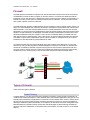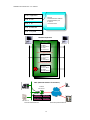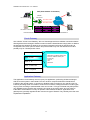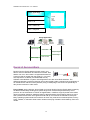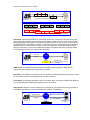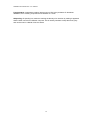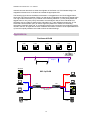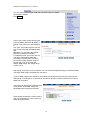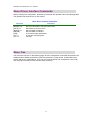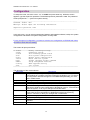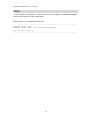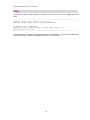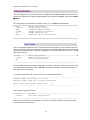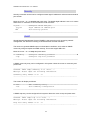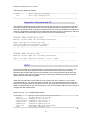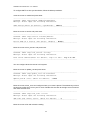
1
USER MANUAL SHRM03 SHDSL Rackmount SHRM03/ET100R Bridge/Router ATM Based SHDSL Line Card CTC Union Technologies Co., Ltd. The information in this publication has been carefully checked and is believed to be entirely accurate at the time of publication. CTC Union Technologies assumes no responsibility, however, for possible errors or omissions, or for any consequences resulting from the use of the information contained herein. CTC Union Technologies reserves the right to make changes in its products or product specifications with the intent to improve function or design at any time and without notice and is not required to update this documentation to reflect such changes. CTC Union Technologies makes no warranty, representation, or guarantee regarding the suitability of its products for any particular purpose, nor does CTC Union assume any liability arising out of the application or use of any product and specifically disclaims any and all liability, including without limitation any consequential or incidental damages. CTC Union products are not designed, intended, or authorized for use in systems or applications intended to support or sustain life, or for any other application in which the failure of the product could create a situation where personal injury or death may occur. Should the Buyer purchase or use a CTC Union product for any such unintended or unauthorized application, the Buyer shall indemnify and hold CTC Union Technologies and its officers, employees, subsidiaries, affiliates, and distributors harmless against all claims, costs, damages, expenses, and reasonable attorney fees arising out of, either directly or indirectly, any claim of personal injury or death that may be associated with such unintended or unauthorized use, even if such claim alleges that CTC Union Technologies was negligent regarding the design or manufacture of said product. TRADEMARKS Microsoft is a registered trademark of Microsoft Corp. HyperTerminal™ is a registered trademark of Hilgraeve Inc. WARNING: This equipment has been tested and found to comply with the limits for a Class A digital device, pursuant to Part 15 of the FCC Rules. These limits are designed to provide reasonable protection against harmful interference when the equipment is operated in a commercial environment. This equipment generates, uses, and can radiate radio frequency energy and if not installed and used in accordance with the instruction manual may cause harmful interference in which case the user will be required to correct the interference at his own expense. NOTICE: (1) The changes or modifications not expressively approved by the party responsible for compliance could void the user's authority to operate the equipment. (2) Shielded interface cables and AC power cord, if any, must be used in order to comply with the emission limits. CISPR PUB.22 Class A COMPLIANCE: This device complies with EMC directive of the European Community and meets or exceeds the following technical standard. EN 55022 - Limits and Methods of Measurement of Radio Interference Characteristics of Information Technology Equipment. This device complies with CISPR Class A. WARNING: This is a Class A product. In a domestic environment this product may cause radio interference in which case the user may be required to take adequate measures. CE NOTICE Marking by the symbol CE indicates compliance of this equipment to the EMC directive of the European Community. Such marking is indicative that this equipment meets or exceeds the following technical standards: EN 55022:1994/A1:1995/A2:1997 Class A and EN61000-3-2:1995, EN61000-3-3:1995 and EN50082-1:1997 CTC Union Technologies Co., Ltd. Far Eastern Vienna Technology Center (Neihu Technology Park) 8F, No. 60, Zhouzi Street Neihu District Taipei, 114 Taiwan Phone: +886-2-2659-1021 FAX: +886-2-2799-1355 SHRM03/ET100R 2-Wire SHDSL Ethernet Bridge/Router, Dual Channel Line Card (ATM) (For G.SHDSL TDM/ATM Based Rack) User Manual Version 1.1 July 2006 This manual supports the following models: SHRM03/ET100R 2-Wire SHDSL Ethernet Bridge/Router, Dual Channel Line Card (ATM) This document is the first official release manual and printing. Please check CTC Union's website for any updated manual or contact us by E-mail at [email protected]. Please address any comments for improving this manual or to point out omissions or errors to [email protected]. Thank you. Specifications subject to change without notice. Table of Contents DESCRIPTION ................................................................................................................................ 7 FEATURES ................................................................................................................................................... 7 SPECIFICATIONS .......................................................................................................................................... 7 APPLICATIONS .......................................................................................................................................... 10 FIREWALL .....................................................................................................................................11 TYPES OF FIREWALL ..................................................................................................................................11 DENIAL OF SERVICE ATTACK .................................................................................................................... 14 VLAN (VIRTUAL LOCAL AREA NETWORK).............................................................................. 17 SPECIFICATION.......................................................................................................................................... 17 FRAME SPECIFICATION ............................................................................................................................. 17 APPLICATIONS .......................................................................................................................................... 18 GETTING TO KNOW THE ROUTER............................................................................................ 20 FRONT PANEL ........................................................................................................................................... 20 REAR PANEL ............................................................................................................................................. 21 CONFIGURATION OF THE ROUTER .......................................................................................... 22 STEP 1: CHECK THE ETHERNET ADAPTER IN PC OR NB............................................................................ 22 STEP 2: CHECK THE WEB BROWSER IN PC OR NB .................................................................................... 22 STEP 3: DETERMINE CONNECTION SETTING ............................................................................................. 22 STEP 5: INSTALL THE SHDSL ROUTER ..................................................................................................... 23 CONFIGURATION VIA WEB BROWSER .................................................................................... 24 BASIC SETUP............................................................................................................................... 26 BRIDGE MODE .......................................................................................................................................... 27 ROUTING MODE ....................................................................................................................................... 29 ADVANCED SETUP...................................................................................................................... 37 ADMINISTRATION........................................................................................................................ 57 UTILITY ......................................................................................................................................... 62 STATUS ......................................................................................................................................... 68 LAN-TO-LAN CONNECTION WITH BRIDGE MODE .................................................................. 69 LAN TO LAN CONNECTION WITH ROUTING MODE................................................................ 71 CONFIGURATION VIA TELNET WITH MENU DRIVEN INTERFACE ........................................ 74 TELNET..................................................................................................................................................... 74 OPERATION INTERFACE............................................................................................................................. 75 WINDOW STRUCTURE ............................................................................................................................... 76 MENU DRIVEN INTERFACE COMMANDS ................................................................................................... 77 MENU TREE .............................................................................................................................................. 77 CONFIGURATION ....................................................................................................................................... 79 STATUS ..................................................................................................................................................... 80 SHOW ....................................................................................................................................................... 81 WRITE ...................................................................................................................................................... 82 REBOOT .................................................................................................................................................... 83 PING ......................................................................................................................................................... 84 ADMINISTRATION ..................................................................................................................................... 85 UTILITY .................................................................................................................................................... 89 EXIT ......................................................................................................................................................... 89 SETUP ....................................................................................................................................................... 90 SHRM03/ET100R Router User Manual Description The SHDSL (Single-Paired High Speed Digital Subscriber Loop) routers comply with G.991.2 standard with 10/100 Base-T auto-negotiation. It provides business-class, multi-range from 64Kbps to 2.304Mbps payload rates over existing single-pair copper wire. The SHDSL routers are designed not only to optimize the service bit rate from central office to customer premises but also to integrate high-end Bridging/Routing capabilities with advanced functions of Multi-DMZ, virtual server mapping and VPN pass-through. Because of the rapid growth of the Internet, virtual LAN has become one of the major new areas in the Internet industry. The SHDSL routers support port-based and IEEE 802.1q VLAN over ATM network. The optional firewall routers provide not only advanced functions, Multi-DMZ, virtual server mapping and VPN pass-through but advanced firewall, SPI, NAT, DoS protection serving as a powerful firewall to protect from outside intruders of secure connection. The SHDSL routers allow customers to leverage the latest in broadband technologies to meet their growing data communication needs. Through the power of SHDSL products, you can access superior manageability and reliability. Features Easy configuration and management with password control for various application environments Efficient IP routing and transparent learning bridge to support broadband Internet services VPN pass-through for safeguarded connections Virtual LANs (VLANs) offer significant benefit in terms of efficient use of bandwidth, flexibility, performance and security Build-in advanced SPI firewall (Firewall router optional) One 10/100Mbps Auto-negotiation and Auto-MDIX port for flexible local area network connectivity (2 channels per line card) DMZ host/Multi-DMZ/Multi-NAT enables multiple workstations on the LAN to access the Internet for the cost of only one IP address Full ATM protocol stack implementation over SHDSL PPPoA and PPPoE support user authentication with PAP/CHAP/MS-CHAP In-band SNMP management with SNMPv1/SNMPv2 agent and MIB II Get enhancements and new features via Internet software upgrade Specifications Routing ¾ ¾ ¾ ¾ ¾ ¾ ¾ Bridging ¾ ¾ ¾ Support IP/TCP/UDP/ARP/ICMP/IGMP protocols IP routing with static routing and RIPv1/RIPv2 (RFC1058/2453) IP multicast and IGMP proxy (RFC1112/2236) Network address translation (NAT/PAT) (RFC1631) NAT ALGs for ICQ/Netmeeting/MSN/Yahoo Messenger DNS relay and caching (RFC1034/1035) DHCP server, client and relay (RFC2131/2132) IEEE 802.1D transparent learning bridge IEEE 802.1q VLAN Spanning tree protocol 7 SHRM03/ET100R Router User Manual Security ¾ ¾ ¾ ¾ ¾ ¾ ¾ DMZ host/Multi-DMZ/Multi-NAT function Virtual server mapping (RFC1631) VPN pass-through for PPTP/L2TP/IPSec tunneling Natural NAT firewall Advanced Stateful packet inspection (SPI) firewall (Optional Firewall Router) Application level gateway for URL and keyword blocking (Firewall Router) User access control: deny certain PCs access to Internet service (Firewall Router) Management ¾ Easy-to-use web-based GUI for quick setup, configuration and management ¾ Menu-driven interface/Command-line interface (CLI) for Telnet access ¾ Password protected management and access control list for administration ¾ SNMP management with SNMPv1/SNMPv2 (RFC1157/1901/1905) agent and MIB II (RFC1213/1493) ¾ Software upgrade via web-browser/TFTP server ATM ¾ ¾ ¾ ATM QoS ¾ ¾ ¾ ¾ Up to 8 PVCs OAM F5 AIS/RDI and loopback AAL5 UBR (Unspecified bit rate) CBR (Constant bit rate) VBR-rt (Variable bit rate real-time) VBR-nrt (Variable bit rate non-real-time) AAL5 Encapsulation ¾ VC multiplexing and SNAP/LLC ¾ Ethernet over ATM (RFC 2684/1483) ¾ PPP over ATM (RFC 2364) ¾ Classical IP over ATM (RFC 1577) PPP ¾ ¾ ¾ PPP over Ethernet for fixed and dynamic IP (RFC 2516) PPP over ATM for fixed and dynamic IP (RFC 2364) User authentication with PAP/CHAP/MS-CHAP WAN Interface ¾ SHDSL: ITU-T G.991.2 (Annex A, Annex B) ¾ Encoding scheme: 16-TCPAM ¾ Data Rate (2-wire mode): N x 64Kbps (N=0~36, 0 for adaptive) ¾ Impedance: 135 ohms LAN Interface ¾ 1-port per channel ¾ 10/100 Base-T auto-sensing and auto-negotiation ¾ Auto-MDIX 8 SHRM03/ET100R Router User Manual Hardware Interface ¾ WAN: RJ-45 or Wire Wrap terminals ¾ LAN: RJ-45 x 1 (1-port router) via HDB26 adapter ¾ RST: Reset button for factory default, one per channel located on front panel Indicators ¾ General: PWR ¾ WAN: LNK, ACT ¾ LAN: 10M/ACT, 100M/ACT (1-port router) ¾ SHDSL: ALM Physical/Electrical ¾ Dimensions: 18.7 x 3.3 x 14.5cm (WxHxD) ¾ Power: -48VDC (via SHRM03 chassis) ¾ Power consumption: 18 watts max ¾ Temperature: 0~45。C ¾ Humidity: 0%~95%RH (non-condensing) Memory ¾ 2MB Flash Memory, 8MB SDRAM Products’ Information SHRM03/ET100R: 2ch., 2-Wire SHDSL Router/bridge with 1-port LAN SHRM03/ET10FR: 2ch., 2-Wire SHDSL Router/bridge with 1-port LAN, plus Firewall features 9 SHRM03/ET100R Router User Manual Applications Concentrator line cards connect to remote modems for Internet access 10 SHRM03/ET100R Router User Manual Firewall A firewall protects networked computers from intentional hostile intrusion that could compromise confidentiality or result in data corruption or denial of service. It must have at least two network interfaces, one for the network it is intended to protect, and one for the network it is exposed to. A firewall sits at the junction point or gateway between the two networks, usually a private network and a public network such as the Internet. A firewall examines all traffic routed between the two networks to see if it meets certain criteria. If it does, it is routed between the networks, otherwise it is stopped. A firewall filters both inbound and outbound traffic. It can also manage public access to private networked resources such as host applications. It can be used to log all attempts to enter the private network and trigger alarms when hostile or unauthorized entry is attempted. Firewalls can filter packets based on their source and destination addresses and port numbers. This is known as address filtering. Firewalls can also filter specific types of network traffic. This is also known as protocol filtering because the decision to forward or reject traffic is dependant upon the protocol used, for example HTTP, ftp or telnet. Firewalls can also filter traffic by packet attribute or state. An Internet firewall cannot prevent individual users with modems from dialing into or out of the network. By doing so they bypass the firewall altogether. Employee misconduct or carelessness cannot be controlled by firewalls. Policies involving the use and misuse of passwords and user accounts must be strictly enforced. These are management issues that should be raised during the planning of any security policy, but that cannot be solved with Internet firewalls alone. Firewall Unknown Traffic Access to Specific Destination Specified Allowed Traffic Internet Internet Allowed Traffic Out to Internet Restricted Traffic Local User Internet Types of Firewall There are three types of firewall: Packet Filtering In packet filtering, only the protocol and the address information of each packet is examined. Its contents and context (its relation to other packets and to the intended application) are ignored. The firewall pays no attention to applications on the host or local network and it "knows" nothing about the sources of incoming data. Filtering consists of examining incoming or outgoing packets and allowing or disallowing their transmission or acceptance on the basis of a set of configurable rules. Network Address Translation (NAT) routers offer the advantages of packet filtering firewalls but can also hide the IP addresses of computers behind the firewall, and offer a level of circuit-based filtering. 11 SHRM03/ET100R Router User Manual Level 5: Application Protocol Source/Destination address Source/destination port IP options connection status Level 4: TCP Level 3: IP Level 2: Data Link Level 1: Physical Stateful Inspection Filter remember this information UDP SP=3264 SA=192.168.0.5 DP=1525 DA=172.16.3.4 192.168.0.5 172.16.3.4 Matches outgoing so allows in UDP SP=1525 SA=172.16.3.4 DP=3264 DA=192.168.0.5 Nomatches so disallows in UDP SP=1525 SA=172.168.3.4 DP=2049 DA=192.168.0.5 NAT (Network Address Translation) Firewall 192.168.0.10 192.120.8.5 Internet Internal IP 192.168.0.10 192.168.0.11 External IP 192.120.8.5 192.120.8.5 192.168.0.11 Internal/Protected Network External/Unprotected Network 12 SHRM03/ET100R Router User Manual PAT (Port Address Translation) Firewall 192.120.8.5 192.168.0.10:1025 192.120.8.5:2205 Internet 192.120.8.5:2206 192.168.0.11:4406 Client IP Internal Port External Port 192.168.0.10 1025 2205 192.168.0.11 4406 Internal/Protected Network 2206 External/Unprotected Network Circuit Gateway Also called a "Circuit Level Gateway," this is a firewall approach that validates connections before allowing data to be exchanged. What this means is that the firewall doesn't simply allow or disallow packets but also determines whether the connection between both ends is valid according to configurable rules, then opens a session and permits traffic only from the allowed source and possibly only for a limited period of time. Level 5: Application destination IP address and/or port source IP address and/or port time of day protocol user password Level 4: TCP Level 3: IP Level 2: Data Link Level 1: Physical Application Gateway The Application Level Gateway acts as a proxy for applications, performing all data exchanges with the remote system in their behalf. This can render a computer behind the firewall all but invisible to the remote system. It can allow or disallow traffic according to very specific rules, for instance permitting some commands to a server but not others, limiting file access to certain types, varying rules according to authenticated users and so forth. This type of firewall may also perform very detailed logging of traffic and monitoring of events on the host system, and can often be instructed to sound alarms or notify an operator under defined conditions. Application-level gateways are generally regarded as the most secure type of firewall. They certainly have the most sophisticated capabilities. 13 SHRM03/ET100R Router User Manual Level 5: Application Level 4: TCP Telnet FTP Http SMTP Level 3: IP Level 2: Data Link Level 1: Physical Proxy Application Host PC Internal External Interface Interface Proxy Server Public Server Request Page Check URL Request Page Return Page Filter Content Return Page Denial of Service Attack Denial of service (DoS) attacks typically come in two flavors: resource starvation and resource overload. DoS attacks can occur when there is a legitimate demand for Inturruption a resource that is greater than the supply (i.e. too many web requests to an already overloaded web server). Software vulnerabilities or system misconfigurations can also cause DoS situations. The difference between a malicious denial of service and simple system overload is the requirement of an individual with malicious intent (attacker) using or attempting to use resources specifically to deny those resources to other users. Ping of death- On the Internet, ping of death is a kind of denial of service (DoS) attack caused by an attacker deliberately sending an IP packet larger than the 65,536 bytes allowed by the IP protocol. One of the features of TCP/IP is fragmentation; it allows a single IP packet to be broken down into smaller segments. Attackers began to take advantage of that feature when they found that a packet broken down into fragments could add up to more than the allowed 65,536 bytes. Many operating systems didn't know what to do when they received an oversized packet, so they froze, crashed, or rebooted. Other known variants of the ping of death include teardrop, bonk and nestea. 14 SHRM03/ET100R Router User Manual Ping of Death Packet (112,000 bytes) Hacker 's System Normal IP Packet (Maximun 65,536 bytes) Target System Normal reassembled Packets bytes from 1~1500 bytes from 1501~3000 bytes from 3000~4500 Reassembled teardrop packets bytes from 1~1700 bytes from 1300~3200 bytes from 2800~4800 SYN Flood- The attacker sends TCP SYN packet which start connections very fast, leaving the victim waiting to complete a huge number of connections, causing it to run out of resources and dropping legitimate connections. A new defense against this is the “SYN cookies”. Each side of a connection has its own sequence number. In response to a SYN, the attacked machine creates a special sequence number that is a “cookie” of the connection then forgets everything it knows about the connection. It can then recreate the forgotten information about the connection where the next packets come in from a legitimate connection. TCP SYN requests Hacker 's System Internet Backing quene TCP SYN-ACK Packets Target System ICMP Flood- The attacker transmits a volume of ICMP request packets to cause all CPU resources to be consumed serving the phony requests. UDP Flood- The attacker transmits a volume of requests for UDP diagnostic services which cause all CPU resources to be consumed serving the phony requests. Land attack- The attacker attempts to slow your network down by sending a packet with identical source and destination addresses originating from your network. Smurf attack- Where the source address of a broadcast ping is forged so that a huge number of machines respond back to victim indicated by the address, overloading it. Broadcast ping request from spoofed IP address Internet Ping response Hacker 's System Target Router 15 Multiple network Subnet SHRM03/ET100R Router User Manual Fraggle Attack- A perpetrator sends a large amount of UDP echo packets at IP broadcast addresses, all of it having a spoofed source address of a victim. IP Spoofing- IP Spoofing is a method of masking the identity of an intrusion by making it appeared that the traffic came from a different computer. This is used by intruders to keep their anonymity and can be used in a Denial of Service attack. 16 SHRM03/ET100R Router User Manual VLAN (Virtual Local Area Network) Virtual LAN (VLAN) is defined as a group of devices on one or more LANs that are configured so that they can communicate as if they were attached to the same wire, when in fact they are located on a number of different LAN segments. Because VLAN is based on logical instead of physical connections, it is extremely flexible. The IEEE 802.1Q defines the operation of VLAN bridges that permit the definition, operation, and administration of VLAN topologies within a bridged LAN infrastructure. VLAN architecture benefits include: 1. 2. 3. 4. 5. Increased performance Improved manageability Network tuning and simplification of software configurations Physical topology independence Increased security options As DSL (over ATM) links are deployed more and more extensively and popularly, it is rising progressively to implement VLAN (VLAN-to-PVC) over DSL links and, hence, it is possible to be a requirement of ISPs. We discuss the implementation of VLAN-to-PVC only for bridge mode operation, i.e., the VLAN spreads over both the COE and CPE sides, where there is no layer 3 routing involved. Specification 1. 2. 3. 4. 5. 6. 7. 8. 9. The unit supports up to 8 active VLANs with shared VLAN learning (SVL) bridge out of 4096 possible VLANs specified in IEEE 802.1Q. Each port always belongs to a default VLAN with its port VID (PVID) as an untagged member. Also, a port can belong to multiple VLANs and be tagged members of these VLANs. A port must not be a tagged member of its default VLAN. If a non-tagged or null-VID tagged packet is received, it will be assigned with the default PVID of the ingress port. If the packet is tagged with non-null VID, the VID in the tag will be used. The look up process starts with VLAN look up to determine whether the VID is valid. If the VID is not valid, the packet will be dropped and its address will not be learned. If the VID is valid, the VID, destination address, and source address lookups are performed. The VID and destination address lookup determines the forwarding ports. If it fails, the packet will be broadcasted to all members of the VLAN, except the ingress port. Frames are sent out tagged or untagged depend on if the egress port is a tagged or untagged member of the VLAN that frames belong to. If VID and source address look up fails, the source address will be learned. Frame Specification An untagged frame or a priority-tagged frame does not carry any identification of the VLAN to which it belongs. Such frames are classified as belonging to a particular VLAN based on parameters associated with the receiving port. Also, priority tagged frames, which, by definition, carry no VLAN identification information, are treated the same as untagged frames. A VLAN-tagged frame carries an explicit identification of the VLAN to which it belongs; i.e., it carries a tag header that carries a non-null VID. This results in a minimum tagged frame length of 68 octets. Such a frame is classified as belonging to a particular VLAN based on the value of the VID that is included in the tag header. The presence of the tag header carrying a non-null VID 17 SHRM03/ET100R Router User Manual means that some other device, either the originator of the frame or a VLAN-aware bridge, has mapped this frame into a VLAN and has inserted the appropriate VID. The following figure shows the difference between a untagged frame and VLAN tagged frame, where the Tag Protocol Identifier (TPID) is of 0x8100 and it identifies the frame as a tagged frame. The Tag Control Information (TCI) consists of the following elements: 1) User priority allows the tagged frame to carry user priority information across bridged LANs in which individual LAN segments may be unable to signal priority information (e.g., 802.3/Ethernet segments). 2) The Canonical Format Indicator (CFI) is used to signal the presence or absence of a Routing Information Field (RIF) field, and, in combination with the Non-canonical Format Indicator (NCFI) carried in the RIF, to signal the bit order of address information carried in the encapsulated frame. 3) The VID uniquely identifies the VLAN to which the frame belongs. Applications Port-based VLAN LAN1 LAN2 LAN3 LAN4 WAN 1 8 Group 1 Group 2 Group 3 SERVER 802.1q VLAN LAN1 LAN2 LAN1 CO LAN2 CPE PWR WIC0 ACT/CH0 WIC0 ACT/CH0 ETH ACT PWR WIC0 ACT/CH0 WIC0 ACT/CH0 ETH AC T OK ACT/CH1 ACT/CH1 COL OK AC T/CH1 ACT/CH 1 COL SHDSL connection with 2PVC LAN3 LAN3 SERVER 1 2 3 4 5 6 7 8 9 8 # * 1 2 LAN4 LAN4 VoIP 3 4 5 6 7 8 9 8 # * VoIP 18 SHRM03/ET100R Router User Manual VID 20 WAN 4 WAN 5 WAN 6 WAN 3 VID 10 VID 30 WAN 2 WAN 7 WAN 8 WAN 1 Backbone ATM Switch POW ER F AU LT D A TA LAN 1 SHDSL Router AL AR M LAN 2 LAN 3 LAN 4 VID 30 VID 10 VID 20 19 SHRM03/ET100R Router User Manual Getting to know the router This section will introduce hardware of the router. Front Panel The front panel contains LED which show status of the router. LED status of 2-channel/2-wire/1-port router Active Description On Power on On SHDSL line connection is established Link G.SHDSL Blink SHDSL handshake Active On Transmit or received data over SHDSL link On Ethernet cable is connected to LAN at 10M 10M Blink Transmit or received data over LAN Ethernet On Ethernet cable is connected to LAN at 100M 100M Blink Transmit or received data over LAN On SHDSL line connection is dropped Alarm Blink SHDSL self test LEDs Power ! The reset button can be used in one of two ways. (1) Pressing the Reset Button for one second will cause system reboot. (2) Pressing the Reset Button for 8 seconds will cause the product to load the factory default settings and lose all of its configuration settings. If you forget the user name or password, or if the product is behaving with unexplained problems connecting to the Internet and you wish to reconfigure it, press the Reset Button of the appropriate channel for 8 seconds with a paper clip or sharp pencil. 20 SHRM03/ET100R Router User Manual Rear Panel The rear panel of SHRM03 rack is where all of the connections are made. Rear panel of SHRM03 Rack DSL Side Data Side Connectors Description of 4-wire/4-port router An RJ-45 jack is provided for each channel. DSL is on the center two pins. Tip and Ring wiring posts are also provided Two HDB26 Female connectors provide Ethernet connection on standard RJ-45 when the adapter is installed on the HDB26. 21 SHRM03/ET100R Router User Manual Configuration of the router This guide is designed to lead users through Web Configuration of G.shdsl Router in the easiest and quickest way possible. Please follow the instructions carefully. Note: There are two methods to configure the router: Telnet or Web Browser. Only one configuration application is used to setup the Router at any given time. Users must choose one method to configure. Step 1: Check the Ethernet Adapter in PC or NB Make sure that Ethernet Adapter had been installed in PC or NB used for configuration of the router. TCP/IP protocol is necessary for web configuration, so please check the TCP/IP protocol whether it has been installed. Step 2: Check the Web Browser in PC or NB According to the Web Configuration, the PC or NB needs to install Web Browser, IE or Netscape. Note: Suggest to use IE5.0, Netscape 6.0 or above and 800x600 resolution or above. Step 3: Determine Connection Setting Users need to know the Internet Protocol supplied by your Service Provider and determine the mode of setting. Protocol Selection RFC1483 RFC1577 RFC2364 RFC2516 Ethernet over ATM Classical Internet Protocol over ATM Point-to-Point Protocol over ATM Point-to-Point Protocol over Ethernet 22 SHRM03/ET100R Router User Manual The different Protocols need to setup difference WAN parameters. After knowing the Protocol provided by ISP, you need the following necessary WAN parameters to set it up. Route EoA Bridge EoA VPI: VCI: Encapsulation: Gateway: Host Name: (if applicable) VPI: VCI: Encapsulation: IP Address: Subnet Mask: Gateway: DNS Server: Host Name: (if applicable) IPoA PPPoA VPI: VCI: Encapsulation: User Name: Password: DNS Server: Host Name: IP Address: VPI: VCI: Encapsulation: IP Address: Subnet Mask: Gateway: DNS Server: Host Name: (if applicable) (if applicable) (if applicable) PPPoE VPI: VCI: Encapsulation: User Name: Password: DNS Server: Host Name: (if applicable) IP Address: (if applicable) Step 5: Install the SHDSL Router ! To avoid possible damage to this Router, do not turn on the rack or insert the line card before Hardware Installation is completed. 9 Connect the Ethernet cable. Note: Because the Ethernet port uses Auto-MDIX, directly connected to PC/NB or a HUB/Switch device can be done with the same straight Ethernet cable. 9 Connect the phone cable to the DSL side connection. 9 Turn on rack power or insert the ET100R line card (hot swapping IS allowed). 9 Turn on the PC or NB which is used for configuration the Router. 23 SHRM03/ET100R Router User Manual Configuration via Web Browser For Win85, 98 and Me, click the start button. Select setting and control panel. Double click the network icon. In the Configuration window, select the TCP/IP protocol line that has been associated with your network card and then click property icon. 24 SHRM03/ET100R Router User Manual Choose IP address tab. Select Specify an IP address. Keyin the IP address and subnet mask as shown. Click OK button. The window will ask you to restart the PC. Click Yes button. After rebooting your PC, open IE or Netscape Browser to connect the Router. Type http://192.168.0.1 The default IP address and sub net-mask of the Router is 192.168.0.1 and 255.255.255.0. Because the router's DHCP server is disabled by default, we have preset the assigned IP address for PC or NB in the network at 192.168.0.3. Type User Name root and Password root and then click OK. The default user name and password are both root. For the system security, suggest to change them after configuration. Note: After changing the User Name and Password, we strongly recommend that you to remember them for the next time you login. The User Name and Password will have to be the new ones you changed to. 25 SHRM03/ET100R Router User Manual Basic Setup The Basic Setup contains LAN, WAN, Bridge and Route operation mode. User can use it to completely setup the router. After successfully completing it, you can access Internet. This is the easiest and possible way to setup the router. Note: The advanced functions are only for advanced users to setup advanced functions. The incorrect setting of advanced function will affect the performance or system error, even disconnection. Click Basic for basic installation. 26 SHRM03/ET100R Router User Manual Bridge Mode Before configuring the router in bridge mode check with your ISP about this information. VPI: VCI: Encapsulation: Gateway: Host Name: (if applicable) Click Bridge and CO Side to setup Bridging mode of the Router and then click Next for the next setting. This product can be setup in either SHDSL mode: CO, Central Office or CPE, Customer Premises Equipment. For connection with standalone modems, the SHDSL mode is CO. For LAN to LAN connection, one side must be CO and the other side must be CPE. LAN Parameters Enter IP: 192.168.0.1 Enter Subnet Mask: 255.255.255.0 Enter Gateway: 192.168.0.254 The Gateway IP is provided by ISP. Enter Host Name: SOHO Some of the ISP requires the host name as identification. You may check with ISP to see if your Internet service has been configured with a host name. In most cases, this field can be ignored. WAN1 Parameters Enter VPI: 0 Enter VCI: 32 Click LLC Click Next. 27 SHRM03/ET100R Router User Manual The screen will prompt with the newly configured parameters. Check the parameters and Click Restart The router will reboot with the new setting or Continue to configure other parameters. 28 SHRM03/ET100R Router User Manual Routing Mode Routing mode contains DHCP server, DHCP client, DHCP relay, Point-to-Point Protocol over ATM and Ethernet and IP over ATM and Ethernet over ATM. You have to clarify which Internet protocol you will provide to the CPE. Click ROUTE and CO Side then press Next. This product can be setup in either SHDSL mode: CO, Central Office, or CPE, Customer Premises Equipment. For connection with a standalone modem, the SHDSL mode is CO. For LAN to LAN connection, one side must be CO and the other side must be CPE. 29 SHRM03/ET100R Router User Manual DHCP Server Dynamic Host Configuration Protocol (DHCP) is a communication protocol that lets network administrators manage centrally and automate the assignment of Internet Protocol (IP) addresses in an organization's network. When an organization sets up its computer users with a connection to the Internet, an IP address must be assigned to each machine. Without DHCP, the IP address must be entered manually at each computer. If computers move to another location in another part of the network, a new IP address must be entered. DHCP allows a network administrator to supervise and distribute IP addresses from a central point and automatically sends a new IP address when a computer is plugged into a different place in the network. If the DHCP server is Enable, you have to setup the following parameters for processing it as DHCP server: Start/End IP or IP pool, DNS servers IP addresses. The embedded DHCP server assigns network configuration information for up to 253 users accessing the Internet in the same time. IP type: Fixed IP Address: 192.168.0.1 Subnet Mask: 255.255.255.0 Host Name: SOHO Some of the ISP requires the host name as identification. You may check with ISP to see if your Internet service has been configured with a host name. In most cases, this field can be ignored. Trigger DHCP Service: Server The default setup is Enable DHCP server. If you want to turn off the DHCP service, choose Disable. For example: If the LAN IP address is 192.168.0.1, the IP range of LAN is 192.168.0.2 to 192.168.0.51. The DHCP server assigns the IP from Start IP Address to End IP Address. The legal IP address range is from 0 to 255, but 0 and 255 are reserved for broadcast so the legal IP address range is from 1 to 254. In other words, you can not assign an IP greater than 254 or less then 1. Lease time 72 hours indicates that the DHCP server will reassign IP information in every 72 hours. DNS Server: Your ISP will provide at least one Domain Name Service Server IP. You can type the router IP in this field. The router will act as DNS server relay function. You may assign fixed IP addresses to some devices while using DHCP, provided that the fixed IP address are not within the range used by the DHCP server. Press Next to setup WAN1 parameters. 30 SHRM03/ET100R Router User Manual DHCP Client Some of the ISP provides DHCP server service by which the PC in LAN can access IP information automatically. To setup the DHCP client mode, follow the procedure. LAN IP Type: Dynamic Click Next to setup WAN1 parameters. 31 SHRM03/ET100R Router User Manual DHCP relay If you have a DHCP server in your LAN and you want to use it for DHCP services, the product provides DHCP relay function to meet yours need. IP Type: Fixed IP Address: 192.168.0.1 Subnet Mask: 255.255.255.0 Host Name: SOHO Some of the ISP requires the host name as identification. You may check with ISP to see if your Internet service has been configured with a host name. In most cases, this field can be ignored. Trigger DHCP Service: Relay Press Next to setup DHCP server parameter. Enter DHCP server IP address in IP address field. Press Next 32 SHRM03/ET100R Router User Manual PPPoE or PPPoA PPPoA (point-to-point protocol over ATM) and PPPoE (point-to-point protocol over Ethernet) are authentication and connection protocols used by many service providers for broadband Internet access. These are specifications for connecting multiple computer users on an Ethernet local area network to a remote site through common customer premises equipment, which is the telephone company's term for a modem and similar devices. PPPoE and PPPoA can be used to office or building. Users share a common Digital Subscriber Line (DSL), cable modem, or wireless connection to the Internet. PPPoE and PPPoA combine the Point-to-Point Protocol (PPP), commonly used in dialup connections, with the Ethernet protocol or ATM protocol, which supports multiple users in a local area network. The PPP protocol information is encapsulated within an Ethernet frame or ATM frame. Before configuring the router, check with your ISP about regarding this information. VPI: VCI: Encapsulation: User Name: Password: DNS Server: Host Name: (if applicable) IP address: (if applicable) Key in the WAN1 parameters: VPI: 0 VCI: 33 AAL5 Encap: LLC Protocol: PPPoA + NAT or PPPoE + NAT Click Next to setup User name and password. For more understanding about NAT, review NAT/DMZ. 33 SHRM03/ET100R Router User Manual Type the ISP1 parameters. Username: test Password: test Password Confirm: test Your ISP will provide the user name and password. Idle Time: 10 If you want your Internet connection to remain on all the time, enter 0 in the Idle Time field. There are two IP types, Dynamic and Static, which you can setup. The default IP type is Dynamic. It means that ISP PPP server will provide IP information including dynamic IP address when SHDSL connection is established. In other words, you do not need to type the IP address of WAN1. Some of ISP will provide fixed IP address over PPP. For fixed IP address: IP Type: Fixed IP Address: 192.168.1.1 Click Next. Note: For safety, the password will be prompt as star symbol. The screen will prompt the parameters that will be written in EPROM. Check the parameters before writing in EPROM. Press Restart to restart the router working with new parameters or press continue to setup other parameters. 34 SHRM03/ET100R Router User Manual IPoA or EoA WAN LAN Router IP: 192.168.0.1 Netmask: 255.255.255.0 IP: 10.1.2.1 Netmask: 255.255.255.0 Gateway: 10.1.2.2 DNS: 168.95.1.1 BAS IP: 10.1.2.2 Netmask: 255.255.255.0 DSLAM PC IP: 192.168.0.2~51 Netmask: 255.255.255.0 Gateway: 192.168.0.1 VPI:0, VCI:33 Encapsulation: LLC Before configuring the router, check with your ISP about regarding this information. VPI: VCI: Encapsulation: IP Address: Subnet Mask: Gateway: DNS Server: Host Name: (if applicable) Type the Wan Parameters; VPI: 0 VCI: 33 AAL5 Encap: LLC Protocol: IPoA , EoA , IPoA + NAT or EoA + NAT Click Next to setup the IP parameters. For more understanding about NAT, review NAT/DMZ. IP Address: 10.1.2.1 It is router IP address seem from Internet. Your ISP will provide it and you need to specify here. Subnet mask: 255.255.255.0 This is the router subnet mask seen by external users on Internet. Your ISP will provide it to you. Gateway: 10.1.2.2 Your ISP will provide you the default gateway. DNS Server 1: 168.95.1.1 Your ISP will provide at least one DNS (Domain Name System) Server IP address. Click Next 35 ISP SHRM03/ET100R Router User Manual The screen will prompt the parameters that will be written in EPROM. Check the parameters before writing in EPROM. Press Restart to restart the router working with new parameters or press continue to setup other parameters. 36 SHRM03/ET100R Router User Manual Advanced Setup Advanced setup contains SHDSL, WAN, Bridge, Route, NAT/DMZ, Virtual server and firewall parameters. 37 SHRM03/ET100R Router User Manual SHDSL You can setup the Annex type, data rate and SNR margin for SHDSL parameters in SHDSL. Click SHDSL Annex Type: There are two Annex types, Annex A (ANSI) and Annex B (ETSI), in SHDSL. Check with your ISP regarding it. Link Type: The product support one link type, 2-wire mode with 2.304Mbps data rate. Data Rate: you can setup the SHDSL data rate in multiples of 64kbps. For adaptive mode, you have to set n=0. The router will adapt the data rate according to the line status. We don't recommend setting adaptive mode on the CO side, only on the CPE side. SHDSL SNR margin: the margin range is from 0 to 10. SNR margin is an index of line connection. You can see the actual SNR margin in STATUS SHDSL. The larger SNR margin, the better line connection. If you set SNR margin in the field as 2, the SHDSL connection will drop and reconnect when the SNR margin is lower than 2. In other words, the device will reduce the line rate and reconnect for better line connection. The screen will prompt the parameters that will be written in EPROM. Check the parameters before writing in EPROM. Press Restart to restart the router working with new parameters or press continue to setup other parameters. 38 SHRM03/ET100R Router User Manual WAN The SHDSL router supports up to 8 PVCs. WAN 1 was configured via BASIC except QoS. If you want to setup other PVCs, 2 to 7, the parameters are setup in WAN. In other words, you must apply two or more Internet Services with ISPs otherwise you do not need to setup WAN. The WAN Number 1 will be the parameters setup in Basic Setup. If you want to setup another PVC, you can configure them in WAN 2 to WAN 8. Enter the parameters. If WAN protocol is PPPoA or PPPoE with dynamic IP, leave the default WAN IP address and Subnet Mask as default setting. The system will ignore the IP address and Subnet mask information by deleting or leaving blank the items that would cause system error. If the WAN protocol is IPoA or EoA, leave the ISP parameters as default setting. The system will ingore the information by deleting or leaving blank the items that would cause system error. QoS (Quality of Service): The Traffic Management Specification V4.0 defines ATM service categories that describe both the traffic transmitted by users onto a network as well as the Quailty of Service that the network needs to provide for that traffic. UBR (Unspecified Bit Rate) is the simplest service provided by ATM networks. There is no guarantee of anything. It is a primary service used for transferring Internet traffic over the ATM network. CBR (Constant Bit Rate) is used by connections that requires a static amount of bandwidth that is available during the connection life time. This bandwidth is characterized by Peak Cell Rate. Based on the PCR of the CBR traffic, specific cell slots are assigned for the VC in the schedule table. The ATM always sends a single cell during the CBR connection’s assigned cell slot. VBR-rt (Varible Bit Rate real-time) is intended for real-time applications, such as compressed voice over IP and video conferencing, that require tightly constrained delays and delay variation. VBR-rt is characterized by a peak cell rate (PCR), substained cell rate (SCR), and maximun burst rate (MBR). VBR-nrt (Varible Bit Rate non-real-time) PCR (Peak Cell Rate) in kbps: The maximum rate at which you expect to transmit data, voice and video. Consider PCR and MBS as a means of reducing lantency, not increasing bandwidth. The 39 SHRM03/ET100R Router User Manual range of PCR is 64kbps to 2400kbps SCR (Substained Cell Rate): The sustained rate at which you expect to transmit data, voice and video. Consider SCR to be the true bandwidth of a VC and not the long-term average traffic rate. The range of SCR is 64kbps to 2400kbps. MBS (Maximum Burst Size): The amount of time or the duration at which the router sends at PCR. The range of MBS is 1 cell to 255 cells. Press Finish to finish setting. The screen will prompt the parameters that will be written in EPROM. Check the parameters before writing in EPROM. Press Restart to restart the router working with new parameters or press continue to setup other parameters. 40 SHRM03/ET100R Router User Manual Bridge If your router is setup in bridge mode and you want to setup advanced filter function, you can use BRIDGE menu to setup the filter function, blocking function. Click Bridge to setup. Press Add to add the static bridge information. If you want to filter the designated MAC address of LAN PC to access Internet, press Add to establish the filtering table. Key the MAC address in MAC address field and select Filter in LAN field. If you want to filter the designated MAC address of WAN PC to access LAN, press Add to establish the filtering table. Key the MAC address in MAC address field and select Filter in WAN field. For example: if your VC is setup at WAN 1, select WAN 1 Filter. The screen will prompt the parameters that will be written in EPROM. Check the parameters before writing in EPROM. Press Restart to restart the router working with new parameters or press continue to setup other parameters. 41 SHRM03/ET100R Router User Manual VLAN Virtual LAN (VLAN) is defined as a group of devices on one or more LANs that are configured so that they can communicate as if they were attached to the same wire, when in fact they are located on a number of different LAN segments. Because VLAN is based on logical instead of physical connections, it is extremely flexible. Click VLAN to configure VLAN. The product supports two types of VLAN, 802.1Q and Port-Based. User can configure one of them into the router. For setting 802.1Q VLAN click the 802.1Q Tag-Based VLAN. The screen will prompt as follows. VID: Virtual LAN ID. It is an definite number ID which is from 1 to 4094. PVID: Port VID which is an untagged member of default VLAN. Link Type: Access means the port can receive or send untagged packets. Link Type: Trunk means that the port can receive or send tagged packets. 42 SHRM03/ET100R Router User Manual Port-Based VLANs are VLANs where the packet forwarding decision is based on the destination MAC address and its associated port. Click Port-Based VLAN to configure the router. 43 SHRM03/ET100R Router User Manual Route If the Router is connected to more than one network, it may be necessary to set up a static route between them. A static route is a pre-determined pathway that network information must travel to reach a specific host or network. With Dynamic Routing, you can enable the Router to automatically adjust to physical changes in the network’s layout. The Router, using the RIP protocol, determines the network packets’ route based on the fewest number of hops between the source and the destination. The RIP protocol regularly broadcasts routing information to other routers on the network. Click Route to modify the routing information. To modify the RIP (Routing information protocol) Parameters: RIP Mode: Enable Auto RIP Summary: Enable Press Modify 44 SHRM03/ET100R Router User Manual RIP Mode: this parameter determines how the product handles RIP (Routing information protocol). RIP allows it to exchange routing information with other routers. If set to Disable, the gateway does not participate in any RIP exchange with other routers. If set Enable, the router broadcasts the routing table of the router on the LAN and incorporates RIP broadcast by other routers into it’s routing table. If set silent, the router does not broadcast the routing table, but it accepts RIP broadcast packets that it receives. RIP Version: It determines the format and broadcasting method of any RIP transmissions by the gateway. RIP v1: it sends RIP v1 messages only. RIP v2: it sends RIP v2 messages in multicast and broadcasts format. Authentication required. None: for RIP, there is no need of authentication code. Password: the RIP is protected by password, authentication code. MD5: The RIP will be decoded by MD5 than protected by password, authentication code. Poison Reserve is for the purpose of promptly broadcast or multicast the RIP when the route is changed. (ex shutting down one of the routers in routing table) Enable: the gateway will actively broadcast or multicast the information. Disable: the gateway will not broadcast or multicast the information. After modifying the RIP parameters, press finish. The screen will prompt the modified parameter. Check the parameters and perss Restart to restart the router or press Continue to setup other parameters. 45 SHRM03/ET100R Router User Manual NAT/DMZ NAT (Network Address Translation) is the translation of an Internet Protocol address (IP address) used within one network to a different IP address known within another network. One network is designated the inside network and the other is the outside. Typically, a company maps its local inside network addresses to one or more global outside IP addresses and reverse the global IP addresses of incoming packets back into local IP addresses. This ensure security since each outgoing or incoming request must go through a translation process, that also offers the opportunity to qualify or authenticate the request or match it to a previous request. NAT also conserves on the number of global IP addresses that a company needs and lets the company to use a single IP address of its communication in the Internet world. DMZ (demilitarized zone) is a computer host or small network inserted as a “neutral zone” between a company private network and the outside public network. It prevents outside users from getting direct access to a server that has company private data. In a typical DMZ configuration for an enterprise, a separate computer or host receives requests from users within the private network to access via Web sites or other companies accessible on the public network. The DMZ host then initiates sessions for these requests to the public network. However, the DMZ host is not able to initiate a session back into the private network. It can only forward packets that have already been requested. Users of the public network outside the company can access only the DMZ host. The DMZ may typically also have the company’s Web pages so these could serve the outside world. However, the DMZ provides access to no other company data. In the event that an outside user penetrated the DMZ host’s security, the Web pages might be corrupted, but no other company information would be exposed. Press NAT/DMZ to setup the parameters. If you want to enable the NAT/DMZ functions, click Enable. Enable the DMZ host Function is used the IP address assigned to the WAN for enabling DMZ function for the virtual IP address. Multi-DMZ: Some users who have two or more global IP addresses assigned by ISP can be used the multi DMZ. The table is for the mapping of global IP address and virtual IP address. 46 SHRM03/ET100R Router User Manual Multi-NAT: Some of the virtual IP addresses (eg: 192.168.0.10 ~ 192.168.0.50) collectively use two of the global IP addresses (eg: 69.210.1.9 and 69.210.1.10). The Multi-NAT table will be setup as; Virtual Start IP Address: 192.168.0.10 Count: 40 Global Start IP Address: 69.210.1.9 Count: 2 Press Finish to continue. The screen will prompt the parameters that will be written in EPROM. Check the parameters before writing in EPROM. Press Restart to restart the router working with new parameters or Continue to configure other parameters. 47 SHRM03/ET100R Router User Manual Virtual Server For example: Specific ports on the WAN interface are re-mapped to services inside the LAN. As only 69.210.1.8 (e.g., assigned to WAN from ISP) is visible to the Internet, but does not actually have any services (other than NAT of course) running on gateway, it is said to be a virtual server. Request with TCP made to 69.210.1.8:80 are remapped to the server 1 on 192.168.0.2:80 for working days from Monday to Friday 8 AM to 6PM, other requests with UDP made to 69.210.1.8:25 are remapped to server 2 on 192.168.0.3:25 and always on. You can setup the router as Index 1, protocol TCP, interface WAN1, service name test1, private IP 192.168.0.2, private port 80, public port 80, schedule from Day Monday to Friday and time 8:0 to 16:0 and index 2, protocol UDP, interface WAN1, service name test2, private IP 192.168.0.3, private port 25, public port 25, schedule always. Click Virtual Server to configure the parameters. Press Modify for modify 1. Type the necessary parameters then click Finish. Press Restart to restart the router or press continue to setup other functions. 48 SHRM03/ET100R Router User Manual Firewall A firewall is a set of related programs that protects the resources of a private network from other networks. It is helpful in preventing hackers from accessing the private data resource accidentally. The firewall is an optional feature. This level only enables the NAT firewall and the remote management security. The NAT firewall will take effect if NAT function is enabled. The remote management security is default to block any WAN side connection to the device. Non-empty legal IP pool in ADMIN will block all remote management connection except those IPs specified in the pool. Press Finish to finish setting of firewall The screen will prompt the parameters, which will be written in EPROM. Check the parameters. Press restart to restart the router or press continue to setup other functions. 49 SHRM03/ET100R Router User Manual This level enables basic firewall security, all DoS protection, and the SPI filter function. Press Finish to finish setting firewall. The screen will prompt the parameters, which will be written in EPROM. Check the parameters. Press Restart to restart the router or press Continue to setup another function. User can determine the security level for special purpose, environment, and applications by configuring the DoS protection and defining an extra packet filter with higher priority than the default SPI filter. Note that, an improper filter policy may degrade the capability of the firewall and/or even block the normal network traffic. 50 SHRM03/ET100R Router User Manual Click Advanced Firewall Security and then press Finish. A SYN flood attack attempts to slow your network by requesting new connections but not completing the process to open the connection. Once the buffer for these pending connections is full a server will not accept any more connections and will be unresponsive. ICMP Flood: A sender transmits a volume of ICMP request packets to cause all CPU resources to be consumed serving the phony requests. UDP Flood: A sender transmits a volume of requests for UDP diagnostic services which cause all CPU resources to be consumed serving the phony requests. A ping of death attack attempts to crash your system by sending a fragmented packet, when reconstructed is larger than the maximum allowable size. Other known variants of the ping of death include teardrop, bonk and nestea. A land attack is an attempt to slow your network down by sending a packet with identical source and destination addresses originating from your network. IP Spoofing is a method of masking the identity of an intrusion by making it appear that the traffic came from a different computer. This is used by intruders to keep their anonymity and can be used in a Denial of Service attack. A smurf attack involves two systems. The attacker sends a packet containing a ICMP echo request (ping) to the network address of one system. This system is known as the amplifier. The return address of the ping has been faked (spoofed) to appear to come from a machine on another network (the victim). The victim is then flooded with responses to the ping. As many responses are generated for only one attack, the attacker is able use many amplifiers on the same victim. IP Spoofing: Falsify the IP header information to deceive the destination host. Traditional firewall are stateless, meaning they have no memory of the connections of data or packets that pass through them. Such IP filtering firewalls simply examine header information in each packet and attempt to match it to a set of defined rules. If the firewall finds a match, the prescribe action is taken. If no match is found, the packet is accepted into the network, or dropped, depending on the firewall configuration. A stateful firewall maintains a memory of each connection and data passing through it. Stateful firewalls record the context of connections during each session, continuously updating state information in dynamic tables. With this information, stateful firewalls inspect each connection traversing each interface of the firewall, testing the validity of data packets throughout each session. As data arrives, it is checked against the state tables and if the data is part of the session, it is accepted. Stateful firewalls enable a more intelligent, flexible and robust approach to network security, while defeating most intrusion methods that exploit state-less IP filtering firewalls. 51 SHRM03/ET100R Router User Manual If you want to configure the Packet Filtering Parameters, choose Enable and press Add. Select the protocol and configure the parameter. If you want to ban all of the protocol from the IP (e.g.: 200.1.1.1) to access the all PCs (e.g.: 192.168.0.2 ~ 192.168.0.50) in the LAN, key in the parameter as; Protocol: ANY Direction: INBOUND (INBOUND is from WAN to LAN, and OUTBOUND is LAN to WAN.) Description: Hacker Src. IP Address: 200.1.1.1 Dest. IP Address: 192.168.0.2-192.168.0.50 Press OK to finish. The screen will prompt the configured parameters. Check the parameters. Click Restart to restart the gateway or Continue to configure other parameters. Filtering Rule for SMTP connection Filtering rule will be configured as follow Index 1 2 3 4 5 Protocol TCP TCP TCP TCP Any Direction Action Inbound Permit Outbound Permit Outbound Permit Inbound Permit Either Deny Source External Internal Internal External Any Destination Internal External External Internal Any 52 Dest. Port 25 >1023 25 >1023 Any Schedule Always Always Always Always Always SHRM03/ET100R Router User Manual Packet Direction 1 Inbound 2 Outbound Source 192.168.3.4 172.16.1.1 Destination 172.16.1.1 192.168.3.4 Protocol Dest. Port Action (Rule) TCP 25 Permit (A) TCP 1234 Permit (B) 172.16.1.1:25 192.168.3.4:1234 1 Internet 2 Firewall SMTP Server Packet Direction 3 Outbound 4 Inbound Source 172.16.1.1 192.168.3.4 SMTP Client Destination 192.168.3.4 172.16.1.1 Protocol Dest. Port Action (Rule) TCP 25 Permit (C) TCP 1357 Permit (D) 172.16.1.1:1357 192.168.3.4:25 3 Internet 4 Firewall SMTP Client Packet Direction 5 Inbound 6 Outbound Source 10.1.2.3 171.16.3.4 SMTP Server Destination 171.16.3.4 10.1.2.3 Protocol Dest. Port Action (Rule) TCP 6000 Deny (E) TCP 5150 Deny (E) 171.16.3.4:6000 10.1.2.3:5150 5 Internet 6 X11 Server Firewall Attacker Update Filtering Rule Index Protocol 1 TCP 2 TCP 3 TCP 4 TCP 5 Any Filtering Result Direction Action Inbound Permit Outbound Permit Outbound Permit Inbound Permit Either Deny Index 1 2 3 4 5 6 Direction Action Source Inbound Permit(A) 192.168.3.4 Outbound Permit(B) 171.16.1.1 Outbound Permit(C) 171.16.1.1 Inbound Permit(D) 192.168.3.4 Inbound Deny(E) 10.1.2.3 Outbound Deny(E) 171.16.3.4 Protocol TCP TCP TCP TCP TCP TCP Source External Internal Internal External Any Destination Internal External External Internal Any 53 Destination 171.16.1.1 192.168.3.4 192.168.3.4 171.16.1.1 171.16.3.4 10.1.2.3 Source Port >1023 25 >1023 25 Any Dest. Port 25 >1023 25 >1023 Any Source Port 1234 25 1357 25 5150 6000 Dest. Port 25 1234 25 1357 6000 5150 SHRM03/ET100R Router User Manual Rule Order The rules order affects the filtering result. The filtering process will proceed from top to bottom, changing the order as the different result of filtering. Rule A B C Source Address 10.0.0.0 10.1.99.0 Any Destination Address 172.16.6.0 172.16.0.0 Any Action Permit Deny Deny Where “0” at the last eight bits indicates “from 1 to 254”, “0” at any eight bits preceding “0”, “0.0” or “0.0.0” indicates “from 1 to 254”. On the other hand, “0” and all “0” successive with “0” represents any. When the rule is ordered as ABC. Index 1 2 3 4 5 Source Address 10.1.99.1 10.1.99.1 10.1.1.1 10.1.1.1 192.168.3.4 Destination Address 172.16.1.1 172.16.6.1 172.16.6.1 172.16.1.1 172.16.6.1 Action Deny (B) Permit (A) Permit (A) Deny (C) Deny (C) The rule order will permit 10.1.99.1 to access 172.16.6.1. When the rule is ordered as BAC. Index Source Address Destination Address 1 10.1.99.1 172.16.1.1 2 10.1.99.1 172.16.6.1 3 10.1.1.1 172.16.6.1 4 10.1.1.1 172.16.1.1 5 192.168.3.4 172.16.6.1 The rule order will deny 10.1.99.1 to access 172.6.6.1. 54 Action Deny (B) Deny (B) Permit (A) Deny (C) Deny (C) SHRM03/ET100R Router User Manual IP QoS IP QoS is a good function to decide which PCs can get the priorities to undergo the over full bandwidth situation. This is enable option to choose if you want to enable it. Set the policy to action. 55 SHRM03/ET100R Router User Manual This is an example for your reference, 192.168.1.60 is the highest priority to undergo the over full bandwidth situation. 192.168.1.50 is the second high priority; 192.168.1.40 is the third high priority and so on. 56 SHRM03/ET100R Router User Manual Administration This session introduces security and simple network management protocol (SNMP) and time synchronous. 57 SHRM03/ET100R Router User Manual Security For system security, it is suggest to change the default user name and password in the first setup otherwise unauthorized persons can access the router and change the parameters. There are three ways to configure the router, Web browser, telnet and serial console. Press Security to setup the parameters. For greater security, change the Supervisor ID and password for the gateway. If you don’t set them, all users on your network can be able to access the gateway using the default IP and Password root. You can authorize five legal users to access the router via telnet or console. There are two UI modes, menu driven mode and command mode to configure the router. Legal address pool will setup the legal IP addresses from which authorized person can configure the gateway. This is the more secure function for network administrator to setup the legal address of configuration. Configured 0.0.0.0 will allow all hosts on Internet or LAN to access the router. Leaving blank of trust host list will cause blocking all PC from WAN to access the router. On the other hand, only PC in LAN can access the router. If you type the excact IP address in the filed, only the host can access the router. Click Finish to finish the setting. The browser will prompt the configured parameters and check it before writing into EPROM. Press Restart to restart the gateway working with the new parameters and press Continue to setup other parameters. 58 SHRM03/ET100R Router User Manual SNMP Simple Network Management Protocol (SNMP) provides for the exchange of messages between a network management client and a network management agent for remote management of network nodes. These messages contain requests to get and set variables that exist in network nodes in order to obtain statistics, set configuration parameters, and monitor network events. SNMP communications can occur over the LAN or WAN connection. The router can generate SNMP traps to indicate alarm conditions, and it relies on SNMP community strings to implement SNMP security. This router support MIB I and MIB II. Click SNMP to configure the parameters. In the table of current community pool, you can setup the access authority. In the table of current trap host pool, you can setup the trap host. Press Modify to modify the community pool. SNMP status: Enable 59 SHRM03/ET100R Router User Manual Access Right: Deny for deny all access Access Right: Read for access read only Access Right: Write for access read and write. Community: it serves as password for access right. After configuring the community pool, press OK. SNMP trap is an informational message sent from an SNMP agent to a manager. Click Modify to modify the trap host pool. Version: select version for trap host (SNMP v1 or SNMP v2). IP: type the trap host IP Community: type the community password. The community is setup in community pool. Press OK to finish the setup. The browser will prompt the configured parameters and check it before writing into EPROM. Press Restart to restart the gateway working with the new parameters and press Continue to setup other parameters. 60 SHRM03/ET100R Router User Manual Time Sync Time synchronization is an essential element for any business that relies on an IT system. The reason for this is that these systems all have clocks that are the source of time for files or operations they handle. Without time synchronization, time on these systems varies with each other or with the correct time and this can cause-, firewall packet filtering schedule processes to fail, security to be compromised, virtual server works in wrong schedule. Click TIME SYNC. There are two synchronization modes: Simple Network Time Protocol (SNTP) and synchronization with PC. For synchronization with PC, select Sync with PC. The gateway will synchronize the time with the connecting PC. SNTP is the acronym for Simple Network Time Protocol, which is an adaptation of the Network Time Protocol (NTP) used to synchronize computer clocks in the Internet. SNTP can be used when the ultimate performance of the full NTP implementation is not required. For SNTP, select SNTP v4.0. SNTP service: Enable Time Server: Any of the time servers around the world can be used but it is suggested to use a timeserver nearby. Time Zone: you have to choose the right time zone. Press Finish to finish the setup. The browser will prompt the configured parameters and check it before writing into EPROM. 61 SHRM03/ET100R Router User Manual Utility This section will describe the utility of the product including system information, load the factory default configuration, upgrade the firmware, logout and restart the gateway. 62 SHRM03/ET100R Router User Manual System Info Click System Info for review the information. The browser will display the system information. 63 SHRM03/ET100R Router User Manual Config Tool This configuration tool has three functions: load Factory Default, Restore Configuration and Backup Configuration. Press Config Tool. Choose the function and then press finish. ¾ Load Factory Default function: it will load the factory default parameters to the gateway. Note: All of the settings will be changed to factory default. In other words, you will lose all the configured parameters. ¾ Restore Configuration: Sometime the configuration will be crashed unintentionally. Restore configuration will help you to recover the backup configuration easily. Click Finish after selecting Restore Configuration. Browse the route of backup file then press finish. The router will automatically restore the saved configuration. ¾ Backup Configuration: After configuration, we suggest using this function to backup your router parameters in the PC. Select the Backup Configuration and then press Finish. Browse the place of backup file named backup. Press Finish. The router will automatically backup the configuration to PC. 64 SHRM03/ET100R Router User Manual Upgrade You can upgrade the gateway using the upgrade function. Press Upgrade. Browse to the file and press OK button to upgrade. The system will reboot automatically after finishing. 65 SHRM03/ET100R Router User Manual Logout To logout the router, press logout. 66 SHRM03/ET100R Router User Manual Restart For restarting the router, click the Restart in UTILITY. Press Restart to reboot the router. 67 SHRM03/ET100R Router User Manual Status You can monitor the SHDSL status including mode, Tx power and Bitrate and Performance information including SNR margin, attenuation and CRC error count. LAN status will display the MAC address, IP address, Subnet mask and DHCP client table. WAN status will display the WAN interface information. You can view the routing table in the status of route. Interface status includes LAN and WAN statistics information. Firewall status display DoS protection status and dropped packets statistics. 68 SHRM03/ET100R Router User Manual LAN-to-LAN connection with bridge Mode STU-C (CO) STU-R (CPE) Bridge Bridge IP: 192.168.0.1 Netmask: 255.255.255.0 PC IP: 192.168.0.2 Netmask: 255.255.255.0 VPI:0, VCI:32 Encapsulation: LLC IP: 192.168.0.200 Netmask: 255.255.255.0 Gateway: 192.168.0.2 IP: 192.168.0.100 Netmask: 255.255.255.0 Gateway: 192.168.0.1 CO side Click Bridge and CO Side to setup Bridging mode of the Router and then click Next. LAN Parameters Enter IP: 192.168.0.1 Enter Subnet Mask: 255.255.255.0 Enter Gateway: 192.168.0.1 Enter Host Name: SOHO WAN1 Parameters Enter VPI: 0 Enter VCI: 32 Click LLC Click Next The screen will prompt the new configured parameters. Check the parameters and Click Restart The router will reboot with the new setting. 69 SHRM03/ET100R Router User Manual CPE Side Click Bridge and CPE Side to setup Bridging mode of the Router and then click Next. LAN Parameters Enter IP: 192.168.0.2 Enter Subnet Mask: 255.255.255.0 Enter Gateway: 192.168.0.2 Enter Host Name: SOHO WAN1 Parameters Enter VPI: 0 Enter VCI: 32 Click LLC Click Next The screen will prompt the new configured parameters. Check the parameters and Click Restart The router will reboot with the new setting. 70 SHRM03/ET100R Router User Manual LAN to LAN Connection with Routing Mode STU-C (CO) STU-R (CPE) Router IP: 192.168.20.1 Netmask: 255.255.255.0 IPoA or EoA VPI:0, VCI:32 Encapsulation: LLC IP: 192.168.30.1 Netmask: 255.255.255.0 Gateway: 192.168.30.2 Router IP: 192.168.10.1 Netmask: 255.255.255.0 IP: 192.168.30.2 Netmask: 255.255.255.0 Gateway: 192.168.30.1 IP: 192.168.20.100 Netmask: 255.255.255.0 Gateway: 192.168.20.1 IP: 192.168.10.200 Netmask: 255.255.255.0 Gateway: 192.168.10.1 CO side Click ROUTE and CO Side then press Next. Type LAN parameters: IP Address: 192.168.20.1 Subnet Mask: 255.255.255.0 Host Name: SOHO DHCP Service: For more DHCP service, review DHCP Service. Type the Wan Parameters; VPI: 0 VCI: 32 AAL5 Encap: LLC Protocol: IPoA , EoA , IPoA + NAT or EoA + NAT Note: The Protocol used in CO and CPE have to be the same. Click Next to setup the IP parameters. For more understanding about NAT, review NAT/DMZ in page 19. 71 SHRM03/ET100R Router User Manual IP Address: 192.168.20.1 Subnet mask: 255.255.255.0 Gateway: 192.169.30.2 Click Next The screen will display the parameters that will be written in EPROM. Check the parameters before writing in EPROM. Press Restart to restart the router working with new parameters or press continue to setup other parameters. 72 SHRM03/ET100R Router User Manual CPE side Click ROUTE and CPE Side then press Next. Type LAN parameters: IP Address: 192.168.10.1 Subnet Mask: 255.255.255.0 Host Name: SOHO DHCP Service: For more DHCP service, review DHCP Service. Type the Wan Parameters; VPI: 0 VCI: 32 AAL5 Encap: LLC Protocol: IPoA , EoA , IPoA + NAT or EoA + NAT Note: The Protocol used in CO and CPE have to be the same. Click Next to setup the IP parameters. For more understanding about NAT, review NAT/DMZ in page 19. IP Address: 192.168.30.2 Subnet mask: 255.255.255.0 Gateway: 192.169.30.1 Click Next The screen will display the parameters that will be written in EPROM. Check the parameters before writing in EPROM. Press Restart to restart the router working with new parameters or press continue to setup other parameters. 73 SHRM03/ET100R Router User Manual Configuration via Telnet with Menu Driven Interface Telnet Make sure the correct Ethernet cable is used for connecting the LAN port of your computer to ROUTER. The LAN LNK indicator on the front panel shall light if a correct cable is used. Starting your Telnet client with VT100 terminal emulation and connecting to the management IP of Router, wait for the login screen appears. When you see the login screen, you can logon to Router. User: admin Password: ***** Note: The default IP address is 192.168.0.1 74 SHRM03/ET100R Router User Manual Operation Interface For Telnet management, the ROUTER implements two operational interfaces: command line interface (CLI) and menu driven interface. The CLI mode provides users a simple interface, which is better for working with script file. The menu driven interface is a user-friendly interface to general operations. The command syntax for CLI is the same as that of the menu driven interface. The only difference is that the menu driven interface shows you all of available commands for you to select. You don’t need to remember the command syntax and save your time on typing the whole command line. The following figure gives you an example of the menu driven interface. In the menu, you scroll up/down by pressing key I / K, select one command by key L, and go back to a higher level of menu by key J. For example, to show the system information, just logon to the ROUTER, move down the cursor by pressing key K twice and select “show” command by key L, you shall see a submenu and select “system” command in this submenu, then the system will show you the general information. SHDSL ROUTER --------------------------------------------------------------------------->> enable Modify command privilege status Show running system status show View system configuration ping Packet internet groper command exit Quit system ---------------------------------------------------------------------------Command: enable <CR>_ Message: ---------------------------------------------------------------------------<I/K> Move up/down, <L/J> Select/Unselect, <U/O> Move top/bottom, <^Q> Help 75 SHRM03/ET100R Router User Manual Window structure From top to bottom, the window will be divided into four parts: 1. Product name 2. Menu field: Menu tree is displayed on this field. “>>” symbol indicates the cursor position. 3. Command field: You will configure the parameters in this field. < parameters > indicates the parameters you can choose and < more…> indicates that there have submenu in the title. 4. Operation menu for help The following table shows the parameters in the brackets. Command <ip> <Route|Bridge> [1~1999] [1~65534|-t] Description An item enclosed in brackets is required. If the item is shown in lower case bold, it represents an object with special format. For example, <ip> may be 192.168.0.3. Two or more items enclosed in brackets and separated by vertical bars means that you must choose exactly one of the items. If the item is shown in lower case bold with leading capital letter, it is a command parameter. For example, Route is a command parameter in <Route|Bridge>. An item enclosed in brackets is optional. Two or more items enclosed in brackets and separated by vertical bars means that you can choose one or none of the items. 76 SHRM03/ET100R Router User Manual Menu Driven Interface Commands Before changing the configuration, familiarize yourself with the operations list in the following table. The operation list will be shown on the window. Keystroke [UP] or I [DOWN] or K [LEFT] or J [RIGHT] or L [ENTER] [TAB] Ctrl + C Ctrl + Q Menu Driven Interface Commands Description Move to above field in the same level menu. Move to below field in the same level menu. Move back to previous menu. Move forward to submenu. Move forward to submenu. To choose another parameters. To quit the configuring item. For help Menu Tree The menu tree is shown on the following page. All of the configuration commands are placed in the subdirectories of Enable protected by supervisor password. In other words, unauthorized users cannot change any configurations. They may only view the status and configuration of the router and use ping command to make sure the router is working. 77 SHRM03/ET100R Router User Manual User Name Password Enable Enable Setup Status Show Write Reboot Ping Admin Utility Exit Status Show Protocol Adress VPI_VCI Encap QoS ISP IP_type List Mode SHDSL WAN Bridge VLAN Route LAN IP_share Firewall DHCP DNS_proxy Hostname Default Mode Modify PVID Link_mode List SHDSL WAN Route Interface Firewall Static RIP System Config Script Mode Link N*64 Type Clear Margin Gateway Static Generic LAN WAN LIst IP_type Address Attrib Level pkt_filter DoS_protect Upgrade Backup Restore System Config Script SHDSL WAN Route Interface Firewall Class PCR SCR MBS Add Delete Modify List MAC LAN_port WAN1_port WAN2_port WAN3_port WAN4_port WAN5_port WAN6_port WAN7_port WAN8_port Add Delete List Attrib Version Authe Clear Modify List Active Gateway Netmask IP_range Lease_time Name_server1 Name_server2 Name_server3 Active Drop_frag Add Delete Modify Exchange List Add Delete User Security SNMP Password ID SNTP Exit Range Delete List Virtual Global Fixed NAT PAT DMZ Generic Fixed Relay List Ping Clear Modify List Port IP_pool List Attrib Profile Modify Clear Community Trap Edit List 78 Range Interface Delete List Modify Interface Delete List Interface Port Server Protocol Name Begin End Active Address sync_flood icmp_flood udp_flood ping_death land_attack ip_spoof smurf_attack fraggle_attack Protocol Direction src_IP dest_IP Port TCP_flag ICMP_type Description Enable End Action Method Service Time_server1 Time_server2 Time_server3 Update_rate Time_zone List SHRM03/ET100R Router User Manual Configuration To setup the router, move the cursor “ >>” to enable and press enter key. While the screen appears, type the supervisor password. The default supervisor password is root. The password will be prompted as “ * “ symbol for system security. ---------------------------------------------------------------------Command: enable <CR> Message: Please input the following information. Supervisor password: **** ---------------------------------------------------------------------- In this sub menu, you can setup management features and upgrade software, backup the system configuration and restore the system configuration via utility tools. For any changes of configuration, you have to write the new configuration to EPROM and reboot the router to work with new setting. The screen will prompt as follow. >> enable setup status show write reboot ping admin utility exit Modify command privilege Configure system Show running system status View system configuration Update flash configuration Reset and boot system Packet internet groper command Setup management features TFTP upgrade utility Quit system The description of the commands are: Command Description enable Modify command privilege. When you login via serial console or Telnet, the router defaults to a program execution (read-only) privileges to you. To change the configuration and write changes to nonvolatile RAM (NVRAM), you must work in enable mode. setup To configure the product, you have to use the setup command. status View the status of product. show Show the system and configuration of product. write Update flash configuration. After you have completed all necessary setting, make sure to write the new configuration to NVRAM by “write” command and reboot the system, or all of your changes will not take effect. reboot Reset and boot system. After you have completed all necessary setting, make sure to write the new configuration to NVRAM and reboot the system by “reboot” command, or all of your changes will not take effect. ping Packet internet groper command. admin You can setup management features in this command. utility Upgrade software and backup and restore configuration are done via “utility” command. exit Quit system 79 SHRM03/ET100R Router User Manual Status You can view running system status of SHDSL, WAN, route and interface via status command. Move cursor “ >> “ to status and press enter. >> shdsl wan route interface firewall Command shdsl wan route interface firewall Show Show Show Show Show SHDSL status WAN interface status routing table interface statistics status firewall status Description The SHDSL status includes line rate, SNR margin, TX power, attenuation and CRC error of the product, and SNR margin, attenuation and CRC error of remote side. The product access remote side information via EOC (embedded operation channel). WAN status shows the 8 PVC information which are configured. You can see the routing table via route command. The statistic status of WAN and LAN interface can be monitor by interface command. The current and history status of firewall are shown in this command. 80 SHRM03/ET100R Router User Manual Show You can view the system information, configuration and configuration in command script with the show command. Move cursor “ >> “ to show and press enter. >> system config script Command system config script Show general information Show all configuration Show all configuration in command script Description The general information of the system will show in system command. Config command can display detail configuration information. Configuration information will prompt in command script. 81 SHRM03/ET100R Router User Manual Write For any changes of configuration, you must write the new configuration to EPROM using write command and reboot the router to take affect. Move cursor to “ >> “ to write and press enter. ---------------------------------------------------------------------Command: write <CR> Message: Please input the following information. Are you sure? (y/n): y ---------------------------------------------------------------------- 82 SHRM03/ET100R Router User Manual Reboot To reboot the router, use reboot command. Move cursor to “ >> “ to write and press enter. ---------------------------------------------------------------------Command: reboot <CR> Message: Please input the following information. Do you want to reboot? (y/n): y ---------------------------------------------------------------------- 83 SHRM03/ET100R Router User Manual Ping Ping command will be used to test the connection of router. Move cursor “ >> “ to ping and press enter. ---------------------------------------------------------------------Command: ping <ip> [1~65534|-t] [1~1999] Message: Please input the following information. IP address <IP> : 10.0.0.1 Number of ping request packets to send (TAB select): -t Data size [1~1999]: 32 ---------------------------------------------------------------------There are 3 types of number of ping request packet to send, default, 1~65534 and –t. Default will send 4 packet and –t continuous packet until you key in Ctrl+c to stop. 84 SHRM03/ET100R Router User Manual Administration You can modify the user profile, telnet access, SNMP (Sample Network Management Protocol), supervisor information and SNTP (Simple Network Time Protocol) in admin. The route is enable Î admin. For configuration the parameters, move the cursor “ >> “ to admin and press enter. >> user security snmp passwd id sntp Manage user profile Setup system security Configure SNMP parameter Change supervisor password Change supervisor ID Configure time synchronization User Profile You can use user command to clear, modify and list the user profile. You can setup at most five users to access the router via console port or telnet in user profile table however users who have the supervisor password can change the configuration of the router. Move the cursor “ >> “ to user and press enter key. >> clear modify list Clear user profile Modify the user profile List the user profile You can delete the user by number using clear command. If you are not sure the number of user, you can use list command to check it. Modify command is to modify an old user information or add a new user to user profile. To modify or add a new user, move the cursor to modify and press enter. ---------------------------------------------------------------------Command: admin user modify <1~5> <more...> Message: Please input the following information. Legal access user profile number <1~5> : 2 ---------------------------------------------------------------------- The screen will prompt as follow. >> Attrib Profile UI mode User name and password There are two UI modes, command and menu mode, to setup the product. We will not discuss command mode in this manual. 85 SHRM03/ET100R Router User Manual Security Security command can be used to configure sixteen legal IP address for telnet access and telnet port number. Move the cursor “ >> “ to security and press enter. The default legal address is 0.0.0.0. It means that there is no restriction of IP to access the router via telnet. >> port ip_pool list Configure telent TCP port Legal address IP address pool Show security profile SNMP Simple Network Management Protocol (SNMP) is the protocol not only governing network management, but also the monitoring of network devices and their functions. The router can generate SNMP traps to indicate alarm conditions, and it relies on SNMP community strings to implement SNMP security. This router support MIB I & II. Move the cursor “ >> “ to snmp and press enter. >> community trap Configure community parameter Configure trap host parameter 5 SNMP community entry can be configured in this system. Move the cursor to community and press enter. ---------------------------------------------------------------------Command: admin snmp community <1~5> <more...> Message: Please input the following information. Community entry number <1~5> : 2 ---------------------------------------------------------------------- The screen will display as follows: >> edit list Edit community entry Show community configuration 5 SNMP trap entry can be configured in this system. Move the cursor to trap and press enter. ---------------------------------------------------------------------Command: admin snmp trap <1~5> <more...> Message: Please input the following information. Trap host entry number <1~5> : 2 ---------------------------------------------------------------------- 86 SHRM03/ET100R Router User Manual The screen will display as follows: >> edit list Edit trap host parameter Show trap configuration Supervisor Password and ID The supervisor password and ID are the last door for security but the most important. Users who access the router via web browser have to use the ID and password to configure the router and users who access the router via telnet or console mode have to use the password to configure the router. It is suggested to change the ID and password after the first time of configuration, and save it. The next time you access to the router, you have to use the new password. ---------------------------------------------------------------------Command: admin passwd <pass_conf> Message: Please input the following information. Input old Supervisor password: **** Input new Supervisor password: ******** Re-type Supervisor password: ******** ---------------------------------------------------------------------- ---------------------------------------------------------------------Command: admin id <pass_conf> Message: Please input the following information. Legal user name (Enter for default) <root> : test ---------------------------------------------------------------------- SNTP Time synchronization is an essential element for any business that relies on an IT system. The reason for this is that these systems all have clocks that are the source of time for files or operations they handle. Without time synchronization, time on these systems varies with each other or with the correct time and this can cause- virtual server schedule processes to fail and system log exposures with wrong data. There are two methods to synchronize time, synchronize with PC or SNTPv4. If you choose synchronize with PC, the router will synchronize with PC. If you choose SNTPv4, the router will use the protocol to synchronize with the time server. Synchronization with time server, SNTP v4, needs to configure service, time_server and time_zone. Synchronization with PC does not need to configure the above parameters. Move the cursor “ >> “ to sntp and press enter. >> method service time_server1 time_server2 time_server3 updaterate time_zone list Select time synchronization method Trigger SNTP v4.0 service Configure time server 1 Configure time server 2 Configure time server 3 Configure update period Configure GMT time zone offset Show SNTP configuration 87 SHRM03/ET100R Router User Manual To configure SNTP v4 time synchronization, follow the below procedures. move the cursor to method and press enter. ---------------------------------------------------------------------Command: admin sntp method <SNTPv4|SyncWithPC> Message: Please input the following information. SYNC method (Enter for default) <SyncWithPC> : SNTPv4 ---------------------------------------------------------------------- Move the cursor to service and press enter. ---------------------------------------------------------------------Command: admin sntp service <Disable|Enable> Message: Please input the following information. Active SNTP v4.0 service (Tab Select) <Enable> : Enable ---------------------------------------------------------------------- Move the cursor to time_server1 and press enter. ---------------------------------------------------------------------Command: admin sntp time_server1 <string> Message: Please input the following information. Time server address(Enter for default) <ntp-2.vt.edu> : ntp-2.vt.edu ---------------------------------------------------------------------- You can configure three time server in this system. Move the cursor to update_rate and press enter. ---------------------------------------------------------------------Command: admin sntp update_rate <10~268435455> Message: Please input the following information. Update period (secs) (Enter for default) : 86400 ---------------------------------------------------------------------- Move the cursor to time_zone and configure where your router is placed. The easiest way to know the time zone offset hour is from your PC clock. Double click the clock at the right corner of monitor and check the time zone. ---------------------------------------------------------------------Command: admin sntp time_zone <-12~12> Message: Please input the following information. GTM time zone offset (hours) (Enter for default) : -8 ---------------------------------------------------------------------- Move the cursor to list and review the setting. 88 SHRM03/ET100R Router User Manual Utility There are three utility tools, upgrade, backup and restore, embedded in the firmware. You can update the new firmware via TFTP upgrade tools and backup the configuration via TFTP backup tool and restore the configuration via TFTP restore tool. For upgrade, TFTP server with the new firmware will be supported by supplier but for backup and restore, you must have your own TFTP server to backup and restore the file. Move the cursor “ >> “ to utility and press enter. >> upgrade backup Restore Upgrade main software Backup system configuration Restore system configuration Exit If you want to exit the system without saving, use exit command to quit system. 89 SHRM03/ET100R Router User Manual Setup All of the setup parameters are located in the subdirectories of setup. Move the cursor “ >> “ to setup and press enter. >> mode shdsl wan bridge vlan route lan ip_share firewall dhcp dns_proxy hostname default Switch system operation mode Configure SHDSL parameters Configure WAN interface profile Configure transparent bridging Configure virtual LAN paramters Configure routing parameters Configure LAN interface profile Configure NAT/PAT parameters Configure Firewall parameters Configure DHCP parameters Configure DNS proxy parameters Configure local host name Restore factory default setting Mode The product can act as routing mode or bridging mode. The default setting is routing mode. You can change the system operation mode by using mode command. Move the cursor “ >> “ to mode and press enter. ---------------------------------------------------------------------Command: setup mode <Route|Bridge> Message: Please input the following information. System operation mode (TAB select) <Route>: Route ---------------------------------------------------------------------- SHDSL You can setup the SHDSL parameters by the command shdsl. Move the cursor “ >> “ to shdsl and press enter. >> mode Link n*64 type clear margin Configure SHDSL mode Configure SHDSL link Configure SHDSL data rate Configure SHDSL annex type Clear current CRC error count Configure SHDSL SNR margin There are two types of SHDSL mode, STU-R and STU-C. STU-C means the terminal of central office and STU-R customer premises equipment. Link type will be 2-wire mode. You can setup the data rate by the multiple of 64Kbps where n is from 0 to 32. If you configure n as 0, the product will perform in adaptive mode. There are two types of SHDSL Annex type, Annex-A and Annex-B. 90 SHRM03/ET100R Router User Manual Clear command can clear CRC error count. Generally, you do not need to change SNR margin, which range is from 0 to 10. SNR margin is an index of line connection. You can see the actual SNR margin in STATUS SHDSL. The larger SNR margin, the better line connection. If you set SNR margin in the field as 2, the SHDSL connection will drop and reconnect when the SNR margin is lower than 2. In other words, the device will reduce the line rate and reconnect for better line connection. WAN The router supports 8 PVC, private virtual circuit, so you can setup eight WAN, WAN1 to WAN8. Move the cursor “ >> “ to wan and press enter. To setup WAN1, type 1. ---------------------------------------------------------------------Command: setup wan <1~8> Message: Please input the following information. Interface number <1~8>: 1 ---------------------------------------------------------------------- >> protocol address vpi_vci encap qos isp ip_type list Link type protocol IP address and subnet mask Configure VPI/VCI value Configure encapsulation type Configure VC QoS Configure account name, password and idle time Configure IP type in PPPoA and PPPoE WAN interface configuration There are four types of protocols, IPoA, EoA, PPPoA and PPPoE, which you can setup. For dynamic IP of PPPoA and PPPoE, you do not need to setup IP address and subnet mask. There is an unique VPI and VCI value for Internet connection supported by ISP. The range of VPI is from 0 to 255 and VCI from 0 to 65535. There are two types of encapsulation, VC-Mux and LLC. You can setup virtual circuit quality of service, VC QoS, using qos command. The product supports UBR, CBR, VBR-rt and VBR-nrt. The peak cell rate can be configured from 64kbps to 2400kbps. Move the cursor to qos and press enter. >> class pcr scr mbs Configure Configure Configure Configure QoS class peak cell rate (kbps) sustainable cell rate (kbps) max. burst size (cell) ISP command can configure account name, password and idle time. Idle time is from 0 to 300 91 SHRM03/ET100R Router User Manual minutes. Most of the ISP use dynamic IP for PPP connection but some of the ISP use static IP. Configure the IP type, dynamic or fixed, via ip_type command. You can review the WAN interface configuration via list command. Bridge You can setup the bridge parameters in bridge command. If the product is configured as a router, you do not want to setup the bridge parameters. Move the cursor “ >> “ to bridge and press enter. >> gateway static Default gateway Static bridging table You can setup default gateway IP via gateway command. You can setup 20 sets of static bridge in static command. After entering static menu, the screen will display as follows: >> add delete modify list Add static MAC entry Delete static MAC entry Modify static MAC entry Show static bridging table After enter add menu, the screen will display as follows >> mac lan_port wan1_port wan2_port wan3_port wan4_port wan5_port wan6_port wan7_port wan8_port list Configure MAC address Configure LAN interface bridging type Configure WAN1 interface bridging type Configure WAN2 interface bridging type Configure WAN3 interface bridging type Configure WAN4 interface bridging type Configure WAN5 interface bridging type Configure WAN6 interface bridging type Configure WAN7 interface bridging type Configure WAN8 interface bridging type Show static bridging table 92 SHRM03/ET100R Router User Manual VLAN Virtual LAN (VLAN) is defined as a group of devices on one or more LANs that are configured so that they can communicate as if they were attached to the same wire, when in fact they are located on a number of different LAN segments. Because VLAN is based on logical instead of physical connections, it is extremely flexible. You can setup the Virtual LAN (VLAN) parameters in vlan command. The router supports the implementation of VLAN-to-PVC only for bridge mode operation, i.e., the VLAN spreads over both the COE and CPE sides, where there is no layer 3 routing involved. The unit supports up to 8 active VLANs with shared VLAN learning (SVL) bridge out of 4096 possible VLANs specified in IEEE 802.1Q. Move the cursor “ >> “ to vlan and press enter. >> mode modify pvid link_mode list Trigger virtual LAN function Modify virtual LAN rule Modify port default ID Modify port link type Show VLAN configuration To activate the VLAN function, move the cursor “ >> “ to mode and press enter. The products support two types of VLAN, 802.11q and Port-Based. The IEEE 802.1Q defines the operation of VLAN bridges that permit the definition, operation, and administration of VLAN topologies within a bridged LAN infrastructure. Port-Based VLANs are VLANs where the packet forwarding decision is based on the destination MAC address and its associated port. 802.11Q VLAN Follow the following steps to configure 802.11q VLAN. ---------------------------------------------------------------------Command: setup vlan active <Disable|8021Q|Port> Message: Please input the following information. Tigger VLAN function (Tab select) <Disable>: 8021Q ---------------------------------------------------------------------- To modify the VLAN rule, move the cursor “ >> “ to modify and press enter. ---------------------------------------------------------------------Command: setup vlan modify <1~8> <1~4094> <string> Message: Please input the following information. Rule entry index <1~8>: 1 VLAN ID (Enter for default) <1>: 10 VLAN port status (Enter for default): 11001 ---------------------------------------------------------------------For each VLAN, VLAN ID is a unique number among 1~4095. 93 SHRM03/ET100R Router User Manual VLAN port status is a 12-digit binary number whose bit-1 location indicates the VLAN port membership in which 4MSBs and 8MSB represents LAN ports and WAN port, respectively. For example: the above setting means that the VID 20 member port includes LAN1, LAN2 and WAN. The member ports are tagged members. Use PVID command to change the member port to untagged members To assign PVID (Port VID), move the cursor “>>” to PVID and press enter. The port index 1 to 4 represents LAN1 to LAN4 respectively and port index 5 to 12 represents WAN1 to WAN8. VID value is the group at which you want to assign the PVID of the port. PVID is ---------------------------------------------------------------------Command: setup vlan pvid <1~12> <1~4094> Message: Please input the following information. Port index <1~12>: 1 VID Value (Enter for default) <10>: 10 ---------------------------------------------------------------------- To modify the link type of the port, move the cursor to link mode and press enter. There are two types of link: access and trunk. Trunk link will send the tagged packet from the port and access link will send un-tagged packet from the port. Port index 1 to 4 represents LAN1 to LAN4 respectively. According to the operation mode of the device, link type of WAN port is automatically configured. If the product operates in bridge mode, the WAN link type will be trunk, and in routing mode, access. ---------------------------------------------------------------------Command: setup vlan link_mode <1~12> <Access|Trunk> Message: Please input the following information. Port index <1~12>: 1 Port link type (Tab select) <Trunk>: Access ---------------------------------------------------------------------- To view the VLAN table, move the cursor to list and press enter. Route You can setup the routing parameters in route command. If the product is configured as a bridge, you do not want to setup the route parameters. Move the cursor “ >> “ to route and press enter. >> static rip Configure static routing table Configure RIP tool If the Router is connected to more than one network, it may be necessary to set up a static route between them. A static route is a pre-determined pathway that network information must travel to reach a specific host or network. With Dynamic Routing, you can enable the Router to automatically adjust to physical changes in the network’s layout. The Cable/DSL Firewall Router, using the RIP protocol, determines the network packets’ route based on the fewest number of hops between the source and the destination. The RIP protocol regularly broadcasts routing information to other routers on the 94 SHRM03/ET100R Router User Manual network. You can setup 20 sets of static route in static command. After entering static menu, the screen will show as follows: >> add delete list Add static route entry Delete static route entry Show static routing table You can add 20 sets of static route entry by using add command. Type the IP information of the static route including IP address, subnet mask and gateway. You can delete the static route information via delete command. You can review the static route entry by using list command. To configure Routing Information Protocol (RIP), you can use rip command to setup the parameters. Move the cursor “>>” to rip and press enter. >> generic lan wan list Configure operation and auto summery mode Configure LAN interface RIP parameters Configure WAN interface RIP parameters Show RIP configuration Generic command can setup RIP mode and auto summary mode. If there are any routers in your LAN, you can configure LAN interface RIP parameters via lan command. The product supports 8 PVCs and you can configure the RIP parameters of each WAN via wan command. Move the cursor “>>” to wan and press enter. ---------------------------------------------------------------------Command: setup route rip wan <1~8> <more...> Message: Please input the following information. Active interface number <1~8>: 1 ---------------------------------------------------------------------- The screen will display as follows: >> attrib version authe Operation, authentication and Poison reverse mode RIP protocol version Authentication code 95 SHRM03/ET100R Router User Manual Attrib command can configure RIP mode, authentication type and Poison reverse mode. Version command can configure RIP protocol version. Authe command can configure authentication code. You can review the list of RIP parameters via list command. LAN LAN interface parameters can be configured LAN IP address, subnet mask and NAT network type. >> address attrib LAN IP address and subnet mask NAT network type IP share You can configure Network Address Translation (NAT), Port Address Translation (PAT) and Demilitarized Zone parameters in ip_share menu. Move the cursor “>>” to ip_share then press enter. >> nat pat dmz Configure network address translation Configure port address translation Configure DMZ host function NAT (Network Address Translation) is the translation of an Internet Protocol address (IP address) used within one network to a different IP address known within another network. One network is designated the inside network and the other is the outside. Typically, a company maps its local inside network addresses to one or more global outside IP addresses and reverse the global IP addresses of incoming packets back into local IP addresses. This ensures security since each outgoing or incoming request must go through a translation process, that also offers the opportunity to qualify or authenticate the request or match it to a previous request. NAT also conserves on the number of global IP addresses that a company needs and lets the company use a single IP address of its communication in the Internet world. DMZ (demilitarized zone) is a computer host or small network inserted as a “neutral zone” between a company private network and the outside public network. It prevents outside users from getting direct access to a server that has company private data. NAT You can configure NAT parameters in nat menu. >> virtual global fixed Virtual IP address pool Global IP address pool Fixed IP address mapping 96 SHRM03/ET100R Router User Manual The virtual menu contains range of virtual IP address, delete virtual IP address and show virtual IP address. >> range delete list Edit virtual IP address pool Delete virtual IP address pool Show virtual IP address pool You can create five virtual IP address pool range in range command. ---------------------------------------------------------------------Command: setup ip_share nat virtual range <1~5> <ip> <1~253> Message: Please input the following information. NAT local address range entry number <1~5>: 1 Base address: 192.168.0.2 Number of address: 49 ---------------------------------------------------------------------- You can delete virtual IP address range- from 1 to 5- by using delete command. You can view the virtual IP address range via list command. To setup global IP address pool, move the cursor “>>” to global command and press enter. >> range interface delete list Edit global IP address pool Bind address pool to specific interface Delete global IP address pool Show global IP address pool You can create five global IP address pool range via range command. ---------------------------------------------------------------------Command: setup ip_share nat global range <1~5> <ip> <1~253> Message: Please input the following information. NAT global IP address range entry number <1~5>: 1 Base address: 122.22.22.2 Number of address: 3 ---------------------------------------------------------------------- After configuration global IP address range, You can bind address pool to specific interface via bind command. ---------------------------------------------------------------------Command: setup ip_share nat global interface <1~5> <1~8> Message: Please input the following information. NAT global ddress range entry number <1~5>: 1 Active interface number <1~8>: 1 ---------------------------------------------------------------------- 97 SHRM03/ET100R Router User Manual You can delete global IP address range- from 1 to 5- by using delete command. You can view the global IP address range via list command. To modify fixed IP address mapping, move the cursor “>>” to fixed command and press enter. >> modify interface delete list Modify fixed NAT mapping Bind address pair to specific interface Delete fixed NAT mapping Show fixed IP address mapping You can create up to 10 fixed NAT mapping entry via range command. ---------------------------------------------------------------------Command: setup ip_share nat fixed modify <1~1o> <ip> <ip> Message: Please input the following information. Fixed NAT mapping entry number <1~10>: 1 Local address: 192.168.0.250 Global address: 122.22.22.2 ---------------------------------------------------------------------After configuration fixed IP address entry, you can bind the entry to specific interface via interface command. ---------------------------------------------------------------------Command: setup ip_share nat fixed interface <1~5> <1~8> Message: Please input the following information. Fixed NAT mapping entry number <1~5>: 1 Active interface number (Enter for default) <1~8>: 1 ---------------------------------------------------------------------- You can delete fixed NAT mapping entry- from 1 to 5- by using delete command. You can view the fixed NAT mapping entry via list command. PAT To configure Port Address Translation, move the cursor “>>” to pat and press enter. >> clear modify list Clear virtual server mapping Modify virtual server mapping Show virtual server mapping pool You can delete virtual server mapping entry- from 1 to 10- by using clear command. You can create up to 10 virtual server mapping entry via modify command. 98 SHRM03/ET100R Router User Manual ---------------------------------------------------------------------Command: setup ip_share pat modify <1~10> Message: Please input the following information. Virtual server entry number <1~10>: 1 ---------------------------------------------------------------------- After key in enter, the screen will prompt as below. >> interface port server protocol name begin end Active interface TCP/UDP port number Host IP address and port number Transport protocol Service name The schedule of beginning time The schedule of ending time Set the active interface number via interface command. You can configure the global port number by using port command. The local server, host, IP address and port number are configured via server command. The authorized access protocol is setup via protocol command. Name command can be used to configure the service name of the host server. Begin and end command is used to setup the local server schedule to access. You can view the fixed NAT mapping entry via list command. DMZ To setup demilitarized zone, move the cursor “>>” to dmz and press enter. >> active address Tigger DMZ host function Configure virtual IP address and interface You can enable the demilitarized zone via active command. 99 SHRM03/ET100R Router User Manual After enabling the DMZ, shift the cursor to address and press enter. ---------------------------------------------------------------------Command: setup ip_share dmz address <ip> <1~10> Message: Please input the following information. Virtual IP address: 192.168.0.251 Active interface number (Enter for default) <1>: 1 ---------------------------------------------------------------------- Firewall The product supports advanced firewall. To setup the advanced firewall, you can use firewall to configure. >> Level Configure firewall security level pkt_filter Configure packet filter dos_protection Configure DoS protection There are three level of firewall which you can setup in this product. Level one, basic, only enables the NAT firewall and the remote management security. The NAT firewall will take effect if NAT function is enabled. The remote management security is default to block any WAN side connection to the device. Non-empty legal IP pool in ADMIN will block all remote management connection except those IPs specified in the pool. Level two, automatic, enables basic firewall security, all DoS protection, and the SPI filter function. Level three, advanced, is an advanced level of firewall where user can determine the security level for special purpose, environment, and applications by configuring the DoS protection and defining an extra packet filter with higher priority than the default SPI filter. Note that, an improper filter policy may degrade the capability of the firewall and/or even block the normal network traffic. The firewall security level can configure via level command. Packet Filtering Packet filtering function can be configured by pkt_filter command. Move the cursor to pkt_filter and press enter. >> active drop_flag add delete modify exchange list Tigger packet filtering function Drop fragment packets Add packet filtering rule Delete packet filtering rule Modify packet filtering rule Exchange the filtering rule Show packet filtering table To enable the packet filtering function, you can use active command. Add the packet filtering rule via add command. 100 SHRM03/ET100R Router User Manual >> protocol direction src_ip dest_ip port tcp_flag icmp_type description enable begin end action Configure protocol type Configure direction mode Configure source IP parameter Configure destination IP parameter Configure port parameter (TCP and UDP only) Configure TCP flag (TCP only) Configure ICMP flag (ICMP only) Packet filtering rule description Enable the packet filtering rule The schedule of beginning time The schedule of ending time Configure action mode DoS Protection DoS protection parameters can be configured in dos_protection menu. Move the cursor to dos_protection and press enter. >> syn_flood Enable icmp_flood Enable udp_flood Enable ping_death Enable land_attack Enable ip_spoff Enable smurf_attack Enable fraggle_attack Enable protection protection protection protection protection protection protection protection SYN flood attack ICMP flood attack UDP flood attack ping of death attack land attack IP spoofing attack smurf attack fraggle attack A SYN flood attack attempts to slow your network by requesting new connections but not completing the process to open the connection. Once the buffer for these pending connections is full a server will not accept any more connections and will be unresponsive. ICMP Flood: A sender transmits a volume of ICMP request packets to cause all CPU resources to be consumed serving the phony requests. UDP Flood: A sender transmits a volume of requests for UDP diagnostic services which cause all CPU resources to be consumed serving the phony requests. A ping of death attack attempts to crash your system by sending a fragmented packet, when reconstructed is larger than the maximum allowable size. Other known variants of the ping of death include teardrop, bonk and nestea. A land attack is an attempt to slow your network down by sending a packet with identical source and destination addresses originating from your network. IP Spoofing is a method of masking the identity of an intrusion by making it appeared that the traffic came from a different computer. This is used by intruders to keep their anonymity and can be used in a Denial of Service attack. A smurf attack involves two systems. The attacker sends a packet containing a ICMP echo request 101 SHRM03/ET100R Router User Manual (ping) to the network address of one system. This system is known as the amplifier. The return address of the ping has been faked (spoofed) to appear to come from a machine on another network (the victim). The victim is then flooded with responses to the ping. As many responses are generated for only one attack, the attacker is able use many amplifiers on the same victim. IPQoS IP QoS is a function to decide the priorities of setting IPs to transfer packets under the situation of overloading bandwidth. To configure IP QoS function, move the cursor to IPQoS and press enter. >> Active Add Delete Modify list Trigger IP QoS function Add IP QoS policy Delete IP QoS policy Modify IP QoS policy Show IP QoS policy table You can enable the IPQoS function via active command. The add parameters of IPQoS can be configured via add command >> Protocol local_ip remote_ip Port description Enable Precedence Configure protocol Configure local IP parameter Configure remote IP parameter Configure port parameter Policy description Enable the policy Configure precedence parameter The port type is configured by protocol command. The local ip range is configured by local_ip command. The remote ip range is configured by remote_ip command. The port range is configured by port command. To define the description of policy is configured by description command. To enable the policy is configured by enable command. To define the priority of the policy is configured by precedence command 102 SHRM03/ET100R Router User Manual To delete the policy is configured by delete command. To modify the policy is configured by modify command. You can view the IPQoS configuration via list command. DHCP Dynamic Host Configuration Protocol (DHCP) is a communication protocol that allows network administrators to manage centrally and automate the assignment of Internet Protocol (IP) addresses in an organization's network. When an organization sets up its computer users with a connection to the Internet, an IP address must be assigned to each machine. Without DHCP, the IP address must be entered manually at each computer. If computers move to another location in another part of the network, a new IP address must be entered. DHCP lets a network administrator supervise and distribute IP addresses from a central point and automatically sends a new IP address when a computer is plugged into a different place in the network. To configure DHCP server, move the cursor to dhcp and press enter. >> generic fixed list Configure generic DHCP parameters Configure fixed host IP address list Show DHCP configuration The generic DHCP parameters can be configured via generic command. >> active gateway netmask ip_range lease_time name_server1 name_server2 name_server3 Tigger DHCP function Default gateway for DHCP client Subnet mask for DHCP client Dynamic assigned IP address range Configure max lease time Domain name server1 Domain name server2 Domain name server3 Activate the DHCP function with active command. Set the default gateway via gateway command. The subnet mask for DHCP client is configured by netmask command. Ip_range command configures dynamic assigned IP address range. 103 SHRM03/ET100R Router User Manual The dynamic IP maximum lease time is configured by lease_time command. You can setup 3 domain name servers via name_server commands. Fixed Host IP Address list are setup via fixed command. >> add delete Add a fixed host entry Delete a fixed host entry You can view the DHCP configuration via list command. DNS proxy You can setup three DNS servers in the product. The number 2 and 3 DNS servers are optional. Move cursor “ >> “ to dns_proxy and press enter. ---------------------------------------------------------------------Command: setup dns_proxy <IP> [IP] [IP] Message: Please input the following information. DNS server 1 (ENTER for default) <168.95.1.1>: 10.0.10.1 DNS server 2: 10.10.10.1 DNS server 3: ---------------------------------------------------------------------- Host name Enter local host name via hostname command. Move cursor “ >> “ to hostname and press enter. ---------------------------------------------------------------------Command: setup hostname <name> Message: Please input the following information. Local hostname (ENTER for default) <SOHO>: test ---------------------------------------------------------------------- Default If you want to restore factory default, first move the cursor “ >> “ to default and then press enter. ---------------------------------------------------------------------Command: setup default <name> Message: Please input the following information. Are you sure? (Y/N): y ---------------------------------------------------------------------104 SHRM03/ET100R Router User Manual 105 Transmission Units Far Eastern Vienna Technology Center (Neihu Technology Park) 8F, No. 60, Zhouzi St., Neihu District, Taipei, Taiwan Phone:(886) 2.2659.1021 Fax:(886) 2.2799.1355 E-mail: [email protected] http://www.ctcu.com Manual Copyright © 2006.