1
SPACING:
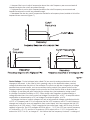
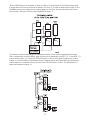
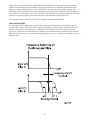
The Spacing control is used to determine the difference between the cutoff frequencies of the
two filters in both Dual Lowpass mode and Highpass/ Lowpass mode. The numbers on the legend
around the knob refer to octaves. When the Spacing control is centered, the cutoff frequencies
of the two filters are identical and the filter sounds like a classic Moog Filter. Setting the Spacing
control to +1 in Dual Lowpass mode means that the right filter has a cutoff frequency equal to
where the Cutoff knob is set, and the left frequency has a cutoff frequency that is one octave
higher than the right filter. This means when the Cutoff control is swept, two resonant peaks are
heard, giving the filter a unique quality.
In Highpass/Lowpass mode, the Spacing control sets the difference between the cutoff
frequencies by shifting the highpass filter’s cutoff frequency up or down. When the Spacing control
is fully clockwise, the cutoff frequencies of the two filters are the same, making for a very narrow
bandpass filter.
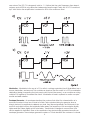
RESONANCE:
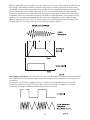
The Resonance control causes feedback in the filter circuit that adds harmonic emphasis at
the cutoff frequency. This control affects the lowpass filters, but not the highpass filter. When the
Resonance control is all the way down, the lowpass filters act as a tone control, rolling off high end
as the Cutoff control is turned down. As the resonance increases, the filter begins to form a peak
at the cutoff frequency. As the Cutoff control is swept the peaks reinforce the harmonics of the
signal being filtered are reinforced – creating an effect that is vocal or zappy. As the Resonance is
turned up the peak increases in strength until the control is set to 8 or higher, when it begins to selfoscillate – creating sine waves with the same frequency as the cutoff frequency.
KEYBOARD CONTROL AMOUNT:
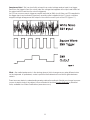
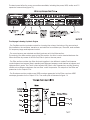
The Keyboard Control Amount knob allows the Filter Cutoff to follow the key played on the
keyboard controlling the Voyager Rack Mount. A higher key will cause a higher cutoff frequency.
This allows a sound to retain its brightness as it is played higher on the keyboard.
FILTER POLES: Each Filter’s Cutoff Slope can be changed. Select 1 pole (6 dB/Oct.) 2 pole (12 dB/
Oct., 3 pole (18 dB/Oct.) or 4 pole (24 dB/Oct.). This can be done in EDIT mode, with the functions
“Filter A Poles” and Filter B Poles”.
25