1
Computerized Sewing and Embroidery Machine
Instruction Manual
Important safety instructions
When using an electrical appliance, basic safety should always be followed,
including the following:
Read all instructions before using this sewing machine.
DANGER - To reduce the risk of electric shock:
1. An appliance should never be left unattended when plugged in.
2. Always unplug this appliance from the electric outlet immediately after using and
before cleaning.
3. The sewing machine is equipped with a LED lamp. If the LED lamp is broken, it
must be replaced by the manufacturer or its service agent in order to avoid a
hazard.
WARNING - To reduce the risk of burns, fire, electric shock, or injury to
persons:
1. Read the instruction carefully before you use the machine.
2. Keep the instructions at a suitable place close to the machine and hand it over if
you give the machine to a third party.
3. Use the machine only in dry locations.
4. Never leave the machine unattended with children or elderly people due to they
may not be able to estimate the risk.
5. Don't let children play with the machine.
6. This appliance can be used by children aged from 8 years and above and
persons with reduced physical, sensory or mental capabilities or lack of
experience and knowledge if they have been given supervision or instruction
concerning use of the appliance in a safe way and understand the hazards
involved.
7. Children shall not play with the appliance.
8. Cleaning and user maintenance shall not be made by children without
supervision.
9. Always switch off the machine if you carry out preparation for work (change the
needle, feed the yarn thru the machine.
10. Always unplug the machine if you leave it unattended, to avoid injury by
expediently switch on the machine.
11. Always unplug the machine if you changing the lamp or carry out maintenance
(oiling, cleaning).
12. Don't use the machine if it's wet or in humid environment.
13. Never pull at the cord, always unplug the machine by gripping the plug.
1
14. Never place anything on the pedal.
15. Never use the machine if the air vents are blocked keep the air vents of the
machine and the food pedal free from dust, fusel and leftovers.
16. The machine may only be used with foot pedal type C-9000.
17. If the supply cord connected with foot pedal is damaged, it must be replaced by
the manufacturer or its service agent or a similarly qualified person, in order to
avoid a hazard.
18. The sound pressure level at normal operation is smaller than 75dB(A).
19. Do not dispose of electrical appliances as unsorted municipal waste, use
separate collection facilities.
20. Contact your local government for information regarding the collection systems
available.
21. If electrical appliances are disposed of in landfills or dumps, hazardous
substances can leak into the groundwater and get into the food chain, damaging
your health and well-being.
22. When replacing old appliances with new ones, the retailer is legally obligated to
take back your old appliance for disposal at least for free of charge.
SAVE THESE INSTRUCTIONS
This sewing machine is intended for household use only.
2
Contents
GETTING READY TO SEW
Principal parts of the machine ...............................................................................................................6
Accessories ...........................................................................................................................................7
Connecting the machine ........................................................................................................................8
Winding the bobbin...........................................................................................................................9-10
Inserting the bobbin .............................................................................................................................11
Threading the upper thread ............................................................................................................12-13
Using the needle threader ...................................................................................................................14
Using the net .......................................................................................................................................15
Adjusting presser foot pressure ...........................................................................................................16
Replacing the needle ...........................................................................................................................16
Matching needle/ fabric/ thread ...........................................................................................................17
Changing the presser foot ...................................................................................................................18
Type of presser foot chart ....................................................................................................................19
Two-step presser foot lifter ..................................................................................................................20
To raise or drop the feed dogs .............................................................................................................20
Information on the LCD Display .....................................................................................................21-24
Normal mode ..................................................................................................................................................21
Memory mode.................................................................................................................................................22
Embroidery mode..........................................................................................................................................23
Buttons of the machine ........................................................................................................................25
Operation buttons ...........................................................................................................................26-27
Function buttons .............................................................................................................................28-31
SEWING BASICS
Pattern chart ...................................................................................................................................32-33
Thread tension.....................................................................................................................................34
Useful skills.....................................................................................................................................35-36
Reverse ..........................................................................................................................................................35
Free arm .........................................................................................................................................................35
Sewing corners ...............................................................................................................................................35
Cutting the thread ...........................................................................................................................................36
Sewing on the heavy fabric.............................................................................................................................36
Selecting stitch ...............................................................................................................................37-38
Straight stitches and needle position ...................................................................................................39
Zigzag stitches.....................................................................................................................................39
Stretch stitch ........................................................................................................................................40
Overcasting stitches ............................................................................................................................41
Using the overcasting foot ..............................................................................................................................41
Using the all purpose foot ...............................................................................................................................41
3
ORDINARY SEWING
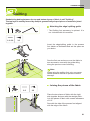
Blind hem/ lingerie stitch......................................................................................................................42
Buttonhole stitch .............................................................................................................................43-46
Making a buttonhole on stretch fabrics ...........................................................................................................46
Bar tack stitch ......................................................................................................................................47
Eyelet Stitch.........................................................................................................................................48
Button sewing ......................................................................................................................................49
Darning stitch .................................................................................................................................50-51
Zipper insertion...............................................................................................................................52-53
inserting a centered zipper .............................................................................................................................52
Inserting a side zipper.....................................................................................................................................53
Narrow hemming .................................................................................................................................54
Cording ................................................................................................................................................55
Single cording .................................................................................................................................................55
Triple cording ..................................................................................................................................................55
Satin stitch sewing ...............................................................................................................................56
Gathering .............................................................................................................................................57
Smocking .............................................................................................................................................58
Free motion darning, embroidery and monogramming ..................................................................59-60
Darning ...........................................................................................................................................................59
Embroidery .....................................................................................................................................................60
Monogramming...............................................................................................................................................60
Quilting ...........................................................................................................................................61-62
Attaching the edge/ quilting guide...................................................................................................................61
Joining the pieces of the fabric .......................................................................................................................61
Patchwork stitching.........................................................................................................................................62
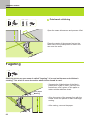
Fagoting...............................................................................................................................................62
Patchwork stich ...................................................................................................................................62
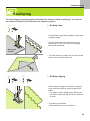
Scallop stitch .......................................................................................................................................63
Scallop hem ....................................................................................................................................................63
Scallop edging ................................................................................................................................................63
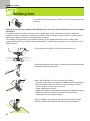
Walking foot .........................................................................................................................................64
Mirror ...................................................................................................................................................65
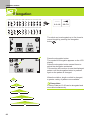
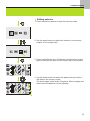
Elongation............................................................................................................................................66
Using the twin needle .....................................................................................................................67-68
Memory...........................................................................................................................................69-73
Combining patterns.........................................................................................................................................69
Editing patterns...............................................................................................................................................71
Clearing patterns ............................................................................................................................................72
Adding patterns...............................................................................................................................................72
Recalling and sewing the memorized pattern.................................................................................................73
4
EMBROIDERY
Important Embroidery information .......................................................................................................74
Embroidery threads ........................................................................................................................................74
Lower threads .................................................................................................................................................74
Stabilizer .........................................................................................................................................................75
Adhesive Spray...............................................................................................................................................75
Iron-on interfacing...........................................................................................................................................76
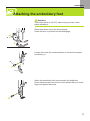
Attaching the embroidery foot..............................................................................................................77
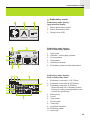
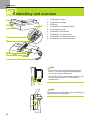
Embroidery unit overview ...............................................................................................................78-80
Connecting the embroidery unit......................................................................................................................79
Removing the embroidery unit........................................................................................................................80
Embroidery hoop overview .............................................................................................................81-84
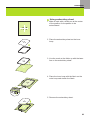
Attaching a stabilizer to the fabric...................................................................................................................81
Hopping the fabric...........................................................................................................................................82
Using embroidery sheet..................................................................................................................................83
Attaching the embroidery hoop.......................................................................................................................84
Removing the embroidery hoop......................................................................................................................84
Embroidery design types .....................................................................................................................85
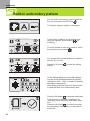
Built-in embroidery pattern ..................................................................................................................86
Built-in embroidery letter ................................................................................................................87-88
Designs from USB ..........................................................................................................................89-91
Starting to sew embroidery.............................................................................................................92-93
Editing the embroidery design ........................................................................................................94-98
Basic setting ...................................................................................................................................................94
Advanced setting ............................................................................................................................................97
Load a Design after interruption ...................................................................................................99-100
APPENDIX
Warning functions.......................................................................................................................101-105
Warning message .........................................................................................................................................101
Warning sound..............................................................................................................................................105
Buzzer sound.....................................................................................................................................106
Maintenance ...............................................................................................................................107-108
Cleaning the screen......................................................................................................................................107
Cleaning the sewing machine surface ..........................................................................................................107
Cleaning the hook.........................................................................................................................................107
Trouble shooting guide................................................................................................................109-111
5
GETTING READY TO SEW
Principal parts of the machine
1. Upper thread guide
2. Presser foot pressure
3. Bobbin thread guide
4. Tension dial
5. LCD display
6. Speed limiting adjustment
dial
7. Face plate
8. Operation buttons
9. Thread cutter
10. Buttonhole lever
11. Auto needle threader
12. Bobbin cover plate
13. Sewing table and accessory
box
14. Horizontal spool pin
15. Hole for second spool pin
16. Bobbin winder spindle
17. Bobbin winder stopper
18. Selection buttons
19. Function buttons
20. Top cover
21. Handwheel
22. Embroidery unit connector
23. Power switch
24. Power cord
25. Foot controller connector
26. Handle
27. Presser foot lifter
28. Drop feed lever
29. Embroidery unit
6
GETTING READY TO SEW
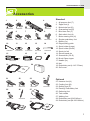
Accessories
1
2
006D1E0004
3
5
6
006904008
006172008
10
11
006008001
7
15
006900008
25
006917008
28
006H3B0001
12
13
TA10943209
006015009
16
17
9
006H1B0001
14
R60033209
18
006099008
19
21
8
006914008
H1D0083209
006012008
006907008
D3A1514000
006905008
Standard
4
20
22
006813008
26
006020008
23
006916008
27
0061850081
29
24
006016008
1.
2.
3.
4.
5.
6.
7.
8.
9.
10.
11.
12.
13.
14.
15.
16.
17.
18.
19.
20.
All purpose foot (T)
Zipper foot (I)
Buttonhole foot (D)
Overcasting foot (E)
Blind hem foot (F)
Satin stitch foot (A)
Button sewing foot (H)
Simple embroidery foot
Bobbin (3x)
Edge/quilting guide
Spool holder (Large)
Spool holder (Small)
Spool pin felt
Second spool pin
Screwdriver (L & S)
Brush/ Seam ripper
Needle (3x)
Net
Embroidery set (L-110*170mm)
Soft cover
Optional
21.
22.
23.
24.
25.
26.
27.
28.
29.
Hemmer foot (K)
Cording foot (M)
Quilting foot (P)
Darning/ Embroidery foot
Gathering foot
Twin needle
Walking foot
Embroidery set (S-40*40mm)
Embroidery set (M-100*100mm)
7
GETTING READY TO SEW
Connecting the machine
Before connecting the power supply, make
sure that the voltage and frequency shown on
the rating plate is conforming with your mains
power.
Place the machine on a stable table.
1. Connect the power line cord to the machine
by inserting the 2-hole plug into the mains
plug socket.
2. Connect the power line plug to the wall outlet.
3. Turn on the power switch.
4. The sewing lamp will light up when the
switch is turned on.
Caution:
Always make sure that the machine is
unplugged from power source and the main
switch is on ("O"). when the machine is not in
use and before inserting or removing parts.
Polarized plug information
This appliance has a polarized plug (one blade
wider than the other), to reduce the risk of
electrical shock; this plug will fit in a polarized
outlet only one way. If the plug does not fit fully
in the outlet, reverse the plug. If it still does not
fit, contact a qualified electrician to install the
proper outlet. Do not modify the plug in any
way.
Foot Control
With the sewing machine turned off, insert the
foot control plug into its connector on the
sewing machine.
Turn on the sewing machine, and then slowly
depress the foot control to start sewing.
Release the foot control to stop the sewing
machine.
Attention:
Consult a qualified electrician if in doubt as how
to connect the machine to the power source.
The appliance must be used with the foot
controller C-9000.
8
GETTING READY TO SEW
Winding the bobbin
1. Place the thread and spool holder onto the spool pin.
For smaller spools of thread, place spool holder with the small
side next to the spool or use the small spool holder.
Note:
If using special thread which winds quickly off the spool attach a
net to the spool before using and use the larger spool holder.
Reduce the thread tension if necessary.
2. Draw the thread from the spool through the upper thread guide.
3. Guide the thread around the thread guide pulling the thread
through the pre-tension spring as illustrated.
4. Wind the thread clockwise around the bobbin winder tension
discs.
5. Place the thread end through one of the inner holes in the
bobbin as illustrated and place empty bobbin on the spindle.
9
GETTING READY TO SEW
6. Push the bobbin to right.
7. When the bobbin winder spindle is pushed to the right, bobbin
winding position, the message is shown on the LCD display.
It will disappear from the LCD display when the bobbin winder
spindle is pushed back to the left into the sewing position
8. Hold the thread tail securely in one hand.
9. Press on the foot control or the Start/Stop button to start
winding the bobbin.
10.After the bobbin has wound a few turns stop the machine and
cut the thread near the hole of the bobbin. Continue filling the
bobbin until it is full.
Once the spool is full, it rotates slowly. Release the pedal or
stop the machine.
Push the bobbin winder spindle to left.
11. Cut the thread and then remove the bobbin.
Note:
When the bobbin winder spindle is placed on the right, "bobbin
winding position", the machine will not sew and the handwheel will
not turn. To start sewing, push the bobbin winder spindle to the left
"sewing position".
10
GETTING READY TO SEW
Inserting the bobbin
Attention:
Turn power switch to off ("O") before inserting
or removing the bobbin.
When inserting or removing the bobbin, the
needle must be fully raised.
Remove the bobbin cover plate.
Insert the bobbin in the bobbin case with the
thread running in a counterclockwise direction
(arrow).
Pull the thread through the slit (A).
A
With a finger held gently on top of the bobbin.
Draw the thread at the arrow markings into the
stitch plate thread guide from (A) to (B).
B
A
Pull the thread at the arrow markings into the
stitch plate thread guide from (B) to (C).
To cut off excess thread pull thread back over
the cutting off blade at point (C).
Close the bobbin cover plate.
B
C
11
GETTING READY TO SEW
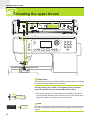
Threading the upper thread
Please Note:
It is important to carry out the threading correctly as by not doing
so several sewing problems could result.
Start by raising the needle to its highest point, and also
raise the presser foot to release the tension discs.
1. Lift up the spool pin. Place the spool of thread on the spool
pin so that the thread comes from the front of the spool, then
place the spool cap at the end of the spool pin.
Note:
In order to prevent tangling of the thread, please use a spool net.
The net is especially usefull to work from large or loose wound
spools.
12
GETTING READY TO SEW
2. Draw the thread from the spool through the upper thread
guide.
3. Guide the thread around the thread guide pulling the thread
through the pre-tension spring as illustrated.
4. Thread the tension module by passing the thread between
the silver discs.
5. Then, down and around the check spring holder.
6. At the top of this movement, pass the thread from right to the
left through the slotted eye of the take-up lever and then
downwards again.
7. Pass the thread behind the flat, horizontal thread guide.
Guide the thread through the wire loop.
Pull the end of the thread through the needle from front to
rear, and pull out about 10 cm of thread.
Use the needle threader to thread the needle. (On the next
page.)
13
GETTING READY TO SEW
Using the needle threader
Raise the needle to its highest position and
lower the presser foot.
Attention:
Turn power switch to the off position ("O").
Lower the needle threader lever slowly and
draw the thread through the thread guide as
illustrated and then to the right.
The needle threader automatically turns to the
threading position and the hook pin passes
through the needle eye.
Take the thread in front of the needle.
Hold the thread loosely and release the lever
slowly. The hook will turn and pass the thread
through the needle eye forming a loop.
Pull the thread through the needle eye.
14
GETTING READY TO SEW
Using the net
When using special threads which wind quickly
off the thread spool, attach a net to the spool
before using.
Net
* If the net is too long, cut the net to match the
size of the spool.
Thread
Spool pin
Spool holder
15
GETTING READY TO SEW
Adjusting presser foot pressure
The presser foot pressure of the machine has
been pre-set and requires no particular
readjustment according to the type of fabric
(light-or-heavy weight).
However, if you need to adjust the presser foot
pressure, turn the presser adjusting screw with
a coin.
For sewing very heavy fabric, loosen the
pressure by turning the screw counter
clockwise, and for thin fabric, tighten by turning
it clockwise.
To return to initial pressure foot setting turn the
presser foot pressure adjusting screw to
become flush with the face cover.
Replacing the needle
B
Attention:
Turn power switch to off ("O") when carrying out
the below operation!
A
Change the needle regularly, especially if it is
showing signs of wear and causing problems.
Insert the needle following the illustrated
instructions.
A. Loosen the needle clamp screw and tighten
again after inserting the new needle. The flat
side of the shaft should be towards the back.
B. Insert the needle as far up as it will go.
Needles must be in perfect condition.
Problems can occur with:
- Bent needles
- Blunt needles
- Damaged points
16
GETTING READY TO SEW
Matching needle/ fabric/ thread
NEEDLE, FABRIC, THREAD SELECTION GUIDE
NEEDLE SIZE
FABRICS
THREAD
9-11 (70-80)
Lightweight fabrics-thin cottons, voile,
serge, silk, muslin, Qiana, interlocks,
cotton knits, tricot, jerseys, crepes,
woven polyester, shirt & blouse fabrics.
Light-duty thread in cotton, nylon,
polyester or cotton wrapped
polyester.
11-14 (80-90)
Medium weight fabrics-cotton, satin,
kettleclote, sailcloth, double knits,
lightweight woollens.
Most threads sold are medium size and
suitable for these fabrics and needle
sizes.
14 (90)
Medium weight fabrics-cotton duck,
woolen, heavier knits, terrycloth,
denims.
16 (100)
Heavyweight fabrics-canvas, woolens,
outdoor tent and quilted fabrics,
denims, upholstery material (light to
medium).
18 (110)
Heavy woollens, overcoat fabrics,
upholstery fabrics, some leathers and
vinyls.
Use polyester threads on synthetic
materials and cotton on natural woven
fabrics for best results.
Always use the same thread on top and
bottom.
Heavy duty thread, carpet thread.
Please Note:
- In general, fine threads and needles are used for sewing fine fabrics, and thicker threads are used
for sewing heavy fabrics.
- Always test thread and needle size on a small piece of fabric which will be used for actual sewing.
- Use the same thread for needle and bobbin.
- For good quality embroidery designs, use a 75/11 needle when embroidering.
- Use a backing for fine or stretchy fabrics.
17
GETTING READY TO SEW
Changing the presser foot
Attention:
Turn power switch to off ("O") when carrying out any of the below
operations!
Attaching the presser foot holder
Raise the presser foot bar (a).
Attach the presser foot holder (b) as illustrated.
a
b
Attaching the presser foot
Lower the presser foot holder (b) until the cut-out (c) is directly
above the pin (d).
Press the black lever (e).
Lower the presser foot holder (b) and the presser foot (f) will
engage automatically.
e
c
d
d
f
Removing the presser foot
Raise the presser foot.
Press the black lever (e) and the foot will disengages.
e
g
18
Attaching the edge/quilting guide
Attach the edge/quilting guide (g) in the slot as illustrated. Adjust
according to need for hems, pleats, etc.
GETTING READY TO SEW
Type of presser foot chart
PRESSER FOOT
APPLICATION
General sewing,
Patchwork stitches,
Decorative stitching,
Smocking,
All purpose foot (T)
Fagoting, etc.
NEEDLE PRESSER FOOT
APPLICATION
NEEDLE
Cording
Cording foot (M)
(Optional)
Inserting zippers
Narrow hemming
Hemmer foot (K)
(Optional)
Zipper foot (I)
Buttonhole sewing,
Bar tack stitches,
Darning stitches.
Darning
Free embroidery
Monogramming
Simple
embroidery foot
Buttonhole foot (D)
Button sewing
Button sewing foot
Quilting
Quilting foot (P)
(Optional)
Blind hem stitching
Gathering
Gathering foot
(Optional)
Blind hem foot (F)
Overcasting
This foot helps to
prevent uneven
feeding of very
difficult fabrics
Overcasting foot (E)
Satin stitch sewing
Satin stitch foot (A)
Walking foot
(Optional)
19
Two-step presser foot lifter
The presser foot lifter raises and lowers your
presser foot.
The second level is only used in embroidery
mode to remove the hoop easily.
Note:
The needle must always be at the highest
position.
To raise or drop the feed dogs
With the sewing table off the machine, the feed
dog adjustment lever can be seen on the base
in back of the sewing machine.
a
a
20
b
Sliding the lever to the "
" (b) will lower
the feed dog, for example during button sewing.
If you wish to continue sewing normally, slide
the lever to the "
" (a) in order to raise
the feed dogs.
The feed dog will not rise up if you do not turn
the handwheel, even if the lever is slid to the
right. Make a complete turn to raise the feed
dogs.
GETTING READY TO SEW
Information on the LCD Display
Normal mode
Normal mode display
1.
2.
3.
4.
5.
6.
7.
8.
9.
10.
11.
12.
13.
14
15.
16.
17.
18.
19.
Pattern
Pattern number
Reverse
Auto-lock
Suggested presser foot
Tension
Pattern group
Needle up position
Stitch length
Needle position
Sound on
Auto-stop
Mirror
Twin needle
Needle down position
Stitch width
Sound off
Alphabet number
Alphabet
Normal mode display pattern browser display
1.
2.
3.
4.
5.
6.
Pattern
Pattern number
Pattern group
Current page
Total page
Operation indication
21
GETTING READY TO SEW
Memory mode
Memory mode display
1.
2.
3.
4.
5.
6.
7.
8.
9.
10.
11.
12.
13.
14.
15.
16.
Selection frame
Memory module with unit
Empty memory module
Current memory module
Pattern number and pattern
Auto-stop
Mirror
Needle up position
Sound on
Elongation
Stitch width
Stitch length
Current pattern group
Current memory unit
Total of memory units
Memory cursor
Memory mode display pattern browser display
1.
2.
3.
4.
5.
6.
7.
22
Pattern
Pattern number
Memory model
Pattern group
Current page
Total page
Operation indication
GETTING READY TO SEW
Embroidery mode
Embroidery mode display type selection display
1. Built-in Embroidery pattern
2. Built-in Embroidery letter
3. Designs from USB
Embroidery mode display Built-in Embroidery pattern
1.
2.
3.
4.
5.
6.
Type mode
Indication - select page up/down
Current pattern
Total pattern
Operation indication
Embroidery pattern number and pattern
Embroidery mode display Built-in Embroidery letter
1. Embroidery hoop size L-110*170mm
2. Embroidery hoop size M-100*100mm
3. Embroidery hoop size S-40*40mm
* When the hoop icon is flickering means
the layout is doing size adjustment or the
current size will change.
4. Editing area
5. Cursor
6. Type model
7. Current page
8. Total page
9. Operation indication
10. Embroidery letter
11. Letter type
23
GETTING READY TO SEW
Embroidery mode display Designs from USB
1. Type mode
2. Cursor
3. Loading pattern
Embroidery mode display editing display
1. Embroidery field
2. Available embroidery hoop
3. Unavailable embroidery hoop (appear in
gray)
4. Multi color
5. Embroidery size (inch)
6. Embroidery distance from the center
7. Degrees
8. Percentage
9. Single color
10. Embroidery size (mm)
Embroidery mode display embroidery display
1. Embroidery pattern number and pattern
2. Available embroidery hoops
3. Current stitch counts and total stitch
counter of the pattern
4. Current color step and Number of colors in
the pattern
5. Current name of color
6. Stitch counts of current color
24
GETTING READY TO SEW
Buttons of the machine
1. Start/stop button
2. Reverse/ Exit button
3. Auto-lock/ Trace button
4. Needle up/down position button
5. Speed limiting adjustment dial
6. OK button
7. Arrow buttons
8. Direct pattern selection and number buttons
9. Mirror button
10. Elongation/ Resize button
11. Twin needle/ Rotate button
12. Stitch length adjustment/ Stitch forward/back button
13. Stitch width adjustment/ Color forward/back button
14. Memory/ Setup button
15. Clear/ Return button
16. Pattern group selection/ Color steup button
Please Note:
The icon on the button is for sewing model, and the icon in the side of button is for embroidery model.
If you want to get more detailed information, please refer the user's manual.
25
GETTING READY TO SEW
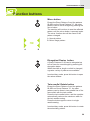
Operation buttons
Start/stop button
The machine will start running when Start/stop
button is pressed and will stop when pressed
the second time.
The machine will rotate slowly at the beginning
of the sewing.
Reverse/ Exit button
Reverse is pressed to sew in reverse.
The icon "
" on the LCD indicates reverse
sewing.
The machine will permanently sew in reverse,
release the button to sew forward.
Only the Direct Patterns 1-5 and A Group
Pattern 00 can be sewn in reverse.
If you press the reverse button before starting
to sew, the machine will permanently sew in
reverse and press the button again to sew
forward.
In embroidery mode, press this button to return
the type selection display, the selected pattern
is cancelled.
Auto-lock/ Trace button
When the Direct Patterns 1-4 and A Group
Pattern 00 selected, the machine will
immediately sew 3 locking stitches when the
Auto-lock button is pressed, then automatically
stop.
The LCD display will display the figure " "
until the machine is stopped.
Select the pattern (except Direct Patterns 0-4
and A Group Pattern 00, 86-98), press the
Auto-lock button, the machine will sew 3
locking stitches at the end of the current
pattern and automatically stop.
The LCD display will display the figure "
"
until the machine is stopped.
The function will be cancelled if you press the
button once again or select another pattern.
In embroidery mode, press this button to check
the size of the embroidering area in the editing
display.
26
GETTING READY TO SEW
Needle up/ down position button
With the Needle up/ down position button, you
decide whether the needle shall stop in the up
position or in the material when you stop sewing.
Press the button so the arrow on the LCD points
upward "
" the needle moves to the highest
position and will stop there after sewing.
Press the button so the arrow on the LCD points
downwards "
" the needle moves to the
lowest position and will stop there after sewing.
Please Note:
During sewing, press the needle up/down
button, the machine will stop automatically.
In the memory mode, the Needle up/ down
position button use only in the embroidery
display.
Speed limiting adjustment dial
Speed limiting adjustment dial can control the
sewing speed.
Turn the dial clockwise to make sewing speed
faster. Turn the dial counterclockwise to make
sewing speed slower.
Note:
Speed setting is applied exclusively in sewing
mode.
Arrow buttons
Use the buttons to select desired pattern,
function... etc.
OK button
Press this button to confirm the selection.
In the normal mode press the button to into
pattern browser.
In the memory mode press the button to into
pattern browser.
27
GETTING READY TO SEW
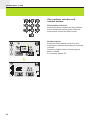
Direct pattern selection and
number buttons
Direct pattern selection
Press the buttons to select the utility patterns
shown beside the number button when the
mode button is set at the Direct mode.
Number buttons
Except the Direct pattern mode, the other
mode can be selected by pressing the desired
numbers.
Press the number buttons for selecting the
pattern needed.
For example: pattern 36
28
GETTING READY TO SEW
Function buttons
Mirror button
Except the Direct Patterns 0 and the patterns
86-98 from the Group Patterns "A", the other
patterns can be mirror imaged by pressing the
mirror button.
The machine will continue to sew the reflected
pattern until the mirror button is pressed again.
The mirror function also will be cancel if the
pattern changed.
A. Normal pattern
B. Mirror image pattern
A
B
Elongation/ Resize button
A Group Patterns 13-36 can be elongated up
to five times its normal length by pressing the
elongation button.
When the width or length or stitch is changed,
a greater variety of patterns are available.
In embroidery mode, press this button to open
the resize window.
Twin needle/ Rotate button
Except the Direct Patterns 0 and the patterns
86-98 from Group Patterns "A", the other
patterns can be sewn in two parallel line of the
same stitch with the twin needle.
Press the twin needle button, and the machine
automatically reduces the maximum width for
the twin needle sewing.
Press the button again to return to single
needle sewing.
In embroidery mode, press this button to rotate
the embroidery pattern.
29
GETTING READY TO SEW
Stitch length adjustment/ Stitch
forward/back button
When you select a stitch the machine will
automatically set the recommended stitch
length which will be indicated by numbers on
the LCD display.
The stitch length can be adjusted by pressing
the stitch length adjustment buttons.
To shorten the stitch length, press the "–"
button (left). For a longer stitch length, press
the "+" button (right). The stitch length can be
adjusted between "0.0-4.5". Certain stitches
have a limited stitch length.
In embroidery mode, press this button to
forward or back the current stitch counts.
Stitch width adjustment/ Color
forward/back button
When you select a stitch, the machine will
automatically set the recommended stitch
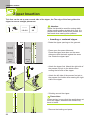
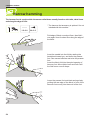
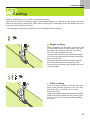
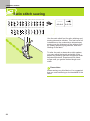
width, which will be indicated by numbers on
the LCD display.
The stitch width can be regulated by pressing
the stitch width adjustment button.
For a narrower stitch, press the button left. For
a wider stitch, press the button right.
The stitch width can be adjusted between "0.07.0". Certain stitches have a limited stitch width
When Direct Patterns 1-4 and A Group Pattern
00 are selected, the needle position is regulated
by the stitch width adjustment buttons.
Press the button left will move the needle to
the left. Press the button right, will move the
needle to the right.
The numbers will be changed from left position
"0.0" to extreme right position "7.0". The preset center needle position will be indicated as
"3.5".
In embroidery mode, press this button to
forward or back the color part.
30
GETTING READY TO SEW
Memory/ Setup button
Press the memory button to enter the memory
mode, and store the combinations of
characters or decorative stitches.
The Direct mode patterns and he patterns 8698 from Group Patterns "A" cannot be
memorized.
In embroidery mode, press this button to into
the setting program.
Clear/ Return button
If an incorrect pattern or memory module is
selected, press this button to clear it or return
to the previous display.
Pattern group selection/ Color steup
button
The LCD display will be set at direct patterns
mode when you turn on the machine.
Press the pattern group selection button, LCD
display enters the pattern group selection
display automatically. Use the arrow buttons to
select the desired group of stitch.
Direct patterns mode.
A Group Patterns mode.
B Group Patterns mode.
Block style alphabet mode.
Script style alphabet mode.
In embroidery mode, press this button to set
the single or multi color for embroidery pattern.
31
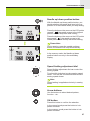
SEWING BASICS
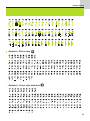
Pattern chart
Direct patterns
A Group Patterns
B Group Patterns
32
SEWING BASICS
Alphabet - Block style
Alphabet - Script style alphabet
33
SEWING BASICS
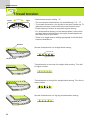
Thread tension
Tight
Loose
- Basic thread tension setting: "4"
- The recommend thread tension for embroidering is "2" - "6".
- To increase the tension, turn the dial to the next number up. To
reduce the tension, turn the dial to the next number down.
- Proper setting of tension is important to good sewing.
- For all decorative sewing you will always obtain a nicer stitch
and less fabric puckering when the upper thread appears on
the bottom side of your fabric.
- There is no single tension setting appropriate for all the stitch
functions and fabrics.
Surface
Normal thread tension for straight stitch sewing.
Upper thread
Bobbin thread
Reverse side
Thread tension is too loose for straight stitch sewing. Turn dial
to higher number.
Thread tension is too tight for straight stitch sewing. Turn dial to
lower number.
Normal thread tension for zig zag and decorative sewing.
34
SEWING BASICS
Useful skills
Reverse
Reverse stitching is used to secure the
threads at the beginning and at the end of a
seam.
Press the reverse button and sew 4-5 stitches.
The machine will sew forward when the button
is released.
Free arm
Free-arm sewing is convenient for sewing
tubular areas such as pant hems and cuffs.
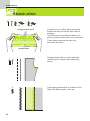
Sewing corners
5
2
1. Stop the sewing machine when you reach a
corner.
2. Lower the needle into the fabric manually or
by pressing the needle up/ down button
once.
3. Raise the presser foot.
4. Use the needle as a pivot and turn the fabric.
5. Lower the presser foot and resume sewing.
35
SEWING BASICS
Cutting the thread
The thread cutter serves two purposes.
1. Cut the thread after threading the needle
2. Cut the thread after finishing a seam.
To cut the thread after completing your work
raise the presser foot.
Remove the fabric, draw the threads to the left
side of the face cover and cut using the thread
cutter.
The threads are cut at the proper length to start
the next seam.
Sewing on the heavy fabric
The black button on the left side of the presser
foot will lock the presser foot in a horizontal
position if you push it in before lowering the
presser foot. This ensures even feeding at the
beginning of a seam and helps when sewing
multiple layers of fabric such as sewing over
seams when hemming jeans.
When you reach the point of an increased
thickness, lower the needle and raise the
presser foot. Press the toe of the foot and push
in the black button, then lower the foot and
continue sewing.
The black button releases automatically after
sewing few stitches.
Cardboard or
thick fabric
36
You also can place another piece of fabric with
the same thickness at the back of the seam.
Or support the presser foot while feeding by
hand and sewing toward the folded side.
SEWING BASICS
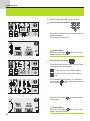
Selecting stitch
Ten of the most frequently used utility stitches
can quickly be selected with the direct pattern
selection and number buttons.
Select the desired stitch from those shown on
the top cover.
1. Turn on the sewing machine.
2. When the sewing machine is turned on, the
straight stitch (center needle position) is
automatically selected.
3. Press the pattern group selection button
to enter the pattern group selection display.
The following 5 category icons show on.
4. Use the arrow buttons
to select the
desired group of stitch that you wish.
(E.g.
For pattern group "A")
5. Press ok button
to into pattern browser,
the display containing the various stitches in
the selected pattern group appears.
37
SEWING BASICS
6. Select the desired pattern that you sew.
Use the number buttons
Press the number buttons for selecting the
pattern needed.
For example: pattern 36
Please Note:
Press the OK button
can return to the
pattern browser display.
Use the arrow buttons
Press the arrow buttons until the stitch that
you wish to use is selected.
To the previous/ next stitch pattern.
To the previous/ next stitch pattern
row.
For example: Direct pattern 11, press the
arrow button
twice, and then press the
arrow button
once.
Press the OK button
is selected.
, the stitch pattern
Please Note:
Press the OK button
can return to the
pattern browser display.
38
SEWING BASICS
Straight stitches and needle position
1
3
2
4
A-00
T
Changing the needle position
0.0
2.0
3.5
5.0
7.0
These setting apply only to Direct Patterns 1-4
and A Group Pattern 00.
The pre-set position is "3.5", center position.
Press the stitch width adjustment button left "....",
the needle position will move to the left.
Press the stitch width adjustment button right
"....", the needle position will move to the right.
Changing the stitch length
0.5
1.0
2.0
3.0
4.5
To shorten the stitch length, press the stitch
length adjustment button left " ". For a longer
stitch length, press the stitch length adjustment
button right " ".
Generally speaking, the thicker the fabric,
thread and needle, the longer the stitch should
be.
Zigzag stitches
5
7
6
T
Adjusting the stitch width
The width increases as you press the stitch
width adjustment button from "0.0-7.0".
The width can be reduced on any patterns.
0.0
1.0
3.0
5.0
7.0
Adjusting the stitch length
0.5
1.0
2.0
3.0
4.5
The density of zigzag stitches increase as the
setting of stitch length approaches "0.3".
Neat zigzag stitches are usually achieved at
"1.0-2.5".
Closed up zigzag stitches (close together) are
referred to as a satin stitch.
39
SEWING BASICS
Stretch stitch
3
4
7
7
T
A
Straight stretch stitch
It assures you of a stitch that is strong and
flexible and will give with the fabric without
breaking.
Good for easy to ravel and knit fabrics. It is
good for joining durable fabric such as denims.
These stitches can also be used as a
decorative top stitch.
Straight stitch
Straight stretch stitch is used to add triple
reinforcement to stretch and hardwearing
seams.
Triple zigzag stretch stitch is suitable for firm
fabrics like denim, poplin, duck, etc.
40
ORDINARY SEWING
Overcasting stitches
Sewing overcasting stitches along the edges of fabric to prevent them from fraying.
5
Using the overcasting foot
8
E
2.0~3.0
5.0
Change the presser foot to the overcasting foot
(E).
Sew the fabric with the fabric edge against the
guide of the overcasting foot.
Attention:
The overcasting foot should be used to sew
with Direct Patterns 5 and 8 only and do not
set the stitch width narrower than "5.0".
It is possible that needle could hit the presser
foot and break when sewing other patterns and
width.
6
Using the all purpose foot
A-02
2.0-3.0
2.5~5.0
Change the presser foot to the all purpose foot
(T).
Sewing the overcasting along the edge of the
fabric so that the needle drops over the edge of
the fabric on the right side.
41
ORDINARY SEWING
Blind Hem
Secure the bottoms of skirts and pants with a blind hem, this stitch will sew without stitches
showing on right side of fabric.
9
A-03
9
A-04
: Blind hem/ lingerie for firm fabrics
A-03 : Blind hem for stretch fabrics
1.0~2.0
F
5mm
Reverse
side
Overcasting
stitch
2.5~4.0
A-04 : Blind hem for stretch fabrics
5mm
Fold the fabric as illustrated with the reverse
side uppermost.
First carry out an overcasting stitch as shown
in left picture.
Please Note:
It takes practice to sew blind hem. Always
make a sewing test first.
Reverse
side
a
Place the fabric under the foot. Turn the
handwheel forwards by hand until the needle
swings fully to the left. It should just pierce the
fold of the fabric. If it does not, adjust the stitch
width accordingly.
Adjust the guide (b) by turning the knob (a) so
that the guide just rests against the fold.
b
Sew slowly, guiding the fabric carefully along
the edge of the guide.
Turn over the fabric.
Right
side
Reverse
side
42
ORDINARY SEWING
Buttonhole stitch
Buttonhole sewing to match the size of the button is possible.
For stretch fabric or thin fabric, it is recommended to use a stabilizer for a better buttonhole
finish.
0
0
0.3~1.0 2.5~7.0
: For thin or medium fabric
A-86 : For thin or medium fabric
A-88 : For horizontal buttonholes on thick
fabrics
A-86
A-88
A-89
A-89 : For thin or medium fabric
0.3~1.0 2.5~5.5
A-87 : For suits or overcoats.
A-90 : For thick coats
A-87
A-90
A-91
A-91 : For jeans or trousers
0.3~1.0 5.5~7.0
A-92
1.0~2.0 3.0~7.0
A-92 : For jeans or stretch fabric with a coarse
weave
Please Note:
Before sewing a buttonhole on your project,
practice on a scrap piece of the same type of
fabrics.
Mark the positions of the buttonhole on the
fabric. The maximum buttonhole length is 3cm
(1 3/16 inch). (Total of diameter + thickness of
button.)
Attach the buttonhole foot, then pull out the
button holder plate and insert the button.
The size of the buttonhole is determined by the
button inserted in the button plate.
The thread should be passed through the hole
in the presser foot, then be placed under the
foot.
43
ORDINARY SEWING
Starting
point
Select the buttonhole stitch.
Adjust the stitch width and the stitch length
to the desired width and density.
Position the fabric under the presser foot
with the front end of the buttonhole mark
aligned with the center line on the buttonhole
foot.
Pull the buttonhole lever all the way down and
position it behind the bracket on the buttonhole
foot.
Please Note:
The buttonhole stitch was selected and the
start/stop button was pressed while the
buttonhole lever is raised, the LCD will display
the warning message to remind you to lower
the buttonhole lever.
Before sewing, please hold the thread by hand.
Please Note:
Gently feed the fabric by hand.
Before stopping, the machine will automatically
sew a reinforcement stitch after the buttonhole
is sewn.
44
ORDINARY SEWING
* Buttonholes are sewn from the front of the presser foot to the back, as shown.
0
A-86
A-88
A-89
A-87
A-90
A-91
A-92
Raise the presser foot and cut thread.
To sew over same buttonhole, raise the presser
foot (will return to original position).
After sewing the buttonhole stitch, raise the
buttonhole lever until it stops.
Please Note:
After finishing, the stitch other than the
buttonhole, bar tack or darning stitch was
selected and the start/stop button was pressed
while the buttonhole lever is lowered, the LCD
will display the warning message to remind you
to raise the buttonhole lever.
45
ORDINARY SEWING
Cut the center of the buttonhole being careful
not to cut any stitches on either side. Use a pin
as a stopper at the bar tack so you do not cut
too much.
Please Note:
When cutting the buttonhole with the seam
ripper, do not place your hands in the cutting
direction, otherwise injuries may result.
Making a buttonhole on
stretch fabrics
When sewing buttonholes on stretch fabric, hook
heavy thread or cord under the buttonhole foot.
Attach the buttonhole foot and hook the gimp
thread onto the back of the presser foot.
Bring the two gimp thread ends to the front of
the foot and insert them into the grooves, then
temporarily tie them there. Lower the presser
foot and start sewing.
Set the stitch width to match the diameter of the
gimp thread.
Once sewing is completed, pull the gimp
thread gently to remove any slack, then trim off
any excess.
Please Note:
It is suggested that you use interfacing on the
backside of the fabric.
46
ORDINARY SEWING
Bar tack stitch
Bar tack stitch is used to reinforce points subject to strain, such as pocket corners and
openings.
A-97
A-98
A
D
0.4~1.0
1.0~3.0
Extend the button holder plate and set to the
desire bar tack length.
Adjust the stitch width and stitch length to
personalize the stitches.
Position the fabric so that the needle is 2mm
(1/16 inch) in front of the pocket opening, and
then lower the presser foot lever.
2mm
Starting
point
Pass the upper thread down through the hole
in the presser foot. Pull down the buttonhole
lever and position behind the bracket on the
buttonhole foot. Gently hold the end of the
upper thread in your left hand, and start
sewing.
97
98
Sewing procedure for bar tack is illustrated.
This is an example of sewn bar tacks at pocket
corners.
Please Note:
It is suggested that you use interfacing on the
backside of the fabric.
47
ORDINARY SEWING
Eyelet stitch
Eyelet stitches are used for making belt holes and other similar applications.
A-94
A-94 : Select for sewing eyelets on belts , etc
A-95
A-95 : Select for sewing eyelets on belts , etc
A
A
5.0 6.0 7.0
B
C
Press the "-" or "+" stitch width adjustment to
button select the eyelet size.
Size of eyelet.
A. Small: 5.0mm (3/16 inch).
B. Medium: 6.0mm (15/64 inch).
C. Large: 7.0mm (1/4 inch).
Lower the needle into the fabric at the
beginning of the stitching, and then lower the
presser foot lever.
Once sewing is completed, the machine
automatically sews reinforcement stitches, then
stops.
Make a hole at the center using an eyelet
punch.
* Eyelet punch is not included with the
machine.
Please Note:
- When using the eyelet punch, place thick paper
or some other protective sheet under the fabric
before punching the hole in the fabric.
- If thin thread is used, the stitching may be
coarse. If this occurs, sew the eyelet twice
one on top of the other.
48
ORDINARY SEWING
Button sewing
A-96
H
2.4~4.5
a
Change the presser foot to the button sewing
foot.
Move the drop feed control to "
the feed dogs.
a
" to lower
b
Position the work under the foot. Place the
button in the desired position, lower the foot.
Select zig zag pattern. Adjust the stitch width to
"2.5-4.5" according to the distance between the
two holes of the button.
Turn the handwheel to check that the needle
goes cleanly into the left and right holes of the
button.
Before sewing, press the Auto-lock button to
sew reinforcement stitches automatically at the
beginning and at the end of the stitch.
If a shank is required (ex. sew on coats or
jackets), place a darning needle on top of the
button and sew.
Pull end of the upper thread to the wrong side
of the fabric, then tie it with the bobbin thread.
For buttons with 4 holes, sew through the front
two holes first, push work forward and then
sew through the back two holes.
Please Note:
When you finish the work, move the drop feed
control to "
" to raise the feed dogs.
49
ORDINARY SEWING
Darning stitch
Darning a small hole or a tear before it becomes larger can save a garment. Choose a fine
thread in a color as color as close to your garment possible.
A-93
D
1.0~2.0
3.5~7.0
Baste the upper fabric and the under fabric
together.
Select the needle position. Lower the presser
foot over the center of the tear.
Pull the button holder to rear.
Set the button guide plate on buttonhole foot to
the desired length.
Stop
a
Start
50
The size of one darn cycle is variable.
However, the maximum stitch length is 2.6cm
(1 inch) and the maximum stitch width is 7mm
(9/32 inch).
a. The length of sewing.
b. The width of sewing.
b
ORDINARY SEWING
Position the fabric so that the needle is 2mm
(1/16 inch) in front of the area to be darned,
and then lower the presser foot lever.
2mm
Please Note:
When lowering the presser foot, do not push in
the front of the presser foot, otherwise the
darning will not be sewn with the correct size.
Pass the upper thread down through the
hole in the presser foot.
Pull down the buttonhole lever.
The buttonhole lever is positioned behind the
bracket on the buttonhole foot.
Gently hold the end of the upper thread in your
left hand, and then start sewing.
Darning stitches are sewn from the front of the
presser foot to the back, as shown.
Please Note:
If the fabric does not feed, for example,
because it is too thick, increase the stitch length.
If the sewing range is too big to sew, then we
suggest you can sew several times (or cross
sew) to get better sewing result.
51
ORDINARY SEWING
Zipper Insertion
This foot can be set to sew on each side of the zipper, the The edge of the foot guides the
zipper to ensure straight placement.
1
1.5~3.0
3.5
Attention:
Zipper foot should be used for sewing width
center needle position straight stitch only. It is
possible that needle could hit the presser foot
and break when sewing other patterns.
Inserting a centered zipper
- Baste the zipper opening on the garment.
5mm
Reverse
stitches
Basting
stitching
Basting
stitching
Wrong
side
- Press open the seam allowance.
Place the zipper face down on the seam
allowance with the teeth against the seam
line. Baste the zipper tape.
Wrong
side
- Attach the zipper foot. Attach the right side of
the presser foot pin to the holder when
sewing the left side of the zipper.
- Attach the left side of the presser foot pin to
the presser foot holder when sewing the right
side of the zipper.
- Stitching around the zipper.
Please Note:
When sewing, be sure that the needle does not
touch the zipper, otherwise the needle may
bend or break.
- Remove the basting and press.
52
ORDINARY SEWING
Inserting a side zipper
5mm
Reverse
stitches
Basting
stitching
- Baste the zipper opening on the garment.
- Fold back to the left seam allowance.
Turn under the right seam allowance to form
3mm fold.
Wrong
side
- Attach the zipper foot. Attach the right side of
the presser foot pin to the holder when
sewing the left side of the zipper.
Attach the left side of the presser foot pin to
the presser foot holder when sewing the right
side of the zipper.
- Stitch the left side of zipper from bottom to
top.
- Turn the fabric right side out, stitch across the
lower end and right side of zipper.
- Stop about 5cm (2 inches) from the top of
zipper. Remove the basting and open the
zipper. Stitch the remainder of the seam.
53
ORDINARY SEWING
Narrow hemming
The hemmer foot is used to stitch the narrow rolled hems usually found on shirt tails, table linens
and along the edge of frills.
* The hemmer foot accessory is optional. It is not
included with this machine.
1
1.5~3.0
3.0~3.5
Fold edge of fabric over about 3mm, then fold it
over again 3mm for about 5cm along the edge of
the fabric.
Insert the needle into the fold by rotating the
handwheel toward you, and lower the presser
foot. Sew several stitches and raise the presser
foot.
Insert the fabric fold into the spiral opening of
hemmer foot. Move fabric back and forth until
the fold forms a scroll shape.
Lower the presser foot and start sewing slowly
guiding the raw edge of the fabric in front of the
hemmer foot evenly into the scroll of the foot.
54
ORDINARY SEWING
Cording
Used for embellishing 1 to 3 cords or decorative threads.
Sew over one strand of cording to create a pretty swirled design on a jacket or vest or sew over three
strands of cording for border trims. Pearl cotton, knitting yarn, embroidery floss, lace thread, fine wool
or lily yarn can be used for cording.
* The cording foot accessory is optional. It is not included with this machine.
5
M
Single cording
Mark the design on the fabric. Insert the cord
in the center groove of the cording foot from
the right side opening. Pull the cord about
5cm (2 inches) behind the foot.
The grooves under the foot will hold the length
of the cord in place while the stitches are being
form over the cord.
Select the stitch and adjust the stitch width so
that the stitches are just covering the cord.
Lower the foot and sew slowly, guiding the cord
over the design.
6
A-10
A-28
Triple cording
Push the sewing thread to the left and insert
three cords into the grooves of the foot and
pull about 5cm (2 inches) of the cords
behind the foot.
Select the desired pattern and adjust the stitch
width so that the stitches are just covering the
cords. Lower the foot and sew slowly guiding
the cords.
55
ORDINARY SEWING
Satin stitch sewing
5
A-13 A-14 A-15 A-16 A-17 A-18 A-19 A-20 A-21 A-22 A-23 A-24
0.3~2.0
2.5~7.0
A-25 A-26 A-27 A-28 A-29 A-30 A-31 A-32 A-33 A-34 A-35 A-36
Use the satin stitch foot for satin stitching and
sewing decorative stitches. This foot has a full
indentation on the underside to allowed easy
sewing over the thickness of the stitches form
by closely spaced zigzag stitches, and even
feeding of the fabric.
To tailor the satin or decorative stitch pattern,
you may adjust the length and width of the
pattern by pressing the stitch length and width
adjustment buttons. Experiment with fabric
scraps until you get the desired length and
width.
Please Note:
When sewing very thin fabrics, it is suggested
that you use interfacing on the backside of the
fabric.
56
ORDINARY SEWING
Gathering
The Gathering Foot is used for gathering fabrics. Ideal for clothing as well as home decor,
works best on thin to medium weight fabrics.
* The Gathering foot accessory is optional. It is
not included with this machine.
1
4.0
3.5
Gathered fabric
Remove the presser foot holder and attach the
gathering foot, lowering the tension setting to
below 2.
Place fabric to be gathered under presser foot
to the right of the presser foot.
Sew a row of stitching, keeping the raw edge of
fabric aligned with the right edge of foot.
The stitches automatically cause the fabric to
gather. Suitable for light to medium weight
fabrics.
To gather and attach gathered fabric in one
step
Look closely at the gathering foot to see a slot
on the bottom.
When using the slot, you can gather the bottom
layer of the fabric while attaching it to a flat top
layer, such as the waistband on a dress bodice.
- Remove the presser foot holder and attach
gathering foot.
- Place the fabric to be gathered with right side
up under the foot.
- Place top layer of the fabric right side down in
the slot.
- Guide the two layers as illustrated.
Note:
- When testing machine for adjustments to
achieve desired fullness, work with 10"
increments of the fabric, trims or elastic. This
makes it easier to determine the adjustments
and how much change is needed for your
project. Always test on your project fabric and
on the same grainline as will be used in your
finished project.
- Sew slow to medium speed for better fabric
control.
57
ORDINARY SEWING
Smocking
The decorative stitch created by stitching or embroidering over gathers is called "smocking". It
is used to decorate the front of blouses or cuffs. The smocking stitch adds texture and elasticity
to fabric.
A-08 A-09
A
Use the all purpose foot to sew straight lines
1cm (3/8 inch) apart, across the area to be
smocked.
Knot the threads along one edge.
Pull the bobbin threads and distribute the
gathers evenly. Secure the threads at the other
end.
Reduce the tension, if necessary and sew
decorative pattern stitches between the straight
seams.
Pull out the gathering stitches.
58
ORDINARY SEWING
Free motion darning, embroidery
and monogramming
1
5
3.5~5.0
a
a
Move the drop feed control to "
the feed dogs.
" to lower
b
Remove the presser foot holder, and attach the
embroidery foot to the presser foot holder bar.
Press the embroidery foot on firmly from
behind with your index finger and tighten the
screw.
Darning
First sew around the edges of the hole (to
secure the threads). Working from left to
right, sew over the hole in a constant and
continuous movement.
Turn the work by 1/4 and sew over the first
stitching moving the work slower over the hole
to separate the threads and not form big gaps
between the threads.
Please Note:
Free motion darning is accomplished without
the sewing machine internal feed system.
Movement of the fabric is controlled by the
operator. It is necessary to coordinate sewing
speed and movement of fabric.
59
ORDINARY SEWING
Embroidery
Select zigzag stitch pattern and adjust the
stitch width as desired.
Stitch along the outline of the design by moving
the embroidery hoop. Make sure to maintain a
constant speed.
Fill in the design working from the outline
towards the inside. Keep the stitches close
together.
You will get longer stitches by moving the hoop
faster and shorter stitches by moving the hoop
more slowly.
Secure with a reinforcement stitches at the end
by press Auto-lock button.
Monogramming
Select the zigzag stitch pattern and adjust
the stitch width as desired. Sew at a
constant speed, moving the hoop slowly
along the lettering.
When the letter is finished. Secure with a
reinforcement stitches at the end by press
Auto-lock button.
* Embroider hoop is not included with the
machine.
Please Note:
When you finish the work, move the drop feed
control to "
" to raise the feed dogs.
60
ORDINARY SEWING
Quilting
Sandwiching batting between the top and bottom layers of fabric is call "Quilting".
The top layer is usually formed by multiple geometrically shaped pieces of materials joined
together.
1
Attaching the edge/ quilting guide
3
* The Quilting foot accessory is optional. It is
not included with this machine.
1.0~3.0
3.5
Insert the edge/quilting guide in the presser
foot holder as illustrated and set the space as
you desire.
Sew the first row and move over the fabric to
sew successive rows with the guide riding
along the previous row of stitching.
Note:
When using the quilting foot, only use center
needle position stitches to prevent machine
damage.
Joining the pieces of the fabric
1
T
1/4"
2.5
3.5
Place the two pieces of fabric with the right
side together and sew with the straight stitch.
Join the pieces of fabric with a seam allowance
of 1/4".
Sew with the side of the presser foot aligned
with the edge of the fabric.
61
ORDINARY SEWING
A-07
A-08
T
Patchwork stitching
A-09
A
Open the seam allowances and presses it flat.
Place the center of the presser foot on the
seam line of the joined pieces of fabric and
sew over the seam.
Fagoting
A-07
T
Stitching across an open seam is called "fagoting". It is used on blouses and children's
clothing. This stitch is more decorative when thicker thread is used.
- Separate the folded edges of the fabric
pieces with a gap of 4mm (1/8 inch) and
baste them onto a piece of thin paper or
water-soluble stabilizer sheet.
Thin paper
Basting
- Align the center of the presser foot with the
center of the two pieces of fabric and begin
sewing.
- After sewing, remove the paper.
62
ORDINARY SEWING
Scalloping
The wave-shaped repeating pattern that looks like shells is called "scalloping". It is used on
the collars of blouses and to decorate the edges of projects.
Scallop hem
A-11
T
- Fold the fabric right side together in and sew
along the edge.
- Cut the fabric along the seam leaving an
allowance of 3mm (1/8 inch) for seaming.
Notch the allowance.
Wrong side
of fabric
- Turn the fabric over and push out the curved
seam to the surface and iron it.
A-12
A-20
Scallop edging
T
- Stitch along the edge of the fabric, marking
sure not to sew directly on the edge of the
fabric.
* For better results, apply spray starch onto
the fabric and press with a hot iron before it
is sewn.
- Trim along the stitches.
* Be careful not to cut the stitches.
63
ORDINARY SEWING
Walking foot
* The walking foot accessory is optional. It is not included with this
machine.
1
Always try to sew first without the walking foot accessory which should be used only when
necessary.
It is easier to guide the fabric and you have a better view of the seam when using the standard,
regular foot on your machine. Your sewing machine offers excellent stitch quality on a wide range of
fabrics from delicate chiffons to multiple layers of denim.
The Walking Foot accessory equalizes the feeding of the upper and lower layers of fabric and
improves the matching of plaids, stripes and patterns. It also helps to prevent uneven feeding of very
difficult fabrics.
Lift the presser foot lifter to raise the presser foot bar.
Remove the presser foot holder by unscrewing (counterclockwise)
the presser bar attaching screw.
a
b
c
Attach the Walking Foot to the machine as follows:
- The arm (a) should fit into above the needle screw and clamp (b).
- Slide the plastic attaching head (c) from your left to right so
that it is fitted into the presser foot bar.
- Lower the presser foot bar.
- Replace and tighten (clockwise) the presser bar attaching screw.
- Make sure both the needle screw and the presser bar
attaching screw are tightly secured.
Draw the bobbin thread up and place both the bobbin thread
and the needle thread behind the walking foot attachment.
64
ORDINARY SEWING
Mirror
Please Note:
- Direct Patterns 0 and Patterns 86-98 from
Group Pattern "A" cannot be mirror imaged.
- Mirror imaged patterns can also be combined
with other patterns.
Select the stitch.
Pressing the mirror button
.
The LCD display icon for mirror imaging of the
pattern appears.
The machine will continue to sew the reflected
pattern until the mirror button is pressed again
or the pattern is changed.
A. Normal pattern sewing.
B. Mirror pattern sewing.
A
B
65
ORDINARY SEWING
Elongation
A-13 A-14 A-15 A-16 A-17 A-18 A-19 A-20 A-21 A-22 A-23 A-24
0.3~1.0
2.5~7.0
A-25 A-26 A-27 A-28 A-29 A-30 A-31 A-32 A-33 A-34 A-35 A-36
The stitch can be elongated up to five times its
normal length by pressing the elongation
button
.
Press the elongation button.
The symbol for elongation appears on the LCD
display.
Press the elongation button several times to
adjust the elongation as desired.
The machine will continue to sew the displayed
pattern until the elongation button is pressed
again or the pattern is changed.
When the width or length or stitch is changed,
a greater variety of patterns are available.
x1
Please Note:
A Group Patterns 13-36 can be elongated and
mirrored simultaneously.
x2
x3
x4
x5
66
ORDINARY SEWING
Using the twin needle
* The twin needle is optional. It is not include
with the accessories.
T
2.0~5.0
Insert the twin needle.
Attention:
When using twin needles, use the all purpose
foot (T) regardless of what kind of sewing foot
will be carried out.
Use only twin needle assemblies with max.
2mm needle distance.
Follow the instructions for single-needle
threading using the horizontal spool pin.
Thread through the left needle.
Set the second spool pin into the hole on the
top of the machine. Thread through remaining
points, making certain to omit the thread guide
above the needle and pass thread through the
right needle.
Thread each needle separately.
Please Note:
Make sure that the two threads used to thread
the twin needle are of the same weight. You
can use one or two colors
Select a stitch pattern. (e.g. A group patter 27)
Except the Direct Pattern 0 and Patterns 86-98
from Group Pattern "A", the other patterns can
be used.
67
ORDINARY SEWING
Press the twin needle button "
".
The LCD display will display the twin needle
icon "
" and the machine automatically
reduces the maximum width for twin needle
sewing by 2mm.
Two lines of stitching are sewn parallel to each
other.
Please Note:
- When sewing with twin needle, always
proceed slowly, and make sure to maintain a
low speed to insure quality stitching.
- When double needle sewing has been
selected, it will remain active even the stitch
pattern is changed. To deactivate double
needle sewing press the double needle
button again.
68
ORDINARY SEWING
Memory
Combined patterns can be stored for later use. Since stored patterns are not lost after the
sewing machine is turned off, they can be recalled at any time. This is convenient for patterns,
such as names, that will be used often.
-
Please Note:
Multiple patterns selecting from pattern groups
,
,
,
can be combined together.
Direct Patterns 0 and Patterns 86-98 from Group Pattern "A" cannot be entered into memory.
This machine has 4 modules of program memory and each module can retain 20 units of stitches.
All the units in the memory can be edited to set its function such as Stitch length, Stitch width,
Elongation, Mirror, and Auto-lock.
Combining patterns
To store the combination of characters or decorative stitches.
1. Press the memory button to enter the memory mode.
If you want to leave the memory module display, press the
clear/ return button to return the normal display.
2. Use the arrow buttons to select the number of the memory
module. (For example: M3)
3. Press the OK button, The memory display is entered
automatically and the flashing cursor is in position for the first
pattern to be entered.
Upper left corner of LCD display shows the number of the
memory module.
69
ORDINARY SEWING
4. Press the pattern group selection button to enter the pattern
group selection display.
Select the desired pattern group.
(E.g.
For pattern group "A")
5. Press the OK button to into pattern browser, the display
containing the various stitches in the selected pattern group
appears.
6. Press the desired pattern number or the arrow buttons to
select desired pattern. (For example: A group pattern36)
The selected pattern displays on the LCD display and the
cursor moves to the next position.
7. Repeat step 4~6 for more patterns to be stored in the memory.
When 20 patterns have been selected, the memory will be
full. If another pattern is selected after the memory is full the
machine will beep to prompt it.
8. Press the memory button to leave the memory mode and
return to the normal mode.
Attention:
The selected pattern will be cleared from the memory module
after closing the machine if you do not press the memory
button again when you have completed your selection.
70
ORDINARY SEWING
Editing patterns
1. Press the memory button to enter the memory mode.
2. Use the arrow buttons to select the number of the memory
module. (For example: M3)
3. Press the OK Button, the LCD display containing the various
types of stitches will open and the cursor stay in 1st position.
4. Use the arrow buttons to select the pattern that you wish to
edit while in the memory mode.
The stitch length, stitch width, Elongation, Mirror imaging and
Auto-lock of the patterns can be adjusted.
71
ORDINARY SEWING
Clearing patterns
1. Use the arrow buttons to move the cursor to the pattern that
you want to delete.
2. Press the clear/ return button to delete the selected pattern
and all patterns in the back will be moved one memory
position forward.
Adding patterns
1. Use the arrow buttons to move the cursor to the pattern that
you want to delete.
2. Press the desired pattern number or the arrow buttons to
select desired pattern. (For example: B group pattern 54)
All patterns in the back will be moved one memory position
backward.
72
ORDINARY SEWING
Recalling and sewing the memorized pattern
1. Press the memory button to enter the memory mode.
2. Use the arrow buttons to select the number of the memory
module. (For example: M3)
3. Press the OK Button, the LCD display containing the various
types of stitches will open.
4. Press the start/stop button or step on the foot controller to
start the sewing.
The cursor on the LCD display will move along with the
sequential pattern while sewing.
Please Note:
- If the cursor stays in a vacant position in the end, the
machine will start sewing from the first pattern.
- If the cursor stays under a specific pattern, the machine will
start sewing from that pattern.
5. Press the memory button to leave the memory mode and
return to the normal mode.
73
EMBROIDERY
Important Embroidery information
Embroidery threads
A good quality thread is essential for embroidery to avoid poor stitch formation, thread breakage, etc.
Embroidery is particularly effective if you use 40wt glossy rayon or polyester embroidery threads as
upper threads. They are available in a wide range of colors for beautiful embroidery.
Polyester threads
Polyester with a brilliant sheen is a hard wearing colorfast thread and has a high tensile strength
which is suitable for all types of embroidery.
Rayon threads
Rayon is a soft viscose fiber with a brilliant sheen and suitable for fine, delicate embroidery, or items
that will not receive excessive wear and tear.
Metallic threads
Metallic thread is a light- to medium weight thread suitable for special effects in embroidery.
Reduce the speed and the upper thread tension when embroidering with metallic threads.
Embroidery needle
- Correct size thread must correspond with correct size needle.
- Replace the needle regularly.
Note:
Use the second spool pin when using metallic or specialty threads.
Lower threads
Bobbin Fill (special bobbin thread)
Bobbin Fill is an especially soft and light polyester thread suitable for bobbin thread. This special
bobbin thread ensures a steady thread tension and an optimal intertwining of the upper and bobbin
thread.
Darning and embroidery thread
Fine mercerized cotton thread which is suitable for embroidering on cotton.
Note:
In most cases, bobbin thread for embroidery is either white or black. Some special cases require the
same thread in top and bobbin.
74
EMBROIDERY
Stabilizer
Tear-away stabilizers
- Excess is easily torn away.
- One or more layers can be used.
- Available in different weights.
- For more stability, apply to the wrong side of the material with temporary adhesive spray before
hooping.
- Carefully tear away excess stabilizer from the back of the embroidery after stitching.
- Designs are not skewed.
- Stabilizer will remain under larger embroidered areas.
Application: For all woven materials and materials without stretch.
Cut-away stabilizers
- One or more layers can be used.
- Available in different weights.
- For more stability, apply to the wrong side of the material with temporary adhesive spray before
hooping.
- Carefully cut away from the back of the embroidery after stitching.
- Designs are not skewed.
- Stabilizer will remain under larger embroidered areas.
Application: For all elastic materials.
Adhesive Spray
Avoid using spray adhesive next to your embroidery system.
- At a distance of 25-30 cm use adhesive spray carefully.
- Spray the stabilizer and adhere to the wrong side of the material carefully smoothing
material so that there are no puckers.
Application:
- Stretch and knitted material: to retain shape.
- Smooth material: to avoid slipping of material layers.
- Appliqués can be exactly positioned.
- Material pieces: position material pieces on stabilizer, e.g.pocket flaps.
- Napped materials (i.e. velvet) that should not be clamped in the hoop to avoid getting hoop marks.
- To fix the parts to be embroidered.
Spray starch for additional stiffening
Spray starch is ideal for additional stiffening of fine, soft or loosely woven materials.
- Spray the area to be embroidered
- Let dry; or press gently with a warm iron if necessary
- Always use an additional stabilizer such as water soluble stabilizer on the wrong side of the material.
Application: Ideal for fine, loosely woven materials, e.g. batiste, fine linen, etc.
75
EMBROIDERY
Iron-on interfacing
Iron-on interfacings are available in a variety of weights. Iron-on
interfacings should be selected to suit the material being used. Use an
iron-on interfacing which is easily removable from the material.
Iron-on interfacings are pressed (fused) to the wrong side of the material
Application: To provide body and shape for the materials onto which
designs will be placed, use the appropriate stabilizer.
Paper-backed adhesive stabilizer
Place stabilizer in hoop, paper side up.
- Use a pointed object (e.g. scissors) to score the paper.
- Remove paper to reveal the self-adhesive surface.
- The self-adhesive surface reveals.
- Position the material to be embroidered on the stabilizer and smoothen the area.
Application:
- Intended for delicate materials such as jersey or silk etc.
- For hard-to-hoop parts and materials.
Note:
Make sure that the adhesive residue on needle, stitch plate and hook area is removed.
Water soluble stabilizer
Water soluble stabilizers look like plastic wrap. Dissolve stabilizer in warm water when the
embroidery is complete. Water soluble stabilizers are ideal protection for materials with a thick or
looped pile such as toweling. This prevents the threads from sinking into the material and prevents
the material from showing through the embroidery stitches.
- Place on top of the material.
- Place all the layers together into the embroidery hoop.
- Use adhesive spray to fix stabilizer if necessary.
- For material with a pile, reinforce with additional, suitable stabilizer on the wrong side.
- After dissolving lay the design down flat and let dry.
Application:
- Ideal for toweling, velvet, bouclé etc.
- Ideal for fine, sheer materials such as organdy, batiste, etc.
- For lace embroidery.
76
EMBROIDERY
Attaching the embroidery foot
Attention:
Turn power switch to off ("O") when carrying out any of the
below operations!
Raise the presser foot to the second stage.
Press the lever (a) and the foot will disengage.
a
Loosen the screw (b) counterclockwise to remove the presser
foot holder (c).
b
c
Attach the embroidery foot to the presser foot holder bar.
Press the embroidery foot on firmly from behind with your index
finger and tighten the screw.
77
EMBROIDERY
Embroidery unit overview
1.
2.
3.
4.
5.
6.
7.
8.
9.
Embroidery surface
Embroidery carriage
USB port
Embroidery unit release button
Hoop-securing lever
Embroidery hoop holder
Embroidery unit connection
Embroidery unit detection device
Embroidery unit connector plug
Note:
- Do not touch the embroidery unit detection
device. The connector could be damaged,
and it may cause malfunctions.
- Do not lift up on the embroidery carriage, and
do not forcefully move it. It may cause
malfunctions.
Note:
Do not carry the embroidery unit by holding the
release button compartment.
78
EMBROIDERY
Connecting the embroidery unit
Attention:
- Turn power switch to off ("O") when carrying
out any of the below operations!
- The foot control is disabled as long as the
embroidery unit is connected.
Remove the sewing table to the left side.
Slide the embroidery unit onto the machine
arm.
Push lightly until the unit clicks into place.
Insert the plug into connector on the right hand
side of the machine.
Note:
Align the arrow on the plug (a) with the arrow on the
machine (b).
79
EMBROIDERY
Removing the embroidery unit
Remove the embroidery hoop, and make sure
the embroidery carriage return to the home
position.
Attention:
- To remove the embroidery hoop, please refer
page 84.
- To return the embroidery carriage, please refer
page 98.
Turn power switch to off ("O")!
Remove the embroidery unit connector plug.
Press the embroidery unit release button on
the lower left side, pull it to left side out
smoothly and carefully.
a
b
a
b
80
Please Note:
When you finish the work, move the drop feed
control to "
" to raise the feed dogs.
EMBROIDERY
Embroidery hoop overview
1.
2.
3.
4.
5.
6.
7.
Inner hoop
Ribs for fitting the embroidery sheet
Center mark
Outer hoop
Embroidery hoop connector
Hoop size
Adjustment screw
Attaching a stabilizer to the fabric
Attention:
Always use stabilizer material when sewing
embroidery projects. The needle may break or
bend if you embroider without using a stabilizer
material for thin fabrics or stretch fabrics.
Furthermore, the pattern may be sewn
incorrectly.
To obtain the best quality embroidery, it is
important to use stabilizers.
1. Prepare stabilizer material that is larger than
the embroidery hoop being used.
a
b
a. Fabric (wrong side)
b. Size of embroidery hoop
c. Stabilizer
c
d
2. If you are using stabilizers with adhesive,
place the adhesive surface of the stabilizer
material against the wrong side of the fabric,
and iron it with a steam iron.
e
f
d. Fabric (wrong side)
e. Stabilizer
f. Adhesive surface
81
EMBROIDERY
Hopping the fabric
1. Loosen the embroidery hoop adjustment
screw on the outer hoop.
Separate the inner and outer hoop by
removing inner hoop upward.
2. Make the fabric with right side upward.
Place the fabric with the stabilizer material
on top of the outer hoop.
a
3. Press the inner hoop down of the fabric.
Push down firmly until the inner hoop is
securely pressed against the outer hoop.
Line up
(a) on the inner hoop and
(b)
on outer hoop.
b
4. Tighten the adjustment screw to secure the
fabric.
Removing any slack in the fabric by hand.
After stretching the fabric, make sure that
the fabric is stretched drum-tight in the hoop.
Attention:
Thick layers of fabric and stabilizer may cause
skipped stitches, or broken threads, needles
and the embroidery hoops.
82
EMBROIDERY
Using embroidery sheet
1. Make a mark with a chalk pen at the center
of the position for the pattern to be
embroidered.
2 Place the embroidery sheet on the inner
hoop.
3. Line the mark on the fabric up with the base
line on the embroidery sheet.
4. Place the inner hoop with the fabric on the
outer hoop and stretch the fabric.
5. Remove the embroidery sheet.
83
EMBROIDERY
Attaching the embroidery hoop
Raise the needle .
Raise the presser foot to the second stage.
Place the embroidery hoop under the presser foot.
Attaching the embroidery hoop, make the
embroidery hoop connector into the embroidery
hoop holder from front to back until it clicks.
Attention:
Do not embroider fabrics that are too thick.
When attach the embroidery hoop to the
embroidery unit, to check the fabric thickness.
If there is space between the presser foot and
the fabric, the fabric can be embroidered. If
there is not space, do not embroider the fabric.
Otherwise, the needle may break, resulting in
injury.
Removing the embroidery hoop
Raise the presser foot to the second stage.
Press down the hoop-securing lever, pull the
hoop towards you smoothly and carefully.
84
EMBROIDERY
Embroidery design types
An embroidery pattern can be selected from the
following types available.
Use the right/ left arrow buttons
for selecting
and press the OK button
to into.
Built-in Embroidery pattern
There are total 40 patterns.
The patterns are completed by
changing the upper thread according to
the instructions displayed on the
display.
Built-in Embroidery letter
There are upper case/ lower case/
special character/ number & symbol.
Designs from USB
To sew the designs from the USB.
* The USB storage device accessory is
optional. It is not included with this
85
EMBROIDERY
Built-in embroidery pattern
Into the built-in embroidery pattern chose the
first icon and press the OK button
.
The pattern selection display is displayed.
There will be 3 patterns on the display and
using the right/left arrow buttons
for
switching.
To move forward or back by 3 patterns, press
the up/down arrow buttons
.
Or just press the number buttons for selection
directly. (Ex. No.26)
Press the OK button
display.
to enter the editing
On the editing display the embroidery design
may be moved forward/backward & right/left,
resized from 80% - 120% or rotate, for detailed
description see page 94.
After editing, press the Auto-lock/ Trace button
to check the size of the embroidering area.
Press the OK button
to prepare embroidery.
Then a warning message is displayed, It's
reminding you to check the embroidery hoop
size.
Press the OK button
to confirm and enter
the embroidery display, then you can start to
embroider.
86
EMBROIDERY
Built-in embroidery letter
Into the built-in embroidery letter chose the
second icon and press the OK button
.
The letter selection display is displayed.
Press the arrow buttons
for letter selecting.
Press the OK button
for enter.
Press the C button
for deleting.
To change the letter type, move the cursor to
icon at lower right corner.
Switch between the uppercase/ lowercase /
special character/ number & symbol by
pressing the OK button
.
Uppercase
Lowercase
Special character
Number & symbol
Enter some letters, e.g. Abc
After editing, move the cursor to icon at upper
front side.
Press the OK button
display.
to enter the editing
87
EMBROIDERY
When selecting letters or writing a word for
embroidering, the display is not showing the
written word but it is showing "
" only.
On the editing display the embroidery design
may be moved forward/backward & right/left,
resized from 80% - 120% or rotate, for detailed
description see page 94.
After editing, press the Auto-lock/ Trace button
to check the size of the embroidering area.
Press the OK button
to prepare embroidery.
Then a warning message is displayed, It's
reminding you to check the embroidery hoop
size.
Press the OK button
to confirm and enter
the embroidery display, then you can start to
embroider.
88
EMBROIDERY
Designs from USB
Embroidery unit has a USB port for connecting to a storage device such as a RAM disk, and
therefore allows the machine to import new embroidery designs from a PC.
Note that the machine cannot permanently keep the imported new embroidery designs from
the storage device, they will be lost after the machine is powered off.
Note:
- The USB storage device such as RAM disk is not included with the machine, but such kind of
devices are easily available in computer shops and camera shops.
- The USB storage device must be of either FAT16 or FAT32 formats only.
- The USB storage device's max allowed capacity is 32GB.
Please be aware of the following tips, otherwise malfunctioning may happen.
- This feature only supports files generated from the EZ Converter application software with .zhs
format. More detailed information please contact nearest authorized retailer.
- Embroidery data must be stored in root directory in USB storage device.
- The file length of each individual file should not exceed 17 characters.
- If somehow the file cannot be read by the machine correctly. It could be because the file name of
the file has contained irregular character(s). The valid file names need to be made of any of the 26
English letters or the numbers 0 through 9.
- The sizes of the embroidery patterns cannot exceed 110 x 170 mm (W x H).
- The color mixes of the embroidery patterns cannot exceed 30.
Connect to and remove from USB port
Insert the USB storage device into the USB
port on the left side of the embroidery unit.
To remove, carefully pull the USB storage
device out straight.
To download the new design patterns via
USB port
A funnel-shaped icon will pop up on the screen
as shown which indicates that data transfer is
in progress.
Do not turn off the power or remove the USB
storage device while the access lamp on the
storage device is still blinking, because this
may result in errors or damages.
89
EMBROIDERY
To download from the USB storage device, use
the up/down arrow button
to choose the USB
icon and press the OK Button
.
Attention:
If the funnel-shaped icon pops on, it indicates
that data transfer is in progress, be sure to wait
and not to interrupt until this icon disappears.
After this icon disappears, the new patterns can
be downloaded from the USB storage device.
It will be able to upload your embroidery designs
and the file list is displayed in the screen.
Select the desired pattern by pressing the
up/down arrow button
.
Press the OK button
display.
to enter the editing
Attention:
A warning message will pop up when the
selected pattern has exceeded the max
allowed size of 110*170 mm, or the color mix
has exceeded 30 colors.
90
EMBROIDERY
When uploading Designs from USB storage
device, the display is not showing the design but
it is showing "
" only.
On the editing display the embroidery design
may be moved forward/backward & right/left,
resized from 80% - 120% or rotate.
After editing, press the Auto-lock/ Trace button
to check the position of embroidering pattern on
the embroidery hoop.
Press the OK button
to prepare embroidery.
A warning message appears reminding you to
check the embroidery hoop size.
Press the OK button
to confirm and enter
the embroidery display, then you can start to
embroider.
91
EMBROIDERY
Starting to sew embroidery
After the preparations are done, you can try
embroidering.
Prepare embroidery thread of the color shown
on the display.
Set the embroidery thread, thread the needle
and embroidery foot.
Pass the thread through the embroidery foot
hole, and hold it lightly in your left hand.
Attention:
- If the thread is pulled too tight, the needle
may break or bend.
- Do not let hands or objects hit the carriage
while sewing. The pattern may misalign.
Lower the presser foot.
Press start/stop button to start embroidering.
After sewing 5 to 6 stitches, press the
start/stop button again to stop the machine.
92
EMBROIDERY
Raise the presser foot.
Cut the thread at the beginning of the stitching.
Lower the presser foot.
Press the start/stop button
embroidering.
to continue
When the first color is completed, the machine
stops automatically.
The raise presser foot message is displayed,
raise the presser foot to the second stage.
After raising, change the thread color message
is displayed.
Re-thread with the next color and press OK
button
to confirm.
And repeat the same actions for embroidering.
Note:
To simply threading of the new thread color and
for easier trim of the jumping stitches the
embroidery hoop can be moved forwards by
pressing the Auto-lock/ Trace button button.
By pressing the Auto-lock/ Trace button again,
the embroidery hoop goes back to the correct
position.
When the embroidery is completed, the
machine stops automatically and the message
is displayed.
Press OK button
to return to the pattern
selection display.
93
EMBROIDERY
Editing the embroidery design
Basic setting
You can edit and combine designs to create
original embroidery.
After selecting the embroidery pattern, press
OK button
the editing display will display.
Embroidery hoop
These flash if the pattern was resized, the layout
was adjusted, or the recommended embroidery
hoop size was changed. Embroidery hoop icons
that appear in gray cannot be used.
Mirror the design
Press this button to horizontally mirror the
embroidery design.
The LCD display icon for mirror imaging of the
pattern appears.
94
EMBROIDERY
Resize the design
Press the button
to resize the embroidery
design.
You can change the size of embroidery design
from 80% to 120% of the original size.
When you press, the resize window will open.
Use the arrow buttons to change size, the size
will change 5% each time you press the arrow
button.
Press
to enlarge the size of the pattern.
Press
to reduce the size of the pattern.
Press the OK button
to save the new size
and return the editing display.
Note:
Not all designs are suitable to be scaled to 80%.
95
EMBROIDERY
Rotate the design
Press the button
to rotate the embroidery
design.
It will rotate 90 degrees clockwise each time
when you press the button.
The icon for rotate of the pattern appears.
It will rotate 90 degrees clockwise each time
when you press the button, the angle of design
will be shown.
The icon for rotate of the design appears.
Single/ Multi color
Press the button
to set the single or multi
color for embroidery pattern.
Multi color
Single color
96
EMBROIDERY
Advanced setting
Press the button
to open setup program
and change the embroidery mode setting,
press the again to save the set and leave setup
program.
In the setup program, the machine settings or
function for embroidery can be customized or
executed.
There are five functions in the program, use
the arrow buttons
to select the function.
mm/inch options
The default unit setting is millimeter.
You can set your machine's measuring unit to
either inch or millimeter by pressing the arrow
buttons
.
Embroidery maximum speed
The default speed setting is 600 spm.
The maximum sewing speed can be changed
350 or 600 spm for embroidery sewing by
pressing the arrow buttons
.
Software version information.
Buzzer sound
The buzzer sound can be set on/ off by
pressing the arrow buttons
.
97
EMBROIDERY
Embroidery carriage return
Select this function, press the OK button
and the carriage will move to the home position.
Attention:
- The needle must be in the highest position.
- Do not return the carriage with the
embroidery hoop attached.
98
EMBROIDERY
Load a Design after interruption
Press the button
display.
to open the type selection
Use the right/ left arrow buttons
to choose
the design from Built-in Embroidery designs or
from USB storage device.
Press the OK button
selection.
to confirm the
Use the arrow buttons or just press the number
buttons to select the desired design.
(Ex. No.26)
Make all necessary editings, i.e mirroring,
resizing, rotating.
Press the OK button
to prepare embroidery.
A warning message appears reminding you to
check the embroidery hoop size.
Press the OK Button
the embroidery display.
to confirm and enter
99
EMBROIDERY
Press the button to move the design to the last
embroidered color.
Press the button to move the design to the last
embroidered stitch position.
Lower the presser foot and press start/stop
button to start to embroider.
Note:
Always remember all made design editings in
case of any interruption to be able to continue
embroidering the design.
100
APPENDIX
Warning functions
Warning message
Presser foot is not ready for sewing
This message is displayed when the Start/stop button or the
needle up/down position button is pressed while the presser
foot is raised.
Presser foot is not raised
This message is displayed when the embroidery unit will
initialize while the embroidery foot is lowered.
Bobbin winding
This message is displayed when the bobbin winder is winding
the bobbin.
Push the bobbin winder spindle to the left
This message is displayed when the bobbin winder spindle in
the right in the embroidery model.
The upper thread is broken
This message is displayed when the upper thread is broken.
Please check and rethread the upper thread.
Bobbin thread is low
This message is displayed when the bobbin thread is running
out.
101
APPENDIX
BH lever is not lifted
This message is displayed when the stitch other than the
buttonhole or darning stitch was selected and the start/stop
button was pressed while the buttonhole lever is down.
BH lever is not lowered
This message is displayed when the buttonhole or darning
stitch was selected and the start/stop button was pressed while
the buttonhole lever is raised.
Turn off the machine, the plug is not attached correctly.
The messages are displayed when the embroidery unit plug is
not attached correctly.
Embroidery unit is not attached correctly.
This message is displayed when the embroidery unit is not
attached correctly.
Remove the embroidery hoop.
This message is displayed when the embroidery unit will
initialize, it is reminding you to remove the embroidery hoop.
102
APPENDIX
Press the OK button to confirm
The carriage of the embroidery unit will move
This message is displayed when the embroidery unit is
initializing.
To raise the needle.
This message is displayed when the embroidery unit is
attached and the power is turned on with the needle in the
down position.
Loading.
A embroidery pattern is loading.
Check the embroidery hoop size.
This message is reminding you to check the embroidery hoop
size.
Chang the thread color.
This message is reminding you to change to the next color part
thread.
103
APPENDIX
Delete pattern?
This message is displayed when the machine is in embroidery
mode and you pressed the button
.
The embroidery pattern is completed.
This message is displayed when the embroidery is completed.
Press ok button
to return to the pattern selection display.
Can not recognize the data.
This message is displayed when there is a possibility that the
data for the selected pattern is not completeness.
Connecting the USB storage device.
The embroidery pattern can't be imported.
This message is displayed when the machine is in USB mode,
the embroidery pattern you selected is too large to fit in the
embroidery hoop (110*170 mm) or it is over then 30 colors.
The sewing machine is in trouble
The animation message means that the thread is twisted or
jammed and the hand wheel axle cannot move.
Please look through the "Trouble shooting guide" to find the
solution.
104
APPENDIX
Warning sound
- When operating correctly: 1 beep
- When the memory is full with 20 units of pattern: 3-short
beeps
- When operating incorrectly: 3-short beeps
- When the sewing machine is in trouble and can't sew: 3-short
beeps
It means that the thread is twisted or jammed and the hand
wheel axle can't move. Please look through the "Trouble
shooting guide" to find the solution. After the problem has
been solved, the machine will continue to sew.
Please Note:
If the problem is still not solved, please contact your local dealer.
Attention:
During the sewing, if the thread get jammed inside the hook
stopping the needle from moving and you continue pressing the
foot control, the security switch will stop the machine completely.
In order to restart the sewing machine, you will have to turn the
on/off switch to the OFF position and then ON again.
105
APPENDIX
Buzzer sound
Hold on the
button and turn on the power switch.
The buzzer sound can be set on/ off by pressing the arrow
buttons
.
Sound on
Sound off
Pressing the OK button
.
The Buzzer sound setting mark will appear on the LCD display
when you have set it.
106
APPENDIX
Maintenance
Attention:
Disconnect the power cord from the wall socket before cleaning
the display and sewing machine surface, otherwise injury or
electrical shock may result.
Cleaning the screen
If the front panel is dirty, wipe it gently with a soft, dry cloth.
Do not use any organic solvents or detergents.
Cleaning the sewing machine surface
If the surface of the sewing machine is dirty, lightly soak a cloth
in mild detergent, squeeze it out firmly and then wipe the
surface. After cleaning it once in this way, wipe the surface
again with a dry cloth.
Attention:
This machine is equipped with a 100mW LED lamp.
If lamp replacement is needed, please contact nearest
authorized retailer.
Cleaning the hook
If lint and bits of thread accumulate in the hook, this will
interfere with the smooth operation of the machine. Check
regularly and clean the stitching mechanism when necessary.
Attention:
Disconnect the machine from the wall outlet before carrying out
any maintenance.
Remove the bobbin cover plate and bobbin.
107
APPENDIX
Clean the bobbin holder with a brush.
Remove the needle, presser foot and presser foot holder.
Remove the screw holding the needle plate and remove the
needle plate.
Clean the feed dog and bobbin case with a brush. Also clean
them, using a soft, dry cloth.
108
APPENDIX
Trouble shooting guide
Before calling for service, check the following items. If the problem still persists, contact the place of
purchase or your nearest authorized dealer.
Problem
Cause
Correction
1. The machine is not threaded correctly.
1. Rethread the machine.
12
2. The thread tension is too tight.
2. Reduce the thread tension (lower number).
34
3. The thread is too thick for the needle.
3. Select a larger needle.
17
4. Remove and reinsert the needle (flat side
towards the back).
16
5. The thread is wound around the spool
holder pin.
5. Remove the reel and wind thread onto
reel.
12
6. The needle is damaged.
6. Replace the needle.
16
Upper thread 4. The needle is not inserted correctly.
breaks
1. The bobbin case is not inserted correctly. 1. Remove and reinsert the bobbin case
and pull on the thread. The thread should
pull easily.
Lower thread
breaks
2. The bobbin case is threaded wrong.
Skipped
stitches
Needle
breaks
2. Check both bobbin and bobbin case.
11
11
-
3. The lower thread tension is too tight
3. Loosen lower thread tension as described.
1. The needle is not inserted correctly.
1. Remove and reinsert needle (flat side
towards the back).
16
2. The needle is damaged.
2. Insert a new needle.
16
3. The wrong size needle has been used.
3. Choose a needle to suit the thread.
17
4. The foot is not attached correctly.
4. Check and attach correctly.
5. The machine is not threaded correctly.
5. Rethread the machine.
12
1. The needle is damaged.
1. Insert a new needle.
16
2. The needle is not correctly inserted.
2. Insert the needle correctly (flat side
towards the back).
16
3. Wrong needle size for the fabric.
3. Choose a needle to suit the thread and
fabric.
17
4. The wrong foot is attached.
4. Select the correct foot.
5. The needle clamp screw is loose.
5. Use the screwdriver to firmly tighten the
screw.
6. The presser foot that is used is not
6. Attach the presser foot that is approappropriate for the type of stitch that you
priate for the type of stitch that you wish
wish to sew.
to sew.
Loose
stitches
Reference
-
16
-
7. The upper thread tension is too tight.
7. Loosen the upper thread tension.
34
1. The machine is not correctly threaded.
1. Check the threading.
12
2. The bobbin case is not correctly
2. Thread the bobbin case as illustrated.
11
3. Needle/ fabric/ thread combination is
wrong.
3. The needle size must suit the fabric and
thread.
17
4. Thread tension is wrong.
4. Correct the thread tension.
34
109
APPENDIX
Problem
Seam
gather or
pucker
Seam
puckering
Patterns are
distorted
The
machine
jams
The
machine is
noisy
Uneven
stitches,
uneven feed
The sewing
machine
doesn't
operate
Embroidery
unit does
not move
110
Cause
Correction
Reference
1. The needle is too thick for the fabric.
1. Select a finer needle.
17
2. The stitch length is adjusted wrong.
2. Readjust the stitch length.
30
3. The thread tension is too tight.
3. Loosen the thread tension.
34
1. The needle thread tension is too tight.
1. Lossen the thread tension.
34
2. The needle thread is not threaded
correctly.
2. Rethread the machine.
3. The needle is too heavy for the fabric
being sewn.
3. Choose a needle to suit the thread and
fabric.
4. The stitch length is too long for the
fabric.
4. Make stitch dense.
5. If you are sewing thin fabric.
5. Sew with stabiliser material under the
fabric.
1. The correct presser foot is not used.
1. Select the correct foot.
2. The needle thread tension is too tight.
2. Loosen the thread tension .
1. Thread is caught in the hook.
Remove the upper thread and bobbin case,
turn the handwheel backwards and forwards
by hand and remove the thread remands.
2. The feed dogs are packed with lint.
12
17
30
17
34
107
1. Fluff or oil have collected on the hook
or needle bar.
1. Clean the hook and feed dog as described.
3. The needle is damaged.
3. Replace the needle.
4. Slight humming sound coming from
internal motor.
4. Normal.
5. Thread is caught in the hook.
6. The feed dogs are packed with lint.
Remove the upper thread and bobbin case,
turn the handwheel backwards and forwards
by hand and remove the thread remands.
1. Poor quality thread.
1. Select a better quality thread.
17
2. The bobbin case is threaded wrong.
2. Remove the bobbin case, the thread and
reinsert correctly.
11
3. Fabric has been pulled.
3. Do not pull on the fabric while sewing, let it
be taken up by the machine.
9
1. The machine is not turned on.
1. Turn on the machine.
8
2. The presser foot lifter is raised.
2. Lower the presser foot lifter.
20
3. The machine is not plugged in.
3. Connect the power line plug to the electric
outlet.
8
1. The embroidery unit is not set up
correctly.
1. Set the embroidery unit up correctly.
2. No pattern selected.
2. Select a pattern.
107
16
-
107
79
85
APPENDIX
Problem
Embroidery
not neatly
done
Cause
Correction
Reference
1. The thread is tangled and the bobbin
case, etc., is plugged up.
1. Remove the tangled thread. When the
bobbin case is plugged up, clean the race.
2. The thread tension is incorrect.
2. Adjust the tension of the upper thread.
34
3. The fabric is not fully stretched on the
embroidery hoop. The fabric is loose.
3. Stretch the fabric properly on the
embroidery hoop.
82
4. No stabilizer material is attached.
4. Always use stabilizer material for
embroidery with stretch fabrics, thin fabrics,
fabrics with a loose weave and fabrics
where stitches easily contract.
81
5. Objects are placed near the carriage or 5. If the embroidery unit carriage or
embroidery hoop.
embroidery hoop bumps into objects, the
pattern will be misaligned.
Do not place objects within the range of
embroidery hoop motion.
107
-
6. Material coming out of the embroidery
hoop is causing problems.
6. Stretch the fabric on the hoop once again
so that the material coming out of the
embroidery hoop does not cause problems,
rotate the pattern and embroider.
-
7. A heavy fabric is being embroidered,
and the fabric is hanging off the table.
7. If embroidery is done with the fabric
hanging off the table, the embroidery unit
movement will be impaired.
Support the fabric while embroidering.
-
8. The fabric is catching. It is pinched.
8. Stop the sewing machine and set the
fabric up correctly.
-
9. The carriage was moved while the
embroidery hoop was being removed
or attached during embroidery.
9. If the carriage is moved during the process,
the pattern may be misaligned.
Be careful when removing or attaching the
embroidery hoop.
-
111
021H4B0102(EN)