1
8
Chapter 1 Getting started
IP Phone 2004 display
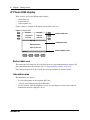
There are three areas to the IP Phone 2004 display:
•
•
•
button label area
information area
feature options area
Figure 3 shows an example of the display and describes each area.
Figure 3 Display area
Call fwd
Page gen
Conference
Intercom
Last num
Intercom
DN: 340
Button label area
Information area
Nortel Networks
April 25 10:51 am
Feature
Feature options area
Button label area
The button label area shows the label and status of the six programmable memory buttons. For
more information about these buttons, refer to “Program memory buttons” on page 14.
Note: Dial pad buttons N, G, H, O and Q also can be programmed as memory buttons.
Information area
The Information area shows:
•
•
•
the extension number of the telephone (DN: 340)
a line for general information (Nortel Networks)
the date and time when the telephone is not in use, and changes to show features and call
information when the telephone is in use
NN40050-108