1
Analyser Control
for Windows
for Networks
Operating Manual
Analyser Control for Windows for Networks - Operating Manual
Procal Analytics Limited
Published by Procal Analytics Limited.
All possible care has been taken in the preparation of this publication, but Procal
Analytics, its agents and distributors, accept no liability for any inaccuracies that
may be found.
Procal Analytics Limited reserves the right to make changes without notice both
to this publication and the products which it describes.
No part of this publication may be reproduced, stored in a retrieval system or
transmitted in any form or by any means electronic, mechanical, photocopying,
recording or otherwise without the express prior written permission of the
copyright holder.
Part Number 7-3038-00 Issue 3, 16 March 2010
© Procal Analytics Limited 2002, 2005, 2010.
Procal Analytics Limited
5 Maxwell Road
Woodston
PETERBOROUGH PE2 7HU
United Kingdom
www.procal.com
PROCAL, PULSI and XSENS are trademarks of Procal Analytics Limited.
page 2
PROCAL ANALYTICS LTD
issue 3
About the Procal Analyser range
Contents
1
Introduction......................................................................................................... 1-1
About the Procal Analyser range....................................................................................................... 1-1
About Analyser Control for Windows for Networks............................................................................ 1-1
About this user manual...................................................................................................................... 1-1
The user interface ............................................................................................................................. 1-2
Further help and support ................................................................................................................... 1-3
2
Installing the program........................................................................................ 2-1
System requirements ........................................................................................................................ 2-1
Unpacking ACWn .............................................................................................................................. 2-2
Connecting the PROCAL Analyser Units........................................................................................... 2-2
Installing ACWn software .................................................................................................................. 2-2
Setup From HDD.exe ........................................................................................................................ 2-3
Installing Firebird ............................................................................................................................... 2-3
Extracting the configuration database ............................................................................................... 2-3
Pre-set configuration ......................................................................................................................... 2-5
Uninstalling ACWn ............................................................................................................................ 2-5
3
Using the program.............................................................................................. 3-1
Starting ACWn................................................................................................................................... 3-1
Changing the language ..................................................................................................................... 3-2
Setting up ACWn for the first time. .................................................................................................... 3-2
Configuring ACWn to start automatically ........................................................................................... 3-2
Changing the access level................................................................................................................. 3-3
Stopping all processes ...................................................................................................................... 3-5
Software Engineer Tools ................................................................................................................... 3-6
Using the program features ............................................................................................................... 3-6
International settings ....................................................................................................................... 3-15
Changing the language ................................................................................................................... 3-15
Backing up data............................................................................................................................... 3-16
Data Log Backup............................................................................................................................. 3-17
Closing ACWn ................................................................................................................................. 3-18
4
Configuring the system ..................................................................................... 4-1
Configuring customers ...................................................................................................................... 4-1
Configuring plants ............................................................................................................................. 4-3
Configuring systems .......................................................................................................................... 4-5
Configuring instruments .................................................................................................................... 4-7
Instrument parameters ...................................................................................................................... 4-9
Configuring channels....................................................................................................................... 4-18
Channel parameters........................................................................................................................ 4-19
Connecting and starting a system ................................................................................................... 4-24
Monitoring module status ................................................................................................................ 4-25
Configuring alarms .......................................................................................................................... 4-26
Stopping and disconnecting a system ............................................................................................. 4-28
5
Viewing Panels ................................................................................................... 5-1
Opening a Panel................................................................................................................................ 5-1
About the Panel display..................................................................................................................... 5-2
Customising the panel....................................................................................................................... 5-5
6
Viewing Trends ................................................................................................... 6-1
Opening a Trend window................................................................................................................... 6-1
About the Trend display .................................................................................................................... 6-2
Customising a Trend ......................................................................................................................... 6-4
Printing a Trend chart........................................................................................................................ 6-9
Adding a new Trend .......................................................................................................................... 6-9
7
Viewing data and calibration ............................................................................. 7-1
Viewing test data ............................................................................................................................... 7-1
About the test data ............................................................................................................................ 7-2
Viewing alarm logs ............................................................................................................................ 7-9
Viewing Auto calibration logs........................................................................................................... 7-11
Manually starting an AutoZero......................................................................................................... 7-12
Manual air purge ............................................................................................................................. 7-13
Manual instrument calibration.......................................................................................................... 7-14
issue 3
PROCAL ANALYTICS LTD
page 3
Analyser Control for Windows for Networks - Operating Manual
8
Generating reports ............................................................................................. 8-1
Generating automatic reports ............................................................................................................8-1
Printing graphical reports...................................................................................................................8-9
Printing manual reports.................................................................................................................... 8-12
Compliance reports ......................................................................................................................... 8-13
9
Instruments with autocalibration ...................................................................... 9-1
Services required...............................................................................................................................9-1
Hardware required .............................................................................................................................9-1
Instrument configuration ....................................................................................................................9-2
Channel configuration........................................................................................................................9-3
Starting autocalibration ......................................................................................................................9-3
Operation...........................................................................................................................................9-4
Action on calibration assessment ......................................................................................................9-6
Viewing the results.............................................................................................................................9-6
OHU electrical connections ...............................................................................................................9-8
10 Using ACWn over a network............................................................................ 10-1
Setting up remote operation ............................................................................................................ 10-1
Using ACWn from a remote PC....................................................................................................... 10-1
Access level control......................................................................................................................... 10-2
Index
page 4
1
PROCAL ANALYTICS LTD
issue 3
1 Introduction
Welcome to the Analyser Control for Windows for Networks (ACWn) Operating
Manual. This introductory section is intended to give you an overview of both
the system and this Operating Manual. If you are new to ACWn, we recommend
that you should read through this section before you start to use your system.
The following topics are covered in this section of the manual:
■ About the Procal Analyser range.
■ About Analyser Control for Windows for Networks.
■ About this user manual.
■ The user interface.
■ Further help and support.
About the Procal Analyser range
The Procal Analyser range of high-performance gas process analyser systems is
intended to be used for Continuous Emission Monitoring (CEM) and measuring
gas concentrations in continuous industrial processes. This is described in the
Procal short form catalogue and in individual data sheets.
About Analyser Control for Windows for Networks
Procal’s range of gas analysers is provided with a serial data port from which
measured data may be transmitted. Analyser Control for Windows for Networks
takes this raw data, and presents it in a Windows graphical user interface and
allows for the storage of that data for up to 5 years.
Analyser Control for Windows for Networks is a stand-alone program that
provides all the display requirements of a Procal Analyser system, including the
incorporation of third party data. It also allows remote monitoring of systems
over a network.
About this user manual
This user manual describes the Analyser Control for Windows for Networks
program. A separate manual exists for each of the different PROCAL optical
head units.
Document conventions
The information in this manual is presented in a consistent manner to make it
easy to follow. A number of conventions are used to ensure that items referred to
regularly can be recognised easily.
issue 3
PROCAL ANALYTICS LTD
page 1-1
Analyser Control for Windows for Networks - Operating Manual
Keyboard keys
The keys on your computer keyboard may not be labelled exactly as they are
represented in this manual. Keys other than alphanumeric are represented in
upper case throughout the manual, for example CTRL to represent the control
key and ESC for the escape key.
Certain operations require the use of combinations of keys. If two keys are to be
pressed together, a plus sign (+) appears between them. For example CTRL + F1
means hold down the control key while pressing F1. Alternatively, a sequence of
key presses will be separated by commas. ALT, C, F means press and release
ALT then C then F in that order.
Text entry
Text that you need to type in is shown throughout this manual in bold. For
example, if an instruction says type win a:\setup, you should type win followed
by a space then a:\setup.
Cross reference
References to other sections of the manual and external documents are presented
in italics. Groups of words in italics are usually cross-referring the reader to a
section or sub-section by name.
Procedures
A number of procedures are described within this manual, each consisting of a
set of individual numbered operations. The operations must be performed in the
order in which they are listed.
Some procedures do not have numbered steps. In these cases, the options may be
alternatives or the steps to be followed may not be in a strict order.
The user interface
Analyser Control for Windows for Networks has been designed to use the
standard Microsoft Windows user interface wherever possible. You should
ensure that you are familiar with the Windows environment before you start to
use Analyser Control for Windows for Networks. If you need more information
about the interface, refer to the documentation supplied with Windows.
Full details of the features contained in Analyser Control for Windows for
Networks and their implementation within Windows are given in the section
entitled Using Analyser Control for Windows for Networks.
page 1-2
PROCAL ANALYTICS LTD
issue 3
1 Introduction
Further help and support
This User Manual aims to give you all the information you require to install and
operate Analyser Control for Windows for Networks. If you require any further
information regarding the product, you should contact Procal Analytics Ltd, or
your Procal distributor.
Procal Analytics Limited
5 Maxwell Road
Woodston
PETERBOROUGH PE2 7HU
United Kingdom
telephone:
fax:
e-mail:
issue 3
+44 1733 232495 (international)
01733 232495 (within the UK)
+44 1733 235255 (international)
01733 235255 (within the UK)
[email protected]
PROCAL ANALYTICS LTD
page 1-3
Analyser Control for Windows for Networks - Operating Manual
page 1-4
PROCAL ANALYTICS LTD
issue 3
2 Installing the program
This section describes how to install Analyser Control for Windows for Networks
(ACWn) so that you can begin to monitor and record data.
The following topics are covered in this section of the manual:
■ System requirements.
■ Unpacking ACWn.
■ Connecting the PROCAL heads.
■ Installing the software.
■ About the pre-set configuration.
System requirements
Procal Analytics Ltd. strongly recommends that Analyser Control for Windows
for Networks should be installed on a dedicated IBM PC-compatible computer
which must conform to the following minimum specification:
■ PC with 1 Gigahertz or higher processor clock speed recommended; 32bit or
compatible 64bit processor; * Intel Pentium/Celeron/Core 2 Duo family, or
AMD Athlon/Sempron (64) family, or compatible processor recommended
■ 1 Gigabytes (GB) of RAM or higher recommended (512 MB minimum
supported; may limit performance and some features)
.
■ 40 gigabytes (GB) of available hard disk space Additional hard disk space may
be required if you are monitoring more instruments.
■ Super VGA (1024 × 768) or higher-resolution video adapter.
■ CDR-W drive.
■ Keyboard and Microsoft Mouse or compatible pointing device.
■ LAN Interface and/or dial-up modem.
■ Two USB ports or more recommended (one USB port minimum).
■ Minimum of two RS232 serial ports.
■ Operating System Microsoft® Windows XP PRO SP2/SP3 or Windows
2000 SP4..
■ 17-inch CRT/LCD (1024x768) monitor minimum.
■ Colour A4 printer.
Note
Actual requirements will vary with your system configuration and any
additional applications you install and run.
issue 3
PROCAL ANALYTICS LTD
page 2-1
Analyser Control for Windows for Networks - Operating Manual
Unpacking ACWn
Analyser Control for Windows for Networks is supplied compressed onto a CDROM. A setup program, contained on the CD-ROM, will automatically
decompress these files and copy them onto your hard disk.
When you first unpack ACWn, you should make sure that the following are
present:
■ An ACWn installation CD-ROM containing the ACWn program files.
■ The Analyser Control for Windows for Networks User Manual (this document).
Connecting the PROCAL Analyser Units
To connect the PROCAL analyser units, please refer to the operating manuals
supplied with each head.
Connection is made from the PC on which ACWn is running to the analyser units
using a multi-drop RS485 network as illustrated in the drawing 7-2103 included
in the Installation Pack.. Procal Analytics Ltd. recommend that the analysers
should be connected to the PC using the specified isolated RS485 unit. If you
intend to connect the analyser units using a different unit, please refer to the
documentation that was supplied with the unit.
Installing ACWn software
For systems meeting the full recommended specification, you should install
ACWn from the supplied CD-ROM. If you need to install onto a system without
a CD-ROM drive, use the procedure Setup From HDD.exe.
The ACWn installation CD contains an automatic setup utility that will guide you
through the installation. If this utility does not start select X:\Install\auto-g.exe
(where X is your CD-ROM drive letter). If you wish to manually install ACWn,
execute the install bat file on the root of the CD.
Note
We strongly recommend that you install ACWn to the default directory.
Follow the instructions in the setup utility to install the software from CD.
Note
You do not need to uninstall any previous versions of ACWn before
installing. If ACWn has not previously been installed on this PC, you will
need to follow the instructions in. If the machine is to be a master you will
also need to extract the configuration database from existing systems. A
configuration database is not required for remote PCs.
A new Program Group will be created entitled ACWn.
WE RECOMMENDED THAT A SHORTCUT TO THE PROGRAM
ACWN.EXE SHOULD BE PLACED IN THE WINDOWS STARTUP
FOLDER SO THAT THE PROGRAM AUTO STARTS AT POWER ON.
The software is now ready for use.
page 2-2
PROCAL ANALYTICS LTD
issue 3
2 Installing the program
Setup From HDD.exe
If you need to install ACWn onto a PC without a CD-ROM drive:
1
Download the ACWN Setup from HDD.exe (available from the CD-ROM
X:/extra/ACWN Setup from HDD.exe, where X is your CD-ROM drive) to
the PC desktop using ftp/LAN.
2
Double-click ACWN Setup From HDD.exe to extract it.
3
Select Install to extract the files to Desktop.
4
Execute the setup.bat file in the folder labelled ACWN117HDD on the
Desktop.
Note
We strongly recommend that you install ACWn to the default directory.
Installing Firebird
If you are installing on a PC that has never had ACWN installed, you will also
need to install Firebird for ACWN to operate for both the master machine and
remote machine. To install Firebird:
1
Place the ACWn CD in your PC CD-ROM drive. The auto-load feature will
display a selection screen.
2
Select the Install Firebird button.
3
Follow the instructions within the wizard to install Firebird.
Extracting the configuration database
For a new master PC, you will need to extract the configuration database from
existing systems. A configuration database is not required for remote PCs. The
procedure has two components:
■ Backing up the system database.
■ Installing the new system database.
Backing up the system database
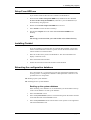
When installing a new database we recommend that you should make a back up
of the current database. To back up the database.
issue 3
1
Select the Overview screen.
2
Select the System Number (which is to be backed-up) from the branch structure
on the left hand side of the Overview screen.
3
Select the System Status menu from the menu screen options on the right hand
side of the Overview screen.
PROCAL ANALYTICS LTD
page 2-3
Analyser Control for Windows for Networks - Operating Manual
4
Connect to the database by selecting the Connection Status - Connect button.
Connecting to the database will cause the Access level menu to appear at the top
of the Overview screen.
5
Select the Access Level menu and enter the appropriate password to change the
Access Level to Engineer.
6
Click the OK button.
7
Select the Tools pull down menu from the top of the Overview screen and select
the Backup/Restore option. The Backup/Restore configuration message box
will be displayed.
8
Enter a name for the back up data base or use the DEFAULT name. Click the
Back Up button. An information message box will appear – System
configuration back up OK.
9
Click the OK button and then the Close button.
10 If the above message is displayed the database has been successfully backed up.
The location of the back-up database file has the following directory path and
can be accessed via the Windows Explorer facility:
C:\Program Files\ Procal\ ACWN\DbM\Configuration
The database File has a GDB extension and includes within the file the Beta
Vectors for all the P5000 Analysers present on the System backed up. To the
database name is added the current date and time together with the system 88------ number.
The size of the file depends on the number of heads within the system and
maybe too large to fit on a normal floppy disk. The file can be zipped up if
required.
11 The database should be stored on an appropriate archive facility.
Installing the new system database
To install the new database:
1
Insert the floppy disk with the system data base into the PC.
2
Copy the database (which may be in the form of a zipped file) to the
Windows\Temp directory.
3
The database file will normally be stored as a zipped file on the floppy disk and
must be unzipped using Winzip or a similar program.
4
Select the Overview screen and select the Disconnect button next to the
Connection Status option to disconnect from the current system database.
5
Copy the unzipped database from the C:\Windows\Temp directory into the
directory:
C:\Program Files\ Procal\ ACWN\DbM\Configuration
and overwrite the current database.
page 2-4
PROCAL ANALYTICS LTD
issue 3
2 Installing the program
6
The new database will not be implemented until the system is re-connected.
Select the Overview screen and click on the Connect button next to the
Connection Status option to connect to the new system database. Select the
Start button next to the System Status to start the system using the new
database.
Pre-set configuration
Before shipping, ACWn has been pre-set with your Analyser system
configuration requirements. To minimise accidental changes to the configuration
settings they have been protected by password.
There are three levels of access to ACWn:
■ Operator — This is the default access level. General day-to-day functions can be
performed by users at this level.
■ Supervisor — This is a higher access level reserved for supervisor use. Operating
ACWn at this level gives the user the facilities to alter some operational features of
the ACWn configuration.
■ Engineer — This access level is reserved for use only by Procal engineers or their
representatives. It allows full access to the configuration of ACWn.
If the access level you are currently working in does not allow you access to a
particular function, it will appear as a 'greyed out' menu option. If you are
viewing configuration data, any data that your access level is not allowed to alter
will be displayed in grey text.
Uninstalling ACWn
To remove ACWn from your machine, run Add/Remove Programs from the
Control Panel, select ACWn, and click Add/Remove. Select the Remove All
button.
issue 3
PROCAL ANALYTICS LTD
page 2-5
Analyser Control for Windows for Networks - Operating Manual
page 2-6
PROCAL ANALYTICS LTD
issue 3
3 Using the program
This section describes how Analyser Control for Windows for Networks (ACWn)
is used. Topics included are:
■ Starting ACWn.
■ Changing the language.
■ Setting up ACWn for the first time.
■ Configuring ACWn to start automatically.
■ Changing the access level.
■ Using the program features.
■ International settings.
■ Backing up data.
■ Exception log.
■ Closing ACWn.
Starting ACWn
If the program has not been configured to auto start in the Windows Startup
folder:
issue 3
1
Open the Windows Start menu.
2
Click Programs.
3
Click ACWn then again ACWn. After system files have been loaded, the
Overview window will be displayed:
PROCAL ANALYTICS LTD
page 3-1
Analyser Control for Windows for Networks - Operating Manual
Note
Whenever ACWn is started, it will automatically open up in Operator
access level.
Changing the language
With the use of ACWn in a country other than the UK a modified version of the
program can be obtained. This version will have the option to change the core
language used throughout the program.
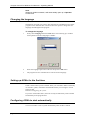
1
To change the language
Firstly select Language from the Tools menu. This will bring up a window
with a pull down menu of languages available:
2
Select the language required from the list and press the OK button.
3
The program will now translate all text into the chosen language.
Setting up ACWn for the first time.
If this is the first time you have started ACWn you will need to define a hierarchy
of customers, plants, instruments and channels before you can begin to record
and store data.
Details in Configuring the system..
If you have used ACWn before, the most recently used hierarchy will be loaded
automatically as the program starts.
Configuring ACWn to start automatically
You can set ACWn to start a system automatically when ACWn is started:
page 3-2
PROCAL ANALYTICS LTD
issue 3
3 Using the program
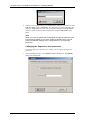
1
In the Overview window, select Options from the Tools menu. The Options
dialog will be displayed:
2
Select the Auto Start checkbox.
3
Enter the number of the system. This is the seven digit number that identifies the
system.
4
Click the OK button.
Next time you start ACWn, the selected system will be connected and started
automatically.
Changing the access level
All parameters, except passwords, can be viewed at any access level. Many of
the settings described in this section of the manual cannot be altered if you are
operating ACWn at Operator level. Some settings can be changed at Supervisor
level while the remainder are restricted to users working in Engineer level.
To use ACWn at Operator level requires no password. If you want to access
data and parameters at a different level you must enter a valid password for that
level.
Working at Supervisor level
To change the access level of ACWn to Supervisor:
1
issue 3
In the Overview window, open the Access Levels menu and select the option
Supervisor. The Access Level dialog box will open.
PROCAL ANALYTICS LTD
page 3-3
Analyser Control for Windows for Networks - Operating Manual
2
Enter the correct password (up to 10 alphanumeric characters), and then click on
OK. The default value is supervisor. The dialog box will close and ACWn will
operate in Supervisor level. The new level will be displayed on the Overview
window’s status bar and a bullet will be shown alongside Supervisor in the
menu.
Note
When you have completed the configuration changes at Supervisor level,
Procal strongly advise you to revert ACWn to Operator level. This will
prevent accidental changes to the configuration by non-authorised
personnel.
Changing the Supervisor level password
If you have Supervisor level access to ACWn, you can change the Supervisor
password:
1
page 3-4
In the Overview window, select Options from the Tools menu. The Options
dialog will be displayed:
PROCAL ANALYTICS LTD
issue 3
3 Using the program
2
Click the Passwords tab to display the current password:
3
Enter the new password in the Supervisor field. You can enter up to 10
alphanumeric characters.
4
Click OK to implement the change.
Note
We strongly recommend that you should change the password from its
default immediately after system installation, and that you should change
it regularly thereafter to prevent unauthorised access to system
parameters.
To revert to Operator level
In the Overview window, open the Access Level menu and select the option
Operator. ACWn will immediately revert to Operator level. This will be shown
on the Overview window status bar and a bullet will be shown alongside
Operator in the menu.
Engineer level
Engineer level is designed to be used only by Procal service personnel during
system setup.
Stopping all processes
There may be times when ACWn has a recurring error or the operation of certain
sections of the program is irrational. The use of the function Process Killer will
close down the program if you are experiencing problems.
issue 3
PROCAL ANALYTICS LTD
page 3-5
Analyser Control for Windows for Networks - Operating Manual
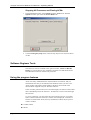
Stopping All Processes and Closing ACWn
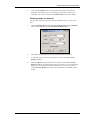
1
In the Overview window, select Options from the Tools menu. With the
Options window open select the Process Killer tab:
2
Click the Emergency Stop button. This will stop all processes and close down
ACWn.
Software Engineer Tools
The other two sections available in the options window, Cache and DCOM
Debug, are options that are only available at engineer level and should not be
altered without instruction from Procal personnel.
Using the program features
ACWn uses many standard features of the Windows environment, and you
should make sure that you are familiar with Windows before you start to use
ACWn. Further information about Windows facilities can be found in the
documentation supplied with your Windows software.
Some of ACWn prime functions are accessed through icon buttons on the toolbar
that is immediately below the menu bar. All functions can be accessed through
the menu bar.
To access a function, you must select the relevant menu option or icon button.
When a function has been selected, a window will be displayed. A number of
features are used within ACWn, and any combination of these may be present
within a window.
■ Toolbar buttons.
■ Menus.
page 3-6
PROCAL ANALYTICS LTD
issue 3
3 Using the program
■ Status bars.
■ Dialog boxes.
■ Text boxes.
■ Drop-down list boxes.
■ Command buttons.
■ Option buttons.
■ Check boxes.
Toolbar buttons
There are three context sensitive toolbars available in ACWn. One is available in
the Overview window, a second is present in all Panel and Trend windows, and
the third is available in the Test window. To select a button, move the cursor
over it and click it using the left mouse button.
Overview window toolbar
The Overview window toolbar is shown below:
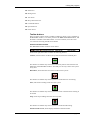
From left to right, the toolbar contains the following buttons:
Connect, which connects ACWn to the system selected in the left-hand pane.
This button is available only when a disconnected system is selected in the lefthand pane of the Overview window. Note that you can only connect one system
at any time
Disconnect, which disconnects ACWn from the current system.
This button is available only when a system is connected but is not running.
Start, which starts reading values from the system.
This button is available only when a system has been connected and is waiting to
be started.
Stop, which stops readings from the current system.
This button is available only when a system is connected and running.
Panels/Trends Screen, which displays the Panels/Trends window.
issue 3
PROCAL ANALYTICS LTD
page 3-7
Analyser Control for Windows for Networks - Operating Manual
This button is available only when a system is connected and running.
Test Screen, which displays the Test window.
This button is available only when a system is connected and running.
Help, which starts the ACWn on-screen help system.
About ACWn, which displays version and copyright information for your
installation of ACWn.
Panel and Trend windows toolbar
The Panel and Trend windows share the same toolbar, which is shown below:
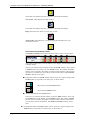
The toolbar consists of two rows of buttons, one to display Trends and the other
to display Panels.
The top row contains shortcut buttons to open the Trend windows. There will be
a Trend button on the toolbar, for each Trend window. The number of Trend
buttons will correspond to the number of analyser units and IOUs with analogue
input devices connected in your Analyser System. Each button, both Trend and
Trend is made up of two parts:
■An image that mimics the Trend window. This is shown as a negative image if the
Trend window it represents is currently open, as shown below:
The currently selected Trend window
A non-selected Trend window.
■A number that identifies the Trend window.
The lower row contains shortcut buttons to open the Panel windows. There will
be a Panel button on the toolbar, for each Panel window. The number of Panel
buttons will correspond to the number of analyser units and IOUs connected in
your Analyser System. Each button, both Panel and Trend is made up of two
parts:
■ An image that mimics the Panel window. This is shown as a negative image if the
Panel window it represents is currently open, as shown below
page 3-8
PROCAL ANALYTICS LTD
issue 3
3 Using the program
The currently selected Panel window
A non-selected Panel window.
■ A number that identifies the head unit. The default background colour for this
number is grey. If an alarm has been activated on the Panel window, the
background colour changes to red. This can be very useful as it alerts the operator
to the alarm status on the head, even if the Panel window for that head is not
currently being viewed.
Test window toolbar
The toolbar on the Test window is combined with the Status bar and is described
in detail under the heading Status bars.
Menus
A menu is a list of commands that can be implemented within ACWn.
ACWn features four context-sensitive menu bars, one on each of the following
types of windows:
■ Overview window.
■ Panel window.
■ Trend window.
■ Test window.
To implement a command, you must open the menu then, if necessary, select the
required option.
Opening a menu
To open a menu, you select it either by clicking the title in the menu bar or by
holding down the ALT key and pressing the letter that is underlined in the menu
title. The menu will then drop down from the menu bar or, in some cases, the
required function will execute immediately.
All the commands contained in the menu will be shown, with the first option
highlighted. You may not have access to all of the commands, in which case
those commands that you cannot select will be shown in grey rather than black.
Selecting an option
To select a menu option you can:
■ Click the option.
■ Move the highlight to the option, using the arrow keys, then press RETURN.
■ Press the letter key underlined in the menu option.
The window selection options can be selected using a combination of keys. In
this case, the key combination is shown in the menu opposite the option. You
can use the key combination to select the menu option from any window within
ACWn.
issue 3
PROCAL ANALYTICS LTD
page 3-9
Analyser Control for Windows for Networks - Operating Manual
Overview window menus
The menu bar on the Overview window contains the following:
■ Exit, which will close ACWn; a message will be displayed if all systems have not
been stopped and disconnected.
■ Access Level, which allows you to change your access level on entry of a valid
password.
■ View, which allows you to display a Panel, Trend or Test window.
■ Tools, which allows you to configure the auto start and access password features,
backup and restore databases, kill processes running within ACWn, Change
Program Display Language, configure Third Party Software to operate inconjunction with ACWn, and Export OPC Modbus slave Configurations.
■ Help, which displays the on-screen help system and the version/copyright
information for ACWn.
Panel/Trend window menus
The menu bar on the Panel/Trend window contains the following:
■ View, which allows you to display the Overview or Test window and to Exit
PanelsTrend Screen.
■ Trends, which allows you to display, add or delete a predefined Trend within the
ACWn system.
■ Panels, which allows you to open the Panel displays for optical heads in the system.
■ Configure, which allows you to re-configure the channels on the currently
displayed Panel or Trend display.
■ Scale, which allows you to change the scale factors of channels in the currently
displayed head Trend chart; this option is not available when a panel is displayed.
■ Reports, which allows you to generate a series of reports for panels and trends.
■ Alarms, which displays a log of alarms generated over a specified time range.
■ Autocal Log, which allows you to view auto calibration details for a selected
instrument.
■ Help, which displays the on-screen help system and the version/copyright
information for ACWn.
Test window menus
The menu bar on the Panel/Trend window contains the following:
■ View, which allows you to display a Panel, Trend or Overview window.
■ AutoZero, allows user to perform AutoZero type operations. This menu item is
only available for the P5000 instruments
■ Manual Calibration, which allows you to calibrate instruments; for more
information about calibration, please refer to the section Viewing data and
calibration. (Not available for Auxiliary Output Unit)
■ Window, which allows you to configure the instrument data windows either
cascaded or tiled format.
page 3-10
PROCAL ANALYTICS LTD
issue 3
3 Using the program
■ Help, which displays the on-screen help system and the version/copyright
information for ACWn.
Status bars
There are four different status bars that appear in ACWn. They are:
■ The Overview window status bar.
■ The Panel window status bar.
■ The Trend window status bar.
■ The Test window status bar.
Overview window status bar
The status bar on the Overview window is to the right of the toolbar just below
the menu bar. It shows:
■ The time indicated by the local computer clock.
■ The time indicated by the remote system clock; this is used only when ACWn is
monitoring remote instruments.
■ Access level (operator, supervisor or engineer).
Panel window status bar
The status bar on the Panel window appears below the toolbar. It is divided into
six parts that tell the user the current status of both the whole system and the
optical head unit or analogue input device represented by the Panel window.
The text used in the status bar is colour coded. All warnings and faults are
displayed in red. If the status is normal the message text is green or black.
The seven statuses that are reported, are:
■ System
System OK — All heads are functioning normally.
System Fault — A fault exists on one of the heads.
■ Filter Wheel (not on P5000)
Filter Wheel OK — The motor is functioning normally.
Filter Wheel Slow — The motor is faulty.
■ Beta Vectors (only P5000)
Beta Vectors OK — Beta Vectors are functioning normally.
Beta Vectors !!!!Error!!!! — Beta Vectors are faulty.
■ Optical Signal
Optical Signal OK — The optical path is clear and the optical source is working.
Low Optical Signal — Either the optical path is obscured or the optical source is
not working.
■ Head Connection
Head. OK — The head connection is functioning normally.
Head Disabled — A fault exists on the head connection.
issue 3
PROCAL ANALYTICS LTD
page 3-11
Analyser Control for Windows for Networks - Operating Manual
■ Drive
Drive OK — Backup drive selected is ready.
Drive Low — Insufficient free space on drive specified.
Drive Not Available – Drive is specified but not ready.
Drive Not Present – Drive specified does not exist in Windows system. Can be
used as an OFF selection.
■ Autozero
Autozero OFF — Readings are live.
Autozero ON — Autozero is in progress. Readings are those last recorded.
Autozero - pending — The head is awaiting a timed, automatic, autozero
Autozero - zero purge — Autozero has started and is
purging gas from the sample cell.
Autozero - zero measure — The head is averaging the data with no sample gas
present.
Autozero - zero update — The head is calibrating the zero datum for each channel.
Autozero - process purge — The head has completed the autozero task and is readmitting process gas to the sample cell.
This box will also display the following text relating to other functions and
conditions related to Autozero:
Safety purge on — If the sample cell temperature is below a preset level then a
safety air purge will be automatically switched on to prevent acidic sample gas
from condensing inside the instrument sample cell, thereby causing rapid corrosion.
Manual purge on — The user can select this air purge for various diagnostic
purposes.
Trend window status bar
The status bar on the Trend windows appears below the toolbar. It has only one
field that reports the system status:
System OK — All heads are functioning normally.
System Fault — A fault exists on one of the heads.
Test window status bar
There are two status bars on the Test window: one at the top of the window, just
below the menu bar, and one at the bottom.
The top status bar is divided into two main parts. The upper portion also shows
the local computer date and time. In the lower portion a button will be present
for each analyser unit or IOU configured in ACWn. The number and status of the
unit is given on the button. These are shortcut buttons to open the Data Window
for the optical heads and analogue input devices.
The bottom status bar also shows system time and also has two fields showing
the data poll status.
page 3-12
PROCAL ANALYTICS LTD
issue 3
3 Using the program
Dialogs and windows
Dialogs are special windows used to enter information into ACWn. Dialogs are
called in ACWn by selecting menu option that is followed by an ellipsis ( ... ).
Dialogs are used to display messages and information, and also to allow the
input of information. Entering information can involve any combination of the
following:
■ Text boxes.
■ Drop-down list boxes.
■ Command buttons.
■ Option buttons.
■ Check boxes.
These are described later in this section.
Many of the dialogs used within ACWn require the input of more than one piece
of information. The current entry point is marked by a selection cursor, which
may be a dotted rectangle, a highlight, or a vertical line. To move to a different
option you can use either the mouse or the keyboard.
To use the mouse, just left-click with the cursor on the required option or area.
The selection cursor will move to that option. Using the keyboard, you can press
TAB to move the selection cursor through the options and areas. Pressing SHIFT
+ TAB moves the selection cursor back to the previous option or area.
Tip
If the option or area you want to select has an underlined letter in its
name, you can choose that item by holding down the ALT key and
pressing the underlined letter.
Drop-down list boxes
List boxes display lists of choices from which you can select one option. A drop
down list box appears initially as a box showing one selection. If you select the
down arrow at the right-hand end of the box, a list of all available choices will
be displayed. If the list is too long to show all choices, scroll bars will be
provided.
Note
Choices are not in alphabetical order.
issue 3
1
To select a choice using the mouse
Open the box by clicking the down arrow at the right of the box.
2
Scroll through the list until you find the required choice.
3
Click the choice, which will then be selected. The list will close and the selected
choice will be displayed in the box.
1
To select a choice using the mouse and keyboard
Open the box by clicking the down arrow at the right of the box.
2
Use the UP and DOWN arrows to highlight the required choice.
3
Press RETURN. The list will close and the selected choice will be displayed in
the box.
PROCAL ANALYTICS LTD
page 3-13
Analyser Control for Windows for Networks - Operating Manual
1
To select a choice using the keyboard
Highlight any current entry in the box.
2
Enter the first character (or the first few characters) of the choice. The first
choice in the list beginning with this character sequence will be selected.
3
If the choice is not the one that you require, enter the character sequence again.
The next choice starting with the sequence will be selected. Continue with this
until the required choice is selected.
Command buttons
Command buttons are used to initiate an action (common buttons are OK and
Cancel). These buttons are shown with a grey background, to represent
keyboard style keys, and are usually located at the bottom of a dialog box.
Some command buttons are not available all the time. When a button is not
available, it is dimmed and cannot be selected.
To select a command button you can either click the button or move the
highlight to the button and press RETURN.
Option buttons
Option buttons are used to represent a group of options from which only one can
be selected. They are shown as a series of circles, one per option, with the option
description alongside each button. The selected option contains a black dot. If
any options are not available, the description is dimmed.
To select an option you can either click the option or press the space bar until the
required option is selected. When you select a new option, the previous option is
deselected automatically.
If the description of the option contains an underlined character, then entering
this character will select the option.
Check boxes
Check boxes are used to tag a choice from a number of options and then
indicate that choice. They are shown as square boxes, each accompanied by a
description of the option. When an option is selected, a tick () appears in the
box. If any options are not available, the description is dimmed.
To select an option you can either click it or press the space bar until it is
selected. If the description of the option contains an underlined character, then
selecting ALT and this character will select the option.
If you click on a check box already containing a tick (), the tick () will be
deleted and the option deselected.
page 3-14
PROCAL ANALYTICS LTD
issue 3
3 Using the program
International settings
This manual has been written, and the screen shots taken From a PC running
ACWn using UK English as the default system setting. If you are running ACWn
on a machine with a different international setting, you may see some differences
in the way certain data is displayed.
The conventions of this manual are as follows:
1234.5
one thousand two hundred and thirty four point five.
29/01/98 29th January 1998.
When the International setting results in a comma being used as the decimal
separator, for example, Spanish, then it is essential that when any data is entered
that includes a decimal point that the comma character is used to denote this and
not the point used when the International setting is English. Failure to observe
this will result in entry of incorrect data.
Changing the language
With the use of ACWn in a country other than the UK a modified version of the
program can be obtained. This version will have the option to change the core
language used throughout the program.
1
issue 3
To change the language
Firstly select Language from the Tools menu. This will bring up a window
with a pull down menu of languages available:
2
Select the language required from the list and press the OK button.
3
The program will now translate all text into the chosen language.
PROCAL ANALYTICS LTD
page 3-15
Analyser Control for Windows for Networks - Operating Manual
Backing up data
You can save the hierarchy configuration onto hard disk to be restored when
required. This allows you to maintain a number of different system
configurations, then select the required hierarchy at any time.
Backing up a configuration
To back up the current configuration:
page 3-16
1
In the Overview window, select Backup/Restore from the Tools menu. This
will display the Backup/Restore Configuration dialog:
2
With the Configuration Backup tab selected, enter a suitable name for the
back up file and click the Backup button:
PROCAL ANALYTICS LTD
issue 3
3 Using the program
The configuration will be saved in the folder
C:\Program Files\ACWn\BM\Databases\Configuration
and a message box will be displayed indicating that the backup is complete.
3
Click the OK button to dismiss the message box.
Note
Only the configuration hierarchy will be saved. Measured data cannot be
backed up using this method.
Restoring a configuration
You can restore a backed up configuration at any time:
1
In the Overview window, select Backup/Restore from the Tools menu. This
will display the Backup/Restore Configuration dialog.
2
Select the Configuration Restore tab to show a list of backed up
configurations:
3
Select the configuration to be restored and click the Restore button. The
system will be restored.
Note
If your system was connected and running, it will be stopped and
disconnected before the restore operation is performed. After the restore,
the system will be connected but will not be started.
4
Click the close button to close the Backup/Restore Configuration dialog.
Data Log Backup
This is a facility intended only to provide diagnostic information to Procal
Analytics Ltd in the event of unexpected program operation. The user may be
requested by Procal Analytics or its representative to use the print facility on this
form so that the information can be transmitted back to Procal for analysis.
issue 3
PROCAL ANALYTICS LTD
page 3-17
Analyser Control for Windows for Networks - Operating Manual
Closing ACWn
Under normal circumstances ACWn should remain running at all times.
WARNING
CLOSING ACWN WILL STOP ALL MONITORING AND RECORDING
OF DATA FROM ALL THE CONNECTED HEADS.
If you need to close ACWn, follow the numbered steps below.
page 3-18
1
Make sure all ACWn initiated operations, such as auto zeroing, manual
calibration or report generating, have ceased and that all dialog boxes are
closed.
2
An access level of Supervisor or higher is required to Stop the running
process.
3
Stop the current instrument then disconnect it.
4
Click Exit on the toolbar. The program will close with no further warning.
PROCAL ANALYTICS LTD
issue 3
4 Configuring the system
The ACWn software reads, stores and analyses data from Procal instruments.
You can build a system hierarchy to represent the real-world organisation of the
instruments.
You can define a number of customers, and each customer can contain plants.
Within each plant you can define a number of systems, each containing the
actual instruments to be monitored
Before you can use ACWn to monitor and display readings from head units, you
must define the hierarchy containing the instruments that the program will read.
You can then connect and start the systems, and configure the alarms for each
instrument.
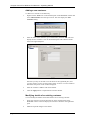
When you first open ACWn, an empty Overview window will be displayed:
You must build a hierarchy of customers, plants and systems with channels.
Configuring customers
Customers are the top level you can define within the hierarchy. These are
shown under the ACWn icon in the left-hand pane of the Overview window.
You can:
■ Add new customers.
■ Modify existing customers.
■ Delete customers.
issue 3
PROCAL ANALYTICS LTD
page 4-1
Analyser Control for Windows for Networks - Operating Manual
Adding a new customer
To add a new customer to the hierarchy:
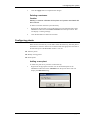
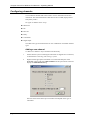
1
Right-click the ACWn icon in the left-hand pane of the Overview window and
select Add Customer from the option menu. This will display the Add
Customer dialog:
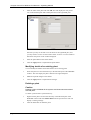
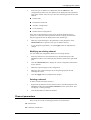
2
Enter the name of the customer, up to 30 characters, and click OK. This will
display the new customer’s icon in the left-hand pane and a blank customer
form in the right-hand pane:
Note that you may not be able to see the whole of the right-hand pane, and
you may need to scroll to see the whole window. Your PC’s screen resolution
determines the portion of the window displayed.
3
Enter the customer’s address and contact details.
4
Click the Apply button to implement the customer details.
Modifying details of an existing customer
You can modify the address and contact details for an existing customer:
page 4-2
1
Select the customer icon from the hierarchy in the left-hand pane of the
Overview window. This will display the customer’s details in the right-hand
pane.
2
Make the required changes to the details.
PROCAL ANALYTICS LTD
issue 3
4 Configuring the system
3
Click the Apply button to implement the changes.
Deleting a customer
Caution
Deleting a customer will delete all the plants and systems associated with
that customer.
To delete a customer from the system hierarchy:
1
Right-click the customer icon from the hierarchy in the left-hand pane of the
Overview window and select Delete Customer from the option menu. This
will display a warning message.
2
Click the Yes button to delete the customer.
Configuring plants
Plants are the second level you can define within the hierarchy, and each plant is
allocated to a customer. Plant icons are shown under the appropriate customer in
the left-hand pane of the Overview window. You can:
■ Add new plants.
■ Modify existing plants.
■ Delete plants.
Adding a new plant
To add a new plant to any customer in the hierarchy:
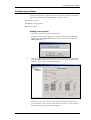
1
issue 3
Right-click the appropriate customer icon in the left-hand pane of the
Overview window and select Add Plant from the option menu. This will
display the Add Plant dialog:
PROCAL ANALYTICS LTD
page 4-3
Analyser Control for Windows for Networks - Operating Manual
2
Enter the name of the plant and click OK. This will display the new plant’s
icon in the left-hand pane and a blank plant form in the right-hand pane:
Note that you may not be able to see the whole of the right-hand pane, and
you may need to scroll to see the whole window. Your PC’s screen resolution
determines the portion of the window displayed.
3
Enter the plant address and contact details.
4
Click the Apply button to implement the plant details.
Modifying details of an existing plant
You can modify the address and contact details for an existing plant:
1
Select the plant icon from the hierarchy in the left-hand pane of the Overview
window. This will display the plant’s details in the right-hand pane.
2
Make the required changes to the details.
3
Click the Apply button to implement the changes.
Deleting a plant
Caution
Deleting a plant will delete all the systems and instruments associated
with that plant.
To delete a plant from the system hierarchy:
page 4-4
1
Right-click the plant icon from the hierarchy in the left-hand pane of the
Overview window and select Delete Plant from the option menu. This will
display a warning message.
2
Click the Yes button to delete the plant.
PROCAL ANALYTICS LTD
issue 3
4 Configuring the system
Configuring systems
Systems are allocated to a plants. System icons are shown under the appropriate
plant in the left-hand pane of the Overview window. You can:
■ Add new systems.
■ Modify existing systems.
■ Delete systems.
Adding a new system
To add a new system to any plant in the hierarchy:
1
Right-click the appropriate plant icon in the left-hand pane of the Overview
window and select Add System from the option menu. This will display the
Add System dialog:
2
Enter the system number, which must have seven digits and will start with 88.
Then click OK. This will display the new system’s icon in the left-hand pane
and basic system details in the right-hand pane:
Note that you may not be able to see the whole of the right-hand pane, and
you may need to scroll to see the whole window. Your PC’s screen resolution
determines the portion of the window displayed.
issue 3
PROCAL ANALYTICS LTD
page 4-5
Analyser Control for Windows for Networks - Operating Manual
3
Click the System Info tab to display the default configuration information for
the new system:
4
Enter the system details.
5
Click the Apply button to implement the system details.
Modifying details of an existing system
You can modify the configuration details for an existing system:
1
Select the system icon from the hierarchy in the left-hand pane of the
Overview window. This will display the system’s details in the right-hand
pane.
2
Click the System Info tab to display the current configuration information for
the system.
3
Make the required changes to the configuration.
4
Make any other required changes by clicking the appropriate tab and
amending the entries.
5
Click the Apply button to implement the changes.
Deleting a system
Caution
Deleting a system will delete all the instruments associated with that
system.
To delete a system from the hierarchy:
page 4-6
1
Right-click the system icon from the hierarchy in the left-hand pane of the
Overview window and select Delete System from the option menu. This will
display a warning message.
2
Click the Yes button to delete the system.
PROCAL ANALYTICS LTD
issue 3
4 Configuring the system
Configuring instruments
Instruments are the lowest level you can define within the hierarchy, and each
instrument is allocated to a system. Instrument icons are shown under the
appropriate system in the left-hand pane of the Overview window. You can:
■Add new instruments.
■Modify existing instruments.
■Configure channels for instruments.
■ Delete instruments.
Adding a new Instrument
To add a new instrument to any system in the hierarchy:
1
Ensure that the access level is Engineer and the appropriate system is stopped
but is connected, as described in Connecting and starting a system.
2
Right-click the appropriate system icon in the left-hand pane of the Overview
window and select Add Instrument from the option menu. This will display
the Add Instrument dialog:
3
Select the type of instrument to be added and click the Add button. The
configuration parameters for the instrument will be displayed in the right-hand
pane of the window. There are up to six tabs containing parameters for each
instrument:
■ Instrument Info.
■ Communication Parameters.
■ Compensations.
■ Temperature Control.
■ AutoZero/AutoCal.
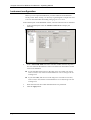
■ Alarm Configurations.
issue 3
PROCAL ANALYTICS LTD
page 4-7
Analyser Control for Windows for Networks - Operating Manual
These tabs are described later in this section under the heading Instrument
parameters. Some tabs contain parameters that do not apply to all instruments.
Only the appropriate tabs are displayed for each instrument type.
4
Make any required changes to the parameters. Some parameters on the
Instrument Info tab are specific to the type of instrument selected.
5
If you changed any parameters, click the Apply button to implement the
changes. The instrument will be added with a default set of channels. These
channels will vary according to the type of instrument selected, but you can
add or delete channels as required as described under the heading Configuring
channels.
Modifying details of an existing instrument
You can modify the configuration details for an existing instrument:
1
Select the instrument icon from the hierarchy in the left-hand pane of the
Overview window. This will display the instrument’s details in the right-hand
pane.
2
Click the Instrument Info tab to display the current configuration information
for the instrument.
3
Make the required changes to the configuration.
4
Make any other required changes by clicking the appropriate tab and
amending the entries.
5
Click the Apply button to implement the changes.
Deleting an instrument
Caution
Deleting a system will delete all the channel information associated with
that system.
To delete an instrument from the hierarchy:
1
Right-click the instrument icon from the hierarchy in the left-hand pane of the
Overview window and select Delete Instrument from the option menu. This
will display a warning message.
2
Click the Yes button to delete the instrument.
Exporting an Instrument Details
Exporting an instrument details will add to another system with optional
reassignment of all that system’s instrument ID numbers.
page 4-8
1
Stop the system you wish to export
2
From the tools menu select instrument export.
3
Choose between; Export system for editing and Export Instruments to existing
system.
4
Select system to export
PROCAL ANALYTICS LTD
issue 3
4 Configuring the system
5
Select Export
Instrument parameters
There are up to six tabs containing parameters for each instrument:
■ Instrument Info.
■ Communication Parameters.
■ Compensations.
■ Temperature Control.
■ AutoZero/AutoCal.
■ Alarm Configurations.
Instrument Info
The following information is contained in the Instrument Info tab for all
instrument types:
issue 3
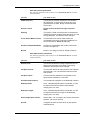
you see
you enter or see
Instrument type
This display-only field shows type of optical head
unit.
Internal Instrument ID
Instrument’s identification number.
Full Instrument Name
You can enter the name of the head unit. The default
is an instrument number derived from the system
configuration.
PROCAL ANALYTICS LTD
page 4-9
Analyser Control for Windows for Networks - Operating Manual
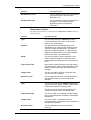
you see
you enter or see
Instrument Serial Number
The serial number of the head unit. You can change
this if required, but you cannot use the same number
for two instruments.
Instrument Enabled
Select whether this instrument is ENABLED or
DISABLED. This allows you to have an instrument
and its channels to the hierarchy but block
communication with that instrument.
Communication Protocol
Select the protocol used to communicate with this
instrument.
Smoothing %
The analyser updates readings every 1 to 2
seconds. As there are random variations in
individual readings due to thermal noise and optical
effects, the displayed values are averaged to give a
more realistic value. This average is set as a
percentage of the previous running value, and is
normally set to 95%.
Setting to a lower figure will provide less averaging,
show more short-term fluctuation and will,
electronically, respond to changes more quickly.
Setting the percentage higher will cause the data to
vary more slowly and show less short-term variation.
The range of values available is 0 to 99.9%
Limit minimum readings to
Scale Minimum
If checked limits minimum readings to Scale
minimum.
Instrument Display Position
The number indicates the position of this instrument
in the hierarchy, and also the number of the panel for
this instrument in the Panel/Trend Screen. You can
change the instrument’s position using the arrow
buttons.
In addition to this information, there are parameters that are specific to each type
of instrument handled by ACWn.
page 4-10
PROCAL ANALYTICS LTD
issue 3
4 Configuring the system
Pulsi 200 specific parameters
The following parameters will be shown on the Instrument Info tab for Pulsi
200 instruments:
you see
you enter or see
IR/UV Detectors
This shows the number of detectors connected to
the instrument. In the majority of cases only one
optical detector is fitted, though sometimes there
may be two.
Source Control
Power level set at Procal for type of Source
fitted.
Phasing
This option is used to set the points on the detector
waveform at which measurements are taken. It is set
during calibration, and should not be changed.
Cross Sense Maths Version
This sets the Cross sense maths version for
compatibility with legacy instrument calibrations or
the current version. Procal to set only
Use Error Bandwidth Maths
Included for compatibility with certain instruments.
Procal to change only.
Drive #
Drives 1 to4, assign function of Auxiliary Outputs
Pulsi 5000 specific parameters
The following parameters will be shown on the Instrument Info tab for Pulsi
5000 instruments:
issue 3
you see
you enter or see
Source Volts
This shows the filament voltage supplied to the UV
lamp in the instrument. This value is set during
calibration and should not be changed.
Cal Spec Interval
This sets the interval for each phase of the Calibrate
Spectrometer. You can select the interval in hours
and minutes.
Cal Spec Phase
This sets the time allowed for each phase of the
spectrometer calibration, in seconds.
Use Darkstrip numbers
This enables the operation of the Darkstrip numbers
Darkstrip Start
Once “Use Darkstrip Numbers” is selected, you will
be required to enter the Start of the Darkstrip,
ranging from 0 to 1023
Darkstrip Length
Once “Use Darkstrip Numbers” is selected, you will
be required to enter the Length of the Darkstrip,
ranging from 0 to 1023
Head Temperature Control
Selects Mk1, 2 or 3 for legacy and current instrument
systems. For Procal use only
Drive #
Configure the devices to be driven by the specific
hardware driver
PROCAL ANALYTICS LTD
page 4-11
Analyser Control for Windows for Networks - Operating Manual
you see
you enter or see
Diode Shift Detection
Select the Diode Shift Detection mode
Peak # Start
Diode number for the start of peak as indicated
Peak # End
Diode number for the end of peak as indicated
Peak # Correct
Diode shift to be corrected for the peak as indicated
P5000 Comms message
length
For legacy and current compatibility. For Procal use
only.
Auxiliary Input Unit specific parameters
There are no parameters specific to the Auxiliary Input Unit.
Auxiliary Output Unit specific parameters
The following parameters will be shown on the Instrument Info tab for
Auxiliary Output Units:
you see
you enter or see
Current Transmitters
This shows the number of transmitters currently
assigned to the instrument (0, 16 or 32).
Input-Output Unit specific parameters
The following parameters will be shown on the Instrument Info tab for InputOutput Units:
you see
you enter or see
Relays
This shows the number of relays currently assigned
to the system (0, 16 or 32).
Analyser Control Unit specific parameters
The following parameters will be shown on the Instrument Info tab for
Analyser Control Units:
you see
you enter or see
Show Test Screen CalSpec/
Rotaspan box
Tick to display status on Test Screen. Only relevant
to P5000.
Power Off/Boot Up Auto
Zero
Tick to enable the function. If enabled, on power up
Autozero is initiated when Sample Reference
Temperature is achieved.
Sample Reference
Temperature For Above
Temperature level to initiate Auto Zero.
Communication Parameters
The following information is contained in the Communication Parameters tab
for all instrument types:
page 4-12
you see
you enter or see
COM Port
This shows the PC COM port number through which
the connection is made to this instrument.
PROCAL ANALYTICS LTD
issue 3
4 Configuring the system
you see
you enter or see
Modbus Address
This shows the address of the instrument on the
Modbus communication link.
Baud Rate
This field shows the communication rate between
the PC and the instrument.
Parity
Select the type of parity used in communication with
the instrument (No, Even, Odd).
Data Bits
This shows the number of data bits contained in
each word of communication.
Stop Bits
This shows the number of stop bits at the end of
each word of communication.
Timeout
This shows the period (in ms) after which the
connection will be broken if there is no
communication between ACWn and the instrument.
Compensations
The following information is contained in the Compensations tab for all
instrument types:
issue 3
you see
you enter or see
Head Temperature Channel Assigned
Select this checkbox to assign a channel
for head temperature compensation. Note
that compensation can be taken from
another instrument in the system if
required.
Head Temp Instrument
You can select the instrument from which
the head temperature is taken as the
standard for compensation. The list
contains all the applicable instruments in
the system.
Head Temp Channel
You can select the channel of the
component used for the compensation.
The list contains all the channels defined
for the selected compensation instrument.
Reference Temperature
You can enter the temperature that will be
used as a reference for the compensation.
The default value is 25.
Sample Temperature Channel
Assigned
Select this checkbox to assign a channel
for sample temperature compensation.
Note that compensation can be taken from
another instrument in the system if
required.
Sample Temp Instrument
You can select the instrument from which
the sample temperature is taken as the
standard for compensation. The list
contains all the applicable instruments in
the system.
PROCAL ANALYTICS LTD
page 4-13
Analyser Control for Windows for Networks - Operating Manual
page 4-14
you see
you enter or see
Sample Temp Channel
You can select the channel of the
component used for the compensation.
The list contains all the channels defined
for the selected compensation instrument.
Reference Temperature
You can enter the temperature that will be
used as a reference for the compensation.
The default value is 25.
Pressure Channel Assigned
Select this checkbox to assign a channel to
apply pressure compensation to this
instrument. Note that compensation can be
taken from another instrument in the
system if required.
Pressure Instrument
You can select the instrument from which
the pressure is taken as the standard for
compensation. The list contains all the
applicable instruments in the system.
Pressure Channel
You can select the channel of the
component used for the compensation.
The list contains all the channels defined
for the selected compensation instrument.
Reference Pressure
You can enter the pressure that will be
used as a reference for the compensation.
The default value is 1020.
Water Channel Assigned
Select this checkbox to define a set point
for water vapour used in the dry basis
calculation.
Water Instrument
You can select the instrument from which
the water vapour level used for the
compensation is taken. The list contains all
the applicable instruments in the system..
Water Channel
You can select the channel of the
component used for the compensation.
The list contains all the appropriate
channels defined for the selected
compensation instrument.
Normalisation Channel Assigned
Select this checkbox to assign
normalisation (diluent correction) to
readings from this instrument. Note that
normalisation can be taken from another
instrument in the system if required.
Normalisation Instrument
You can select the instrument from which
the gas component used for the
normalisation is taken. The list contains all
the applicable instruments in the system.
Normalisation Channel
You can select the channel of the
component used for the normalisation. The
list contains all the channels defined for the
selected normalisation instrument.
PROCAL ANALYTICS LTD
issue 3
4 Configuring the system
you see
you enter or see
Normalisation Level
You can enter the level of the normalisation
component at which the process is
expected to run.
Normalisation Type
You can select the type of normalisation to
be applied. The list contains all the
applicable types for the selected
instrument.
Temperature Control
The following information is contained in the Temperature Control tab for all
instrument types:
you see
you enter or see
Type
You can select the type of HEAD temperature
control (from None, Fan cooler, Vortex cooler,
heater or any combination).
Setpoint
This determines the head temperature to be
maintained by the cooling and/or heating system.
There are several optional extras. This value is
adjusted, if Adapt is selected, on a daily basis to
adapt to the environment to give optimal stability
between auto zeros. The default is 25.
Adapt
You can select this to allow modification of the
head temperature Setpoint to reflect the mean
head temperature measured over the previous 24
hours.
Proportional Term
Head cooling proportional term and head heating
proportional term. A gain setting dependant on the
thermal system parameters. This should not be
changed.
Integral Term
This is to provide for removal of long term error.
This should not be changed.
Derivative Term
This is a differential term for cooler and heater to
provide faster response. This should not be
changed.
Type
You can select the type of SAMPLE temperature
control (from None, Heater, Cooler). Options are to
fit ISH (heater) and ISC (cooling probe).
This shows the for the associated sample cell
control (an optional extra). The default is 25.
issue 3
Proportional Term
This can be used in combination with the integral
term to eliminate periodic oscillation of the sample
temperature.
Integral Term
This can be used in combination with the
proportional term to eliminate periodic oscillation of
the sample temperature.
Derivative Term
This is a differential term to provide faster
response.
PROCAL ANALYTICS LTD
page 4-15
Analyser Control for Windows for Networks - Operating Manual
AutoZero/AutoCal
The following information is contained in the AutoZero/AutoCal tab for P200
and P5000 instrument types:
you see
you enter or see
Autozero control
You can select the control option for this
instrument, from Master(default) and Slave. This is
used on extractive analyser systems where a
common gas path is used through two or more
sample cells.
Timed Autozero
You can select whether Autozero is to run
automatically at set time intervals.
Interval
You can enter the time (in hours) at which the
Autozero cycle will be repeated automatically. The
default is 12 hours.
Offset from Midnight
You can enter the time delay (in hours) from
midnight after which the first Autozero will be
started. The default is 0.
Zero Purge Period
You can enter the time allowed (in minutes) for the
zero gas to expel the sample gas from the sample
cell. The procedure to set the zero gas flow rate is
described in the Operating Manual for the particular
optical head unit.
The default value is 1 minute.
Cal Gas Purge Period
You can enter the time allowed (in minutes) for a
span gas to fill the sample cell.
The default value is 1 minute.
Measure Period
The measure period follows the zero flush cycle of
the Autozero. During the measure period any zero
error is accumulated prior to averaging and
correction. By default this time is one minute, but in
exceptional circumstances (particularly on very
high sensitivity analysers) this may be increased to
four or five minutes to ensure the consistency of
the Autozero. This period is also used to set the
time during which automatic measurement of
calibration gas is made.
Process Purge Period
At the end of the Autozero cycle the purge air or
calibration gas is switched off and the sample gas
permeates back into the cell. The process purge
period is introduced to allow the analyser reading
to return to a true value before being ‘unfrozen’ and
becoming live again.
The default value is 1 minute.
page 4-16
Special Purge
Tick box selects special purge Gas input during
Auto Zero cycle instead of Air.
Special Purge Name
Name entered to appear on Status messages
when in use
PROCAL ANALYTICS LTD
issue 3
4 Configuring the system
you see
you enter or see
‘Autocal OK’ Limit
Set to OFF if Autocalibration not required, set to
5% or 10% as a limit if Autocalibration required.
Autocalibration is described in Instruments with
autocalibration.
Interval
You can set the time interval (in hours) at which
Autocalibration will be run. The default is 12 hours.
Adjust Calibration
Select this checkbox if Autocalibration is to adjust
the calibration automatically if any detected
deviations are within the selected Autocal OK limit.
Timed Blowback
ON/OFF selection, default OFF
Select if Blowback accessory to be driven.
1 to 999 hours, default 24.
Interval
Interlocked with AutoZero such that first to start
completes delaying the other start.
Offset From Midnight
0 to 23 hours, default 4.
Purge Period
0 to 99 seconds, default 60 seconds.
Period of Blowback operation.
0 to 10 minutes, default 5.
Hold Period
Hold follows purge, no blowback, normal solenoids
but readings frozen.
Air Purge On During
Blowback
Tick to enable. Default OFF
Allows air purge on during blowback to restrict
ingress of dust.
Pulse On Period
2- 98 seconds in 2 second steps. Default 2.
Blowback drive on for pulsed operation.
Pulse Off Period
2- 98 seconds in 2 second steps. Default 4.
Blowback drive off.
Alarm Configurations
This tab displays the configuration details of each alarm defined for the selected
instrument. Note that none of these values can be changed, as they are entered
during alarm configuration.
For more information please refer to the heading Configuring alarms.
issue 3
PROCAL ANALYTICS LTD
page 4-17
Analyser Control for Windows for Networks - Operating Manual
Configuring channels
You can define channels that will be used to receive information from each
instrument. The channels define the data that will be recorded, displayed and
analysed by ACWn.
Six types of channel can be set up:
■ Measured.
■ DC.
■ Derived.
■ Relay.
■ Transmitter.
■ Digital Input.
Note that each type of instrument has its own combination of available channel
types.
Adding a new channel
To add a new channel to any instrument in the hierarchy:
1
Ensure that the system containing the instrument is stopped but is connected,
as described in Connecting and starting a system.
2
Right-click the appropriate instrument icon in the left-hand pane of the
Overview window and select Add Channel from the option menu. This will
display the Add Channel dialog:
Note that the actual channel options available will depend on the type of
instrument.
page 4-18
PROCAL ANALYTICS LTD
issue 3
4 Configuring the system
3
Select the type of channel to be added and click the Add button. The
configuration parameters for the channel will be displayed in the right-hand
pane of the window. There are up to five tabs containing parameters for each
channel:
■ Channel Info.
■ Calibration Coefficients.
■ AutoZero Configuration.
■ Cross Sensitivity.
■ Channel Alarm Configurations.
These tabs are described later in this section under the heading Channel
parameters. Some tabs contain parameters that do not apply to all channels.
Only the appropriate tabs are displayed for each channel type.
4
Make any required changes to the parameters. Some parameters on the
Channel Info tab are specific to the type of channel selected.
5
If you changed any parameters, click the Apply button to implement the
changes.
Modifying an existing channel
You can modify the configuration details for an existing channel:
1
Select the channel icon from the hierarchy in the left-hand pane of the
Overview window. This will display the channel’s details in the right-hand
pane.
2
Click the Channel Info tab to display the current configuration information
for the channel.
3
Make the required changes to the configuration.
4
Make any other required changes by clicking the appropriate tab and
amending the entries.
5
Click the Apply button to implement the changes.
Deleting a channel
To delete a channel from the hierarchy:
1
Right-click the channel icon from the hierarchy in the left-hand pane of the
Overview window and select Delete Channel from the option menu. This
will display a warning message.
2
Click the Yes button to delete the channel.
Channel parameters
There are up to five tabs containing parameters for each channel:
■ Channel Info.
■ Calibration Coefficients.
issue 3
PROCAL ANALYTICS LTD
page 4-19
Analyser Control for Windows for Networks - Operating Manual
■ AutoZero Configuration.
■ Cross Sensitivity.
■ Channel Alarm Configurations.
Channel Info
The following information is contained in the Channel Info tab for all
instrument types:
page 4-20
General
you enter or see
Channel Type
This display-only field shows type of optical head unit
and channel.
Full Channel Name
You can enter the name of the channel. The default
is derived from the system configuration.
Short Channel Name
You can enter a shortened name that will be
recognised for the channel.
Units
You can select the units for the measurement made
on the channel
PROCAL ANALYTICS LTD
issue 3
4 Configuring the system
General
you enter or see
Display Format
This shows the number of decimal places to which
the measurements are displayed. This should not be
adjusted to display a resolution significantly greater
than the accuracy of the analyser. Typically 1
decimal point will be used for full scale sensitivities of
10 – 100 and 2 decimal points for full scale
sensitivities of less than 10. Otherwise, no decimal
points are included.
Scale Minimum
You can enter the lower calibration limit for the
channel.
Scale Maximum
You can enter the upper calibration limit for the
channel.
Channel Display Position
The number indicates the position of this channel in
the hierarchy. You can change the channel’s position
using the arrow buttons.
In addition to this information, there are basic configuration parameters that are
specific to channel types and instrument types handled by ACWn.
Measured channel information
Different instrument and measured channel combinations have different
configuration parameters. Any subset of the following information and
selections may be shown on the Channel Info tab for measured channels:
Basic Configuration
you enter or see
Measure Filter
For Pulsi x00 OHU’s only. For each component, two
signals are recorded; the upper reading is from a
measure filter and the lower reading is from a
reference filter.
This shows the measure filter number. You can
select a different filter from the drop-down list.
The number of the filter used; for example, 1
indicates the first of up to eight filters on the filter
wheel. Filters 0 and 9 are fixed references.
Reference Filter
For Pulsi x00 OHU’s only. This shows the number of
the filter used to record the lower reading for the
channel. You can select a different filter from the
drop-down list.
Gas Correlation
For Pulsi x00 OHU’s only. For some gases it is
possible significantly to reduce the effect of
interfering components by the use of a gas cell and
well matched filters. The use of this technique is
described in the Operating Manuals for each PULSI
head unit.
Select this checkbox to apply gas correlation.
issue 3
PROCAL ANALYTICS LTD
page 4-21
Analyser Control for Windows for Networks - Operating Manual
DC channel information
The following information will be shown on the Channel Info tab for DC
channels:
you see
you enter or see
Reading Address
This shows the Modbus address that ACWn will read
to retrieve data for this channel.
Derived channel information
Derived channels are channels that show information derived from two other
channels. There are a number of algorithms that can be used to derive the
channel values from the source information.
The following information will be shown on the Channel Info tab for derived
channels:
you see
you enter or see
Derived Type
From this drop-down list you can select the method
that will be used to derive information for this
channel. This now includes compensated, % in limit
and dual auto cal mode.
First Channel
From this list you can select the channel that will be
used to supply the first set of values in the algorithm
for the method used to derive the channel
information.
Second Channel
From this list you can select the channel that will be
used to supply the second set of values in the
algorithm for the method used to derive the channel
information.
Alarm
Not changeable while running, Selects the source for
% in Limit.
Averaging Period
Not changeable while running. Selects period for
Averaging from a list.
Value
Not changeable while running. Enter value selecting
an ACUbased Channel
Relay channel information
Different instrument and relay channel combinations have different
configuration parameters. Any subset of the following information and
selections may be shown on the Channel Info tab for relay channels:
page 4-22
IOU/Basic Configuration
you enter or see
Relay Index
You can select the relay.
Inverted
Check this box if you want the relay to be normally
close, then open on triggering.
Instrument
You can choose the instrument that will be
monitored for alarm conditions that will trigger the
relay. This list contains all the instruments defined for
the system.
PROCAL ANALYTICS LTD
issue 3
4 Configuring the system
IOU/Basic Configuration
you enter or see
Trigger Alarm
From this drop-down list you can select the alarm
that will trigger the relay.
Delay
You can enter a delay (in seconds) that will elapse
after the alarm condition before the relay is triggered.
Transmitter channel information
The following information will be shown on the Channel Info tab for
transmitter channels:
IOU/Basic configuration
you enter or see
Output Address
Transmitter module socket number
Instrument
Source Instrument
Channel
Source Channel
4mA Count
0 value bit count
20mA Count
Full Scale value bit count.
Frozen During Calibration
Check to freeze output during Autozero/Autocal.
Digital input channel information
The following information will be shown on the Channel Info tab for digital
input channels:
IOU/Basic Configuration
you enter or see
Input Index
You can select the position of the relay within the list.
Inverted
Check this box if you want the relay to be normally
close, then open on triggering.
Calibration Coefficients
Each type of channel has its own combination of calibration coefficients. The
calibration coefficients for each head can be viewed. Access to most of the
calibration coefficients is restricted to service engineers only.
WARNING
ACWN IS SUPPLIED PRE-CONFIGURED IN ACCORDANCE WITH
THE CALIBRATION OF EACH OHU. SYSTEM SETTINGS SHOULD
ONLY BE CHANGED FOR GOOD OPERATIONAL REASONS.
EXPERIMENTING WITH SYSTEM SETTINGS MAY DISTURB THE
PROPER FUNCTIONING OF THE SYSTEM.
AutoZero Configuration
The following parameters are shown on the AutoZero Configuration tab:
issue 3
you see
you enter or see
Air Offset
In some cases there can be a significant amount of one of the
measured components in the zero gas supply, for example
carbon dioxide. You can enter this level here so that the
Autozero process can allow for this residual level.
PROCAL ANALYTICS LTD
page 4-23
Analyser Control for Windows for Networks - Operating Manual
you see
you enter or see
Zero Offset
Each infra red or ultra violet channel measurement has an offset
value that is adjusted to give a zero reading in the absence of
any measured component. This is adjusted automatically during
Autozero, but you can enter a value here to give a positive
offset during analyser testing in order to assess stability.
Cal Gas Bottle
You can select a cylinder number for calibration, or NONE.
Cal Gas Conc
You can enter the component concentration in the specified
cylinder.
Cross Sensitivity
The cross-sensitivity parameters are set during the initial system calibration and
must not be changed. Any amendments made after calibration may severely
affect the performance of the instrument and your whole system.
Channel Alarm Configurations
This tab displays the configuration details of each alarm defined for the selected
channel. Note that none of these values can be changed, as they are entered
during alarm configuration.
For more information please refer to the heading Configuring alarms.
Connecting and starting a system
To view system status and configure alarms, you must first connect and start the
system:
Either click the Connect button on the toolbar or select the System Status tab and
click the Connect button in the Connection area. The Status line will show progress
as the connection is made, and will show CONNECTED on completion.
page 4-24
PROCAL ANALYTICS LTD
issue 3
4 Configuring the system
Either click the Start button on the toolbar or click the Start button in the System
Status area. The Status line will show progress as the system starts, and will show
RUNNING on completion. Note that you cannot start a system until it has been
connected.
See Screenshot below.
Monitoring module status
The status of ACWn modules is displayed in the System Status tab:
If the application is run over a network, the module status is displayed for both
the local and remote systems.
For each module there are four status indicators:
■ Started.
■ Configured.
■ Connected.
issue 3
PROCAL ANALYTICS LTD
page 4-25
Analyser Control for Windows for Networks - Operating Manual
■ Running.
When that status is achieved, the marker goes green. If the status has not been
achieved, the marker is grey. The current status is also given explicitly at the
right-hand side.
Configuring alarms
You can configure alarms for any system, instrument or channel that is
connected and started:
1
Select the appropriate item from the hierarchy in the left-hand pane of the
Overview window.
2
Ensure that the system is connected but not running, then select the
appropriate Alarm Configurations tab in the right-hand pane.
3
Perform the required configuration, which can be:
■ Adding new alarms.
■ Editing existing alarms.
■ Deleting alarms.
Adding a new system alarm
To add a new alarm:
page 4-26
1
Click the Add button. This will display the Alarm Edit Form dialog
containing default information:
2
Select the Alarm Type from the drop-down list, which shows all the types
that apply to the selected item. The following table gives a full list of alarm
codes and their meanings:
Type
alarm
OFF
No alarm set.
CLO
Measured value < LOW alarm.
CLL
Measured value < two LOW alarms.
CHI
Measured value > HIGH alarm.
PROCAL ANALYTICS LTD
issue 3
4 Configuring the system
Type
alarm
CHH
Measured value > two HIGH alarms.
CBO
Measured value either < LOW or >HIGH alarm.
SIG
Reference signal LOW.
CAL
Autocalibrate fault.
DUA
Dual channel range
(OFF = LOW range
ON = HIGH range).
CON
Head disconnected.
AUZ
Autozero in progress.
WHE
Filter wheel speed fault.
There are a further four alarms that are triggered by a combination of those
alarms listed above:
Type
alarm
HUC
An alarm that includes all alarm sources of a head including
measured value alarms.
HUN
An alarm that includes all alarm sources of a head but not
including measured value alarms.
ANC
An alarm that includes all alarm sources of all heads including
measured value alarms.
ANN
An alarm that includes all alarm sources of all heads but not
including measured value alarms.
3
Select the required Alarm Level from the drop-down list, which contains the
following:
type
level
Fault
Triggering of the alarm indicates that a fault condition has been
detected.
Reading
Triggering of the alarm indicates that a reading has been taken.
Warning
Triggering of the alarm indicates that a warning has been
generated.
Info
Triggering of the alarm indicates that there is information for the
user.
Trigger
Triggering of the alarm indicates that a trigger value has been
exceeded.
Note that some Alarm Types do not use all the levels. Only the applicable levels
will be shown.
issue 3
4
Enter a name for the alarm (free text up to 29 characters).
5
Select whether the Trigger Value is the normal (TRUE) condition or will
cause the alarm to be triggered.
6
Select whether the alarm is normally enabled.
PROCAL ANALYTICS LTD
page 4-27
Analyser Control for Windows for Networks - Operating Manual
7
Click OK to create the alarm.
Editing an existing alarm
You can modify the details of an existing alarm:
1
From the hierarchy in the left-hand pane of the Overview window select the
item to which the alarm relates. This will display the item’s details in the righthand pane.
2
Select the Alarm Configurations tab for the item to display the list of alarms
for the item.
3
Select the alarm from the list within the tab and click the Edit button. This
will display the Alarm Edit Form dialog showing details of the alarm.
4
Make the required changes to the alarm configuration.
5
Click the OK button to implement the changes.
Deleting an alarm
You can delete any custom alarms created for an item. Note that some of the
alarms created when the item was first defined cannot be deleted. If you try to
delete one of these alarms, a message will be displayed to tell you that the alarm
cannot be deleted.
To delete an alarm:
1
From the hierarchy in the left-hand pane of the Overview window select the
item to which the alarm relates. This will display the item’s details in the righthand pane.
2
Select the Alarm Configurations tab for the item to display the list of alarms
for the item.
3
Select the alarm from the list within the tab and click the Delete button. The
alarm will be deleted with no warning.
NOTE: MANUAL ALARMS WILL OPERATE EVEN WHEN
INSTRUMENT IS DISABLED.
Stopping and disconnecting a system
You can stop and disconnect a system at any time:
page 4-28
1
Either click the Stop button on the toolbar or ensure that the System Status
tab is selected and click the Stop button in the System Status area. This will
display a warning.
2
Click the Yes button. The Status line will show progress as the system shuts
down, and will show STOPPED on completion.
3
Click the Disconnect button, either in the Connection area or on the toolbar.
The Status line will show progress as the connection is broken, and will show
DISCONNECTED on completion. Note that you cannot disconnect a system
until it has been stopped.
PROCAL ANALYTICS LTD
issue 3
5 Viewing Panels
This section describes how you can use the Panel window to monitor the values
recorded by the optical head units. You can select a specific panel from the
Panel/Trend Screen.
The following topics are covered in this section of the manual:
■ Opening a Panel.
■ About the Panel display.
■ Customising the Panels.
You can display the Panel/Trend Screen from the Overview window by either
clicking the Panels/Trends Screen button on the toolbar or choosing the
Panels/Trends option from the View menu.
Opening a Panel
Analyser Control for Windows for Networks has a separate Panel window preconfigured for each connected optical head.
You can open a specific Panel window from:
■ Any other Panel or Trend window.
■ The Test window.
From any Panel or Trend window
To open a Panel window, either:
■ Open the Panel menu and select the appropriate Head option.
■ Click on the appropriate Panel button on the toolbar.
Note
When a Panel window is displayed, the head it describes is easily
identified as the Panel button appears greyed out the toolbar.
From the Test window
To open a Panel window, from the Test window:
1
Either click the Panel/Trend button on the toolbar or select Panel/Trend
from the View menu. The Panel or Trend window that was last viewed will
be displayed.
2
If the Trend window is displayed, either:
■ Open the Panel menu and select the appropriate Head option.
■ Click on the appropriate Panel button on the toolbar.
issue 3
PROCAL ANALYTICS LTD
page 5-1
Analyser Control for Windows for Networks - Operating Manual
Note
Trend windows can display channels from any OHU connected to the
system. When a Trend window is displayed, the head it describes is
easily identified as the Trend button appears greyed out on the toolbar.
About the Panel display
The following illustration shows a typical Panel display:
Panel header
Status bar
Channels
Water
compensation
Normalisation
Panel header
The currently displayed head is given in the Panel header and is indicated on the
toolbar by the Panel selection button being a different colour than the rest.
Status bar
The status bar, which is positioned below the header, shows details of system
and instrument conditions:
you see
what it means
System
System OK — All heads are functioning normally.
System Fault — There is either a Filter Wheel or Optical
Signal fault on one of the heads. This can be ascertained by
selecting each of the heads in turn until the one showing one
of those faults appears. A quicker diagnosis is provided by
taking the mouse pointer to this status box and double-clicking
on it. This will bring up an information box containing the
current alarms contributing to that System fault.
Filter Wheel
This box will only be active if the head is a PULSI Px00 head.
Filter Wheel OK — The filter wheel motor is functioning
normally.
Filter Wheel Slow — The motor is faulty.
page 5-2
PROCAL ANALYTICS LTD
issue 3
5 Viewing Panels
you see
what it means
Optical Signal
This box will only be active if the head is a PULSI Px00 or
P5000 head.
Optical Signal OK — There is sufficient light available.
Optical Signal LOW — Insufficient light available.
issue 3
Head Connection
Head Connection OK — The head RS485 data connection is
functioning normally.
Head Connection Fault — A fault exists on the head
connection such that no data communication can take place.
Drive Status
Drive OK – Drive ready with sufficient free space.
Drive Low – Drive ready with insufficient free space.
Drive Not Available – Drive not ready.
Drive Not Present – Drive does not exist.
Autozero
This box reflects the current state of the Autozero function
and is not active if the head is an Auxiliary Input Unit The
possible states are:
Autozero - OFF
Autozero - pending — The head is awaiting a timed,
automatic, autozero.
Autozero - zero purge — Autozero has started and is
purging gas from the sample cell.
Autozero - zero measure — The head is averaging the data
with no sample gas present.
Autozero - zero update — The head is calibrating the zero
datum for each channel.
Autozero - process purge — The head has completed the
autozero task and is re-admitting process gas to the sample
cell
This box will also display the following text relating to other
functions and conditions related to Autozero:
Safety purge on — If the sample cell temperature is below a
preset level then a safety air purge will be automatically
switched on to prevent acidic sample gas from condensing
inside the instrument sample cell, thereby causing rapid
corrosion.
Manual purge on — The user can select this air purge for
various diagnostic purposes.
PROCAL ANALYTICS LTD
page 5-3
Analyser Control for Windows for Networks - Operating Manual
Channels
Up to 16 channels can be displayed on a panel screen. If more than 16 channels
are selected, tabs will be displayed showing 16 channels on each tab. Each
channel is presented in an individual front panel type mimic showing
information for the channel.
you see
what it means
Measured component
The name of the component being measured on the
channel.
Measured value
The measured value for each channel is given qualitatively
as a ribbon gauge.
The colour or the ribbon gauge indicates the alarm status of
the channel.
Green — No alarm is active
Yellow — Low alarm is active
Yellow flashing — low alarm active, measured value is off
the scale.
Red — High alarm is active
Scale
This is set during configuration of the channel, and shows
the range over which readings will be displayed on the bar
for this channel.
Alarms
This shows whether an alarm condition exists for this
channel.
Measured value
The measured value for each channel is given quantitatively.
Measured units
This shows the units in which the measured value is
displayed.
Water compensation
This will tell you if the displayed values have been adjusted for water vapour
content.
Wet basis — No adjustment has been made.
Dry basis — Value has been adjusted.
Normalisation
This shows the diluent correction (if appropriate) for the presence of carbon
dioxide or oxygen.
page 5-4
PROCAL ANALYTICS LTD
issue 3
5 Viewing Panels
Customising the panel
Each Panel window will display a factory preset arrangement of the channels.
The order, and components monitored on the channels can be changed to suit
your own requirements:
1
Display the Panel for the instrument to be reconfigured then select Configure
from the menu bar. This will display the Configure Instrument dialog
showing the current allocation of channels for the instrument.
Note
If there are more than 16 channels, tabs will be displayed in the dialog
with 16 channels on each tab.
issue 3
2
Click on the down arrow alongside the channel position you wish to change
and select the component you want to be displayed The drop-down list will
disappear and your chosen component will be displayed in the channel box.
Each component can be allocated to only one channel on each instrument.
3
Continue to do this, selecting each channel in turn until you have configured
as many of the channels as you want components to be displayed.
PROCAL ANALYTICS LTD
page 5-5
Analyser Control for Windows for Networks - Operating Manual
Note
Any channels with no entry in this dialog are left un-configured. Only
configured channels will be displayed on the Panel window.
4
page 5-6
When your configuration is complete, click the Save button. The Panel
window will refresh and display the components you have selected.
PROCAL ANALYTICS LTD
issue 3
6 Viewing Trends
This section describes how you can use the Trend windows to view historical
recorded levels monitored by the optical head units. You can select a specific
trend from the Panel/Trend Screen.
The following topics are covered in this section of the manual:
■ Opening a Trend window.
■ About the Trend display.
■ Customising a Trend window.
■ Printing a Trend chart.
■ Adding a new Trend.
You can display the Panel/Trend Screen from the Overview window by either
clicking the Panels/Trends Screen button on the toolbar or choosing the
Panels/Trends option from the View menu.
Opening a Trend window
Analyser Control for Windows for Networks is supplied with a separate Trend
window pre-configured for each connected optical head.
You can open a specific Trend window from:
■ Any other Panel or Trend window.
■ The Test window.
From any Panel or Trend window
To open a Trend window, either:
■ Open the Trend menu and select the appropriate Trend number. Trends are
numbered for convenience as any Trend can have a selection of channels from a
mix of instruments.
■ Click the appropriate Trend button on the toolbar.
Note
When a Trend window is displayed, its number is easily identified as the
Trend button appears greyed out on the toolbar.
From the Test window
To open a Trend window, from the Test window:
1
issue 3
Either select the Panel/Trend option in the View menu or click the
Panels/Trends screen button on the toolbar. The Trend or Panel window
(depending on which was last viewed) for the active Head Data window will
be displayed.
PROCAL ANALYTICS LTD
page 6-1
Analyser Control for Windows for Networks - Operating Manual
2
If the Panel window is displayed, either:
■ Open the Trend menu and select the appropriate Trend number.
■ Click the appropriate Trend button on the toolbar.
Note
When a Trend window is displayed, its number is easily identified as the
Trend button appears greyed out on the toolbar.
About the Trend display
The following illustration shows a typical Trend display:
Trend header
Status bar
Measured
values at
the cursor
Trend chart
Time controls
Trend header
The currently displayed Trend number is given in the Trend header and is
indicated on the toolbar by the Trend selection button being a different colour
from the other buttons.
Status Bar
The status bar, which is positioned below the header, shows details of system
conditions:
System OK — No problems exist on the system.
System Fault — There is either a Filter Wheel or Optical Signal fault on one of
the heads. This can be ascertained by selecting the Panel window on each of the
heads in turn until the one showing one of those faults appears. A quicker
diagnosis is provided by taking the mouse pointer to this status box and doubleclicking on it. This will bring up an information box containing the current
alarms contributing to that system fault.
Trend chart
Up to eight channels can be displayed on the Trend chart. Each channel is
presented as a user-selectable coloured line.
page 6-2
PROCAL ANALYTICS LTD
issue 3
6 Viewing Trends
you see
what it means
Percentage scale
The values plotted on the chart are displayed as percentage
values of full scale on a given range. The range is different
for each channel and the maximum and minimum values are
given in the Scale boxes.
Scale boxes
These figures represent the upper and lower limit on which
the percentage scale of the chart is based. Values are colour
coded to match the trace on the chart and entries on the
table
Timescale
The timescale is given on the lower axis of the Trend chart.
Cursor
The vertical, white cursor marks the position of readings
displayed in the measurement table at the date and time
given in the Measurement Time box.
Time Controls
Below the Trend chart and the measurement table are several control features
which can be used to view the displayed data over time:
you see
what it means
Time Scale
The drop-down list allows you to select the time range for the
displayed area of the Trend chart. The available options are:
6 hours, 24 hours, 7 days, 31 days, 1 year
The arrows at the ends of the box allow you to step
backward and forward through the trend data. Clicking an
arrow moves you through the data in steps of the selected
time scale magnitude.
issue 3
Averaging period
Readings are recorded in the data log every thirty seconds.
This drop-down list allows you to select a time period over
which the plotted values will be averaged. The available
options are:
1 minute, 5 minutes, 15 minutes, 30 minutes, 1 hour,
4 hours, 12 hours, 24 hours. The actual options on the list
depend on the Time Scale selection.
Date
You can select a date for which you want to view trend data.
Go To Date
Clicking this button will display the trend data for the date
selected in the Date field.
Go To Last
Clicking on this button returns the displayed area of the chart
and the cursor to the present time.
Toggle Grid
Clicking this button will toggle the grid on the trend chart
between visible and invisible.
Refresh
Clicking this button will redraw the current chart to include
the most recent data.
Print
Clicking this button will print the portion of the Trend chart
currently displayed.
Measurement Time
This gives the exact time of the readings given in the
measurement table. The readings correspond with those on
the Trend chart at the position of the cursor.
PROCAL ANALYTICS LTD
page 6-3
Analyser Control for Windows for Networks - Operating Manual
Measured values at the cursor
The table to the right of the Trend chart identifies each measured component and
its value at the time shown in the Measurement Time field.
you see
what it means
Coloured bar
This coloured sample indicates the colour of the
corresponding trace on the Trend chart.
Measured Value
A measured value for each channel is given quantitatively as
a digital reading. The value shown is specific to the date and
time given in the Measurement Time field. It corresponds to
the value given on the Trend chart at the position of the
cursor.
Measured units
This shows the units in which the measurement is being
displayed.
Measured component
This gives the name of the component being measured.
Head
This indicates the number of the head that is measuring the
component.
View Series
Select this checkbox to display a trace in the trend chart for
this component.
0%
The value in this field shows the actual value of the
component when the trace shows 0%
100%
The value in this field shows the actual value of the
component when the trace shows 100%
Customising a Trend
When ACWn is dispatched, a Trend window will normally be pre-configured to
display the default arrangement of traces for each of the connected optical heads
or auxiliary input units. You can customise any Trend window to record
components of your choice from any optical head or auxiliary input unit.
Any changes to a Trend window’s configuration will not be reflected in its
partner Panel window, nor will the changes affect the configuration of any other
Trend window.
Note
It is recommended that to avoid confusion Trend 1 should display the
same information as Head 1 and so on, as supplied. However , additional
Trend windows can be configured. These can be used to display
components measured by different heads on the same Trend. Details on
how to create a new Trend window are given later in this section under
the heading Adding a new Trend.
page 6-4
PROCAL ANALYTICS LTD
issue 3
6 Viewing Trends
Customising a Trend window can involve any of the following:
■ Changing the components shown on the Trend window.
■ Changing the timescale on the chart.
■ Changing the averaging period of the chart.
■ Viewing different areas of the chart.
■ Showing and hiding components.
■ Showing and hiding the chart grid.
■ Refreshing Trend data.
■ Changing the scaling of individual components.
Changing the components shown on the Trend window
When ACWn is dispatched, each Trend window will display the default
arrangement of component traces. The order, and components displayed on these
traces can be configured to your own requirements:
issue 3
1
From the Configure menu select the trend to be reconfigured. This will
display the Configure Trend dialog showing the current configuration of the
traces shown on the chart:
2
Click the down arrow alongside the channel you wish to change, and then
select the component you want to be displayed.
3
Continue to do this with each channel in turn until you have selected as many
of the components as you want to be displayed, then click the Save button.
The Trend window will refresh and display the data for the components you
have selected.
PROCAL ANALYTICS LTD
page 6-5
Analyser Control for Windows for Networks - Operating Manual
Note
When you configure channels, if you need to delete selecting the blank
area above Head 1 on the Head pull down list deselects the channel.
Only configured channels will be displayed on the Trend window.
ACWn accepts gaps. Blanks are automatically moved to the end of the
list when saved.
Changing the timescale on the chart
The default timescale for the visible area of the component traces is 6 hours. If
required the timescale can be adjusted to show the previous 24 hours, 7 days, 31
days or 1 year of data. This can be particularly useful when assessing data
qualitatively.
To change the timescale used on the chart:
1
Click the down arrow in the Timescale box. A drop-down list of time options
will appear.
2
Select the timescale you want to be use on the chart.
The drop-down box will close and the Trend window will refresh to show your
selected data.
Changing the averaging time of the chart
The default averaging time for the component traces is different for each
timescale:
■ 6hrs: 1 minute.
■ 24hrs:
5 minutes.
■ 7 days:
30 minutes.
■ 31 days:
4 hours.
■ 1 year:
24 hours.
On each timescale this is the minimum averaging time that can be set. If required
the averaging time can be changed. Increasing the averaging time will result in a
smoothing of the traces on the chart.
To change the averaging time used on the chart:
1
Click the down arrow in the Averaging Time box. A drop-down list of time
options will appear.
2
Select the averaging time you want to use to plot the traces on the chart.
The drop-down box will close and the Trend window will refresh to show the
traces produced using your chosen averaging time.
page 6-6
PROCAL ANALYTICS LTD
issue 3
6 Viewing Trends
Viewing different areas of the chart
The table on the Trend window gives specific measurements of all components
at the position of the chart cursor. The default position of the chart cursor is at
the right hand side of the chart and denotes current time.
The cursor can be moved to any time on the chart. This can be done in a number
of ways:
■ Clicking the mouse to position the chart cursor.
■ Using the Left and right ARROW keys to move the chart cursor.
■ Displaying trends for a specified day.
■ Displaying the most recent data.
Using the mouse to position the chart cursor
This is probably the easiest way to interrogate a specific point on the chart.
Click any point within the displayed chart area. The chart cursor will move to
the selected position, the time at that point will be shown in the Measurement
Time field and you can read the measured values for all components at that time.
If you want to go back, or forward, further than the time span of the displayed
chart then you should click the appropriate arrow symbol either side of the
Time Scale selection control. In each case the time period regresses or advances
by the length of the timescale chosen.
Using the ARROW keys to position the chart cursor
This is the easiest way to scroll back through the time, viewing the traces as you
go.
The left and right ARROW keys on the keyboard will move the chart cursor to
the left and right in time steps equal to the defined Averaging Period. The
measured values of the components will refresh as the cursor moves.
Displaying trends for a specified day
You can view a Trend chart for a specified day:
1
Enter the date you want to view into the Date field of the Time Control area.
Alternatively, click the arrow button at the right-hand end of the field to display
a calendar, then select the day.
3
Click the Go To Date button to move the Trend display to the beginning of
the chosen date. The selected date and time will be shown in the Trend
display will be shown in the Measurement Time field and the measurement
values for the time will be displayed.
Displaying the most recent data
To display the most recent data on the Trend chart click the Go To Last button.
The time of the last measurement will be shown in the Measurement Time field
and the most recent measurement values will be displayed.
Showing and hiding components
You can choose which component series will be shown on the Trend chart. To
hide a series, clear the View Series checkbox for that component. To display a
series, ensure that the View Series checkbox is selected.
By default, all series are selected for display.
issue 3
PROCAL ANALYTICS LTD
page 6-7
Analyser Control for Windows for Networks - Operating Manual
Showing and hiding the chart grid
You can show or hide the background grid of the Trend chart by clicking the
Toggle Grid button.
Refreshing Trend data
You can force the Trend chart to retrieve the latest data from components by
clicking the Refresh button. The chart will then display the most recent data.
Changing the scaling of individual components
The default values for the span of each component results on the zero and
maximum measurements to be used for the bottom and top of the Trend chart.
If required, you can change the default scaling, thereby moving the trace relative
to those around it In this way, two traces that fall on top of each other can be
moved apart. In doing so you may increase the sensitivity of the trace. Note,
however, that the accuracy of each measured channel is still ±2% of the original
span value.
To change the scaling of a component on the Trend chart:
1
Click the Scaling menu. A menu listing all the currently configured channels
will open.
2
Select the channel (head and component) you want to re-configure. The Scale
dialog will be displayed:
The colour of the trace of the channel is given at the top of the window. If this
does not match the channel you want to adjust, click Cancel and start the
procedure again.
3
The current scaling is given by the figures in the Minimum and Maximum
boxes. Enter your new scale in these boxes. You can either type the numbers
directly into the boxes or use the sliding bars to select a value.
4
Click the Apply button. The Adjust Trend Scaling window will remain open
but your new scaling for your selected channel will be applied to the chart to
enable you to evaluate its effect.
5
If the new scaling is acceptable, click OK. The Scale dialog will close and
your new scale will remain on the chart.
If the new scaling is not correct, you can repeat steps 3and 4 as often as required.
If you want to revert to the previous scaling, click Cancel. The Scale dialog will
close and the Trend chart will display the previous scaling for the selected
channel.
If you want to restore the default scaling for the selected channel, click the
Default button. The Scale dialog will close and the default scaling will be used.
page 6-8
PROCAL ANALYTICS LTD
issue 3
6 Viewing Trends
Printing a Trend chart
You can print the displayed section of a Trend chart at any time by clicking the
Print button. The chart will be printed on the computer’s default printer using its
standard configuration.
The print will show:
■ The actual chart, with its visible traces.
■ The instrument names.
■ Measured values.
■ Units.
■ Scale values.
■ Measurement time and date.
■ Averaging period.
Adding a new Trend
ACWn allows you to create your own Trend windows. You can use these new
windows, for example, to compare measurements of components from different
heads.
To create a new Trend window:
1
issue 3
Open the Trends menu and select the New option. This will create a new
Trend window with a New Trend dialog box already open.
PROCAL ANALYTICS LTD
page 6-9
Analyser Control for Windows for Networks - Operating Manual
page 6-10
2
Click the down arrow alongside the first Head box. A drop-down list of all the
available optical heads and analog input units will be displayed.
3
Select the head unit required. The drop-down list will close and your selected
head will appear in the first Head box.
4
Click the down arrow alongside the first Channel box. A drop-down list of
components will appear.
5
Select the component you want to be displayed as the first trace. The dropdown list will disappear and you chosen component will be displayed in the
first Channel box.
6
Repeat this procedure for each Head and Channel box in turn, until you have
selected as many of the components as you want to be displayed.
7
Click Save. The New Trend dialog box will close and your new Trend
window will be displayed. A new Trend button will also appear on the
toolbar.
PROCAL ANALYTICS LTD
issue 3
7 Viewing data and calibration
This section describes the information given in the Data Windows in the Test
window, and describes routine calibration procedures.
The following topics are covered in this section of the manual:
■ Viewing test data.
■ About the test data.
■ Viewing alarm logs.
■ Manually starting an auto zero.
■ Manual air purge.
■ Manual calibration of gases.
■ Manual calibration of analogue inputs.
Viewing test data
The Test window can be opened from any Panel or Trend window or from the
Overview window. To do this, either select Test from the View menu or click
the Test Screen button on the toolbar. The Test window will open:
The Test window, consists of a set of Data Windows. There is a separate Data
Window for each of the optical head units and analogue input devices
configured in ACWn.
issue 3
PROCAL ANALYTICS LTD
page 7-1
Analyser Control for Windows for Networks - Operating Manual
Any menu items that are called from the Test window will be applied to the
optical head unit or analogue input device for the active Data Window. The
currently active Data Window can be identified in two ways:
■ The table header is displayed in the highlight colour appropriate to your chosen
Windows colour scheme.
■ The head selection button on the status/toolbar is displayed as a reverse image and
so is different than the others.
To make a different Data Window active, either:
■ Click anywhere on the appropriate Data Window.
■ Click the appropriate selection button on the Test window’s status/toolbar.
About the test data
The data given in a Data Window is dependent on the type of head unit and its
configuration. The title bar of each data window identifies the instrument to
which the data applies and its current connection status.
Note
Entries in the Data Windows are colour coded. Any value that falls
outside the configured acceptable range will be displayed with a RED
background. Acceptable values are displayed with a BLUE background.
PULSI optical head units from the P5000 series will have a Data Window that
includes spectral information, similar to the one shown below:
The significance of this data is shown in the following table:
page 7-2
entry
what it means
Chart and Grid
This area displays the chart (as shown in the illustration) or
presents instrument data in a table.
Chart
When selected, this checkbox displays data in a chart. When
cleared, data is shown in a table grid.
PROCAL ANALYTICS LTD
issue 3
7 Viewing data and calibration
entry
what it means
Spectrum
The displayed spectrum can be selected from the buttons
below the spectrum display. Selection of a button initiates a
spectrum download.
Current – the spectrum currently being measured minus the
stored dark level.
Mirror – the stored mirror spectrum level.Dark – the stored
dark level.
Reference – the stored reference spectrum level.
Abs – the calculated absolute value for the currently
measured spectrum. High abs value equates to high
absorption, zero level indicates no absorption.
Bn – internal intermediate reference spectrum.
Sn – internal intermediate current spectrum.
Comparison -
Save
Click this button to save spectrum data as Current.txt,
Dark.txt, Reference.txt and Absolute.txt in the directory
C:\Program Files\Procal Analyser Control.
Refresh
Click this button to initiate the download of the selected
spectrum.
Beta Vectors/Master
Comparison Spectra
This indicates progress of the Beta Vector upload to the
OHU. You can select the set number (usually 1), choose
whether to make it visible and refresh the spectra.
Modify
Accesses the Beta Vector Configuration Menu.
Actual
This allows you to select the CalSpec position, from Open,
Mirror, Dark and Filter. These settings are used in
conjunction with the P5000 internal calibration unit.
Open – Measure Sample Cell.
Mirror – Measure Mirror reflection.
Dark – Measure Dark shutter.
Cell – Measure Sample Cell with internal filter added.
Note that during automatic sequences, the button indicated
as selected will indicate that sequence is in progress.
During manual operation the Status Panel will show the
position achieved, apart from in Open when the normal
status message will re-appear.
issue 3
Collect Comparison
Spectra
For Procal Calibration staff use only
Collection Time
This allows you to specify the time over which to collect
Comparison data, there is a button to apply any change to
the Collection Time.
Print
Clicking this button will print a copy of the displayed Data
Window.
Measured Values
This area shows the actual data values measured for the
channels of the selected instrument. The actual channels will
represent the channels defined for the instrument, but some
are present by default.
PROCAL ANALYTICS LTD
page 7-3
Analyser Control for Windows for Networks - Operating Manual
entry
what it means
T Head
Temperature of the head unit. To achieve accurate and
reliable measurements, it is important that the optical head
unit remains within a defined temperature range. Within this
range, the analyser is fully compensated for variations in
temperature. The permissible internal temperature range for
a PULSI optical head unit is –10°C to 55°C (14°F to 131°F).
T Sample
Temperature in the sample cell. Again, it is important that the
sample remains within a defined temperature range. Within
the range, the analyser is fully compensated for variations in
sample temperature. The permissible temperature range for
the sample cell is application-dependent, but is typically
±50°C of the nominal calibration temperature.
P Sample
The pressure within the sample cell. Again, it is important
that the analyser can fully compensated for variations in
sample pressure.
Sample Temp Ctrl
OHU Fan Cooling
In some applications a head Fan cooler is fitted and this
indicates the current level of Fan cooling being applied.
Cooling for wide variation of environments can be controlled.
OHU Heating
In some applications a head heater is fitted and this indicates
the current level of heating being applied. Heating for wide
variation of environments can be controlled.
OHU Vortex Cooling
In some applications a Head Vortex cooler is fitted and this
indicates the current level of Vortex cooling being applied.
Cooling for a wide variation of environments can be
controlled.
A status field indicates the current OHU status. Options are:
No reply from head — Connection to the head is broken
Safety purge on — If the sample cell temperature is below a
preset level then a safety air purge will be automatically
switched on to prevent acidic sample gas from condensing
inside the instrument sample cell, thereby causing rapid
corrosion.
Manual purge on — The user can select this air purge for
various diagnostic purposes.
Peak Shifts
page 7-4
PROCAL ANALYTICS LTD
issue 3
7 Viewing data and calibration
A PULSI 200 optical head unit will have a Data Window that will resemble the
following:
The significance of this data is shown in the following table:
Entry
what it means
Photometric Channels
This area shows data received directly from the OHU, and
the actual channels will represent the channels defined for
the instrument.
Filter
This shows the number of the filter used; for example, 1
indicates the first of up to 8 filters on the filter wheel. Filters
0 and 9 are fixed references. If a G is shown after the filter
number, this indicates that a gas correlation cell is fitted
with that filter. For a full explanation please refer to the
manual supplied for that particular OHU.
Level
For each component, two signals are recorded; the upper
reading is from the ‘measure’ filter and the lower reading is
from the ‘reference’ filter.
The optical signal strength through each filter is recorded
by the detector, and is given in this column. A typical count
of 5000 is equivalent to 5V amplitude at the A-D Converter.
The higher the absorbance, the lower the measured signal.
This signal is updated approximately every 1 to 2 seconds.
Signal strength figures are relevant when calibrating the
analyser and in diagnosing faults by reference to the
figures obtained in the factory or from earlier field readings.
Offset
issue 3
To correct for fixed differences in the filters’ optical
transmission, an offset value is applied to the measured
signal to bring the indicated value for the component within
the correct range. The Offset value is adjusted
automatically during Autozero. It should only be adjusted
manually for test purposes. Below each offset is the units
used for this component.
PROCAL ANALYTICS LTD
page 7-5
Analyser Control for Windows for Networks - Operating Manual
Entry
what it means
Abs
The values displayed in this column, on the upper row, are
in milliabsorbance units (mAU) and represent the basic
photometric measurements. ABS values are only used for
diagnostic purposes, and will not always correlate with the
measured values shown on the MAIN screen. See the
section in the appropriate OHU Operating Manual entitled
Technical description for a fuller explanation.
The value shown on the row below this, alongside the units
in the offset column, is the concentration of that gas,
repeating the information displayed on the Panel window.
Analog and Derived
Channels
T Head
Temperature of the head unit. To achieve accurate and
reliable measurements, it is important that the optical head
unit remains within a defined temperature range. Within
this range, the analyser is fully compensated for variations
in temperature. The permissible internal temperature range
for a PULSI optical head unit is -10°C to 55°C (14°F to
131°F).
T Sample
Temperature in the sample cell. Again, it is important that
the sample remains within a defined temperature range.
Within the range, the analyser is fully compensated for
variations in sample temperature. The permissible
temperature range for the sample cell is applicationdependent, but is typically ±50°C of the nominal calibration
temperature.
P Sample
The pressure within the sample cell. Again, it is important
that the analyser can fully compensated for variations in
sample pressure.
This area shows general data about the system.
System
Wheel Speed
Sample Heat/Cool
OHU Cooling
page 7-6
This area shows data received on analog channels and
also channels derived from other channels. The actual
channels will represent the channels defined for the
instrument, but some are present by default.
A figure representing the quality of the data received from
the optical head unit. This will normally show 100, but if the
filter wheel speed is not constant it will show a lower figure.
Readings appearing on the Panel window and Data
Window will be largely unaffected by a figure in the range
60 to 100, but readings below 90% would indicate an
incipient problem with the filter wheel motor. In this case
the problem should be investigated and remedied. If the
figure is less than 50, the readings should not be
considered accurate and you should contact Procal
Analytics or your local agent.
If a heater is associated with the OHU, for example a cell
heater on P400 or an In-situ heater (ISH) on a P200LR or
P5000, the current power level of the heater is shown. If a
Cooling Probe is fitted (ISC) the current power level to the
cooling fan is shown.
In some applications a head cooler is fitted and this
indicates the current level of cooling being applied. Cooling
for wide variation environments can be controlled.
PROCAL ANALYTICS LTD
issue 3
7 Viewing data and calibration
Entry
what it means
OHU Heating
In some applications a head heater is fitted and this
indicates the current level of heating being applied. Heating
for wide variation environments can be controlled.
Print
A Data Window for an Auxiliary Input Unit (AIU) will contain less information
and will resemble the following example Data Window:
There will be one row of data for each channel defined for the instrument. The
significance of this data is shown in the following table:
entry
what it means
Value
This displays the measured value for the channel.
Units
This shows the units of measurement for the channel, as
defined in the Channel Info tab for the channel.
A Data Window for an Auxiliary Output Unit (AOU) will resemble the
following example Data Window:
This shows readings for the two banks of relays and transmitters for the unit.
The name of each item is given, followed by either the activation status (for
relays) or the measured value (for transmitters).
issue 3
PROCAL ANALYTICS LTD
page 7-7
Analyser Control for Windows for Networks - Operating Manual
A Data Window for an Input-Output Unit (IOU) will resemble the following
example Data Window:
The tabs divide channels into their groupings. For each channel, the value is
shown, and for analogue I/O channels the units and type are also displayed.
A Data Window for an Analyser Control Unit (ACU) will resemble the
following example Data Window:
The significance of this data is shown in the following table:
page 7-8
PROCAL ANALYTICS LTD
issue 3
7 Viewing data and calibration
Entry
what it means
Measured Channels
This area shows the actual data values measured for the
channels of the selected instrument. The actual channels will
represent the channels defined for the instrument, but some
are present by default.
H20
Measured channel reading. Calibrated or uncalibrated.
CO2
As above.
Analogue and
Derived Channels
Additional Analogue and Derived channels as defined will be
here.
T Head
Analyser optics/electronics Temperature
T Sample
Sample gas temperature
P Sample
Sample gas pressure.
System
ACU/ Instrument Status messages
Instrument Type
Eg P200
ACU Clock
Time on ACU.
Rotaspan/Calspec
Posn
P200 Rotaspan option or P5000 Calspec. May be hidden.
Comms to ACU fail
Communications status, PC to ACU or ACU to Instrument.
Status
Instrument sample state - eg AutoZero in Progress.
Viewing alarm logs
You can view details of recorded alarms by opening the alarm log. Filters allow
you to select the exact alarms and time period.
To view the alarm log:
1
issue 3
Open the Panel/Trend window and select Alarm Log from the menu bar.
This will display the Alarm Log dialog:
PROCAL ANALYTICS LTD
page 7-9
Analyser Control for Windows for Networks - Operating Manual
2
Select the required filter parameters from the Filters section of the dialog, as
described in the following table:
you see
you enter or see
Alarm Type
You can select the type of alarm you want to view from this
drop-down list, which contains all the alarm types defined
for the current configuration categorised by level.
Leaving this field blank selects all applicable alarms.
Alarm Level
You can select the level of alarm to view, from Customer
Level down to Channel Level. Leaving this field blank
selects all applicable alarms.
Instrument
You can select the instrument for which you want to view
alarms from this list, which includes all the instruments
defined for the current system. Leaving this field blank
selects all instruments and channels.
Channel
You can select the channel for which you want to view
alarms from this list, which includes all the channels
defined for the selected instrument. Leaving this field blank
selects all channels for the instrument.
Note that this field is blank if no instrument has been
selected.
3
page 7-10
Select the time and date period for which you want to view alarms from the
Date Selection section of the dialog, as described in the following table:
you see
you enter or see
From date
You can select the first date from which you want to view
alarms. Clicking the arrow button at the right-hand end of
the field will display a calendar from which you can select
the required date. The default is yesterday’s date.
From time
You either enter a start time or move the slider to select the
start time from which you want to view alarms. The default
is 00:00 (midnight).
PROCAL ANALYTICS LTD
issue 3
7 Viewing data and calibration
you see
you enter or see
To date
You can select the last date to which you want to view
alarms. Clicking the arrow button at the right-hand end of
the field will display a calendar from which you can select
the required date. The default is today.
To time
You either enter a start time or move the slider to select the
finish time up to which you want to view alarms. The default
is 00:00 (midnight).
4
Click the Get Alarms button. ACWn will retrieve all the alarms conforming to
your selections and will display them in the bottom area of the dialog, as
shown in the following example:
Viewing Auto calibration logs
You can view details of auto calibration procedures performed on Procal Px00
or P5000 instruments by opening the auto calibration log. You can then select a
date for which you want to view records.
issue 3
PROCAL ANALYTICS LTD
page 7-11
Analyser Control for Windows for Networks - Operating Manual
To view the auto calibration log:
1
Open the Panel/Trend window and select AutoCal Log from the menu bar.
2
From the displayed menu choose the instrument you want to view. This will
display the Auto Calibration Log dialog:
3
In the Date Selection section you can select the last date from which you want
to view alarms. Clicking the arrow button at the right-hand end of the field
will display a calendar from which you can select the required date. The
default is today’s date.
4
Click the Go to Date button. Auto calibration data will be retrieved and
displayed in the bottom section of the dialog, with a status code for each
parameter. The codes are listed in the Status Codes section of the dialog.
Manually starting an AutoZero
Each optical head unit can be configured to perform an automatic autozero at
user defined intervals, see AutoZero/AutoCal in the section Configuring the
system. It may sometimes be necessary to override the automatic autozero and
perform an immediate autozero of a head unit. This can be done achieved by
ACWn using the Start Autozero Now option.
Starting an immediate autozero
To start an immediate autozero of a head, follow the numbered steps below.
1
In the Test screen, make the Data Window active for the head for which you
want to start the immediate autozero. To do this either:
■ Click anywhere on the appropriate Data Window.
■ Click the appropriate selection button on the Test window’s status/toolbar.
The Data Window for your selected instrument will become active.
2
page 7-12
Open the Autozero menu and select the Start Autozero Now option. The
autozero will start on your selected instrument.
PROCAL ANALYTICS LTD
issue 3
7 Viewing data and calibration
You will know that this operation has started as the status field on the Data
Window will show Requesting AutoZero:
While the autozero in progress, the readings in the Data Window will freeze at
the last ‘live’ value. On completion of the autozero ACWn will make any
necessary corrections to the zero offset, and ‘live’ monitoring will resume.
Note: Following a manual Autozero or AutoCal change, Autozero will occur on
the following conditions
- Man AZ triggered and AC scheduled within 1hr:
- If AZ interval > 1hr then reschedule AC for the end of the 1hr hold-off
- If AZ interval = 1hr then reschedule AC to coincide with the next AZ
- Man AZ triggered and AC not scheduled within 1hr or
- Man AC triggered and AC scheduled within 1hr or
- Man AC triggered and AC not scheduled within 1hr:
- Resume scheduled AZs and ACs after the 1hr hold-off
Manual air purge
During commissioning and periodic servicing it is sometimes necessary to
ensure that there is no sample gas in the analyser. This is achieved by evoking a
manual air purge in that head.
Starting a manual air purge
To start a manual air purge of a head:
1
Select the Data Window for the head in which you want to start the manual
air purge. To do this either:
■ Click anywhere on the appropriate Data Window.
■ Click the appropriate selection button on the Test window’s status/toolbar.
The Data Window for your selected instrument will become active.
2
Open the Autozero menu and select the Manual Air Purge option. The
manual air purge will start on your selected head.
You will know this operation has been successful as the status field on the Data
Window will read Requesting Manual Air Purge as the purge starts and a
bullet (•) will appear alongside the menu item.
issue 3
PROCAL ANALYTICS LTD
page 7-13
Analyser Control for Windows for Networks - Operating Manual
Caution
You must ensure that the manual air purge is stopped at the end of
commissioning and servicing. While the manual air purge is set no valid
readings can be obtained as sample gas is excluded from the optical
head unit.
Stopping a manual air purge
To stop a manual air purge of an optical head unit:
1
Select the Data Window for the head in which you want to stop the manual
air purge. To do this either:
■ Click anywhere on the appropriate Data Window.
■ Click the appropriate selection button on the Test window’s status/toolbar.
The Data Window for your selected instrument will become active.
2
Open the Autozero menu and ensure that the Manual Air Purge option is
marked with a bullet (•) to indicate that a manual air purge is currently
running.
3
Select the Manual Air Purge option. The manual air purge will stop on your
selected head.
You will know this operation has been successful as the status field on the Data
Window will show Stop Manual Air Purge and the bullet (•) will be removed
from the menu option.
Manual instrument calibration
You can perform a number of manual calibration operations from within ACWn.
The actual calibration available depends on the particular instrument:
■ For P5000 instruments you can calibrate components, analog inputs and the
spectrometer.
■ For Px00 instruments you can calibrate components and analog inputs.
■ For auxiliary input units you can calibrate analog inputs.
■ For auxiliary output units there is no calibration available.
■ For input/output units you can calibrate analog inputs.
■ Scatter Input/outputs for P5000.
The calibration procedures, which are all accessed through the Test window, are
described individually.
Starting a manual calibration gas purge
Before individual component gases can be calibrate, you must first perform a gas
purge to remove test gas from the OHU. You must then fill the OHU with a pure
sample of the gas before calibrating the instrument.
page 7-14
PROCAL ANALYTICS LTD
issue 3
7 Viewing data and calibration
Each PULSI optical head unit can have connection to up to two cylinders
containing calibration gases. ACWn refers to these two calibration gases as Gas
1 and Gas 2.
The following procedure assumes you are using calibration gas 1 to purge the
optical head unit. If you want to use calibration gas 2 substitute Gas 2 where
ever you see Gas 1 in the procedure.
To start a calibration gas purge of a head, follow the numbered steps below.
1
Select the Data Window for the head in which you want to start the gas
calibration. To do this either:
■ click anywhere on the appropriate Data Window
■ click the appropriate selection button on the Test window’s status/toolbar.
The Data Window for your selected instrument will become active.
2
Open the Autozero menu and select the Manual Cal Gas 1 option. The
calibration gas purge will start on your selected head.
You will know this operation has been successful as the status box on the Data
Window will read Requesting Manual Cal Gas 1 and a bullet (•) will appear
alongside the menu item.
You can now calibrate the individual gases.
Manual calibration of components
During commissioning and periodic servicing it is sometimes necessary to recalibrate the optical head unit’s evaluation of some or all of the component
gases. Full details on calibrating PULSI optical head units are given in their
operating manuals under the heading Field calibration checks.
You can control the calibration process using ACWn. To do this, perform the
following sequence of operations:
When the optical head unit is filled with the calibration gas and the readings are
steady, you can calibrate that channel:
1
Perform a manual gas purge as described in Starting a manual calibration gas
purge.
2
Select the Data Window for the instrument which you want to calibrate for
gases. To do this either:
■ Click anywhere on the appropriate Data Window.
■ Click the appropriate selection button on the Test window’s status/toolbar.
The Data Window for your selected instrument will become active.
issue 3
3
Check that the status box on the Data Window still displays CAL GAS 1 (or
2) ON. If it does not, stop this procedure and follow the procedure given
under the heading Starting a manual air purge.
4
Open the Manual Calibration menu and select the Calibrate Components
option. The Manual Calibration dialog box will be displayed:
PROCAL ANALYTICS LTD
page 7-15
Analyser Control for Windows for Networks - Operating Manual
5
Using the drop-down list, choose the component gas to be calibrated.
6
Check that the Expected value is set to the value shown on the gas bottle
calibration certificate.
7
The current measured value for your chosen component will be displayed as
the Measured value. When the Measured value stabilises, click the Adjust
button. ACWn will recalibrate the component.
Note
If the ratio of measured value to expected value is less than 0.2 or
greater than 1.5 then the error message REQUIRED ADJUSTMENT
TOO GREAT will be displayed and no correction will be made. In practice
the ratio should be within the range 0.95 to 1.05.
8
If you want to calibrate other gases, repeat steps 5 to 7 until all calibrations
have been completed.
9
When the calibration is complete, click the Exit button.
Caution
You must ensure that the manual calibration gas purge is stopped at the
end of calibration. While the manual calibration gas purge is set, no valid
readings can be obtained as sample gas is excluded from the optical
head unit.
Stopping the manual calibration gas purge
The following procedure assumes you are using calibration gas 1 to purge the
optical head unit. If you used calibration gas 2 substitute Gas 2 where ever you
see Gas 1 in the procedure.
To stop the manual calibration gas purge of an optical head unit:
1
Select the Data Window for the head in which you want to stop the manual
calibration gas purge. To do this either:
■ Click anywhere on the appropriate Data Window.
■ Click the appropriate selection button on the Test window’s status/toolbar.
The Data Window for your selected instrument will become active.
2
page 7-16
Open the Autozero menu and select the Manual Cal Gas 1 option.. The
manual calibration gas purge will stop on your selected head.
PROCAL ANALYTICS LTD
issue 3
7 Viewing data and calibration
You will know this operation has been successful as the status box on the Data
Window will show Stop Manual Cal Gas 1 and the bullet (•) against the menu
item will be removed.
Manual calibration of analogue inputs
Analogue input devices can be calibrated using ACWn. To calibrate analogue
input devices:
1
Select the Data Window for the head in which you want to stop the manual
calibration gas purge. To do this either:
■ Click anywhere on the appropriate Data Window.
■ Click the appropriate selection button on the Test window’s status/toolbar.
The Data Window for your selected instrument will become active.
2
Open the Manual Calibration menu and select the Calibrate Analog Inputs
option. The Calibrate Analog Inputs window will be displayed:
This window consists of a series of tabbed forms, one for each analog input
device (note that if there is only one device it is displayed directly in the dialog
with no tabs). Each device is calibrated in the same way using a current source in
the range 0 to 25 mA to simulate signals from the external source.
Calibration of the input device can be done at the zero and scan points, but
greater accuracy of readings is usually achieved if the calibration is done at the
20% and 80% points of the range.
The same process is used for both low and high calibrated readings. The
following procedure describes calibration of the low point:
issue 3
1
Select the tab for the item to be calibrated and ensure that the option button
alongside the Low Count box is selected.
2
Set the low reading to the required value (typically 20% of the range for the
low value and 80% for high). The Linco (linear coefficient) reading shows the
raw analogue to digital count of the current calibration value.
3
If you know the linear coefficient value to be used in the calibration, enter that
value into the Low Count field and click the Apply button.
4
If you do not know the linear coefficient, connect the current source.
5
Click the Read input button. The reading will change to reflect the digital
value being read by the ADC.
6
Repeat step 5 several times until the Low Count value stabilises.
PROCAL ANALYTICS LTD
page 7-17
Analyser Control for Windows for Networks - Operating Manual
Note
A count of 25 represents 0.1% of span, so a ‘jitter’ of this magnitude is
not significant compared to the likely accuracy of the source instrument.
7
Click the Apply button to transfer the stabilised value into the Linco field.
8
Disconnect the current source.
9
Click the option button alongside the High Count box.
10
Set the high reading to 80% of the range.
11
Set the signal to 80% of the signal range. Connect the current source.
12
Click the Read input button.
13
Repeat step 12 several times until the High Count value stabilises.
Note
A count of 25 represents 0.1% of span, so a ‘jitter’ of this magnitude is
not significant compared to the likely accuracy of the source instrument.
14
Click the Apply button to transfer the stabilised value into the Linco field.
15
Disconnect the current source.
16
Click Exit. The Analogue Input Calibration window will close and the
count values will be stored and used in all subsequent calculations.
Manual calibration of spectrometer – P5000 only.
The stored Reference Spectra and Dark Spectra used in the P5000 Head for
calculation of concentrations can be updated manually:
1
Select the P5000 head.
2
Select Manual Calibration.
3
Select Calibrate Spectrometer.
An automatic update process will take place in the P5000 head. The content of
the sample cell is not relevant to this operation. See the P5000 Operating
Manual for details.
page 7-18
PROCAL ANALYTICS LTD
issue 3
8 Generating reports
This section describes the printed reports available in ACWn and how to
generate them. The reports are defined and generated through the Panel/Trends
Screen.
The following topics are covered in this section of the manual:
■ Generating tabular reports.
■ Printing graphical reports.
■ Printing manual reports.
Generating automatic reports
Four types of tabular reports can be generated automatically by Analyser Control
for Windows:
■ Daily report.
■ Weekly report.
■ Monthly report.
■ Autocal report (if autocalibration is enabled).
Each report reflects the data recorded by ACWn from a specific instrument over
the given period of time.
Set up of automatic reports
Reports can be generated automatically. You can define the types of reports to
be generated, and the time at which they will be generated, for any instrument or
auxiliary input device.
To configure automatic reports:
1
issue 3
In the Panel/Trends Screen, open the Reports menu, and select the Select
Automatic option. The Configure Report Printing dialog will be displayed:
PROCAL ANALYTICS LTD
page 8-1
Analyser Control for Windows for Networks - Operating Manual
2
Select the type or types of reports you want to be generated. To do this, click
on the Daily, Weekly, Monthly or Autocal (present only if autocalibration
selected) check boxes.
3
Select a print time where indicated. This defines when the report will be
generated:
■ Daily report; enter a specific time either by typing a time directly in the
selection box or using the sliding bar to select a time.
■ Weekly report; enter a specific day of the week either by typing a day
number directly in the selection box or using the drop-down list to select a
day.
■ Monthly report; enter a specific day of the month either by typing a date
directly in the selection box or using the sliding bar to select a date.
4
Select the Peak Value Measurement interval from the drop-down list.
5
When the report configuration is complete, click on OK.
The dialog will close. Reports will be generated automatically according to the
set configuration, and a separate report will be printed for each instrument. For
each report type selected, ACWn will print a tabulated report and a graphical
report describing the measurements obtained from the selected instrument during
the reporting period. These will be printed on the default printer defined for the
PC.
Selection of Instruments and Channels
The instruments and channels that will appear on a report can be selected or
removed. You can decide which instruments and which of their channels should
appear on the reports.
To Select the Instruments and Channels for Reports:
1
page 8-2
In the Panel/Trends Screen, open the Reports menu, and select the
Configure Reports option. The Configure Reports window will be
displayed:
PROCAL ANALYTICS LTD
issue 3
8 Generating reports
2
Decide which Instruments appear on the Report by clicking in the tick box
next to Selected. To confirm your selection make sure you press Apply.
3
To select which channels are present on the Report, click the drop down
menu, then select the channel from the list or select blank to not use the
channel. Make sure you click Apply to confirm any changes made to channel
selection.
Note: Changes to the Configure Reports menu, will apply to all automatic reports as
well as manual reports.
Automatic report format
The following format is used for all automatically generated tabular reports:
item
what it means
Header section
This shows general information about the channels defined
for the instrument. Each line in this section represents one
channel.
Gas
Units
issue 3
This shows the name of the channel.
This displays the units defined for the channel during
configuration. For more information refer to the section
Configuring the system.
PROCAL ANALYTICS LTD
page 8-3
Analyser Control for Windows for Networks - Operating Manual
item
what it means
Range
High limit
This displays the value range defined for the channel
during configuration. For more information refer to the
section Configuring the system.
These are the high alarms that you can define for each
channel. For more information refer to the section
Configuring the system.
This shows the measured results for the instrument. The
date and time depend on the type of report. A set of
readings (one for each channel) is shown for each time.
Results section
Date
This shows the date on which the set of readings was
taken.
Time
This shows the time at which the set of readings was
taken.
Status
This is the status of the analyser for > 50% of the time
interval that it describes. The possible categories are:
OK — Measurement valid
OFF — Analyser switched OFF
Analyser fault — Analyser fault
Readings
Period Summary
Average Value
Peak Value
This shows a summary of the instrument’s results over the
report period. The summary is broken down into results for
each channel.
This shows the average recorded value for each channel.
Only valid data is included when calculating the average
values that are shown in the reports. The occasions when
the readings are marked as ‘not valid’ are:
During Autozero, when the last valid measurements are
logged.
If there is an all-alarm ‘Analyser fault’.
If there is an ACU-to-OHU communications fault.
If there is a PC-to-ACU communications fault.
If the ACWn program is not running.
This shows the highest value (at the user selected
averaging time) measured during the report period.
At Date
This shows the date on which the peak value was
recorded.
At Time
This shows the time at which the peak value was recorded.
Total time > high limit
ACWN Version
Page No.
page 8-4
A reading value is displayed for each channel.
This shows the total measured time for which recordings
on each channel exceeded the high limit defined for the
channel.
The version of program you are using currently.
Which page you are viewing.
PROCAL ANALYTICS LTD
issue 3
8 Generating reports
The following four pages show examples of the four standard tabular reports. If
you want to generate tabular reports to a different format please contact either
Procal Analytics Ltd. (at the address given under the heading Further help and
support) or your local agent. We may be able to arrange additional customised
report formats.
issue 3
PROCAL ANALYTICS LTD
page 8-5
Analyser Control for Windows for Networks - Operating Manual
An example Daily report
The Daily report includes a table of 24 hourly averages.
Note
The items enclosed in < > are replaced by data relating to the specific
customer and analyser. The details of an actual analyser have been used
to make the report illustration more representative.
page 8-6
PROCAL ANALYTICS LTD
issue 3
8 Generating reports
An example Weekly report
The Weekly report is similar to the Daily report but includes 28 periods of 6
hours over a 7 days period.
Note
The items enclosed in < > are replaced by data relating to the specific
customer and analyser. The details of an actual analyser have been used
to make the report illustration more representative.
issue 3
PROCAL ANALYTICS LTD
page 8-7
Analyser Control for Windows for Networks - Operating Manual
An example Monthly report
The Monthly report is similar to the previous two reports but includes a month of
reports on a daily basis.
Note
The items enclosed in < > are replaced by data relating to the specific
customer and analyser. The details of an actual analyser have been used
to make the report illustration more representative.
page 8-8
PROCAL ANALYTICS LTD
issue 3
8 Generating reports
Six Monthly Reports
To create a six monthly report select reports on the panel trend screen, then select print manual
report. See screen shot.
To preview select the preview report tick box.
Printing graphical reports
A graphical report is a print of a Trend chart, which reflects the information
visible on the Trend window and will typically look as follows:
issue 3
PROCAL ANALYTICS LTD
page 8-9
Analyser Control for Windows for Networks - Operating Manual
To print a graphical report of a Trend chart, display the chart and click the Print
button.
page 8-10
PROCAL ANALYTICS LTD
issue 3
8 Generating reports
Layout of Autocal Report
The Autocal report includes a table of calibration results from the 7 day Log.
Note
The items enclosed in < > are replaced by data relating to the specific
customer, analyser and results as in the Autocal Log, see Instruments
with autocalibration.
issue 3
PROCAL ANALYTICS LTD
page 8-11
Analyser Control for Windows for Networks - Operating Manual
Printing manual reports
If a copy of a previously printed report is required, or if you want to create a
report for a specified period, it can be reprinted by ACWn. You can print Daily,
Weekly and Monthly reports for a specific instrument, and you can choose a
particular start time for the report.
Note
The menu options needed to reprint reports, will not become available
until you have started using Analyser Control for Windows to monitor and
record data, and have already produced printed reports.
page 8-12
1
From the Panel/Trends Screen open the Reports menu and select the Print
Manual Report option. This will display the Manual Report dialog:
2
Select the type of report (Daily, Weekly, Monthly or 6 Monthly) from the
Report Type list.
3
Enter a date for the report. You can either type the date directly into the field
or click the arrow button at the right-hand end of the field to choose from a
calendar.
4
Enter a start time for the report. You can either type a time directly into the
field or use the slider to adjust the time. This field is not available for Monthly
reports.
5
Select the Instrument for the report. This list contains all the instruments
defined for the current system.
6
Select the Peak value average period from the drop-down list.
7
If you want to see a preview of the report on screen, select the Preview
Report checkbox.
8
Click the Print button to print the report. If you have selected the Preview
Report checkbox, the report will be shown on screen; you can scroll through
the preview, zoom and print the report from the preview. If you have not
selected Preview Report, the report will be printed on your default system
printer.
PROCAL ANALYTICS LTD
issue 3
8 Generating reports
Compliance reports
The compliance reports can be found in the Panel/Trend Screen Reports menu
under Print Compliance Reports.
Creating a new compliance report
To create a new report, click on the New button. This will bring up a New
Report dialog:
This window allows the name of the report to be entered. The combo box below
allows a report to be entered, which will be used as the basis for the channels of
the new report i.e. the new report will contain the channels reported in the
selected report, mainly used to avoid re-entering channels previously entered on
a different report.
If OK is clicked then the configuration window for this report is displayed.
Configuring a report
This window is displayed when a new report is created or the configure button
on the compliance report window is pressed. Once the configuration is changed
then the save button will become enabled, so changes can be saved. The exit
button closes the window.
issue 3
PROCAL ANALYTICS LTD
page 8-13
Analyser Control for Windows for Networks - Operating Manual
Compliance Channels tab
You can enter the following report parameters:
■ Include analyser. Selects whether the analyser row, availability of the head, is
included into the report.
■ Manual exclude. Selects whether manual exclusions are included when calculating
and printing report.
■ Automatic exclude. Selects whether automatic exclusions are included when
calculating and printing report.
■ Default report. When selected the report becomes the default report selected in the
compliance report window.
■ Auto Exclude Channel. This list gives all the available channels. If the automatic
exclude checkbox is selected, then an automatic exclude channel needs to be
selected.
■ Auto Limit. This is the automatic exclude limit value.
■ Trigger Level. This trigger value allows the trigger of the automatic exclude
channel value to be “>” greater than, “<” less than or “=” equal to trigger limit.
■ Head. This list allows a head to be selected.
■ Channel. This list displays the channels of the head selected in the Head list.
■ Limit. This edit box is the limit for the channel selected in the channel combo box.
page 8-14
PROCAL ANALYTICS LTD
issue 3
8 Generating reports
Compliance Periods tab
This tab contains the following features:
■ Compliance periods grid. This shows all the compliance period for this system.
The periods that have enabled set equal to true are the ones selected for this report.
Selecting a row will put its details into the Edit periods boxes. Only 12 periods can
be enabled for a report at a time.
■ Add. This button adds a new enabled period to the grid. It defaults to the start date
being the 1st of the month following the last period and the end date is the 1st of the
next month.
■ Delete. This button deletes the selected period from the grid.
■ Start Date. This allows the start date of the selected period to be changed.
■ End Date. This allows the end date of the selected period to be changed.
■ Enable Period. shows whether the selected period is enabled for current report.
■ Apply. This button applies any changes made to the selected period.
issue 3
PROCAL ANALYTICS LTD
page 8-15
Analyser Control for Windows for Networks - Operating Manual
Exclusion Periods tab
If the manual exclusion check box on the compliance channels tab is checked
then these are the manual exclusion periods that will be used. They apply to all
the reports. When an exclusion period is selected its details are shown in the
Edit Periods panel:
This tab contains the following features:
■ Add. This button adds a new period with default start and end dates of midnight of
the current date to midnight of the next day.
■ Delete. This button removes the selected exclusion period.
■ Start Date. Allows the start date to be changed.
■ Start Time. Allows the start time to be changed.
■ End Date. Allows the end date to be changed.
■ End Time. Allows the end time to be changed.
■ Description. Enter a description to help explain the exclusion.
■ Apply. Applies the changes made to the selected period to the grid.
page 8-16
PROCAL ANALYTICS LTD
issue 3
8 Generating reports
Printing a compliance report
Printing of the report is done from the Compliance Report window:
The Report list holds all the reports for the current system. Select the one that is
to be printed. The Preview Report checkbox allows you to display a preview
window that can be used for printing. When previewing the report is shown in
two distinct previews:
■ Channel value.
■ Exclusion periods.
Click the Print button to preview or print the report. Following this the
compliance report window will close and the report will be generated. This can
take a while depending mainly on the length and number of periods. Most
reports covering less than three months will be printed within a minute.
Calculations:
All calculations are done on the 15min averages of the channel readings.
The Channel Average = (sum of 15 min readings) / count of 15 min readings
(Excluding when instrument is OFF and exclusions)
Channel Compliance = 100 – (100 * (count of 15 mins > compliance
limit)/count)
(Excluding when instrument is OFF and exclusions)
Analyser availability = 100 – (100 * (count of 15mins with analyser off)/count))
(Exclusions are not used in this calculation)
Formatting:
The channel averages on the report are formatted using the channel formatting.
Compliance and analyser availability percentages have one decimal place.
issue 3
PROCAL ANALYTICS LTD
page 8-17
Analyser Control for Windows for Networks - Operating Manual
Page intentionally blank.
page 8-18
PROCAL ANALYTICS LTD
issue 3
9 Instruments with autocalibration
To satisfy the environmental regulations in the USA and some other countries, it is
necessary both to check and to demonstrate that the analyser is within its quoted
calibration accuracy. This requires that the Autozero facility should be augmented
by an automatic check of the span calibration of the analyser.
Once a day the analyser zero and span accuracy must be checked and recorded.
This record is maintained on a rolling seven day basis, and the record for the
previous seven days must be available for viewing and printing at any time on
demand.
This section describes the automatic calibration functions of the Procal P200LR
and P400, which are designed to meet the requirements of US EPA 40 CFR Part
75. It must be read in conjunction with the appropriate OHU Operating Manual.
Services required
The following services are required for this option:
ZERO GAS
Clean, dry instrument air at a continuous 0.5 litre/min for the
analyser void flush and 5 litres/min for approximately 4
minutes every autozero cycle. The use of instrument air meets
the EPA requirement that the zero gas concentration should be
between 0 and 20% of full scale of the measured gases.
SPAN GAS
This should be a gas, or gas mixture containing all the gases
for which verification is required. The concentration of each
gas should be between 80% and 100% of the full scale
sensitivity of its measured channel. Consumption is 5 litres/min
for approximately four minutes every 24 hours. NO, CO, SO2
etc. should be mixed with N2. NO2 should be mixed with pure
air. The span gas concentration (from the certificate) must be
entered in the AutoZero Configure tab for the channel each
time a new gas bottle is installed. For US EPA compliance
purposes it should be EPA Protocol 1, calibration gas, vendor
certificated.
Hardware required
For Autocalibration to work, a Procal Autoverification Unit (Procal part number
1-1400) must be fitted adjacent to the OHU to which it will provide gas.
issue 3
PROCAL ANALYTICS LTD
page 9-1
Analyser Control for Windows for Networks - Operating Manual
Instrument configuration
Before you can request autocalibration you must enable the Autocalibration
facility on the ACWn. Firstly, it is necessary to gain Engineer or Supervisor level
access as described under the heading Changing the access level:
In the left-hand pane of the Overview window, select the instrument to be calibrated.
1
In the right-hand pane select the AutoZero/AutoCal tab to display the
following:
2
In the ‘Autocal OK’ limit field select either 5% or 10% from the drop-down
list. This selection determines the action to be taken if an instrument is found
to be out of calibration:
■ If you select 5%, then an error in the range 0 to 2.5% results in no action,
errors of 2.5% to 5% will be corrected and errors over 5% will give an out
of range error.
■ If you select 10%, then an error in the range 0 to 5% results in no action,
errors of 5% to 10% will be corrected and errors over 10% will give an out
of range error.
page 9-2
3
Select the time interval at which autocalibration is be performed.
4
Click the Apply button.
PROCAL ANALYTICS LTD
issue 3
9 Instruments with autocalibration
Channel configuration
When you have enabled autocalibration for the instrument you can set up the
channel parameters for each applicable channel:
1
In the left-hand pane of the Overview window, select the required channel.
2
In the right-hand pane of the Overview window select the AutoZero
Configuration tab:
3
Select the gas bottle to be used for the calibration. The calibration gases may
be mixed in either one or two cylinders. The latter case allows for gases that
do not form stable mixtures.
4
Enter the concentration of the calibration gas (between 80% and 100% is
recommended) and the Gas Cell Factor, then click Apply.
Starting autocalibration
Autocalibration is started from the Test window. Select the required instrument
on the status bar and select Start AutoCal Now from the AutoZero menu. The
autocalibration will then run as described under the heading Operation for all the
channels that have been configured.
Note
If you want to run autocalibration on more than one instrument, you must
start the process for each instrument in turn.
issue 3
PROCAL ANALYTICS LTD
page 9-3
Analyser Control for Windows for Networks - Operating Manual
Operation
At the first Autozero after midnight, the Autozero cycle will be augmented to
include a calibration routine. In the following table this is phases 5 to 7 inclusive
for Calibration cylinder 1, and 8 to 11 inclusive for Calibration cylinder 2. In
addition, this data will be recorded, once per day at this time, for 7 days. This
data can be inspected and printed as described in Viewing the results.
During calibration, the introduction of the gases causes the pressure in the cell to
increase slightly. To allow for variations in ambient pressure, in process pressure
and in the gas pressure during auto calibration, a transducer in the analyser is
used to provide continuous pressure compensation. In addition, to ensure that
calibration gas is present, the calibration gas cylinder pressure can be, optionally,
sensed by a pressure switch (set to operate at 100 psi) integral with its regulator.
The contacts of this switch are sensed in the OHU and an error is reported if the
gas pressure is low.
A further function is provided for the remote start of an Autozero cycle which
overrides the internal automatic timer. If fitted, this facility is activated by
shorting 2 inputs on the Optical Head Unit pcb with an external volt-free contact
(see the heading OHU electrical connections later in this section).
The following table shows the phases of the calibration cycle, their default
timings and the states of the gas solenoids during the automatic calibration:
Phase
Name
Function
Default
Duration
(hh:mm:ss)
Zero
Gas
Span
Gas 1
Span
Gas 2
Span
Gas 3
1
ANALYSE
Normal analyser
operation
12:00:00
1
0
0
0
2
ZERO
FLUSH
Introduce zero
gas, thereby
purging the
sample gas.
00:03:00
0
0
0
0
3
ZERO
MEASURE
Average the
readings
00:02:00
0
0
0
0
4
ZERO
UPDATE
Log the
concentration
reading and
reset the zero
level.
00:00:01
0
0
0
0
5
SPAN 1
FLUSH
Introduce span
gas, thereby
purging the zero
gas
00:03:00
1
1
0
0
6
SPAN
1MEASUR
E
Average the
readings
00:02:00
1
1
0
0
7
SPAN 1
UPDATE
Log the
concentration
reading and act
upon the error
00:00:01
1
1
0
0
page 9-4
PROCAL ANALYTICS LTD
issue 3
9 Instruments with autocalibration
Phase
Name
Function
Default
Duration
(hh:mm:ss)
Zero
Gas
Span
Gas 1
Span
Gas 2
Span
Gas 3
according to the
procedures
below.
8
SPAN 2
FLUSH
Introduce span
gas, thereby
purging the zero
gas
00:03:00
1
0
1
0
9
SPAN 2
MEASURE
Average the
readings
00:02:00
1
0
1
0
10
SPAN 2
UPDATE
Log the
concentration
reading and act
upon the error
according to the
procedures
below.
00:00:01
1
0
1
0
11
SPAN 3
FLUSH
Introduce span
gas, thereby
purging the zero
gas
00:03:00
1
0
0
1
12
SPAN 3
MEASURE
Average the
readings
00:02:00
1
0
0
1
13
SPAN 3
UPDATE
Log the
concentration
reading and act
upon the error
according to the
procedures
below.
00:00:01
1
0
0
1
14
LIVE
FLUSH
Switch off span
gas thereby
allowing the
sample gas to
re-enter the cell.
00:03:00
1
0
0
0
(1 = energised, 0 = de-energised)
Note that if SPAN GAS 3,2,1 are not selected the 11 to 13, 8 to 10, 5 to 7
respectively omitted.
Note that the Zero gas solenoid valve is energised-closed so that in the event of a
power failure the valve opens, flooding the sample cell with dry air and
excluding low temperature sample gas that could cause acidic condensation and
hence corrosion.
issue 3
PROCAL ANALYTICS LTD
page 9-5
Analyser Control for Windows for Networks - Operating Manual
Action on calibration assessment
At calibration, the action taken automatically depends on the magnitude of the
error:
■ If the error is less than 2.5% (or 5% for higher limit) of full scale, no action is
required as the calibration is within specification.
■ For a change in calibration of between 2.5% and 5% (or 5% to 10%) of full scale,
the analyser calibration is automatically adjusted to give the correct reading and the
calibration is OK; this function is enabled in SERVICE MENU - AUTOCAL
MENU.
■ If the error is greater than 5% (or 10%) or if the gas cylinder pressure falls below
100 psi, the analyser is considered to be out of calibration; no re-calibration action is
taken and ERROR is shown against that gas in the ALARM screen under the heading
CAL.
In addition, the word ERROR appears on the ALARM screen under the heading
Cal.
Viewing the results
You can view autocalibration results on screen, and also print reports either on
demand or on a daily basis.
Viewing results on screen
Autocalibration results are held in a log within ACWn. To view the
autocalibration log:
page 9-6
1
Open the Panel/Trend window and select AutoCal Log from the menu bar.
2
From the displayed menu choose the instrument you want to view. This will
display the Auto Calibration Log dialog:
3
In the Date Selection section you can select the last date from which you want
to view alarms. Clicking the arrow button at the right-hand end of the field
will display a calendar from which you can select the required date. The
default is today’s date.
PROCAL ANALYTICS LTD
issue 3
9 Instruments with autocalibration
4
Click the Go to Date button. Autocalibration data will be retrieved and
displayed in the bottom section of the dialog, with a status code for each
parameter. The codes are listed in the Status Codes section of the dialog.
Printing results on demand
You can print selected content from the autocalibration log is a report at any
time:
issue 3
1
Open the Panel/Trend window and select Print AutoCal from the Reports
menu. This will display the Auto Calibration Report dialog:
2
Enter date and time details for the report and select the instrument.
3
If you want to see a preview of the report on screen, select the Preview
Report checkbox.
4
Click the OK button to print the report. If you have selected the Preview
Report checkbox, the report will be shown on screen; you can scroll through
the preview, zoom and print the report from the preview. If you have not
selected Preview Report, the report will be printed on your default system
printer.
PROCAL ANALYTICS LTD
page 9-7
Analyser Control for Windows for Networks - Operating Manual
Printing results on a daily basis
You can configure ACWn to print the content of the autocalibration log on a
daily basis:
1
Open the Panel/Trend window and choose Select Automatic from the
Reports menu. This will display the Configure Automatic Reports dialog:
2
Select Print AutoCal Report and click OK. The report will then be printed
daily.
OHU electrical connections
On the OHU CPU pcb there are 2 external interface connectors: TS1, which is a
16-way 2-part screw connection terminal strip, and on the OHU transition board
TS2 which is a 6-way terminal strip and TS3 which is an 8-way terminal strip.
TS2 is the connector used for analogue inputs, TS3 for outputs. Connections to
TS2 should be made using individual bootlace crimped wires of a multicore
round cable.
All the connections in the OHU are routed either to the ACU or the ALU. All the
customer connections are made in the ALU, none being made to the OHU.
The electrical connections are detailed in the following table (see also drawing
number 7-2055 and 7-2099):
page 9-8
OHU connection
To
Function
TS1-1
ACU TS3-1
Data return B
TS1-2
ACU TS3-2
Data return A
TS1-3
ACU TS3-3
Data Out B
TS1-4
ACU TS3-4
Data Out A
TS1-5
ACU TS3-5
DC +24 V
TS1-6
ACU TS3-6
DC 0 V
PROCAL ANALYTICS LTD
issue 3
9 Instruments with autocalibration
issue 3
OHU connection
To
Function
TS1-7
To next OHU
DC return B
TS1-8
To next OHU
DC return A
TS1-9
To next OHU
Data Out B
TS1-10
To next OHU
Data Out A
TS1-11
To next OHU
DC +24 V
TS1-12
To next OHU
DC 0 V
TS1-13
ALU terminal 7
DC +24 V
TS1-14
ALU terminal 10
A/Z solenoid
TS1-15
ALU terminal 8
Heater SSR (not used)
TS1-16
ALU terminal 13
A/V solenoid
TS2 – 1
PRESSURE SENSOR
)See 7-2099-00
TS2-2
I/P2
)
TS2-3
I/P3
)
TS2-4
I/P4
)
TS2-5
0V
)
TS2-6
0V
)
PROCAL ANALYTICS LTD
page 9-9
Analyser Control for Windows for Networks - Operating Manual
Page intentionally blank.
page 9-10
PROCAL ANALYTICS LTD
issue 3
10
Using ACWn over a network
ACWn can be used over a network to enable remote monitoring and control
using:
■ Direct connection.
■ Local Area Network (LAN) connection.
■ Dial-up connection.
The master PC, which is connected directly to the OHU, can be connected to any
number of remote systems. Any of these remote systems can then access the data
from the master system.
Setting up remote operation
The procedure within ACWn is identical in each case, but the Windows set-up
may vary. You can configure the remote PC to access any system on the master
PC. The system must be active on the master PC before remote access can be
achieved.
1
Make the appropriate connection between the computers and use standard
Windows techniques to configure the connection.
2
Start ACWn on the remote PC.
3
Create a new system on the remote PC with the same number as the system on
the master PC.
4
Select the new system on the remote PC.
5
Select the System Info tab, and select Remote Access from the ACWn Mode
drop-down list.
6
Enter the IP address of the master PC into the Remote IP Address field. If
you do not have this address, contact your network administrator.
7
From the Connection list select the appropriate connection method.
8
Click the Apply button to implement the connection.
9
Select the System Status tab and click the Connect button. When the
connection has been made, the status will change to show CONNECTED.
Using ACWn from a remote PC
On connection, the Status field will show RUNNING.
Once the system has been configured, connected and started, the remote PC has
all the same features as the master PC. System operation is identical to a
standalone ACWn system.
issue 3
PROCAL ANALYTICS LTD
page 10-1
Analyser Control for Windows for Networks - Operating Manual
Access level control
Although the master system can be monitored by any number of users with
Operator level access, only one user at any time can have access at any higher
level. If you log on as a Supervisor, any other user currently logged on at
Supervisor level will have access downgraded to Operator level.
If any user has Engineer level access, only Operator access can be achieved on
any other system.
page 10-2
PROCAL ANALYTICS LTD
issue 3
Index
about
ACWn ......................................................1-1
automatic reports......................................8-1
Data Windows..........................................7-2
graphical reports.......................................8-9
Panel window...........................................5-2
PULSI analyser range ..............................1-1
tabular reports ..........................................8-1
this user manual........................................1-1
Trend window ..........................................6-2
access levels ....................................... 3-3, 10-2
adding
alarms .....................................................4-26
channels..................................................4-18
customers .................................................4-2
instruments ...............................................4-7
plants ........................................................4-3
systems .....................................................4-5
adding a new Trend......................................6-9
air purge
manually starting....................................7-13
manually stopping ..................................7-14
alarm logs.....................................................7-9
alarms
adding.....................................................4-26
configuring .............................................4-26
deleting...................................................4-28
modifying ...............................................4-28
new .........................................................4-26
analog inputs ..............................................7-17
Analyser Control for Windows
closing ....................................................3-18
starting.............................................. 3-1, 3-2
Analyser Control for Windows for Networks
configuring ...............................................4-1
generating reports.....................................8-1
installing the program ..............................2-1
using the program.....................................3-1
viewing data and calibration ....................7-1
viewing Panels .........................................5-1
viewing Trends.........................................6-1
autocalibration..............................................9-1
action on assessment ................................9-6
channel configuration...............................9-3
electrical connections ...............................9-8
hardware required ....................................9-1
instrument configuration ..........................9-2
operation...................................................9-4
printing results..........................................9-7
results .......................................................9-6
services required ......................................9-1
starting......................................................9-3
viewing results .........................................9-6
autocalibration logs ....................................7-11
issue 3
automatic report format ............................... 8-3
automatic reports
configuring........................................8-1, 8-2
autostart ....................................................... 3-2
autozero
manually starting.................................... 7-12
backing up data .......................................... 3-16
calibration .................................................. 7-14
analog inputs.......................................... 7-17
components ............................................ 7-15
gases....................................................... 7-15
spectrometer........................................... 7-18
ceports
compliance reports................................. 8-13
changing
alarms..................................................... 4-28
channels ................................................. 4-19
customers ................................................. 4-2
instruments............................................... 4-8
plants........................................................ 4-4
systems..................................................... 4-6
changing access levels ................................. 3-3
passwords................................................. 3-4
to engineer ............................................... 3-5
to operator................................................ 3-5
to supervisor ............................................ 3-3
channels
adding .................................................... 4-18
configuring............................................. 4-17
deleting .................................................. 4-19
modifying............................................... 4-19
new......................................................... 4-18
parameters.............................................. 4-19
closing Analyser Control for Windows ..... 3-18
compliance reports..................................... 8-13
configuring............................................. 8-13
creating .................................................. 8-13
printing................................................... 8-17
configuring
alarms..................................................... 4-26
automatic reports ..............................8-1, 8-2
channels ................................................. 4-17
customers ................................................. 4-1
instruments............................................... 4-7
plants........................................................ 4-3
system hierarchy ...................................... 4-1
systems..................................................... 4-5
configuring compliance reports ................. 8-13
connecting PULSI heads.............................. 2-2
connecting systems .................................... 4-24
connection
status ...................................................... 4-25
connections .................................................. 9-8
creating compliance reports ....................... 8-13
PROCAL ANALYTICS LTD
index 1
Analyser Control for Windows for Networks - Operating Manual
customers
adding ...................................................... 4-2
configuring .............................................. 4-1
deleting .................................................... 4-3
modifying ................................................ 4-2
new .......................................................... 4-2
customising a Trend window ...................... 6-4
changing averaging time ......................... 6-6
changing components .............................. 6-5
changing the scaling of components........ 6-8
changing the viewing area....................... 6-7
hiding the grid ......................................... 6-8
showing the grid ...................................... 6-8
customising the Panel window .................... 5-5
data
backing up ............................................. 3-16
Data window
auxilary input unit ................................... 7-7
auxilary output unit .......................... 7-7, 7-8
P5000....................................................... 7-2
Pulsi optical head unit ............................. 7-5
Data Windows
about ........................................................ 7-2
deleting
alarms .................................................... 4-28
channels................................................. 4-19
customers................................................. 4-3
instruments .............................................. 4-8
plants ....................................................... 4-4
systems .................................................... 4-6
disconnecting systems ............................... 4-28
displaying old trend data ............................. 6-7
displaying recent trend data......................... 6-7
document conventions................................. 1-1
cross reference......................................... 1-2
keyboard keys.......................................... 1-2
procedures ............................................... 1-2
text entry.................................................. 1-2
editing
alarms .................................................... 4-28
channels................................................. 4-19
customers................................................. 4-2
instruments .............................................. 4-8
plants ....................................................... 4-4
systems .................................................... 4-6
electrical connections .................................. 9-8
exception log ............................................. 3-17
further help and support .............................. 1-3
gas purge
starting................................................... 7-14
stopping ................................................. 7-16
hardware ...................................................... 9-1
installing the program.................................. 2-1
connecting PULSI heads ......................... 2-2
pre-set configuration ............................... 2-5
software ................................................... 2-2
system requirements ................................ 2-1
unpacking ................................................ 2-2
instruments
index 2
adding.......................................................4-7
configuring...............................................4-7
deleting.....................................................4-8
modifying.................................................4-8
new...........................................................4-7
parameters ................................................4-9
international settings ..................................3-15
introduction ..................................................1-1
about ACWn ............................................1-1
about the PULSI analyser range...............1-1
about this user manual..............................1-1
further help and support ...........................1-3
the user interface ......................................1-2
manual calibration......................................7-14
master PC ...................................................10-1
menus
Overview window..................................3-10
Panel window.........................................3-10
Test window...........................................3-10
Trend window ........................................3-10
modifying
alarms.....................................................4-28
channels .................................................4-19
customers .................................................4-2
instruments...............................................4-8
plants ........................................................4-4
systems.....................................................4-6
modules
status ......................................................4-25
most recent trend data ..................................6-7
network operation ......................................10-1
opening
Panel window...........................................5-1
Test window.............................................7-1
Trend window ..........................................6-1
Overview window
menus .....................................................3-10
status bar ................................................3-11
toolbar ......................................................3-7
Panel window
about.........................................................5-2
customising ..............................................5-5
menus .....................................................3-10
opening a panel ........................................5-1
status bar ................................................3-11
toolbar ......................................................3-8
panels ...........................................................5-1
parameters
channels .................................................4-19
instruments...............................................4-9
passwords............................................. 3-3, 3-4
plants
adding.......................................................4-3
configuring...............................................4-3
deleting.....................................................4-4
modifying.................................................4-4
new...........................................................4-3
pre-set configuration ....................................2-5
printing autocalibration results.....................9-7
PROCAL ANALYTICS LTD
issue 3
0Index
printing compliance reports........................8-17
printing manual reports ..............................8-12
printing Trend charts............................ 6-9, 8-9
program configuration
access levels .............................................3-3
recent trend data ...........................................6-7
remote operation ........................................10-1
remote PC...................................................10-1
reports ..........................................................8-1
automatic report format............................8-3
configuring ....................................... 8-1, 8-2
daily report ..................................... 8-6, 8-11
generating automatic reports ....................8-1
generating tabular reports.........................8-1
monthly report..........................................8-8
printing ......................................... 8-12, 8-17
printing graphical reports .........................8-9
weekly report............................................8-7
security .......................................................10-2
software installation .....................................2-2
starting ACWn ..................................... 3-1, 3-2
starting autocalibration.................................9-3
starting systems ..........................................4-24
status bar
Overview window ..................................3-11
Panel window.........................................3-11
Test window...........................................3-12
Trend window ........................................3-12
stopping systems ........................................4-28
system requirements.....................................2-1
systems
adding.......................................................4-5
configuring ...............................................4-5
connecting ..............................................4-24
deleting.....................................................4-6
disconnecting .........................................4-28
modifying .................................................4-6
new ...........................................................4-5
starting....................................................4-24
status.......................................................4-25
stopping..................................................4-28
Test window
Data Windows..........................................7-2
third draft
menus..................................................... 3-10
status bar ................................................ 3-12
toolbar...................................................... 3-9
the user interface.......................................... 1-2
toolbar
Overview window.................................... 3-7
Panel window .......................................... 3-8
Test window ............................................ 3-9
Trend window.......................................... 3-8
Trend window
hiding the grid.......................................... 6-8
Trend window
about ........................................................ 6-2
adding a new Trend ................................. 6-9
customising .............................................. 6-4
menus..................................................... 3-10
opening a Trend window ......................... 6-1
showing the grid ...................................... 6-8
status bar ................................................ 3-12
toolbar...................................................... 3-8
unpacking Analyser Control for Windows for
Networks.................................................. 2-2
using the program ........................................ 3-1
closing Analyser Control for Windows . 3-18
exception log.......................................... 3-17
international settings .............................. 3-15
starting ACWn ..................................3-1, 3-2
using the program features....................... 3-6
using the program features........................... 3-6
check boxes............................................ 3-14
command buttons................................... 3-14
dialog boxes and windows..................... 3-13
drop-down list boxes ............................. 3-13
menus....................................................... 3-9
option buttons ........................................ 3-14
status bars .............................................. 3-11
toolbar buttons ......................................... 3-7
viewing alarm logs....................................... 7-9
viewing autocalibration logs...................... 7-11
viewing autocalibration results .................... 9-6
viewing data and calibration ........................ 7-1
viewing Trends ............................................ 6-1
PROCAL ANALYTICS LTD
page 3
Analyser Control for Windows for Networks - Operating Manual
index 4
PROCAL ANALYTICS LTD
issue 3