1
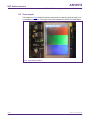
AN10815 NXP Semiconductors SWIM: NXP's basic graphics library for LPC products 1. Introduction Simple Window Interface Manager (SWIM) is a basic graphics library developed for the NXP LPC products. It can be also be used with LPC controllers that do not have a dedicated LCD interface. The SWIM graphics library allows developers to quickly and easily implement a system with basic graphics support. Project examples for IAR EWARM, KEIL MDK, and Rowley Crossworks toolchains are provided as part of the package. These projects are directed at the following target platforms: LPC3250 from Phytec: http://www.phytec.com LPC2478 from EA: http://www.embeddedartists.com IRD Platform from NXP: http://ics.nxp.com/support/boards/ird/ LPC1850 from Hitex: http://www.hitex.com/index.php?id=3212 LPC1788 from EA http://www.embeddedartists.com The example projects demonstrate how to use the library and will help users get familiar with the library calls quickly and efficiently. 2. SWIM features The following section describes the main features and functionality of the SWIM library. In addition, the library code is well commented and an associated API document for the software calls - SWIM v1.0.pdf – is also available. Some of the main SWIM functions are briefly summarized in the following subsections. 2.1 Graphic primitives swim_put_pixel – places a pixel of specified color at a specified location on the LCD swim_put_line – draws a colored line for positions x to y swim_put_diamond – draws a diamond shape of specified color and position swim_put_box – put box at specified location. Pen color for edges and fill color for center swim_set_pen_color – sets the pen color swim_clear_screen – fills the draw area of the display with the selected color 2.2 Image support swim_put_image – puts a raw image into a window swim_put_scale_image – puts and scales a raw image into a window swim_put_invert_image – puts a raw image into a window inverted 2.3 Font support Helvetica 10-point proportional font 8x16 proportional font 8x8 proportional font Fixed 5x7 proportional font Windows FreeSystem 14x16 Font AN10815 Application note © NXP B.V. 2011. All rights reserved. Rev. 3 — 15 June 2011 3 of 20