1
User Manual
English
Configuration - Output Ports
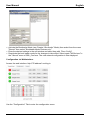
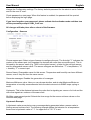
Choose Output Port to configure: This field is used to select the output ports to be configured.
Label: You can assign a name of up to 15 characters for each of the output ports. Using the
name, an identification of the the device connected to the port can be facilitated. This name is
also shown on the status page.
Start-up Monitoring
It is important, that if necessary the condition of the output ports can be restored after a power
failure. Therefore each port can be configured with “Initialisation status” to a specific start-up
state. This start-up sequence can be delayed by the parameter “Initialisation Delay”. There is a
minimum one-second delay between switching of ports.
Initialisation status: This is the port state (on, off, remember last state) the port should be set
when the device is turned on. The setting "remember last state" saves the last manually set
state of the output port in the EEPROM.
Initialisation delay: You can configure how long the port should wait to switch to its defined state
after the device is turned on. The delay may last up to 8191 seconds. This corresponds to a
period of approx. two hours and 20 minutes. A value of zero means that the initialization is off.
Re-power delay: When this feature is enabled (value greater than 0), the output port will switch
itself on again at a specified time after it has been disabled. Unlike the "Reset" button this
function applies to all switch actions, including SNMP or an optional serial interface.
Reset Duration: When the "Reset" button is triggered, the device turns the output port off, waits
for the time entered here (in seconds) and turns the output port on.
Configuration - Watchdog
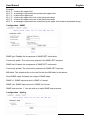
The watchdog feature allows you to monitor various remote devices. Therefore either ICMP
pings or TCP pings are sent to the device to be monitored. If these pings are not answered
within a certain time (both the time and the number of attempts can be set), the port is reset. For
example; this allows you to switch other devices that are connected via the relay.
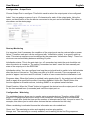
When a watchdog is activated it saves the information as color-coded text:
Green text: The watchdog is active and regularly receives ping replies
Orange text: The watchdog is currently enabled, and is waiting for the first Ping response