1
PATROL II LCD User's Manual Rev.D
2011-04-01
WORKING WITH THE READER
Connecting to PC
Before you begin work with the reader, the Patrol Master software (v3) and USB driver must be
installed on the designated computer (they can be downloaded from Roger’s web site:
www.roger.pl) then reader can be connected to any free USB port. Reader will be automatically
registered in the computer as another serial port. Once connected to USB reader automatically
switches from standby to normal work and will remain in this state until plugged off from the
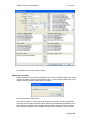
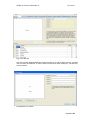
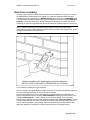
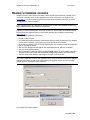
computer. With the reader connected to PC run Patrol Master program. In Patrol Master go to the
Readers tab and click Connect button - software will establish connection with the reader.
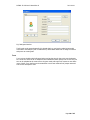
Fig.1 Main window of Patrol Master software
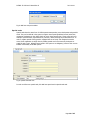
After connecting to computer reader displays message Online Mode and remains in it until
finishing work with software. Active connection with a reader is indicated in Patrol Master software
by message ONLINE in the Status field of the Readers tag. Lack of active connection with a reader
is indicated in Patrol Master software with message OFFLINE . Establishing connection with a reader
as well as disconnecting it from computer is written in the event memory of the device (events:
Enter to ONLINE mode, Exit from ONLINE mode).
Starting new PATROL system
Patrol Master software can be used to manage many different guard tour systems (objects) using
numerous PATROL II LCD readers. This function is particularly useful for security companies which
usually work in many companies or institutions in different locations. .
Page 4 of 25