1
bdiGDB for GNU Debugger, BDI3000 (MIPS32)
User Manual
8
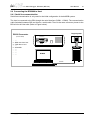
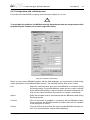
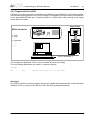
2.2 Connecting the BDI3000 to Power Supply
The BDI3000 needs to be supplied with the enclosed power supply from Abatron (5VDC).
!
Before use, check if the mains voltage is in accordance with the input voltage printed on power
supply. Make sure that, while operating, the power supply is not covered up and not situated near
a heater or in direct sun light. Dry location use only.
!
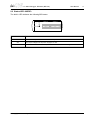
For error-free operation, the power supply to the BDI3000 must be between 4.75V and 5.25V DC.
The maximal tolerable supply voltage is 5.25 VDC. Any higher voltage or a wrong polarity
might destroy the electronics.
+5 VDC
RS232
GND
POWER
TRGT
MODE
BDI
casing connected to ground terminal
TARGET A
TARGET B
The green LED «BDI» marked light up when 5V power is connected to the BDI3000
Please switch on the system in the following sequence:
• 1 –> external power supply
• 2 –> target system
© Copyright 1997-2015 by ABATRON AG Switzerland
V 1.04