1
Digital Signal Processing Division
4.
A SIMPLE PROGRAM - WORKED EXAMPLE 1
The following section contains a worked example detailing how to develop a very simple
program for the DSP. It will demonstrate the form of assembly programs, give instructions
on how to assemble programs, and show how the GUI can be used to verify the operation
of, and, if necessary, to debug the program.
4.1
WRITING THE PROGRAM
The program can be edited using one of a large number of standard editors, e.g MS-DOS
edit, Turbo C editor, EMACS, etc. It is also possible to use a word processor if it has a
‘save as text’ option.
The following program will perform the very simple task of adding two numbers together.
NOTE: It is important to remember that the 56000 family of processors use fractional
arithmetic. Please read DSP56000 Family Manual Section 3.3: Data Representation and rounding if you are unfamiliar with the DSP56000 family.
NOTE: A semi-colon (;) comments to the end of the line.
Labels must be left justified
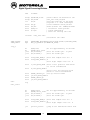
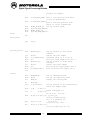
;**************************************************************************
;A SIMPLE PROGRAM
;**************************************************************************
;THIS SIMPLE PROGRAM WILL ADD TWO NUMBERS
;**************************************************************************
;Y MEMORY
;**************************************************************************
org y:$0
;instructs the assembler that we
;are referring to Y memory starting
;at location 0
input1
dc $1234
;y:input1 is defined as a $1234
;$ indicates a hexadecimal value
result
ds 1
;reserve a single word of space in
;y memory. label it ‘result’
;**************************************************************************
;X MEMORY
;**************************************************************************
org x:$0
;instruct the assembler that we are
;now referring to X data memory,
;starting at location 0
input2
dc $2345
;x:input2 is defined as $2345
;**************************************************************************
8