1
2. System Requirements
The general overview of the system and functional requirements of the LPR auto-gate
system are listed in this section of the document.
2.1. System Overview
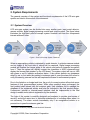
LPR auto-gate system can be divided into many smaller parts: input metal detector,
camera module, digital image processing module and output system. The figure below
illustrates the high-level proof-of-concept system flowchart and how the components
interact with each other.
Figure 1: Proof-of-Concept System Flowchart
1
When an approaching vehicle is detected by metal detector, it activates camera module
and an image of the front side of vehicle will be captured. Digital image processing
module will localise the license plate of the vehicle and perform character recognition
from it. Then the system will digitally convert the characters to ASCII characters and
display the license plate number on the LCD board. The system output will turn on LED
with green or red to indicate verification status. If the system detects any trespasser
either by car or foot while the parking lot entrance gate is open the alarm will sound to
notify the security personal on site and captures the scene for enforcement purpose.
Due to the limitation on budget and time, the proof-of-concept system will exclude some
features of final commercialised system. While other operation stays unchanged, the
final product shall interact with the entrance gate. User interface unit to manage the
database of the registered vehicle shall also be included in the final product design.
Furthermore, intranet or internet-based interface shall be implemented in the final
design to enable visitor vehicle registration by the residents.
The logic of the system is carefully designed and analysed to provide good sense of
security, and at the same time, to minimize misbehaviour of sounding alarm when it is
not necessary. The alarm sounds immediately only if an unregistered vehicle or a
person tries to pass the entrance gate line.
1
The figure is created by using Microsoft Word 2007 SmartArt.
2
Copyright © 2009, Seco Innovations Corporation