1
SAMPLE RATE DISPLAY
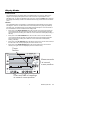
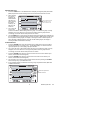
1. Press the VIEW and the TIME buttons simultaneously from the Standard View mode
2. Both numerical displays will switch off so that the LCD can show only the sample rate
in minutes (the MIN display icon will switch on)
3. The projected TIME-DAYS that the internal memory will be full (based on the current
sample rate) is displayed in the TIME and DATE display areas
4. To change the sample rate, refer to the programming section of this manual.
5. Press the VIEW button to return to the Standard View
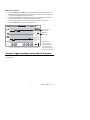
Sample rate
in minutes
MINUTES
indicator
12 Hrs 38 minutes 10 months 28 days 3 years
Displays how
long it will take
to finish recording
in hours:minutes
months/days/years.
Not the actual date.
Transfer logged readings using the PC Interface
Software installation procedure and operational instructions are located on the ExChart
software disc.
12
RH520-EU_ENG V4.2 3/10