1
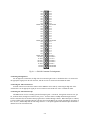
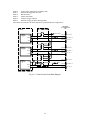
The DM6910 digital I/O dataModule® turns your IBM PC-compatible cpuModule or other PC/104 computer into a high-performance control system. Ultra-compact for embedded and portable applications, the module features: 48 bit programmable digital I/O lines, Pull-up/pull-down resistors on each bit, Three 16-bit timer/counters and on-board 8 MHz clock, Operation from single +5V supply, DOS example programs with source code in BASIC and C, Diagnostics software. The following paragraphs briefly describe the major functions of the module. A detailed discussion of module functions is included in subsequent chapters. Digital I/O The DM6910 has 48 bit-programmable buffered TTL/CMOS digital I/O lines which are grouped into six 8-bit ports, Port 0 through Port 5. Three EPLD chips handle the digital I/O circuitry, with each EPLD carrying two ports, or 16 bit-programmable digital I/O lines. Bit configurable pull-up or pull-down resistors are provided for all 48 lines. Instructions for activating these pull-up/pull-down resistors are given at the end of Chapter 1, Module Settings. 8254 Timer/Counters An 8254 programmable interval timer provides three 16-bit, 8 MHz timer/counters to support a wide range of user timing and counting functions. What Comes With Your Module You receive the following items in your module package: DM6910 interface module with stackthrough bus header Mounting hardware Example programs in BASIC and C with source code & diagnostics software Users manual If any item is missing or damaged, please call Real Time Devices Customer Service Department at (814) 234-8087. If you require service outside the U.S., contact your local distributor. Module Accessories Hardware accessories for the DM6910 include the XD68 cable and TB68 terminal block board. Using This Manual This manual is intended to help you install your new module and get it running quickly, while also providing enough detail about the module and its functions so that you can enjoy maximum use of its features even in the most complex applications. We assume that you already have an understanding of data acquisition principles and that you can customize the example software or write your own application programs. When You Need Help This manual and the example programs in the software package included with your module provide enough information to properly use all of the modules features. If you have any problems installing or using this dataModule, contact our Technical Support Department, (814) 234-8087, during regular business hours, eastern standard time or eastern daylight time, or send a FAX requesting assistance to (814) 234-5218. When sending a FAX request, please include your companys name and address, your name, your telephone number, and a brief description of the problem. You can also contact us through our E-mail address [email protected]. i-3