1
Page 9 of 28
MICRON USER GUIDE
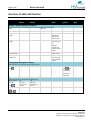
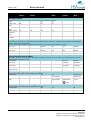
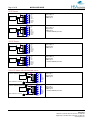
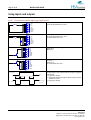
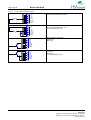
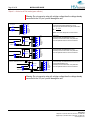
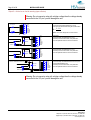
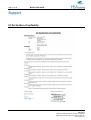
Load and save overview
Micron saves and stores layouts to both USB and internal memory.
For a complete overview of when layouts are stored and where, please refer to the table
below:
Scenario
Load/Store job action
USB stick present
with job
Boot 1
Boot 2
Boot 3
USB remove 1
USB remove 2
Store to
USB
Store to
memory
X
No USB stick
X
X
X
USB insert,
job same as loaded
X
Error state
X
X
X
Start dist adjust 2
Load from
memory
X
USB insert,
job different from loaded
USB insert no job
Print mode end 1
Print mode end 2
Start dist adjust 1
no job
X
Load from
USB
X
X
X
X
X
X
No USB stick
X
X
X
No USB stick
X
HSA Systems
Mileparken 16 | DK-2740 Skovlunde | Denmark | +45 4494 0222
Egegaardsvej 3 | DK-5260 Odense S | Denmark | +45 6610 3401
www.hsasystems.com