1
User’s Manual
Key Usage in Virtual Keyboard
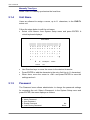
A virtual keyboard shows when edit the settings, such as camera title, e-mail
address, etc. The virtual keyboard displays as follows.
A
B
C
D
E
F
G
H
I
K
L
M
N
O
P
Q
R
S
T
U
V W X
Y
Z
a
b
c
d
e
f
g
h
i
j
k
l
m
n
o
p
q
r
s
t
u
v
w
x
y
z
0
1
2
3
4
5
6
7
8
9
.
!
@
#
−
_
◄
►
Cancel
Backspace
J
Delete
OK
<To input characters>
Move the cursor by pressing Direction keys and press ENTER to select
characters.
<To move the cursor in title entry>
Press MODE and LEFT / RIGHT simultaneously to move the cursor to left /
right in the title entry.
<To delete previous character>
Select <Backspace> and press ENTER, or press MODE and UP
simultaneously.
<To delete current character>
Select <Delete> and press ENTER, or press MODE and DOWN
simultaneously.
<To exit the virtual keyboard>
Select <OK> and press ENTER to save the settings and exit, or press ESC to
exit without saving changes
42