1
First Things First
GB
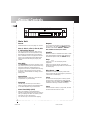
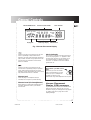
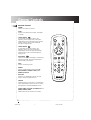
POWER
VIDEO
TUNER
DISC 1
DISC 2
DISC 3
DISC 4
DISC 5
CD
TAPE
EQ PRESET
DISC SKIP
VOL
VOL
OPEN/CLOSE
POWER
MUTE
5 DISC CHANGER
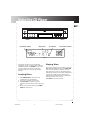
TRACK
PLAY
TRACK
LEVEL
PHONES
SHUFFLE
INTRO
PROGRAM
REPEAT
ATS
CLEAR
SEARCH
REPEAT
SEARCH
STOP
DISC SKIP
SHUFFLE
SEEK
PRESET
TUNING
CONGRATULATIONS ON
YOUR PURCHASE...
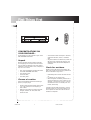
Congratulations on the purchase of your new 5
DISC CHANGER CD PLAYER !
•
Unpack
•
Remove all items including packing materials
and wrappings from the pack. We recommend
that you save the shipping carton and packing
materials in case you want to store, transport, or
ship the unit in future.
•
•
•
•
•
Your new purchase/gift includes these items:
one 5 DISC CHANGER CD PLAYER;
one remote control;
one audio cable;
one user’s guide.
Choose a Location
Follow the guidelines below when selecting a
place to put your player:
•
•
Choose a level and solid surface. Don’t place
it on a soft surface, such as carpeting or
foam rubber.
Make sure the location is away from direct
sunlight, radiators, air ducts, and other
sources of heat.
Avoid locations that are subject to moisture,
mechanical vibration, shock, or excessive
dust.
As good ventilation is essential to protect the
CD player from internal heat build up, the
selected location should have adequate air
circulation.
Check for moisture
Moisture is your CD player’s worst enemy. Do
take note of some of the following situations in
which condensation might form :
•
•
•
Immediately after a heater has been turned
on;
In a steamy or very humid room;
When the system is suddenly moved from a
cold environment to a warm, moist one; for
example, in moving the unit from a cool air
conditioned room to an outside porch on a
humid, summer day.
If moisture forms inside this player, it may not
operate properly. To correct the problem, turn
off the power and wait about 30 minutes for
moisture to evaporate.
2
RP8075R IB
3
3
11/8/99, 9:00 AM