1
General Controls
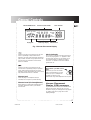
Selected REPEAT Mode
Track Time /Track Number
REPEAT 1 ALL DISCS
PROGRAM
1
5
DISC
4
2
INTRO
ATS
3
SHUFFLE
Playing Disc
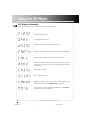
CD Message Display
GB
Music Calendar
1
2
3
4
5
6
7
8
9 10 11 12
13 14 15
Selected Mode
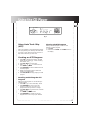
Fig. 1 Vacuum Fluorescent Display
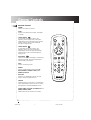
Press once to skip to the beginning of the next
track or repeatedly to skip forward to the
beginning of other tracks. Press and hold during
play to search forward at high speed within the
current track. Play resumes to normal when
button is released.
Press once to skip to the beginning of the
current track or repeatedly to skip to previous
tracks. Press and hold during play to search
backward at high speed within the current track.
Play resumes when button is released.
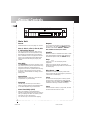
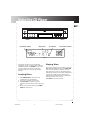
Phones Jack
Music Calendar
You can see at a glance how many tracks there
are on the playing disc. A “>” appears if there
are more than 14 tracks. in play mode, one of
the numbers flashes to indicate the playing
track; the “>” flashes for the track numbers
greater than 14.
Have a Blast - Just Not in Your
Ears!
Make sure you turn the volume
down (towards MIN) on the unit
before you put on headphones.
Increase the volume to the
desired level only after headphones are in place.
Insert the plug of a headphone set (not
included) into this jack for private listening.
Phones Level (for headphones)
When listening to music with headphones (not
included), adjust this knob to your desired
volume level.
Vacuum Fluorescent
Display (VFD) messages
As you select various modes, the VFD shows the
settings and current status of the unit. Fig.1
shows the majority of messages that may appear
on display. Also refer to page 13 for more
display messages.
5
RP8075R IB
6
11/8/99, 9:00 AM