1
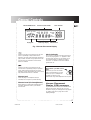
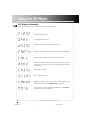
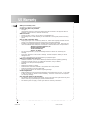
General Controls
GB
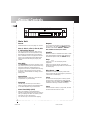
DISC 1
DISC 2
DISC 3
DISC 4
DISC 5
DISC SKIP
OPEN/CLOSE
POWER
5 DISC CHANGER
LEVEL
PHONES
SHUFFLE
INTRO
PROGRAM
REPEAT
ATS
CLEAR
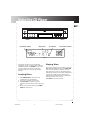
Main Unit
Power
Repeat
Press this button to turn the player on and off.
You can set the CD player to play repeatedly a
track, a disc or all discs. Press REPEAT to toggle
between these modes: REPEAT 1, REPEAT 1
DISC, REPEAT ALL DISCS, ALL DISCS.
Disc 1, disc 2, disc 3, disc 4, disc
5 Direct Disc Access
You can press these buttons to select one of
the loaded discs on the CD compartment tray.
With Direct Disc Access buttons, the selected
disc is accessed and the unit plays the CD from
track 1. The corresponding Direct Disc Access
button will flash indicating the playing disc
number.
Disc Skip
Press DISC SKIP to skip to the next disc on the
tray without opening the CD compartment tray,
the button flashes to indicate disc skip in
progress. If the button is pressed while the tray
is out and a CD is playing, the tray rotates
clockwise or anti-clockwise for loading and unloading CDs.
Open/Close
Press this button to slide out or close the CD
compartment tray automatically.
Program
The CD player can store up to 32 tracks in
memory and play back the programmed tracks
in the same sequence as you stored them.
Auto Track Skip (ATS)
Shuffle
Select this mode to randomize the order of track
play. Randomization between discs depends on
the selected repeat mode (see REPEAT above).
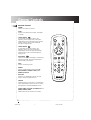
Stop
Press this button to end CD play mode.
play/pause
Press once to begin CD play, press again to
temporarily suspend play mode and a third time
to resume play.
Play/Pause
This button controls the CD play mode. Press
once to begin CD play, press again to pause and
a third time to resume play.
Clear
To clear the stored program in memory (either
program play or ATS program), press and hold
the button until the display shows CLEAR which
indicates the memory is cleared and empty.
Intro
Use this feature to listen, in play mode, the first
10 seconds of each track on a disc.
ATS is the opposite of programmed play.
Instead of programming the tracks you want to
hear, you specify and store into memory those
ones that you don’t like hearing.
You can block up to 32 tracks from playing.
4
RP8075R IB
5
11/8/99, 9:00 AM